
An ecommerce marketing strategy is how you bring shoppers to your store, turn their visits into orders and get buyers back. Build it in six steps: a sales target, who you sell to, two or three channels, what stops orders, repeat orders, and a monthly check. Each step has its own screen in your Shopify admin.
Your store is live and the products look right. You've posted on Instagram, run a week of ads and written two blog posts, and last month brought 30 orders. You can't tell which of those sold anything, or what to do next month.
What is an ecommerce marketing strategy?
An ecommerce marketing strategy is your choice of which shoppers to go after, where to reach them and how you'll know it worked. Shopify's ecommerce marketing guide splits the work into three jobs: traffic, conversion and retention. Steps 3 to 5 below take those three jobs in order.
A shopper's path from first hearing of your store to placing an order is your sales funnel. What you sell, its price, where it sells and how shoppers hear of it make up your marketing mix, the 4 Ps of marketing.
Step 1: What sales target should you set?
Set one sales number for one month, built from last month's sessions, conversion rate and average order. Those three multiply into your sales, so you can pick which one to move.
Say last month brought 3,000 sessions, 1% of them ordered, and the average order was $50. That's 30 orders and $1,500. A target of $1,800 is 20% more, and four routes reach it:
| Route to $1,800 | Sessions | Conversion rate | Orders | Average order | Sales |
|---|---|---|---|---|---|
| Last month | 3,000 | 1% | 30 | $50 | $1,500 |
| More visits | 3,600 | 1% | 36 | $50 | $1,800 |
| More visits become orders | 3,000 | 1.2% | 36 | $50 | $1,800 |
| Bigger orders | 3,000 | 1% | 30 | $60 | $1,800 |
| More visits and bigger orders | 3,300 | 1% | 33 | $55 | $1,815 |
Whichever route costs your store least decides where steps 3 to 5 put your time.
To track the number, open Analytics in your Shopify admin, click "Try targets" and choose "Create target", the form that turns one number into a gauge for the month. Pick Total sales as the metric, then set the time period to Month and pick next month. Targets take fixed amounts only, so type 1,800 rather than 20% more. Then click "Save to dashboard" to keep the gauge on your Analytics page.
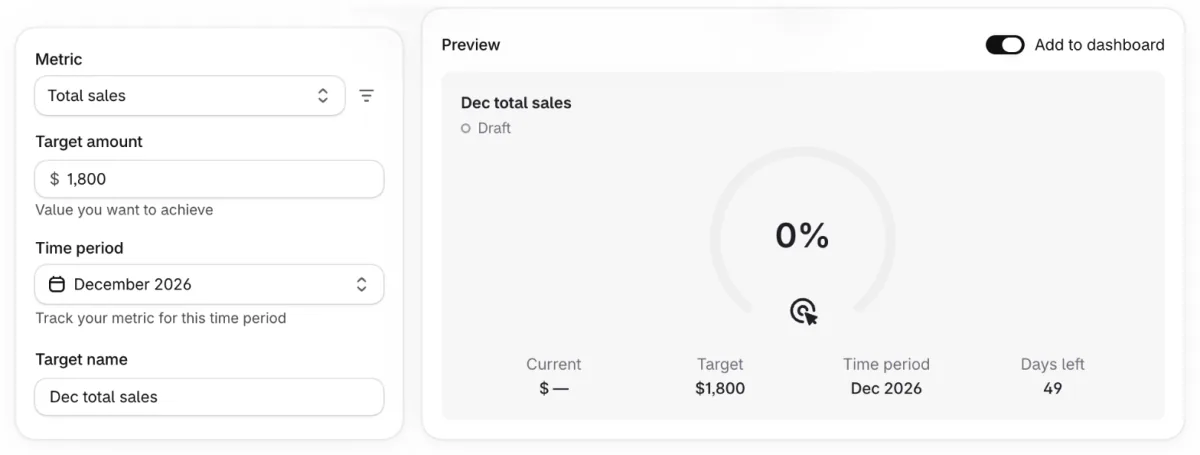
Take last month's numbers from October 2026 or later, because Shopify changed how it counts sessions on September 21 to 23, 2026. Which other numbers to watch, and how often, is in ecommerce KPIs.
Step 2: Who are you selling to, and why would they pick you?
Name one buyer and the one reason they'd buy from you, before you pick a channel. Shopify's marketing plan guide starts here too, with questions such as "What makes your store special?"
Your past orders already point to the buyer. In your Shopify admin, go to Customers, then Segments, click Create segment and open the segment templates, ready-made groups such as "Customers who placed a lot of orders recently". Shopify adds and removes customers from a segment on its own.
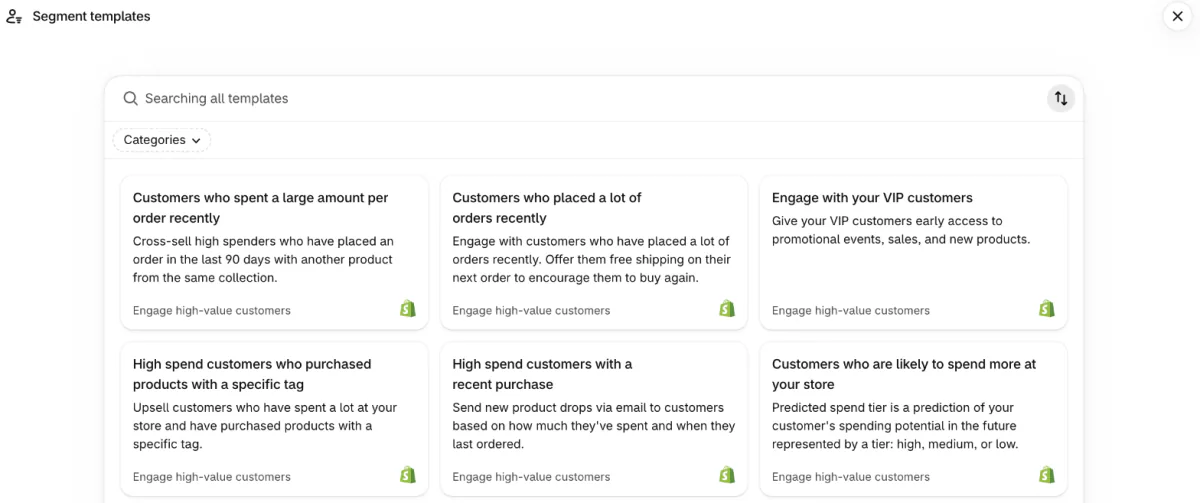
Describe the group that orders most often. What each of those buyers spends with you over time is their customer lifetime value, and it tells you what winning one more is worth.
Write the reason they'd pick you in the words shoppers already use. Analytics, then Reports, then "Searches by search query" lists what visitors type into your store's search bar. Those words belong in your message and on your pages.
Step 3: Which marketing channels should you start with?
Start with two or three channels you can keep up every week, mixing ones you own, such as email, with ones you earn or pay for. "You don't need to be on every channel," as Shopify's Help Center puts it.
Seven ecommerce marketing ideas, with what each costs you and where it sits in Shopify:
| Idea | Kind | What it costs | Where in Shopify |
|---|---|---|---|
| Email newsletter | Owned | 10,000 emails a month free on Basic and up, then $1 per 1,000 | Apps, then Messaging |
| Pages written for what shoppers search | Owned | Your time | Each page's search engine listing |
| Customer photos and posts | Earned | A free product or a thank-you | Product pages and your social accounts |
| Creators who try your product | Earned | The product plus a commission | Shopify Collabs, for creators you invite |
| A giveaway | Earned | The prize | Your social account |
| TikTok Shop | Sales channel | A fee on each order | The TikTok sales channel |
| Shop Campaigns, ads through the Shop channel | Paid | Charged only when a customer converts, and needs Shopify Payments in a supported country | Sales channels, then Shop, then Advertising |
When every place you sell shares one stock count and one customer list, that is omnichannel selling.
What you post on each channel is your content marketing. Pick a few formats you can repeat, such as how-to posts, customer photos or behind-the-scenes clips, and give each post a date on a content calendar. Posts that shoppers can buy from directly are shoppable content.
To tell your channels apart later, give each push its own link. Growth, then Campaigns, then "Create campaign" gives a campaign a short tracking link and a QR code, so its sales show up by name, Shopify's Help Center says. It needs the Basic plan or higher and a computer.
Step 4: How do you turn more visits into orders?
Fix the step where most visits stop before you pay for more visits. In Analytics, then Reports, "Conversion rate breakdown" counts the visits that add to cart, reach checkout and place an order.
Shopify's plan guide lists fixes such as showing shipping costs early, a clear return policy, and photos and reviews on product pages. The Shopify CRO guide works through each page where shoppers stall.
When an email or an ad promises a sale, shoppers should still see it on the page they land on. With Sledge, a Shopify app, you can show a banner on collection and search pages and in the cart drawer, and a countdown across the store or on chosen product pages. Both are Sledge promotions, on every paid plan. On Accelerate and up, its Back in Stock emails the shoppers who signed up when a sold-out product returns.
Step 5: How do you get first-time buyers to order again?
Let Shopify send the second-order emails for you. Go to Apps, then Messaging, then Automations, click "Create automation", and pick "Thank customers after they purchase" or "Win back customers".
By default, automations go only to customers who said yes to marketing, so every signup you collect widens who gets them. Shopify Forms collects those signups with a popup or a form placed inside a page.
Timing and offers for the second order are in how to get repeat customers. For setup and costs, see Shopify email marketing, and for texts, SMS marketing.
Step 6: How do you know which channel is working?
Once a month, compare channels on sales, not clicks, and move time and money to the ones that pay. Under Growth, then Attribution, the "Performance" view shows your total sales, orders, average order value and sessions. Below them it lists your top marketing channels and campaigns, ranked by sales, Shopify's Help Center says.
By default, each sale goes to the last channel that sent the shopper, skipping visits where they came straight to your store, such as by typing your address. Shopify calls that model "Last non-direct click".
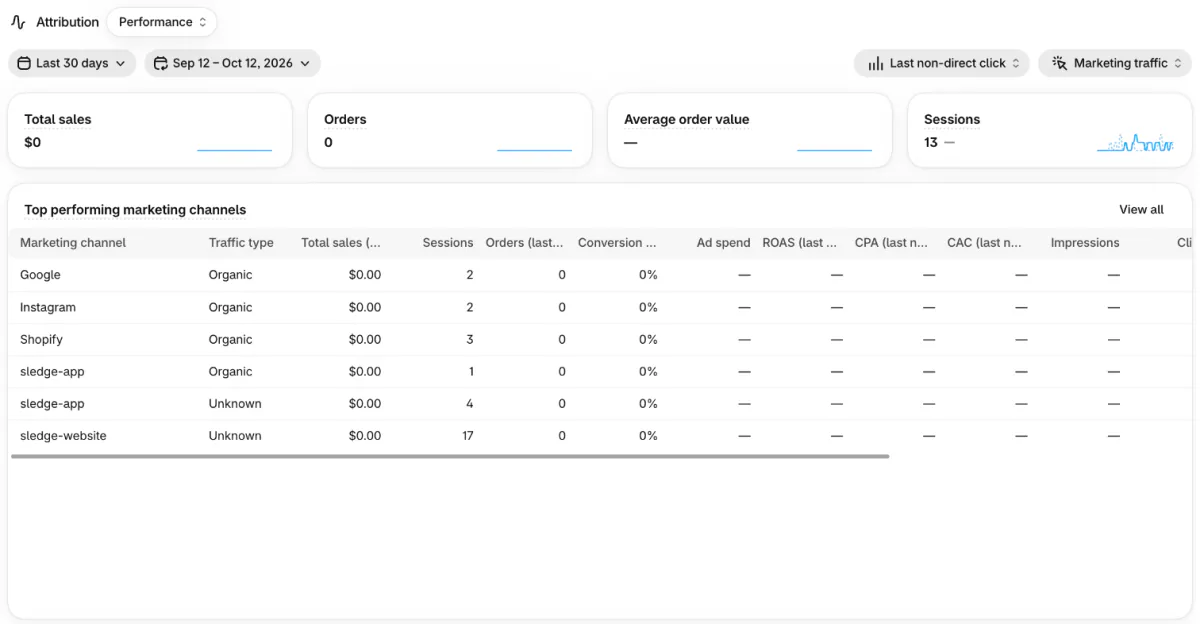
For paid channels, "Performance by marketing channel", a report under Analytics, then Reports, adds ad spend, return on ad spend and customer acquisition cost when the ad platform sends Shopify its costs.
Then check the month against your step 1 target and set the next one. Shopify's plan guide calls marketing planning "never finished".
FAQ
Questions, answered
-

14-day free trial
Explore Sledge on your store before you decide to commit.
-

No credit card required
Start improving your store with no upfront commitment.
-

Setup in minutes
Get Sledge running without a lengthy setup process.
-

Built to grow sales
Turn shopper behavior into actions that help you sell more.
What's the difference between a marketing strategy, a marketing plan and a campaign?
Your strategy is the set of choices: who you sell to, why they should pick you and which channels reach them. Your plan puts those choices on a calendar, with a budget and a sales target. A campaign is one push inside the plan, such as a spring sale sent by email and posted on Instagram.
What is the 3-3-3 rule for marketing?
Shopify's ecommerce marketing guide describes the 3-3-3 rule as choosing three core audience segments, three core messages and three marketing channels. It keeps you from spreading yourself thin. One buyer, one message and two or three channels you can keep up every week is a plan you'll actually run.
How much should a small online store spend on marketing?
There's no set amount: it comes from your margin and what a new customer costs you. Shopify's guide suggests a 70-20-10 split: 70% of your budget on channels that already work, 20% on new ones and 10% on fresh ideas. Start with what costs time, not cash: Shopify Messaging sends 10,000 emails a month free on Basic and up.
What are good ecommerce marketing ideas for a new store?
Pick by what each idea does. An email signup with a welcome discount builds a list you own. Collection pages written for the words shoppers search bring free visits over time. A creator who tries your product reaches people who trust them, and a giveaway trades a prize for follows and signups. Run one or two, then measure.
What is ecommerce content marketing?
Ecommerce content marketing means making things people want to read or watch, such as blog posts, emails, videos and social posts, so they find your store and come back. Shopify's Help Center calls content strategy part of your marketing plan and suggests a few formats you repeat.
Your channels bring the visits. Does your store keep them?
Sledge doesn't send email campaigns, run ads or do your SEO. It works on what shoppers do once they land: search, filters, bundles, and banners and countdowns for the offers your channels promote. Try it free for 14 days. Growth Intelligence turns on when you pick a paid plan, weekly on Pro, and its suggested fixes add up to one dollar figure, labeled Est. potential.

