

User-generated content is anything a buyer makes about your products. The 7 examples below are photo reviews, video reviews, customer photo galleries, questions and answers, unboxing clips, tagged social posts and testimonials. Reviews come in through a review app or the Shop app. A post on a buyer's own account stays theirs, so ask before you reuse it.
A buyer tags your store in a video of her opening the parcel and pulling the sweater on. It shows the fit better than any photo you took. Before it goes on your product page, you need her yes.
What counts as user-generated content?
A review, photo, video, question or post that a buyer made, not you, is user-generated content.
Organic content comes from buyers you didn't pay, such as a review left after delivery or a photo shared to Instagram. Paid content is a clip you commission from a creator, who usually hands it over instead of posting it. Shopify's guide makes the same split.
Shoppers go looking for it. In PowerReviews research cited by Shopify, 60% of US shoppers said they always search for customer photos and videos before buying, up from 40% in 2016.
What are 7 examples of user-generated content?
There are seven kinds, from a photo inside a review to a post on a buyer's own account. Anything a buyer leaves through your store can show there. Anything you bring in from elsewhere, or put in an email or an ad, needs a written yes.
Each example below is written for a made-up knitwear store.
| Kind | Example | Where it shows | How you get it | Ask before reuse? |
|---|---|---|---|---|
| Photo review | Stars, "Size M, room for a shirt underneath," and a mirror photo | Product page | A review app that takes photos | Not on your store; yes for an email or an ad |
| Video review | Twenty seconds turning in the sweater | Product page | A review app that takes video | Same as a photo review |
| Customer photo gallery | Twelve buyers' photos in one grid | Homepage or a page of its own | Built from review photos, or uploaded by you | Yes, for photos you upload |
| Questions and answers | "Does the wool itch?" answered by a buyer | Product page | A review app with questions | No, it's posted on your page |
| Unboxing clip | The parcel opened on camera | With the product's own photos | Asked for, then uploaded by you | Yes, in writing |
| Tagged social post | An Instagram post that tags your store | The buyer's account, then your store | A buyer tags you or uses your hashtag | Always, in writing |
| Testimonial | "Second order, same care in the packing" | Testimonial page or homepage | A store review form, or a quote | Only for a quote from an email or message |
1. Photo reviews
A buyer adds a photo to a star rating and a few lines. A review app collects these reviews and shows them on your product page. The Shop app also asks Shop buyers for a rating and a comment after delivery, and shows those reviews in Shop. A review app that works with Shop can show them on your store too, each marked "Verified by Shop", a badge you can't remove. The customer review examples show what a useful one says.
2. Video reviews
A buyer sends a short clip of the product in use with the review. Not every review app takes video, and some keep it for a paid plan. The review app comparison lists which free plans include it.
3. Customer photo galleries
One grid of buyers' photos sits on your homepage or a page of its own. A review app can build it from the photos in your reviews, so each picture keeps its stars and its words. Your theme's image sections work too, but then you upload every photo and need every buyer's yes.
4. Questions and answers
Shoppers ask on the product page, and past buyers answer. In PowerReviews' 2024 Q&A report, cited by Shopify, 92% of shoppers looked for answers from verified buyers and 51% valued the store's own. Shopify's guide points to review apps for a questions section. Until you add one, answer the common questions in your product description, though that's your content, not a buyer's.
5. Unboxing clips
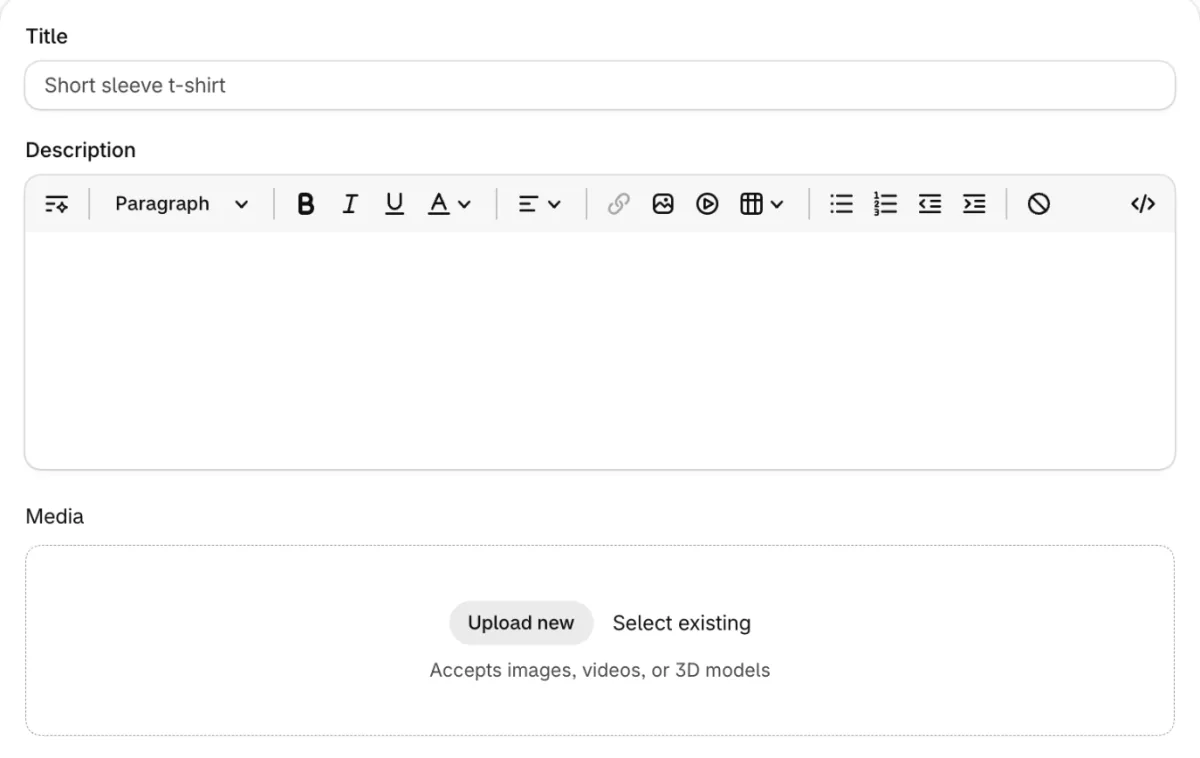
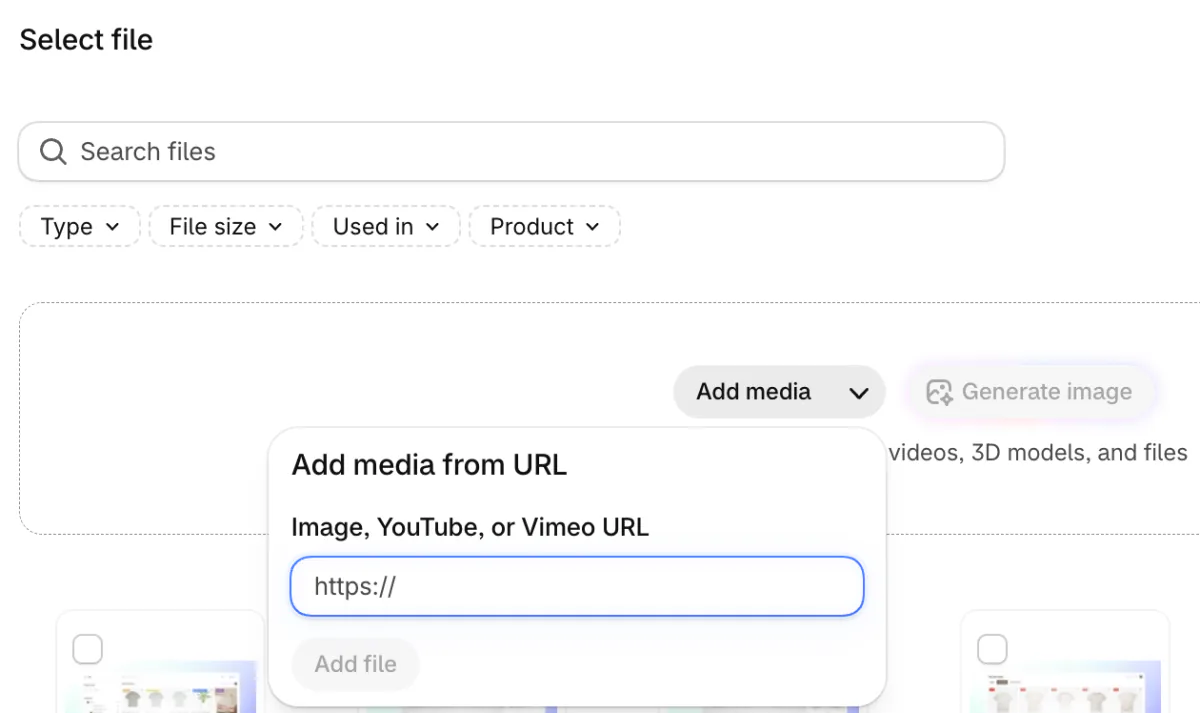
A buyer films the parcel being opened and the product coming out. With a written yes, add the clip to the product's Media section, the photos and videos at the top of the product page. Click "Upload new" for a file from your computer. The file can be up to 10 minutes and 1 GB, as MP4, MOV or WebM, per Shopify's Help Center. For a YouTube or Vimeo link, click "Select existing", then the arrow beside "Add media", and paste the link into the box that opens. The YouTube video has to be Public or Unlisted. Your theme has to support video on product pages too.
6. Tagged social posts
A buyer posts your product and tags your store or uses your hashtag. The post is theirs. The US Copyright Office says a work is under copyright from the moment it's created. Shopify's guide adds that a tag or a hashtag isn't consent to repost. Print a short hashtag on your packing slip so buyers have one to use. To put tagged posts on your store with a product on each, see shoppable content.
7. Testimonials
A testimonial is a short quote about your store as a whole, often from a repeat buyer. Store reviews collected on your site work as testimonials. A line lifted from an email or a message needs the buyer's yes and the name they want shown. The testimonial page guide covers the layouts.
How do you ask permission to reuse a customer's post?
Message them where they posted, name every place the post will appear, keep the written yes, and credit them. Shopify's guide asks for that yes in writing for an ad, an email or any other use beyond a repost.
- Ask in the app they posted in, or by email.
- Name the places: your product page, your emails, your ads. A yes to a repost doesn't cover an ad.
- Keep the reply, with its date. A screenshot is your record.
- Credit them the way they choose: first name, handle or nothing.
- If you give a discount or a free product for it, say so next to the post. The FTC counts both as a connection to disclose.
A message you can copy: "Hi [name], we love your photo of the [product]. Could we show it on our product page and in our emails, credited to [handle] or however you prefer? A yes here is all we need, and you can ask us to take it down anytime."
One big brand wrote the same deal into its contest rules. In Apple's Shot on iPhone macro challenge, announced on January 25, 2022, entrants kept the rights to their photos and gave Apple a free one-year license to use them. The 10 winners granted a longer, exclusive license for a licensing fee, and any photo Apple reproduced carried a photographer credit.
Where should user-generated content go on your store?
Put it where a shopper hesitates: on the product page, as stars on collection cards, and in the email that follows an abandoned cart.
- Product page. Photo reviews and answers near the size and price, an unboxing clip with the product photos.
- Collection and search cards. The star rating, seen before anyone opens the product.
- Homepage. One gallery of buyers' photos as social proof for a first-time visitor.
- Emails and ads. A buyer's photo or review line, only with a yes that names that use.
A product with no reviews leaves those spots empty, and the review request email templates ask for the first ones.
FAQ
Questions, answered
-

14-day free trial
Explore Sledge on your store before you decide to commit.
-

No credit card required
Start improving your store with no upfront commitment.
-

Setup in minutes
Get Sledge running without a lengthy setup process.
-

Built to grow sales
Turn shopper behavior into actions that help you sell more.
What are examples of user-generated content?
A photo review of a sweater, an unboxing clip, a sizing question answered by another buyer, an Instagram post that tags your store and a short quote about your packing. Customers made all five, not you, which makes them user-generated content, or UGC. A post on a buyer's own account needs their yes before you reuse it.
Is a customer review user-generated content?
Yes. The star rating, the words and any photo or video a buyer adds all count. Reviews come in through a review app's form on your product page, or through the Shop app, which asks Shop buyers for a rating and a comment after delivery. A review app that works with Shop can show those reviews on your store too.
Can I repost a customer's Instagram photo on my store?
Only with their yes. The photo belongs to the person who took it, and a tag or your hashtag in the caption is not permission. Message them, name where it will appear, such as your product page or an ad, and keep the written reply. Credit them the way they ask, by first name, handle or not at all.
Do you have to pay for user-generated content?
No. Buyers leave reviews and post photos without being paid. Paying a creator to film your product is a different deal: agree in writing where the clip can run and for how long. In the US, money, a free product or a discount given for a post is a connection the post has to disclose. This isn't legal advice.
How do you get user-generated content with few customers?
Email every buyer a review request after delivery, and ask for a photo of anything people judge by eye. If you sell on the Shop app, it asks Shop buyers for you. A reward has to go to every honest review, five stars or one, and the review should say it was rewarded. The FTC warns against asking only the buyers you think will be pleased.
What is the difference between UGC and influencer content?
The difference is where it runs. An influencer posts to their own followers, and you pay for that reach. Paid user-generated content is a clip a creator makes for you to run on your product pages, emails and ads, usually without posting it themselves. Organic content comes from buyers you didn't pay. Shopify's own guide draws the same line.
Let your buyers' photos answer the next shopper
Sledge doesn't accept video reviews, send review requests or pull in social posts. It collects photo reviews on your product pages, up to five photos each, and shows the stars on its product cards in collections and search. Try it free for 14 days. Growth Intelligence turns on when you pick a paid plan. It can spot a catalog where most products have no reviews yet, and its suggested fixes add up to one dollar figure, labeled Est. potential.

