
To find influencers for your brand, start with buyers who already tag you. Then search your product's hashtags and keywords on Instagram, TikTok and YouTube, and see who posts for stores in your niche. Shopify Collabs searches its own creators by keyword, location and audience size. Check the comments before the follower count.
Say a creator with 80,000 followers quotes $400 for one post, and the comments under each post are strings of emoji. A buyer with 6,000 followers tagged your candle last week, and three people asked where it came from. Message the buyer first.
Where can you find influencers for your brand?
To find influencers on social media, look on Instagram, TikTok and YouTube, and start with people who already post about you. Write down who buys from you first, because the influencer who can promote your brand is one whose followers look like those buyers. The first five ways below cost only your time.
1. Buyers who already tag you
Open the tagged posts on your Instagram profile and your mentions on TikTok, and note the buyers who left a photo review. Search each name under Customers in your Shopify admin to see what they bought. Your shipping email can ask for a tagged photo, which brings in more of them.
2. Your niche's hashtags and keywords
Search the words and hashtags people use for your product, such as #handmadecandles. Open recent posts as well as top posts, and note who posts about the category every week. Groups where people ask each other for recommendations turn up names too.
3. Creators who post for brands like yours
Search your product type with #ad or #sponsored to see who already makes paid posts for stores in your niche. In the US, the FTC asks creators to label paid posts with words like these, as the last section explains. These creators know the work, and they'll quote a fee.
4. Creators near you
Look through the place tags of local shops, markets and events, and city hashtags such as #denvermakers. A Google search of your city plus your product turns up local names. In Shopify Collabs, the Location filter finds creators who give a location in their profile. A local creator suits products shoppers can see or collect nearby.
5. YouTube and Google
Search YouTube for your product plus "review", such as "soy candle review", and Google for "best soy candles". Both turn up reviewers who already test your category. YouTube's own creator search sits inside Google Ads and is "now testing in select markets", per its creator partnerships page.
6. Shopify Collabs
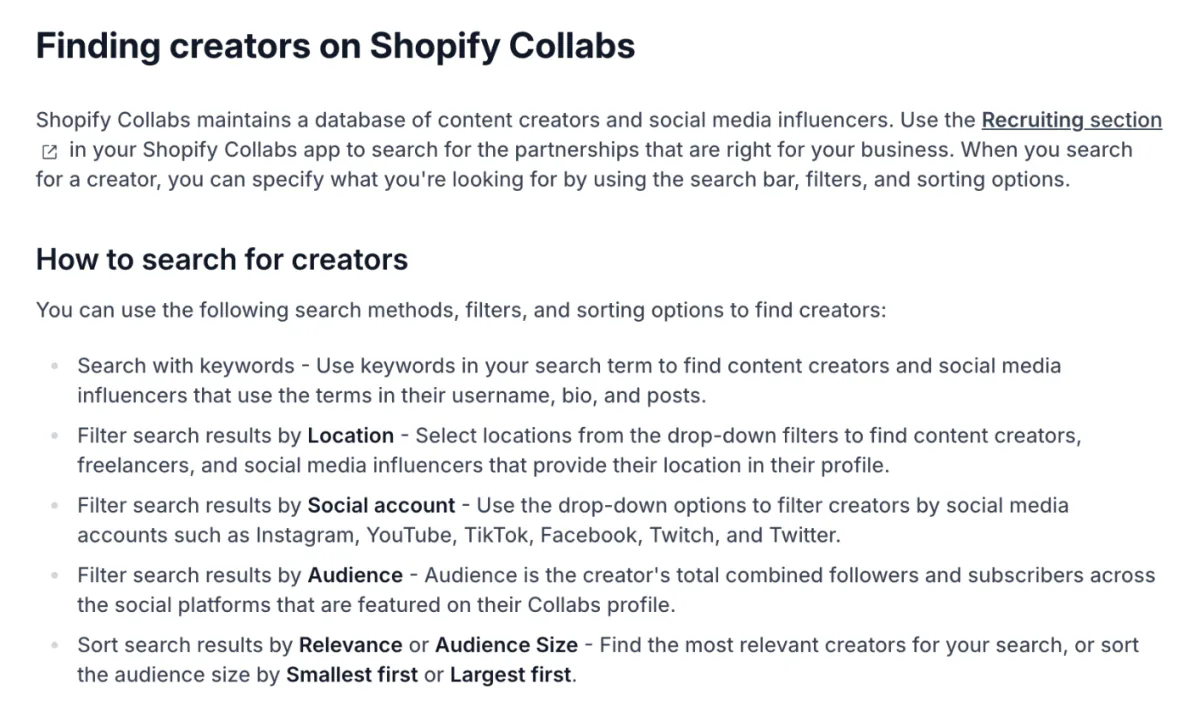
Shopify Collabs is Shopify's own app for working with creators. Its "Recruiting" section, where you look for creators, searches the words in their username, bio and posts. Filters cover Location, Social account and Audience, a creator's followers added up across platforms. Results sort by Relevance or Audience Size, per Shopify's Help Center.
The search covers only creators already in Collabs, and Collabs isn't taking new creator sign-ups. Fees, payouts and setup are in our Shopify Collabs guide.
7. The platforms' own marketplaces
TikTok calls TikTok One's Creator Marketplace "the official platform for brand-creator collaboration", from finding creators to running the campaign. Instagram's creator marketplace sits in Meta Business Suite, only in the countries Meta has opened it to, so check whether your account has it. To sell inside TikTok instead, see how to sell on TikTok Shop.
How do you find micro influencers?
To find micro influencers, scroll past the top posts on Instagram and TikTok into the recent ones, where smaller accounts sit, or sort Shopify Collabs by Audience Size, Smallest first. Shopify's 2024 guide counts 10,000 to 99,999 followers as micro, Sprout Social counts 10,000 to 100,000, and Semrush 5,000 to 30,000.
Macro starts at 100,000 and runs to a million in both Shopify's and Sprout Social's tables. Shopify's guide adds that brands can get higher engagement rates from micro accounts than from bigger ones.
How do you check an influencer before you send anything?
Read the comments first and the follower count last.
- Comments with real questions. "Where is it from?" and "Does it come in large?" show people listening. A string of one-word replies and emoji says much less.
- Your category, unpaid. Look for posts about products like yours that no brand paid for.
- Engagement rate. Shopify's blog calls it "the percentage of their followers interacting with their posts". Say an account has 12,000 followers, and its last 10 posts average 360 likes and comments. That's 360 divided by 12,000, or 3%.
- Followers where you ship. Ask for a screenshot of their audience by country and age. A store that ships only in the US needs US followers.
- Past paid posts. Look for posts marked ad or sponsored, and check whether people still comment on those.
Real questions under a creator's post are the social proof you're paying for.
How do you reach out to an influencer?
Send one short message that names a post of theirs, says what you offer and asks for what you'd like back. You can offer a free product, a commission on each sale made with their code, or a fee. Shopify's 2024 guide put many micro influencers at $100 to $500 for a sponsored post, and a mega influencer at $10,000 or more. A creator you keep for months rather than one post is a brand ambassador.
Agree in writing on what they post, where, by when, whether you may reuse it, and how they mark it as an ad. With a gift, say up front whether you expect a post. To reuse their clip on your store, these user-generated content examples cover asking permission.
How do you gift a product to an influencer from Shopify?
Create a draft order, set the product's price to zero, add free custom shipping, then mark it as paid.
- In your Shopify admin, go to Orders, then Drafts, and click Create order.
- Add the product, then click its price. In "Unit price", the price box that opens, click the pencil icon, type 0 and click Done.
- Click "Add shipping or delivery". Until you add the creator's address, the box that opens offers only "Custom shipping". Name the rate Creator gift, set its price to 0 and click Apply.
- Add the creator as the customer, with the address the gift should go to.
- In the Payment section, click "Collect payment", not "Send invoice", then "Mark as paid", then "Create order".
- Fulfill it like any other order.
Steps checked November 12, 2026, in the Shopify admin and against Shopify's Help Center.
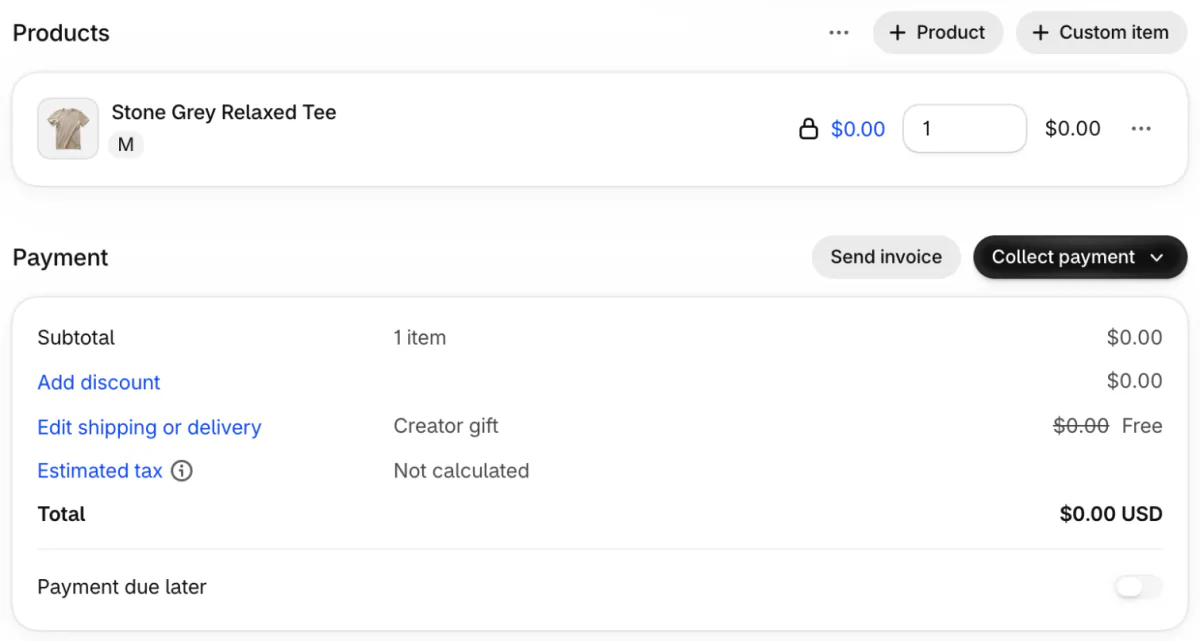
Once paid, the draft becomes a regular order on your Orders page, and if Shopify tracks that product's stock, the gift comes off the count like a sale. For a creator you're connected with in Shopify Collabs, a Collabs gift can let them pick the size themselves.
How do you track sales from each influencer?
Give each creator a discount code of their own, then read one report.
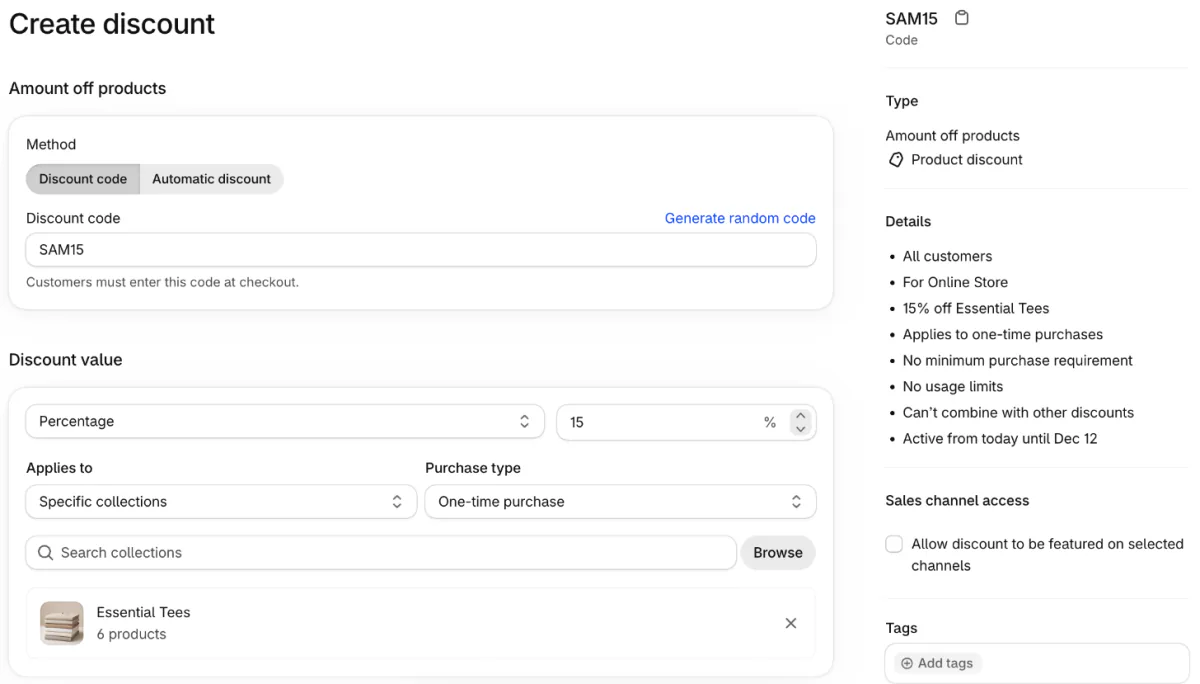
- In Discounts, click Create discount and pick "Amount off products".
- Under "Method", the choice between a code and an automatic discount, pick Discount code. Type a code named after the creator, such as SAM15.
- Set the percentage off, and the products or collections it covers.
- Under "Schedule", the dates section, click "Set end date" so the code expires, then click Save.
Then open Analytics, then Reports, and find "Sales by discount codes". It groups your sales by each code's name, so every creator's sales get their own row. It counts only the items a code applied to, and it leaves out test orders.
A creator's code can end up on coupon sites, so give each one an end date and a cap under "Maximum discount uses", the limit on how often it works. Ticking "Limit to one use per customer" there stops one shopper using it twice. When a sitewide automatic sale is running, a creator's code works alongside it only if both are set to combine, as what stacks and what collides shows. Every setting is in how to create a discount code on Shopify.
If you'd rather pay a commission and skip the counting, Shopify Collabs tracks each creator's link and code and adds the commission to your Shopify bill. It also lets you dispute a commission that came through a leaked code.
Do influencers have to say a post is an ad?
In the US, yes, and a free product counts. The FTC's guide for influencers asks for a disclosure "if you got anything of value to mention a product", free or discounted products included.
Plain words such as ad, advertisement or sponsored work, and so does a line thanking the brand for the free product. The label should sit with the endorsement itself and be hard to miss. Writing it as a hashtag, such as #ad, is fine but not required. The FTC says to avoid vague tags such as "sp", "spon" or "collab". Put the disclosure in your written deal, and check the rules in other countries you sell to. This isn't legal advice.
FAQ
Questions, answered
-

14-day free trial
Explore Sledge on your store before you decide to commit.
-

No credit card required
Start improving your store with no upfront commitment.
-

Setup in minutes
Get Sledge running without a lengthy setup process.
-

Built to grow sales
Turn shopper behavior into actions that help you sell more.
How do I find influencers for my small business for free?
Start with people who already post about you: tagged posts, mentions and buyers who left photo reviews. Then search your product's hashtags and keywords on Instagram and TikTok, and look at recent posts, not only the top ones. Offer a free product or a commission on each sale instead of a fee.
What is considered a micro influencer?
Shopify's blog puts a micro influencer at 10,000 to 99,999 followers, and Sprout Social at 10,000 to 100,000. Semrush draws the line lower, at 5,000 to 30,000. Below micro sits the nano tier. Shopify and Sprout Social both put a macro influencer at 100,000 to a million followers.
How do I find local influencers in my area?
Search your city's hashtags and the place tags of local shops, markets and events on Instagram and TikTok, and note who posts there every week. In Shopify Collabs, the Recruiting search has a Location filter for creators who list a location in their profile. A local creator suits products shoppers can see or collect nearby.
How much do micro influencers charge?
Shopify's blog said in 2024 that many micro influencers charge $100 to $500 for a sponsored post, and a mega influencer $10,000 or more. Some creators take a free product or a commission on each sale instead of a fee. Agree on the price, the post and the date in writing.
How do I track influencer sales on Shopify?
Give each influencer their own discount code, named after them, under Discounts in your Shopify admin. Then open Analytics, then Reports, and the Sales by discount codes report groups your sales by code. Shopify Collabs tracks each creator's link and code for you, and pays their commission through your Shopify bill.
Do influencers have to disclose gifted products?
In the US, yes. The FTC's guide for influencers says a free or discounted product counts as a connection to disclose. Plain words such as ad, advertisement or sponsored work, placed next to the endorsement where followers can't miss it. Writing the disclosure as a hashtag, such as #ad, is fine but optional. This isn't legal advice.
A creator's followers land on your product page. What do they see?
Sledge doesn't find influencers, make their codes or pay them. It works on the store their followers land in, with product reviews that show buyer photos, volume discounts that make two cheaper per item than one, and bundles. Try it free for 14 days. Growth Intelligence turns on when you pick a paid plan. It reads your orders and searches, and its suggested fixes add up to one dollar figure, labeled Est. potential.

