
To get repeat customers on Shopify, make the second order easy to want and easy to place. Get the first order right: in Attentive's 2026 survey, quality and shipping beat loyalty offers as reasons to buy again. Then send a timed reminder with Shopify Messaging and turn on Buy again. Emailing shoppers when a sold-out item returns takes an app.
Your ads pay for a first order, then the buyer goes quiet. Shopify already does more to win that second order than most guides say, and the rest takes one or two apps.
What brings a customer back for a second order?
A good first order brings buyers back more than a loyalty offer does. In Attentive's survey of 600 US shoppers (January 2026), the top reasons to buy again from a new brand were good deals (52%), product quality (45%), and free or fast shipping and fair prices (38% each). Exclusive loyalty offers came in at 18%.
Asked what stops them coming back after a first order, shoppers named prices too high for the value (45%) and low quality (41%), then poor service (34%). Much of service is the reply you send, and these customer service email templates cover the emails every store gets.
If you sell clothing, the test is fit. A first order that has to go back can cost you the second one, whatever you email afterwards. So the first retention fix sits on the product page: size guidance, fit notes and photos on more than one body type. When a wrong size still comes back, a Shopify returns app can let the shopper pick the new size as an exchange, and your refund policy can promise that exchange up front.
How do you see who your repeat customers are on Shopify?
Shopify counts a customer as returning once their order history already includes an order. In Analytics, open Reports and set the Category filter to Customers. "Returning customers" lists everyone with two or more orders, and "One-time customers" lists those with one. "Customer cohort analysis" groups customers by the month of their first order, so you can see how each month's buyers come back. The share who stop coming back is your churn rate.
These reports count each customer's whole order history. A new buyer this month sits under One-time customers until a second order moves them to Returning customers.
To act on those customers, build a customer segment, a list that updates itself from rules you pick: customers with more than one order, say, or exactly one. You can email a segment or limit a discount to it. If you slip a small gift into returning customers' parcels, the segment is your packing list.
Your repeat purchase rate, by the formula on Shopify's blog, is customers who bought more than once divided by all unique customers in the same period, times 100. No single "good" rate exists: the same post says benchmarks vary by industry, product type and how often people buy. Compare your rate with your own earlier months instead. A higher rate also raises customer lifetime value, the total each customer spends across all their orders. The other customer reports, and what each pattern means, are in customer behavior analytics.
How do you give customers a reason to come back?
Shopify has no loyalty program built in, but it gives you four ways to reward a returning customer without a loyalty app.
- A segment discount: limit a discount to "Customer segments", so only the customers in a segment, such as one-order customers, can use it.
- Store credit: you issue it to a customer, who spends it on your online store, POS or Shop. Online, they sign in to their customer account or pay with Shop Pay to use it. Stores created on or after May 12, 2025 pay third-party transaction fees on the part paid with credit.
- A VIP welcome: Shopify Messaging's "Welcome VIP customers" automation emails a customer by default on their third order with at least $1,000 spent, or when you tag them VIP.
- A Shop app offer: if you sell on the Shop channel, a post-purchase offer gives returning customers an in-app discount, one active offer at a time.
Points and tiers need an app. Shopify's Help Center suggests a gift card, a discount code or "an app to set up customer rewards and loyalty programs". Many loyalty apps price by monthly orders and keep VIP tiers for pricier plans, so before you pay for points, check that buyers like the product enough to come back. If they do, compare loyalty apps and their free plans. Already on Growave? See the Growave alternatives.
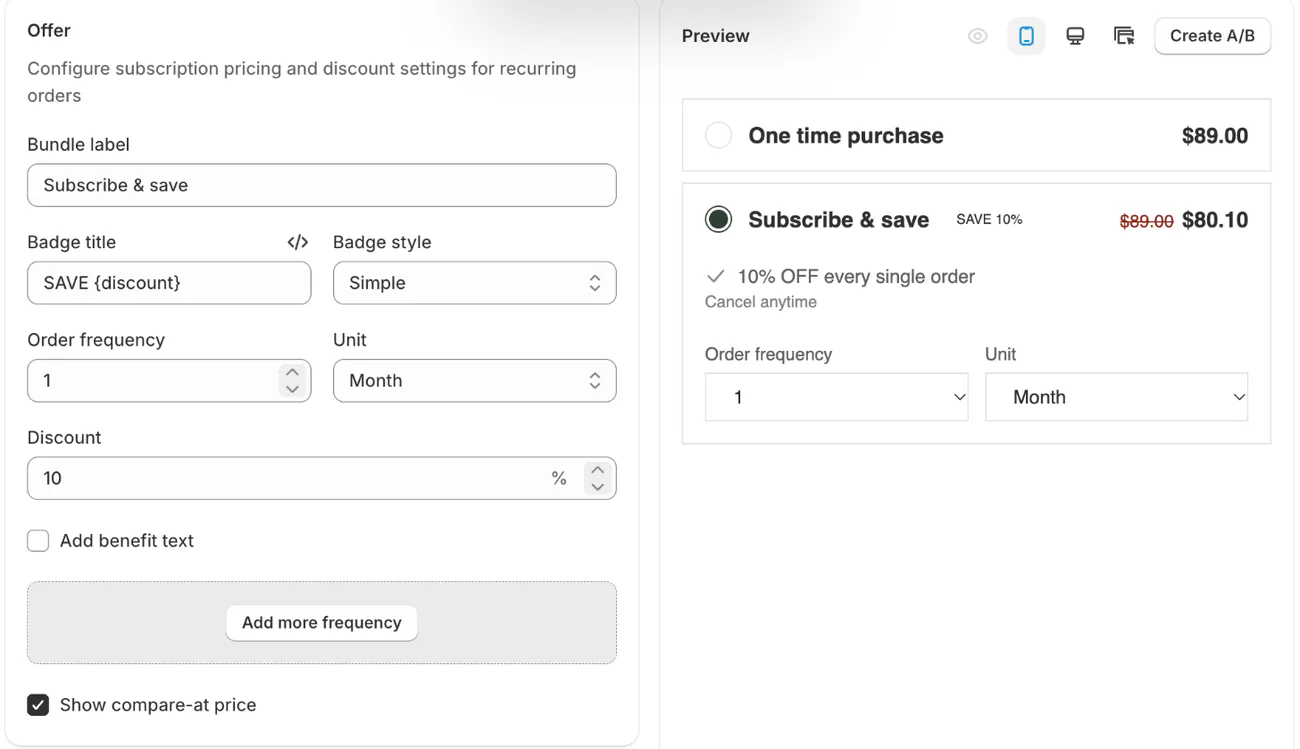
Shopify's free Subscriptions app renews an order on a schedule. Sledge is a Shopify app whose subscribe and save offer puts "Subscribe & save" beside the one-time price on your product page. It suits products people use up. You pick the delivery frequency and the discount, 10% unless you change it. Subscribers can cancel. It comes with every paid plan, and Sledge has no loyalty program or points.
A thank-you page offer is a different job. The shopper completes it through checkout as an order of its own, so it adds to this visit rather than bringing anyone back. The post-purchase upsell playbook covers it.
How do you remind customers to come back?
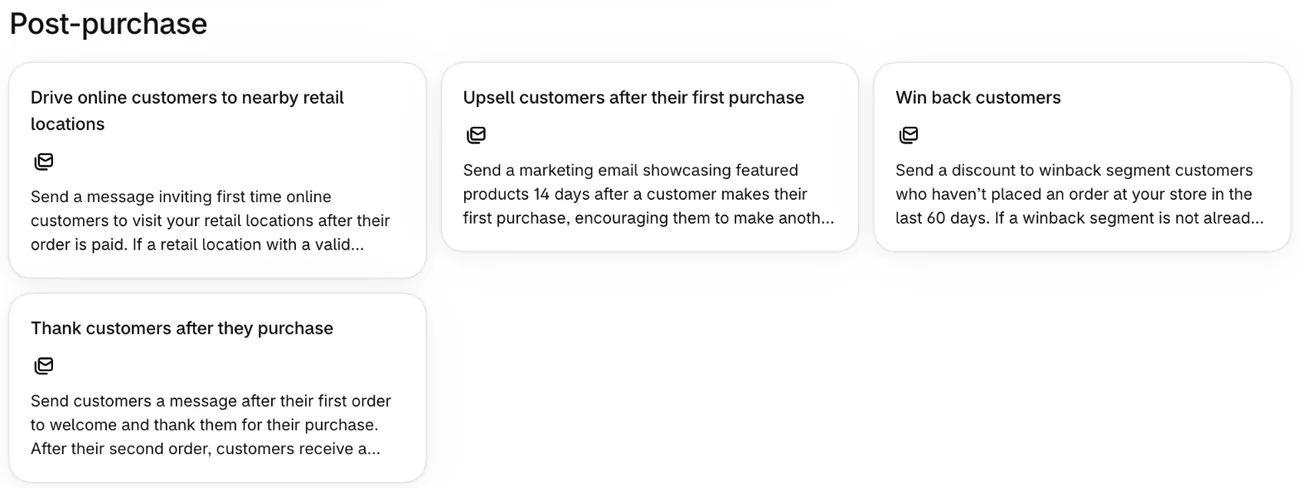
Shopify Messaging, formerly Shopify Email, comes with ready-made emails for the second order. Go to Apps, then Messaging, then Automations, and click "Create automation". In the Post-purchase group, "Thank customers after they purchase" goes out after the first and second purchases. It is one of five emails in a post-purchase email flow, beside the order confirmation and the shipping updates. "Win back customers" goes out once a set time has passed since the last order, so set that wait to how long your product lasts.
Your first 10,000 emails each calendar month are free, and automations count toward them. After that, it costs $1 per 1,000. By default, automations reach only customers subscribed to marketing, so grow that list with Shopify Forms, a free app for sign-up forms that can carry a discount. To grow it with a prize wheel instead, compare Shopify popup apps. Messaging also needs Shopify Network Intelligence switched on in your privacy settings.
Shoppers who use the Shop app can get a push notification when a product they saved in Shop drops in price or comes back in stock. You can't see those saves or change the alerts. For questions before the next order, Shopify Inbox is a free chat app where you answer shoppers and send product links.
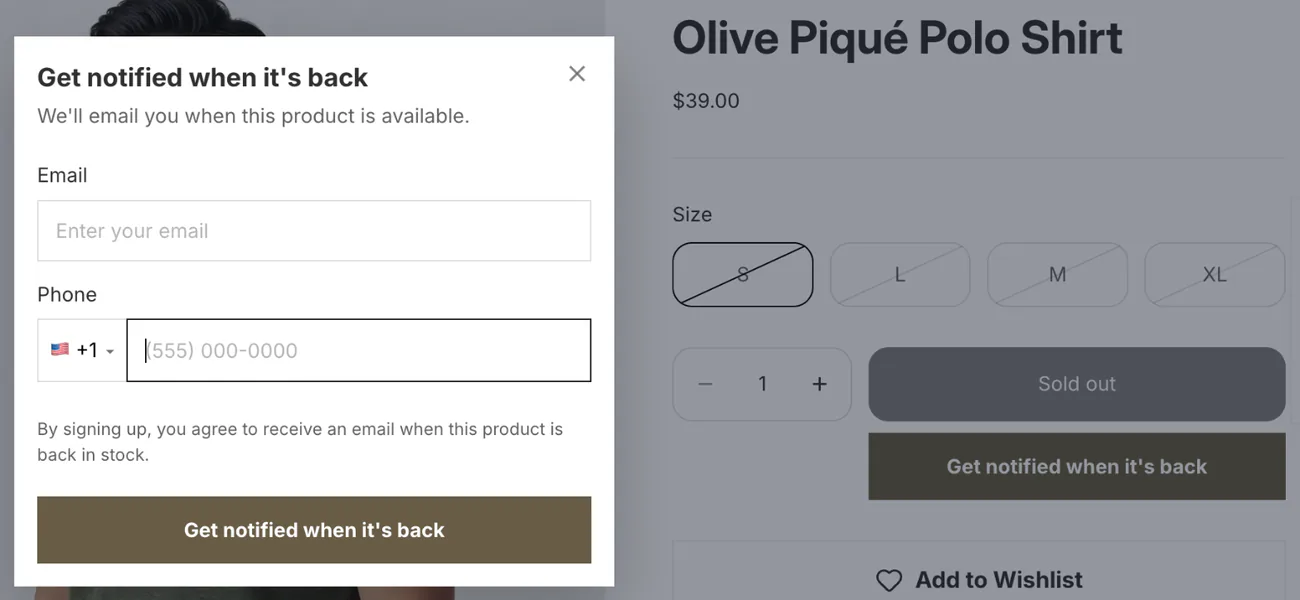
Sledge's Back in Stock puts a notify button on a sold-out product's page, on its card in collections, and in search. When the product returns, the shoppers waiting on it get an email. It works per product, by email only, on Accelerate ($199 a month) and up. Setup and timing are in how to set up back-in-stock alerts.
Sledge's wishlist keeps a saved item one tap away for when the shopper comes back on their own, on every paid plan. Sledge sends no email campaigns or saved-item reminders, so the win-back email stays with Shopify Messaging.
How do you make the second order faster to place?
Shopify's Buy again button lets a customer reorder past items from the order status page. Go to Settings, then Checkout, and click Edit under Configurations. Pick "Order status" from the editor's page list to see the button. If it is missing, turn it on in the editor's settings and save.
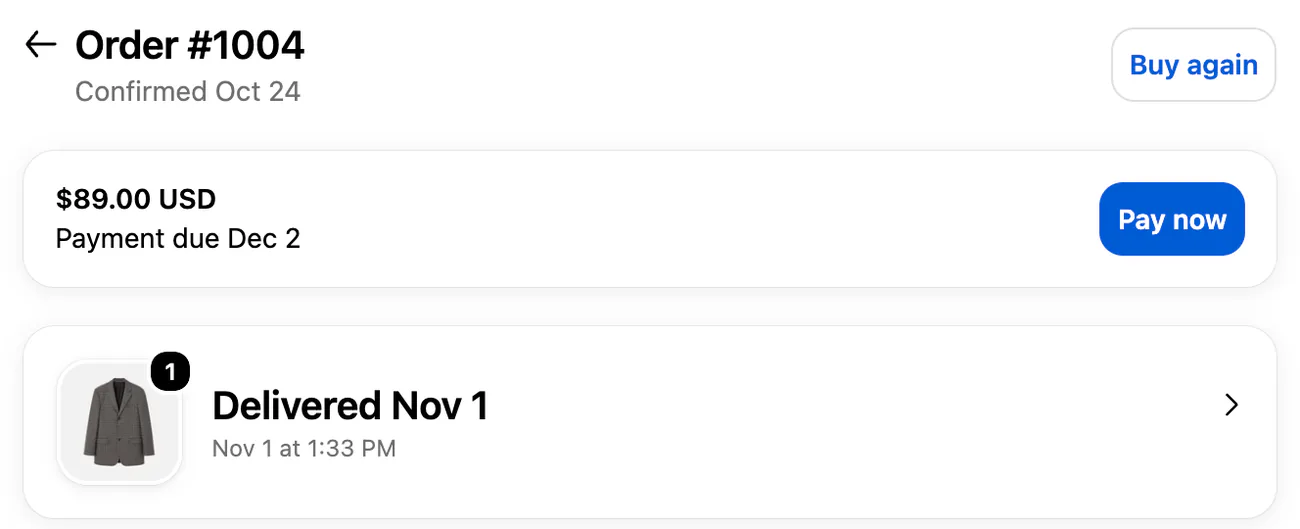
Buy again works with the new customer accounts, not the legacy ones Shopify is phasing out. Customer accounts let shoppers sign in with a six-digit code instead of a password and stay signed in for up to a year. The reorder still goes through checkout.
For products people use up, a subscription takes the reorder away. Shopify Subscriptions is a free app for weekly, monthly or yearly renewals, and adding subscriptions to Shopify walks through the options.
Sledge's Recently Viewed row shows a returning shopper what they looked at last time, on the same phone or laptop. On any paid plan, personalized search reorders search results and collection pages for each shopper, from what they searched, clicked, added to cart and bought. Sledge has no Buy again button, and Shopify's own covers that job.
Which Shopify tools help you get repeat customers?
Shopify covers seeing, reminding and reordering on its own. Loyalty points, back-in-stock emails and a wishlist on your own store need an app.
| Job | Shopify's own tools | With Sledge |
|---|---|---|
| See who came back | Returning customers report, cohort analysis, segments | Growth Intelligence flags a low repeat rate (paid plans) |
| A reason to return | Segment discounts, store credit, VIP automation, Shop offer | Subscribe and save; no loyalty program |
| A reminder | Shopify Messaging automations, Shop app alerts | Back in Stock emails (Accelerate and up) |
| A faster reorder | Customer accounts, Buy again, Shopify Subscriptions | Wishlist, Recently Viewed row, personalized search (paid plans) |
How do you know your repeat customer plan is working?
Change one thing at a time, then read the cohort report. The question is whether this month's first buyers come back sooner than last month's. For the emails, Messaging's Automations page shows reach, sessions, orders, conversion rate and sales across your automations. Click an automation's title for its own numbers.
On a paid plan, Growth Intelligence, Sledge's built-in advisor, reads your last 90 days of orders. When the share of customers who ordered more than once runs low for your kind of store, it flags the gap and suggests a fix. A button opens the tool for that fix in Sledge, and nothing goes live until you save it.
FAQ
Questions, answered
-

14-day free trial
Explore Sledge on your store before you decide to commit.
-

No credit card required
Start improving your store with no upfront commitment.
-

Setup in minutes
Get Sledge running without a lengthy setup process.
-

Built to grow sales
Turn shopper behavior into actions that help you sell more.
How do you get repeat customers on Shopify?
Deals, quality and shipping were the top reasons to buy again in Attentive's 2026 survey of US shoppers, so get the first order right and give buyers a reason to return. Then remind buyers with Shopify Messaging's Win back customers automation, turn on Buy again for customer accounts, and track who returns in the Returning customers report.
What is a good repeat purchase rate?
No single number fits every store. Shopify's blog says retention benchmarks vary by industry, product type, how often people buy and business model, so a store selling coffee and one selling sofas can't share a target. Divide customers with two or more orders by all customers in the period, then compare the result with your own past months.
Does Shopify have a loyalty program?
No. Shopify's Help Center suggests an app for points and rewards. Without one, you can still limit a discount to a customer segment, issue store credit to a customer's account, and send the Welcome VIP customers automation in Shopify Messaging. Sledge has no loyalty program either.
How do I see repeat customers in Shopify?
Go to Analytics, then Reports, and filter by Customers. The Returning customers report lists everyone with two or more orders, and Customer cohort analysis shows how each month's new buyers come back. For a list you can email, build a customer segment of people with more than one order.
How do I send a win-back email on Shopify?
In Shopify Messaging, formerly Shopify Email, open Automations, click Create automation and pick Win back customers. It emails customers once a set time has passed since their last order, by default only those subscribed to marketing. Your first 10,000 emails each month are free, then it costs $1 per 1,000.
Your next order starts with your last one.
Try Sledge free for 14 days and add a wishlist and a subscribe and save offer; back-in-stock alerts come with Accelerate and up. Growth Intelligence turns on when you pick a paid plan. It reads your last 90 days of orders, can flag a low share of customers who ordered more than once, and totals what its fixes could add in one dollar figure, labeled "Est. potential".

