
Yes. Shopify has email marketing, in a tool called Shopify Messaging, formerly Shopify Email. It's included from the Basic plan up, sends campaigns and automatic emails to customers who agreed to marketing, and gives you 10,000 emails a month free. After that it costs $1 per 1,000. Open it under Apps, then Messaging.
Your sale starts Friday. You open Apps in your admin and find a tool called Messaging. You don't know if it sends real email, what it costs, or whether the 400 people who ticked the box at checkout will ever see it.
What is Shopify Messaging, Shopify's email marketing tool?
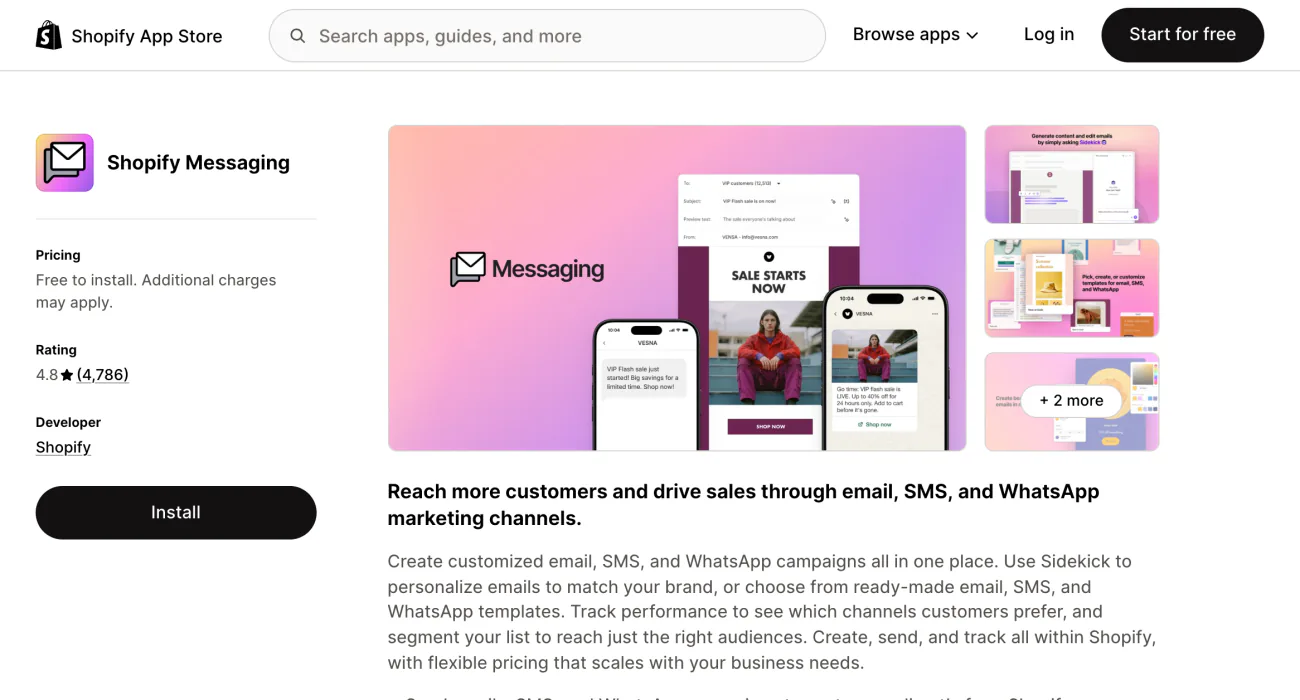
Shopify Messaging is the email marketing tool Shopify makes, and it sits inside your admin. It used to be called Shopify Email. Shopify says it comes installed on your store, and you can add it from the Shopify App Store if it's missing.
- Campaigns. Pick a template, choose who gets it and schedule the send.
- Automations. Eleven ready-made emails start on their own when a shopper acts or goes quiet, such as leaving a checkout.
- Reports. The message list shows open rate, click rate, conversion rate and sales for each message.
- Help writing. Sidekick, Shopify's assistant, drafts subject lines and body text, and you check what it writes.
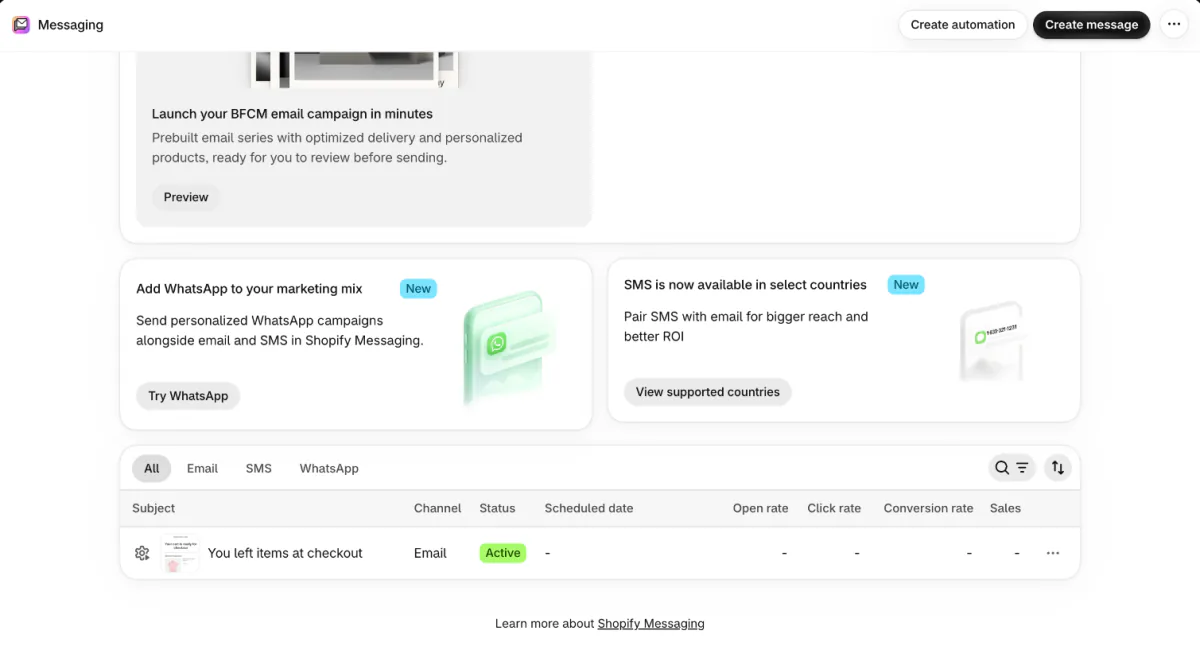
Shopify Messaging also sends text and WhatsApp messages, which are charged per message. Shopify's Help Center says Autopilot, under Growth, recommends email automations and campaigns, and you approve each one before it goes live.
You need a paid plan from Basic up, the Online Store sales channel, a payment provider and a confirmed sender email address. The privacy setting Shopify Network Intelligence, under Settings, then Customer privacy, must also be on. On a free trial you can build emails and send yourself tests, but you can't send to subscribers.
How much does Shopify Messaging cost?
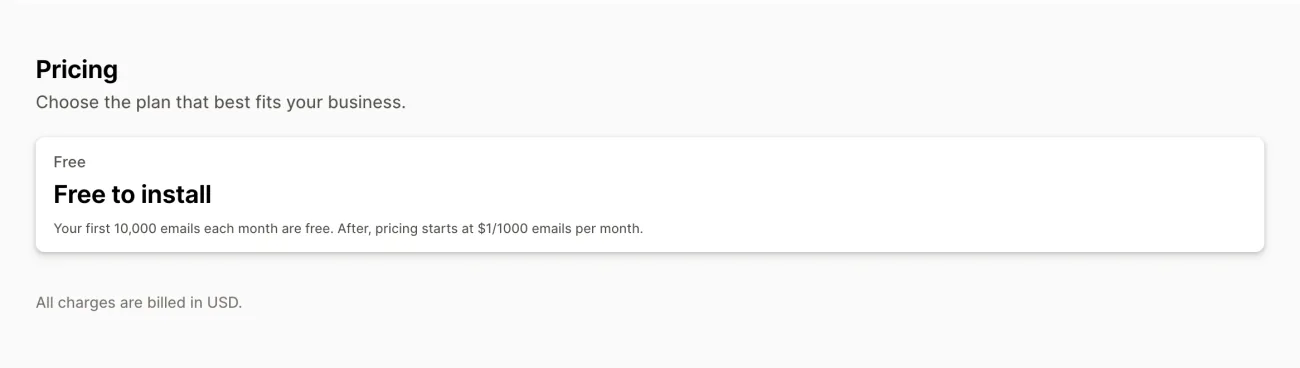
Your first 10,000 emails each calendar month are free, then Shopify charges $1 per 1,000. Shopify counts every address it sends to, so one email to 800 subscribers is 800 emails. Campaigns and automations share the same 10,000, except abandoned checkout emails, which are always free. Unused emails don't roll over.
Say you have 2,500 subscribers, send four newsletters in a calendar month and send 300 welcome emails. The newsletters are 10,000 emails, and the welcome emails make 10,300. You pay for 300 of them, which is $0.30.
Texts are charged per message from the first one, at $0.012 each to US numbers, plus $2.15 a month for each toll-free number. The email rate falls once you pass 300,000 emails a month, and Shopify's pricing page lists each rate.
Extra emails show on your Shopify bill as "Marketing emails". To get a warning first, open Settings in Messaging and click "Add threshold" under "Monthly spending alert". It emails the account owner when your costs reach the amount you set, but it doesn't stop the charges. Apps that stay free, and where each one stops, are in our list of free Shopify apps.
How do you send your first email campaign in Shopify?
You send a campaign in six steps, and nothing sends until you confirm the email is ready.
- Go to Apps, then Messaging, and click "Create message".
- Pick one of the 104 templates on "Select a starting point".
- In the "To" field, choose All subscribers or a customer segment.
- Write a subject line and preview text, then edit the sections.
- Click "Send test" and read the email on your phone, because Shopify doesn't check spelling.
- Click Review, then "Schedule send", and pick the suggested time, Send now or a custom date.
Steps follow Shopify's Help Center, read November 6, 2026.
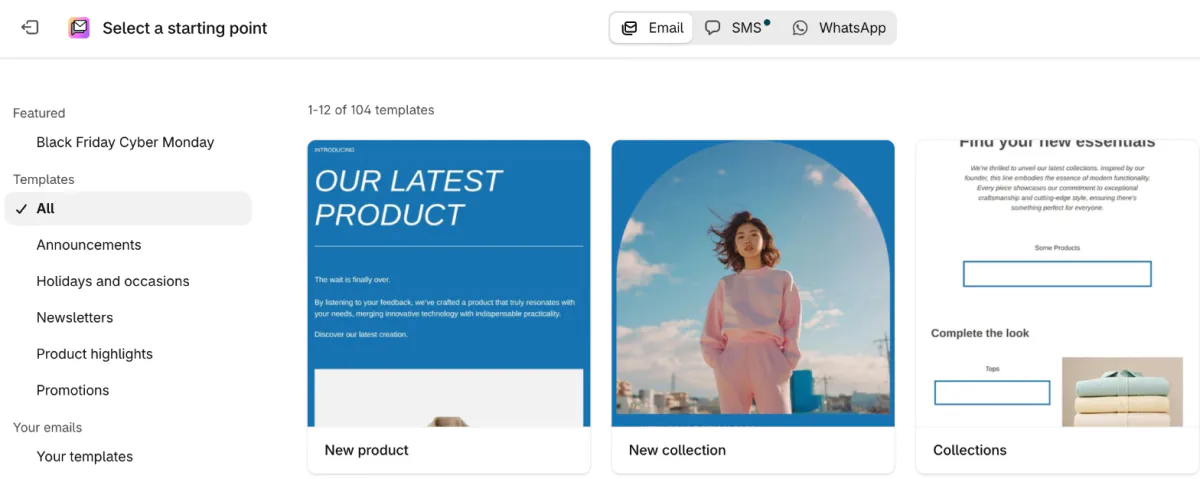
Sending for the first time? Start with the subscribers most likely to open, such as people who opened or clicked in the last three months, then widen the audience. Gmail, Yahoo and Outlook can slow or block a sudden spike from a sender they don't know yet.
If you send from your own domain, prove it's yours first. Shopify calls this authenticating it and says it can take up to 48 hours to verify. For a launch, our product launch email templates have the copy.
Which automatic emails can Shopify Messaging send?
Shopify Messaging has 11 ready-made automations in four groups, and you start each one from the template list that "Create automation" opens.
| Group | Templates | Starts when |
|---|---|---|
| Recover site visitors | Recover abandoned cart, Recover abandoned checkout, Convert abandoned product browse | A shopper views a product, adds to the cart or starts checkout, then leaves |
| Welcome new subscribers | Welcome new subscribers with a discount email, Welcome new subscribers with a discount series | A shopper subscribes to marketing through your online store |
| Post-purchase | Thank customers after they purchase, Upsell customers after their first purchase, Win back customers, Drive online customers to nearby retail locations | After an order, or once a customer goes quiet |
| Customer appreciation | Celebrate customer birthday, Welcome VIP customers | A customer's birthday, or a new VIP customer |
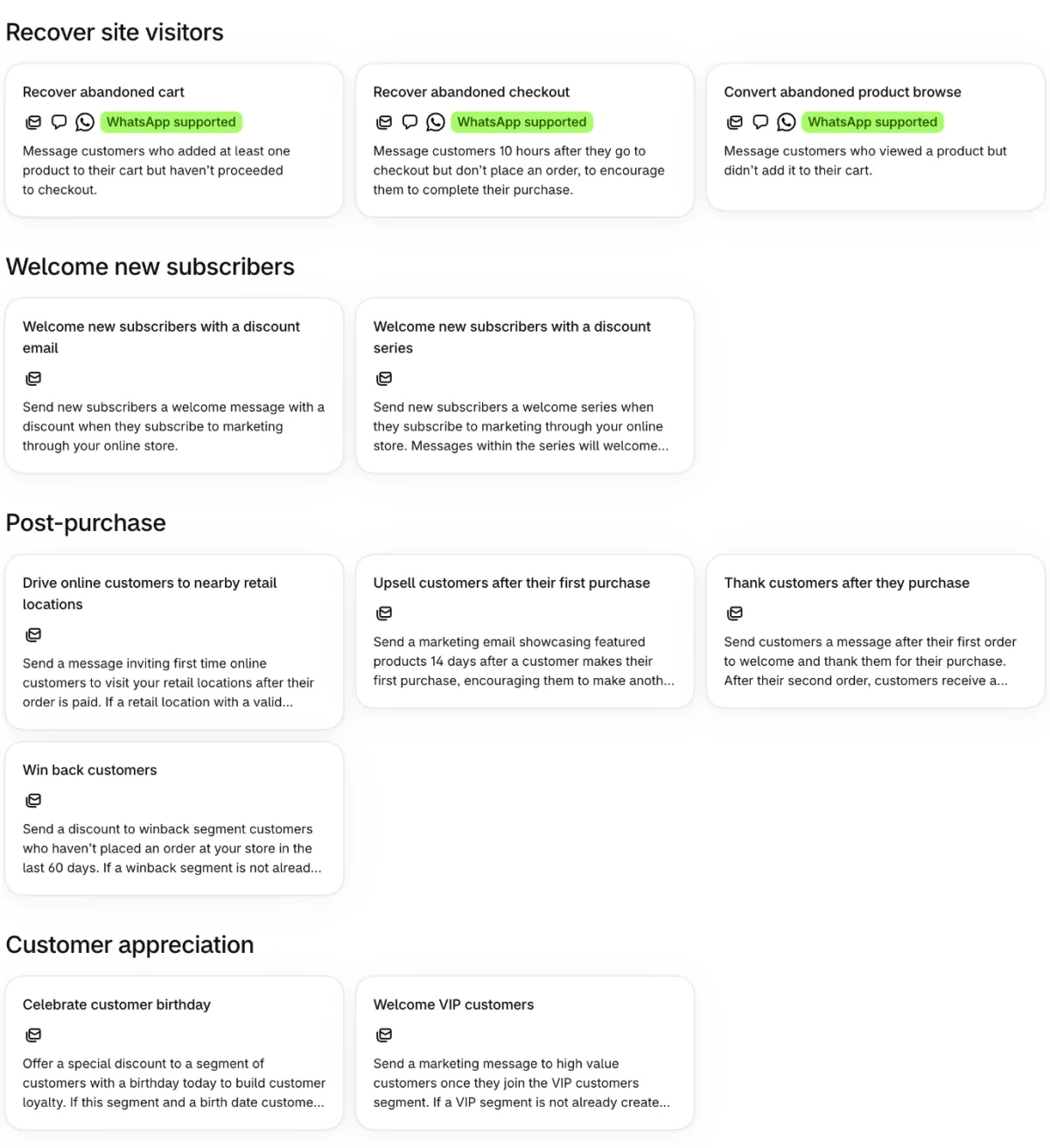
- Subscribers only. Automations go to customers who agreed to marketing. The one exception is Recover abandoned checkout, whose "To" field you can switch to All customers.
- A computer for most. The Shopify app on your phone builds only the three Recover site visitors automations. The rest, and any edit, need a computer.
- Don't double up. Two welcome automations switched on send twice as many emails.
Order confirmations and shipping updates are notifications, not marketing. Shopify sends them to every buyer with an email address, and most notifications can't be switched off. For each flow in full, see the abandoned cart email guide and the post-purchase email flow.
How do you get people onto your email list?
Shopify Messaging emails only people who agreed to marketing, so the list starts with a checkbox.
- At checkout. In Settings, then Checkout, open "Marketing opt-in" and choose where the Email checkbox shows. Shopify's Help Center lists checkout only, the sign-in page only or both.
- On your store. Add a newsletter sign-up to your store, or install the free Shopify Forms app. For a pop-up, see our list of Shopify popup apps.
- Check the list. Open Customers and the "Email subscribers" segment to see who agreed.
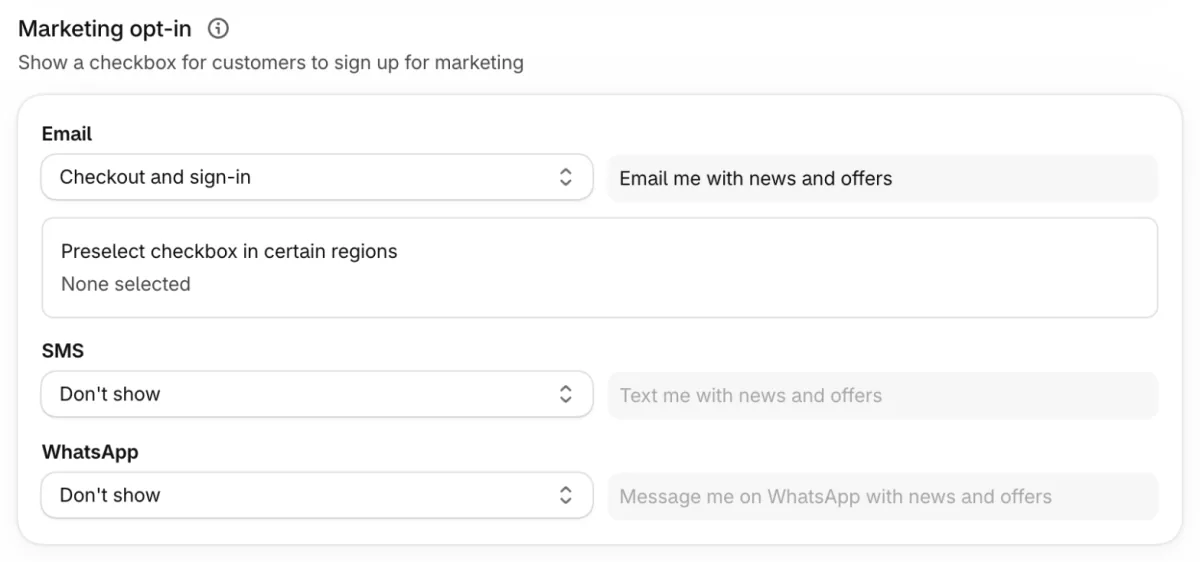
Never buy a list, because Shopify's Terms of Service prohibit it. To make subscribers confirm by email first, turn on double opt-in under Settings, then Notifications, then Customer notifications, in the "Marketing double opt-in" section.
Why didn't everyone get my Shopify marketing email?
Shopify Messaging sends only to subscribers who agreed to marketing, and it drops some of them before you click send. You switch on the abandoned cart email, a hundred shoppers leave, and none get it, because none ticked the box.
- Not subscribed. A buyer who left the checkbox unticked gets order and shipping emails, not marketing. Only the abandoned checkout email can be switched to All customers.
- Smart delivery. On by default. The admin says it prioritizes subscribers "more likely to convert". Shopify's Help Center says that once the send list passes 1,000, Smart delivery leaves out subscribers who haven't engaged with your recent emails, and that switching it off can raise bounces, spam complaints and costs.
- List health. The admin says it blocks invalid addresses and hard bounces. Shopify's Help Center adds that people who unsubscribed or reported spam stay off future campaigns, and you can't turn it off.
- An empty audience. A campaign aimed at a segment with no subscribers by send time goes back to a draft.
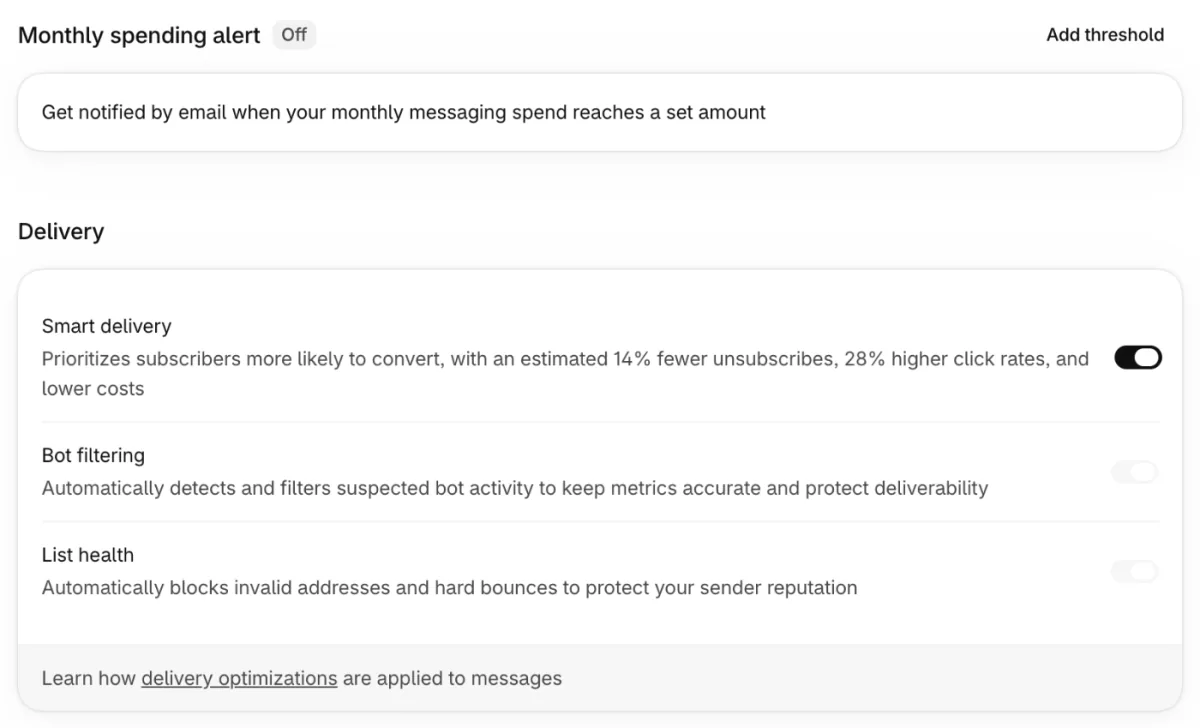
In an email's report, "Recipient count" is how many Shopify expected to send to before it removed bounced and bot-generated subscribers, and "Emails sent" is how many went out.
Where does Shopify's email marketing stop?
Shopify Messaging covers newsletters and eleven ready-made automations for people who opted in. Shopify's Help Center names three limits.
- No attachments. Upload the file to your store and put a link in the email.
- No translation. An email goes out in the language you wrote it, so build a segment per language and send one email to each.
- Numbers differ. Shopify counts from its own store data, so its report may not match another platform's.
If Messaging can't do a job you need, the next step is an email app from the App Store's Email marketing category.
FAQ
Questions, answered
-

14-day free trial
Explore Sledge on your store before you decide to commit.
-

No credit card required
Start improving your store with no upfront commitment.
-

Setup in minutes
Get Sledge running without a lengthy setup process.
-

Built to grow sales
Turn shopper behavior into actions that help you sell more.
Is Shopify Email the same as Shopify Messaging?
Yes. Shopify's Help Center says Shopify Messaging was formerly known as Shopify Email. The app now sends text and WhatsApp campaigns as well as email. You still open it under Apps in your Shopify admin, and the first 10,000 emails each calendar month are free.
Is Shopify email marketing free?
Partly. Stores on Basic and up get 10,000 emails free each calendar month, and extra emails cost $1 per 1,000. Automations count toward the 10,000, except abandoned checkout emails, which are always free. Text messages are charged from the first one, at $0.012 each to US numbers.
Can I email all my customers on Shopify?
No, only customers who agreed to marketing. The one exception is the abandoned checkout email, which you can switch to All customers. Shopify also leaves out anyone who bounced, unsubscribed or reported spam, according to its Help Center. Order and shipping emails differ, because Shopify sends those to every buyer with an email address.
Do I need a separate email app with Shopify?
Not to start. Shopify Messaging covers campaigns, eleven ready-made automations and reports, free up to 10,000 emails a month. Look at an email app when Messaging can't do a job you need. Shopify says it can't attach files and doesn't translate your emails for you.
Does Sledge send marketing emails?
No. Sledge sends no email campaigns, so those stay with Shopify Messaging. It does send back-in-stock alerts, on Accelerate and up. Sledge's promotion banner can carry your email's offer on your collection pages, on the dates you set. On paid plans, Growth Intelligence puts one dollar total on what its fixes could add, labeled Est. potential.
The email gets the click. Does the page keep it?
Sledge doesn't send email campaigns, so yours stay in Shopify Messaging. Try Sledge free for 14 days and run your email's offer as a banner on your collection pages, dated to start and end with the email. Growth Intelligence turns on when you pick a paid plan, reads how shoppers move through your store and totals what its fixes could add in one dollar figure, labeled "Est. potential".

