
A content calendar is a dated plan of everything your store puts out: social posts, emails, blog posts, product launches and sales. Each row says what goes out, where, when, who makes it and whether it's ready. For a store, start from the dates you sell around, then plan the posts and emails that point to them.
Say your January sale starts Monday at midnight. The discount is set, but the email is a draft, the reel isn't filmed and the restocked tee is still hidden. Each lives on its own screen. A content calendar puts them on one page, each with a date and an owner.
What goes on a store's content calendar?
On a store's content calendar, every sale, launch, restock and holiday gets a row, and so does each post, email and blog post that points at one. Many teams call it an editorial or marketing calendar. Shopify's Help Center suggests adding every social update, blog post, email, SMS campaign and video to it, so you can see that no channel goes quiet.
Its rows come in two kinds:
- Store dates: a sale's start and end, a launch, a restock, a holiday and your last order day, the last day an order still arrives in time.
- Content: the social posts, emails, blog posts and videos that point at those dates, plus a few that stand alone.
A social media content calendar is the social rows of the same calendar. Which channels you use and what each should sell belong to the plan above it, your ecommerce marketing strategy.
What columns does a content calendar template need?
Seven columns cover most stores, and one of them says where each row gets scheduled.
| Column | What goes in it | Example |
|---|---|---|
| Date and time | The day and hour it goes live, in your store's time zone | Mon Jan 4, 9:00 AM |
| Channel | Store, email, Instagram or blog | |
| What goes out | One line on the post or change | Sale email: three coats, ends Sunday |
| Links to | The page it sends people to | Coats collection |
| Where it's scheduled | The screen that publishes it on time | Messaging, Schedule send |
| Owner | Who makes it | You |
| Status | Idea, Drafting, Ready, Scheduled or Live | Scheduled |
Add a Results column if you track each campaign's sales. Keep past rows too: they show what ran and when.
How to set up a content calendar template in Google Sheets
Start a blank sheet and type the seven column names in row 1. Click View, then Freeze, then 1 row, so the names stay in view as you scroll. Select the Status column, click Insert, then Dropdown, the menu that turns each cell into a list of choices, and add Idea, Drafting, Ready, Scheduled and Live. Give the Channel column its own dropdown the same way.
To see one channel or one week at a time, click Data, then Create a filter. Click Format, then Conditional formatting, to color a Status cell when it reads Scheduled. Notion, Trello or a shared Google Calendar can hold the same plan, so pick the one your team already opens.
How do you create a content calendar, step by step?
Start from your store's dates, then work back from each one to the posts and emails it needs.
- List your dates for the next six weeks. Write down every sale, launch, restock and holiday, plus your last order day before each holiday. Restock dates come out of your demand forecast.
- Pick two or three channels and a pace you can keep. Shopify's Help Center notes that a predictable schedule teaches customers what to expect. For Instagram, Buffer's study of 2.1 million posts from 102,000 accounts puts the likely sweet spot for reach and growth at 3 to 5 posts a week. Start lower if that's more than you can make.
- Work back from each date. A launch might get a teaser about a week ahead and the launch email the minute it goes live. A sale gets a last call a few days before it ends.
- Fill the quiet days with a content mix. Repeat a few formats, such as a how-to, a customer photo and a look behind the counter. Ask before you repost a customer's photo, as the UGC examples explain.
- Schedule each row where it runs. Then set its Status to Scheduled. The next section names the screen for each row.
- Check it every Monday. Every row for the week should read Scheduled, and every scheduled email should still show its send date. An email to a segment with no subscribers at send time goes back to draft. At month end, if you grouped the month's posts and emails into a campaign under Growth, then Campaigns, read its results there.
How do you schedule blog posts, emails and sales in Shopify?
Shopify can hold most rows until their date, each on its own screen. Social posts are the exception.
| Row | Where in Shopify | What you set |
|---|---|---|
| Blog post | Content, then Blog posts | The calendar icon under Visibility |
| New product | Products, then the product's Publishing section | A date and time beside Online Store |
| Collection | Products, then Collections, then its Publishing section | A date and time beside Online Store |
| Apps, then Messaging, then Review | Schedule send, then Custom date and time | |
| Sale discount | Discounts, then the discount's Schedule section | A start date and time, then Set end date |
| Theme or announcement bar | Markets, then Rollouts | A start and an end, on the Basic plan and up |
| Instagram or Facebook post | Not in Shopify | Meta Business Suite or another social tool |
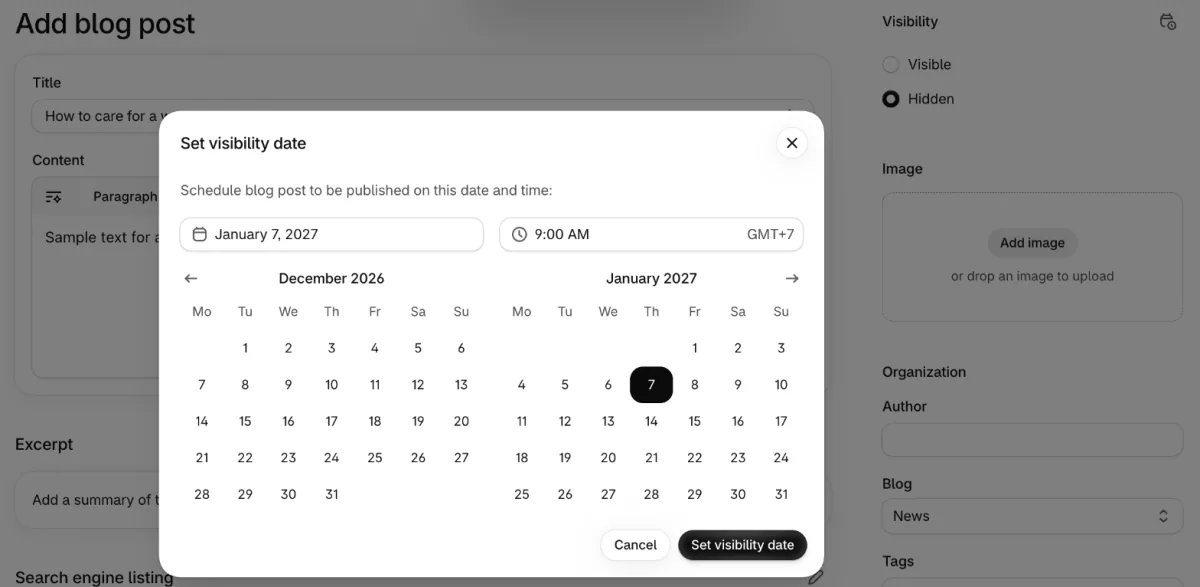
A new blog post stays hidden until you publish it. Open Content, then Blog posts, then the post, and click the calendar icon in the Visibility section. In "Set visibility date", the dialog that holds the post until a day you pick, choose the date and time, click Set visibility date, then Save.
The product launch email guide walks through a product's Publishing picker, and Shopify email marketing covers what Messaging sends and costs.
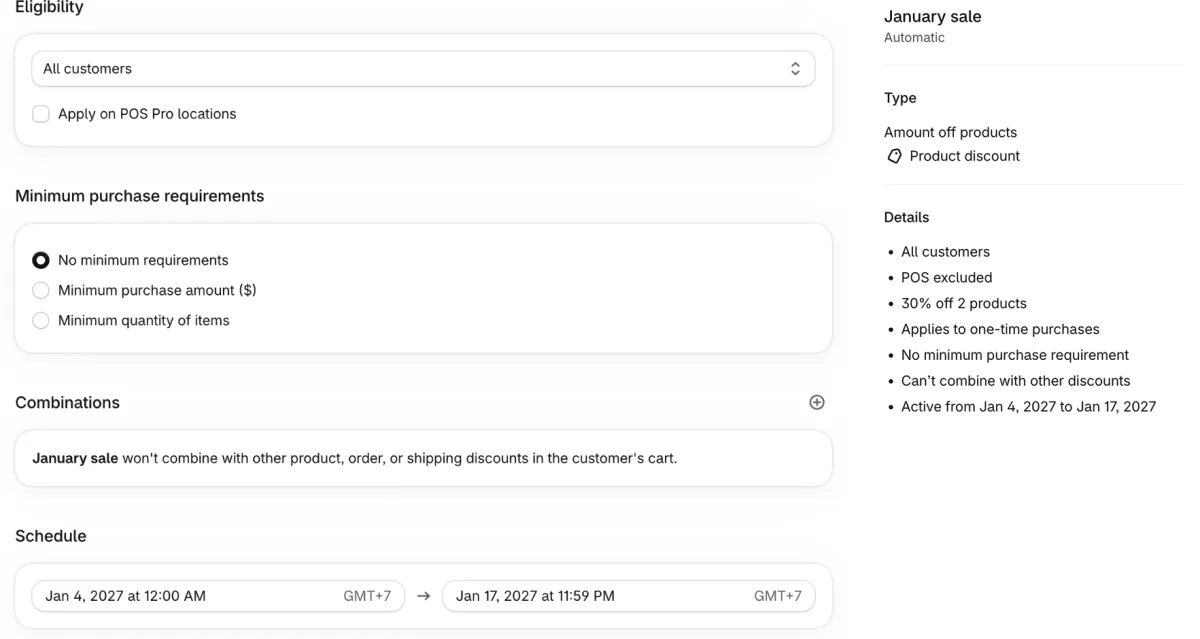
A discount's dates sit in its "Schedule" section, the part of the form that sets when it runs. Pick the start date and time in one field, then click Set end date, the control that adds a last day, so the sale stops on time. The time list goes in half-hour steps, but you can type 11:59 PM.
Rollouts schedules an announcement bar change with a start and an end. For Instagram and Facebook, Meta Business Suite schedules stories and ads as well as posts.
Future publishing, Shopify's name for a set publish date, doesn't reach the Shop app, and it can't hold back a single size or color. A product has to be set to Active before its date comes, or it stays hidden. Each date follows your store's time zone, set under Settings, then General.
If you use Sledge, a Shopify app for search, filters and offers, its banners, countdowns, badges and most bundle offers have their own "Active dates", the section that sets when each one starts and stops. Give them the sale's dates, and the banner and countdown come down when the discount ends. The guide to scheduling a sale banner walks through both Rollouts and Active dates.
Content calendar example: six weeks to Valentine's Day 2027
One sale, one restock, one gift edit and one launch fill six weeks of rows. Say you sell clothing, make every post yourself and ship orders that take four business days to arrive. You own every row, so the Owner column drops out, and Links to is left off to save room.
| Date | Channel | What goes out | Where it's scheduled | Status |
|---|---|---|---|---|
| Mon Jan 4, 12:00 AM | Store | January sale starts: 30% off winter coats | Discounts, start date | Scheduled |
| Mon Jan 4, 9:00 AM | Sale email: three coats, ends Sunday the 17th | Messaging, Schedule send | Scheduled | |
| Tue Jan 5 | Reel: one coat worn three ways | Meta Business Suite | Ready | |
| Thu Jan 7, 9:00 AM | Blog | How to care for a wool coat, linking the sale | Blog posts, Set visibility date | Drafting |
| Thu Jan 14, 9:00 AM | Last call: the sale ends Sunday | Messaging, Schedule send | Idea | |
| Sun Jan 17, 11:59 PM | Store | Sale ends | Discounts, Set end date | Scheduled |
| Tue Jan 19 | Store, Instagram | The white tee is back in stock | Inventory count; a back-in-stock app emails who asked | Idea |
| Mon Jan 25, 9:00 AM | Store | Valentine's gift edit goes live | Collections, Publishing | Idea |
| Tue Jan 26, 9:00 AM | Gift edit in three price ranges, last order day at the top | Messaging, Schedule send | Idea | |
| Mon Feb 1 | Gift edit carousel with your last order day | Meta Business Suite | Idea | |
| Thu Feb 4, 9:00 AM | Store, Email | Spring linen shirt launches, with an email at the same minute | Products, Publishing; Messaging | Idea |
| Mon Feb 8 | Store, Email | Last order day for delivery by the 14th | Rollouts for the announcement bar; Messaging | Idea |
| Sun Feb 14 | Story: an e-gift card for anyone who missed the last order day | Meta Business Suite | Idea |
An order placed Monday, February 8 arrives Friday the 12th. One placed Tuesday arrives Monday the 15th at the earliest, the day after Valentine's Day, so the 8th is your last order day.
On Accelerate and up, Sledge's Back in Stock emails the shoppers who signed up for a product once it's back, so the restock row needs no send date of its own.
This table holds only the when and where. The ideas behind each email are in newsletter ideas, and Christmas marketing ideas plans December around its last order day.
How do you create a social media content calendar?
Give each platform its own rows, tie most posts to a store date and fill the rest with formats you can repeat.
Pick one or two platforms you can keep up with, at the pace from step 2. Shopify's Help Center advises against adding the same content everywhere. Let each channel tell a different part of the story instead: the reel shows the coat worn, while the email carries the price and the end date.
Put the page each post sells in the Links to column, and tag products where the platform allows; shoppable content shows how. Creators' post dates go on the calendar as well, so a paid post lands while the sale still runs. How to find influencers covers choosing them, and how to sell on Instagram covers selling from the posts themselves.
FAQ
Questions, answered
-

14-day free trial
Explore Sledge on your store before you decide to commit.
-

No credit card required
Start improving your store with no upfront commitment.
-

Setup in minutes
Get Sledge running without a lengthy setup process.
-

Built to grow sales
Turn shopper behavior into actions that help you sell more.
What is a content calendar?
A content calendar is a schedule of what you'll publish, where and when: social posts, emails, blog posts and videos. Many teams call it an editorial calendar. A store's version also holds the dates its content points to, such as a sale's start and end, a product launch and a restock, so every post has a reason to go out.
How do you create a social media content calendar?
Start from your store's dates for the next month: sales, launches, restocks and holidays. Pick one or two platforms, set a pace you can keep, such as three posts a week, and give each post a row with its date, platform, idea, link, owner and status. Fill quiet weeks with how-tos, customer photos and behind-the-scenes posts.
What should a content calendar include?
Seven columns cover most stores: date and time, channel, what goes out, the page it links to, where it's scheduled, who owns it and its status. Status moves from idea to drafting, ready, scheduled and live. Add a results column if you track each campaign's sales, and keep finished rows as a record of what ran.
Is there a free content calendar template for Google Sheets?
Many sites offer one to copy, and you can make your own in a blank Google Sheet, which is free. Type the seven column names in row 1, then click View, Freeze, 1 row so they stay in view. Add status and channel choices with Insert, Dropdown, and use Data, Create a filter to see one channel or week.
How far ahead should you plan a content calendar?
Far enough ahead to cover your next sale or launch, plus the time each piece takes to make. Shopify's own guide puts the lead time at a month or a quarter, depending on your strategy, your team and how much you publish. Plan the dated rows six to eight weeks out, and leave room each week for a timely post.
Can Shopify schedule posts, emails and product launches?
Emails, launches and sales, yes; social posts, no. Shopify Messaging schedules emails. Future publishing sets a date for products, collections, blog posts and pages. Discounts take a start and an end date, and Rollouts schedules theme changes. Instagram and Facebook posts get scheduled in Meta Business Suite or another social tool.
Your calendar sets the sale dates. Does your store keep them?
Sledge doesn't plan content, schedule posts or send your marketing emails. On your store, its banners, countdowns, badges and most bundle offers take start and end dates under Active dates, so a sale's on-site pieces keep your calendar's dates. Try it free for 14 days. Growth Intelligence turns on when you pick a paid plan, and its suggested fixes add up to one dollar figure, labeled Est. potential.

