
Your ads bring visits and carts fill up, but the orders don't come, and nothing in your dashboard says which page lost them. One Shopify report, Conversion rate breakdown, already shows the step where shoppers drop off. Shopify CRO means fixing the page behind the biggest drop first, with free settings before any app.
What is Shopify CRO?
Shopify CRO, short for conversion rate optimization (optimisation, in British spelling), is getting more of the visits you already have to end in an order. You fix pages, not traffic.
Your conversion rate is the share of sessions that ended in a purchase. One session can hold two orders and still count once, so converted sessions can be fewer than your orders.
Littledata's October 2026 study of 436 Shopify stores puts the median at 1.4%, and the top 20% above 2.7%. Your own trend still tells you more than anyone's average.
Compare only periods that start after 23 September 2026. Between 21 and 23 September, Shopify changed how it counts sessions. Sessions now end after 30 minutes without activity, and known bots are filtered out. Your conversion rate can move without one order changing, so Shopify says to treat the update as a new baseline.
How do you find where shoppers leave your store?
Shopify already draws the path. In Analytics, open Reports, set the Category filter to Behavior, and open Conversion rate breakdown.
The report is a funnel of four steps: All sessions, Sessions with cart additions, Sessions that reached checkout, and Sessions that completed checkout. Each step is a share of all sessions. Use the Open Funnel toggle to switch to a closed funnel, which counts only sessions that took the steps in order, then hover a step to see "Reached this step" and "Dropped off".
The page behind the biggest drop between two steps is the one to fix first.
| The biggest drop | Where shoppers stall | Start with |
|---|---|---|
| All sessions to cart additions | The page they land on, a collection, search or a product page | Landing page, collections, search, product page |
| Cart additions to reached checkout | The cart | Cart |
| Reached checkout to completed checkout | Checkout and payment | Checkout |
Then ask Sidekick, the assistant in your Shopify admin, for conversion rate by device, to see whether phones or desktops lose more.
Last, open that page on your phone and try to buy. The report names the step, and being the shopper usually shows the reason.
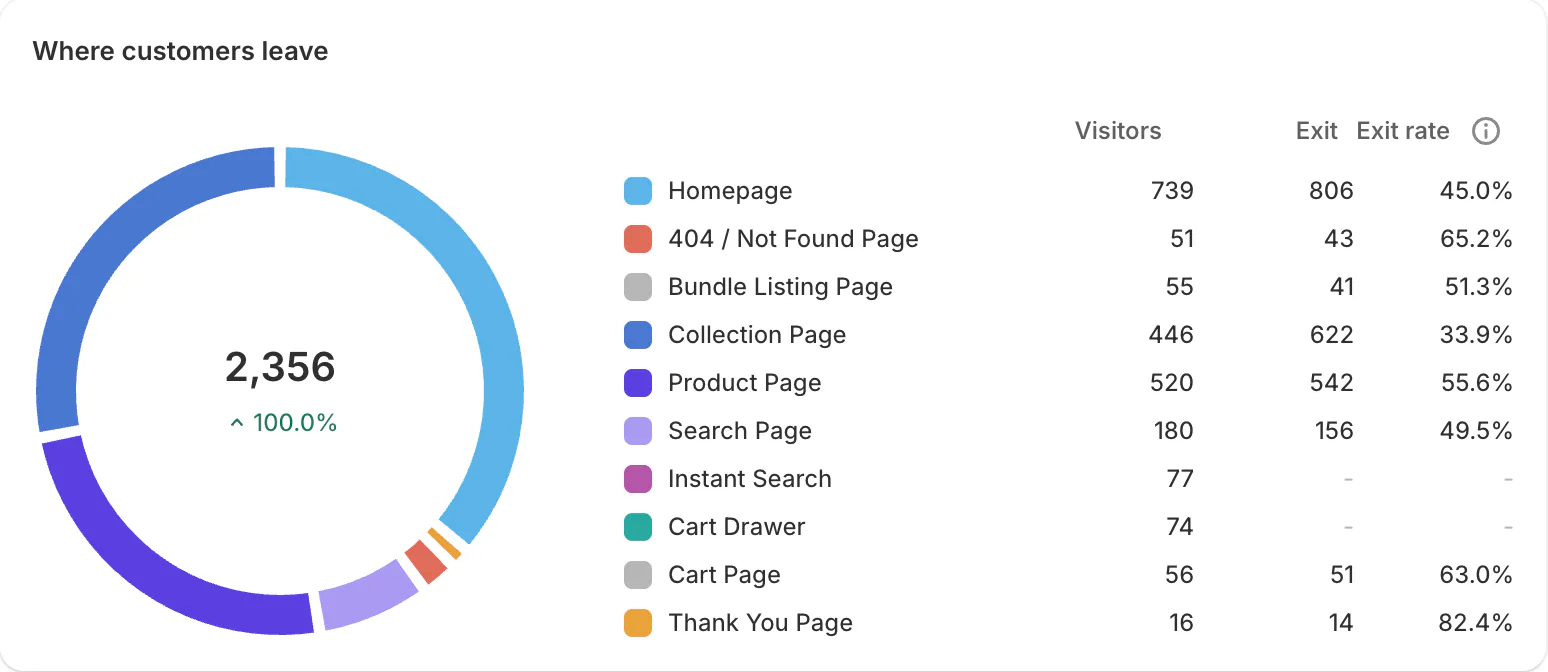
If you run Sledge, its Analytics adds the view by page: on the Journey tab, "Where customers leave" shows exits per page, as in the picture above. The Signals tab names a leak in plain words, such as a search term that found nothing. The tab refreshes twice a day for every active store, trial included. Reading the customer journey walks through both.
Why do shoppers leave the first page they land on?
A shopper clicks your ad, waits on a slow page, or lands on something the ad never showed, and goes back. An old link to a deleted product is worse: it opens your 404 page.
How to spot it: Sessions by landing page lists where visits start. Look for a page with plenty of visits and a high bounce rate. Then open the web performance summary on your Themes page. It rates loading (LCP), interactivity (INP) and visual stability (CLS) as Good, Moderate or Poor, from real visits over the past 30 days, and shows the effect of app installs and theme updates. A store behind a password page gets no data.
The free fix:
- Send each ad to the page it shows: the product in the picture, not your homepage.
- Remove apps that don't earn sales: Shopify warns that too many apps loading files on your storefront can slow it. How to tell if apps slow your store shows how to find them.
- Redirect dead links. In your admin, search for URL redirects and send a deleted product's old address to the closest live page. A redirect works only from an address that no longer loads, and you can add up to 100,000 outside Plus.
Sledge plays a small part here: it can fill your 404 page with product recommendations, and Signals flags a jump in visits to that page.
Why do collection pages get views but no add to carts?
Your bestsellers sit three rows down. The first row is sold out. A collection of 400 products has no filters, or a filter combination ends on an empty page, and the shopper goes back.
How to spot it: Sessions by landing page shows a collection pulling visits. None of Shopify's behavior reports shows which filters or sort orders shoppers use, so browse the collection yourself, on a phone, from the top.
The free fix starts with sort order. A new collection defaults to the Most relevant sort, which follows sales performance. The Best selling sort counts all-time orders, so last year's hit can sit above this season's. When it does, switch to Manual and set the order by hand.
Then add filters with Shopify's free Search & Discovery app. Two limits apply: a collection with more than 5,000 products shows no filters at all, and one filter shows at most 100 values. Filters past ten thousand products covers big catalogs, and pushing out-of-stock products to the bottom clears the sold-out first row.
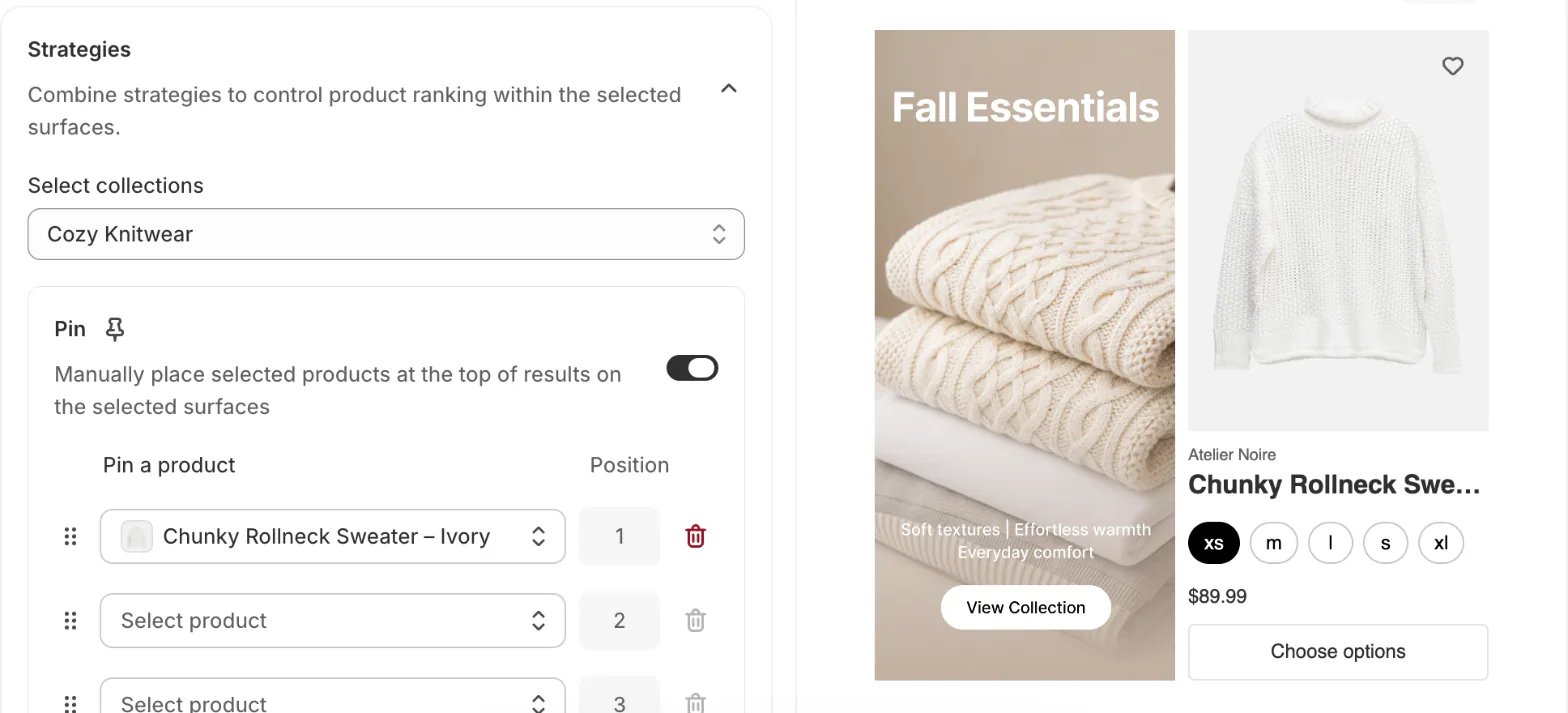
Where an app helps: Sledge filters work on collection and search pages, with color and image swatches and no filter limit on any plan. Merchandising rules set the order for you. Pin puts a product you choose in a fixed spot. Boost, Demote and Hide can follow Best sellers or Inventory, so a sold-out product drops down the page by itself. Signals flags a filter value shoppers leave after, and how often the first three products on your collections were sold out. The merchandising guide goes further.
Why do shoppers search your store and still leave?
A shopper who searches has already told you what they want. They type one word, your product titles use another, and the results miss.
How to spot it: open three search reports in Analytics. Top online store searches with no results and Searches with no clicks show the misses. Search conversions over time shows click rate, add-to-cart rate and purchase rate for searches. The reports can run up to 72 hours behind, and they leave out bots.
The free fix: Shopify's built-in search already handles typos, shows results as shoppers type, and understands related words from your titles, descriptions, product types, categories and tags. You switch nothing on. It doesn't read images, so take your top no-result terms and put the shopper's word in the right product's title or tags.
When a search finds the right products in the wrong order, add a product boost in Search & Discovery. A boost works only while the product is available, and sold-out products go to the end. Shopify advises boosting only a few products per term. Fixing zero-result searches covers the rest.
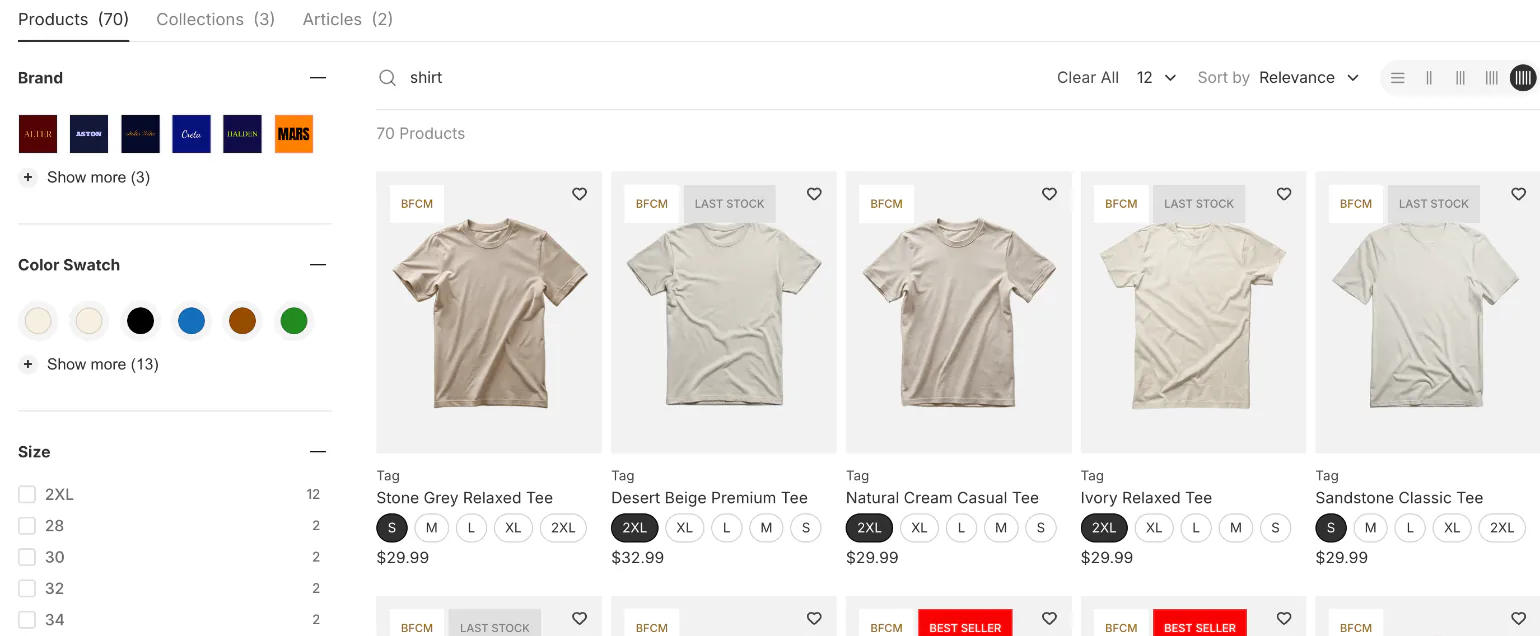
Where an app helps: Sledge search shows products in a dropdown as shoppers type and on a full results page with filters. On paid plans, AI-Smart Search lets you choose Keyword (the words typed), Semantic (the meaning) or Hybrid (both), and it starts on Keyword. Redirect sends a search term straight to a page, such as "returns" to your returns policy. Signals flags a term that keeps finding nothing. Search conversions over time leaves out products added to cart or bought through a third-party app or a Buy Button, so read those results in the app. Turning more searches into sales and the search optimization guide go deeper.
How do you get more product page visits to add to cart?
The page loads, the shopper reads it, and nothing tells them to buy now. Shipping is a mystery, there are no reviews, their size is sold out with no way to wait, and there's no reason to take two.
How to spot it: look for a weak Sessions with cart additions step while visits look healthy. Littledata's median add-to-cart rate, from the same benchmark, is 6.8%.
The free fix:
- Put shipping costs and your returns policy next to the price, so nobody has to go looking.
- Add reviews with a free reviews app. The apps table below lists one.
- Keep accelerated checkout buttons on. Some payment methods also show as buttons on the product page, so a decided shopper can skip the cart.
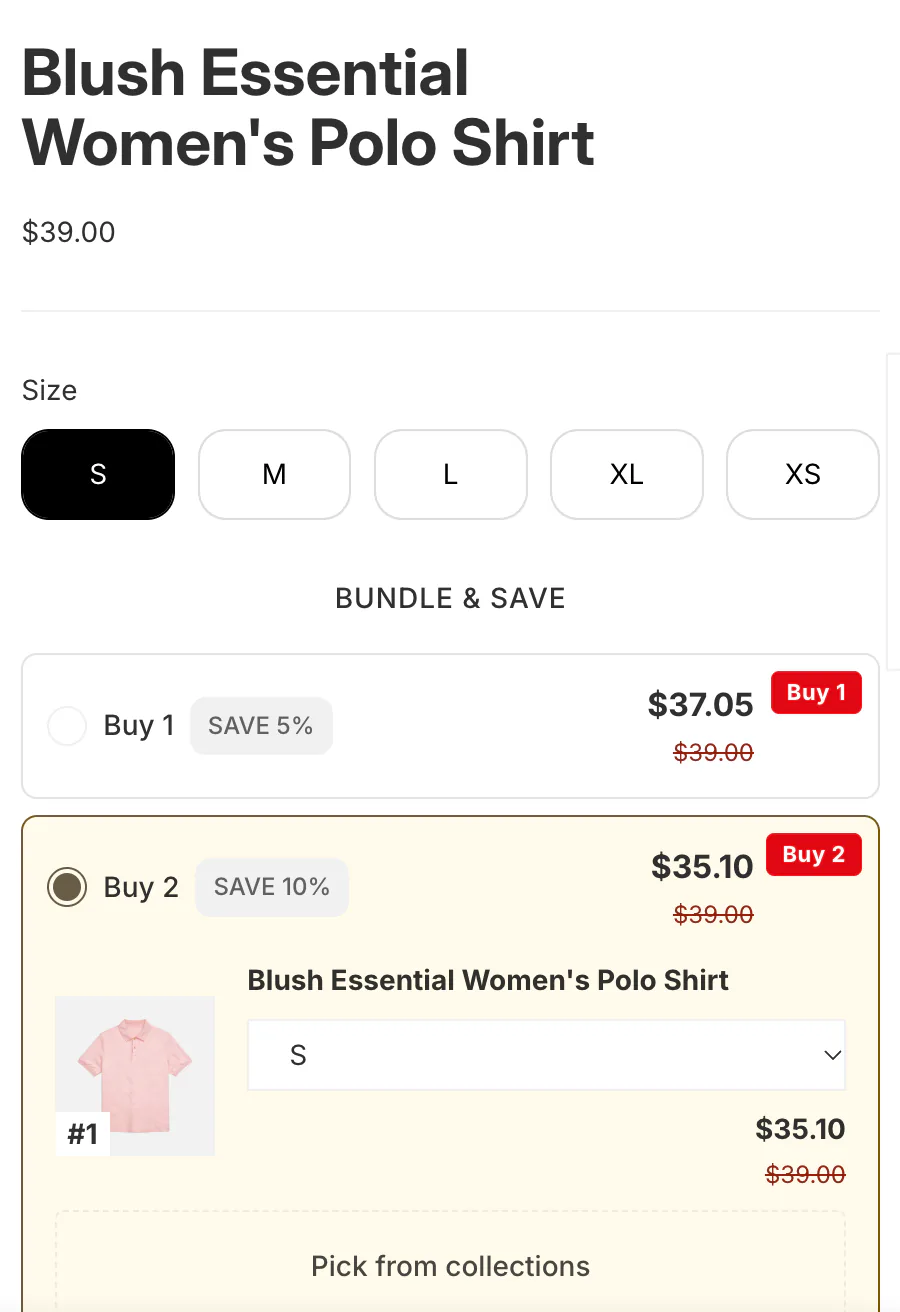
Where an app helps: Sledge offers sit under the price as a fixed bundle, quantity breaks (Volume Discounts in the admin), add-ons or a free gift, so the shopper has a reason to add more. When a product sells out, Back in Stock lets the shopper sign up for an email when it returns, on the Accelerate and Ultimate plans. Signals flags a product with plenty of visits and few add to carts, and shoppers who tried three or more options before leaving. How to increase average order value helps you pick the offer.
How do you reduce cart abandonment on Shopify?
Carts fill all week and almost nobody reaches checkout. Often the cart hides a cost until the last step, like shipping that reads "calculated at checkout".
Baymard Institute puts the average documented cart abandonment rate at 70.22%, across 50 studies. Leave out the shoppers who were only browsing, and 40% of US shoppers who abandoned blamed extra costs such as shipping, tax or fees. Another 12% couldn't see the total cost up front.
How to spot it: compare Sessions with cart additions with Sessions that reached checkout. A wide gap points at the cart.
The free fix:
- Show the shipping cost, or your free-shipping minimum, in the cart. A free shipping discount, by code or automatic, can require a minimum purchase amount, counted on product prices only.
- Keep wallet buttons like Apple Pay and Google Pay in the cart.
- Turn on Recover abandoned cart in Shopify Messaging, free to install. It emails shoppers who added to cart but never started checkout, if they subscribed to marketing. Your first 10,000 emails each month cost nothing.
Beyond Shopify's own tools, Trust signals that stop cart abandonment covers what else shoppers look for before they pay.
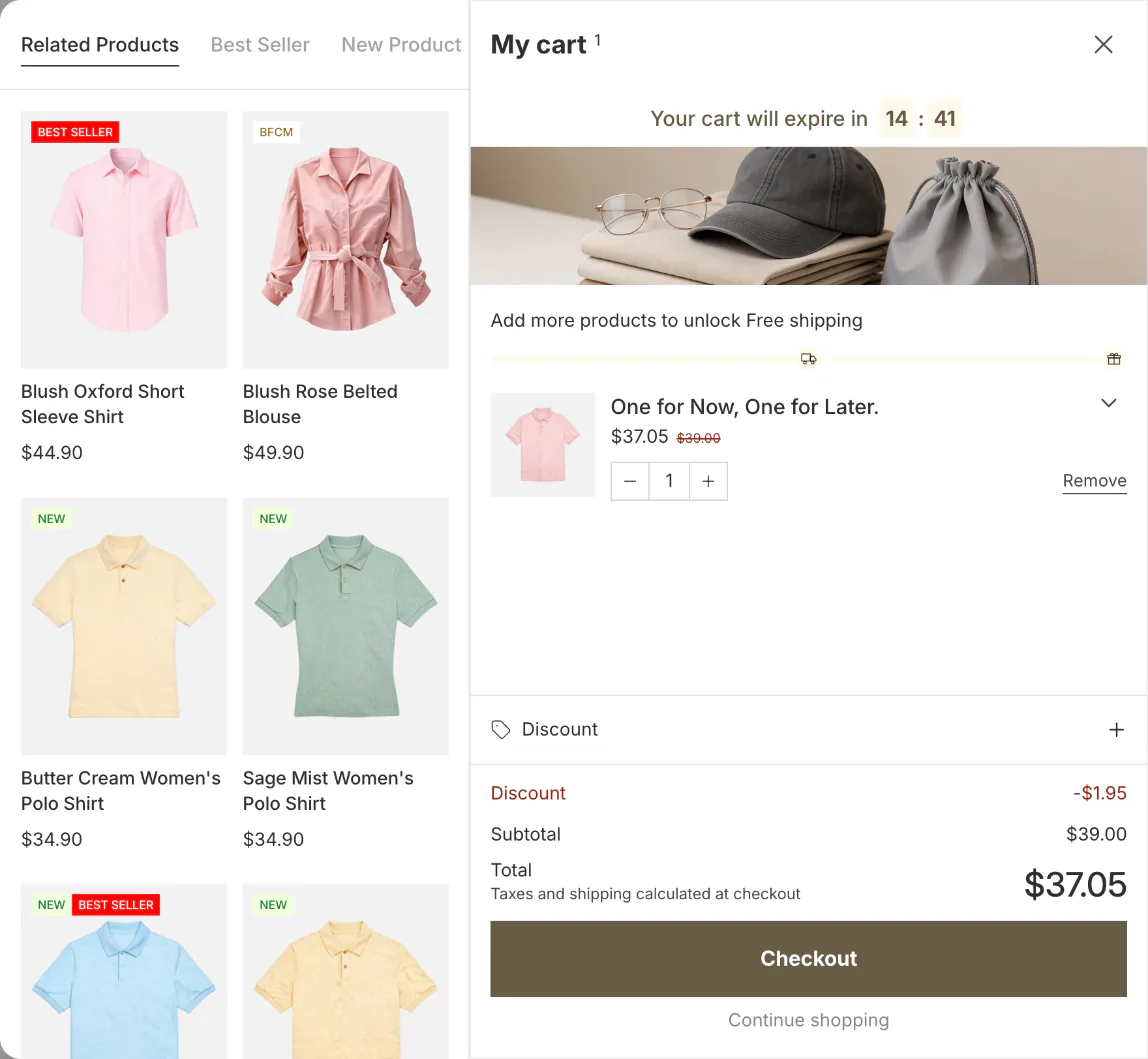
Where an app helps: in the Sledge cart drawer, a Progress goal shows how far the cart is from free shipping or a free gift, counted by cart total or by quantity. Trust badges can sit in the drawer's footer, by the checkout button. Signals counts the week's orders that came in just short of free shipping, and shoppers whose add to cart failed. Adding a free-shipping progress bar helps you set the goal.
Why do shoppers reach checkout and still not buy?
Your report shows healthy cart and checkout steps, then almost no orders. Treat that shape as a broken payment step until a test order proves otherwise.
How to spot it: compare Sessions that reached checkout with Sessions that completed checkout. "Reached checkout" counts any session where the shopper typed or clicked in checkout. Then open Abandoned checkouts. A checkout counts as abandoned when it stays unfinished more than ten minutes after the shopper gives an email. Each one has a Timeline with its payment events, including why a payment failed. Shopify deletes abandoned checkouts after three months.
The free fix: every step here is a Shopify setting.
- Place a test order through Shopify's Test payment gateway, or test mode if you use Shopify Payments. Test orders cost nothing but need a paid plan. While test mode is on, nobody can pay by card, so switch it off straight after. On a live store with ads running, place a real order and refund it instead; processor fees may apply.
- Leave sign-in optional. In Settings, then Checkout, under Customer contact method, keep "Require customers to sign in to their account before checkout" off. When it's on, wallet buttons like Apple Pay disappear from the cart.
- Keep accelerated checkouts on: Shop Pay, Apple Pay, Google Pay, Amazon Pay and PayPal. Shopify warns that hiding them "might have a negative impact on your conversion rates". It also says Shop Pay converts "as much as 50% better" than guest checkout, citing an April 2023 study with a consulting firm. Shop Pay comes with Shopify Payments.
- Set up Recover abandoned checkout in Shopify Messaging. It sends to marketing subscribers by default, and you can switch the email to All customers. These emails don't count toward your monthly email allowance.
How to test your Shopify store before Black Friday runs the full checkout check, any month of the year.
Do you need a Shopify CRO agency or expert?
Not for the first pass. When one step clearly leaks and the fix is a setting, you can make the change yourself today.
A Shopify CRO expert earns the fee when the fix needs theme work, when several pages leak at once, or when you want tests run properly.
On 30 October 2026, Shopify's Partner Directory listed 2,639 partners offering Shopify CRO services under Conversion rate optimization. Shopify tiers them Select, Plus, Premier and Platinum by their experience and results. Prices on its first page ran from $49 to $150 at the low end to $599 to $10,000 at the top, and many said "Contact for pricing". Before you sign, ask three questions:
- Which report do you read first?
- What will you change, page by page?
- How will you prove it worked?
Which Shopify apps help with conversions?
Add an app only where a report shows a leak your free settings can't close, because every app is one more thing for your store to load.
| App | The job | Price | What it won't do |
|---|---|---|---|
| Shopify Search & Discovery | Filters on collection and search pages, product boosts, recommendation tweaks | Free | Filter a collection over 5,000 products, or show more than 100 values in one filter |
| Sledge | Search, filters and merchandising rules, plus offers and a free-shipping goal where shoppers decide | Pro $29.99, Scale $89.99, Accelerate $199 a month; 14-day free trial; free on development stores | Replay sessions, draw heatmaps, change checkout or send recovery emails; the trial has no Growth Intelligence or AI search |
| Microsoft Clarity | Session replays and heatmaps | Free | Change the page; it shows where shoppers hesitate |
| Judge.me Product Reviews | Unlimited reviews with photos and videos on the free plan | Forever Free; Awesome $15 a month | Custom widget and email design on the free plan |
| Shopify Messaging | Abandoned cart, abandoned checkout and abandoned browse emails, built by Shopify | First 10,000 emails a month free, then from $1 per 1,000 | Reach shoppers who never subscribed, except with the abandoned checkout email |
| Klaviyo | Recovery flows with segments, and A/B tests on paid plans | Free up to 250 active profiles and 500 emails a month; Email from $20 a month | Stay cheap as your list grows |
| Lucky Orange | Replays, heatmaps and funnels in one place | Free for 100 sessions a month; Launch $19, Build $39, Grow $89 a month | Record past its plan's session cap |
Sledge is a Shopify search and filter app that also puts offers, merchandising rules and a free-shipping goal on the pages shoppers pass, and on paid plans its Growth Intelligence names the next fix with one estimated dollar total. It shows no replays or heatmaps and stays out of checkout, which is why a replay tool and a recovery email app sit beside it in this table.
How do you know which fix worked?
Measure the step you set out to fix. Compare equal periods that both start after 23 September 2026, so Shopify's session change can't fake a result.
On the Grow plan and up, Shopify's Rollouts can run an Experiment. By default, half your visitors see the changed theme and half the current one, so a small store waits longer for a clear answer. For a theme edit it reports conversion, bounce, reached checkout and add to cart rates. It doesn't run on older, vintage themes.
Sledge runs A/B tests on seven things: offers, merchandising rules, badge campaigns, pre-orders, Back in Stock, promotion banners and countdowns. Tests are unlimited on paid plans.
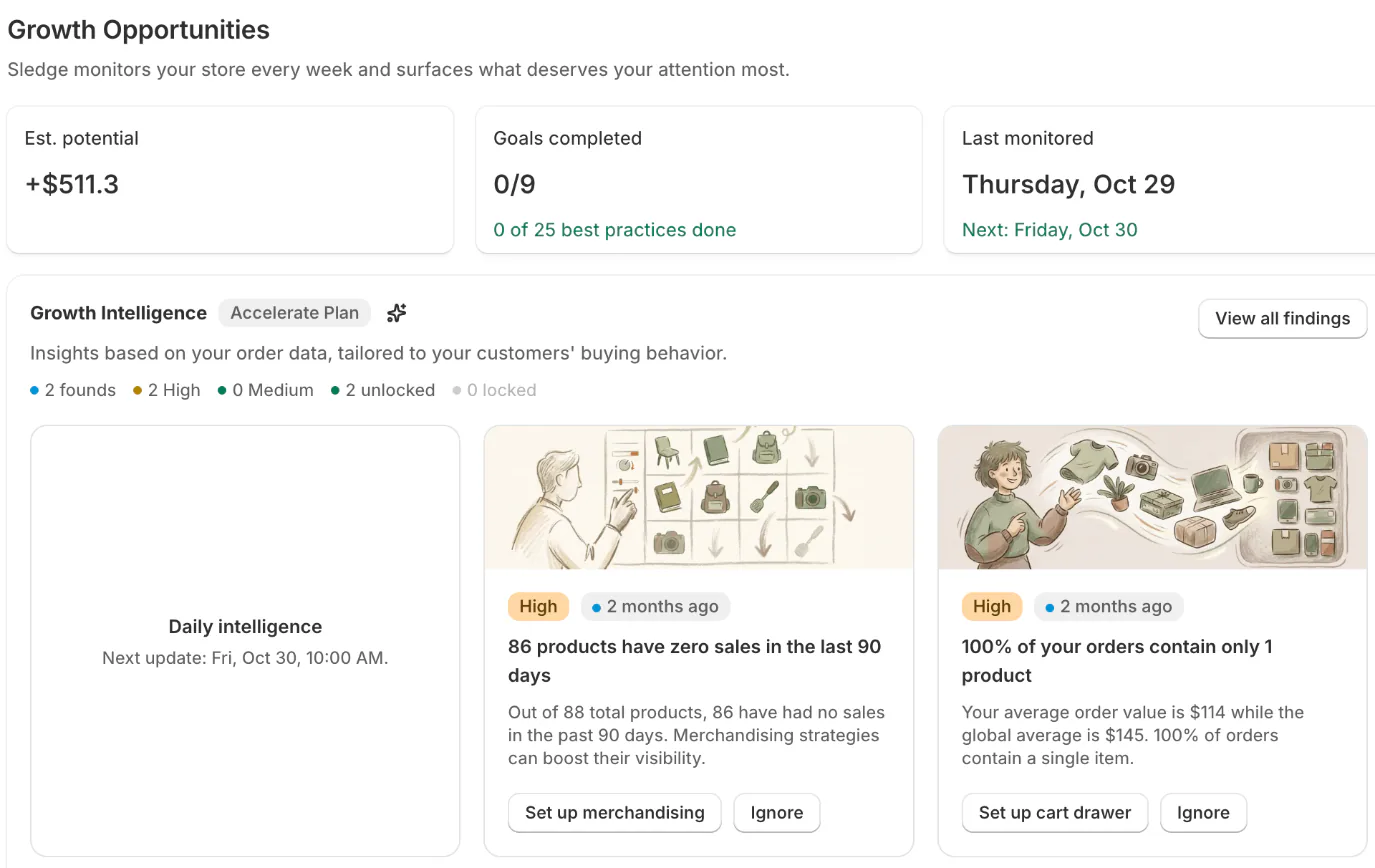
The harder question is what to fix next. On paid plans, Growth Intelligence reads 90 days of your orders and the last week of searches, including the ones that found nothing, plus filters shoppers leave after and carts. It names the fix inside the tool it belongs to, with a button that opens it. Every suggestion you haven't dismissed adds up to one total, labeled "Est. potential". If yours reads $1,800, that is an estimate of what those suggestions are worth a month, not a promise. Once a change is live, Growth Intelligence checks it against real sales, as an estimate rather than a controlled test. It runs weekly on Pro, twice a week on Scale, and daily on Accelerate and Ultimate. From analytics to what to change shows the loop end to end.
FAQ
Questions, answered
-

14-day free trial
Explore Sledge on your store before you decide to commit.
-

No credit card required
Start improving your store with no upfront commitment.
-

Setup in minutes
Get Sledge running without a lengthy setup process.
-

Built to grow sales
Turn shopper behavior into actions that help you sell more.
What is a good conversion rate for a Shopify store?
Littledata's benchmark of 436 Shopify stores puts the median at 1.4% in October 2026, with the top 20% above 2.7%. Your own trend matters more than any average. Shopify changed how it counts sessions on 21 to 23 September 2026, so compare periods that start after that date.
How does Shopify calculate conversion rate?
Shopify divides sessions that completed checkout by all sessions in the same period. The Conversion rate breakdown report shows each step the same way: sessions with cart additions, sessions that reached checkout, then sessions that completed checkout, each as a share of all sessions. One session can hold two orders, so the counts can differ.
How much does a Shopify CRO agency cost?
Prices vary widely. On 30 October 2026, Shopify's Partner Directory listed 2,639 partners under Conversion rate optimization, with first-page prices from $49 to $150 at the low end to $10,000 at the top, and many asking you to contact them. Before you sign, ask which report they read first and how they will prove a change worked.
Why do shoppers add to cart but not check out?
Extra costs are the top reason. In Baymard Institute's survey, 40% of US shoppers who left for a reason other than browsing named shipping, tax or fees, and 18% left because the store wanted an account. Place a test order yourself first, since a broken payment step looks the same in your reports.
Do I need an app to improve my Shopify conversion rate?
Not first. Show shipping costs before checkout, keep accelerated checkout buttons on, leave sign-in optional, and set up Search & Discovery filters and boosts, all free. An app earns its place when a report shows a leak those settings cannot close, such as searches that find nothing or a cart with no reason to add more.
Find the page that loses your sales.
Start the 14-day free trial with search, filters, offers and the cart drawer. On Pro at $29.99 a month, Growth Intelligence reads your orders, searches and carts every week, names the next fix, and adds its suggestions up to one Est. potential total in dollars.

