
SMS marketing means sending promotional texts to customers who agreed to get them. On Shopify, the Shopify Messaging app sends text campaigns and reminder texts to shoppers who leave without buying. Each text to a US number costs $0.012, plus $2.15 a month for the sending number. Customers have to tick a separate SMS box first.
Your sale goes live Friday at 9 a.m. You have 2,000 phone numbers from past orders and a text with two emojis in it. What you can't tell is who agreed to texts, what 2,000 of them cost, or why one emoji can double the bill.
What is SMS marketing?
SMS marketing is promotional texts sent to people who agreed to get them, either as campaigns you schedule or as automations that send on their own. A campaign carries a sale, a launch or an offer to your SMS subscribers. An automation texts one shopper who left a product, a cart or a checkout.
Order confirmations by text are notifications, not marketing. Shopify Messaging sends email too, and our guide to Shopify email marketing covers that side.
Is SMS marketing worth it for a small store?
Only if your texts bring in more profit than they cost, because Shopify charges for each one. Say 2,000 US subscribers get one text a week. On Shopify Messaging that's $98.15 a month, as long as each text fits in 160 characters with no emoji or accented letter. At $20 profit an order, about five orders a month cover it, which is your break-even point.
Hold off in three cases:
- No SMS subscribers yet. Phone numbers from past orders don't count without an SMS opt-in, so build the list first.
- Products Shopify bans from texts. Alcohol, CBD, vaping, tobacco, firearms and fireworks are among them.
- Customers outside the supported countries. Shopify Messaging reaches 10 countries, and Australia isn't one.
How do you start SMS marketing on Shopify?
Update your policies, add your countries, register for the US and Canada, then turn on the SMS box at checkout. You need a paid Shopify plan, from Basic up. These steps follow Shopify's Help Center, read November 10, 2026.
- Update your privacy policy and terms of service. The privacy policy has to say how you collect, use and store phone numbers, who you share them with, SMS providers included, and how customers can see or delete their data. The terms need your message frequency, a note that data rates might apply, how to opt out and how to reach you.
- Go to Apps, then Messaging, then Settings, then SMS. In "Targeted countries for SMS marketing", click "Add countries", pick yours and click Next. For the UK and the EU, create a sender name and click Done, and you can send right away.
- For the US and Canada, fill in the toll-free registration form: your contact details, your business details, and sections for your privacy policy and terms of service. Click Next, review your sender information and click Done. Registration can take 2 to 5 business days, and Shopify emails you when it's through.
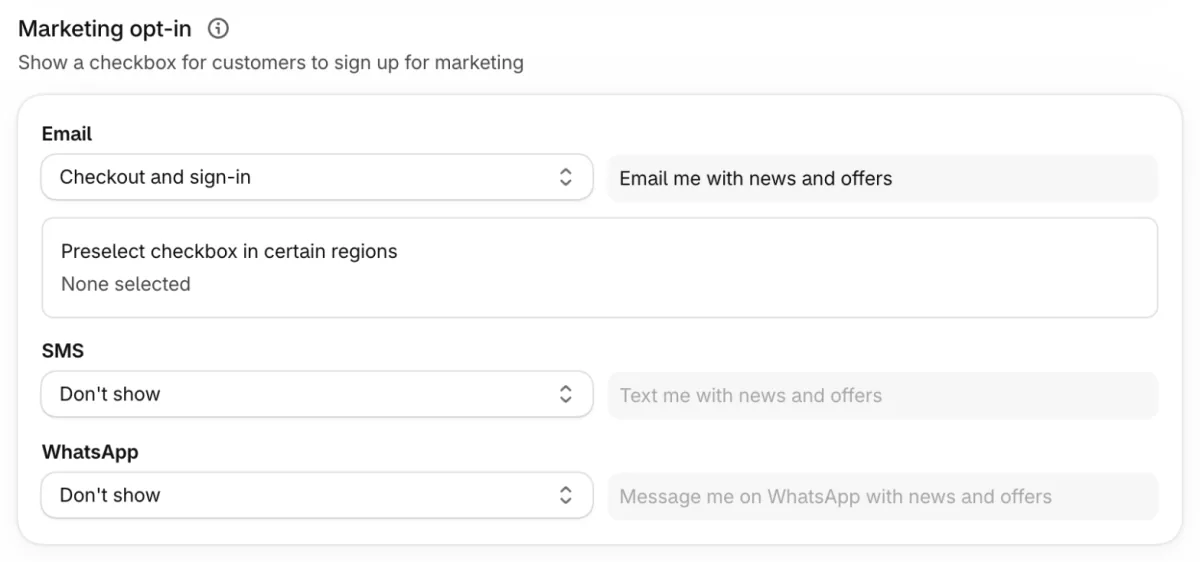
- Go to Settings, then Checkout. In "Marketing opt-in", the checkout setting that shows sign-up boxes, set SMS to "Checkout only" and save.
- Send a test to your own phone before any customer gets one.
The toll-free number Shopify assigns is random, and customers can't reply to it.
Why toll-free registrations get rejected
Shopify's Help Center lists these as the most common causes:
- Your business details differ from what your store shows.
- Your business email is a free address, such as Gmail or Yahoo, that your store doesn't show as a contact.
- The contact name is generic, such as Admin or Support, or only part of a name.
- The SMS box is off, or its wording doesn't say the texts are marketing.
- You sell age-restricted products and check age with a checkbox instead of a full date of birth or a third-party check.
Fix the cause, then open Messaging's Settings, click SMS, click Manage beside the rejected country, and click "Resubmit form".
What are the consent rules for SMS marketing?
Text only people who opted in to SMS, because agreeing to email doesn't count. Shopify leaves numbers without SMS consent out of your campaigns on its own.
- Collect consent, never buy it. Use a clear opt-in such as the checkout box, never a bought or imported list.
- Say what's coming. At sign-up, tell people what kind of texts they'll get and how often.
- Follow the law where your customers live. Your opt-in has to meet laws that can include the GDPR, the California Privacy Rights Act and the US Telephone Consumer Protection Act, plus EU and UK rules on electronic marketing, according to Shopify's SMS requirements.
- Keep the way out. Each campaign carries your store name and an unsubscribe link by default.
This is general information, not legal advice.
How much does SMS marketing cost on Shopify?
Shopify Messaging charges for every text it sends a customer, and a text to the US costs $0.012.
| Charge | Price (USD) |
|---|---|
| A text to the United States | $0.012 |
| A text to Canada | $0.025 |
| A text to the United Kingdom | $0.06 |
| A text to the other supported countries | $0.041 to $0.13 |
| Toll-free number, for the US and Canada | $2.15 a month |
Prices from Shopify's SMS pricing page, read November 10, 2026.
The toll-free number is billed once it's active. Confirmation texts to new subscribers, double opt-in texts and replies to keywords such as HELP are charged too. Up to 25 test texts a week are free.
Length sets the bill. A text holds 160 standard characters. One emoji, accented letter or special character drops that to 70. Past the limit, Shopify splits the text and charges each part.
Say you send 2,000 US subscribers one 120-character text a week, your store name and unsubscribe link included. That's 8,000 texts in a four-week month, or $96, plus $2.15 for the number: $98.15. Add one emoji and each text becomes two parts, so the month costs $194.15.
Charges land on your Shopify bill as Messaging. A spending alert in Messaging's settings emails you when email, SMS and WhatsApp together reach an amount you set, but it doesn't stop the charges. Your plan's own price is in Shopify pricing.
What does a good marketing text look like?
One offer, one link, under 160 characters and no emoji. Three examples, each counted before the link:
- Sale, 78 characters. "20% off every linen shirt until midnight Friday. Use code LINEN20 at checkout:" then your link.
- Launch, 75 characters. "New in: the Harbor jacket, in four colors and sizes XS to XL. See it first:" then your link.
- Abandoned checkout, 68 characters. "You left the Harbor jacket in your checkout. Finish your order here:" then your link.
Your store name and the unsubscribe link use characters too, so check the count in the editor before you send.
What are the best practices for SMS marketing?
Keep each text inside one message, link to your own store, and send outside quiet hours. These come from Shopify's SMS best practices unless another source is named.
- Stay inside one message. Turn on "Replace special characters" in the editor so a ç in a customer's name doesn't cut the limit to 70. Curly quotes pasted from a document can count as special characters too.
- Link to your own store. Carriers often block public link shorteners such as bit.ly. Turn on "Shorten links" instead, which also tracks clicks and sales.
- Write like a person. Skip all caps, strings of exclamation marks and deliberate misspellings.
- Test small first. Send to yourself, then to a small share of your list.
- Send promotions at most once a week. That advice comes from Shopify's blog in 2024, which adds that most texts should be informational.
- Keep a steady pace. Shopify advises a steady volume over sudden bursts.
Respect quiet hours. Shopify Messaging won't deliver a text during quiet hours in the customer's local time. The hours keep you within laws against marketing at unreasonable hours, according to Shopify's Help Center. It holds any text due during quiet hours or the hour before them, and retries once they end. A text sent near quiet hours can take up to 12 hours to arrive.
| Where your customer is | Quiet hours, local time |
|---|---|
| Canada, the EU and the UK | 8 p.m. to 8 a.m. |
| Most US states | 9 p.m. to 8 a.m. |
| Alabama, Florida, Louisiana, Maryland, Mississippi, Oklahoma, Oregon, Tennessee and Washington | 8 p.m. to 8 a.m. |
| Connecticut and Nevada | 8 p.m. to 9 a.m. |
| Texas | 9 p.m. to 9 a.m. Monday to Saturday, 9 p.m. to noon on Sundays |
Measure each send. Watch delivery rate, failed deliveries and opt-out rate after every campaign. SMS has no spam folder, so a text a carrier filters never arrives, and the delivery rate is where you see it.
Which texts should you automate first?
Shopify Messaging automates three texts, all for shoppers who leave: abandoned product browse, abandoned cart and abandoned checkout. Automated texts earned an average of $0.74 per send, against $0.15 for campaigns, in Omnisend's 2026 report on 321 million texts sent through its app in 2025.
Once SMS is set up, go to Apps, then Messaging, then Automations, and click "Create automation". Pick a template, choose SMS in the dialog, then click "Turn on automation".
- The checkout text reaches SMS subscribers only. The email version can go to every customer and is free, while each text is billed.
- No welcome or post-purchase texts. Those automations, and the customer appreciation ones, are email only.
- Add Shopify Flow. Shopify says automations need its Flow app to work fully.
The email side of these flows is in abandoned cart email and browse abandonment email.
When do you need an SMS marketing app?
When you need replies, countries Shopify can't reach, or automated texts beyond the three.
- Replies. Customers can't text back to Shopify's toll-free number.
- Countries. Shopify Messaging reaches 10 countries, and texts to Spain and Austria are paused. For anywhere else, its Help Center suggests a third-party app.
- More automated texts. Welcome and post-purchase automations are email only. Shopify's one order text is a free confirmation, with no shipping updates.
Three SMS apps from the Shopify App Store:
- Attentive: email and SMS marketing, with in-house compliance help and templates.
- Klaviyo: email, SMS and WhatsApp in one app, with two-way texts.
- Postscript: a text-first app for Shopify stores, with two-way texts and keyword sign-ups.
Each lists its prices on its App Store page, and the App Store's SMS marketing category has more. To collect phone numbers on your store, see Shopify popup apps. For two-way chat, see conversational commerce.
FAQ
Questions, answered
-

14-day free trial
Explore Sledge on your store before you decide to commit.
-

No credit card required
Start improving your store with no upfront commitment.
-

Setup in minutes
Get Sledge running without a lengthy setup process.
-

Built to grow sales
Turn shopper behavior into actions that help you sell more.
Is SMS marketing legal?
Yes, when each customer agreed to texts first. Your opt-in has to meet laws such as the US Telephone Consumer Protection Act, the GDPR and California's privacy law, according to Shopify's Help Center. Your privacy policy and terms also need to cover phone numbers, message frequency and how to opt out. This is general information, not legal advice.
How much does SMS marketing cost on Shopify?
Shopify Messaging charges per text: $0.012 to the US, $0.025 to Canada and $0.06 to the UK. Texts to the US and Canada also need a toll-free number at $2.15 a month. A text over 160 characters, or over 70 with an emoji, is billed as two or more. Up to 25 test texts a week are free.
Can I text customers who gave a phone number at checkout?
Only if they also ticked your SMS box, which reads Text me with news and offers. A number typed for delivery isn't an SMS opt-in, and agreeing to email doesn't cover texts. Shopify leaves numbers without SMS consent out of your campaigns. Turn the box on under Settings, then Checkout, in Marketing opt-in.
How often should you send marketing texts?
Shopify's own blog suggests promotional texts no more than once a week, with most of your texts informational. Shopify Messaging also holds texts during quiet hours in each customer's time zone: 9 p.m. to 8 a.m. in most US states, and 8 p.m. to 8 a.m. in Canada, the EU and the UK.
Which countries can Shopify Messaging send SMS to?
Canada, Denmark, Finland, Italy, Luxembourg, Poland, Portugal, Sweden, the UK and the US, excluding Puerto Rico. Texts to Spain and Austria are paused, and you can't add either as a new country. For any other country, Australia included, Shopify's Help Center points you to a third-party SMS app.
What is the difference between SMS marketing and SMS notifications?
SMS marketing is promotions sent to people who opted in, billed per text. SMS notifications are order messages. When a buyer checks out with only a phone number and your business is in a supported country, Shopify texts one free order confirmation. It sends no shipping updates by text, and for those Shopify points you to a separate SMS app.
Your text says the sale ends at midnight. Does your store?
Sledge sends no texts, so yours stay in Shopify Messaging or your SMS app. Try Sledge free for 14 days and set a countdown on your store that ends when the sale in your text ends, then disappears. Growth Intelligence turns on when you pick a paid plan, and its suggested fixes add up to one dollar figure, labeled Est. potential.

