
To sell books online, pick what you stock (new, used or rare), then list each title with its ISBN and condition in your own store, on a marketplace, or both. On Shopify, an ISBN goes in the Barcodes box, hardcover and paperback are variants of one product, and a one-off used copy is a product with 1 in stock.
Say you buy 40 used paperbacks at a library sale for $1 each and list them at $12. On Amazon's Individual plan, each sale gives up $4.59 in fees before shipping. In your own store, the card fee is 65 cents, plus a plan. Where you list decides how much of that $12 you keep.
What books can you sell online?
An online bookstore starts with the books you can get, not with the platform, and new, used and rare copies are three different jobs.
| Type | Where the stock comes from | The catch |
|---|---|---|
| New | Wholesalers, publishers and distributors | Amazon says you might need to buy in bulk, so unsold copies can tie up your cash |
| Used | Library sales, thrift shops, yard sales and estate sales | Condition decides the price, and Amazon says used books can often sell for around half the price of a new edition |
| Rare and collectible | Estate sales, auctions and used book stores | Each copy is one of a kind, and some have no ISBN |
| Ebooks and your own titles | Your own files, or a print-on-demand service | A different how-to, linked below |
Ebooks are a download, and our guide to selling digital products covers them, including Shopify's free Digital Products app. A print-on-demand service prints and ships each copy of your own title as orders come in, and our print-on-demand guide covers that. Both stay out of this page.
Pick a niche before you buy stock: one genre, one language or one region.
Where can you sell books online, and what does each keep?
The same $12 book gives up a different amount in each place, and each place does a different job for it.
| Where | What it does for the book | What a $12 book gives up |
|---|---|---|
| Your own Shopify store | Gives you your own pages and your own customer list, and you bring the shoppers | $0.65 in card fees, plus $29 a month paid yearly or $39 monthly |
| Amazon, Individual plan | Puts the book in front of shoppers who already search Amazon | $4.59: a 15% referral fee ($1.80), a $1.80 closing fee and $0.99 per item |
| Amazon, Professional plan | Does the same, for a monthly fee instead of a per-item one | $3.60, plus $39.99 a month |
| eBay | Puts the book in front of buyers who already search eBay, with up to 250 zero-insertion-fee listings a month | $2.24: a 15.3% fee ($1.84) plus $0.40 per order |
Fees as Amazon's, eBay's and Shopify's pricing pages listed them in November 2026, with no shipping or tax counted. Amazon and eBay count the shipping a buyer pays in the fee, and eBay counts sales tax too, so a real order costs more.
You can use more than one route and compare what your books sell for on each. Amazon asks for each book's condition and its ISBN before you list. It also says some textbooks, such as instructor's editions and solutions manuals, may be prohibited, so check the edition first.
Our Amazon vs Shopify and eBay vs Shopify pages work out the monthly math across a whole catalogue. For a sale to someone nearby, selling on Facebook Marketplace adds no listing fee to the book.
How do you add a book to your Shopify store?
The book's ISBN goes in Barcodes, your own shelf code goes in SKU, and the author goes in Vendor.
- Open Products, click Add product, and type the title, description, price and photos.
- In the Inventory card, open "More details". Type your own shelf code in "SKU (Stock Keeping Unit)", Shopify's code for tracking one item, and the ISBN in "Barcodes", whose empty box reads "ISBN, UPC, GTIN, etc.".
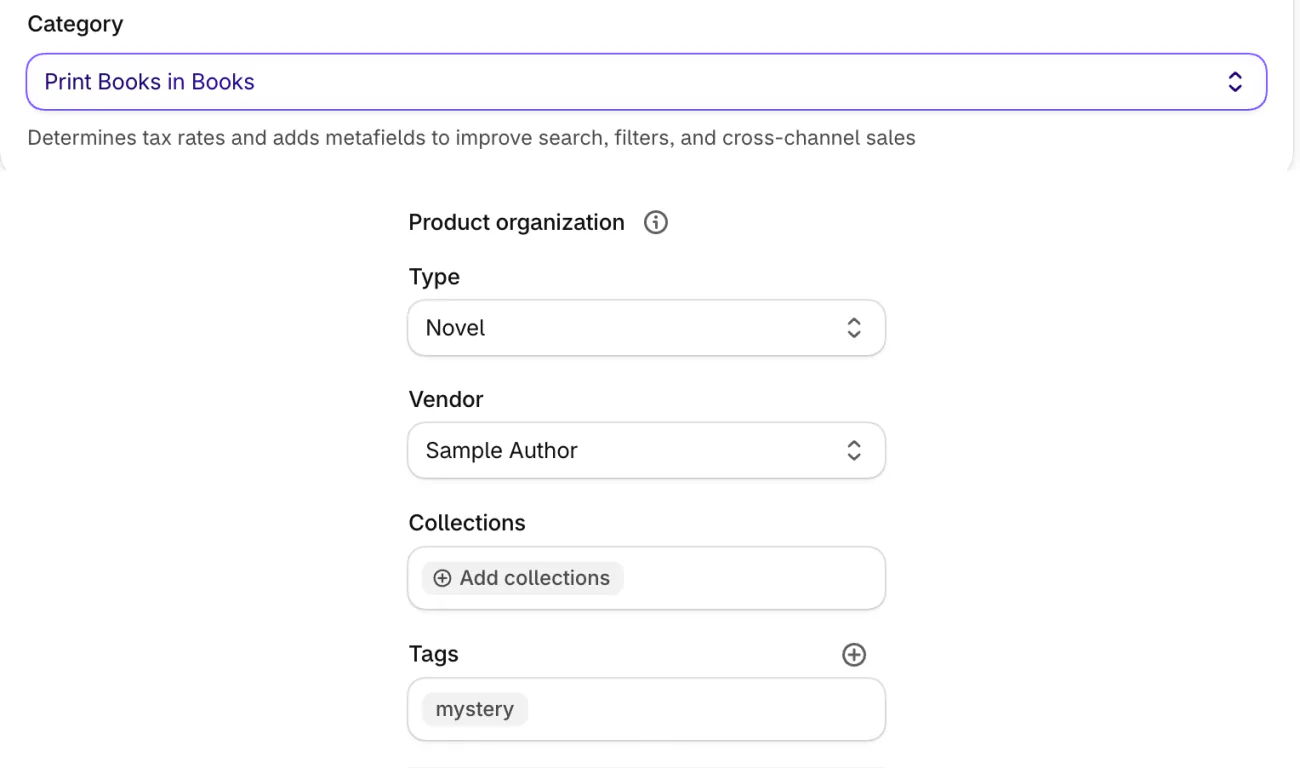
- In "Category", under the photos, pick "Print Books in Books", which Shopify suggests from the title. In Product organization, add a "Type", put the author in "Vendor" and the genre in tags.
- Leave "Inventory tracked", the switch that makes Shopify count stock, on, and type how many copies you have.
- In the Shipping card, keep "Physical product" on and enter the weight of the book packed.
- Click Save.
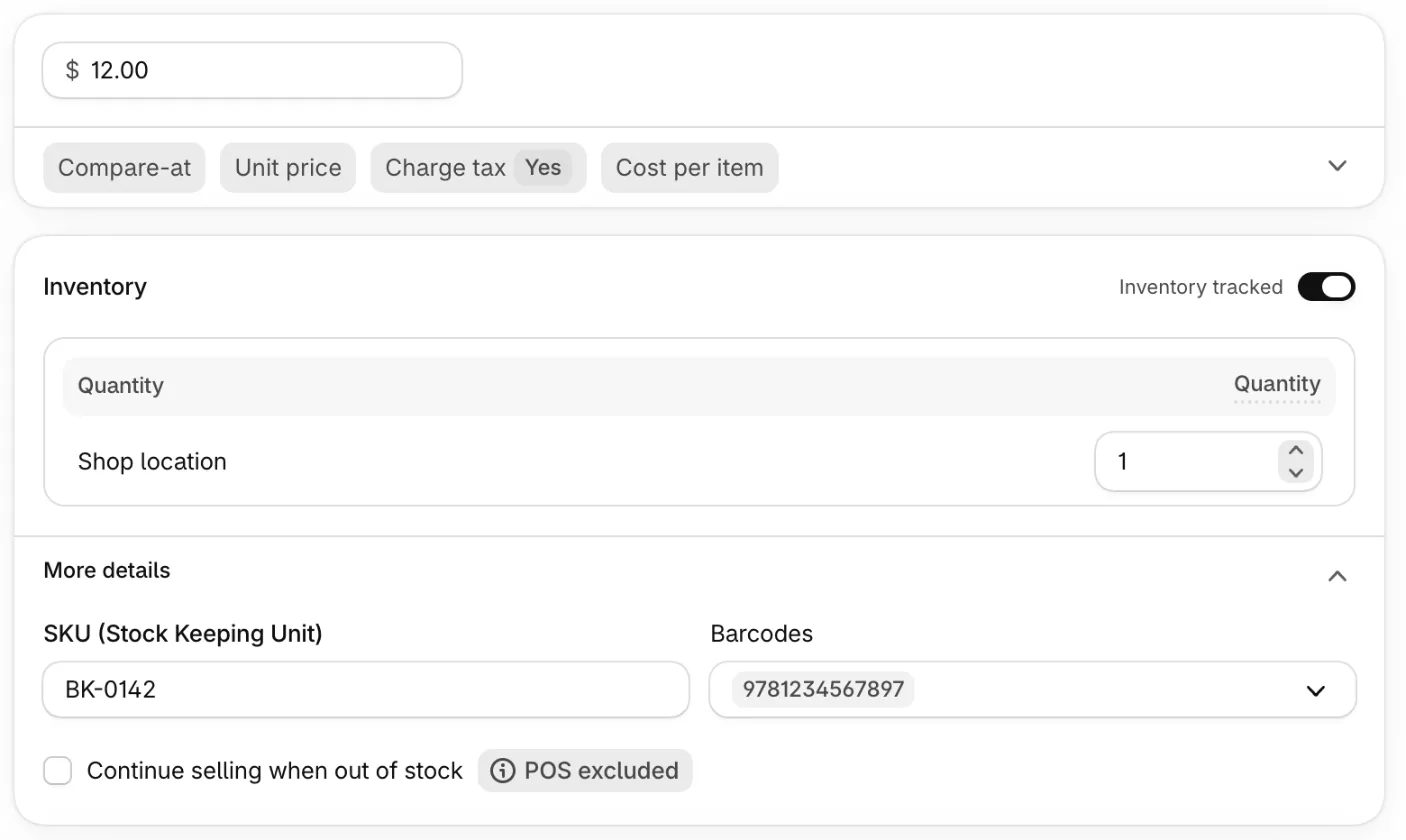
Shopify's Help Center says an ISBN is assigned to each separate edition and variation of a book. A hardcover and a paperback therefore carry two. It also says barcodes might be required if you sell on online marketplaces. Your own store does not need one to take an order, so a rare book with no ISBN leaves Barcodes empty.
A SKU is optional. Shopify suggests keeping it to 16 characters or fewer, using letters, numbers, dashes and underscores, and giving each variant its own. It is a separate field from the barcode, and a product can carry both. A book's ISBN does the job a UPC code does on other goods. Typing hundreds of ISBNs by hand is slow.
Should each edition be its own product, or a variant?
Give each edition its own product, and use variants for format and condition.
An edition has its own cover, year and ISBN, and a product shares one set of photos and one description. A hardcover and a paperback of the same edition fit as variants of one product. In the Variants card:
- Click "Add options like size or color". Its "Recommended" list for the Print Books category offers "Book cover type", and "Create custom option" lets you pick your own name.
- Type Format in "Option name", add Hardcover and Paperback under "Option values", and click Done.
- Set a price and an "Available" count for each variant in the list, and give each its own ISBN in Barcodes.
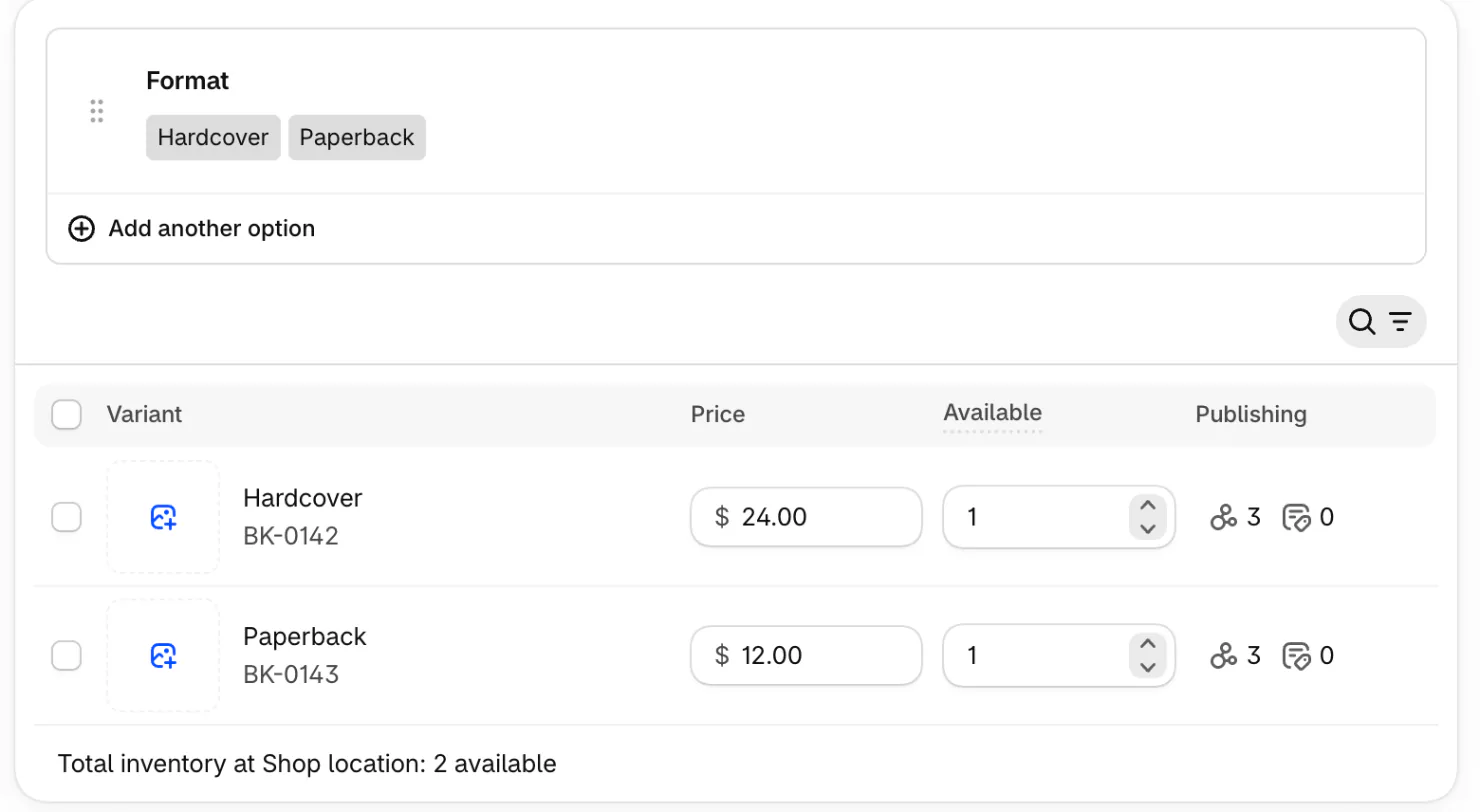
For identical used copies, add Condition as a second option and keep a quantity for each grade. A product takes up to three options and 2,048 variants, so one title can hold both. That split is our advice, not a Shopify rule. Our guide to Shopify variants shows the screens in full. If you also stock sizes and colors, how to sell clothes online covers that side.
How do you sell used and rare books online?
Grade each copy honestly, and set up a one-off copy so it sells once.
Amazon grades a book as New, or as Used in one of four grades: Like new, Very good, Good or Acceptable. AbeBooks' scale for rare books is longer, from As New and Fine to Poor, and it asks sellers to note every defect. It also says an ex-library book must be marked ex-library. Other sellers use scales of their own, so write your grades down and use them the same way every time.
For a one-off copy, keep "Inventory tracked" on and type 1 as the quantity. At zero, Shopify's default stops the sale, so a sold copy can't be bought again.
Photograph the actual copy, not a stock cover: the front, the spine, the edges, the copyright page and every flaw. Our product photography guide covers the setup. For the price, a cost-based start is cost-plus pricing, and a $1 paperback listed at $12 leaves $11 before fees and shipping.
How do you ship books cheaply?
USPS Media Mail charges by weight, not distance, and only books and similar media qualify.
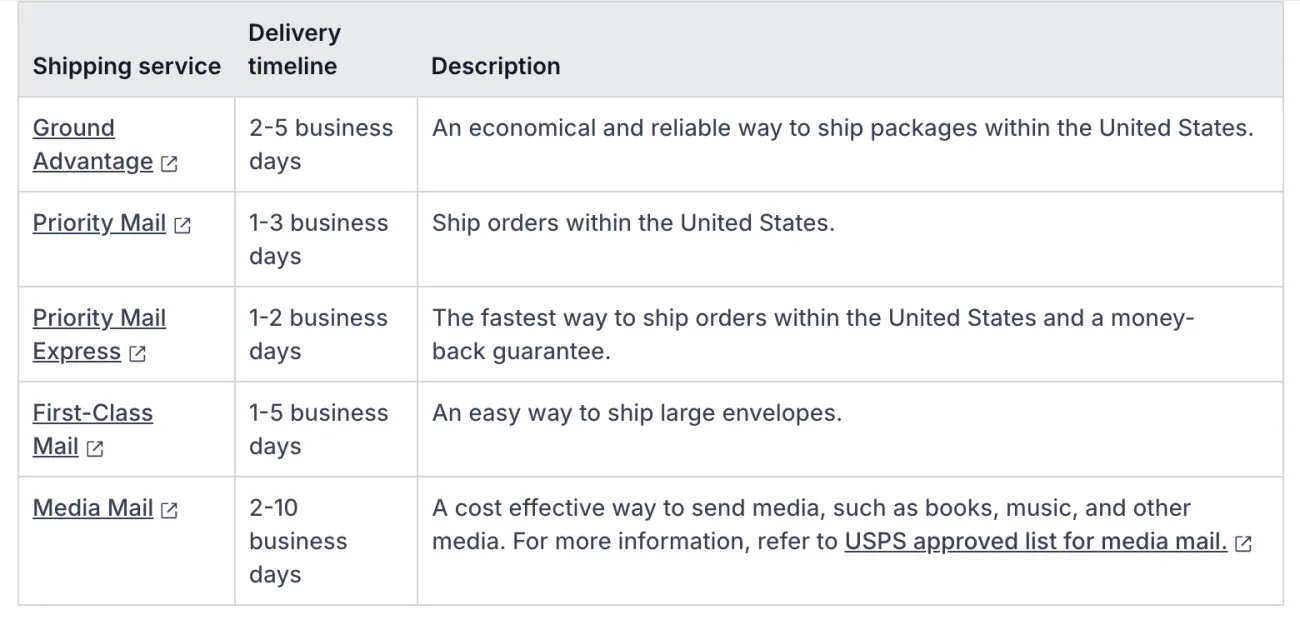
USPS's own price list, in force from October 4, 2026, puts Media Mail at $4.39 for 1 lb, $5.13 for 2 lb and $5.86 for 3 lb. USPS Ground Advantage runs from $10.05 to $13.65 for 1 lb, depending on the zone. Those are USPS's retail prices, and the label price in your admin may differ.
A package is billed per pound or fraction of one, so a 1 lb 2 oz parcel bills as 2 lb. Weigh the book packed. Sending it at the Media Mail price means agreeing that USPS may open the parcel to inspect it, and USPS guarantees no delivery time. Shopify lists it at 2 to 10 business days.
Shopify's list of USPS services with included coverage does not name Media Mail. For a rare copy, shipping protection is worth a look.
Shopify may offer the Media Mail rate on a cart that also holds non-book items, so test your own checkout with one book and one other product. If it does, one workaround is a separate shipping profile for the products that aren't media, and a cart that mixes both then pays both profiles.
Amazon's own packing tips fit any book: protect the corners, edges and dust jacket, wrap each book when you ship several, and fit them snugly. Our shipping labels and shipping rates guides cover the Shopify side.
How do you sell a book before it is released?
Take orders now, and say plainly when the book ships.
Shopify's own route is the "Continue selling when out of stock" box, which keeps a title buyable at zero. Shopify's help says pre-orders need an app, and currently work only with Shopify Payments or PayPal Express.
A pre-order app such as Sledge switches that setting on for the titles you pick, in bulk if you like. It adds a Pre-order button and a note shoppers see in the cart, at checkout and in the order email, and switches the setting back when you close the campaign. Sledge pre-order covers the setup, and our guide to notify me or pre-order covers the checkout limits.
Write the release date in the product description and on the button note.
How do you help shoppers find the right book in a long list?
Keep the author in Vendor and the genre in tags, and let search and filters read them.
Shopify has no Author field, so many stores keep the author in Vendor. A collection can be built on Vendor, product type or tags, and Shopify's own storefront filters can show them too. Picking "Print Books in Books" also adds a "Category metafields" card with chips for Genre, Book cover type, Language version and Target audience.
Sledge search reads past a typo in a title or in Vendor, and Sledge filters can be built from Vendor, product type, tags or a custom product detail, so shoppers narrow a long list by author or genre. A series on your shelf can sell as one offer: a Sledge fixed bundle takes the books you pick and a percentage or fixed amount off. For a title that comes back, Back in Stock, on the Accelerate plan and up, lets shoppers ask to be told.
Our pages on search, filters, bundles and back in stock cover each one.
How do you find your first book buyers?
Collect emails from the first sale, go where your genre's readers talk, and test a marketplace.
- Start an email list from the first sale. Shopify email marketing shows how.
- Go where readers of your genre already talk, such as Instagram.
- List a few titles on a marketplace as a test, as in the fee table above.
FAQ
Questions, answered
-

14-day free trial
Explore Sledge on your store before you decide to commit.
-

No credit card required
Start improving your store with no upfront commitment.
-

Setup in minutes
Get Sledge running without a lengthy setup process.
-

Built to grow sales
Turn shopper behavior into actions that help you sell more.
Can you sell books on Shopify?
Yes. Add each book as a product, type its ISBN in the Barcodes box, and put the author in Vendor. Give hardcover and paperback their own variants, and set a used copy to 1 in stock so it sells once. Shopify Basic costs $29 a month paid yearly, or $39 monthly, plus 2.9% and 30 cents online.
Do you need an ISBN to sell books online?
Not in your own Shopify store, where barcodes are optional, though Shopify's help says marketplaces may require one. Amazon asks for an ISBN and lets you request an exemption for rare or collectible books, and for books printed before 1970. An ISBN identifies one edition, so each format has its own.
How much does it cost to sell books on Amazon?
Amazon charges $0.99 per item sold on its Individual plan or $39.99 a month on Professional. Books also pay a 15% referral fee and a $1.80 closing fee per item. On a $12 book with no shipping counted, that comes to $4.59 on the Individual plan, as of November 2026.
Can you sell used books online?
Yes. Amazon grades used books as Like new, Very good, Good or Acceptable. AbeBooks' longer scale for rare books runs from As New to Poor and asks sellers to note every defect. In Shopify, list each one-off copy with 1 in stock so it sells once, and photograph that exact copy.
How do you ship books cheaply?
In the US, USPS Media Mail is priced by weight, not distance: $4.39 for a book up to 1 pound at USPS retail prices from October 4, 2026, against $10.05 to $13.65 for Ground Advantage. Only books and similar media qualify, and USPS may inspect the parcel. Shopify lists Media Mail as a label service.
Should you sell books on Amazon or your own store?
You can do both. Amazon brings shoppers who already search it and charges a per-item or monthly fee, a 15% referral fee and a closing fee. Your own store charges a plan and card fees, keeps the customer list yours, and needs you to bring the shoppers. Amazon vs Shopify works out the monthly math.
Hundreds of titles? Help shoppers find theirs.
Sledge doesn't list your books, read ISBNs or deliver ebooks. It's a Shopify app whose search reads past a typo in a title or in Vendor, whose filters can be built from genre tags and authors, and whose pre-order button takes orders for a book not yet out. Try it free for 14 days. Growth Intelligence turns on when you pick a paid plan, and its suggested fixes add up to one dollar figure, labeled Est. potential.

