
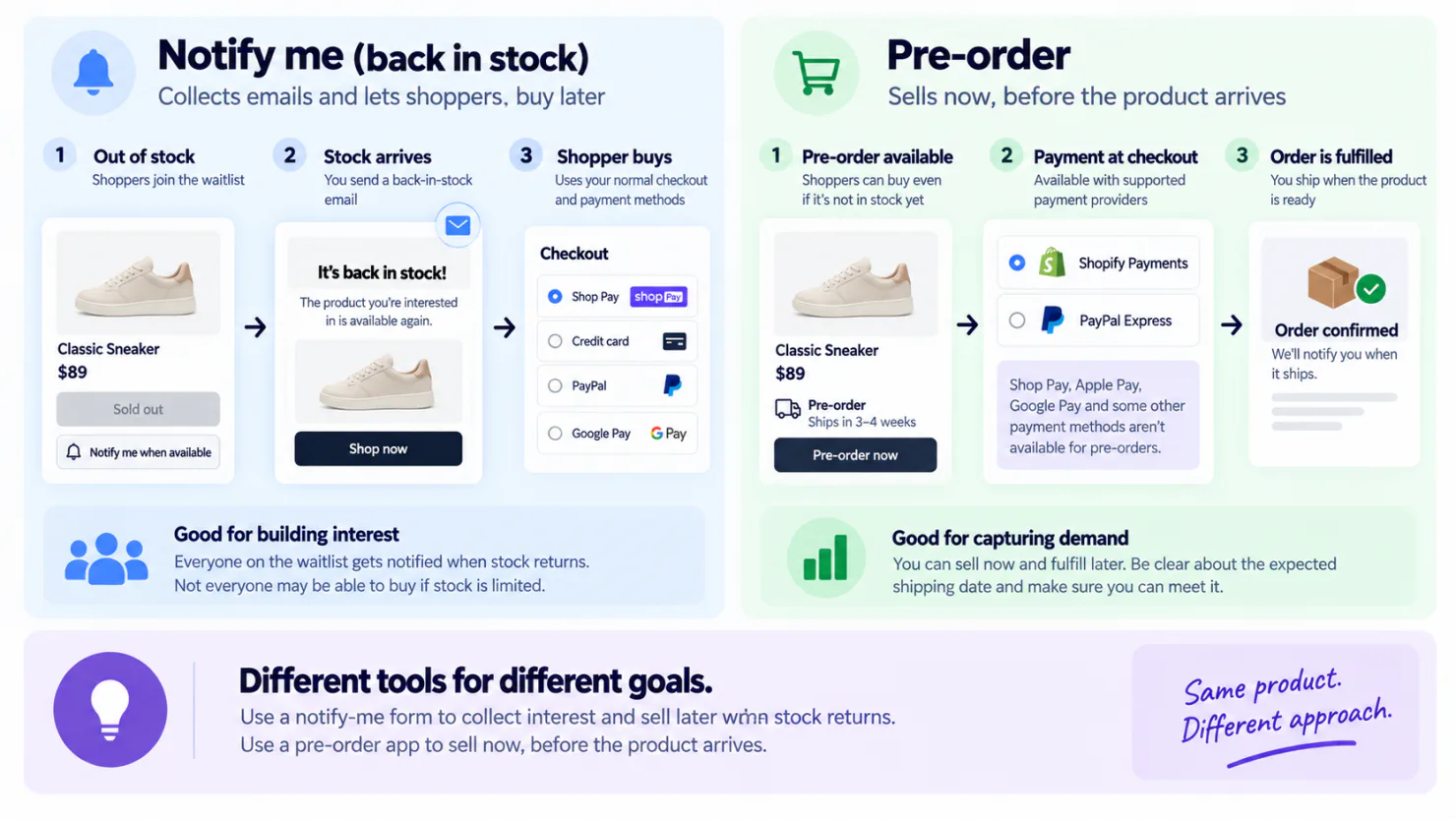
Use a notify-me form, the box on a sold-out product page where a shopper leaves an email address, until you can name a restock date. It sells nothing today. When the shopper comes back to buy, the order goes through your normal checkout and its available payment methods. A pre-order set up through a pre-order app, Sledge included, sells now, but Shopify turns off Shop Pay, Apple Pay and Google Pay for it.
Your restock is six weeks away, or your supplier will not give a date. You still have to decide this morning what the sold-out page does. A notify-me form asks the shopper for an email address. A pre-order asks for money now, the full price or a deposit, for something still on its way to you.
Check one: can your checkout take a pre-order at all?
A pre-order app works only with some payment providers, the services that charge the shopper's card. Shopify currently lists Shopify Payments and PayPal Express as the payment providers supported for pre-orders. You can see which provider you use under Settings, then Payments, in your Shopify admin.
On any other provider you still have a route. Shopify's help pages name pre-orders as a reason to switch on Continue selling when out of stock, the product setting that keeps a sold-out item buyable. An order placed that way goes through checkout like any other, with every pay button. You give up the deposit option and the pre-order details a pre-order app shows.
The next limit shows up once shoppers reach checkout. On a pre-order set up through a pre-order app, Shopify blocks Shop Pay, Apple Pay and Google Pay, plus local payment methods such as Klarna and iDEAL. Local payment methods are the pay-later and bank payment options popular in certain countries. A shopper who normally pays in two taps now types a card number or goes through PayPal, on a phone, to reserve something that has not shipped.
Two smaller limits also apply to pre-orders set up through an app. They sell only on your online store or a custom-built storefront, and not in Shopify POS, the app for selling in a physical shop. Shopify's help page also says pre-orders are not supported on stores with customized checkouts. Shopify has shut down the old way to edit checkout that only Plus stores had, so if your Plus store has checkout changes, test a pre-order before you launch.
None of that affects a notify-me form. The sale it leads to happens later, at an ordinary checkout with every pay button working.
Check two: can you promise a ship date and keep it?
The date on a pre-order page is a promise with a rule attached. You need a reasonable basis for any shipping time you show, such as a date your supplier confirmed. If you do not give a specific shipping date, Shopify says you must have a reasonable basis to expect the order to ship within 30 days. That comes from the US Federal Trade Commission's Mail, Internet, or Telephone Order Merchandise Rule, and Shopify's pre-order help page repeats the 30 days.
As soon as you know you will miss the date, and before it passes, tell the buyer the new date and that they can cancel for a full refund. An email or a phone call both count. If they cancel, refund them promptly.
A supplier who says "probably March" has not given you a date you can promise. If you guess one to keep the page selling, you spend the wait answering "when will my order ship?" one message at a time. Often you give the refund anyway, weeks later, to a buyer who has lost patience.
A notify-me form does not create a pre-order because the shopper has not placed an order. You still need the appropriate consent before sending marketing emails. If you still want to run the pre-order, the pre-order guide covers the setup.
Check three: how many units are coming, against how many are waiting?
A restock email does not keep anyone's place in line. It goes to everyone waiting on that product once stock is back, and the first buyers take all the new stock.
Say your supplier sends 9 units, and 63 people are waiting on that product. At most 9 of them can buy. The other 54 who click through find a page that says sold out again. Each signup gets one automatic restock email, so they hear about the next restock only if they sign up again.
Sledge sends that email on its own when the product's stock rises above zero. It does not check whether a pre-order is open, so anyone on the list who has since reserved gets it too. So before the units arrive, take pre-orders for the next delivery, export the waiting list, and email those 63 people from your own email tool. Each one who reserves is a sale the sold-out page would have lost.
Sledge shows how many people are waiting on each product beside the stock you hold now, in two admin columns named Subscribers and Available quantity. The count covers the whole product, not each size, and stock your supplier has only promised is not in it. With 63 waiting and only 9 units coming, the answer is to reorder and take pre-orders, not to wait for the restock email. Back in Stock keeps the list, on the Accelerate plan and up, and Pre-order takes orders for the next delivery, on every paid plan.
Getting the form onto a sold-out page is its own short job, and the notify-me setup post covers it. Shopify's free apps can collect the addresses but have no ready-made notify-me form, so read what they can and cannot send before you build anything around them.
Notify me or pre-order, side by side
| Question | Notify me | Pre-order through an app |
|---|---|---|
| What the page collects | An email address, no money today | The order, with full, part or no payment today |
| Payment provider needed | Whatever your store already uses | Shopify Payments or PayPal Express |
| Shop Pay, Apple Pay, Google Pay | All work when the shopper returns to buy | Blocked |
| Pay-later and bank options (Klarna, iDEAL) | All work when the shopper returns to buy | Blocked |
| What you owe the shopper | One email when the stock is back | A ship date you can back up, a new date before the old one passes, and the choice to cancel for a full refund |
| Fits when | The restock date is still a guess | You can name the week and keep it |
Can one product run both at once?
Not at the same moment. While a Sledge pre-order is open on a product, Sledge's notify-me form stays hidden there, so the shopper sees one button, not two. Shopify has a similar rule of its own. A product can have several ways to buy it, such as a subscription and a pre-order, but a shopper cannot combine two of them on that same product. So a subscription product cannot also be pre-ordered.
So run them one after the other, not at the same time
- Run a notify-me form while the restock date is still uncertain, and let the list grow.
- Switch the product to pre-order when your supplier confirms the expected delivery week. Export the waiting list and email those shoppers before you announce the pre-order anywhere else.
- Close the pre-order when the stock arrives. The selected sizes stop selling as pre-orders and return to their previous stock settings. On Accelerate or Ultimate, with Back in Stock switched on, the notify-me form returns when the product sells out again.
A deposit helps at step two when the price is high and the wait is long, because paying part now is an easier decision for the shopper. The deposit post works out how much to ask for.
FAQ
Questions, answered
-

14-day free trial
Explore Sledge on your store before you decide to commit.
-

No credit card required
Start improving your store with no upfront commitment.
-

Setup in minutes
Get Sledge running without a lengthy setup process.
-

Built to grow sales
Turn shopper behavior into actions that help you sell more.
Does Shopify have a built-in notify me form?
No. A sold-out product page says sold out and stops there. Shopify Forms, Shopify's free form app, can collect an email address, but it has no ready-made notify-me form and cannot change its questions based on an earlier answer. It allows up to 25 forms per store, which you only run out of if you build a separate form for each product.
Can you take the order now and charge the card when it ships?
Not automatically. Shopify has a payment term called 'Due on fulfillment', which makes payment due when you ship, but it does not charge the card for you. You or your pre-order app has to collect that payment, and Shopify sends no payment reminders on pre-orders. Sledge's deposit option uses a set due date instead.
Can you take a deposit instead of the full price?
Yes, with Sledge Pre-order. You set the amount the shopper pays at checkout and the date the rest is due. Deposits and full-price pre-orders in Sledge both need a supported payment provider, such as Shopify Payments or PayPal Express, so taking full payment instead does not avoid that requirement.
Why does a pre-order show no delivery estimate?
Shop Promise, the delivery-date badge Shopify shows on eligible products, leaves out pre-orders. It only runs for fast US shippers in the top 1% on Shopify, so most stores never show it anyway. On a pre-order, the shopper sees the dates you write and what your pre-order app shows. So write the expected ship dates in the product description and again in the order confirmation email.
Do Buy X Get Y offers run on a pre-order?
No. Shopify says Buy X Get Y discounts, where buying one item earns another free or cheaper, do not work on pre-orders. If a launch depends on a free gift with purchase, run that offer once the stock arrives, and sell the pre-order at the plain price you set.
Do back-in-stock emails actually convert?
In Omnisend's 2025 benchmark data, back-in-stock automation had a 6.72% conversion rate and generated $9.14 in revenue per email sent. The benchmark covers shoppers who asked to hear when a specific product came back, so it is more relevant to back-in-stock campaigns than to general email marketing.
What does it cost to send the restock emails yourself?
Shopify Messaging includes 10,000 free emails each month. After that, additional emails cost $1 per 1,000 up to 300,000 emails. The cost is rarely the problem. Building a new email by hand every time a product comes back is the job that gets skipped by the third week.
Which Sledge plan covers each one?
Pre-order is in every paid Sledge plan, starting with Pro at $29.99 a month. Back in Stock starts on the Accelerate plan at $199 a month, which covers up to $75,000 a month of sales credited to Sledge and runs Growth Intelligence, Sledge's built-in advisor, every day. No plan takes a percentage of what you sell.
Pick the one your checkout can take.
Install free, with a 14-day free trial on every plan. Pre-order is in every paid plan, from Pro at $29.99 a month, and Back in Stock starts on Accelerate at $199 a month. On Pro and up, Growth Intelligence, Sledge's built-in advisor, reads your own orders and suggests your next change with a dollar estimate on it.

