
Shopify shipping rates are what shoppers pay at checkout. Set them in Settings, then Shipping and delivery. On a store moved to Markets, open a market, add a shipping option, pick a type and price, and switch on Offer free shipping to waive it above an amount. The labels you buy are a separate price, so the two can differ.
Say a shopper pays $7.00 for shipping and your label costs $11.20. Over 200 orders in a month, that gap is $840 out of your pocket. Both prices show in Shopify, and they are set in different places.
What are Shopify shipping rates?
A shipping rate is the price a shopper pays for delivery at checkout, and the label is what you pay the carrier. The carrier sets the label price, and Shopify takes a discount off it.
A new store starts with rates Shopify made for it, often including a free one, so review them before you open.
On November 6, 2026, Sledge's demo store showed a Shipping options card with a banner reading "Shipping has moved to Markets" and a Switch back button these steps never use, then one row per market. Shopify's Help Center calls that setup early access and says most stores use shipping profiles.
Which type of shipping rate fits your store?
Flat suits parcels that cost about the same, Package weight suits heavy items that cost far more to send, and Carrier or app calculated suits parcels that vary a lot. The Type menu offers those three and Order amount, and the Offer free shipping toggle waives the price above a Minimum order amount.
| Rate | You set | The catch |
|---|---|---|
| Flat | One price | You estimate the cost yourself and redo it when carriers change prices |
| Order amount | A price per cart total | The tiers must cover every cart total |
| Package weight | A price per cart weight | Every product needs a weight |
| Free | $0, often above a Minimum order amount | The cost still comes out of your margin |
| Carrier or app calculated | Nothing, the carrier prices it | Needs weights and package sizes, and shows only at checkout |
The carriers Shopify builds in, such as USPS and UPS for a US location, work on every plan. In November 2026, connecting your own UPS, FedEx or USPS account in the Carrier accounts card needs Advanced or Plus, or Grow with a monthly fee or yearly billing.
How do you set up a flat shipping rate on Shopify?
Open Shipping and delivery, open a market, add a shipping option and set its Type and Price. These steps are for a store that shows a Shipping options card. If yours shows Shipping profiles instead, the last paragraph of this section covers it, and Shopify's Help Center has the full walkthrough.
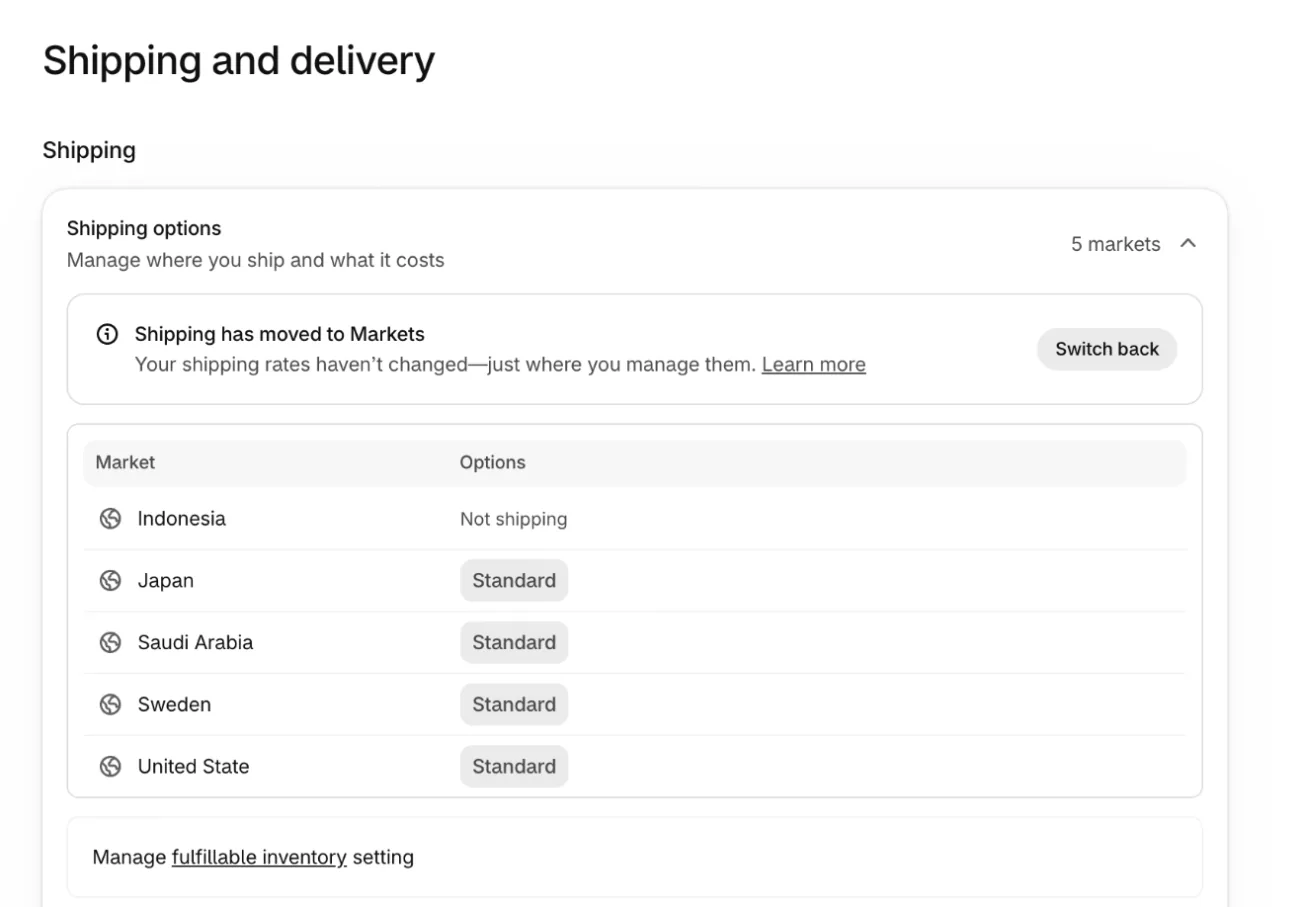
- In your Shopify admin, go to Settings, then Shipping and delivery.
- In the Shipping options card, click a market's name, such as Japan. It opens that market in Markets.
- On the market's page, click the chip in the Shipping row of the Customized card. It reads the market's current option, such as Standard. Then click Add shipping option.
- Type an Option name. Check that Type reads Flat, then enter the Price under Rate.
- Save the option. Repeat for any market that needs its own rate.
Steps checked November 6, 2026, in the Shopify admin (Markets screen) and against Shopify's Help Center.
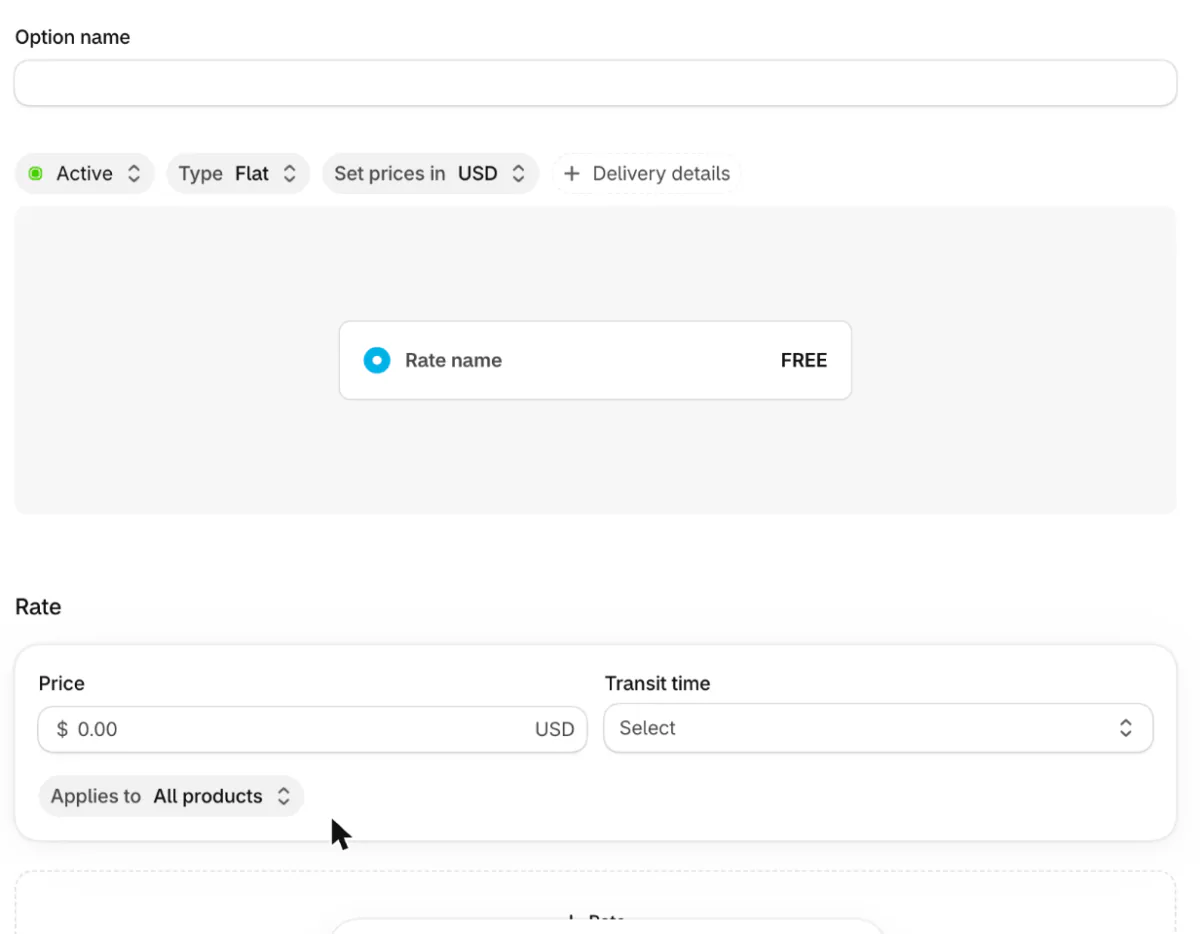
Shopify's Help Center says a flat rate is charged once per order, however many items it holds, for example $10 on every order. A price that changes with the order total, such as $5 over $50, is an Order amount rate, and free shipping over $100 is the Offer free shipping toggle.
If your page shows a Shipping profiles card instead, Shopify's Help Center describes that route, and Sledge's demo store did not show it. You click General profile, which covers all your products, then Add zone, a group of countries that pay the same rates, then Add shipping option. The menu is Rate type, with Weight in place of Package weight, and you finish with Done, then Save.
How do you offer free shipping over an amount?
Open the shipping option, switch on Offer free shipping below the Rate section and enter the Minimum order amount. Then save it.
Shopify's Help Center says an Order amount rate reads the cart total after discounts and before tax. A 20% code takes a $55 cart to $44, under a $50 tier, so that cart pays the rate for smaller carts.
Free shipping on certain products takes a custom profile or a rate limited to certain collections, in the next section. Free shipping for specific customers is a free shipping discount code, built like any discount code.
Shoppers see shipping rates only after they type an address, so a free shipping threshold stays hidden until checkout unless you show it earlier. Sledge sets no rates. On every Sledge plan, its Cart Drawer adds a Free shipping reward under Progress goal, a bar that fills as the cart grows. At your goal, the reward takes the discount you set off the shipping rate Shopify offers.
How do you charge different shipping for some products?
Shopify's Help Center says to put those products in a custom shipping profile, or on the Markets screen to limit a rate to specific collections. On the profiles screen, under Shipping profiles, click Add custom profile, name it, add the products, then add zones and shipping options as above. Save.
You can make up to 99 custom profiles, and a product sits in one at a time. Products outside every custom profile use the General profile.
On the Markets screen, a rate's Applies to chip reads All products on a new option. Shopify's Help Center says to change it to Specific collections and add the collections, so group the products in a collection first. Sledge did not open that menu on the demo store.
Why does a customer see two shipping charges, or none?
Shopify's Help Center says rates from different shipping profiles are added together, and a rate that doesn't match the cart doesn't show. On the Markets screen, it says only the highest matching rate inside one shipping option is charged, and two separate options that both match a cart, such as Standard and Express, are added together.
- Say shirts and pants sit in different profiles, each with a Standard shipping rate: $3 and $2. A cart with both pays $5, if the names match exactly. Rates named differently show as one line called Shipping. Products in one profile that ship from one location share one rate for the order.
- Shoppers see no rate until they enter an address, and then only the rates that fit their order, with the cheapest selected.
- If no rate shows, check that the shopper's market lists an option, since a market that reads Not shipping offers none. Check too that each product is a physical product with a weight and that the shopper's country sits in an active market.
- Test with a new checkout. An abandoned one keeps the rates it had when it was made.
How do you get carrier-calculated rates on Shopify?
Set Type to Carrier or app calculated, then pick the services to show. Give every product a weight and set your package sizes in the Packages card first, because the carrier prices from them.
The Help Center says the Handling fee setting adds a percentage, a flat amount or both to the carrier's price. A $5.00 carrier price with a 50% fee and a $1.00 flat fee costs the shopper $8.50, because Shopify adds the percentage first.
If the carrier doesn't answer and no other rate fits, Shopify shows backup rates so checkout still finishes, and a flat rate for the same places always shows when it fits.
What do Shopify shipping labels cost, and why can it differ from checkout?
A label costs the carrier's rate less Shopify's discount, so it lines up with the checkout rate best when both come from the same place. The discount varies with the carrier, the package, the weight, the route and, in some cases, your plan.
To see a label price, go to Settings, then Shipping and delivery. The Shipping labels card has a Calculate rates link, and Shopify's Help Center says the calculator asks where the parcel ships from and to, the package and the weight.
The Help Center names the usual reasons the label price differs:
- You pick a different package at purchase than the one checkout used.
- An app priced checkout, while the label uses Shopify's discounted rates.
- The shopper chose a rate you set, which carriers don't offer, so the label is the carrier's own price.
- UPS in the US adds surcharges to labels that checkout rates leave out. A handling fee on the rate can cover them.
For the closest match, use Shopify's rates at checkout and buy labels in Shopify, or use a third-party app for both.
How do you set a rate that doesn't lose money?
Compare the labels you bought with the shipping shoppers paid. Take your last 20 orders and add up both. If labels run higher, you cover the gap, and it comes out of your contribution margin.
Then pick the rate that closes it: a flat price near your average label, tiers by cart total, or free shipping with the cost built into prices. Shopify's Help Center reminds you that shipping is never actually free, so a share of it belongs in your product prices.
FAQ
Questions, answered
-

14-day free trial
Explore Sledge on your store before you decide to commit.
-

No credit card required
Start improving your store with no upfront commitment.
-

Setup in minutes
Get Sledge running without a lengthy setup process.
-

Built to grow sales
Turn shopper behavior into actions that help you sell more.
Where do I find shipping rates in Shopify?
In your admin, go to Settings, then Shipping and delivery. On a store moved to Markets, the Shipping options card lists each market, and a market's name opens that market in Markets. Shopify's Help Center says most stores still use shipping profiles. Label prices sit in the Shipping labels card on the same page.
Can I charge shipping per item on Shopify?
Not with one setting. A flat rate is charged once per order, however many items it holds. Shopify's Help Center says charging per item takes separate rates or a third-party app. Weight-based rates are the closer fit when parcel cost follows weight.
What plan do I need for carrier-calculated shipping?
As of November 2026, rates from the carriers Shopify builds in, such as USPS and UPS for a US location, work on every plan. Connecting your own UPS, FedEx or USPS account needs Advanced or Plus. Grow can add it for a monthly fee or yearly billing. Other plans can't.
Why is my shipping label more than the customer paid?
Checkout and label prices come from different places. The package may differ, a rate you set isn't a carrier price, an app may price checkout while labels use Shopify's discounts, and UPS in the US adds surcharges only to labels. Pricing both in Shopify gives the closest match.
Do I need an app to set shipping rates?
Not for the basics. Flat, order-amount, weight, free and carrier-calculated rates are built in. Shopify's Help Center points to an app for per-item charges, and a shipping app can sit beside the carriers under Carrier or app calculated when you want rates Shopify doesn't offer.
Your free shipping line is set. Do shoppers know where it is?
Sledge sets no shipping rates. It adds a Free shipping reward to your cart drawer's progress bar, and its Signals tab flags "Almost free shipping" when 10 or more orders in a week landed just under your goal. Try it free for 14 days. Growth Intelligence turns on when you pick a paid plan, and its suggested fixes add up to one dollar figure, labeled Est. potential.

