
Searchandising, short for search merchandising, means arranging what your store's search shows. To searchandise, you choose which products lead, which sink or disappear, which words open a page, which offers show, and where an empty search leads. On Shopify, the free Search & Discovery app covers boosts and where sold-out items sit. Most of the rest takes a search app.
A shopper types "linen shirt". The first row holds a pocket square, a sold-out shirt and last summer's color. Your new linen shirt sits on row three. Search matched the words. Nobody arranged the shelf.
What does searchandising mean?
The word blends search and merchandising, and some ecommerce writers spell it "searchandizing". Merchandising decides what a shopper sees first on a page you built, such as a collection. Searchandising does the same on the page a shopper builds by typing.
Search results are the one shelf where the shopper has already named what they came for. A collection has to guess at that.
Searchandising's cousin is visual merchandising: the window display in a shop, and the photos and badges on a product grid online.
What does searchandising cover?
Six jobs, each with one clothing-store example.
Which products a search shows first
Search lists products by how well they match the words. A good match can still be the wrong lead: a $12 accessory, a sold-out size, a color you are clearing. A search for "shirt" can bring back dozens of products, and on a phone the first row is all anyone sees before scrolling.
Boosting, burying and hiding
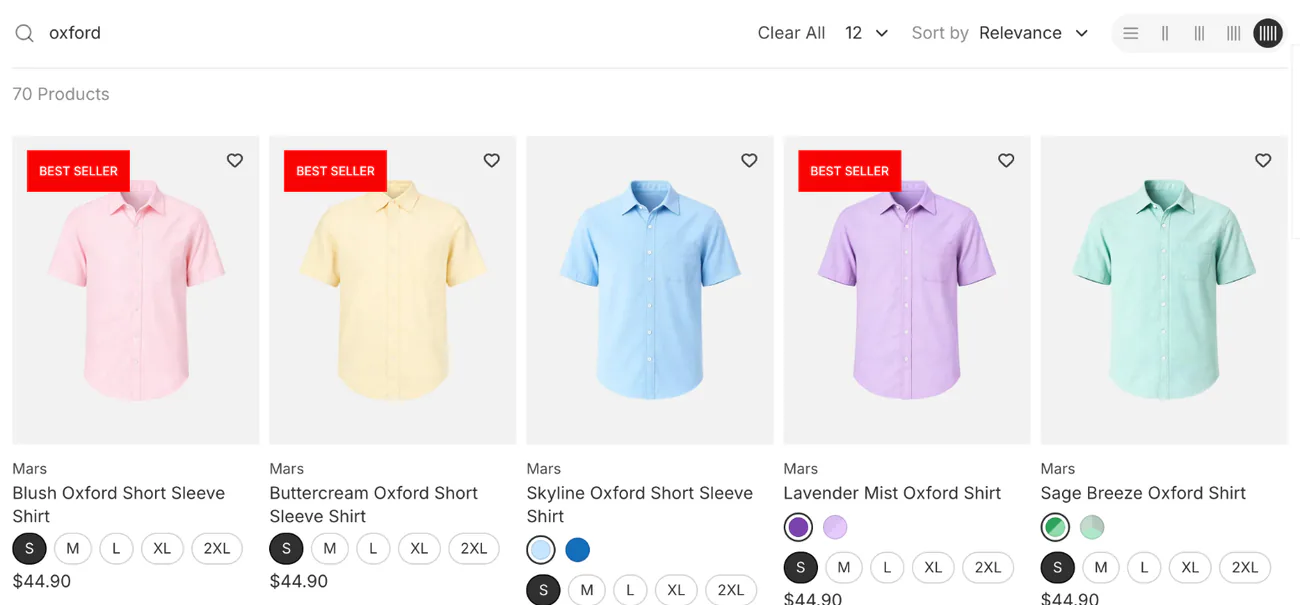
A boost lifts products without fixing their place. Burying pushes them lower, and hiding takes them out of the results. For "jacket", you might lift the in-stock best sellers of the last 30 days, push down styles that are nearly sold out, and hide the gift box whose description mentions jackets.
Pinning
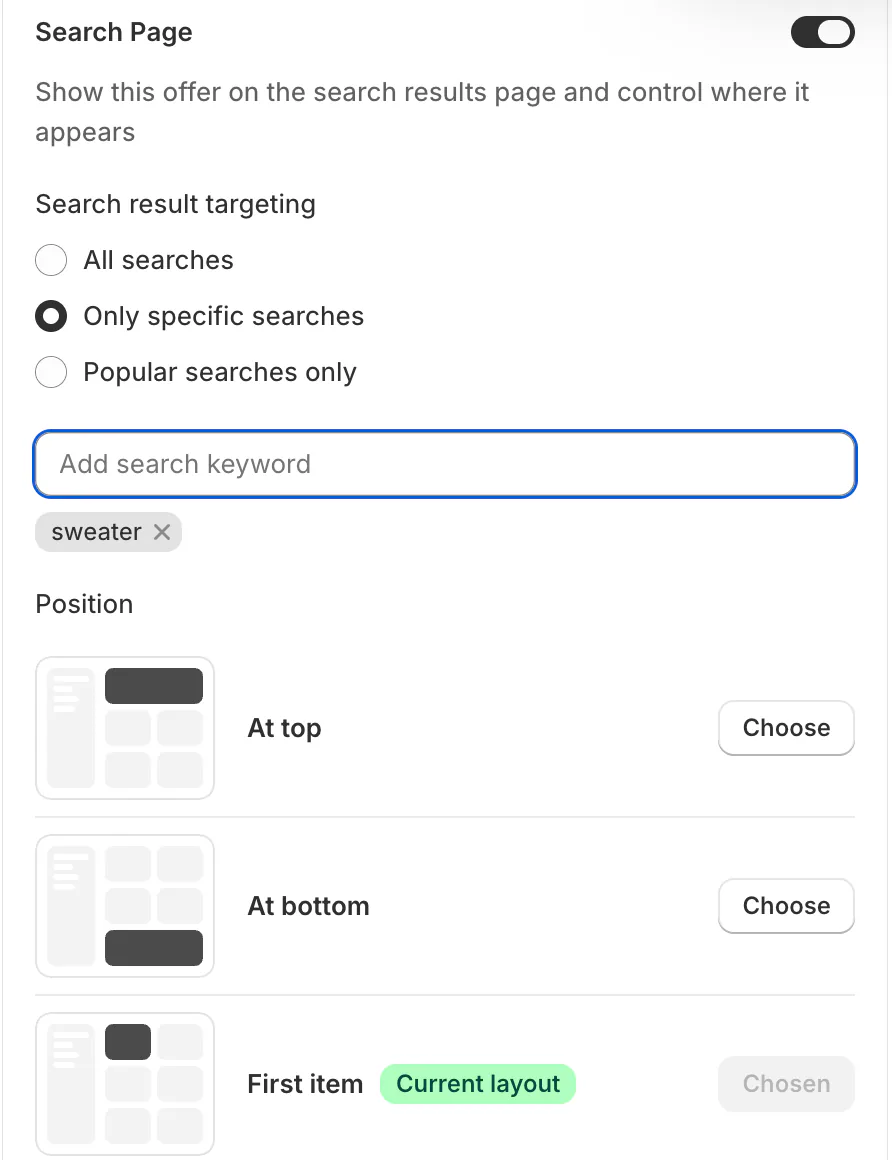
A pin holds one chosen product in a set slot for a search, where a boost only moves products up. In launch week, pin the new linen shirt to the first slot for "linen".
Sending a search word to a page
Some searches want a page, not a grid of products. "Size chart" should open your size guide. A brand name should open that brand's collection, and a brand you stopped carrying should open a collection of the two that replaced it.
Banners and offers in the results
Put the sale in front of shoppers already looking for it. During a shorts sale, a search for "shorts" shows a "2 pairs for $50" banner above the grid, and a "Last stock" badge marks the shorts running low.
Searches with no results
An empty page answers a shopper who told you exactly what they wanted. You can suggest searches that work, show best sellers, send the word to a page, or add the shopper's word to the products it should find. If "raincoat" finds nothing because you stock none, send it to your jackets.
More on what a zero-result search is, and how to find and fix them.
Can you searchandise on Shopify without an app?
Partly. Shopify's free Search & Discovery app gives you two controls. Its "Product boosts" list the products you pick above the usual results, for up to 10 search terms each. Its settings also decide whether sold-out items show, hide or sit last.
Past that, Shopify's help pages say "you can't change how results are ordered." Synonyms are gone too: the app now reads "Synonyms have been retired". Three other Shopify tools look like workarounds, and each falls short.
- Shopify's URL redirects work only from an address that shows "Page not found". A search results page always loads, so a redirect set on one never fires.
- Setting a product to "Unlisted", the status for products sold only by direct link, takes it out of search, collections and recommendations at once, never out of one search.
- A banner section you add to your theme's search page in the theme editor shows on every search, whatever was typed.
Shopify's free app has no setting that sends a search to a page, hides a product from one search, or shows a banner for chosen searches.
One route around the missing redirect is a developer's change to your theme that sends chosen searches to a page. You get the redirect for the price of their time. A theme update keeps that change only when it doesn't clash with the new version. Otherwise someone copies it across by hand.
Here is how to set up Search & Discovery.
What does a search app add?
Sledge is a Shopify search app that helps shoppers find what they typed, and it lets you arrange what each search shows.
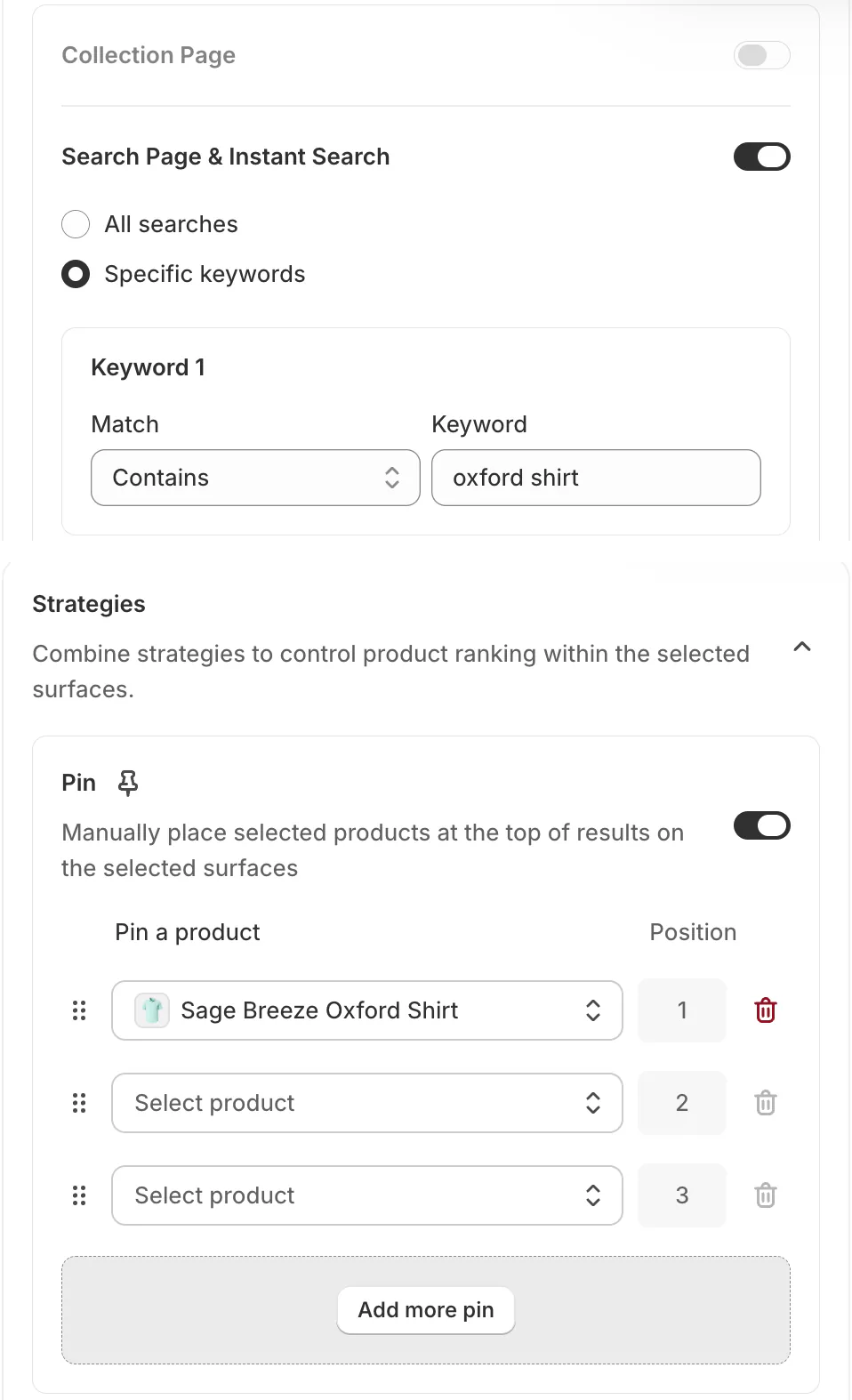
A merchandising rule set to "Search Page & Instant Search" covers the results page and the drop-down that opens as shoppers type. Choose "Specific keywords", type a word, and pick "Contains", for any search with that word in it, or "Exact", for a search of that word alone. Pick a word that isn't part of a longer one, because "tee" also matches "steel".
Then pin a product to a slot, boost products, push them down (the admin calls it "Demote"), or hide them. "Inject product" adds one from another collection at a set spot. A boost can follow a condition instead of a pick, such as best sellers of the last 30 days.
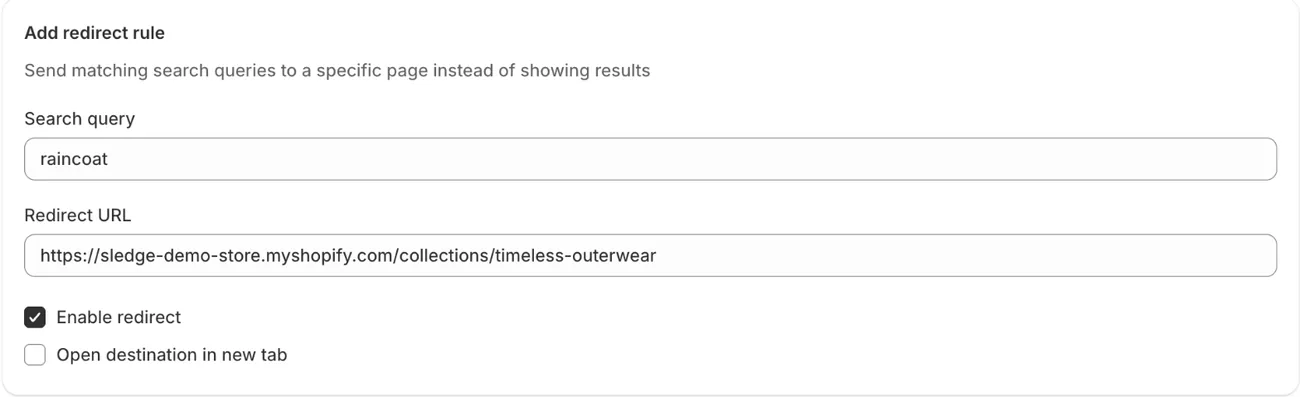
In Sledge's Redirect tool, you type the search words in "Search query" and paste the page's address as the "Redirect URL". A matching search then opens that page.
Promo banners, fixed bundles, Buy X Get Y and volume discounts can show in search for the words you pick. Badge campaigns can show on search results too. You can also write your own synonyms in Sledge, so a word your shoppers use can find products you named another way.
Merchandising rules act where Sledge shows the results, so switch on its search page or drop-down first. Shopify says its boosts "only work with Shopify's native search", so once an app runs your search, set up your top words again in the app.
Rules, redirects and banners are on all four paid plans. Pro, at $29.99 a month, covers up to 10,000 products. Try them on your top search during the 14-day free trial.
How do you start searchandising your store?
Start with the words shoppers type most.
- List your 20 most-searched words, from Search & Discovery's "Searches by search query" report, the list of what shoppers typed, or from Analytics in Sledge.
- Search each one on your phone and read the first row only.
- Fix the worst first row: boost what should lead, push down what shouldn't, pin a launch.
- Open "Searches with no results", the report of searches that found nothing, and give the common ones somewhere to go.
Once your fixes are live, come back to those reports, which show the last 30 days. Read the "Click rate" and "Purchase rate" reports, check whether the words you fixed left "Searches with no clicks", and see whether the no-results list got shorter. Shopify's reports cover the results page, not the drop-down, so if Sledge runs your search, read its Analytics instead.
For more, read the full search guide and the chapter on merchandising search results.
FAQ
Questions, answered
-

14-day free trial
Explore Sledge on your store before you decide to commit.
-

No credit card required
Start improving your store with no upfront commitment.
-

Setup in minutes
Get Sledge running without a lengthy setup process.
-

Built to grow sales
Turn shopper behavior into actions that help you sell more.
What does searchandise mean?
To searchandise is to arrange what your store's search shows, the way you would arrange a shop shelf. You pick which products lead for a search word, push some down or hide them, send certain words to a page, and add offers to the results. The noun is searchandising, short for search merchandising.
Is searchandising the same as Searchanise?
No, though the names sound alike. Searchanise is a search and filter app on the Shopify App Store, and merchandising is one of its features. Searchandising is the job itself: arranging what your store's search shows. Many search apps do it, Sledge included. If you are weighing that app, here are the Searchanise alternatives side by side.
What is the difference between merchandising and searchandising?
Merchandising arranges every product grid in your store: collections, search results and recommendations. Searchandising is the part that runs on search, where the shopper's own words pick the products. A collection order applies to everyone who opens that page. A search rule can apply only to shoppers who typed the words you chose.
Can Shopify's Search & Discovery app do searchandising?
Partly. In the Search & Discovery app, product boosts list the products you pick above other results, for up to 10 search terms each. A setting decides whether sold-out products show, hide or sink. The app can't send a search to a page, add a banner, or hide a product for one search, and its synonyms are retired.
Can searchandising run on its own?
Some of it. In a search app such as Sledge, a rule can lift products by a condition, like best sellers over the last 30 days, so the order follows your sales. Personalized search goes further and reorders results for each shopper. Pinning a product or sending a word to a page still takes your choice.
Find the searches that lose the sale.
Set up your first search rule during the 14-day free trial. Growth Intelligence turns on when you pick a paid plan, then watches for searches that keep finding nothing and adds a fix to its list. Its one total, "Est. potential", estimates in dollars what all your open fixes could add each month.

