

To sell on Facebook Marketplace, open Marketplace in Facebook, choose Create new listing, add photos, a price and pickup or shipping, then publish. Sales through Facebook's checkout cost 10%, at least 80 cents. Shopify's Facebook & Instagram channel fills a Facebook Shop, not Marketplace, so Shopify won't list your products there for you.
Say a ceramic mug sells for $40 in your store, and you list the same mug on Marketplace. A local buyer pays you in cash, and Shopify still shows the mug in stock. Listing is the easy part. The double sale is the one to head off.
Can a store sell on Facebook Marketplace?
Meta says Marketplace is meant for consumer-to-consumer sales, and selling as a business in some countries may bring restrictions, so check your own account first. A Facebook Shop is where Shopify's channel puts a store's products.
Meta's Commerce Policies say Marketplace is intended for consumer-to-consumer sales, and warn that anyone selling in a business or commercial capacity in the European Economic Area, the Philippines and India may face restrictions, including suspension of Marketplace access or removal of their listings. The same policies bar downloadable digital content, and Shopify's guide says Marketplace listings must be products for sale, not services. Check your own account before you list stock.
| Place | How products get there | Where the buyer pays | What Meta charges |
|---|---|---|---|
| Marketplace | You list each one by hand | In cash at pickup, or in Facebook's checkout | Nothing for local pickup, per Shopify's guide. 10% in Facebook's checkout |
| Facebook Shop | Shopify's channel syncs them | At your store's checkout | No fee to Meta, per Shopify's guide |
As of November 2026, from Meta's policies and Shopify's guide to selling on Facebook.
How do you list a product on Facebook Marketplace?
Open Marketplace, create a listing, set a price and publish. The screen names below are the ones Shopify's guide uses, and Meta can change them.
- Open Marketplace from the left menu of your Facebook feed. In the Facebook app, tap the storefront icon, then Sell.
- Choose "Create new listing", then "One item" or "Multiple items".
- Add photos and a title with the words a buyer would type.
- Set the price, then pickup or shipping. Shipping shows only if your account is eligible.
- Publish, then answer buyers in Facebook's chat.
Copy the title, photos and description from the product's page in your Shopify admin, so the two listings match. Keep the whole conversation in Facebook's chat, because Meta says a request to move to phone or email may signal a scam. Shopify's guide also names "Boost listing", a paid promotion whose budget you set.
Does Shopify list your products on Facebook Marketplace?
Not through its Facebook & Instagram channel, which fills a Facebook Shop and Instagram Shopping.
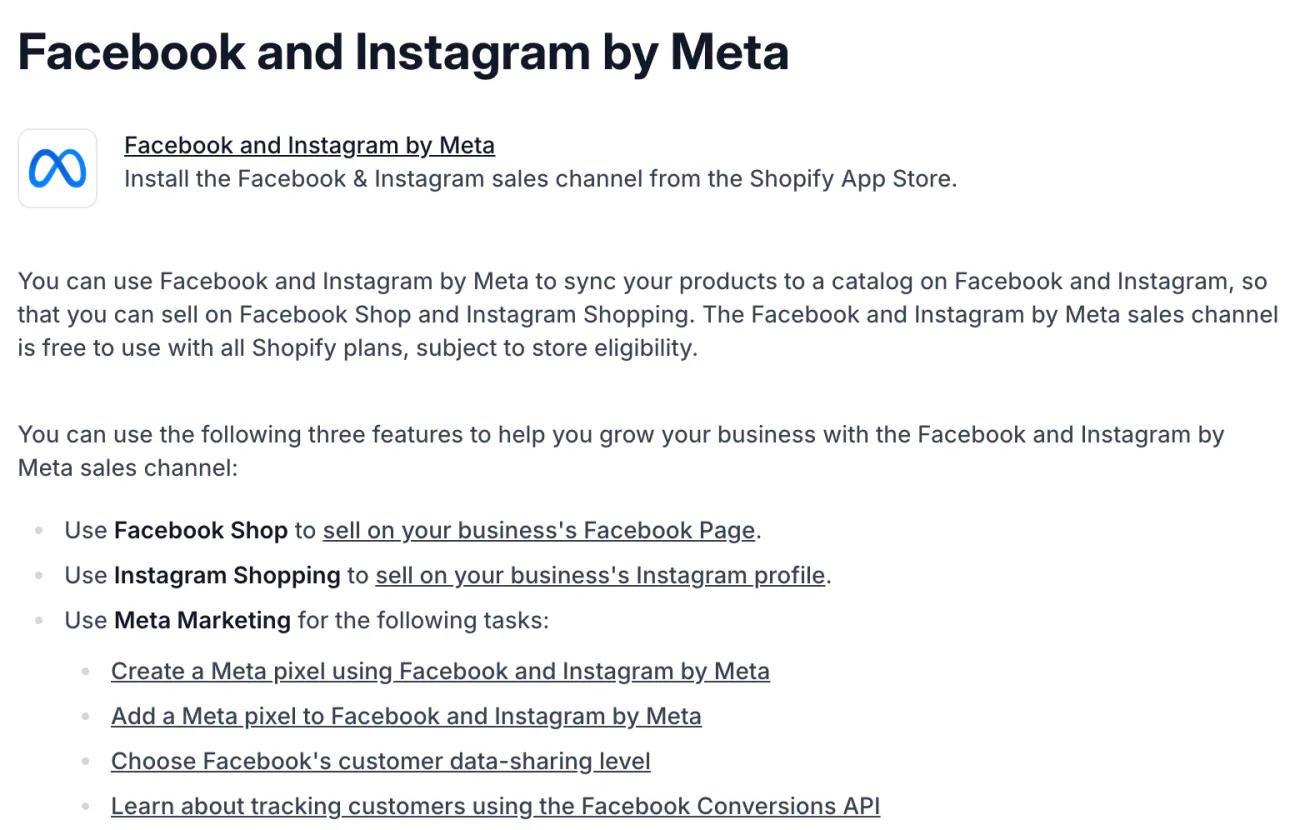
Shopify's Help Center lists the channel's three features as Facebook Shop, Instagram Shopping and Meta Marketing. Marketplace is not one of them. The channel is free with all Shopify plans, for stores that qualify, and a shopper who finds a product in your shop pays at your store's checkout.
Our guide to selling on Instagram covers the channel's setup steps, and shoppable content covers the tags that send shoppers to your store.
Shopify Marketplace Connect lists on Amazon, Target Plus, Walmart and eBay, per its App Store listing, and our Amazon vs Shopify guide covers the Amazon side. Other apps may claim a Marketplace link. None was tested for this page, so check Meta's rules and the app's listing first.
How do you keep your Shopify stock right when something sells on Marketplace?
Shopify's channel doesn't tell Shopify about a Marketplace sale, so set the stock yourself when a listing sells. Route A fixes the count. Route B also records the sale.
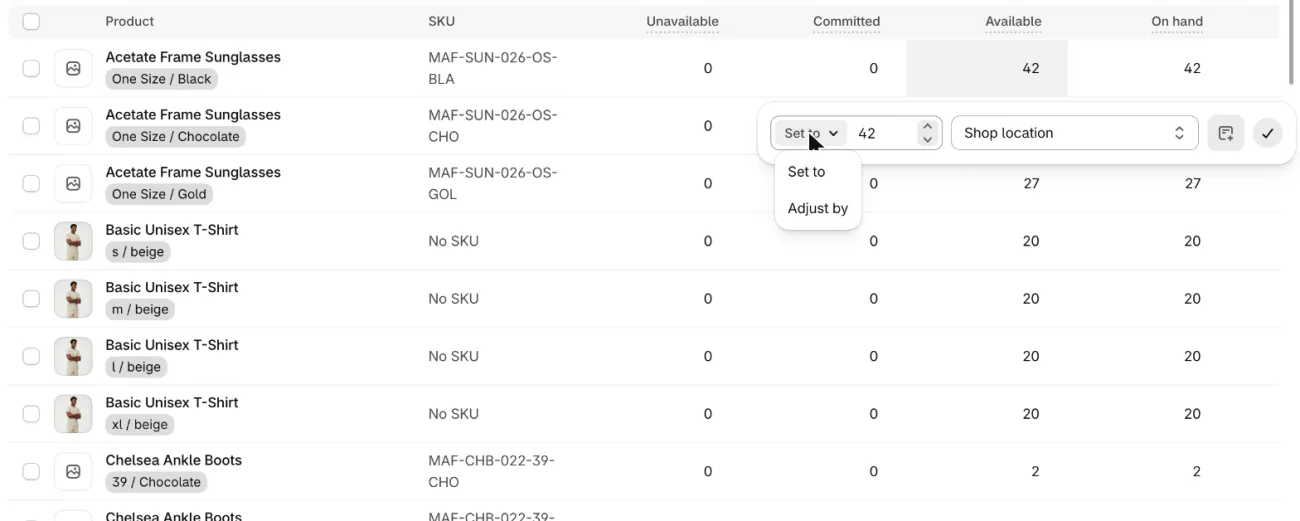
- Route A, stock only. In Products, open Inventory, then click the number in the Available column, the stock you can sell now. In the first menu that opens, which reads "Set to", pick "Adjust by". Type -1 and click the check icon, then Save if the page shows one. The small icon beside the check lets you add a reason.
- Route B, the sale too. In Orders, open Drafts and start a new draft order (on an empty list the button reads "Create draft order", and the page that opens is titled "Create order"). Click "+ Product" and add the product. In the Payment section, click "Mark as paid", which records money you already received. Shopify's Help Center lists that button under "Collect payment", so look there if your screen differs. Change the optional "Amount received" if it differs from the total, then click "Create order".
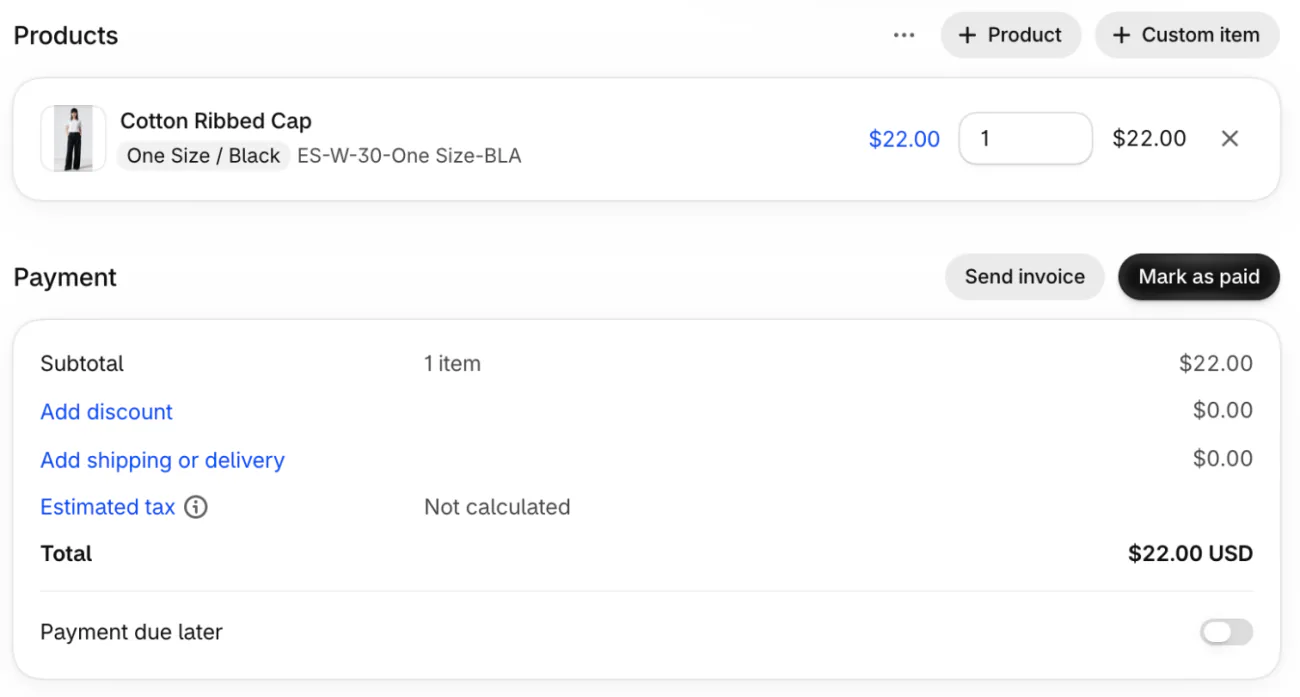
Shopify's Help Center names phone, email and in-person sales as the use of draft orders, and the draft order screen asks for no sale source, so a Marketplace sale you were paid for can be recorded the same way. A paid draft order becomes a regular order on your Orders page, so it sits with your other orders. Use "Add shipping or delivery" and "Estimated tax" in the Payment card so the total matches what the buyer paid.
Our Shopify inventory management guide explains Available and Committed. Keeping one stock count across places is what omnichannel means.
What does Facebook Marketplace charge you to sell?
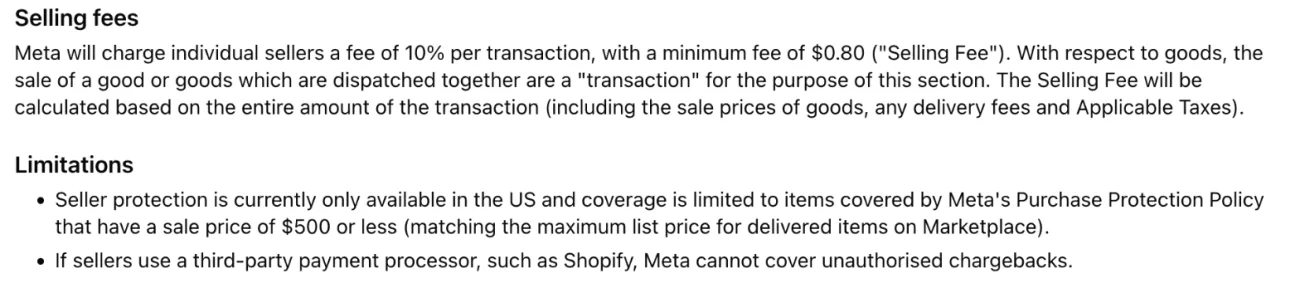
Listing is free, and local pickup carries no fee to Meta, per Shopify's guide. A sale paid through Facebook's checkout costs 10% of the whole transaction, at least $0.80, in Meta's policy for individual sellers.
| What you do | What it costs | Source |
|---|---|---|
| List an item | Free | Shopify's guide |
| Sell for pickup, paid in person | No fee to Meta | Shopify's guide |
| Sell through Facebook's checkout | 10% of price plus shipping and taxes, minimum $0.80 | Meta's seller policy |
| Boost a listing | A budget you set | Shopify's guide |
As of November 2026, from Meta's Facebook Marketplace Seller Protection Policy and Shopify's guide, updated November 17, 2026.
Take a $40 mug that ships for $6. The fee base is $46, so Meta keeps $4.60 and you keep $41.40, before your own costs. Taxes would add to the base. On a $5 item, 10% is 50 cents, so the $0.80 minimum applies, which is 16% of the sale.
The policy states the fee for individual sellers and says nothing of a business seller's rate, so read it again before you rely on the number. Guides disagree on the rate, and this page uses Meta's policy. Your own store's card fee on a sale is worked out in Etsy vs Shopify fees.
How do you sell on Facebook Marketplace safely?
Confirm the money in your own account, keep the chat on Facebook, meet in public, and ship only inside Facebook's checkout if you want Meta's protection, which covers US sellers only.
- Check your own account to confirm payment, even if the buyer sends a screenshot, per Meta.
- Treat a request to move to phone or email, especially early on, as a warning sign, per Meta.
- Meet in a public, well-lit place and tell a friend or family member where you are going, per Shopify's guide.
- For shipped orders, Seller Protection needs Facebook's checkout, a label issued by Meta, carrier receipt within seven calendar days and tracking, and it covers items sold for $500 or less. Meta says it is only available in the US.
- Meta's policy says it can't cover unauthorized chargebacks when a seller uses a third-party payment processor, and it names Shopify as an example. A Shopify checkout link sent to a Marketplace buyer would take that sale outside Seller Protection, which needs Facebook's checkout.
- If you suspect a scam, stop talking to the buyer and report it to Facebook.
As of November 2026, from Meta's Scam Protection Center and seller policy, which show no date.
FAQ
Questions, answered
-

14-day free trial
Explore Sledge on your store before you decide to commit.
-

No credit card required
Start improving your store with no upfront commitment.
-

Setup in minutes
Get Sledge running without a lengthy setup process.
-

Built to grow sales
Turn shopper behavior into actions that help you sell more.
Can you sell on Facebook Marketplace without a Facebook Shop?
Yes. Shopify's guide says you don't need an online store to start, only an active Facebook account, and that US sellers must be at least 18. Marketplace listings must be products for sale, not services, and some items are banned. A store can list there too, but Shopify's channel fills a Facebook Shop instead.
Does Facebook Marketplace charge fees to sell?
Listing is free. Shopify's guide says local pickup sales carry no fee to Meta. A sale paid through Facebook's checkout costs 10% of the whole transaction, shipping and taxes included, with a minimum of $0.80, under Meta's seller policy. Boosting a listing is a separate paid promotion you set a budget for.
Can you connect Shopify to Facebook Marketplace?
Not with Shopify's Facebook & Instagram channel. Shopify's Help Center lists its features as Facebook Shop, Instagram Shopping and Meta Marketing, and Marketplace is not one. Shopify's Marketplace Connect app lists on Amazon, Target Plus, Walmart and eBay. Other apps may claim a Marketplace link, so check Meta's rules and the app's listing first.
Can a business sell on Facebook Marketplace?
Meta says Marketplace is intended for consumer-to-consumer sales, and that anyone selling in a business or commercial capacity in the European Economic Area, the Philippines and India may face restrictions, including suspension of Marketplace access. A Facebook Shop is where Shopify's channel puts a store's products. Check your own account before you list stock.
How do you avoid scams when selling on Facebook Marketplace?
Check payment in your own account, never from a screenshot. Keep the chat on Facebook, because Meta says requests to move to phone or email may signal a scam. Meet in a public, well-lit place. For shipped orders, Meta's Seller Protection needs Facebook's checkout, Meta's label, carrier receipt within 7 days and tracking, and covers US sellers only.
Can you sell digital products on Facebook Marketplace?
No. Meta's Commerce Policies bar downloadable digital content, and Shopify's guide says Marketplace listings must be products for sale, not services. Sell files from your own store instead, where Shopify's free Digital Products app delivers them. Our guide to selling digital products covers the setup and what a $12 sale costs.
Your Facebook link lands on one product. Can they find another?
Sledge doesn't list on Facebook Marketplace, tag your Facebook posts or see sales made there. It works on your own store, where a shopper from a Facebook ad or link lands: search and filters help them find the product, bundles offer a second item, and the cart drawer takes them on to checkout. Try it free for 14 days. Growth Intelligence turns on when you pick a paid plan, and its suggested fixes add up to one dollar figure, labeled Est. potential.

