
An order bump is one small, related extra offered with a tick box right before the shopper pays: a $12 waterproofing spray beside $90 boots. Ticking it adds the extra to the same order. On Shopify, only Plus stores can place one inside checkout, so on any other plan it goes on the product page or in the cart.
You want one line before the shopper pays: "Add a waterproofing spray for $12?" Then you open your checkout settings and find colors, a logo and no place for it. Only Plus lets an app add that line inside checkout. Below Plus, an order bump still has two good places to go.
What is an order bump?
An order bump is one small extra, related to what the shopper is buying, behind a tick box or a switch just before payment. Ticking it opens no new page.
The term comes from funnel builders, whose checkout forms put the box beside the pay button. That is why most guides picture it there. Some call it a pre-purchase bump.
Say you sell $90 boots and put a $12 waterproofing spray behind a tick box. If one buyer in ten ticks it, 200 orders a month bring 20 sprays, or $240.
An order bump adds one small extra to the order the shopper is already placing, with a single tick.
Order bump vs upsell, cross-sell and post-purchase offer: what is the difference?
All four add to what the shopper buys. They differ in when they appear and how much they ask.
| Offer | When | What it is | How the shopper says yes | Example |
|---|---|---|---|---|
| Order bump | Just before payment | One small extra | Ticks a box | A $12 waterproofing spray ticked beside $90 boots |
| Upsell | While the shopper chooses | A bigger or better version | Picks the other size or model | The lined boot instead of the unlined one |
| Cross-sell | On the product page or in the cart | A product that goes with it | Adds it to the cart | A leather belt shown on the boot page |
| Post-purchase offer | After payment | One more item, often discounted | Accepts on the page after paying | Boot trees offered once the boots are paid for |
The names clash. Funnel tools say upsell for the offer after payment, which on Shopify is a post-purchase offer, or a post-purchase upsell. In ecommerce, an upsell means trading up to the bigger or better version.
So an order bump is a cross-sell in its smallest form, made at the last moment. For the trade-up itself, see how to upsell on Shopify.
Can you add an order bump to Shopify checkout?
Yes, if your store is on Shopify Plus. Shopify's own example is an upsell app placed in checkout's order summary, where customers add items while they check out. Each area of checkout takes up to three apps.
Below Plus, no. In Shopify's table of checkout apps by plan, apps that add to the information, shipping and payment steps are for Plus stores only. Those steps come before payment, which is where a bump sits.
From the Basic plan up, apps can add to the post-purchase page, the thank-you page and the order status page, all after payment. Shopify's free Checkout Blocks app is narrower still below Plus: content blocks only, on the thank-you and order status pages. The rule is the same for one-page and three-page checkout.
Shopify has no built-in order bump setting either. Its gift message field, listed as coming soon, adds words to an order, not a product.
August 26, 2026 was Shopify's deadline to upgrade the thank-you and order status pages, and stores that missed it were upgraded automatically. If an offer on your old thank-you page vanished with it, you can put it back.
Where can an order bump go on a Shopify store without Plus?
Two spots come before payment.
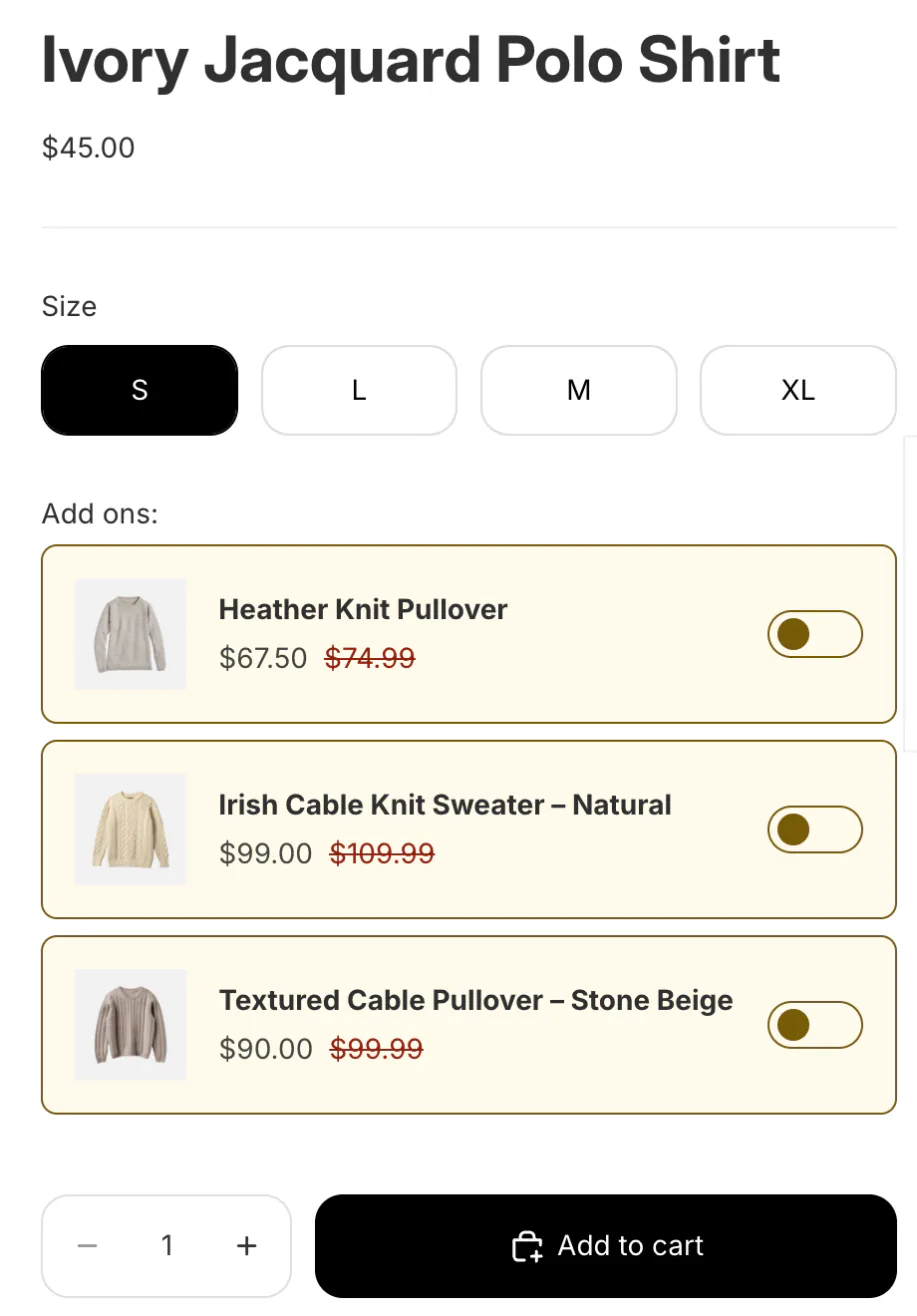
The product page, beside Add to cart. The shopper is still choosing and looks at one product at a time. A switched-off extra beside the button joins the cart with the product once the shopper turns it on. On a product page this is usually called a product add-on: the nearest thing to a bump below Plus, one step earlier.
The cart page or the cart drawer. Here the shopper sees the whole order. A row with a switch suits gift wrap, shipping protection or a refill.
After payment, the post-purchase page and the thank-you page can show one more item. The shopper has paid by then, so that is a post-purchase offer, not a bump.
Sledge's add-ons cover the product page. Its cart drawer, not the cart page, has a switch row for shipping protection and can show other extras as discounted picks.
Should the order bump box start ticked?
No. In the UK, the Competition and Markets Authority's guidance on extra charges, published in November 2025, says shoppers must actively choose to pay for an optional extra. A box ticked in advance is not consent. Its own allowed example is a gift wrapping charge behind an unticked box. Express delivery added automatically, and insurance put in the basket on the payment screen, are among its examples of what is not allowed.
Under the EU's Consumer Rights Directive, a shopper charged for an extra through a pre-ticked default can claim the money back.
Shopify's App Store rules point the same way. An app has to show what an optional extra costs and get the shopper's clear yes before adding it, a rule in force since February 18, 2025. It covers a shipping protection fee as much as a bump.
Leave the box empty and let the shopper tick it.
What makes a good order bump?
A good bump passes five checks.
- Related to the item. A waterproofing spray with boots, a wash bag with lingerie, spare laces with sneakers.
- Small beside the main price. The $12 spray is about 13% of the $90 boots, so the tick needs little thought.
- One offer, not a menu. A list of extras turns one tick into another round of shopping.
- The price and the saving in view. If the extra is discounted, show the struck price next to the new one.
- Nothing to decide. Gift wrap or a refill needs no size, no color and no comparing.
How do you add an order bump with Sledge?
Sledge is a Shopify upsell app whose add-ons put the extra on the product page, where the shopper is still deciding. Add-ons are on all four paid plans.
Each extra sits next to the Add to cart button, with a switch that starts off. When the shopper presses Add to cart, every extra they switched on goes in with it, each as its own line. The discount on those extras holds while the main product stays in the cart.
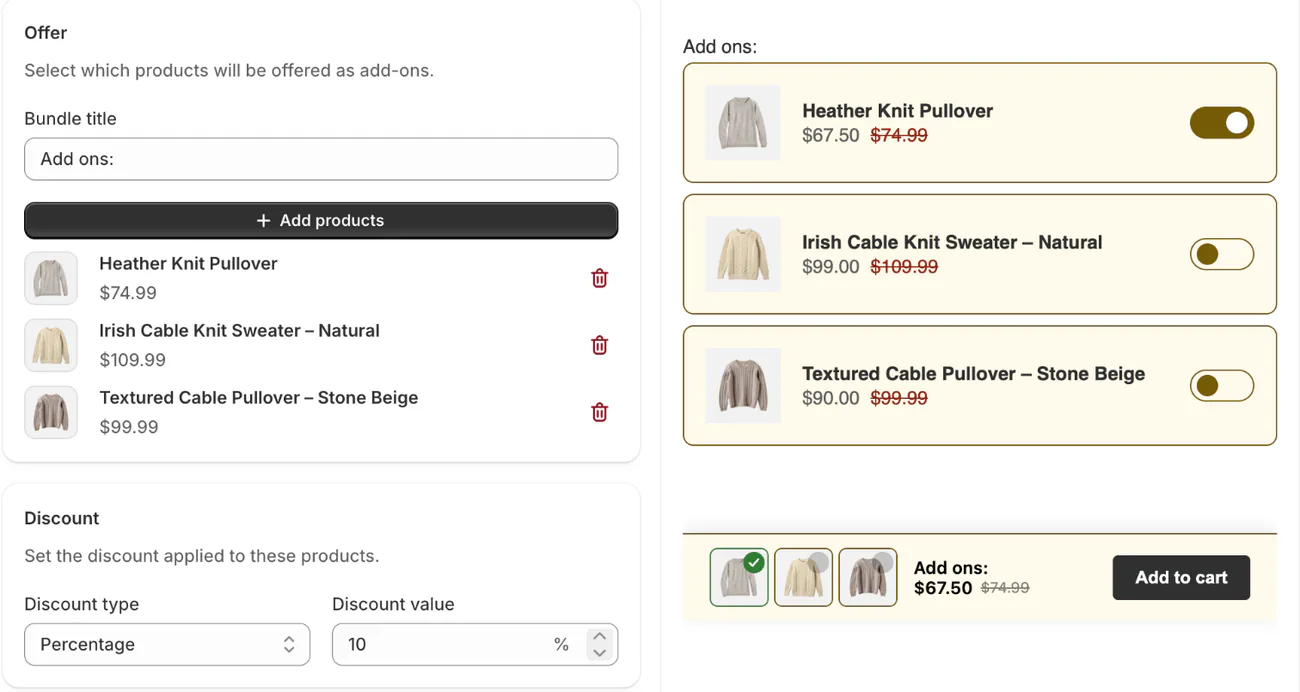
- In Sledge, open "Bundle, Discount & Upsell", the section that holds your offers, then "Add-ons".
- Under "Product eligibility", pick the products the extra goes with.
- Under "Offer", pick one or two extras, then set the "Discount", a percentage or a fixed amount above zero.
- Leave "Product Page" on under "Surfaces". Under "Layout", "List" shows every extra and "Slider" shows one at a time. Then save.
In the cart drawer, Sledge's Shipping Protection block does the same for a fee: one row, your price and a switch the shopper turns on.
After payment, Sledge's Thank You Page offer can show one more item, which the shopper buys through checkout as its own order. Adding an upsell to the thank-you page covers the setup.
Sledge puts no offer inside checkout itself. If you want the box on checkout's payment step, that takes Shopify Plus and a checkout app.
FAQ
Questions, answered
-

14-day free trial
Explore Sledge on your store before you decide to commit.
-

No credit card required
Start improving your store with no upfront commitment.
-

Setup in minutes
Get Sledge running without a lengthy setup process.
-

Built to grow sales
Turn shopper behavior into actions that help you sell more.
What is an order bump?
An order bump is a small extra offered with one tick box or switch just before the shopper pays, like gift wrap or a waterproofing spray beside a pair of boots. Ticking it adds the extra to the same order, with no new page. The term comes from funnel builders, where the box sits on the checkout form.
What is the difference between an order bump and an upsell?
Timing and size. An order bump is a small extra ticked just before payment and added to the same order. An upsell moves the shopper to a bigger or better version of what they are buying. Funnel tools also say upsell for the offer shown after payment, which on Shopify is a post-purchase offer.
Can you add an order bump to Shopify checkout?
Only on Shopify Plus. There, apps can add to the information, shipping and payment steps of checkout, up to three apps in each area. On Basic and higher, apps can add to the thank-you, order status and post-purchase pages, which all come after payment. Shopify has no built-in order bump setting.
Can the order bump box be ticked for the shopper?
Not through an app from the Shopify App Store: its rules make apps show the cost of an optional extra and get the shopper's clear yes before adding it. In the UK, the CMA's November 2025 guidance says a box ticked in advance is not consent. EU law lets shoppers reclaim a charge added that way.
Can Sledge add an order bump to Shopify checkout?
No. Sledge puts no offer inside checkout itself. Its add-ons sit on the product page as switches the shopper turns on, and the extras join the cart with the product at Add to cart. The cart drawer can carry a Shipping Protection switch and discounted picks, and the thank-you page can show one more offer after payment.
Offer the small extra before checkout.
Try Sledge free for 14 days: a switched-off extra beside Add to cart, a Shipping Protection row in the cart drawer, one more item after payment. On a paid plan, Growth Intelligence can tell you when most of your orders hold one item and no offer runs yet, with one dollar total, labeled "Est. potential", for what its fixes could add.

