
A parcel shows delivered, the customer says it never came, and you pay for the same order twice. Shipping protection is worth it when the fee shoppers pay beats what lost and damaged parcels cost you per order. Then decide who pays the claims: a licensed provider, an app, or you.
You have seen the small protection switch in other stores' carts. Before you add one, run the sum below with your own order count.
What is shipping protection?
Shipping protection is an optional fee at the cart or checkout that pays to replace or refund an order lost, stolen or damaged on its way to the shopper. Package protection is another name for it. In the cart it sits like gift wrap, a small add-on the shopper chooses to pay for.
It is not the carrier's insurance, which comes with the label. It is not Shopify Protect either: that covers fraud chargebacks on eligible Shop Pay orders, for US stores on Shopify Payments, and never a parcel that goes missing.
Who pays the claims, and who keeps the fee?
Every protection app answers both questions its own way, and the answers fall into three models.
| Model | Who keeps the fee | Who pays a claim | Apps |
|---|---|---|---|
| A licensed protection program | The provider | The provider | Route |
| An app that takes on the claims | SavedBy keeps it, Onward shares a part, Corso and Extend don't publish it | The app | Corso, Extend, Onward, SavedBy |
| Your own guarantee | You, minus any app cut | You | Navidium, ShipAid |
Whoever keeps the fee should be the one paying the claims. If you keep it, every lost parcel is yours to refund or reship. If a provider keeps it, you are buying less support work, plus whatever share it passes back.
How much does shipping protection cost?
Protection carries two bills. The first is the shopper's: a flat fee or a percentage of the order. Extend's own example button reads "Add protection for $2.99". Route does not publish its fee; one store's help page lists $1.55 on orders under $100 and 2.6% of the order above that, so the fee varies by store.
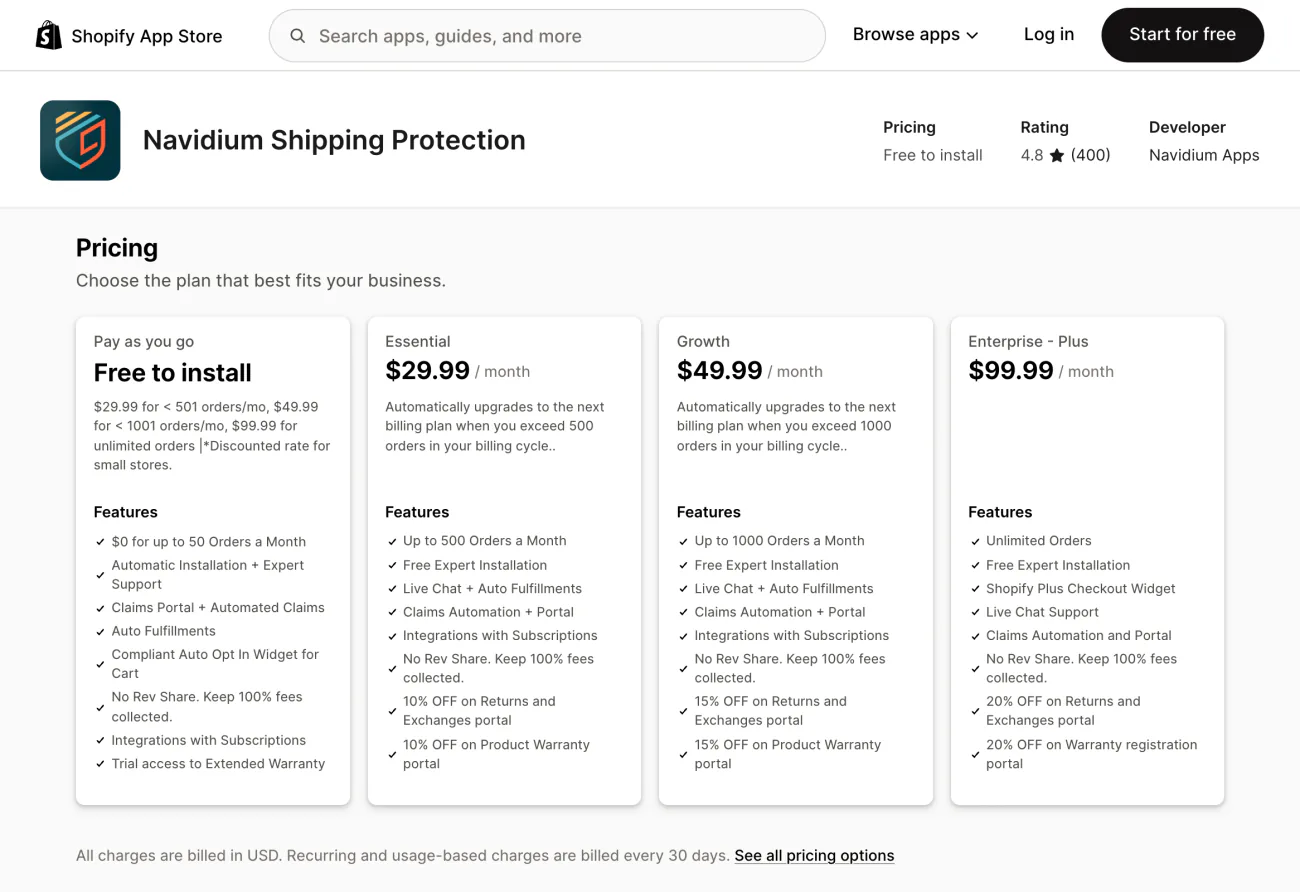
The second bill is yours. Among the apps that publish a price, it runs from $0 to $99.99 a month, or 9% to 15% of the protection fees, depending on the app and your order volume.
Compare that with insuring parcels yourself. On labels you buy in Shopify, extra insurance up to $5,000 costs $0.89 per $100 of value on domestic parcels and $1.29 per $100 on international ones.
Don't carriers already cover lost packages?
Often, up to a point. In the US, USPS Ground Advantage includes $100 of insurance, and Priority Mail and Priority Mail Express include up to $100 on parcels with USPS Tracking. UPS limits its liability to $100 a package unless you declare a higher value and pay for it.
Eligible labels you buy in Shopify include up to $200 of insurance, on the Grow, Advanced or Plus plan with Shopify Payments on. The parcel must ship from the US, and USPS First Class Mail does not qualify. Claims go to Shipsurance, filed from your Shopify admin between 24 hours and 120 days after shipping. These are US figures; elsewhere, check your own carrier.
So why add protection on top? A claim can stall: the label said insured, and the claim screen says not eligible. The paperwork can run for weeks. And a $400 order sits far above a $100 cap.
If your labels already carry cover, say so in the fee's wording. A New York federal court let a suit go ahead over a $2.98 protection fee the shopper had to untick. The shoppers had a plausible case, it found, that the fee's wording misled them by leaving out the carrier's own $100 cover. A law firm reported the ruling in February 2026.
Is package protection worth it for your store?
Run the sum. Say you ship 1,000 orders a month, and 15 go missing or arrive broken. Each costs you $40 to replace and reship. That is $600 a month, or $0.60 an order.
Now add a $2.99 fee. Suppose 40% of shoppers switch it on, a made-up rate for this example; Extend puts its own average take-up at 52%. The fee collects $1,196 a month.
| Say 1,000 orders, 15 lost | Fees you keep | Losses you pay | Your month |
|---|---|---|---|
| No protection | $0 | $600 | $600 lost |
| Your own guarantee | $1,196 | $600 | About $596 ahead, before the app bill |
| A provider pays the claims | $0, unless the provider shares a part (Onward does; Route names an incentive program) | About $360, for the 9 orders without protection | About $360 lost, with the 6 protected claims paid for you |
Shipping protection is worth it when the fee collected per order beats what lost and broken parcels cost you per order. Here that is about $1.20 an order in fees against $0.60 in losses.
It pays on pricey, fragile or theft-prone deliveries, and when you already eat the losses. It rarely pays on cheap items, a near-zero loss rate, or orders your label cover already fits.
How do Route, Navidium, Corso, Extend, Onward, SavedBy and ShipAid compare?
All seven are free to install from the Shopify App Store. Every figure below was read on October 29, 2026, from each app's listing and its own website.
| App | Who pays a claim | Who keeps the fee | Your bill | Rating, Oct 29, 2026 |
|---|---|---|---|---|
| Route | Route | Route, with an incentive program whose terms are not published | $0 a month on Standard | 4.0 from 375 reviews, 19% of them one-star |
| Navidium | You | You, all of it | $0 up to 50 orders a month, then $29.99, $49.99 or $99.99 | 4.8 from 400 |
| Corso | Corso, for approved claims | Not published | $0 fixed, plus a percentage of the revenue Corso brings in, rate not published | 4.9 from 21 |
| Extend | Extend | Not published | Free to install; store pricing not published | 4.8 from 21 |
| Onward | Onward | Onward, with a share to you | Free to install | 5.0 from 29 |
| SavedBy | SavedBy, from its own wallet | SavedBy, with no share to you stated | Free to install | 5.0 from 56 |
| ShipAid | You | You, minus ShipAid's cut | 15% of the fees under 200 orders a month, 12% at 200 to 500, 9% above | 4.8 from 25 |
Route
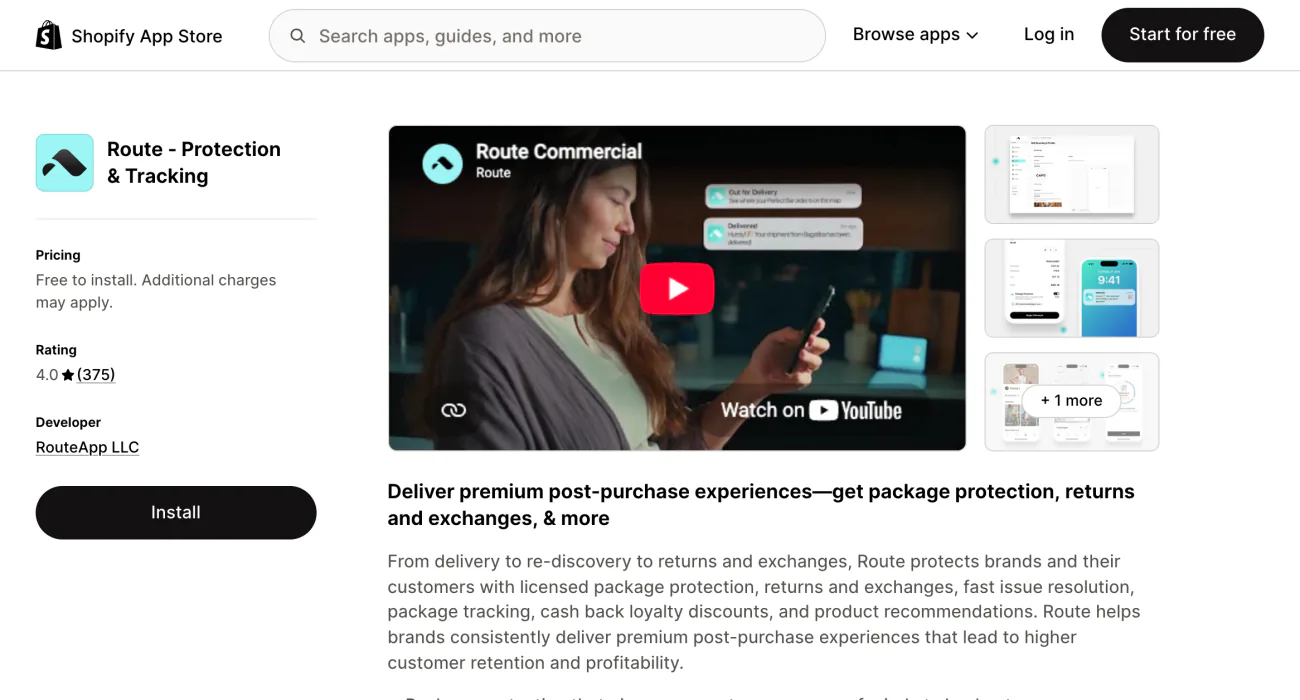
Route, from RouteApp LLC, has been on the App Store since January 2019. It covers loss, theft and damage, and the shopper files the claim with Route online. Route says it holds Department of Insurance authorization in all 50 states. On its $0 Standard plan, shoppers pay for the cover through the fee. A lawsuit filed in June 2026 alleges a hidden, pre-selected toggle; those are allegations, not a ruling.
Navidium
Navidium lets you keep 100% of the fees. In return, it says, "We are not a shipping insurance company, and don't underwrite claims." You judge and fund every claim through its claims portal, and its plans are priced by monthly orders. It carries the Built for Shopify badge.
Corso
Corso's app covers tracking, returns, warranty and shipping protection. Corso says it "pays for approved claims" from the protection fees, and that its cover is not insurance-backed. There is no monthly minimum or long-term contract. Shoppers can add a carbon offset in the same step. Corso's separate green app is not currently available on the App Store.
Extend
Extend's listing, now called Extend Shopper Operations, pairs shipping protection for lost, stolen and damaged parcels with product protection and returns. Extend says it "takes on all liability, including replacement and shipping costs." Its store pricing is not published.
Onward
Onward Checkout+ sells protection with perks. Shoppers pay a small percentage of their order value, and you earn a share of what they pay. The cover reaches parcels stuck in transit, damaged, stolen or returned to sender, plus missing and wrong items. Shoppers also get cashback as store credit. Onward's cart widget works on every Shopify plan; the version inside checkout needs Shopify Plus.
SavedBy
SavedBy Package Protection charges your shopper a fee based on the order value, and pays refunds and reorders from its own wallet rather than yours. It states no share of the fee for you.
ShipAid
ShipAid runs a guarantee in your store's name, managed from its dashboard. It also says, "We don't insure packages," so you decide each claim and pay for the refund or reship. Its listing shows only the 9% cut, the rate above 500 orders a month.
What do shoppers think when they see the fee?
Your shoppers search Google with the same doubts you have: is shipping protection a scam, and do they need it? The worst case is a fee already sitting in the cart, a box they have to find and untick, on a small item whose price it nearly doubles.
A switch left off, a clear price and a one-line promise answer both doubts. It works like any trust signal in the cart: the shopper sees the cost before checkout, never after.
What can go wrong when you offer it?
- A pre-checked box: since February 18, 2025, Shopify's App Store rules bar apps from adding or pre-selecting optional charges that raise the checkout total. The cost must show, and the shopper must agree first. Pre-checked fees have also drawn US lawsuits, one filed in June 2026.
- Cover that ends: a provider pays a handful of claims, then closes your account because the claims cost more than your fees brought in.
- Shoppers who paid and got no help: a parcel goes missing, the provider does not step in, and the angry email lands on you.
- The fee in your ads: if your app creates a protection product, it can show up in your Google and Facebook product feeds. Open that product in your Shopify admin and check which sales channels it is published to.
- The word "insurance": if you pay the claims yourself, you are running a guarantee. Navidium and ShipAid both say as much about their own apps.
How do you add shipping protection to a Shopify store?
- Pick the model: a provider that takes on the claims, or your own guarantee.
- Install the app from the Shopify App Store.
- Set the price, a flat fee or a percentage of the order.
- Put the toggle in your cart, switched off, so the shopper is the one who turns it on.
- Write a short claims page: what is covered, how to report a problem and who decides. Link it from your shipping policy.
Below Shopify Plus, shipping protection lives in the cart, not in checkout. Apps that change checkout's information, shipping and payment steps need Plus, so the offer sits on the cart page or in the cart drawer. If your theme has no drawer, a cart drawer app can add one.
Can your cart charge for protection without an insurer?
Yes, if you already reship lost orders yourself and want the fee to pay for some of it. Sledge is a Shopify app whose cart drawer has a block named Shipping Protection, off until you switch it on. You set its Title, Description and Price, one flat amount in your store's currency.
The shopper sees one row with your title, promise, price and a switch they turn on themselves. Once the block is on and saved, Sledge creates a Shipping Protection product in your store at your price. The fee arrives as a line on the order, a sale in your own store, and Sledge marks that line fulfilled for you.
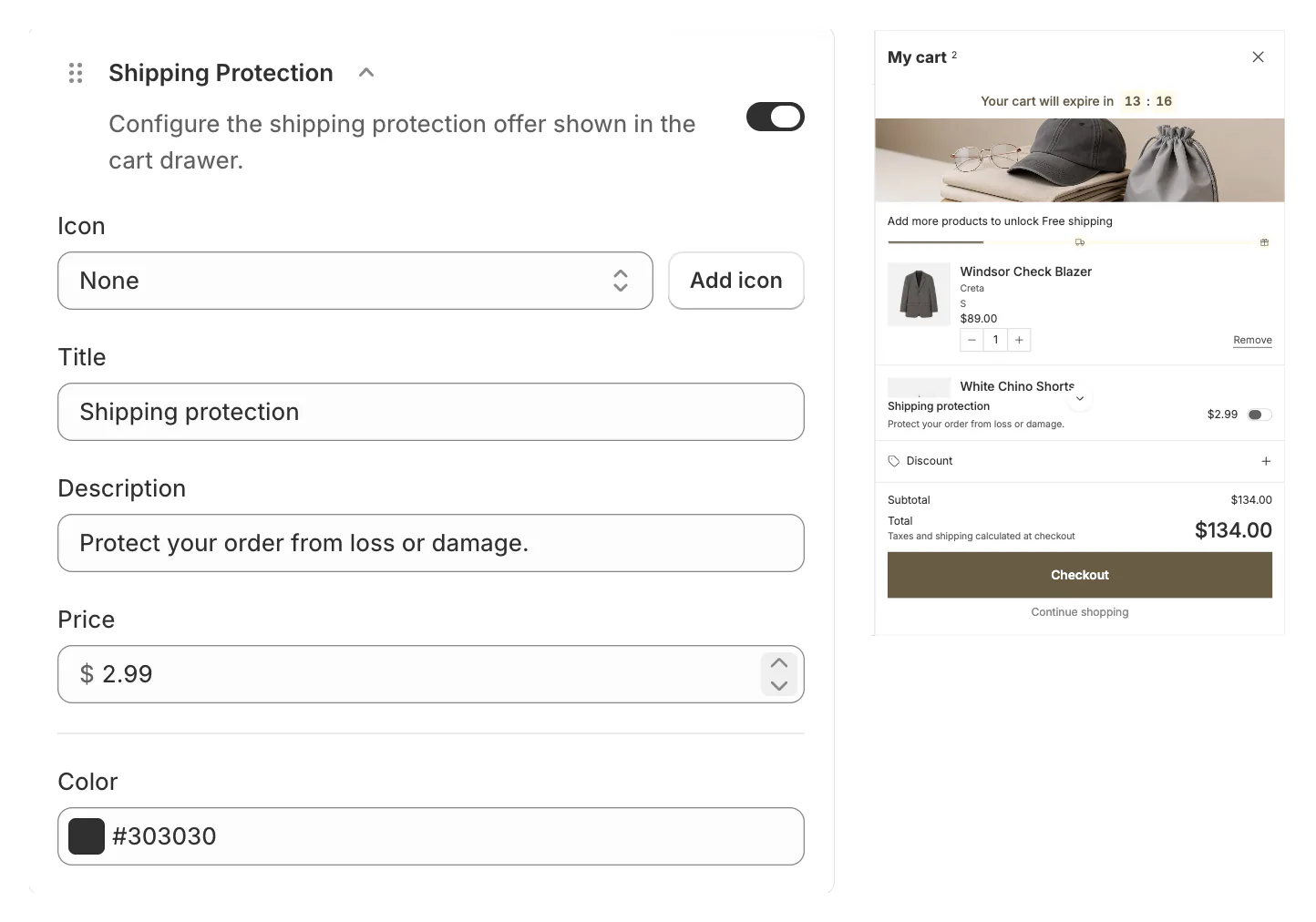
No insurer stands behind it, and there is no claims portal: when a parcel goes missing, you choose the refund or the reship. The row lives in the drawer only, so a shopper who checks out through a button that skips the drawer, such as Buy it now, never sees it. Switching the block off deletes the product; if you uninstall without switching it off first, the product stays in your Products list.
The Shipping Protection block comes with every Sledge plan, from $29.99 a month with a 14-day free trial. On a paid plan, Growth Intelligence counts your refunded orders and can flag your refund rate once it passes 5%.
FAQ
Questions, answered
-

14-day free trial
Explore Sledge on your store before you decide to commit.
-

No credit card required
Start improving your store with no upfront commitment.
-

Setup in minutes
Get Sledge running without a lengthy setup process.
-

Built to grow sales
Turn shopper behavior into actions that help you sell more.
Do I need shipping protection for my store?
Not always. If your orders are cheap, losses are rare, and your labels bought in Shopify carry up to $200 of insurance (Grow plan and up, with Shopify Payments, shipping from the US), you may never need it. It earns its place when parcels are valuable, fragile or headed where theft is common, and reshipping already eats your margin.
Is Route package protection worth it for a store?
It is worth it when you want claims off your desk. Route is free to install, shoppers pay the fee with their order, and Route handles covered claims. The fee goes to Route, and its $0 Standard plan names an incentive program without publishing its terms, so count on less support work rather than extra margin.
What is green shipping protection?
It is package protection with a carbon offset added in the same step, so the shopper covers loss, theft or damage and offsets the delivery's emissions at once. Corso's standalone green app is not currently available on the Shopify App Store; its main app lets shoppers add the offset when they add protection.
Can I pre-check the shipping protection box?
No. Since February 18, 2025, Shopify's App Store rules say apps can't add or pre-select optional charges that raise the checkout total, and must show the cost and get the shopper's consent first. Pre-checked protection fees have also drawn lawsuits in the US. Leave the toggle off and let shoppers switch it on.
Is shipping protection the same as shipping insurance?
Not exactly. Insurance is a policy from a licensed insurer, like the cover that comes with a shipping label. Shipping protection is a fee the shopper adds at the cart or checkout, and who stands behind it varies: a licensed program, an app that takes on the claims, or your own store paying every claim.
Watch your refund rate before it eats the margin.
Install free. On a paid plan, Growth Intelligence reads your orders and can flag a refund rate past 5%. One total, labeled "Est. potential", puts a dollar figure on what its suggested fixes could add each month.

