
To sell clothes online, choose where the clothes come from: you make them, buy them wholesale, use print on demand or resell them. Price each piece above everything it costs you. On Shopify, list each style once with Size and Color as options, add a size chart, shoot every piece the same way and set returns before launch.
Say 200 people a day open your new store and none of them buys. The few who reach a product page want to know which size to order, and the answer sits on a page they never find.
Should you sell clothes on a marketplace or your own store?
A marketplace suits clearing out your own closet, and your own store suits a brand you plan to grow. Resale marketplaces such as Poshmark, Depop and eBay bring buyers who already browse there. Your own Shopify store starts with no buyers, but the customer list, the prices and the look are yours.
Where will your clothes come from?
Pick one of four ways to get stock, by how much you can spend before the first sale.
| Source | How it works | The catch |
|---|---|---|
| Make your own | You design it and a maker sews it under your private label | Samples and a minimum run come before any sale |
| Buy wholesale | You buy finished pieces in bulk | Your cash sits in sizes that may not sell |
| Print on demand | A supplier prints each piece after an order | The supplier's price comes off every sale |
| Resell or vintage | You buy single pieces, used or deadstock | Every piece needs its own photos and listing |
You can also sell another brand's clothes. Shopify Collective lets you sell products from other Shopify stores, and Shopify's Help Center says you take on no inventory costs to start.
How do you price clothes so each sale makes money?
Add up what one piece costs you, then set a price that leaves a margin after shipping and returns. Say a hoodie costs you $20 and you sell it for $50. Type 20 under Cost, the price your supplier charges you, and Shopify shows the profit and a 60% profit margin next to it.
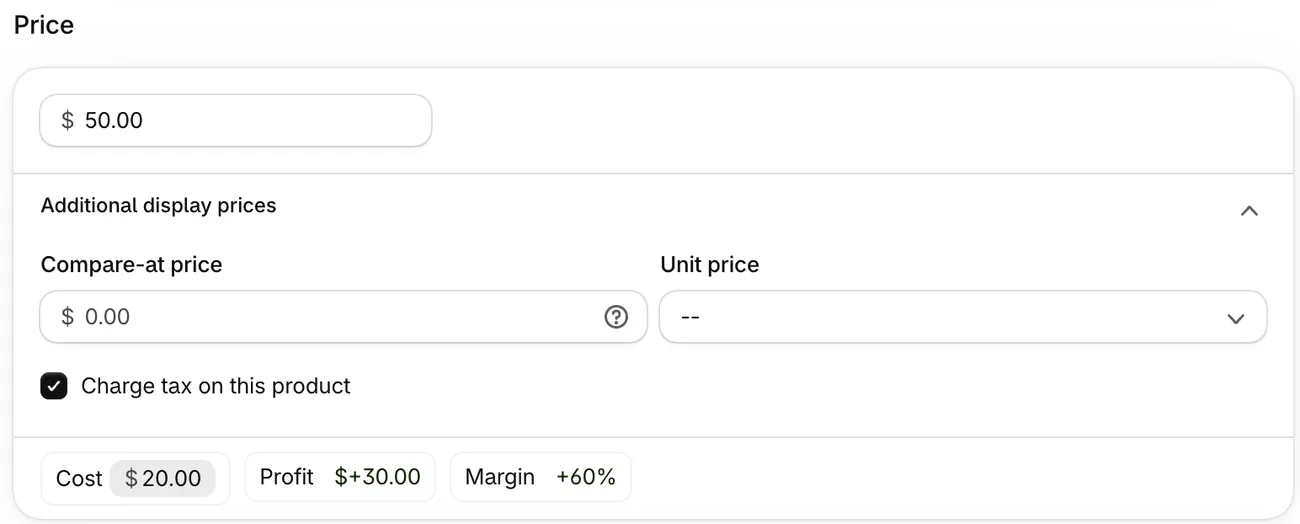
The same $30 on a $20 cost is a 150% markup, and markup vs margin explains why the two numbers differ. Shipping, packaging, card fees and the pieces that come back all come out of that $30. Once a style has sizes, each size gets its own Cost.
How do you add sizes and colors to a product on Shopify?
Add each style once, with Size and Color as options, and Shopify makes one variant for each combination.
- From your Shopify admin, go to Products and click the product.
- In the Variants section, click Add options like size or color.
- Type Size as the Option name and each size under Option values.
- Click Add another option and do the same for Color.
- Click Done, then Save.
Steps checked November 9, 2026, in the Shopify admin and against Shopify's Help Center.
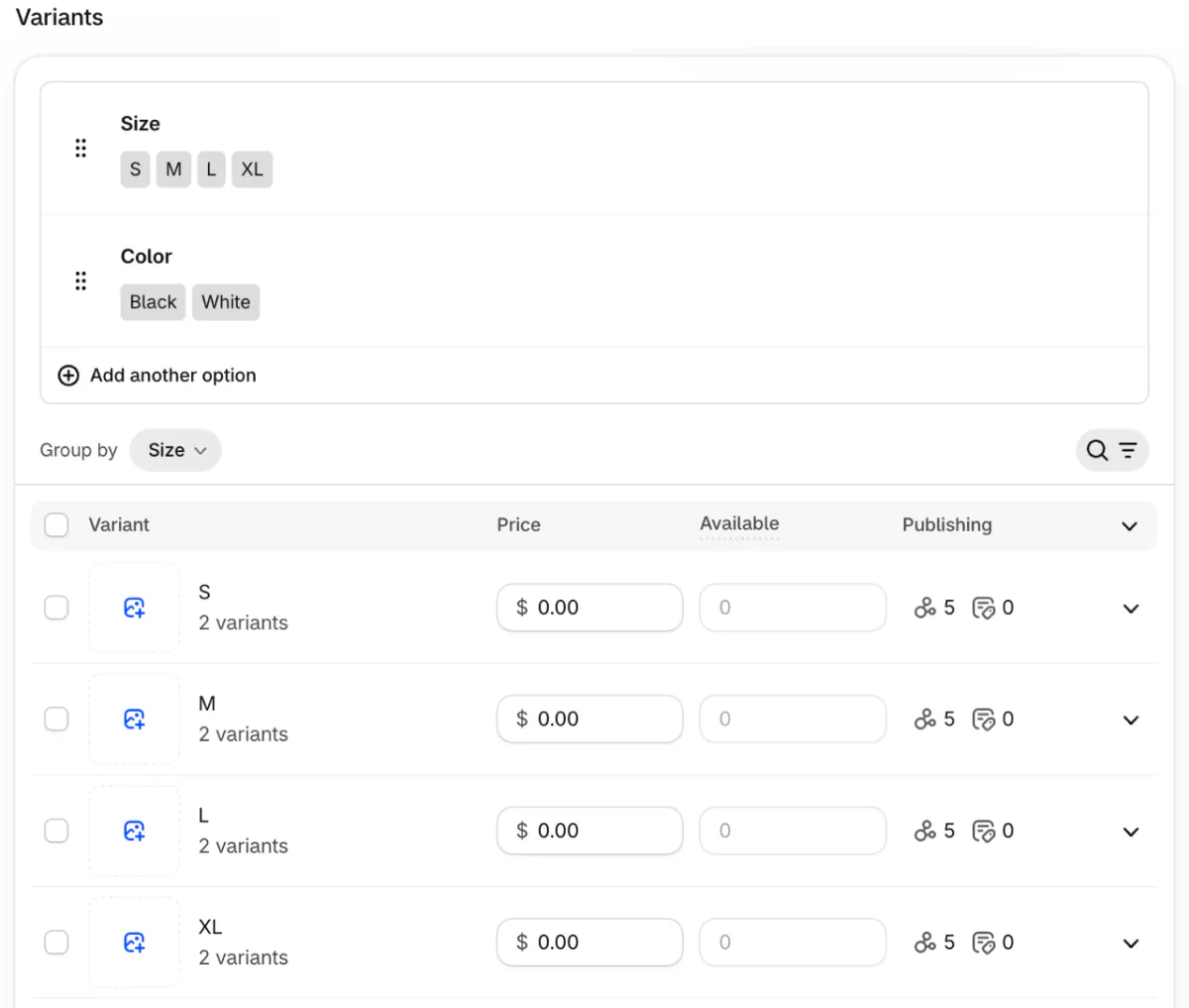
A shirt in five sizes and three colors makes 15 variants, each with its own stock. Shopify allows three options and 2,048 variants per product, and its Help Center warns that some themes and apps might not handle more than 100.
Give each product a category, such as Shirts under Apparel and Accessories. Shopify then offers ready-made fields for size, fabric, sleeve length and color, and filters can read them.
How do you add a size chart on Shopify?
Measure the garment itself, then put the chart next to the size picker. Size and fit led the reasons for online apparel returns in a 2023 Coresight Research survey, picked by 53% of the 100 decision-makers at US apparel brands and retailers it asked.
Lay each size flat and measure the chest, the length and the waist. One chart per fit is enough, so every slim shirt shares it.
Make each chart a page. Go to Online Store, then Pages, and click Add page. A new page can open set to Hidden, so check that Visibility reads Visible before you save.
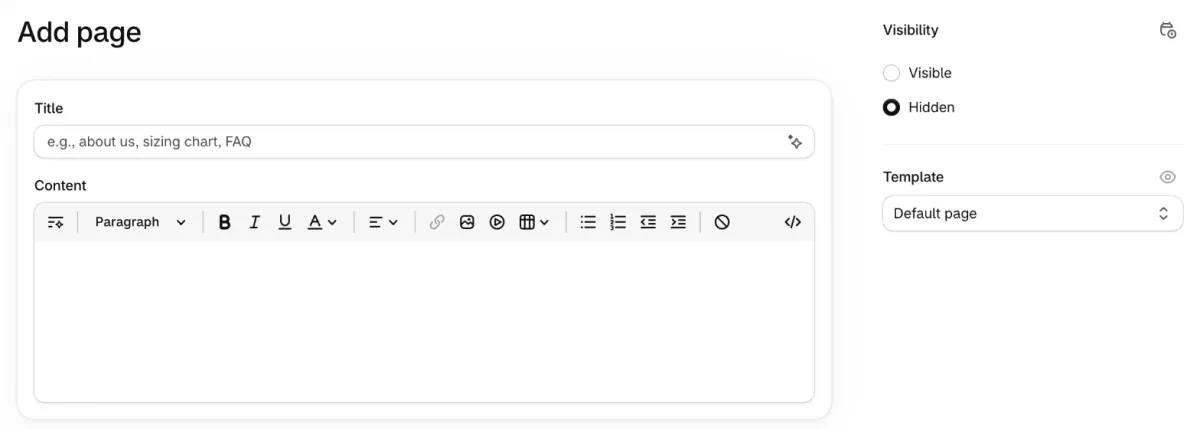
Then link the page beside the size picker with your theme's pop-up block, if it has one. Some of the best themes for clothing stores list a size chart among their features. For a chart that changes by product type, look at the apps for a clothing store.
How should you photograph clothes for your store?
Shoot every piece on the same background, in the same order, so the collection page reads as one store. Start with the piece alone on a plain background, then on a person, the back, a close-up of the fabric and the label. A 4:5 portrait frame keeps a whole outfit in view, as the Shopify product image size guide explains.
A product holds up to 250 photos and videos. Each variant can take one of them, so a color can show its own photo. To shoot at home or hire it out, see product photography.
How do shoppers find their size and color?
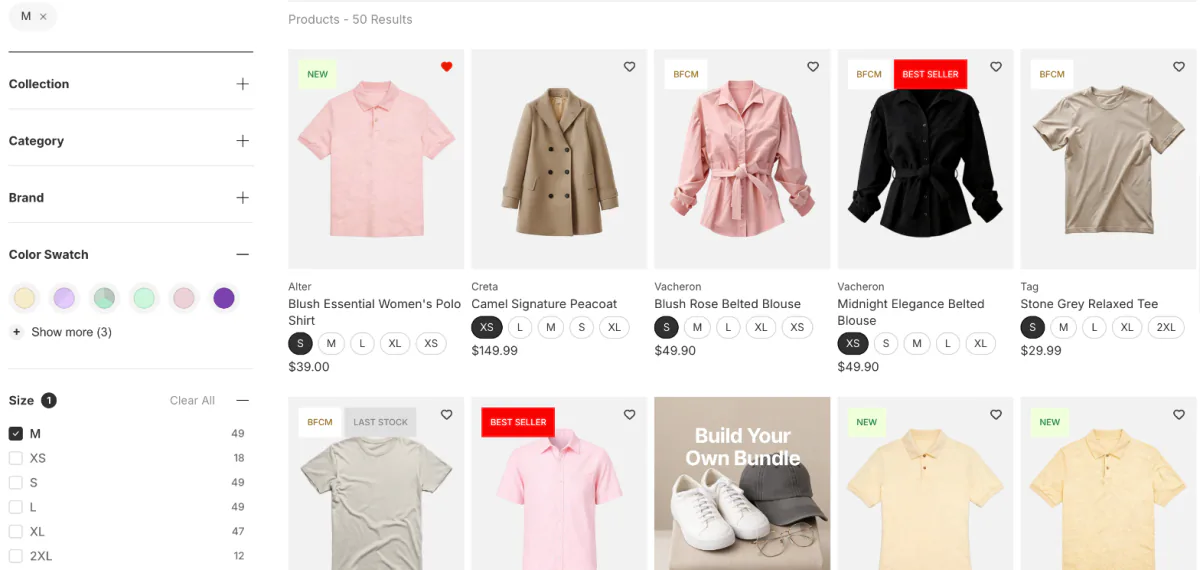
Filters by size and color let a shopper skip everything that won't fit. Shopify's free Search & Discovery app adds them to collection pages and search results. A filter named Size sorts XS before S on its own, and you can group Onyx, Ebony and Midnight under one Black. Shopify's Help Center says a collection of more than 5,000 products shows no filters.
Sledge is a Shopify search and filter app with a few more controls for clothing. Its Color Swatch tool turns color names into chips, and Merge Value folds near-duplicate names into one. In Display Settings, the switch Show out of stock variant filter items starts on. Turn it off, and ticking Size M leaves only the products with an M still in stock. The sold-out size guide covers that switch in full. Sledge filters are part of every paid plan, and Pro costs $29.99 a month once the 14-day free trial ends.
How do you handle returns and exchanges?
Write your return rules before the first order, and expect sizes to come back. For 2025, NRF and Happy Returns expected 19.3% of online sales to come back.
Shopify's self-serve returns let a shopper ask for a return from the order status page. That form takes no exchange requests, so when you approve the return, you add the new size yourself. Set the window, who pays return shipping and what is final sale in your return rules. The ecommerce returns guide covers the costs, and a refund policy template gives you the wording.
What do you set up before you launch?
Set your shipping rates, a way to take payment and a plan, then take the store out of private mode. A new Shopify store starts in private mode, so visitors see a password page instead of your clothes.
Start with Shopify shipping rates, then payments, such as Shop Pay. Pick a plan from Shopify pricing. When all three are in, go to Online Store and click Private. Select Public, then click Launch store, the button Shopify shows the first time.
Why does a new clothing store get visits but no sales?
A first-time shopper looks for four answers before paying a store they don't know.
- Who runs it: an About page, real photos, a contact address.
- What shipping costs, before checkout.
- Which size to order, beside the size picker.
- How to send it back, in a policy one click away.
Check the visits first. A store few people open needs shoppers before it needs any of these fixes. Once shoppers arrive, a store audit shows which of the four answers is missing.
FAQ
Questions, answered
-

14-day free trial
Explore Sledge on your store before you decide to commit.
-

No credit card required
Start improving your store with no upfront commitment.
-

Setup in minutes
Get Sledge running without a lengthy setup process.
-

Built to grow sales
Turn shopper behavior into actions that help you sell more.
Can I sell clothes online without buying stock?
Yes. With print on demand, a supplier prints each piece after it sells, so you buy no stock up front. Shopify Collective lets you sell another Shopify store's products without inventory costs. You still pay for samples, photos and your Shopify plan, and the supplier's price comes off every sale.
Is selling clothes online profitable?
It can be, if the margin survives shipping and returns. Say a $50 hoodie costs you $20: Shopify shows a 60% margin. Coresight Research estimated from a 2023 survey that 24.4% of US online apparel orders came back, so price for shipping, packaging and returns, not the product cost alone.
What is the best way to sell clothes online?
It depends on what you sell. A resale marketplace suits used pieces from your own closet, because buyers already browse there. Your own Shopify store suits a brand you want to grow, since the customer list, the prices and the look stay yours. Both need clear photos and honest measurements.
How do I add a size chart on Shopify?
Make the chart a page. In your Shopify admin, go to Online Store, then Pages, and click Add page. Title it Size chart, add a table of measurements per size, check that Visibility reads Visible and save. Then link that page beside the size picker, using your theme's pop-up block if it has one.
How do I price used clothes?
Add up what each piece cost you, including cleaning and the shipping to get it, then add the margin you want. Check what the same brand and condition sell for elsewhere before you list. A piece that sits unsold for weeks is often priced above what shoppers will pay for it.
Your sizes are in. Can shoppers find theirs?
Sledge doesn't make, photograph or ship your clothes. It's a Shopify app that filters your collections by size and color, with swatches and a size filter that can leave out sold-out sizes. Try it free for 14 days. Growth Intelligence turns on when you pick a paid plan, and its suggested fixes add up to one dollar figure, labeled Est. potential.

