
A product launch email sequence is four emails: a teaser about a week before, the launch email the minute the product goes live, a reminder to anyone who missed it, and a last call before a launch offer ends. Shopify Messaging, Shopify's own email app, sends 10,000 emails a month free on the Basic plan and up.
You haven't emailed your 3,000 subscribers since spring. On launch morning, the new jacket goes to all of them at once. Shopify warns that a big send after a long gap can be delayed, slowed or blocked, so part of your list sees the launch hours late, if at all.
What is a product launch email?
A product launch email tells your subscribers a new product is on sale and links straight to it. It is the second of the four emails in a launch sequence.
A launch sequence works when each email has one job and goes only to the people who still need it.
| When | Who gets it | Its one job | |
|---|---|---|---|
| Teaser | About a week before | Subscribers who opened or clicked in the last three months, then the rest | Set the date |
| Launch day | The minute the product goes live | Every subscriber, split into segments if Shopify asks | Bring the first orders |
| Reminder | Two or three days later | Subscribers who didn't open the launch email | Answer the main doubt |
| Last call | The offer's last evening | Subscribers who haven't bought it | Close the offer |
Skip the last call if no offer ends.
What should a product launch email say?
The first two lines say what the product is, what it costs and when it ships. These best practices keep the rest short.
- One product, one button. Shopify's Product section holds up to nine, but a launch needs one.
- A short subject line. Shopify suggests three to six words, or under 50 characters, so it fits a phone.
- Preview text that finishes the thought. It is the gray line after the subject in the inbox.
- A deadline only when it's real. Name an end date only if the discount or the pre-order closes then.
- Words for anything that matters. Some inboxes block pictures, so free shipping goes in the text, not only in the photo.
Product launch email templates you can copy
Each one is ready to paste: the subject line, the preview text, the words and the button label. Say you sell outerwear, and a $148 waxed cotton jacket, the Harbor, goes on sale Thursday at 9 am with free shipping through Sunday.
Email 1: the teaser
Send it about a week before, to subscribers who opened or clicked an email in the last three months. Point its button at a page of photos, because the product page isn't live yet.
- Subject: Something new lands Thursday
- Preview text: A first look at the jacket we spent the year on.
- Body: Hi [First name], our waxed cotton jacket goes on sale Thursday at 9 am. It keeps the rain out and still fits over a thick sweater. You'll get an email the minute it's live.
- Button: See the first photos
Email 2: the new product launch email
Send it the minute the product goes live, to every subscriber.
- Subject: It's here: the Harbor jacket
- Preview text: Free shipping on it through Sunday night.
- Body: The Harbor jacket is on sale now: $148, in olive, navy and black, sizes XS to XL. Orders through Sunday ship free, within two business days. Waxed cotton outside, flannel inside, two pockets that button shut.
- Button: Shop the Harbor jacket
Email 3: the reminder
Send it two or three days later, only to subscribers who didn't open Email 2.
- Subject: In case Thursday got away from you
- Preview text: The new jacket, and how to pick your size.
- Body: The Harbor jacket went on sale Thursday. It runs true to size with room for a sweater, so take your usual size. If the fit is off, swap sizes free within a month.
- Button: Find my size
Email 4: the last call
Send it on the offer's last evening, only to subscribers who haven't bought the jacket. To leave out buyers, make a segment in Customers, then Segments, that skips customers whose orders include the jacket. Add a Countdown section, Shopify's timer for emails, set to end at midnight.
- Subject: Free shipping on the jacket ends tonight
- Preview text: After midnight, the jacket ships at the usual rate.
- Body: One last note on the launch. Free shipping on the Harbor jacket ends tonight at midnight. After that it stays in the shop at the usual shipping rate.
- Button: Order with free shipping
Create the free shipping discount before you write Email 2, and end it Sunday at midnight, so the email and the checkout agree.
20 product launch email subject lines
These 20 product launch email subject lines come in four groups of five, one group for each email of the sequence. Add [First name] with Personalize, beside the subject line, and enter a Default value, because Shopify leaves the space blank for anyone without a name on file. Swap the jacket for your product.
| Subject line | Send it as | Note |
|---|---|---|
| Something new lands Thursday | Teaser, email 1 | Use your real launch day |
| A first look, a week early | Teaser, email 1 | One photo in the body |
| Mark Thursday, [First name] | Teaser, email 1 | Set a default value |
| We've kept this quiet since spring | Teaser, email 1 | Only if it's true |
| Coming Thursday: a jacket for rainy mornings | Teaser, email 1 | Clothing; swap in your product |
| It's here: the Harbor jacket | Launch day, email 2 | Name your product |
| On sale now, [First name] | Launch day, email 2 | Set a default value |
| The new jacket is live | Launch day, email 2 | Send after the product publishes |
| Out today, in three colors | Launch day, email 2 | Your real color count |
| Launch day: free shipping through Sunday | Launch day, email 2 | Only with a real end date |
| In case Thursday got away from you | Reminder, email 3 | Non-openers only |
| How to pick your size in the new jacket | Reminder, email 3 | Answer the question you get most |
| Three ways to wear the Harbor jacket | Reminder, email 3 | One photo per way |
| Your questions about the jacket, answered | Reminder, email 3 | Three answers in the body |
| Missed Thursday's email? Here it is | Reminder, email 3 | Non-openers only |
| Free shipping on the jacket ends tonight | Last call, email 4 | Matches Email 4 |
| Launch week ends at midnight | Last call, email 4 | Say what ends in the preview text |
| Last email about the new jacket | Last call, email 4 | Then really stop |
| Final hours for launch-week shipping | Last call, email 4 | Only with a real end time |
| Pre-orders close Friday at noon | Last call, email 4 | Only on a pre-order with a close date |
Written for this page, November 2026. Shopify settings checked November 5, 2026.
How do you send a product launch email from Shopify?
Shopify can publish the product and send the email at the same minute, so nothing needs pressing on launch morning.
Open Products, then the new product, and set its status to Active. In the Publishing card, click the settings icon to open Manage publishing, point at Online Store and click the calendar that appears. In the Schedule publishing picker, choose the launch date and time, click Done, then Save. A product still in Draft at that time stays hidden. The picker shows your store's time zone beside the time. You change the time zone under Settings, then General.
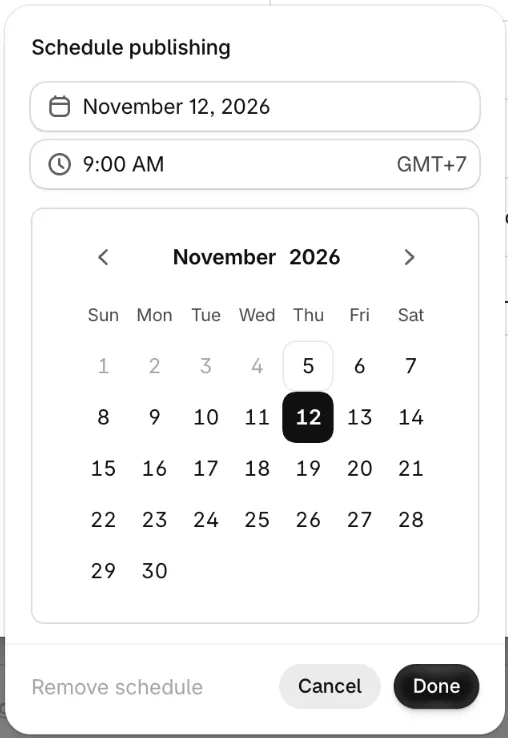
Then go to Apps, then Messaging, click Create message and pick a template. Choose All subscribers or a segment in the To line, and add the subject and preview text. In the Product section, choose Static, the option where you pick the products yourself, and pick the jacket. Dynamic fills itself with your best sellers or newest products at send time.
Click Send test for up to five addresses and tap every link. Then click Review, then Schedule send, and pick Custom date and time for the minute the product goes live. Shopify's Suggested time is chosen to get the most clicks, and it may fall before your launch.
Each calendar month, 10,000 emails are free, shared by every campaign and automation except abandoned checkout emails, which never count. After that, Shopify charges $1 for every 1,000. Four emails to all 3,000 subscribers is 12,000 sends, so the launch costs $2 at most if nothing else went out that month. During a Shopify free trial, only test emails go out, and only to you.
Shopify's recommended series, ready-made sets of emails for occasions such as Black Friday, always go to every subscriber. A launch gives each email its own audience, so it runs as four campaigns you schedule yourself.
Why does a launch email arrive late or land in spam?
Launch day is often your biggest send, and mail providers slow down a sender whose volume suddenly jumps. Shopify warns that five times your usual volume in one day, or a big campaign after a long gap, can hold mail up for hours or days, or stop it arriving.
Shopify also sets a safe send limit for your store, a cap on how much you can send in a day or a week. Near that limit, a banner on the review page warns you. Send to one segment first, then duplicate the email for the next.
The teaser can start the warm-up. Send it first to your most engaged subscribers, the ones who opened or clicked an email in the last three months. Shopify suggests growing your volume by 20 to 30% a week, so a list that went quiet needs a few weeks of smaller sends before launch day.
If your emails come from your own domain, authenticate it in Shopify at least two days before launch, because Shopify says the check can take up to 48 hours. Keep spam complaints under 0.1%, as Shopify asks, since Gmail and Yahoo enforce a limit of 0.3%. After the send, each email's report shows its Delivery rate and Bounce rate.
What if the new product sells out on launch day?
A sold-out launch can keep taking orders, as long as shoppers know when the product ships. Shopify's "Continue selling when out of stock", the setting that keeps a product on sale at zero stock, tells shoppers nothing about the ship date.
Sledge is a Shopify app whose pre-order keeps a sold-out product taking orders. A note you type under Pre order note, such as the week it ships, shows in the cart, at checkout and in the order email (how to set it up).
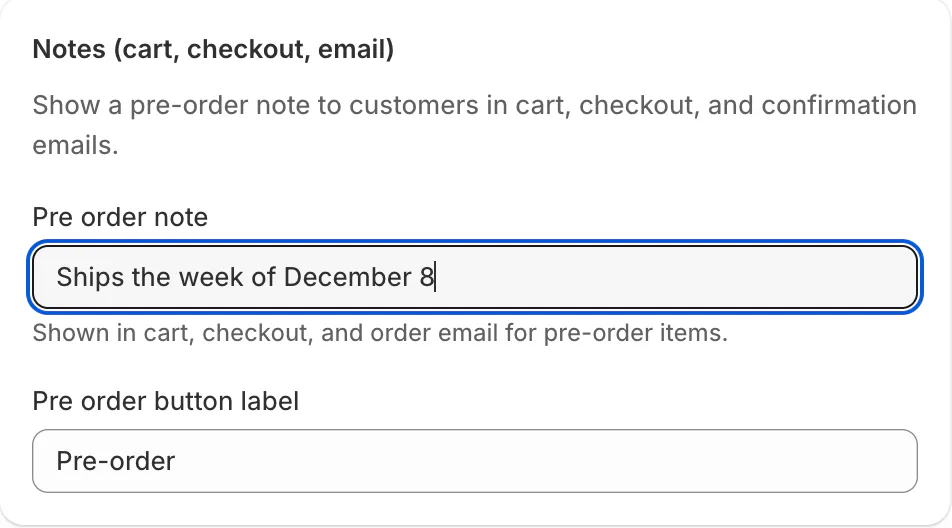
Then reword the reminder and the last call to say pre-order, and leave out buyers with the segment from Email 4.
For other moments, send an abandoned cart email to shoppers who leave, and a post-purchase flow and a review request after an order.
FAQ
Questions, answered
-

14-day free trial
Explore Sledge on your store before you decide to commit.
-

No credit card required
Start improving your store with no upfront commitment.
-

Setup in minutes
Get Sledge running without a lengthy setup process.
-

Built to grow sales
Turn shopper behavior into actions that help you sell more.
How many emails should a product launch sequence have?
Plan on four: a teaser about a week before, the launch email when the product goes live, a reminder two or three days later and a last call before the offer ends. Skip the last call if no offer ends. On Shopify Messaging, four emails to all 3,000 subscribers is 12,000 sends at most, $2 past the free 10,000.
When should you send a product launch email?
Send it the minute the product goes live, or a few minutes after. Sent earlier, its button leads to a page that isn't live yet. In Shopify, schedule the product's publishing and the email for the same time, and check the time zone under Settings, then General. Send the teaser about a week before, to your most engaged subscribers first.
How do I give email subscribers early access to a new product?
The plain route in Shopify is to publish the product an hour early, keep it out of your menus and email the link to subscribers. Anyone with the link can buy, and shoppers browsing or searching your store may find it, so keep the window short. Private mode with a password hides your whole store, not one product.
How do you build an email list before a product launch?
Put a sign-up form where your teaser posts and ads point. Shopify Forms, Shopify's free form app, can sit on a coming-soon page, and each form can become its own customer segment, so the launch email reaches exactly the people who asked. Also add the sign-up checkbox at checkout by ticking Email under Marketing opt-in, in Settings, then Checkout.
Does Sledge send product launch emails?
No. Sledge sends no launch or marketing emails, so send the sequence from Shopify Messaging or your email app. Sledge helps on the product page: its pre-order keeps a sold-out launch taking orders, with your note in the cart, at checkout and in the order email. On paid plans, Growth Intelligence totals what its fixes could add as Est. potential.
Sold out by Friday? Keep Saturday's orders.
Try Sledge free for 14 days and open a pre-order on your new product, so a sold-out launch keeps taking orders with your ship-date note in the cart. Growth Intelligence turns on when you pick a paid plan, and it totals what its fixes could add in one dollar figure, labeled "Est. potential".

