
A customer service email template is a reply you write once and reuse for the emails every store gets: where is my order, a late parcel, a wrong item, a refund. Here are 10 to copy, each with a subject line and, where it helps, the matching step in Shopify.
Monday's inbox holds 23 emails. Nine ask where an order is, and four of those give no order number. Two parcels arrived broken. You answer each one from a blank page, and by noon you've typed the same tracking reply nine times.
What should a customer service email include?
A good customer service email answers the question in its first line, names the order, gives one next step with a date, and comes from a person.
- A subject that carries the answer. "Order #1042 ships Friday", not "Re: your inquiry".
- The order number, so nobody looks it up twice.
- The answer first, and the reason after it.
- One next step, with a date you control.
- Your first name and a reply address someone reads.
Shopify sends the order confirmation, shipping updates and refund email by itself: see the post-purchase email flow. The templates below are the replies only you can write. A review ask has its own review request templates.
Customer service email templates for the emails you get every week
Fill the brackets, then save each reply where you answer from. Numbers 9 and 10 are for tough situations: refusing a return, and apologizing.
1. Where is my order?
Use it when the order has shipped with a tracking number.
- Subject: Order [#1042]: where it is right now
- Body: Hi [first name], your order left us on [date] with [carrier], and its last scan was in [city]. The carrier expects it by [date]. Follow it here: [tracking link]. If it hasn't reached you by [date], write back and I'll chase the carrier for you.
Shopify's shipping confirmation carries the tracking number, and the order status page links to the carrier. Two shipments mean two confirmations, so name both parcels.
2. The order number is missing
Use it when someone writes about "my order" with nothing to find it by.
- Subject: Help me find your order
- Body: Hi [first name], I couldn't find an order under this email address. Could you send the order number from your confirmation email, or the name and email you used at checkout? I'll answer within a working day of hearing back.
3. Shipping delay
Send it the day you know the date will slip, before the customer asks.
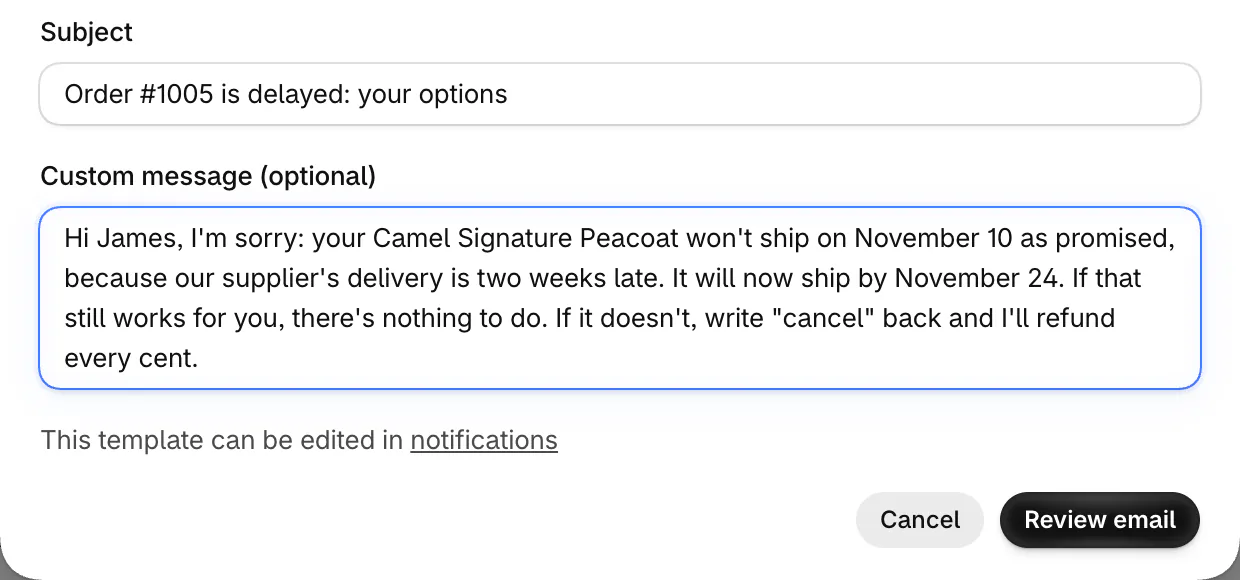
- Subject: Order [#1042] is delayed: your options
- Body: Hi [first name], I'm sorry: your [product] won't ship on [date] as promised, because [our supplier's delivery is two weeks late]. It will now ship by [new date]. If that still works for you, there's nothing to do. If it doesn't, write "cancel" back and I'll refund every cent.
In the US, the FTC's mail order rule asks for this notice: the new date, and the choice to cancel for a full refund. If the new date falls within 30 days of the old one, silence counts as agreeing. With no new date, or one more than 30 days later, silence means you cancel and refund, so ask them to reply if they'll wait. Details are in the FTC's business guide, and this isn't legal advice. For ship dates set before the sale, see notify me or pre-order.
4. Sold out after the order
Use it when an order came in for stock you no longer had.
- Subject: About the [product] in order [#1042]
- Body: Hi [first name], the [product] in [size] sold out before we packed your order. I apologize. Everything else in your order ships today. For the [product], reply with what suits you: 1, wait for our restock on [date]; 2, swap it for [another size or product]; 3, a refund of [$amount] for that item.
Open the order, click Edit and remove the item: the order shows whether you owe a refund. Then check the product's "Continue selling when out of stock", which lets orders through at zero stock.
5. Wrong item sent
Use it when you packed the wrong size, color or product.
- Subject: The right [product] ships today
- Body: Hi [first name], you ordered [the medium in navy] and we sent [the large in black]. We packed the wrong one, and I apologize. The right one ships today, free, with tracking by email. [Keep the wrong one, or] send it back with the prepaid label attached.
You can create the return label in your admin when the customer and one of your locations share a country, the United States or Canada.
6. Damaged item
Use it when a parcel arrives broken.
- Subject: Your [product] arrived damaged: here's the fix
- Body: Hi [first name], I'm sorry your [product] arrived broken. Could you send two photos, one of the item and one of the box? Then pick what you'd like: a replacement, sent within [two working days], or a full refund.
The photos back a carrier claim and help you spot a false report: see what to check before you refund. If breakage repeats, weigh whether shipping protection is worth it.
7. Cancel or change an order
Answer these first: an order can ship while the email waits.
- Subject: Your change to order [#1042]
- Body, not shipped yet: Hi [first name], done: I've [canceled your order / changed the size to medium / updated the address]. [Your refund of $amount is on its way to your card.] Nothing else is needed from you.
- Body, already shipped: Hi [first name], your order shipped [this morning], so I can't change it now. When it arrives, you can return it within [30 days] for a refund: [how to start a return].
Edit changes only unfulfilled items. To cancel a paid order with nothing fulfilled, click More actions, then Cancel order. Shopify refunds the original payment unless you pick store credit or Refund later.
8. Refund on its way
This refund email template answers "where is my money?"
- Subject: Your [$amount] refund: when it lands
- Body: Hi [first name], I refunded [$amount] to your card ending [last four digits] on [date]. Banks often take several days to show it, and some take 10 business days. If it hasn't appeared by [date], reply and I'll pass on the reference number your bank can trace it with.
Shopify emails the customer when you refund, unless you untick "Send a notification to the customer", so send this one when they ask. With Shopify Payments, a refund stays Pending for up to 2 business days, and it can take up to 10 business days to reach the customer. For Visa and Mastercard, the reference number is the Acquirer Reference Number, under the refund details in the order's timeline.
9. Return refused
Use it when a return request falls outside your policy.
- Subject: About returning your [product]
- Body: Hi [first name], thanks for asking first. Our returns close [30 days] after delivery, and your [product] arrived on [date], so I can't take it back for a refund. I can offer [an exchange / store credit / a repair] instead, if that helps. Our full policy is here: [link].
In Shopify's return requests, click Review request, then Decline, and pick a "Decline reason", which the customer never sees. Paste the body into "Message to customer", the note Shopify emails them. In the EU, a buyer can cancel most online purchases within 14 days of delivery, no reason given, whatever your policy says. This isn't legal advice. For the policy itself, start from the refund policy template.
Written for this page, November 2026. Shopify settings checked November 5, 2026.
How do you write an apology email to a customer?
An apology email to a customer names the mistake in its first line, says sorry once, shows the fix already made and gives something back in proportion.
- Name the mistake. "We sent your order to an old address", not "any inconvenience".
- Say sorry once, with no "if". "Sorry if you were upset" blames the customer.
- Lead with what you've done, then what happens next and when.
- Size the gesture to the mistake: refund the shipping on a late parcel, or add a discount code for a second slip.
- Sign with your own name.
10. A sample apology email to a customer
Use it when the mistake was yours and the customer noticed.
- Subject: We got your order wrong, [first name], and I'm sorry
- Body: Hi [first name], we [sent your order to an old address / left your email unanswered for eight days], and that's on us. I'm sorry. Here's what I've done: [a new parcel left this morning by express, tracking below]. To set it right, [I've refunded your shipping / here's 15% off your next order with the code SORRY15]. If something else is off, answer this email: it lands with me, not a queue. [Your name], [store name]
More subject lines:
- For bad service: You waited too long for an answer. I'm sorry.
- For a late parcel: Your parcel is running late: what I've done
A public bad review needs its own answer: how to respond to negative reviews.
Where should you send customer service emails from?
Contact form messages arrive at the address under "Sender email", in Settings, then Notifications, so that inbox is where most replies start. Shopify also uses it as the From address on your store's emails.
Your email inbox. Save each template in your email app. Keep "no-reply" out of the address, since some email hosts reject it.
Your Shopify admin, for a reply sent as your store. Go to Customers, click the customer, then their email address under "Contact information" to open "Contact customer". Paste a template into "Custom message (optional)", the box for your own words. Click "Review email", then "Send notification".
Shopify Inbox, for chat on your store. It's free, and you answer from your desktop or phone. In Inbox, go to Settings, then "Quick replies", and give each template a one-word shortcut that fills in the whole reply.
A helpdesk, once two people answer or messages pile up across email, chat and social. You get a shared inbox and saved replies, and many show the customer's Shopify orders beside each message. Compare helpdesks or chat apps.
FAQ
Questions, answered
-

14-day free trial
Explore Sledge on your store before you decide to commit.
-

No credit card required
Start improving your store with no upfront commitment.
-

Setup in minutes
Get Sledge running without a lengthy setup process.
-

Built to grow sales
Turn shopper behavior into actions that help you sell more.
What is a customer service email template?
A customer service email template is a saved reply to a question customers ask often, such as where an order is or how to return it. You fill in the order details, adjust a line for the person, and send. Replies go out faster, every customer hears the same policy, and nobody starts from a blank page.
How do you write an apology email to a customer?
Name the mistake in the first line, say sorry once without an “if”, and say what you have already done to fix it. Give the next step with a date you control. Match any gesture to the mistake, such as refunding shipping on a late parcel. Sign with your own name, so the customer knows a person reads their reply.
How do you reply to a customer from Shopify?
Open Customers in your Shopify admin, click the customer, then click their email address under Contact information. Write your reply in Custom message (optional), tick your own address under Send bcc to for a copy, click Review email, then Send notification. It goes out as one of your store's notifications.
Can you email every customer whose order is late at once?
Not with Shopify Messaging alone. Its campaigns reach only customers subscribed to marketing, so buyers who never subscribed miss the notice. For a few orders, send each one from the customer's page in your admin. For dozens, an app that picks recipients from your orders, not your marketing list, can email all of them at once.
Where do contact form messages go on Shopify?
To your Sender email, the customer-facing address under Settings, then Notifications. Shopify uses it as the From address on your store's emails and delivers contact form messages there. If messages stop arriving, check that address first, then your spam folder. Avoid an address with “no-reply” in it, since some email hosts reject those.
How many of these emails end in a refund?
Sledge is a Shopify app for search, filters, offers and the cart, and it sends none of these replies. Growth Intelligence turns on when you pick a paid plan. It counts your refunded orders, can flag a refund rate above 5%, and totals what its fixes could add in one dollar figure, labeled "Est. potential". Try Sledge free for 14 days.

