
Last week 2,000 people visited your store and 30 bought, and your sales report says nothing about the other 1,970. Customer behavior analytics shows what those 1,970 did: where their visits stopped, which searches found nothing, and which carts never became orders.
Shopify already counts four of the five patterns worth watching, free on every plan. The fifth, which filters shoppers use, isn't in its standard reports.
What is customer behavior analytics?
Customer behavior analytics means reading what shoppers do in your store, counted across many visits: the pages they open, what they search for, the filters they tick, what goes in the cart, and whether they come back.
It is not customer analytics, which looks at who buys: lifetime spend, cohorts and Shopify's RFM report. Nor is it one visit. To open a single visit step by step, see the Shopify customer journey.
One shopper leaving tells you nothing; 400 leaving at the same step tells you where to work.
Which shopper behaviors cost a Shopify store the most sales?
Five patterns are worth watching first, because each one points at a page you can change.
| Pattern | What it usually means | Where to see it free |
|---|---|---|
| Where visits stop | Many shoppers leave at the same step or page | Conversion rate breakdown, Sessions by landing page |
| Searches that find nothing | Shoppers use words your products don't, or want what you don't stock | Searches with no results, Searches with no clicks |
| Which filters shoppers use | A filter value with no products, or one people leave after | Not in Shopify's standard reports |
| Add to cart, no order | A surprise cost at checkout, or a shopper just browsing | Conversion rate breakdown, Live View |
| Return visits and repeat buyers | First buyers who don't come back for a second order | Returning customers, Customer cohort analysis, RFM customer analysis |
Carts come with a benchmark. Baymard Institute puts the average documented cart abandonment rate at 70.22%, from 50 studies. In its survey of US online shoppers, 42% left because they were just browsing. Set that group aside, and extra costs such as shipping, tax and fees top the list at 40%.
The pattern to fix first is the one with the most visits behind it.
What does Shopify Analytics show about customer behavior?
A free set of reports, on every plan: open Analytics, then Reports, and pick the Behavior category.
- Conversion rate breakdown: a four-step funnel from All sessions to Sessions that completed checkout. With Open Funnel switched off, hover a step to see the share of sessions that dropped off there.
- Searches with no results and Searches with no clicks: each term shoppers typed, with the number of sessions that searched it.
- Sessions by landing page and by device: where visits start, and on what.
- Live View: its Customer behavior card counts Active carts, Checking out and Purchased over the last 10 minutes.
- Customers reports: Returning customers, Customer cohort analysis, and RFM customer analysis, which sorts buyers into 11 groups.
An order's Conversion summary shows that buyer's visits in the last 30 days, but it covers buyers only. Sidekick, Shopify's assistant, answers questions about sessions, such as your conversion rate, but not about searches.
Open Conversion rate breakdown first: the step with the biggest drop is where to look.
Where do Shopify's own reports stop?
- The search drop-down: search reports cover the search results page. What shoppers do in the suggestions under the search bar isn't included.
- The delay: search reports run up to 72 hours behind.
- Filters: Shopify's standard reports don't include one for filter use, so a filter that leads to an empty page stays hidden.
- Exit pages: the Behavior reports list where visits start, and none lists where they end.
- The September 2026 change: from September 21 to 23, 2026, Shopify changed how it counts sessions, and it now filters out known bots. Orders and sales are counted as before, and Shopify says to treat the new numbers as a fresh starting point.
Shopify's reports tell you what happened, and none of them says what to change.
Which customer behavior analytics tools work with Shopify?
Start with Shopify's reports plus Google Analytics, then add recording software, or an app that counts searches and filters, when one question needs it.
| Tool | What it counts | Price | Where it stops |
|---|---|---|---|
| Shopify Analytics | The funnel to checkout, failed searches, landing pages, returning customers | Included in every plan | No drop-down searches, no filter report, search data up to 72 hours late |
| Google Analytics 4 | Where visitors came from, path and funnel explorations, site searches, scroll depth | Free, through the free-to-install Google & YouTube app | Numbers rarely match Shopify's; records nothing while your store is behind its password page |
| Microsoft Clarity | Heatmaps, session recordings, conversion funnels | Free Forever, with no traffic limit | One visit at a time, so hours of watching |
| Lucky Orange | Recordings, heatmaps, funnels, checkout drop-off by step, surveys | Free up to 100 sessions a month, then $19, $39 or $89 a month on its App Store listing | Plans capped by sessions; its own website lists different prices |
| Hotjar | Heatmaps, recordings, feedback widgets | hotjar.com's pricing page now opens Contentsquare's, which lists a free plan and paid plans from $39 a month beside a struck-out $49 | No app of its own in the Shopify App Store |
| Sledge Analytics | Searches that found nothing, the filters shoppers apply, patterns named in plain words | Pro $29.99 to Ultimate $399 a month, 14-day free trial | No heatmaps or recordings; can't say which ad paid off; counts only while Sledge runs in your store |
Prices as of October 2026. Expect Shopify and Google to disagree: they define a session differently, Google misses visitors whose browsers block it, and their time zones can differ. Compare each tool with itself over time, never with another tool.
Do you need heatmaps and session recordings?
Only for a layout question on a few key pages: does anyone reach the size chart, and does the menu get used? Recordings also earn their place when the numbers point at a page and you can't see why, such as a Shop Now button that loops back to the homepage.
On a small store they make a slow first step. Each recording is one visit, so you can watch all afternoon and still not know why people leave. Count the pattern in your reports first, then watch a few visits that show it. Microsoft Clarity records them for free.
How do you run a customer behavior analysis in five steps?
Shopify's free reports are enough.
- Pick one question, such as "why don't product page visits turn into carts?"
- Open Analytics, then Reports, then Conversion rate breakdown, and find the step with the biggest drop.
- Open Searches with no results and Searches with no clicks to see what shoppers looked for and didn't find.
- Change one thing on the page behind the biggest drop.
- Compare the same number of days before and after, in the same report, with both periods after September 23, 2026, when Shopify's session change finished.
Change one thing at a time, or you won't know which change moved the number.
What should you change when a pattern shows up?
Treat each change as a first guess, and check it with step 5's before-and-after comparison.
| Pattern | What to change |
|---|---|
| A search finds nothing | Add a search synonym so the word finds your product, or stock what people ask for |
| A filter shows no products, or shoppers leave after it | Hide or restock the empty value, and open the filtered page to see what it shows |
| Viewed often, rarely added to cart | Check the price, the photos and the stock |
| Shoppers switch sizes, then leave | Look for sold-out sizes, and offer a back-in-stock alert (in Sledge, Accelerate plan and up) |
| Carts that never become orders | Show the shipping cost before checkout, allow guest checkout, and add trust signals to the cart |
| Just short of free shipping | Check the threshold against your average order, and show the gap with a free-shipping bar |
| Mobile buys less | Open your product page on a phone and buy something |
| Fewer repeat buyers | Send a follow-up email after the first order |
For search, the full routine is in how to find and fix zero-result searches.
How does Sledge turn a pattern into a fix?
Sledge is a Shopify app for search, filters and offers. Its Analytics counts what Shopify's standard reports leave out: which filters shoppers apply, and what they type into the drop-down under the search bar. Each search that found nothing comes with the closest match in your catalog and an action, Add synonym or Consider stocking.
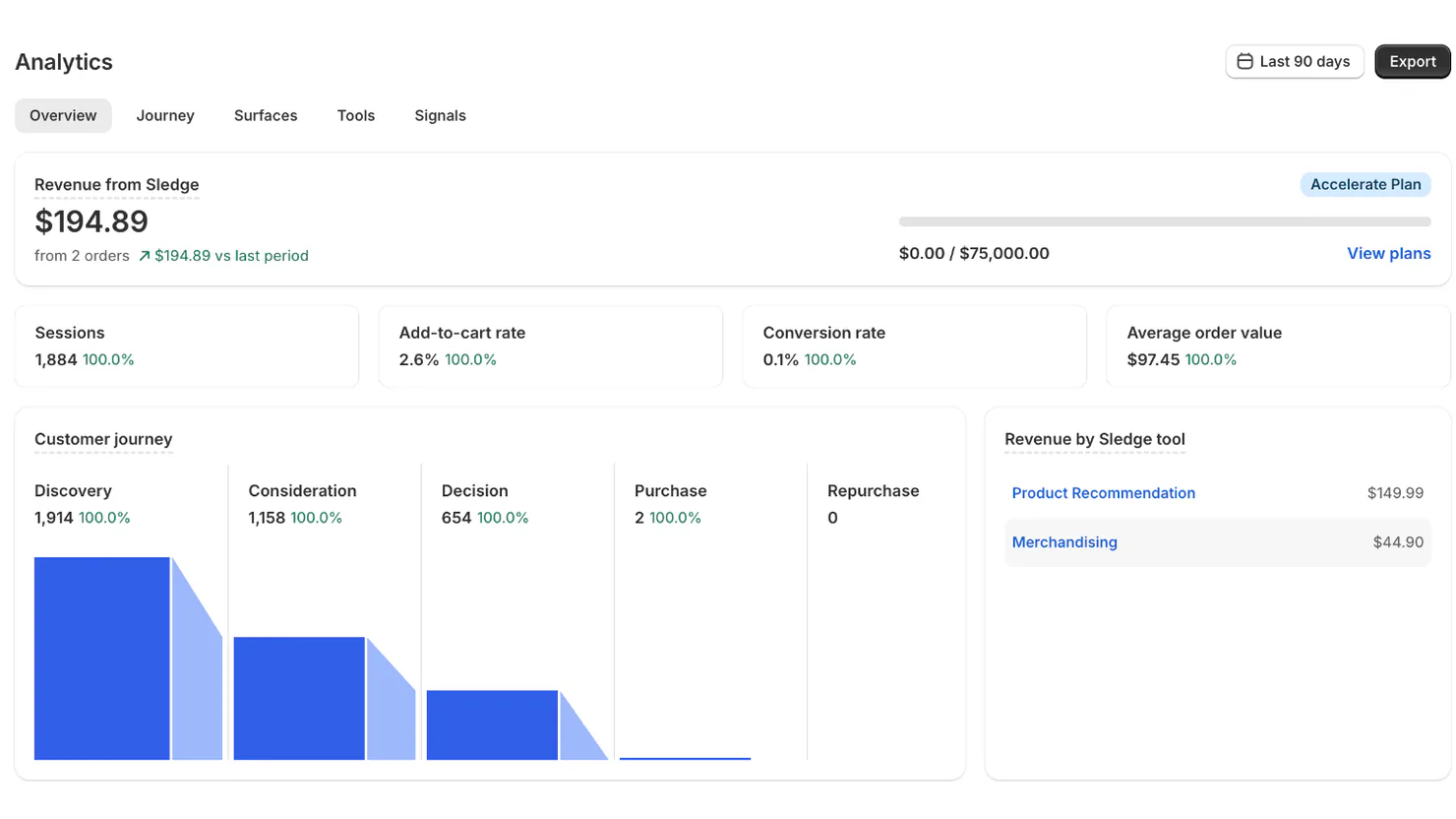
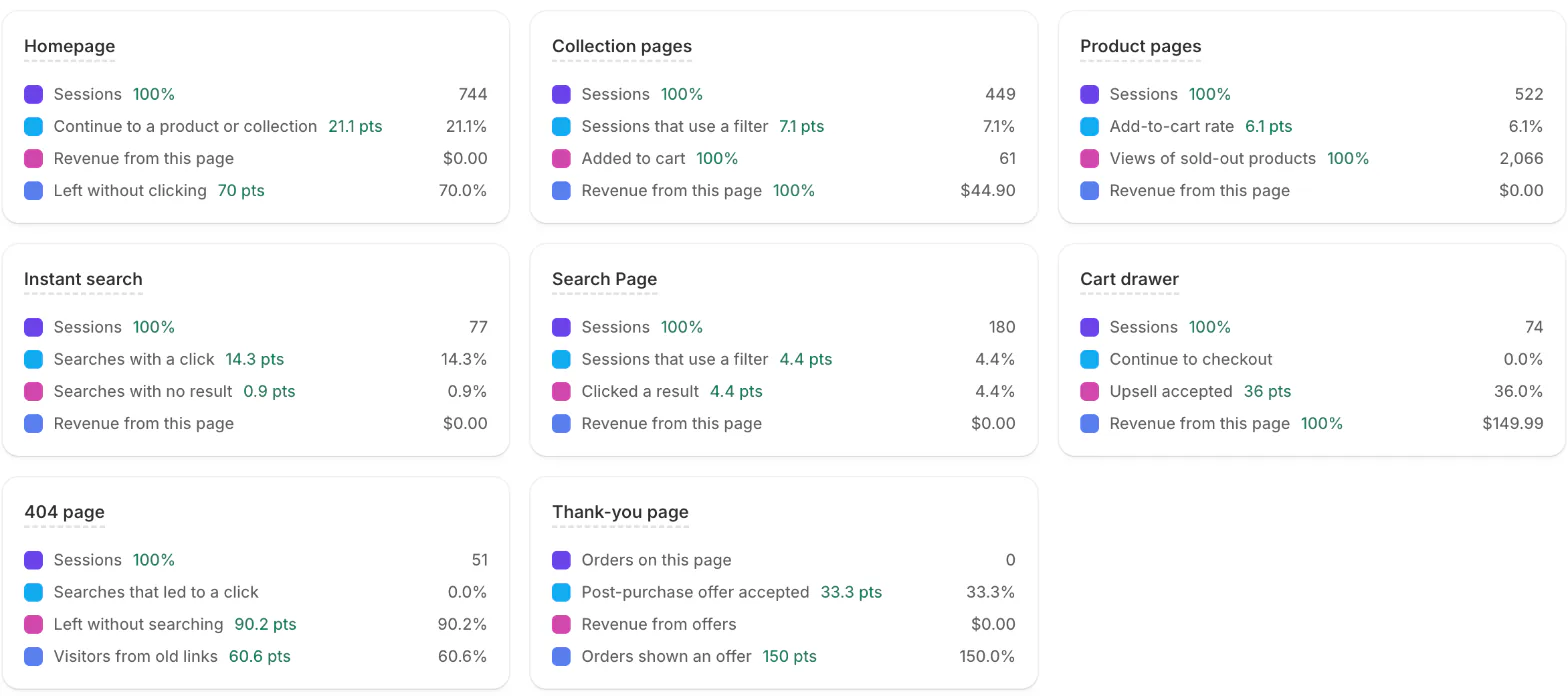
The Signals tab turns those counts into sentences twice a day, on every plan, the free trial included. Each row gives the pattern, the numbers and what to look at, and most carry a button to the fix: "Filter people leave after" comes with Review filters. A search gets its own row once it has found nothing five times in a week.

On paid plans, Growth Intelligence ranks the fixes. It reads what sold, what shoppers searched and filtered, and what they left in carts, then tags each fix with a priority, such as High or Medium. What the fixes could add each month shows as one Est. potential total, rounded and in your currency: $1,240 reads +$1.2K. It runs weekly on Pro, twice a week on Scale and daily on Accelerate and Ultimate.
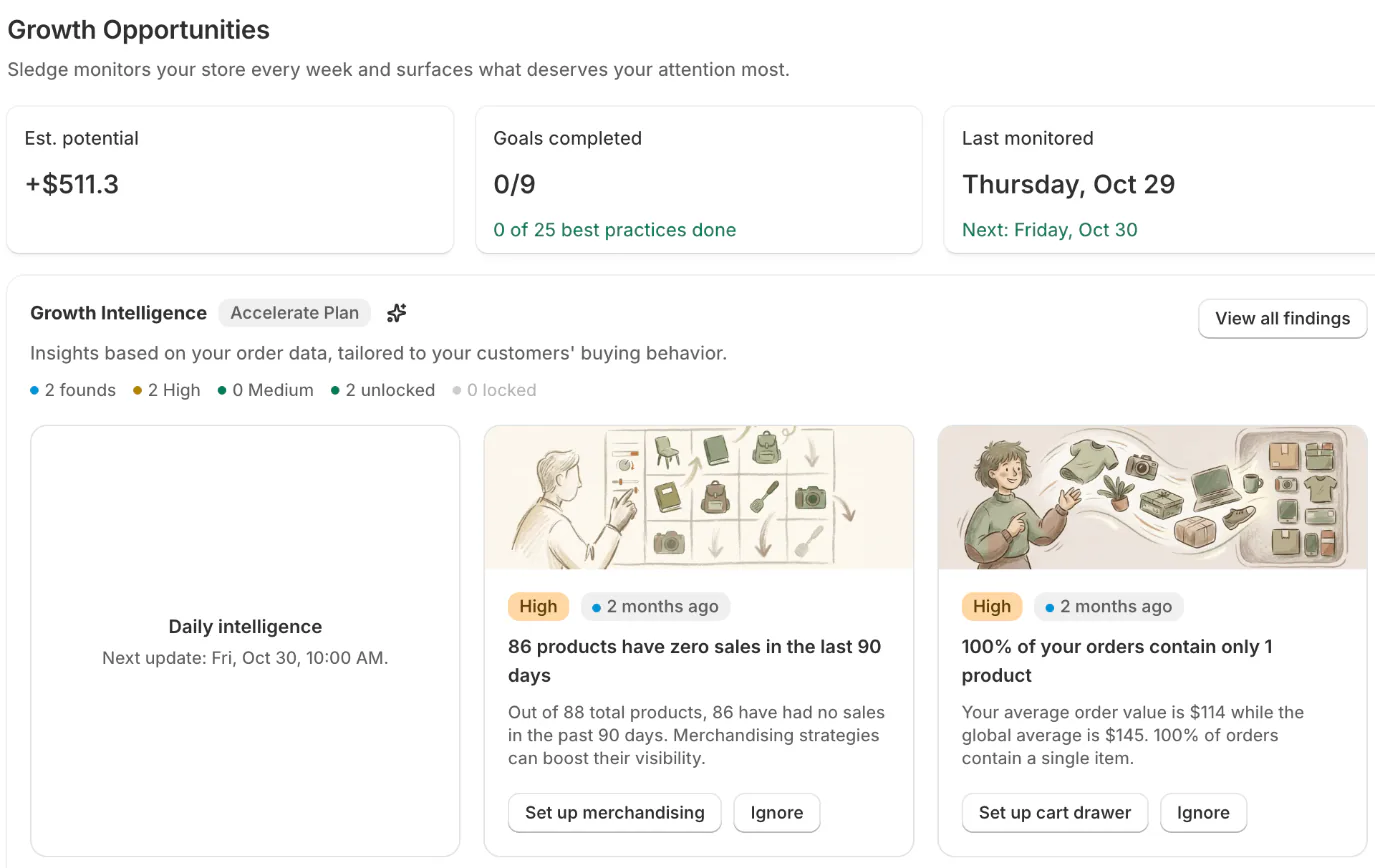
Each fix opens its set-up page, and nothing in your store changes until you save. The total is an estimate, not revenue you have earned. Sledge records no heatmaps or recordings and doesn't say which ad paid off. For the ads, compare attribution and profit tools. Plans start at $29.99 a month; Growth Intelligence isn't in the 14-day free trial.
FAQ
Questions, answered
-

14-day free trial
Explore Sledge on your store before you decide to commit.
-

No credit card required
Start improving your store with no upfront commitment.
-

Setup in minutes
Get Sledge running without a lengthy setup process.
-

Built to grow sales
Turn shopper behavior into actions that help you sell more.
What is customer behavior analytics?
Customer behavior analytics is reading what shoppers do in your store, counted across many visits: where visits stop, what they search for, which filters they use, what they add to the cart and leave, and whether they come back. It answers what people do, not who they are, so you can fix the step that loses the most sales.
What is the difference between customer analytics and customer behavior analytics?
Customer analytics looks at who buys: cohorts, lifetime spend and groups such as Shopify's RFM report. Customer behavior analytics looks at what visitors do before they buy or leave, including the ones who never order. You need both, but a problem you can fix on a page shows up in behavior data first.
Can Shopify show what customers do on my store?
Partly, and free on every plan. In Analytics, then Reports, you get a funnel from all visits to finished checkouts, the search terms that found nothing, landing pages and devices. Live View counts active carts over the last 10 minutes. Shopify's standard reports don't count which filters shoppers use or what they type into the search drop-down.
Is Google Analytics enough for a Shopify store?
GA4 is free and adds path and funnel views, site search and scroll depth, and it is strongest on where visitors came from. Its numbers rarely match Shopify's, because the two define a visit differently and Google misses browsers that block it. Neither tells you what to change on a page, so read both, then pick one pattern to fix.
Are heatmaps worth it for a small Shopify store?
Only for a layout question on a few key pages, such as whether shoppers reach your size chart. Microsoft Clarity records heatmaps and visits for free, so start there. Recordings show one visit at a time, which means hours of watching on a small store. Count the pattern first, then watch a few visits that show it.
Find the pattern that costs you the most.
Install free, and Signals check your store for these patterns twice a day. On any paid plan, from $29.99 a month, Growth Intelligence ranks the fixes and adds them up to one Est. potential total in your currency, so you know which change to make first.

