
A product listing page (PLP) is the page that shows many products in a grid, so shoppers can compare them and choose one to open. On Shopify, it is your collection page and your search results page. Five parts decide whether it sells: the filters, the sort order, the first row, the product cards and how more products load.
A shopper taps Sweaters from your menu. The first row is two sold-out sweaters and last winter's best seller. She wants a size M in green, so she opens a product to check, taps back, and starts again from the top. Each of those moments is one part of the page, and each one starts from a default you may never have checked.
What is a product listing page?
On Shopify, your collection pages and your search results page are product listing pages. Other platforms call them category pages.
A product listing page has one job: get each shopper to the right product page. That is the page where one product gets the whole screen.
In Baymard's August 2026 guide, 80% of ecommerce sites have serious usability flaws on their product listing pages. Baymard draws the guide from usability testing across more than 330 leading sites.
What does a Shopify collection page give you for free?
Your theme draws the page, and Shopify's free Search & Discovery app supplies the filters.
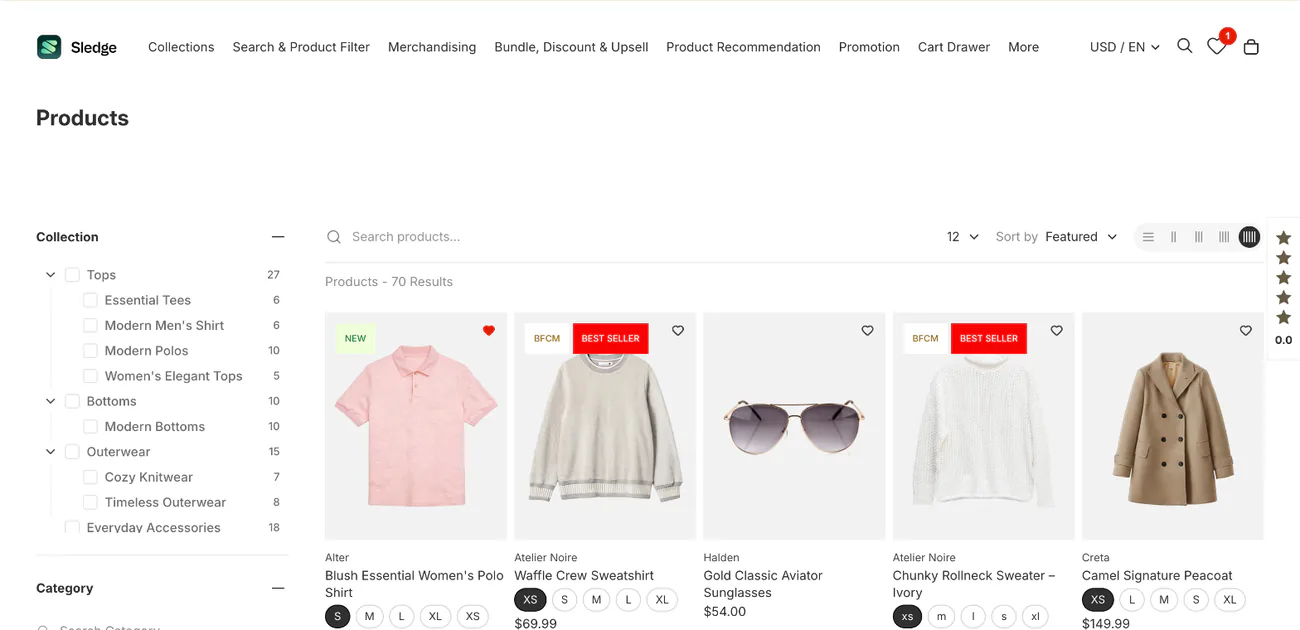
Two of Shopify's free themes, Dawn and Horizon, give you the same parts with different starting settings.
| Part | Dawn 16.1.1 | Horizon 4.3.0 |
|---|---|---|
| Filters | On. "Filter layout": Horizontal, Vertical or Drawer | On in the default collection page. "Direction": Horizontal or Vertical |
| What the filters can be | From Search & Discovery: Availability, Category, Price, Product type, Tags, Vendor, plus your own product details; 25 at most | Same |
| Sort menu for shoppers | On ("Sorting") | On ("Sorting") |
| Starting order | The order you set on the collection's admin page | Same |
| Product card | Sale and Sold out badges; quick add off; no swatches; second photo off | Sale and Sold out badges; quick add on (desktop); swatches on, once your colors have them; second photo on |
| More products | Numbered pages, 16 a page (8 to 36) | Loads more as the shopper scrolls; 24 a page if you turn that off |
Theme defaults as Shopify ships Dawn 16.1.1 and Horizon 4.3.0, read November 3, 2026. Your copy may be older or edited.
Both themes cover all five parts for free, and neither puts sold-out products last in a collection. Each part below shows where the defaults stop. Check 3 of a Shopify store audit tests what your own collections show.
What filters should a Shopify collection page have?
A shopper after a green sweater in size M under $80 needs three filters: size, color and price. On a clothing store, show the colors as swatches.
In Baymard's mobile testing, 80% of test shoppers applied a price filter. Only 43% of 60 benchmark sites offered all five key filters: price, user rating, color, size and brand. And 28% of sites don't show the filters a shopper has already picked above or beside the grid, Baymard found.
Shopify caps a store at 25 filters, and one filter at 100 values. A collection with more than 5,000 products shows no filters at all. The price filter hides when a shopper switches to a currency other than your store's default.
If your filters were there yesterday and are gone today, count the products in that collection first. Filters on a big catalog covers large collections, and adding filters to Horizon walks through the setup.
How does Shopify sort products in a collection?
Two orders matter. The first is the order a collection opens in, which you set under "Products", the product list on the collection's admin page. The second is the sort menu, which a shopper can change.
If your admin lists Most relevant, a new collection starts there. Shopify bases it on "sales performance". Shopify's other starting orders are best selling, title A to Z or Z to A, price high or low, newest or oldest, and "Manually", the order you set by hand. Best selling ranks by all-time orders, so last winter's hit can lead a collection all summer.
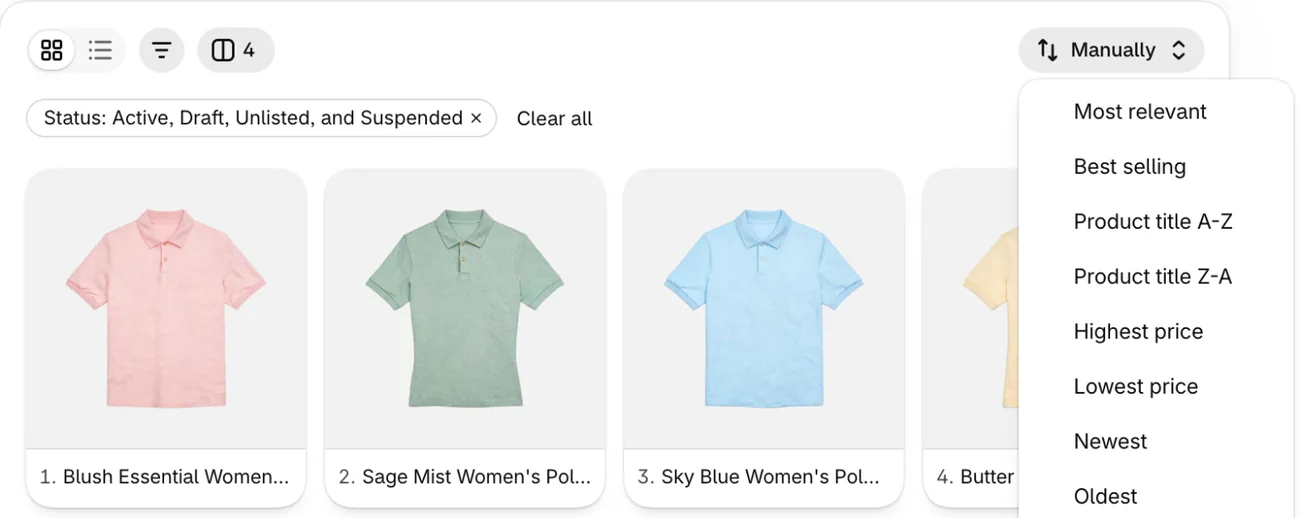
Baymard names four sorts a list should offer: price, user rating, best selling and newest. In its 2021 research, 64% of desktop sites missed at least one. Shopify's sort menu has price, best selling and newest, and no rating sort.
In Shopify, a manual order is the only way to set an order of your own. On a big collection, read manual sorting for big catalogs before you rely on it.
What should the first row of a collection show?
The first row should show products a shopper can buy, but none of Shopify's collection sorts is based on stock, so a sold-out product can keep its spot there. Search & Discovery already puts sold-out products last in your search results by default, a setting that does not reach collections. The free route is a manual order with sold-out products moved "To the end", redone each time stock changes. Pinning one best seller above a newest-first list means setting the whole collection to manual too.
What should a product card show on a collection page?
A shopper scanning the grid wants five things from each card: the price, a second photo, the colors, a badge such as Sale, and a way to add to cart from there.
"Quick add" puts an add to cart button on the card. Dawn ships it off and shows no swatches on its cards. Horizon ships it on for desktop, and shows swatches once your product colors have them set. In Dawn, switching it on is one setting in the collection page's "Product grid" section. The same section's "Image ratio" sets the shape of every card's photo.
When the colors live only on the product page, a shopper who sees one green sweater may never learn it also comes in navy. Every question a card leaves open costs the shopper a trip to the product page and back.
How badges and swatches should look is the work of visual merchandising, and color swatches on Shopify collection pages shows how to put them in your filters on Dawn.
How does a collection page load more products?
Dawn splits a collection into numbered pages, and Horizon loads more as the shopper scrolls. Which one fits your store, and what each does to the Back button, is in our guide to Shopify pagination.
What does Sledge add to a product listing page?
Sledge is a Shopify app for search, filters and merchandising that runs on your collection pages and your search results page. You build filters from size, color, price, tags or your own product details, and show them as checkboxes, swatches or a price slider. A merchandising rule can pin a product to the top of a collection or push the ones you pick further down.
In Sledge's product list settings, "Move Sold Products to the end of product listing" keeps sold-out products on the page, after the ones you can sell. To load more products, the filter layout offers "Load more" and "Infinite scroll" beside page numbers, on all four paid plans. Sledge's sort menu has no rating sort.
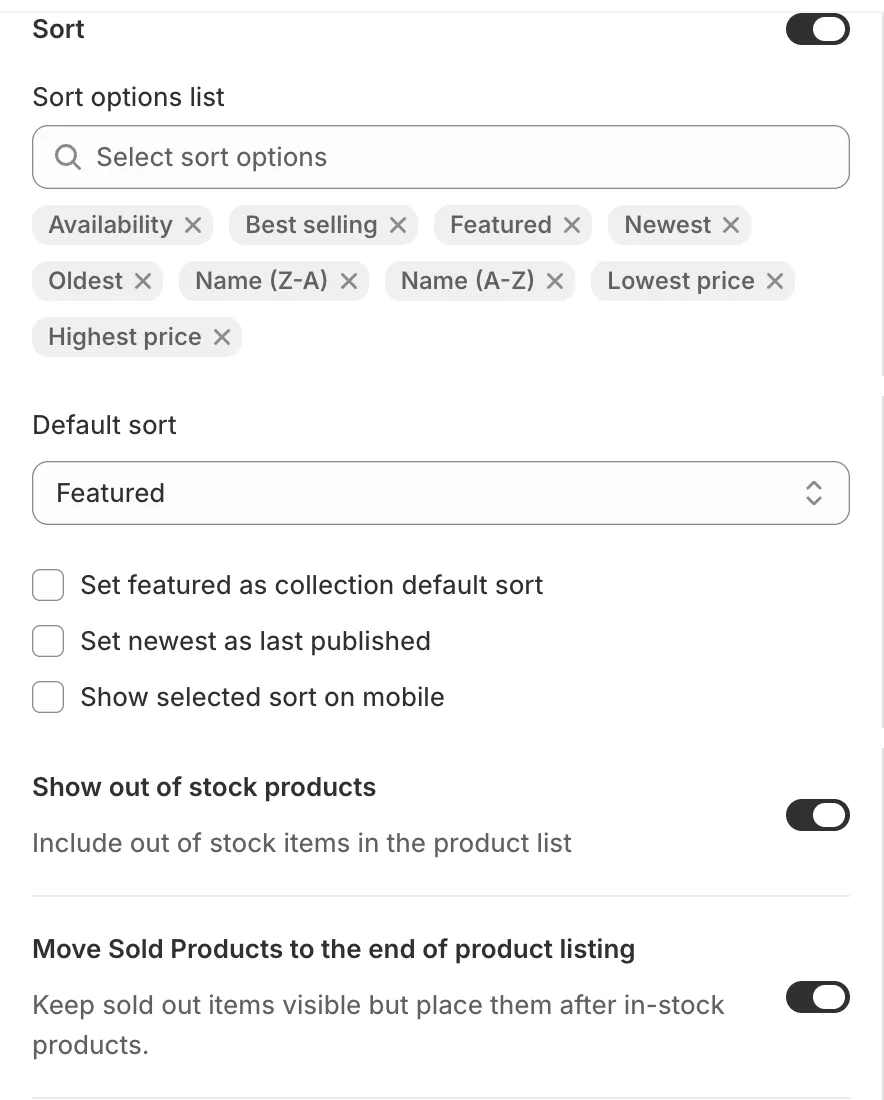
Sledge doesn't change your theme's own grid settings. Its grid takes the theme's place on the pages where it runs, so choose how more products load in one place, not both.
FAQ
Questions, answered
-

14-day free trial
Explore Sledge on your store before you decide to commit.
-

No credit card required
Start improving your store with no upfront commitment.
-

Setup in minutes
Get Sledge running without a lengthy setup process.
-

Built to grow sales
Turn shopper behavior into actions that help you sell more.
What is a product listing page?
A product listing page, or PLP, shows many products in a grid so shoppers can compare them and open one. On a Shopify store, it is your collection page and your search results page. On Amazon or Etsy, a listing means one product's own page, which is a different thing.
What is the difference between a product listing page and a product detail page?
A product listing page shows many products, each as a small card with a photo, a price and sometimes a badge or color swatches. A product detail page shows one product: every photo, the description, the size picker and the main add to cart button. The listing page's job is to send each shopper to the right product page.
Is a product listing page the same as a category page?
Often, yes. Many platforms call the product grid a category page, and Shopify calls it a collection page. Some stores use the name for a hub instead: a page of links to smaller collections, with no grid of its own. If the page shows products shoppers can filter and sort, it is a product listing page.
How do I add an add to cart button to my Shopify collection page?
Open your theme editor on a collection page. In Dawn, click the Product grid section and set Quick add to Standard. Horizon starts with Quick add on for desktop, under Product cards in theme settings, and Mobile quick add off until you switch it on. Product cards from Sledge show an add to cart button by default.
Can Sledge show me what is wrong with my collection pages?
Yes. Sledge's Signals tab, in Analytics, can flag “Top spots sold out” when sold-out products keep filling the first 3 spots on your collection pages, and “Top spot not selling” when a product there sold nothing in 30 days. Growth Intelligence turns on when you pick a paid plan, and its fixes add up to one “Est. potential” dollar total.
See when sold-out products lead your collections.
Try Sledge free for 14 days. Its Signals tab flags it when sold-out products keep taking the first 3 spots on your collection pages. Growth Intelligence turns on when you pick a paid plan: it can suggest a merchandising rule when products sit unsold, and its fixes add up to one dollar total, labeled "Est. potential".

