
Growth hacking for ecommerce: what it is and 10 examples for a Shopify store
Summarize with AI
Growth hacking for ecommerce is running many small, cheap tests on your store to find what grows sales, then keeping what works. On Shopify, that means changing one thing at a time, such as an offer, a shipping line or an email, and reading one number. Ten examples follow, each with the screen to use.
Say your store gets 600 visits a week and 6 orders. More visits would help, but you can't say where the other 594 leave. A growth hacking test starts there: pick one leak, change one thing, and see if the number moves.
What is growth hacking in ecommerce?
Growth hacking is a loop of small, cheap tests: guess, change one thing, read one number, keep or drop. The term dates from 2010 and began with software startups chasing cheap, fast growth. Shopify's own guide describes it as low-cost ways to win customers, and it warns that those customers may not be the highest-value ones.
For a store with no ad budget, the loop runs on pages and settings you already have. A test that loses still pays, because it tells you what to leave alone.
How is growth hacking different from marketing?
Marketing plans a season; growth hacking runs a test. A marketing plan picks buyers, channels and a budget. A growth hacking test takes one step on that path and changes one thing.
Definitions vary, and a store can use both. Marketing brings visits, and tests make each visit worth more. The ecommerce marketing strategy plan covers the first half.
What does one growth hacking test look like in a store?
One leak, one change, one number, one verdict.
- Pick the step where most visits stop. Example 1 shows where to look.
- Change one thing and write down the date. Two changes at once leave you guessing which one worked.
- Read one number, such as orders per 100 visits, against the same stretch before or against a version that ran at the same time.
- Keep or drop it, then pick the next leak.
Traffic sets how far you can trust a result. Shopify's A/B testing guide suggests two weeks and at least 1,000 visitors per version, so a small store reads its result as a hint. The conversion rate page explains the number, and Shopify A/B testing covers how long to wait.
Which growth hacking examples fix what your store already loses?
The cheapest growth is often the visit you already paid for.
1. Find the step where most visits stop
In Shopify, open Analytics, then Reports, then "Conversion rate breakdown", the report that counts visits at each step from first page to paid order.
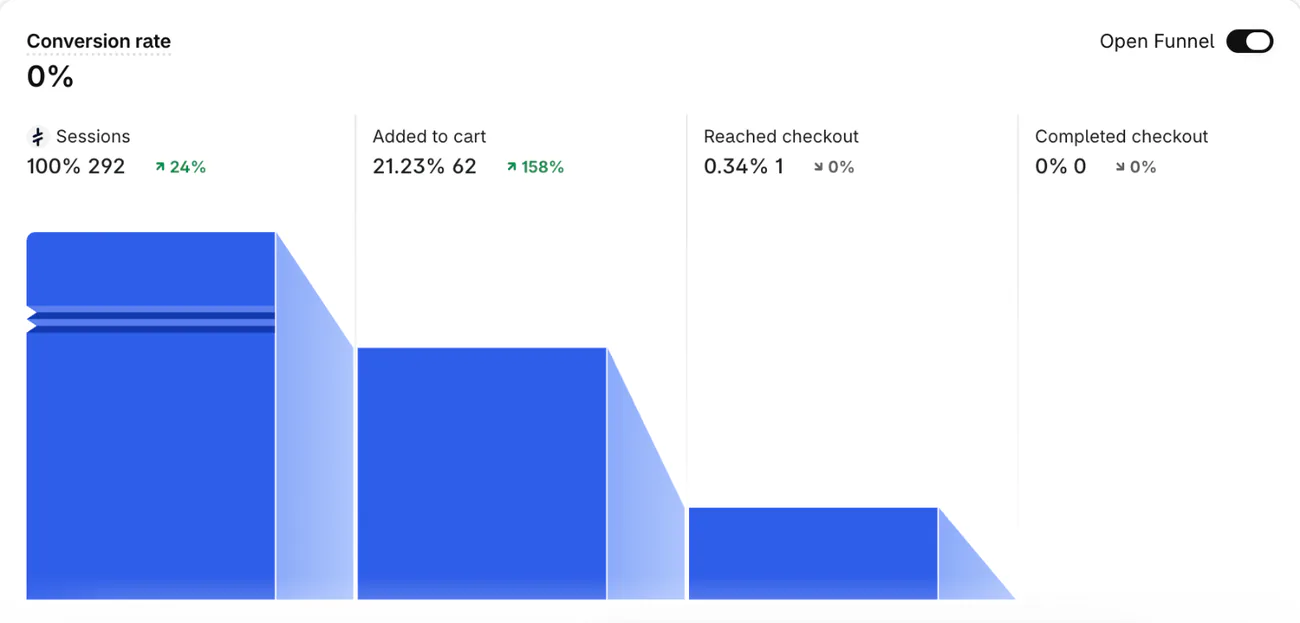
This test store had 292 visits, 62 carts and 1 checkout. Test the page behind the steepest drop. It costs a look, and the number to watch is the share that moves on to the next step. The sales funnel and store audit pages go deeper.
2. Test one offer against another
Say a 3-pack bundle takes 12% off. Open the bundle, set its status to Enable first, press "Create A/B" and make version B 15%. In "A/B Test settings", pick "Even allocation", which splits visitors half and half.
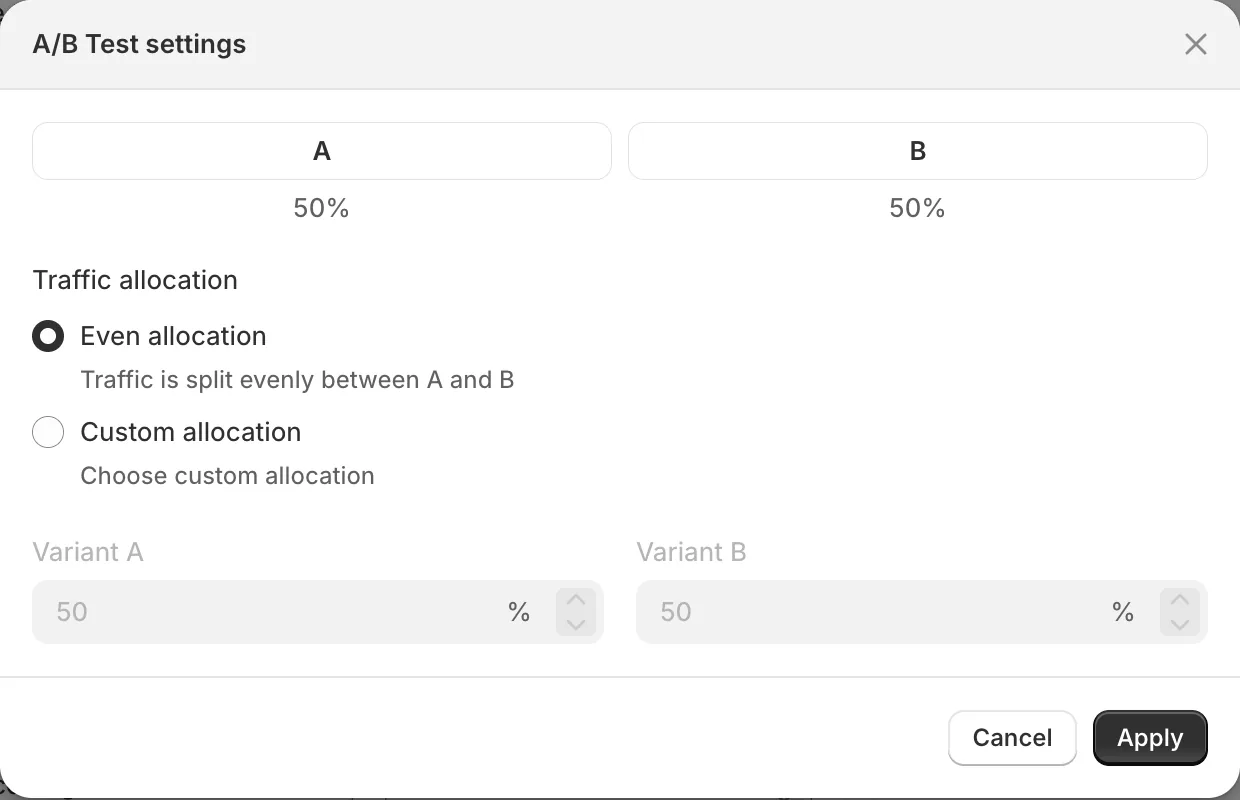
Sledge shows each version's visitors, clicks and, on most tools, revenue. It picks no winner, so you press "Stop A/B", then "Choose winner". Promotion banners, countdowns, badges, sort rules and pre-order campaigns split the same way, as the A/B testing guide explains. On the Grow plan and up, Shopify's own Rollouts (Markets, then Rollouts) tests themes and discounts against a control. Read revenue per version only after the traffic floor above.
3. Put a free-shipping line in your shipping rates
Open Settings, then "Shipping and delivery", then "Shipping options". Pick your market, open its Shipping row and click "Add shipping option". (Stores on the older layout pick a shipping profile and zone instead.) Below Rate, switch on "Offer free shipping" and set the "Minimum order amount" a little above your average order. Say the average is $60 and you set $75.
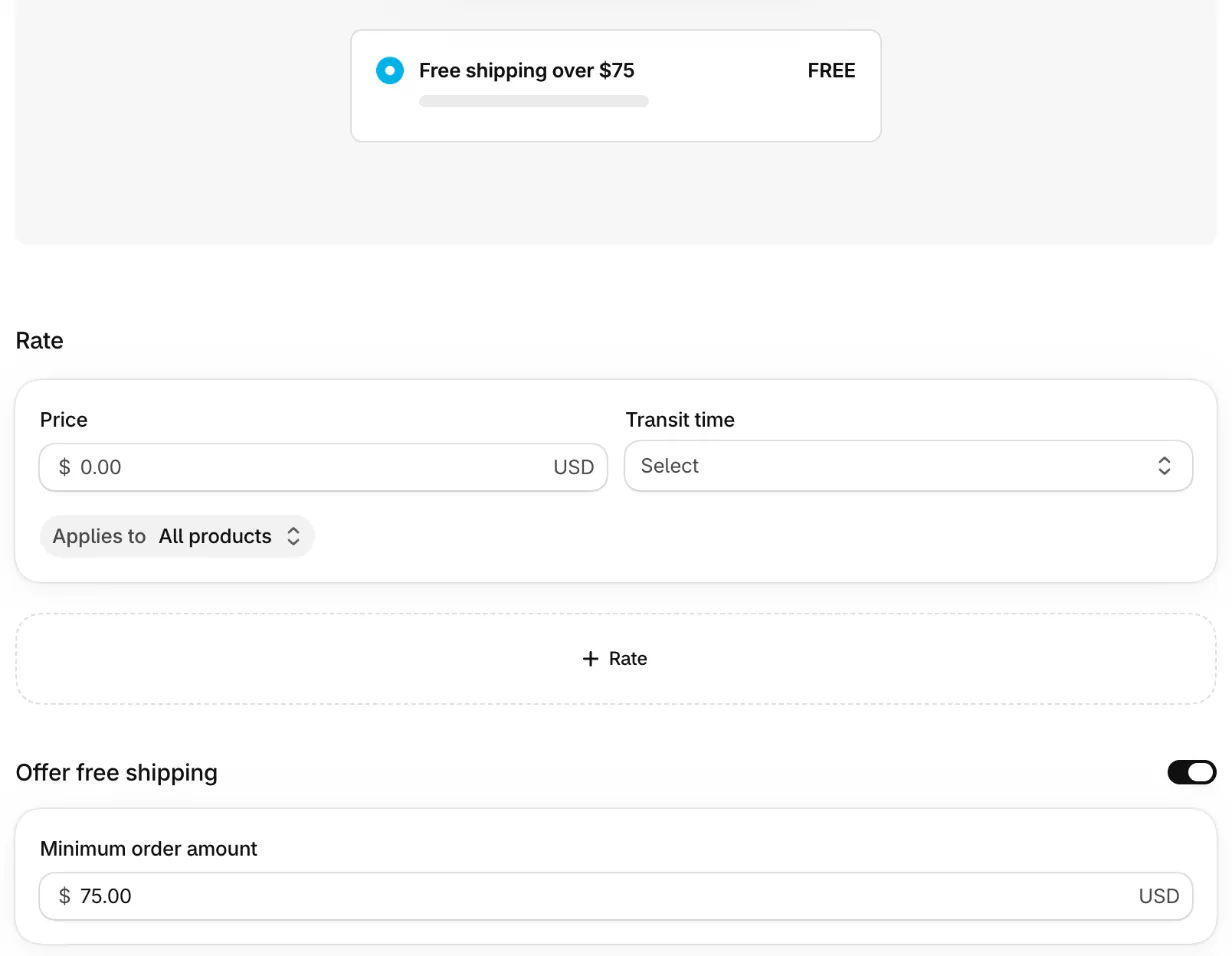
The setup is short. Compare average order value and orders per 100 visits for two weeks before and two weeks after. That is a before and after read, not a split test, so treat it as a hint.
4. Turn search words into products
Under Analytics, then Reports, "Searches by search query" lists what shoppers typed, and "Searches with no results" lists words that found nothing. The first runs up to 72 hours behind.
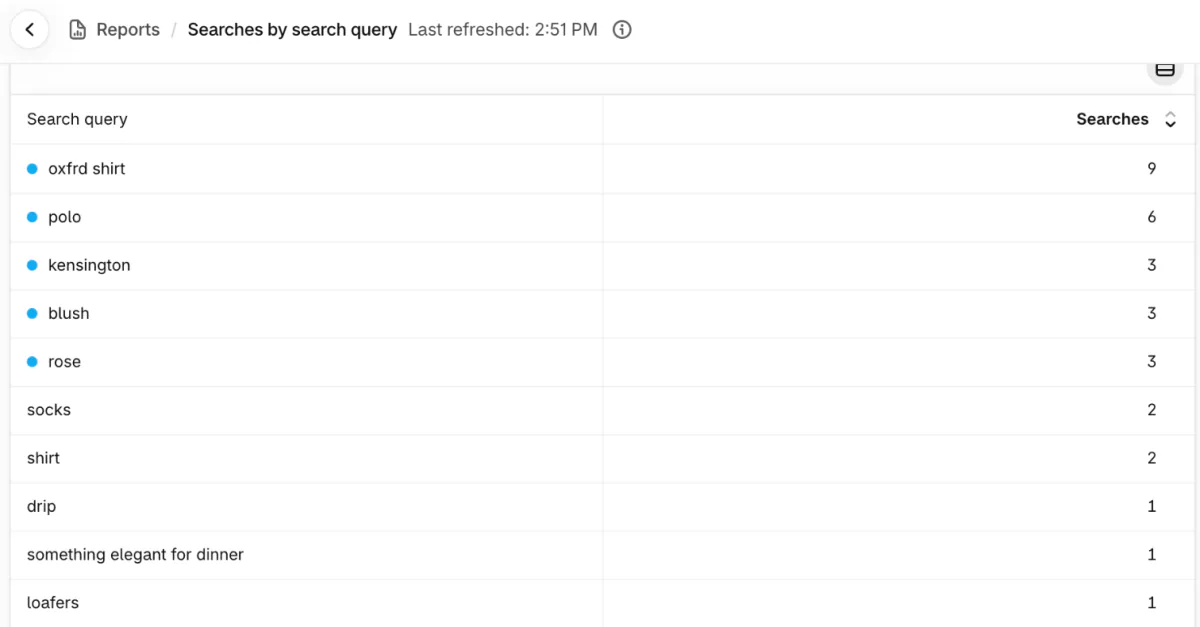
A misspelling at the top is a fix to make, and a word with no match is a product or collection to add. Count the searches with no results next week. The zero-result search page shows the common causes.
Which growth hacking examples bring in the first orders?
A first order is often cheapest to win from someone who already gave you an email or a friend's word.
5. Give new subscribers a welcome code
In Discounts, make a code with an end date, a use limit and a minimum order amount. Shopify Messaging (formerly Shopify Email) can send it when someone signs up for your newsletter. Watch how many signups place a first order in the "Sales by discount codes" report. Shopify email marketing and newsletter ideas cover the sending.
6. Hand out a code a friend or creator can share
Give each person their own code, and "Sales by discount codes" shows who sent orders. Say 10 codes go out and 3 bring orders: keep those three and drop the rest. Referral apps exist, and a code per person needs none. Count orders per code. See how to find influencers and word of mouth marketing.
7. Run a sale with a real end date
Create a discount, set its start in "Schedule" and click "Set end date". Compare orders per 100 visits on the sale days with the same days a week earlier, then with the days after. The content calendar shows where the dates sit.
8. List your products where shoppers already scroll
Add a sales channel from the Sales channels menu in your admin, such as Facebook and Instagram or TikTok. The "Total sales by sales channel" report shows what each one earns. Allow an afternoon and the channel's own rules, then count its orders after a month. Read how to sell on Instagram and how to sell on TikTok Shop first.
Which growth hacking examples bring buyers back?
The second order usually costs less than the first, so test it second.
9. Email the people who left at checkout
Orders, then "Abandoned checkouts", lists shoppers who gave contact details and did not pay. The "Recover abandoned checkout" automation in Shopify Messaging emails them a link. Change one line, the subject or the offer, and leave the rest. Count orders recovered per 100 emails, and see the abandoned cart email page.
10. Ask first-time buyers for a second order
In Apps, then Messaging, then Automations, "Thank customers after they purchase" and "Win back customers" are the two templates. Test the wait or the offer, one at a time. Watch the share of buyers who order twice, and read how to get repeat customers for the rest.
When is growth hacking the wrong move?
Skip a test when your traffic is too small to read it, and check second orders before you scale a cheap win. Shopify's own guide warns that low-cost customers may never return, so read repeat orders as well as first ones. Nothing here fixes a product shoppers do not want, and a win that costs more than a buyer is worth is no win. The customer acquisition cost page shows how to check.
FAQ
Questions, answered
-

14-day free trial
Explore Sledge on your store before you decide to commit.
-

No credit card required
Start improving your store with no upfront commitment.
-

Setup in minutes
Get Sledge running without a lengthy setup process.
-

Built to grow sales
Turn shopper behavior into actions that help you sell more.
What are growth hacking strategies for an online store?
Growth hacking strategies for a store are small tests on steps you already have. Fix the page where most visits stop, test one offer against another, add a free-shipping line, send a welcome code, recover abandoned checkouts and ask first-time buyers back. Pick one, change one thing and read one number.
Which ecommerce brands used growth hacking?
The famous cases come from software firms and marketplaces, not stores. Store-sized versions repeat a few moves: a code for a first order, a code a friend can share, a dated sale and a nudge for the second order. Copy the test, not the brand, because your traffic and margins differ.
Does growth hacking still work?
Tests still work, because they show what your own shoppers do. Tricks that lean on one platform's loophole fade when it changes its rules. Shopify's own guide warns that cheap-customer tactics may bring buyers who never return, so check repeat orders as well as first orders.
When does a growth hacking agency make sense?
Consider one after you have run a few tests yourself, know which number matters and lack the hours to run more. Ask what it will change in your store and which number should move. Then price that against running one more test yourself first, because an agency starts from the same reports you can open.
How do you measure growth hacking success?
Pick one number before you start, such as orders per 100 visits, and compare two versions that ran at the same time. Shopify's A/B testing guide suggests two weeks and at least 1,000 visitors per version. With less traffic, a result is a hint, so repeat the test before you rebuild anything.
Can Sledge A/B test my offers?
Yes, for offers. Sledge splits visitors between two versions of an offer, banner, badge, countdown, sort rule or pre-order, and shows each version's numbers on every paid plan. It doesn't run ads, referral programs or email campaigns, and it can't test themes, checkout or product prices.
Test an offer, keep the one that sells
Sledge doesn't run ads, referral programs or email campaigns, and it can't test themes, checkout or product prices. It splits visitors between two versions of an offer, banner, badge, countdown, sort rule or pre-order, and shows each version's visitors, clicks and, on most tools, revenue. Try it free for 14 days. Growth Intelligence turns on when you pick a paid plan: it suggests fixes and adds up what they could be worth in one dollar total, labeled Est. potential.

