
Shopify A/B testing, also called split testing, shows two versions of your store to different visitors at the same time, so you can keep the one that wins. On the Grow plan and up, Shopify's Rollouts runs this as an Experiment for themes, checkout, discounts and catalog prices. Test apps can add revenue per visitor.
You raised a price on Monday. Sales dipped by Thursday, and you can't tell if it was the price, the ads or the week. Since October 2026, Shopify's own tool can test discounts and prices too, so the cheapest route may already sit in your admin.
Which Shopify A/B testing route fits your store?
| What you want to know | Route | Cost | What you read |
|---|---|---|---|
| Which theme or checkout wins? | An Experiment in Rollouts | Included on Grow and up | Conversion and other rates, not revenue |
| Does a discount beat your usual offer? | An Experiment with a discount change | Included on Grow and up | The same rates, with no revenue per discount |
| What should this product cost? | A catalog Experiment, Smart Pricing or a test app | Included on Grow and up; free for select US stores; or an app plan | See how to A/B test prices |
| Which offer, sort order or badge sells more? | The app that runs it, such as Sledge | Sledge: 14-day free trial, then from $29.99 a month | Visitors, clicks and, on most tests, revenue per version |
| What if you have too little traffic? | Before and after | Free | A hint, not proof |
Before and after proves little, because seasons, ads and stock all change between the two periods.
How do you run an A/B test on Shopify without an app?
Shopify's own A/B test is called an Experiment, and it lives in Markets > Rollouts on the Grow plan and up. On Basic you can schedule a change in Rollouts, but you can't run an Experiment. In the US, Grow costs $105 a month and Basic $39, billed monthly. Our Shopify review lists every plan's price and card rate.
An Experiment can change your theme, your checkout and accounts pages, your discounts or your catalogs, which hold prices. Discounts arrived on 2 October and catalogs on 23 October 2026.
Each visitor gets a group at random before the page loads, so the page doesn't flicker. You can't aim a test at phones or at a customer group.
Experiments run on your online store only. They can't carry a developer's change to your theme or run on vintage themes, Shopify's older kind.
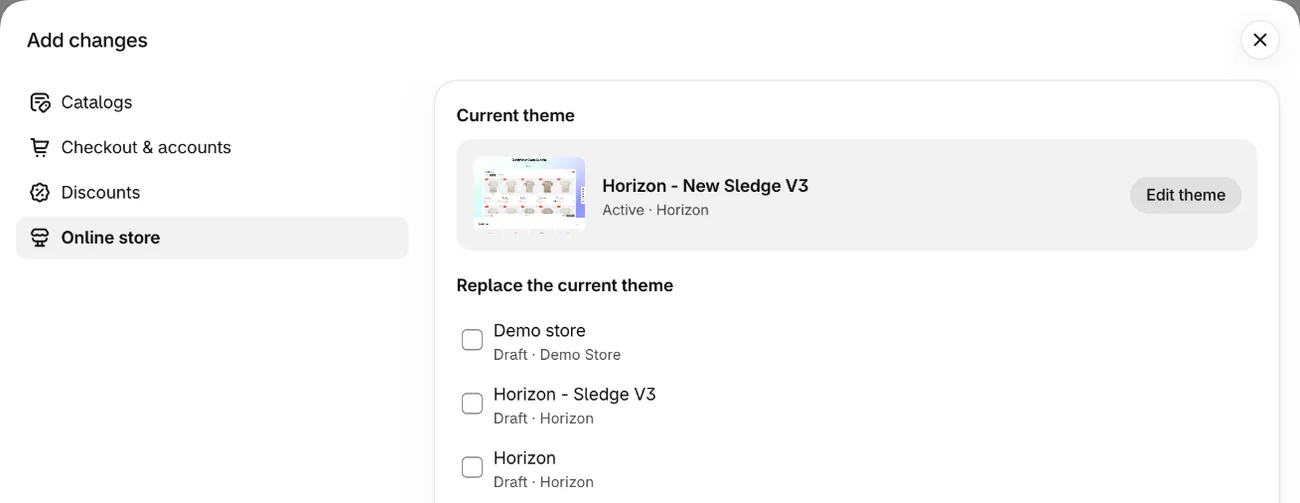
Plan for step 6, because a rollout that reaches its end date rolls back and leaves nothing to apply.
- Pick one change and the one number that decides it.
- Go to Markets, then Rollouts, and click "Create rollout". Name it and select "Experiment" in the type menu.
- Under "Changes", click "Add changes". Pick "Online store", "Checkout & accounts", "Catalogs" or "Discounts", then click "Apply". To edit your main theme, save first, then click "Edit theme".
- In "Audience", keep the 50/50 "Traffic split", or move it. "Traffic allocation" sets how much of your store takes part.
- In "Scheduling", set the dates. The end date defaults to 90 days out. Read any conflict message before you save, because overlapping rollouts can hide your change.
- To keep the change, open the rollout before its end date and click "End", then "Apply changes", then "End". An applied change can't be undone. To drop it, click "Roll back changes" instead, or let the end date pass, when it rolls back by itself.
What do Rollouts A/B test results show, and what's missing?
Expect rates, not revenue. A theme Experiment reports conversion rate over time, plus bounce, reached checkout and add to cart rates. A checkout Experiment reports checkout conversion rate.
Shopify's help page lists no revenue figure for an Experiment. So a version can win on conversion and still lower your average order value. You also can't add your own metrics, or filter results by device or country.
A discount Experiment shows no revenue or orders for the discount, so it can't say if a sale earned money or gave away margin. It also counts visitors who reached the discount without qualifying for it.
Shopify's help pages describe the rates, not a verdict, so the call is yours. Only visitors who consent to tracking are counted.
How long should a Shopify A/B test run?
Two to four weeks is the usual answer, if your traffic can carry it. Shopify's A/B testing guide asks for more than 5,000 visitors to a page and at least one, ideally two, full business cycles. Run it in full weeks. Stop early and you may be reading luck. Run too long and cleared cookies and switched devices skew the result, the guide adds.
Treat that 5,000 as a floor. At a 2% conversion rate, spotting a 20% lift to 2.4% takes about 21,000 visitors per version, or about 42,000 in all. Those are our own sums at the usual 95% confidence and 80% power.
At 500 visits a week, a product page needs about 84 weeks to get there. If you can't reach your sample in two to four weeks, try other fixes until traffic grows, Shopify's guide says. So test big changes on your busiest page, or fix the leaks first.
Two Experiments at once thin your traffic further, and overlapping promotions can muddy a result too.
A test started now may not finish before 27 November, so your Black Friday checklist comes first.
How do you A/B test prices on Shopify?
A price test shows two groups of visitors two prices at the same time. Judge it on profit, not conversion, because a lower price usually converts better and can still earn less.
You have four routes. If Shopify offers your store Smart Pricing, start there.
- A catalog Experiment. In Markets, then Catalogs, build a catalog with a "Price adjustment" percentage or set prices, and assign it to a market. Keep it on "Draft", because an "Active" catalog is already live. Add it to an Experiment and choose "Set to active". It's included on Grow and up and runs only in that market. Where another catalog already covers those products, the lower price can show. The route is weeks old and Shopify lists no metrics for it, so profit is yours to work out.
- Smart Pricing. Shopify's free app runs A/B pricing experiments in early access, for select US stores on Grow or higher. It's the only one of Shopify's own routes that says "Conclusive", at 95% confidence, and shows profit. You import the winning prices with a spreadsheet file (CSV).
- A test app. The next section prices six.
- Two product pages at two prices. It works on any plan, if you add a test tool or pay a developer to split traffic. It can split your reviews and search visibility, and you may track the same stock twice.
Watch three things.
- Checkout. Changing only the price your theme shows can leave a shopper charged a different price at checkout.
- Ads. In a catalog Experiment or a Smart Pricing test, ads, listings and feeds keep the old price. Shopify warns that Google and Meta can delist products or suspend an account over mismatched offers. Pause those ads or remove those products from listing channels for the test.
- Fairness and the law. A price test can feel unfair and hurt your brand's reputation, HubSpot's pricing guide warns. Rules on showing different prices differ by country, so check yours first.
If you don't want two sticker prices live, test the deal instead. A discount Experiment does this, and so does a bundle at 12% off against 15% off. Neither changes a product's listed price, so your ads should still match, unless an ad promises that discount. Run both versions together, because 10% off one week against 20% off the next tells you about the weeks, not the offers.
Which apps run A/B tests on Shopify?
A Shopify test app can add what an Experiment leaves out: revenue per visitor, profit with your own costs, tests aimed at a device or a traffic source, and winners applied for you. These six are sorted by the cheapest plan that lists price tests.
| App | What stands out | Price a month | Best for | Watch for |
|---|---|---|---|---|
| A/B: Product and Price Testing (Trident AB) | Tests pages and prices | Free up to 500 impressions and one test; Premium $19.99 (5,000 impressions); Business $24.99 (50,000); Enterprise $49.99 (unlimited) | A first test on a small store | 500 impressions is far below the 5,000 visitors above, and the 2% example needs Business or up |
| Visually A/B Testing & CRO | Prices, offers, themes and upsells | $15 up to 100 orders; $25 up to 200; $80 up to 600 | Stores under 600 orders a month | Price climbs with orders; its plan cards don't say which plan has price tests |
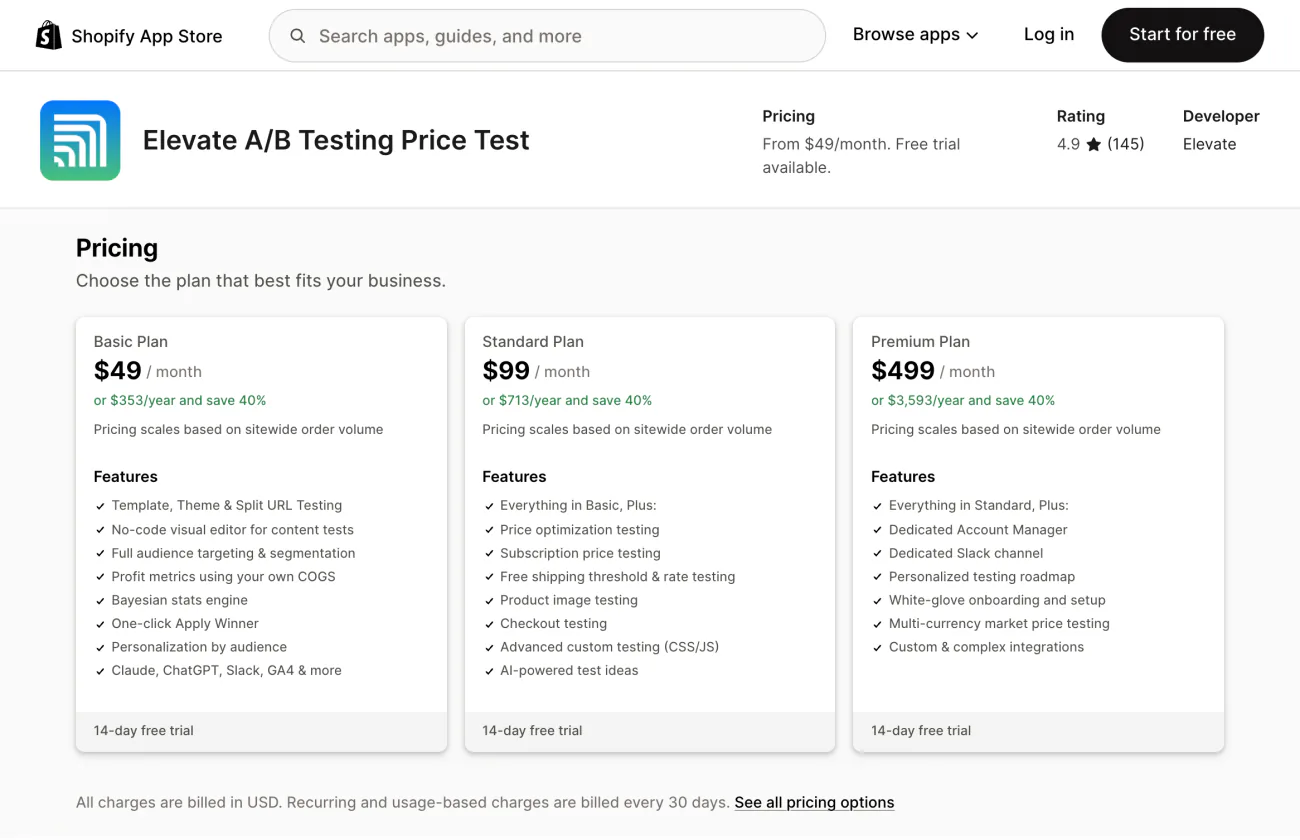
| Elevate A/B Testing Price Test | Profit using your own costs | Basic $49 (no price test); Standard $99 | Price and shipping tests | Pricing scales with sitewide orders |
| ABConvert: A/B Testing | Prices, offers, shipping, checkout | Starter $99 (no price test); Growth $199 with 5,000 test orders, then $39 per 1,000 | Comparing revenue and profit across price tests | Checkout content, cart and upsell tests need Shopify Plus, its listing says |
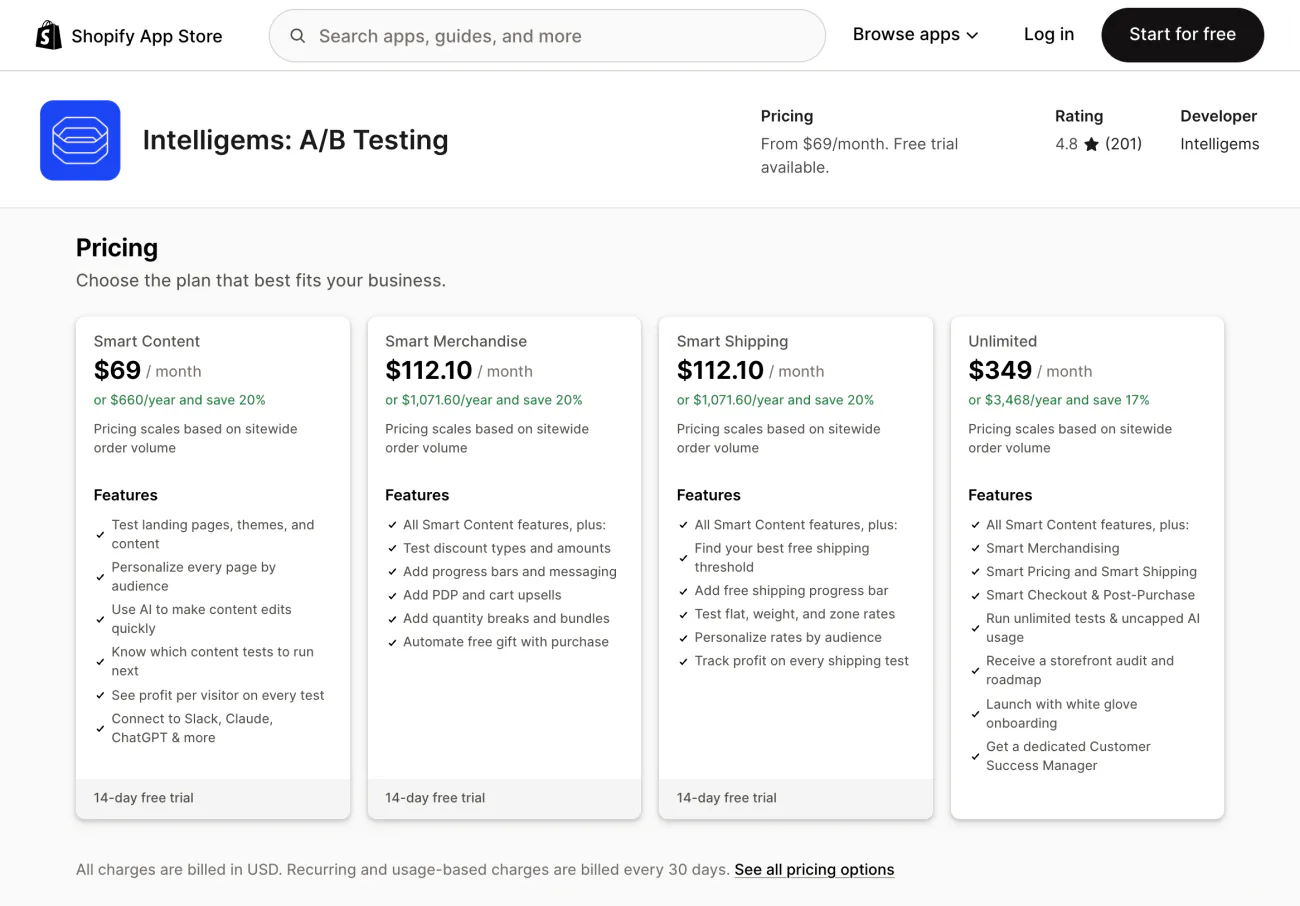
| Intelligems: A/B Testing | Prices, shipping, discounts, checkout; your own costs | Smart Content $69; Smart Merchandise and Smart Shipping $112.10; Unlimited $349, the only plan listing price tests | Larger stores testing price and shipping | Pricing scales with orders |
| Shoplift: CRO & A/B Testing | Versions built in the theme editor; conversion, revenue per visitor, order value | Core $99; Advanced $399 with price testing | Shopify Plus stores, its listing says | Priced by monthly unique visitors, so a busy store pays more |
Prices are as of November 2026.
Work out next month's bill from your own orders or visitors before you start. Ask each app who sets up your first test.
How do you A/B test offers, sort orders and badges?
You test an app's offers, sort rules and badges inside that app, because "which bundle sold more" needs revenue per offer. On some plans, Rollouts can switch an app on or off, but it can't compare two settings inside one.
Sledge is a Shopify search and filter app that also A/B tests what it puts on your pages: offers, collection sort rules, badges, pre-orders, banners and countdowns. Each shopper stays on one version in their browser.
| Tool in Sledge | What you compare | Numbers per version |
|---|---|---|
| Offers, all nine types, upsells included | The deal, such as 12% off against 15% off | Visitors, clicks, extra revenue, total revenue |
| Strategy, your sort rules | Two ways of sorting the same collection | Visitors, clicks, total revenue |
| Badge Campaign | The badge's wording, position or design | Visitors, clicks, total revenue |
| Pre Order | Payment options | Visitors, clicks, total revenue |
| Back in Stock | The button's position, the form and the design | None yet |
| Banner | The promotion message | Visitors, clicks; no revenue |
| Countdown | The timer's look and message; its timing stays the same | Visitors, clicks; Product Countdown adds total revenue |
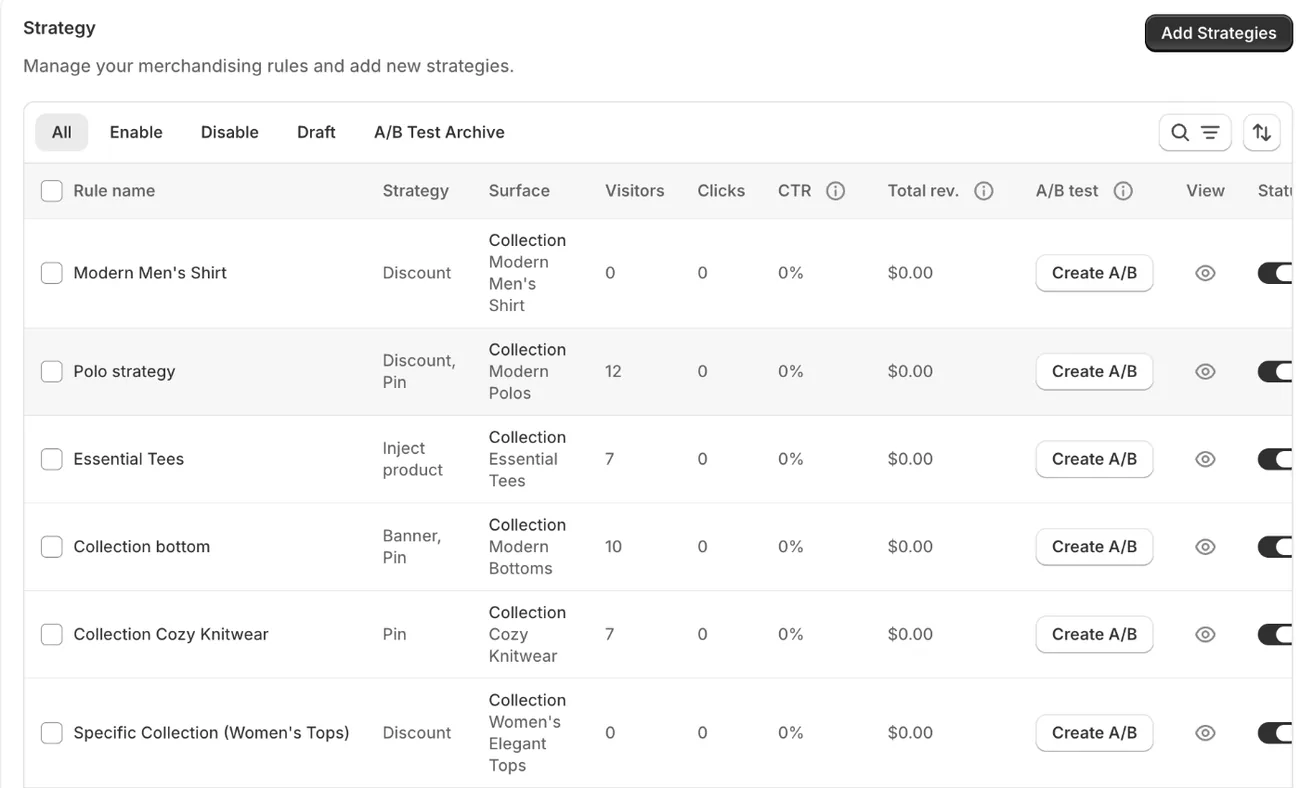
A test takes four steps.
- Set the item's status to "Enable", then press "Create A/B" on its row to open versions A and B.
- Change version B, and add up to two more versions if you want them.
- Pick "Even allocation" or "Custom allocation" in "A/B Test settings", then save, or the versions stay a draft.
- To finish, press "Stop A/B", then "Choose" on the version you want, then "Choose winner".
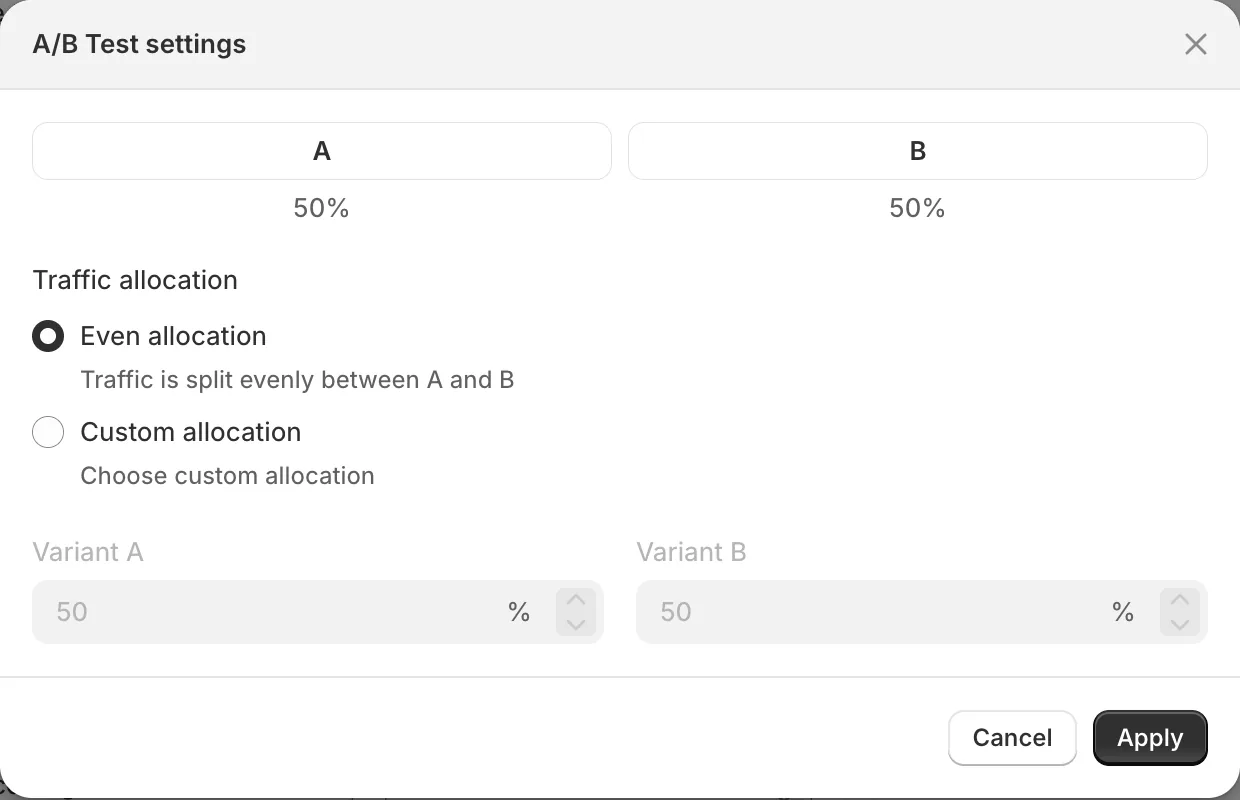
The winner then gets all your traffic, and the test moves to the "A/B Test Archive", where "Start over" can run it again. The "Choose winner" dialog says the other versions will be deleted, but the archive keeps them. Back in Stock has no archive tab, so read that warning before you press.
Sledge shows the numbers and makes no winner call, so the traffic and timing advice above still applies. It can't test themes, checkout, product prices, recommendations or filters. Back in Stock needs Accelerate or higher and shows no per-version numbers yet. Revenue here is what Sledge counts inside your store, so it can differ from your ad platforms.
The 14-day free trial runs three active tests per tool, with no Back in Stock.
Which ecommerce A/B tests should you run first?
The best first test changes one thing on a page that already gets visitors and sells.
- Product page layout, on your busiest product (Rollouts, theme edit).
- Your checkout setup (Rollouts, checkout and accounts).
- A sale discount against your usual offer (Rollouts, discount change).
- 12% off a bundle against 15% (Sledge, Fix Bundles).
- A $75 gift goal against $85 (Sledge, Free Gift).
- Boosting in-stock products against boosting best sellers on one collection (Sledge, Strategy).
Reach your sample with no clear winner, and the change probably didn't matter much.
FAQ
Questions, answered
-

14-day free trial
Explore Sledge on your store before you decide to commit.
-

No credit card required
Start improving your store with no upfront commitment.
-

Setup in minutes
Get Sledge running without a lengthy setup process.
-

Built to grow sales
Turn shopper behavior into actions that help you sell more.
Does Shopify have built-in A/B testing?
Yes. On the Grow plan and higher, the Rollouts page under Markets runs an Experiment, which splits visitors between your current store and a changed version. It can test a theme, a checkout and accounts setup, discounts or market catalogs. On the Basic plan, Rollouts can schedule changes but can't run an Experiment.
Can I A/B test on the Basic plan?
Not with Shopify's own tool: Basic gets Rollouts for scheduled changes, and Experiments start at Grow. Your options are a test app from the Shopify App Store, or Sledge if you want to test an offer, a collection's sort order, a badge or a banner. Price either one against moving up to Grow.
Can I A/B test prices on Shopify?
Yes. On Grow and up, a Rollouts Experiment can compare a market catalog with different prices, on your online store only. Shopify's Smart Pricing app runs price experiments for select US stores in early access. Test apps such as Elevate and Intelligems run them on paid plans. If those products run in ads, pause the ads, because prices won't match.
How long should a Shopify A/B test run?
Shopify's A/B testing guide says at least one, ideally two, full business cycles, usually two to four weeks, in full-week steps. A Rollouts Experiment defaults to 90 days, but that is an end date, not a target. If you can't reach enough visitors in four weeks, the same guide says to try other forms of optimization first.
Can Sledge A/B test product prices, recommendations or filters?
No. Sledge tests offers, Strategy rules, badge campaigns, pre-orders, banners and countdowns, plus Back in Stock, which shows no per-version numbers yet. It can't change a product's price in a test, but it can compare two offers on that product, such as 12% off against 15% off. Themes and checkout stay with Shopify's Rollouts.
Test everything. Keep what wins.
Install free and run up to three tests at a time per tool during the 14-day trial. On a paid plan, tests are unlimited, and Growth Intelligence reads your orders, searches and carts, then totals what its fixes could add in one dollar figure, labeled Est. potential.

