
A good abandoned cart email subject line reads like a note from your store, not an ad. It says what is waiting, uses the shopper's first name, and saves any discount for the last email. Shopify sends its abandoned checkout email for free, but only to shoppers it can identify.
Say yesterday brought 40 carts and 2 orders. Shopify's abandoned checkout email went out 6 times, to shoppers who typed an email at checkout. The other 32 left from the cart without giving an email, so nothing went out. The 6 need better words, and the 32 need a better cart.
Who gets Shopify's abandoned cart email?
Shopify Messaging, Shopify's own email app (formerly Shopify Email), is free to install and has three ready-made emails for shoppers who leave, listed under "Recover site visitors" when you click Create automation.
| Automation | When it fires | Who can get it | What it costs |
|---|---|---|---|
| Convert abandoned product browse | Viewed a product, didn't add it to the cart | Marketing subscribers Shopify recognizes | Counts toward 10,000 free emails a month |
| Recover abandoned cart | Added to the cart, didn't start checkout | Marketing subscribers Shopify recognizes | Counts toward 10,000 free emails a month |
| Recover abandoned checkout | Typed an email at checkout, didn't order | Subscribers by default, or all customers | Always free |
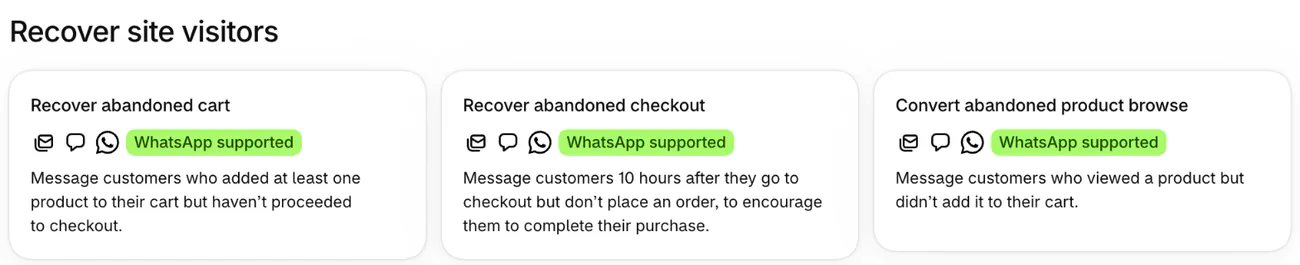
Shopify can only email a shopper it can identify: someone who typed an email at checkout, or a subscriber it recognizes on that visit, such as one who is signed in. A shopper who leaves from the cart without ever giving an email gets nothing from any of the three.
All three need the Basic plan or higher and Shopify Network Intelligence switched on in your privacy settings, and they work fully once the Shopify Flow app is installed. On a Shopify free trial, only tests to yourself go out. Past 10,000 emails a month, Shopify charges $1 per 1,000.
To grow your subscriber list, turn on the sign-up box at checkout under Settings, then Checkout, then "Marketing opt-in", the box shoppers tick to get your emails. Once you send cart reminders, Shopify asks you to reword the text beside it. For sign-up forms elsewhere, see the best Shopify popup apps.
How do you set up the abandoned checkout email in Shopify?
Turn on Recover abandoned checkout and set it to All customers, so every shopper who typed an email at checkout can get it.
- In Shopify, go to Apps, then Messaging, then Automations, and click Create automation.
- Pick Recover abandoned checkout, then Email.
- Click Edit email. Beside "To:", the list of who gets it, pick All customers.
- Fill in "Subject:" and "Preview text:", the line that shows after the subject in an inbox.
- Click Send test, read the email on your phone, then click Turn on.
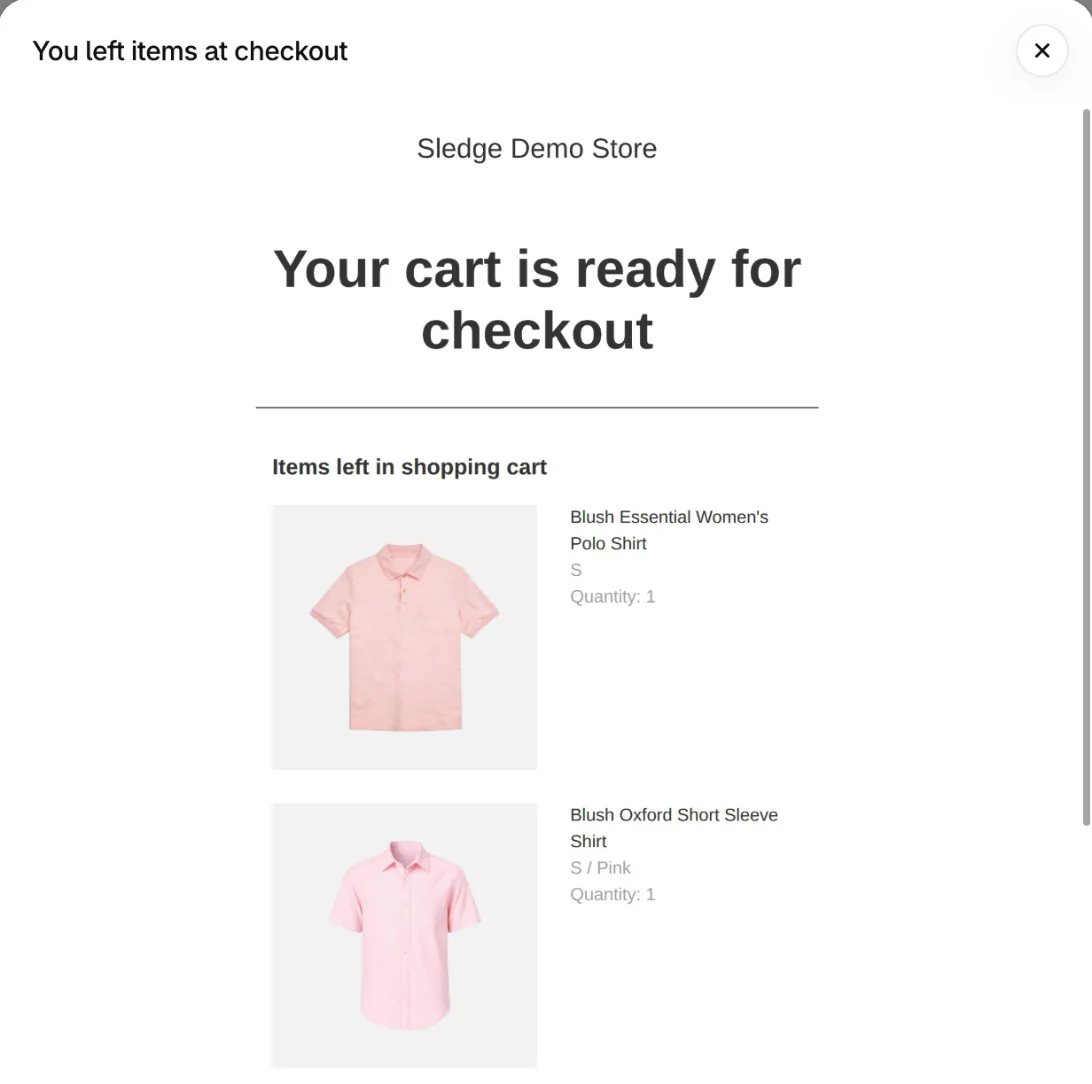
Once the automation is on, open it and click its email to see what a shopper gets. Click View to edit it, and Shopify warns first: editing turns the email back into a draft, and no shopper gets it until you set it active again in the editor.
Shopify's template sends the email 10 hours after a shopper reaches checkout and doesn't order. To change the wait, click Edit workflow, which opens Shopify Flow.
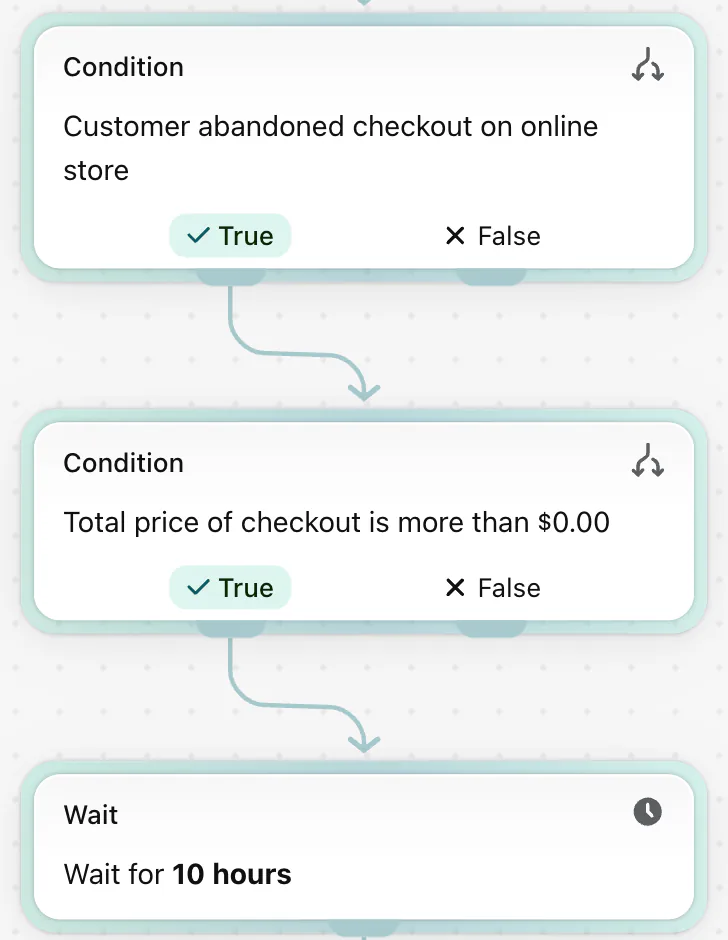
Older stores may still run the email from Settings, then Checkout. Moving to the Messaging version can't be undone. To stop sending, open the automation and click Turn off automation.
To send one shopper the link by hand, go to Orders, then Abandoned checkouts, click the checkout, then the customer's email, and your email app opens with the link. Anyone who opens that link can finish the checkout, and you can't expire it, so send it to that shopper only.
What makes a good abandoned cart email subject line?
Shopify sends one template to every cart, so a good subject line has to be true for all of them. A "last one in stock" line, or one product's name, is false for most carts.
- First name, with a fallback. Click Personalize beside the subject, add First name, and fill in "Default value", the word used when a name is missing, such as "there". Without one, Shopify leaves a blank space.
- Two details at most. Personalize adds customer details such as first name or city. Keep to two across subject and preview text.
- Preview text finishes the thought. The subject starts it.
- One emoji at most. Shopify allows them. Put one beside words, never in place of them.
- The discount waits. Some shoppers would come back anyway, so save any code for the last email.
- A deadline only when it's true. Say a code ends Sunday only if its end date in Discounts says Sunday.
24 abandoned cart email subject lines to copy
These 24 abandoned cart email subject line examples come in six groups of four, and each row names the email it suits. [First name] is the Personalize field, and you type your store's name where [Store] stands.
| Subject line | Send it as | Note |
|---|---|---|
| [First name], we held on to your picks | Reminder, email 1 | Needs a default value |
| You left a few things with us | Reminder, email 1 | Needs no name at all |
| Back for the things you chose? | Reminder, email 1 | Preview text says the cart is saved |
| Your checkout is still open, [First name] | Reminder, email 1 | Checkout email only |
| Questions about sizing? Just reply | Offer help, email 1 or 2 | Swap sizing for what your shoppers ask |
| Need a hand finishing your order? | Offer help, email 1 or 2 | Fits any product |
| Did something stop you at checkout? | Offer help, email 1 or 2 | Checkout email only |
| Reply to this email and we answer | Offer help, email 1 or 2 | Only if someone reads replies |
| Returns are free on every order | The doubt, email 2 | Only if returns are free |
| Order by 2 pm and it ships today | The doubt, email 2 | Use your real cutoff time |
| Shipping and returns, answered | The doubt, email 2 | Put both policies in the body |
| Wrong size later? Exchanges are free | The doubt, email 2 | Only if exchanges are free |
| Still looks good on you, [First name] | Light touch, any email | Clothing; swap in your product |
| Did the Wi-Fi drop, [First name]? | Light touch, any email | Only if your voice is playful |
| Plot twist: you can still check out | Light touch, any email | Only if your voice is playful |
| Saved, folded and ready to ship | Light touch, any email | Swap folded for your product |
| 10% off, if they are still on your mind | The code, email 3 | Create the code first |
| A thank-you code for your cart | The code, email 3 | Name the amount in the preview text |
| Your code is inside: 10% off | The code, email 3 | Matches Email 3 below |
| Last reminder, with a little extra | The code, email 3 | Only on the last email |
| [Store]: we held your items | Store name, any email | Type your store's name by hand |
| From [Store]: one quick question | Store name, any email | Ask the question in the body |
| A note from the [Store] team | Store name, any email | Suits a calm, plain voice |
| [Store] checkout: still open | Store name, any email | Checkout email only |
Written for this page, November 2026. Shopify settings checked November 4, 2026.
Three abandoned cart email templates, with examples
Each template gives a subject, preview text, body and button, and Shopify adds the cart items and the link back to checkout. Say you sell linen shirts and a shopper leaves a $68 shirt at checkout.
Email 1: the simple reminder
It goes out at Shopify's 10-hour wait.
- Subject: [First name], we held on to your picks
- Preview text: Everything you chose is still in your cart.
- Body: Hi [First name], your picks are below, just as you left them. If something looked wrong, reply and we'll sort it out.
- Button: Back to my cart
Email 2: the doubt
Send it about a day after Email 1, if you add it, and swap in your real shipping terms and refund policy.
- Subject: Shipping and returns, answered
- Preview text: Exchanges are free if the size is off.
- Body: Still deciding? Orders over $75 ship free, and exchanges are free for 30 days. Everything you picked is below.
- Button: Finish my order
Email 3: the code
Send it two days after Email 2, and only if you use a code. On the $68 shirt, the code gives away $6.80.
- Subject: Your code is inside: 10% off
- Preview text: It works until Sunday at midnight.
- Body: Here is 10% off everything in your cart until Sunday at midnight, with your code below.
- Button: Use my 10% off
Create the code first, with a Sunday end date under "Schedule", then add it in the email's editor so the shopper can use it back at checkout.
Shopify's template sends one email. For a sequence, Shopify lets you add a second abandoned checkout automation, but it starts at a 10-hour wait and subscribers only, so lengthen the wait and set To: to All customers. Then check out with your own email and see what arrives before you trust it.
How do you reduce cart abandonment before the email?
Answer the shopper's doubt in the cart itself, because no email reaches a shopper who left without giving one. In Baymard's survey of US online shoppers, leaving aside those just browsing, 40% left a cart because extra costs ran too high: shipping, tax or fees.
Three fixes answer that in the cart.
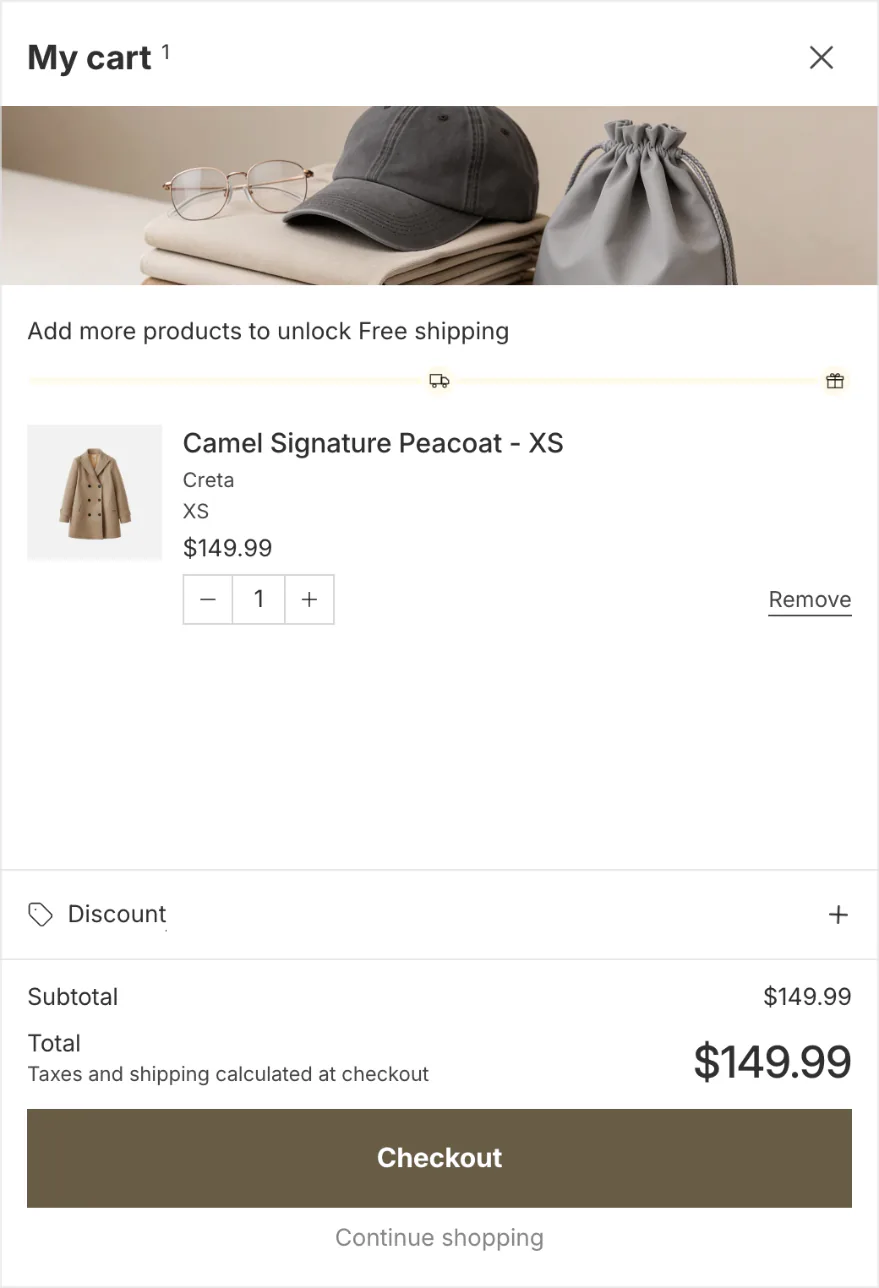
- Show the shipping cost, or how far the cart is from free shipping, with a free-shipping progress bar.
- Give shoppers a box for discount codes before checkout.
- Put trust signals near the checkout button.
Sledge is a Shopify app whose cart drawer opens in place of your theme's slide-out cart. Open Tools, then Cart Drawer, in Sledge and switch it on. The Body card's "Progress goal" shows a bar toward free shipping, money off or a free gift, counted by cart total or by quantity. In the Footer card, "Discount code" adds a box for codes, and "Trust badges" shows badges you pick. The drawer and all three blocks come with every plan, from Pro at $29.99 a month. Sledge sends no cart or checkout emails, so that job stays with Shopify Messaging.
How do you know your abandoned cart email works?
Shopify's Automations page shows Reach, Sessions, Orders, Conversion rate and Sales for your automations. For email, Reach is the number sent. Click an automation's title for its own numbers.
Divide Sales by Reach to get sales per email sent. Klaviyo publishes a similar benchmark: across more than 110,000 of its customers in 2026, abandoned cart emails averaged $6.77 in sales for every person who got one, the most of any automated email it compared.
Change one line at a time. Some fake checkouts from bots still reach your Abandoned checkouts list, Shopify says. A run of checkouts under one strange email address is worth a look before you blame the subject line.
Emails after an order have their own pages: the post-purchase email flow and the review request email. For a new product, the product launch email sequence runs from a teaser about a week out to a last call.
FAQ
Questions, answered
-

14-day free trial
Explore Sledge on your store before you decide to commit.
-

No credit card required
Start improving your store with no upfront commitment.
-

Setup in minutes
Get Sledge running without a lengthy setup process.
-

Built to grow sales
Turn shopper behavior into actions that help you sell more.
Does Shopify send abandoned cart emails?
Yes, once you turn them on in Shopify Messaging, Shopify's own email app. Recover abandoned checkout can email every shopper who typed an email at checkout and left, once you set its To: to All customers, and those emails are always free. Recover abandoned cart and Convert abandoned product browse reach only subscribers Shopify recognizes on that visit. You need the Basic plan or higher.
When should you send an abandoned cart email?
Shopify's Recover abandoned checkout template waits 10 hours after the shopper leaves checkout. You can change that wait with Edit workflow, which opens Shopify Flow. If you add a second email, send it about a day after the first, and keep any discount for the last one. Then judge the timing by your own orders.
Why didn't my abandoned cart email send?
Shopify skips it when the shopper buys before it sends, when nothing in the checkout can still be bought, when the whole order is free, when the checkout came from the Shop app, or when Shopify Payments blocked it as high risk. And until you set To: to All customers, it reaches subscribers only.
Can I send abandoned cart emails to people who didn't subscribe?
Only the abandoned checkout email. Set its To: to All customers, and every shopper who typed an email at checkout can get it. The cart and browse emails go to marketing subscribers only, and so do the text and WhatsApp versions of all three. If you send cart reminders, Shopify asks you to reword the text by the sign-up box at checkout.
Does Sledge send abandoned cart emails?
No. Sledge sends no cart or checkout emails, so that job stays with Shopify Messaging. Sledge works earlier, in the cart: its cart drawer can show a bar toward free shipping, a box for discount codes and trust badges you pick. On paid plans, Growth Intelligence can flag how many carts don't turn into orders.
The email catches checkouts. What catches carts?
Try Sledge free for 14 days and give your cart a free-shipping goal, a code box and trust badges in Sledge's cart drawer. Growth Intelligence turns on when you pick a paid plan. It can flag how many carts don't become orders, and it totals what its fixes could add in one dollar figure, labeled "Est. potential".

