
To reduce returns in ecommerce, find which products come back and why, then fix that cause. On Shopify, give each product a category, record a return reason on every return, and read the returns report. Then fix sizing, photos, packing and return rules for the worst products first.
Say a linen shirt sells 100 times and 31 come back, most marked Too small. The refund is only part of the cost. You also pay the return label, the repack and a shirt you may not resell. The leak may be one product page, and Shopify's report shows which product.
How many returns are normal for an online store?
NRF and Happy Returns estimated that 19.3% of online sales would be returned in 2025. Its retailer survey covered large US companies, so your own rate can sit far from it.
A return costs more than the refund. You also pay for the label, the repack and an item you may not resell.
In Shopify, watch the Returned quantity rate, the share of ordered units that came back. Its neighbor, the Reversed quantity rate, also counts cancellations and edits, so it can read high on orders that never shipped (see the sales report's definitions). Compare your products with each other, not with 19.3%. For the setup side, see how to handle returns.
How do you see which products come back, and why?
Set a category on every product, pick a reason on every return, then read the report.
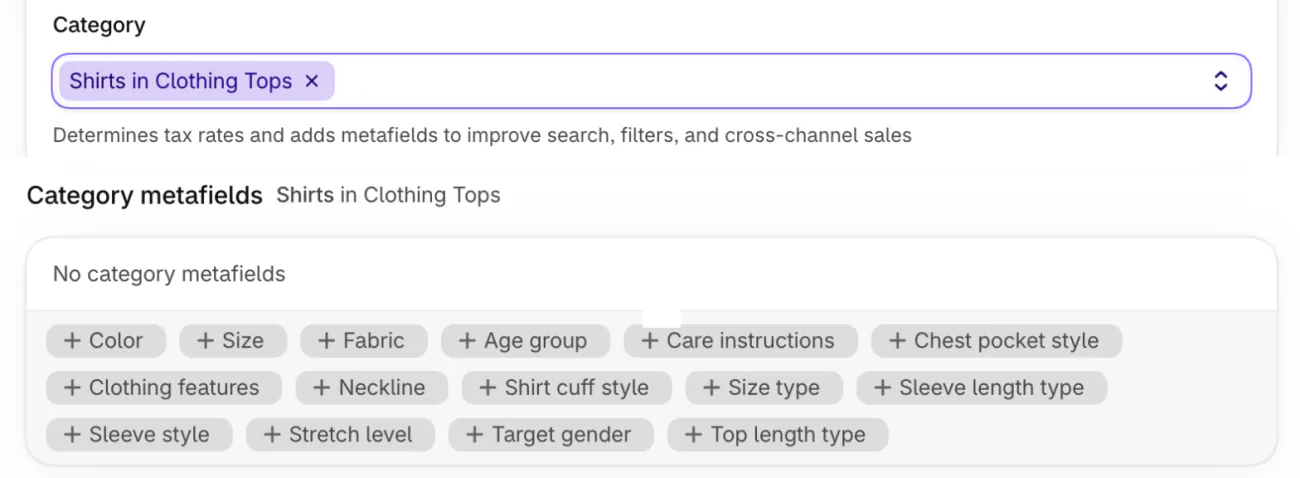
- Set the category. In Products, open a product and find "Category", where you tell Shopify what kind of product it is. Type a word such as "Shirts" and choose the closest match. Shopify then offers reasons that fit, such as "Too big" or "Too small" for clothing, as its product category page explains. On a new product, Shopify may suggest a category itself.
- Pick a reason on every return. Create the return from the order and pick a reason from the list before you refund. A refund without a return records no reason, and the "Reason for refund" box is only a note for you and your staff.
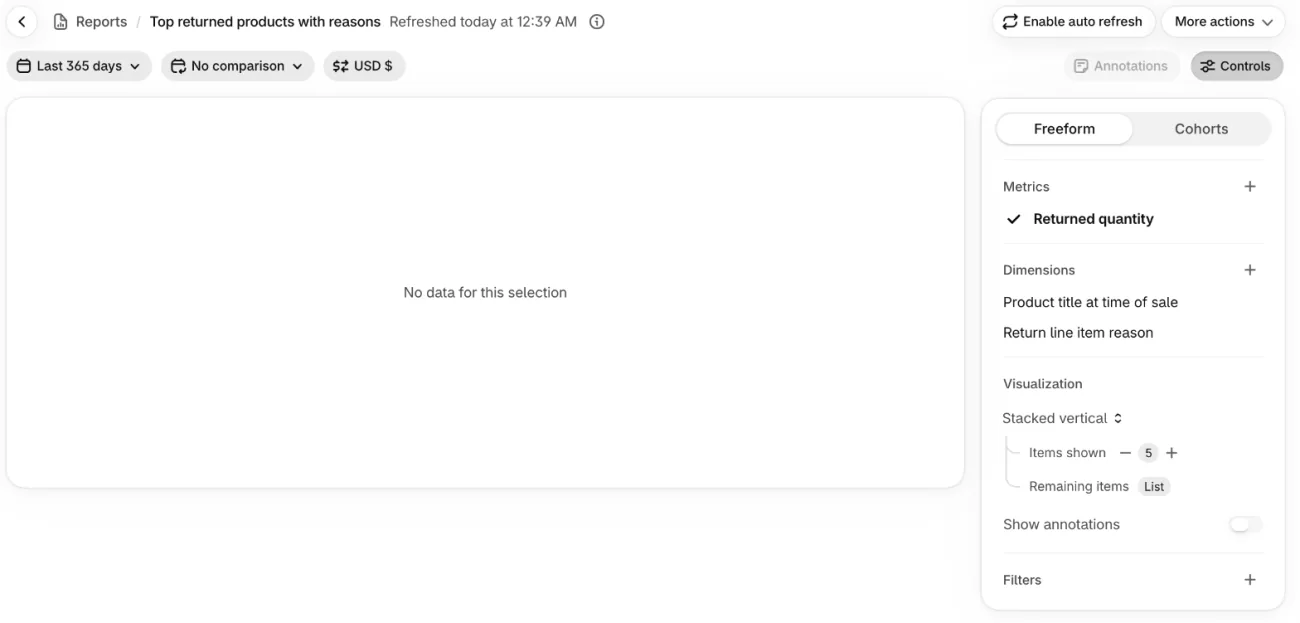
- Open the report. Go to Analytics, then Reports, search "return" and open "Top returned products with reasons". It charts "Returned quantity" by "Product title at time of sale" and "Return line item reason", so each product's bar splits by the reason given. Shopify's refund page says reports like it use only reasons from returns.
- Read the repeats. Find the product with the tallest bar and the reason that fills most of it.
A store with no returns sees "No data for this selection". Do steps 1 and 2 now and read the report once returns arrive.
Why do customers return products?
Shopify's guide lists five reasons, and each one points at a different part of your store.
| Reason | Look at | Fixes |
|---|---|---|
| Fit or sizing | Size help and the size picker | 1, 2 |
| The item differs from its description or photos | Photos, words and reviews | 3, 4, 5 |
| Damaged in transit | Packing | 6 |
| Defect | The product or its supplier | 7 |
| Change of mind | Your return rules | 8, 9 |
Reasons as listed in Shopify's guide, read November 19, 2026.
A reason that doesn't fit the pattern may be abuse, not a product problem. Return fraud covers how to tell.
How do you stop returns for the wrong size?
Put the answer to "will it fit?" next to the size picker.
1. Put a size chart beside the size picker
Measure the garment, put the numbers on a page and link it beside the size picker. The steps are in how to sell clothes online. In Sledge, Search, then Redirect, then "Add redirect rule" sends a search term you set, such as "size chart", to that page when a shopper presses Enter.
2. Let shoppers filter to their size and color
Once a shopper knows their size, a filter keeps the products that don't come in it out of the way. Shopify's free Search & Discovery app does this. Sledge filters add swatches, live product counts and a switch, "Show out of stock variant filter items", for sizes that are sold out. The size filter guide covers that switch.
How do you stop "it looked different" returns?
Show the real color, say what a photo can't, and let other shoppers show it.
3. Give each color its own photo
Open the product and go to Variants. Beside each variant, click its image and choose the photo that matches. A variant takes one image from the product's gallery, so add the rest there first.
4. Say what the photo can't
Put measurements, material and scale in the description. Set the Category first. For a shirt, Shopify then shows a "Category metafields" card, extra product fields that depend on the category, where you can add Color, Size and Fabric. Add one close-up and one photo in use. The guides to product photography and the product detail page show how.
5. Let shoppers show it
In Sledge, shoppers can add up to five photos to a review from the product page. In Product Review, open Translation and edit the row "Form Review Placeholder", the hint a shopper sees in the review box before typing. Ask the question shoppers have before they buy, for example "How did it fit, and how does it look in person?"

Under Product Review, Display Settings, the switch "Show reviews with no image" decides whether text-only reviews stay in the list. Switch it off to list only reviews with a photo.
A photo from another shopper sets expectations before a purchase, and reviews arrive only after people buy. Start with how to get more reviews, then see the review request email for timing and the reviews page for the tool.
How do you stop damaged and defective returns?
A pattern in the reasons tells you whether the box or the product is at fault.
6. Pack for the worst handling
If "Damaged in transit" repeats on one product, change that product's box before anything else. Custom packaging and how to ship products to customers cover the options.
7. Check what you ship
Open one unit from each batch before you list it. When the same defect repeats, send your supplier the product's return reasons. How to find a supplier covers what to ask for.
How do return rules cut change-of-mind returns?
Rules may not stop a change of mind, but they set what each one costs you.
8. Match the rules to the product
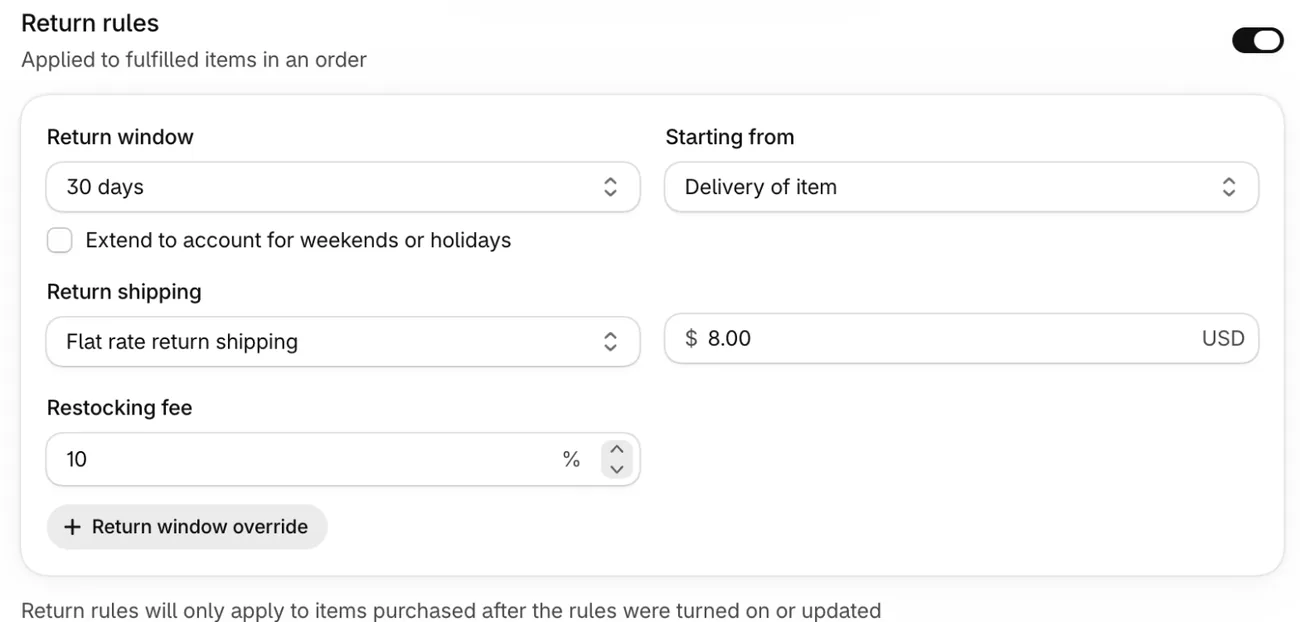
Go to Settings, then Policies, and open "Default rules" under "Return and cancellation rules". You can set a return window, a return shipping fee and a restocking fee as a percentage. "Return window override" gives a collection a longer or shorter window. "Final sale items" covers products that can't come back at all, such as custom or personal care items. Shopify's return rules page lists each setting. Fees and windows are your call, and this isn't legal advice. Local consumer law may limit fees, and Shopify advises a window of at least 14 days for shoppers in the EU.
9. Offer an exchange before a refund
Self-serve requests can't ask for an exchange, so say in your refund policy that one is possible. Then add the new item when you approve the return. With Shopify Payments, a refund doesn't give back the card fee on the original sale, so keeping the sale through an exchange means that fee isn't wasted.
When exchanges or labels outgrow Shopify's own returns, the Shopify returns apps compared on that page show what each adds. Until then, change one thing, then read the report again.
FAQ
Questions, answered
-

14-day free trial
Explore Sledge on your store before you decide to commit.
-

No credit card required
Start improving your store with no upfront commitment.
-

Setup in minutes
Get Sledge running without a lengthy setup process.
-

Built to grow sales
Turn shopper behavior into actions that help you sell more.
How do you reduce returns in ecommerce?
Find the products that come back and the reason given, then fix that cause. In Shopify, set each product's category, record a return reason on every return, and open the returns report under Analytics. Then improve sizing help, photos, packing or return rules, starting with the product that comes back most.
What is a good return rate for an online store?
NRF and Happy Returns estimated that 19.3% of online sales would be returned in 2025, but its retailer survey covered large US companies. A small store can sit far above or below that. Compare your own products against each other, using Shopify's Returned quantity rate, which divides the units sent back by the units ordered.
Do product reviews with photos reduce returns?
They show shoppers how a product looks and fits on other people, which sets expectations before they buy. No review feature can promise fewer returns. In Sledge, shoppers can add up to five photos to a review, and the switch Show reviews with no image controls whether text-only reviews stay in the list.
Does a return fee or restocking fee reduce returns?
Shopify lets you set a restocking fee as a percentage and a return shipping fee, and both recover part of the cost of a return. Whether they deter returns is a trade-off, because they can also deter buyers. Local consumer law may limit these fees, and this isn't legal advice.
How do you reduce returns on clothing?
Start with fit. Put a size chart next to the size picker, give each color its own photo, and ask reviewers how it fit. Let shoppers filter by size and color. In Shopify, record the reason Too big or Too small on each return, then fix the product that repeats it. Offer an exchange before a refund.
How do you reduce chargebacks?
Some shoppers dispute a charge with their bank instead of returning the item. Keep your return policy easy to find, make the listing match what arrives, and keep tracking on every parcel. Shopify's steps for answering a dispute, and what Shopify Protect covers, are in the chargeback guide.
Your returns run in Shopify. Can shoppers find their size first?
Sledge doesn't run returns, print labels or make size charts. It's a Shopify app for search, filters and reviews, free to try for 14 days. Shoppers can filter by size and color, search "size chart" and land on your page, and add photos to a review. Growth Intelligence turns on when you pick a paid plan. It names fixes and adds them up to one dollar figure, labeled Est. potential.

