
A Shopify shipping policy tells shoppers where you ship, what delivery costs, how soon you send an order and how they can track it. Copy the template below, fill each bracket from your shipping settings, paste it under Settings, then Policies, and click Save.
A shopper pays on Monday. On Friday she writes: where is my order? Checkout said 3 to 5 days, but your shipping policy page is empty, so there is nothing to point her to.
What should a shipping policy say?
A shipping policy answers six questions before a shopper asks them: where you ship, how long you take to pack an order, what delivery costs, how long the parcel takes after that, how they can track it, and what happens when it goes wrong.
The return side is a different policy, and the refund policy template covers it. Among the reasons US shoppers gave for abandoning a cart, leaving out just browsing, extra costs such as shipping, tax and fees came first at 40% and slow delivery second at 20%, according to the Baymard Institute. A policy can't make shipping cheaper or faster. It keeps a shopper from guessing.
If you sell in the UK, you have a rule of your own. GOV.UK lists "delivery arrangements, costs and how long goods will take to arrive" among what you must tell the customer before the order, except for goods worth £42 or less.
Shopify shipping policy template to copy
Each highlighted bracket is a blank to fill in or an option to keep or delete. Remove the brackets from what you keep, then check every number against the table below.
Shipping policy
Last updated: [date]
Where we ship. We ship to [the United States and Canada]. [We don't ship to PO boxes.] [We don't ship to [regions].]
Order handling. We pack orders and hand them to the carrier within [2] business days of payment. Business days are [Monday to Friday, not public holidays]. Orders placed after [2 pm, time zone] count from the next business day. [Made-to-order items take [5 to 7] business days to make before they ship.]
Shipping options and costs. The options and prices are shown at checkout before you pay. [Standard: [$5.95], usually [3 to 7] business days after we ship.] [Express: [$14.95], usually [1 to 3] business days after we ship.] [Free shipping: orders over [$75] qualify for Standard.]
Delivery times. Delivery times are estimates from the carrier, not guarantees. Peak seasons, weather and customs can add days, and the count starts when we ship, not when you order.
Tracking. We email a tracking number when your order ships. [Tracking can take up to [24 hours] to update.] If tracking hasn't moved in [5] business days, email [email].
Address mistakes. Please check your address at checkout. [If a parcel comes back because of a wrong address, we'll ask you to pay to send it again.]
Late, lost or damaged parcels. If your order is late, email [email] and we'll check with the carrier. [If a parcel is lost, we'll replace it or refund you.] If it arrives damaged, tell us at [email] within [7] days of delivery, with your order number and a photo.
International orders. [Delete this section if you ship only at home.] [Duties, import taxes and customs fees are set by the destination country. They're [included at checkout / paid by you when the parcel arrives].]
Returns. See our [return policy, link to it].
Questions. Write to [email] and we'll answer within [1] business day.
Written for this page, November 2026. Shopify settings checked November 19, 2026. Not legal advice.
- Treat every sentence as a promise, so delete any option you don't run. Shopify's Help Center says you are responsible for following your published policies.
- Keep delivery wording hedged with "usually" and "estimated", and count it from the day you ship.
- Print the international line only if you ship abroad. The international shipping guide covers duties and the setup.
A dropshipping store can use the same text. The order handling line is where a supplier's packing time goes.
How do you add a shipping policy in Shopify?
Open Settings, then Policies, and click Shipping policy under Written policies. Then work through four steps.
- Read what is there. With "Use automated policy" on (the switch that lets Shopify write the text), Shopify has already filled it in from your store name, support email, fulfillment time (only when delivery dates are set to Manual or Automated) and shipping countries. Its text is grey and read-only while the switch is on. It has headings for order processing, shipping methods and delivery times, costs, tracking, destinations, address accuracy, lost, damaged or delayed packages, order changes and questions, so read it before you keep it.
- To use your own words, turn the switch off. Turning it off keeps the current text.
- Replace the text with your filled template. The editor has no Insert template button for this policy, so paste the template from above.
- Read it once more and click Save.
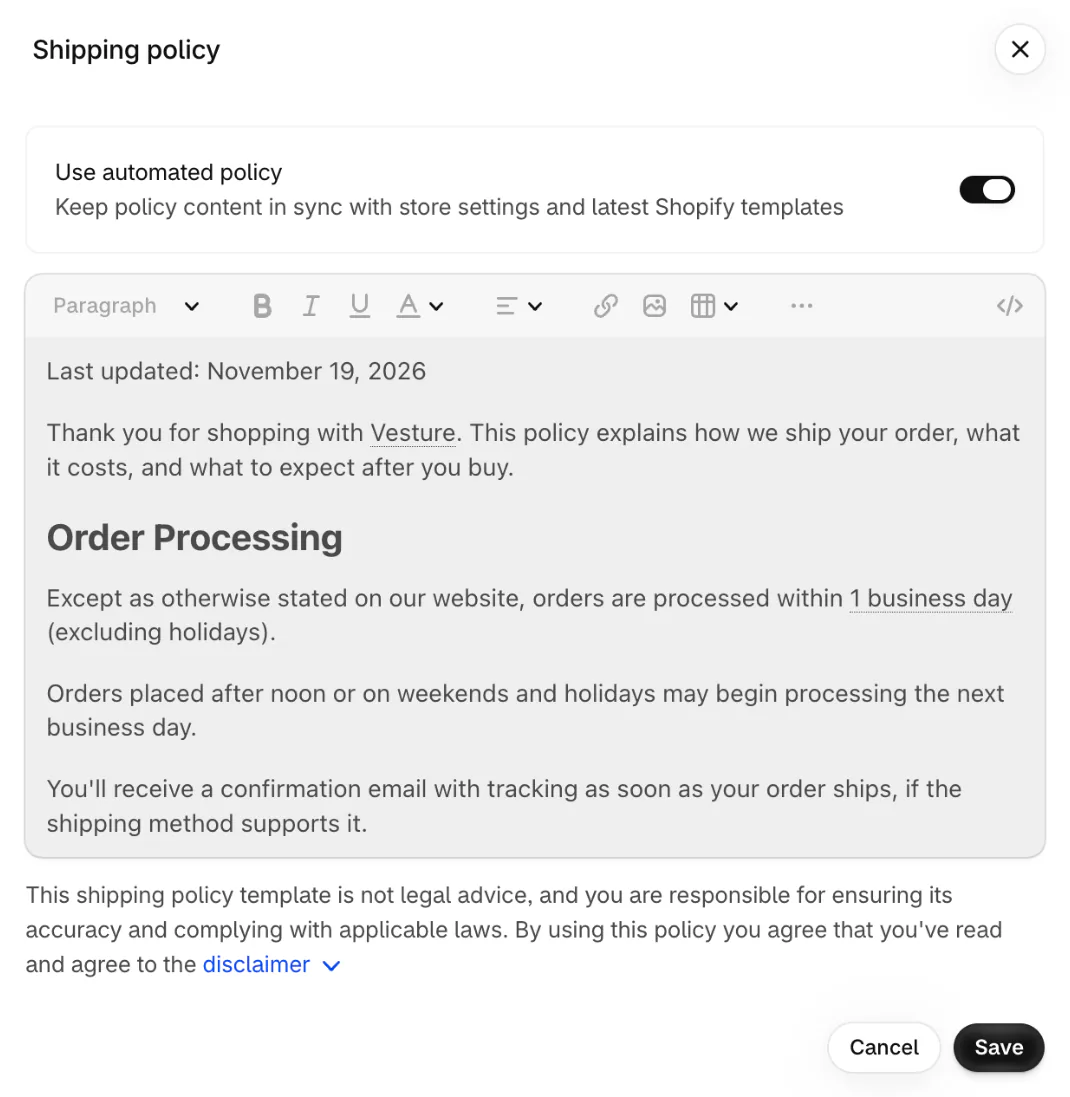
Switching automation back on replaces your wording with Shopify's, so keep a copy first. On a store that already has a policy, it also replaces custom translations in languages that have an automated template. The steps are on Shopify's Adding store policies page.
Shopify lists your policies in the checkout footer by default, and lists a link to the shipping policy on your product pages and cart too (its free themes downloaded after November 2018 show the product-page link). Your store's own footer needs a menu item. Go to Content, then Menus, click the menu, choose Add menu item, search for the policy, add it and click Save menu. The policy also has its own web address, so you can send it in an email or a bio.
Which parts of the policy must match your Shopify settings?
Five lines in the policy are also settings in your admin: packing time, countries, standard rate, free shipping minimum and email. A shopper can catch the one that disagrees.
| Your policy says | Set it in Shopify |
|---|---|
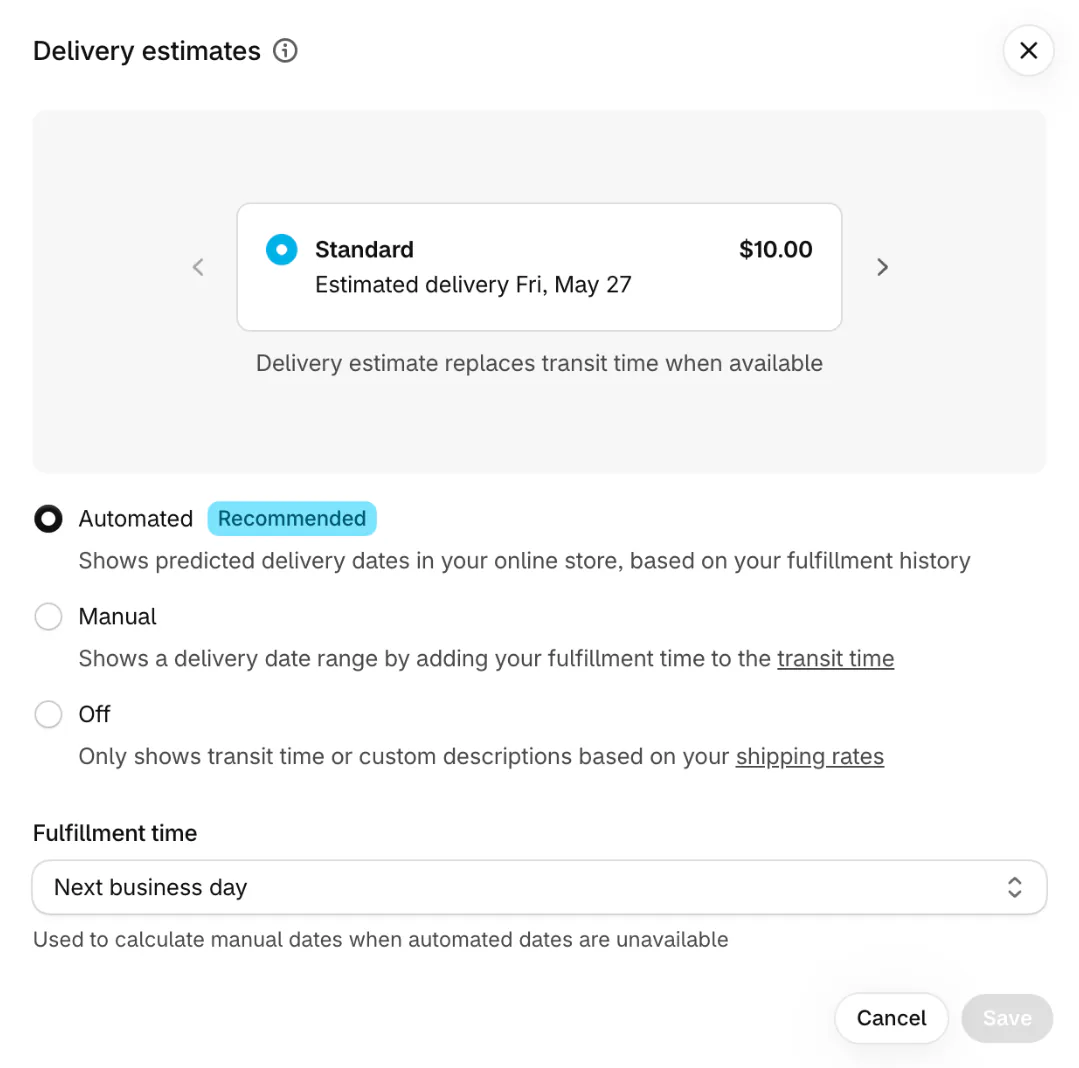
| We pack orders within [2] business days | Settings, then Shipping and delivery, then Delivery estimates, in the Fulfillment time menu, which shows once delivery dates are set to Manual or Automated. The choices are Same business day, Next business day, 2 business days, or Custom from 3 to 40 business days (or 1 to 8 weeks) |
| We ship to [countries] | Your shipping zones and markets. Shopify's automated text lists only the countries that are in both |
| Standard costs [$5.95] | The shipping options of each market in Shipping and delivery. A store not yet moved to Markets sets them as shipping rates in the same place |
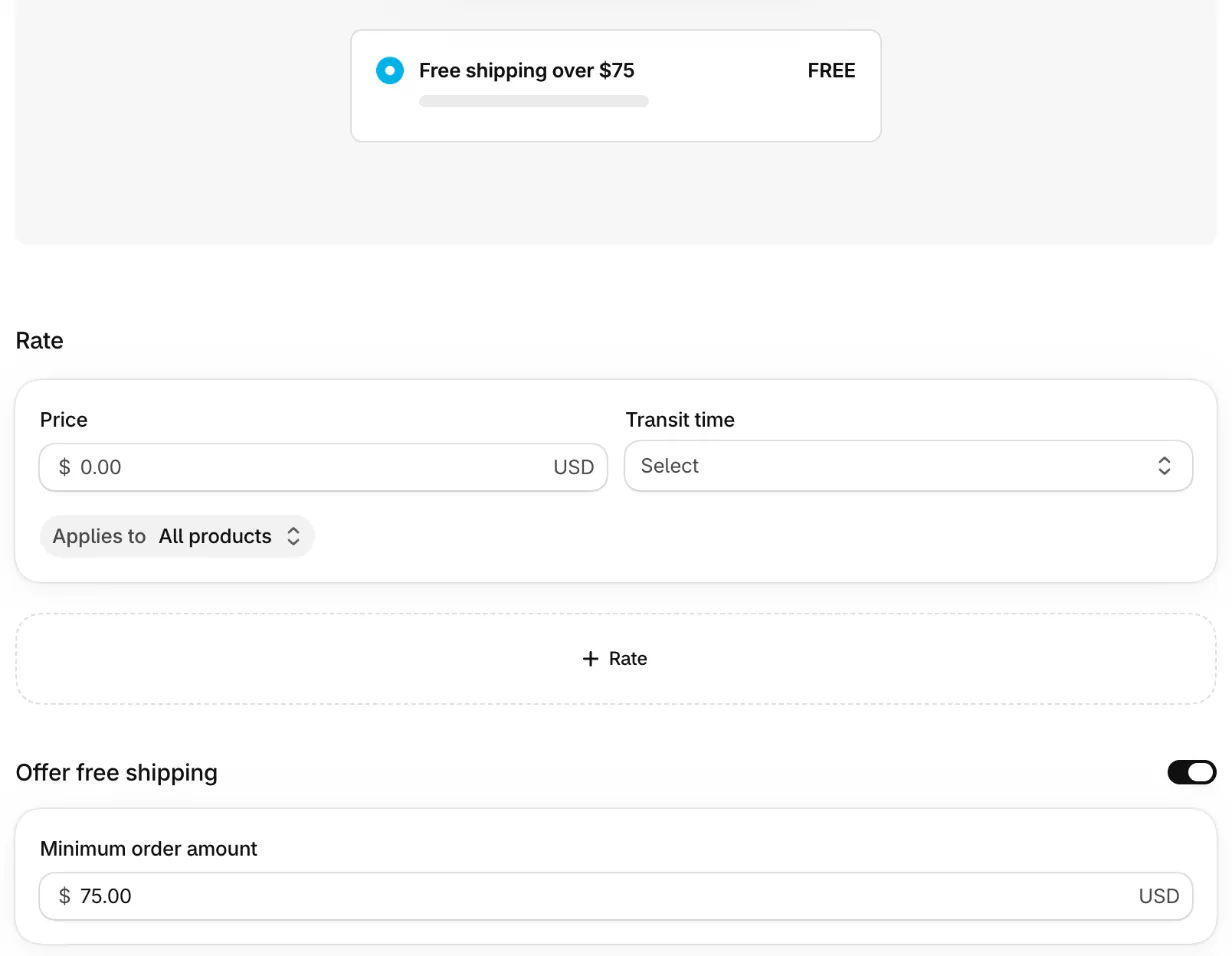
| Free shipping over [$75] | The "Offer free shipping" switch and its minimum amount, called "Minimum order amount" on a store moved to Markets |
| Email [email] | Settings, then General, in Store email, which the automated text uses |
Shopify's own review list for automated policies gives the same warning: don't promise delivery or shipping times that you can't provide. Shopify counts business days as Monday to Friday, and it uses a 12 pm cutoff in the time zone of your shipping origin when it works out a delivery date. Name your own cutoff and its time zone, as the template does.
Shopify is gradually moving shipping rates to shipping options set by market, so the screen your store shows decides which words to look for. The capture below shows the "Offer free shipping" section of the newer "Add shipping option" dialog. A store not yet moved to Markets shows the same switch inside each shipping rate.
The shipping rates guide covers the rates and why a label costs more than the rate you charge.
How do you word delivery times you can keep?
Give a firm number for packing, which you control, and an estimate for transit, which the carrier controls, counted from the day you ship.
- Keep handling and transit apart: "packed within 2 business days", then "usually 3 to 7 business days after we ship".
- Say "usually" and "estimated" for anything a carrier does.
- Add one sentence for peak weeks, so a late December parcel doesn't read as a broken promise.
US law cares more about the shipping date than the delivery date. The FTC's rule for online orders says you need a reasonable basis to expect to ship within the time you state, or within 30 days when you state none. If you can't, you must offer the buyer the choice to wait or cancel for a prompt refund. It covers shipping, not carrier delivery. In the UK, GOV.UK says to deliver within 30 days unless the customer agreed otherwise. Rules differ by country and product, so this is not legal advice. Shopify itself says you may not be legally required to publish a shipping policy.
For weighing, labels and tracking, see shipping products to customers.
Where does the free shipping line show up for shoppers?
Your policy states the free shipping line once, and the cart is where a shopper meets it. A shopper who sees "free over $75" in a policy still has to do the sum while shopping.
Sledge, a Shopify app, has a Cart Drawer tool with a "Progress goal" block, a bar that fills as the cart grows. Open Tools, then Cart Drawer, then Cart Drawer again for its settings. Under Body, switch Progress goal on and click the Free shipping button to add a tier. Under "Free shipping source", choose "Create in Cart Drawer", set Progress goal to "Minimum purchase amount" and type the same number your policy quotes in Value. Two fields in the block set the words. Subtitle is the line above the bar until the cart reaches the goal, and the preview shows "Get Free shipping". Finish title is the line that replaces it once the cart gets there, and it starts as "Congratulations!!!", so reword both.
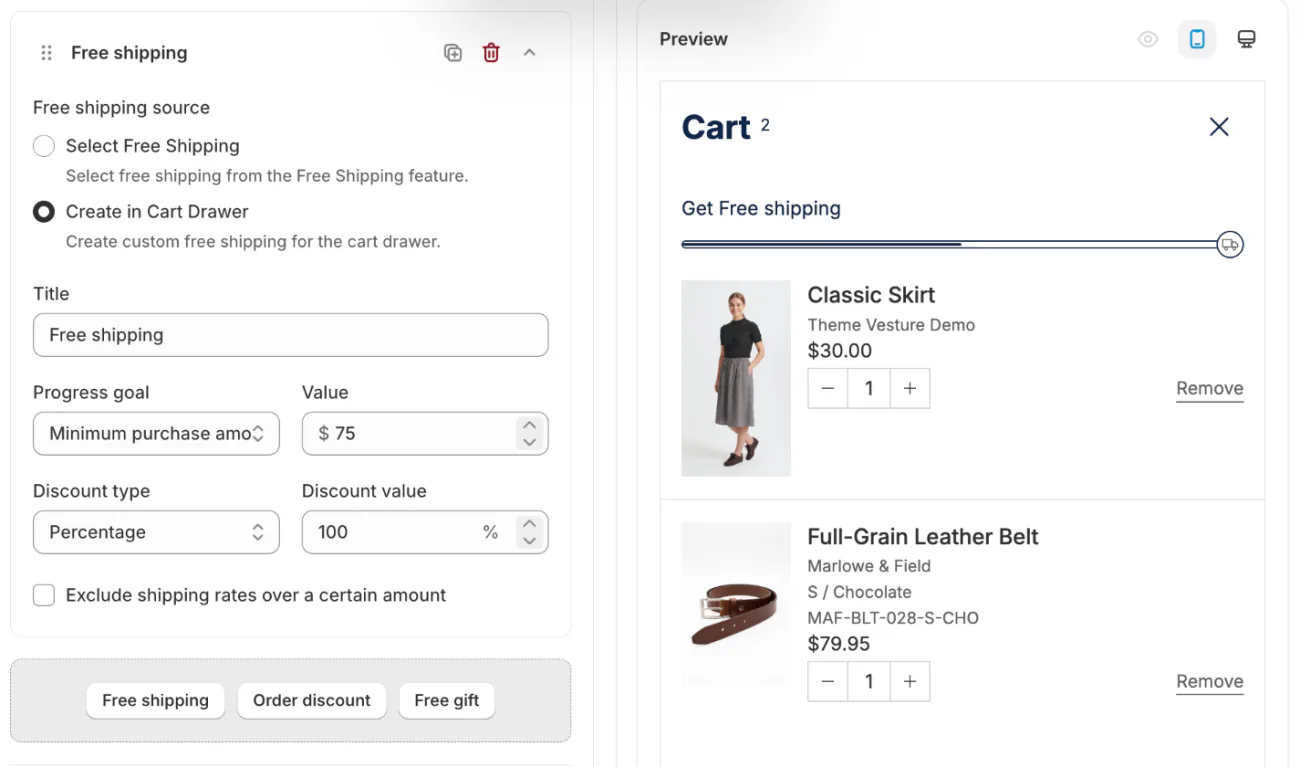
Keep three numbers at one amount: the minimum in Shopify, the number in the Sledge bar and the one in your policy. A bar that promises $75 over a shipping rate that starts at $100 can cost you the sale. The free shipping bar guide has the full setup, and the cart drawer page shows the rest of the tool. To choose the number, see free shipping threshold.
FAQ
Questions, answered
-

14-day free trial
Explore Sledge on your store before you decide to commit.
-

No credit card required
Start improving your store with no upfront commitment.
-

Setup in minutes
Get Sledge running without a lengthy setup process.
-

Built to grow sales
Turn shopper behavior into actions that help you sell more.
Does Shopify have a shipping policy template?
Yes. Open Settings, then Policies, click Shipping policy and turn on Use automated policy. Shopify writes the text from your store name, support email, fulfillment time and the countries you ship to, then keeps it current. Or turn the switch off and paste your own, such as this page's template. Shopify says its text isn't legal advice.
Where do I add or edit a shipping policy on Shopify?
In your admin, go to Settings, then Policies. Under Written policies, click Shipping policy, then add or edit the text and click Save. If Use automated policy is on, turn it off first to type your own words. Shopify then links the policy in your checkout footer.
Why isn't my shipping policy in my store's footer?
Shopify lists policy links in the checkout footer by default, and your store's own footer needs a menu item. Go to Content, then Menus, click the footer menu, choose Add menu item, search for your shipping policy and add it. Then click Save menu.
Do I need a shipping policy?
You may not be required to publish one, says Shopify's own guide, but you still have shipping duties. In the US, you need a reasonable basis to expect to ship within the time you state, or within 30 days if you state none. This isn't legal advice, so check the rules where you sell.
What should a shipping policy include?
Where you ship, how long you take to pack an order, each option with its cost and usual delivery time, the free shipping minimum, tracking, what you do when a parcel is late, lost or damaged, and who pays duties on international orders. Add a contact email and a last updated date.
Can a shipping policy generator write it for me?
A generator asks about your store and drafts the text. Shopify's own version is Use automated policy, which fills in from your settings. Either way, read it, delete what you don't do, and keep its numbers in step with your rates. No generator knows how fast you really pack.
The policy states the line. Does your cart show it?
Sledge does not write, host or enforce your shipping policy; that stays in Settings, then Policies. For the free shipping line it quotes, Sledge adds a progress bar to your cart drawer that fills as shoppers add items, and you can try it free for 14 days. Growth Intelligence turns on when you pick a paid plan. It studies what shoppers search for and buy, then lists fixes for the sales your store misses, with one dollar total for all of them, labeled "Est. potential".

