
To find a supplier, decide whether you need a manufacturer or a wholesaler, search by product and place, and ask at least three for the same quote. Order samples before a bulk run. In Shopify, record the order under Products, then Purchase orders, and take pre-orders while the stock is on its way.
Say a mug maker quotes $4.50 a mug, with a minimum order of 500 and 7 weeks to deliver. That is $2,250 up front for stock you will not have for almost two months. The supplier you pick sets your cash, your calendar and your quality.
What kind of supplier do you need?
A supplier is anyone who sells you products, and the kind you pick sets your minimum order and how much control you keep.
| Type | What they do | You get | Check first |
|---|---|---|---|
| Manufacturer | Turns raw materials into finished goods | Your own product, made to your spec | Who owns the design and the tooling |
| Wholesaler | Buys from manufacturers in bulk and sells to retailers | Finished stock to resell | The resale terms. Some ask for your business license and tax papers |
| Private label maker | Makes a product you sell under your brand | Your label on a product the maker produces | Whether anyone else can sell the same one |
| Print on demand | Prints and ships each item after it sells | No stock to buy | Print quality, on a sample |
Every manufacturer is a supplier, but not every supplier is a manufacturer, as Shopify's guide puts it. Dropshipping is a different model and is not covered here.
Where do you look for a supplier?
Start with a search for your product plus a place, then widen to people and directories.
- Search your product with words such as "wholesale", "supplier" or "distributor", and add your country or region.
- Ask other sellers in your niche, and read the online communities where they talk.
- Go to a trade show, or join a trade organization for your product.
- Browse a directory. Shopify's guides name Thomasnet, Maker's Row, MFG and Kompass as domestic directories and Alibaba for makers mostly in China. Treat them as places to start, not a ranking.
Maker's Row, for one, says it lets you post your production requirements once and get matched with U.S. manufacturers. On any marketplace, read the page that explains what a badge such as "Verified Supplier" checks before you lean on it.
How do you vet a supplier before you pay?
Seven questions turn a stranger into a shortlist. Ask them of every supplier, in writing.
| Ask | Why | Red flag |
|---|---|---|
| 1. Do you make it yourself? | Shopify's guide says to deal with the maker, not a trading company in the middle | No factory name or address |
| 2. Who else buys from you? | Current customers can vouch for the work. Ask about product liability insurance too | Hesitates to share references |
| 3. What happens when it arrives wrong? | Get the defect and return policy in writing, including who pays shipping and duties | "We'll see" |
| 4. How long, and how many? | The lead time and the minimum order set your cash and your calendar | No written lead time |
| 5. How do I pay? | Some makers want full payment up front, and many will talk terms. Shopify's example is half now, half after delivery | Full payment up front, no terms |
| 6. May I sell it where I sell? | Some suppliers allow your own site but ban marketplaces | An answer that changes when you ask twice |
| 7. What paperwork comes with each order? | Invoices prove where your stock came from | None offered |
Your quote request also shows how a supplier communicates, and Shopify's guide advises favoring the ones who are responsive. Shopify's wholesale guide also advises starting small with a new supplier.
Price the order on its landed cost, the full price once the goods reach you. For import rules, start with Basic Importing and Exporting from U.S. Customs and Border Protection.
What do you send a supplier first?
Send every supplier the same one-page brief, so the quotes can be compared. List the dimensions, materials, finish, packaging, quantities and reference images.
Shopify's guide advises asking at least three suppliers for a quote, in a clear and concise first email. It also advises asking about the minimum order, but not leading with it. Here is a message to adapt:
- Subject: Quote request: 12 oz stoneware mug
- Body: Hello, I run an online store that sells ceramic mugs. I am looking for a maker for a 12 oz stoneware mug (spec sheet attached). Could you quote 250, 500 and 1,000 units? Please include the price per unit, your minimum order, the cost and time for a sample, production time, payment terms, and who pays shipping and duties. Can you share a reference from a current customer? I am comparing three suppliers this week. Thank you, [your name]
Three quantities show how the unit price moves as the order grows. Compare quotes on more than the unit price: shipping and duties, currency exchange, inspection, rework and tooling can all add to the bill.
How do you order samples before a bulk order?
Pay for samples from your top two or three suppliers, because a quote shows the price and a sample shows the quality. Shopify's guide says to always get samples before full production.
- Order a sample from each shortlisted supplier. Its cost and time were in your message.
- Use it the way a shopper will.
- Compare it with your spec sheet.
- Date and sign the one you approve, and keep it as a control sample.
- Place the first order small.
If a shipment arrives in the wrong color, check it against the control sample.
What are a minimum order quantity and lead time, and can you change them?
The minimum sets how much cash you tie up, the lead time sets when you can sell, and most minimums can be negotiated.
A minimum order quantity, or MOQ, is the smallest order a supplier will accept, counted in units or in dollars. Lead time is the wait from ordering to stock you can sell, and our lead time page breaks it down. A first-time buyer can face a higher minimum than a repeat customer.
Back to the mug: 500 at $4.50 is $2,250. Split 50/50, that is $1,125 now and $1,125 on delivery. Or ask for two deliveries of 250.
Shopify's guide says most minimums can be negotiated. You can offer a higher price per unit, ask for a different material, take delivery in batches or commit to a longer contract. When the first order sells through, the economic order quantity page shows how big a reorder should be.
How do you record the supplier order in Shopify?
Shopify records the order and the delivery, and it does not choose the supplier.
Open Products, then "Purchase orders", the list of what you have ordered from suppliers, and click "Create purchase order". Click "Select supplier", add each product with a quantity and a cost, and fill in "Payment terms" if you agreed any. Shopify's Help Center says to save it as a draft, send the supplier a PDF copy from More actions, and mark it as ordered once the supplier confirms. Marking it as ordered can't be undone. You pay the supplier outside Shopify.
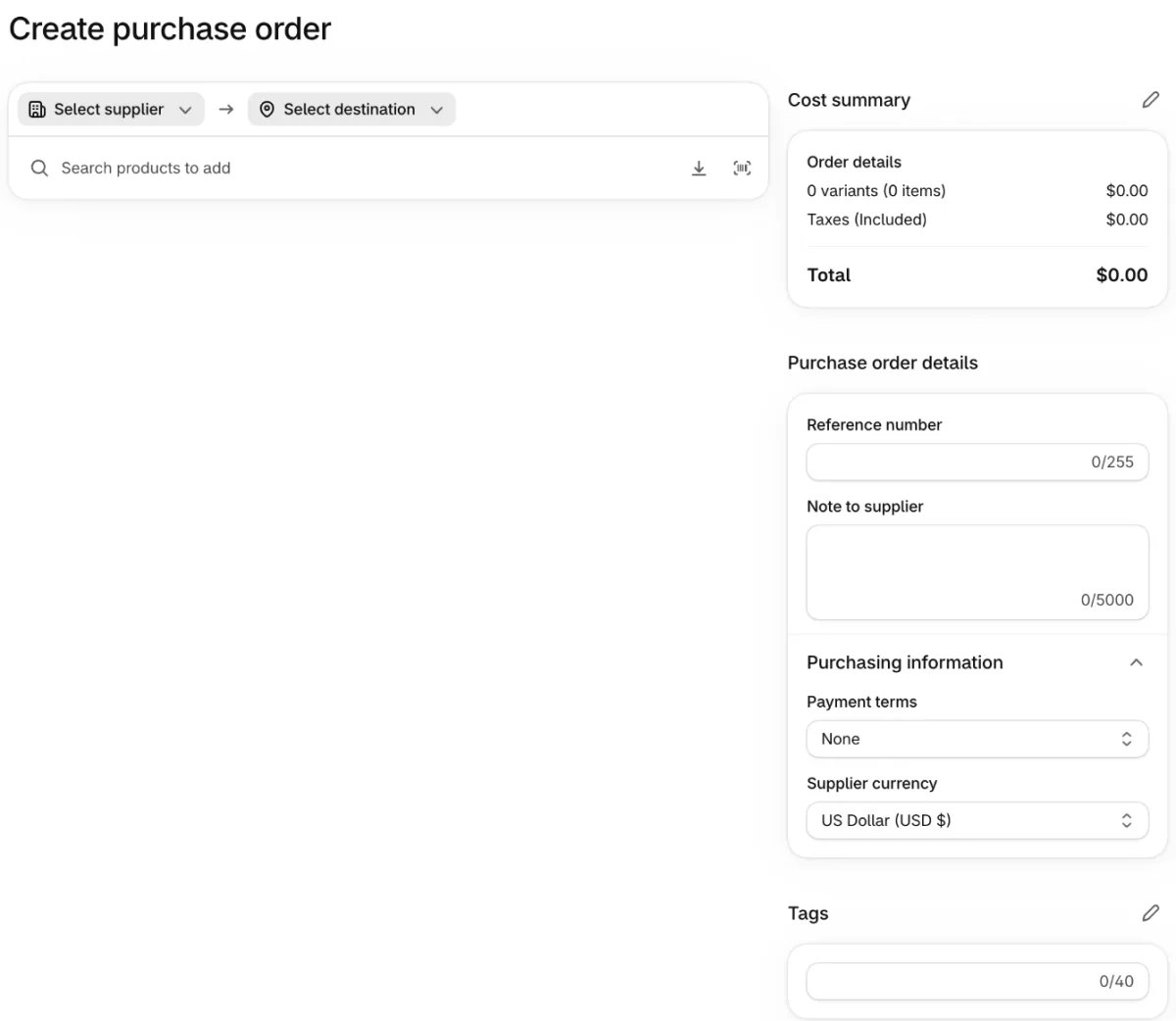
When the boxes ship, click "Create transfer" on the order and save it, then "Mark as in transit", and add an "Expected arrival" date if you know it. Shopify then counts that stock as incoming until you receive it. The purchase order page has the detail, and inventory management covers counting and reordering once the stock is in.
How do you sell while the stock is on its way?
A supplier's lead time can run to weeks, and the product can take orders in the meantime. Only promise a ship week your supplier can keep.
The built-in setting is on the product page. In the Inventory card, leave "Inventory tracked" on, click "Sell when out of stock", and tick "Continue selling when out of stock", the box that keeps a product buyable at a quantity of 0.
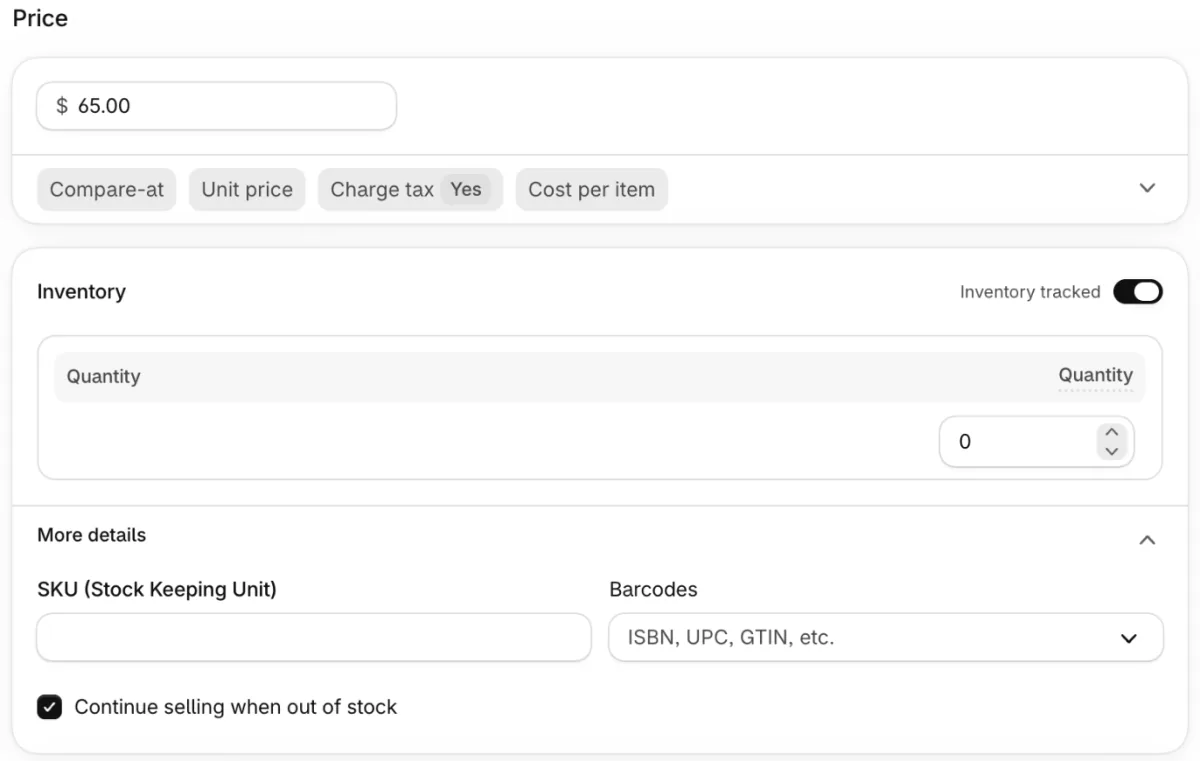
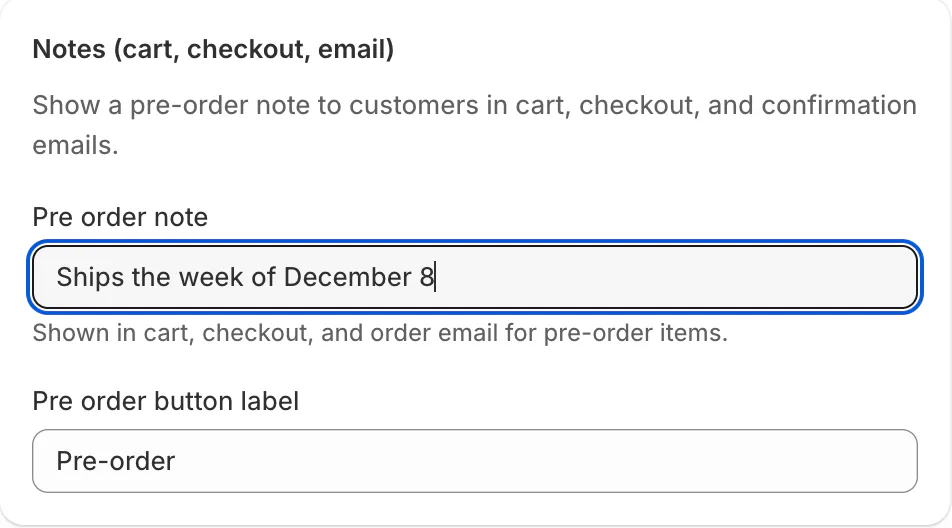
Shopify's own pre-orders need an app, and the Help Center says they are currently available only to stores using Shopify Payments or PayPal Express. A pre-order app such as Sledge turns on that checkbox for the products you pick with "Add products". It then adds a "Pre-order" button and a note, such as the ship week, that shoppers see in the cart, at checkout and in the order email. Turn the pre-order off or delete it, and Sledge switches back only what it changed.
The FTC's Mail Order Rule asks sellers to have a reasonable basis for the shipping time they state, so read it before you name a date.
When the same supplier restocks a product that sold out, Back in Stock collects shoppers' email addresses on that product and emails them when it returns. It works per product, by email only, on Accelerate ($199 a month) and up. Once the boxes arrive, how to ship products to customers picks up from there.
FAQ
Questions, answered
-

14-day free trial
Explore Sledge on your store before you decide to commit.
-

No credit card required
Start improving your store with no upfront commitment.
-

Setup in minutes
Get Sledge running without a lengthy setup process.
-

Built to grow sales
Turn shopper behavior into actions that help you sell more.
How do you find a supplier for your product?
Decide whether you need a manufacturer or a wholesaler. Search your product plus a place, ask other sellers, and try directories and trade shows. Send the same one-page brief to at least three suppliers, compare the quotes, order samples from your top two, and place a first order small enough to lose.
How do you find a manufacturer for your product idea?
Write a one-page brief with dimensions, materials, finish, packaging, quantities and reference images, so every factory quotes the same product. Shopify's guide advises getting quotes from at least three manufacturers and ordering samples before production. Ask each for prices at 250, 500 and 1,000 units to see how the unit price moves.
What is the difference between a supplier, a manufacturer and a wholesaler?
Supplier is the broad word for anyone who sells you products. A manufacturer makes them, and a wholesaler buys from manufacturers in bulk and sells to retailers. In Shopify's words, every manufacturer is a supplier but not every supplier is a manufacturer. A private label maker produces an item you sell under your own brand.
How do you know a supplier is legitimate?
Ask who actually makes the product, get references from current customers, and check reviews and any Better Business Bureau complaints. Ask whether they carry product liability insurance. Shopify's guide says a supplier who hesitates to share references is a warning sign. Pay for a sample before any large payment.
What is a minimum order quantity, and can you negotiate it?
A minimum order quantity, or MOQ, is the smallest order a supplier will accept. It can be units or a dollar value: 1,000 pens at 20 cents is $200. Shopify's guide says most MOQs can be negotiated, for example by paying more per unit, taking delivery in batches or changing a material.
Can you sell a product before the supplier delivers it?
Yes, as a pre-order. Shopify's Help Center says pre-orders need a pre-order app and are currently available only to stores using Shopify Payments or PayPal Express. Name a ship date your supplier's lead time can meet. Sledge's pre-order adds the button and the note, and sets Continue selling when out of stock for you.
The stock is weeks away. Can shoppers order it today?
Sledge doesn't find, vet or manage suppliers. Its pre-order keeps the products you pick taking orders while stock is on its way, where your payment provider allows, with a "Pre-order" button and a note shoppers see in the cart, at checkout and in the order email. Try it free for 14 days. Growth Intelligence turns on when you pick a paid plan, and its suggested fixes add up to one dollar figure, labeled Est. potential.

