
To ship products to customers on Shopify, weigh each packed product, set what shoppers pay for delivery, then fulfill every order. Buy a label in your admin, or ship with any carrier and add its tracking number. Pack the box, hand it over, and Shopify can email the shopper the tracking.
Say your first order lands at 9 p.m. The box is on the table, and three questions come with it: what does it weigh, what will the postage cost, and where does the label come from? Each one has a screen in your Shopify admin.
What are the steps to ship an order from a Shopify store?
There are six steps, and four of them happen in your admin.
| Step | Where in Shopify | What you do |
|---|---|---|
| 1. Weigh and size the packed product | The product's Shipping section | Enter the packed weight |
| 2. Set what shoppers pay | Settings, then Shipping and delivery | Add a rate for each place you ship |
| 3. Decide who ships | Your desk, a fulfillment service or a supplier | Pick one way for each product |
| 4. Buy a label or add tracking | The order's Unfulfilled section | Buy a label, or type in a tracking number |
| 5. Pack and hand off | Your packing table | Seal the box and give it to the carrier |
| 6. Tell the shopper | Notify customer on the order, or Send shipping information to customers on a label | Email the shopper the tracking number |
When you notify the shopper, the shipping confirmation email carries the tracking number. Shoppers also want to know the price and the wait before they buy, which a shipping policy answers.
How do you weigh and measure a product before it ships?
Weigh the product packed, because carriers bill the parcel, not the item.
Open a product and scroll to its Shipping section. The Weight field shows only when Physical product is on, the switch that tells Shopify the item ships.
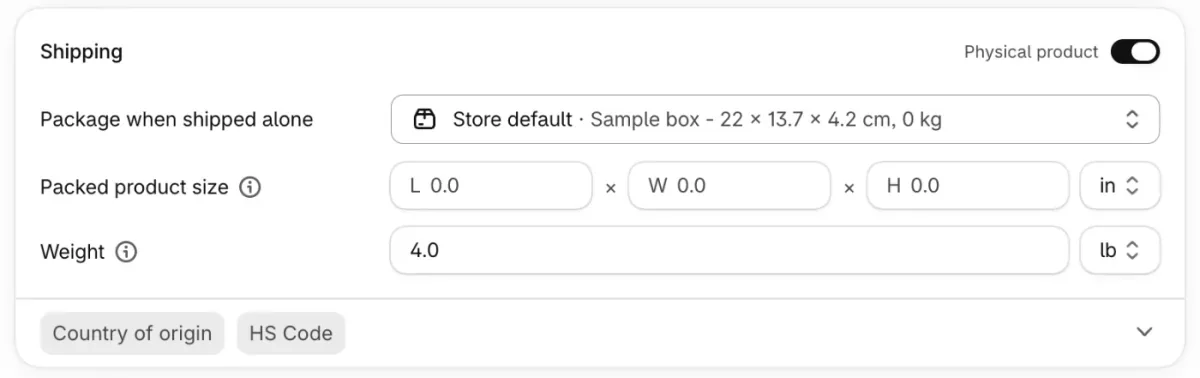
Shopify adds your default package's weight to the products' weight when it picks a weight-based rate. A wrong weight on either one changes the rate on every order that holds the product. A kitchen scale does the job, and Shopify's Hardware Store sells shipping scales. The box itself is a separate choice, covered in custom packaging.
Who ships your orders: you, a fulfillment service or a supplier?
Ship yourself while orders are few. Shopify supports three routes:
- You pick, pack and hand off every box, the pick and pack work.
- A fulfillment service stores your stock and ships for you. That is a third-party logistics company, and Shopify's Fulfillment Network app connects you to one.
- A supplier ships for you, which is dropshipping.
Whichever you pick, the order ends as fulfilled in your admin. Order fulfillment covers the full job.
How do you ship an order in Shopify?
Open the order, then buy a label or add a tracking number.
Go to Orders and click the order. The items you owe sit in the Unfulfilled section.
To use a Shopify label, click Create shipping label. Check the package and the Total weight (with package), pick a Shipping service and click Buy shipping label. To email the shopper, tick Send shipping information to customers in the label form. Once you print the label, Shopify marks the order fulfilled.
Shopify sells labels only for fulfillment locations in ten countries: the United States, Canada, Australia, the United Kingdom, France, Germany, Italy, the Netherlands, Poland and Spain. If you don't see the button, your location may not qualify, so use the tracking route below. How to make a shipping label covers printing and voiding.
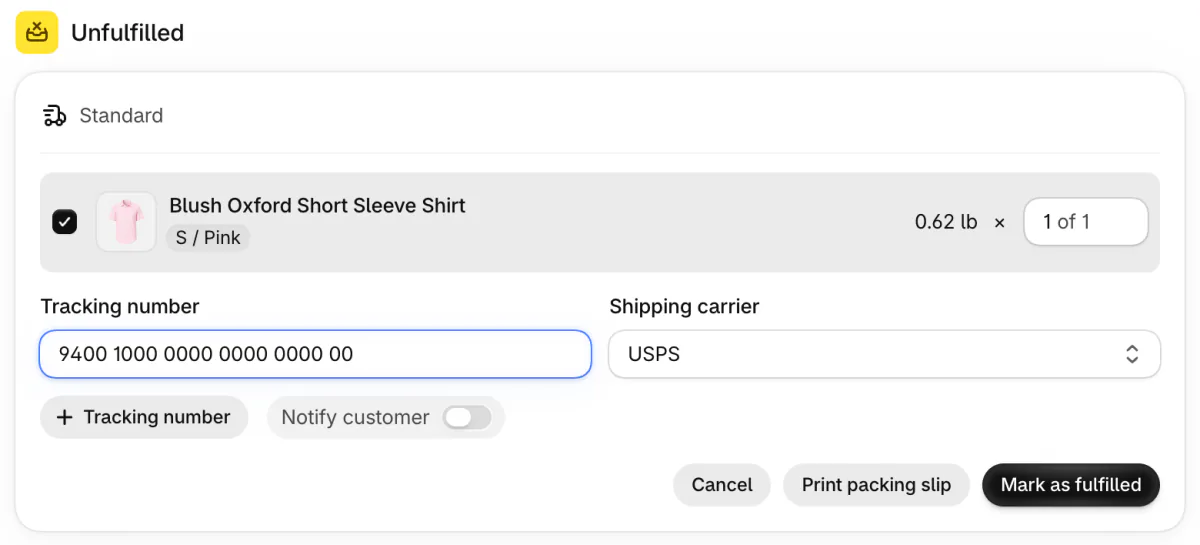
You can also ship with any carrier. Buy the postage on the carrier's site or in a shipping app, type its number under Tracking number, and click Mark as fulfilled. Shopify may pick the carrier for you. Switch Notify customer on to email the shopper the tracking number.
How do you pick a carrier and see the price before you buy?
Price the parcel in Shopify's rate calculator first.
Open Settings, then Shipping and delivery, click Shipping labels, then Calculate rates. Choose where the parcel goes, the package and its total weight, then click Calculate discounted rates.
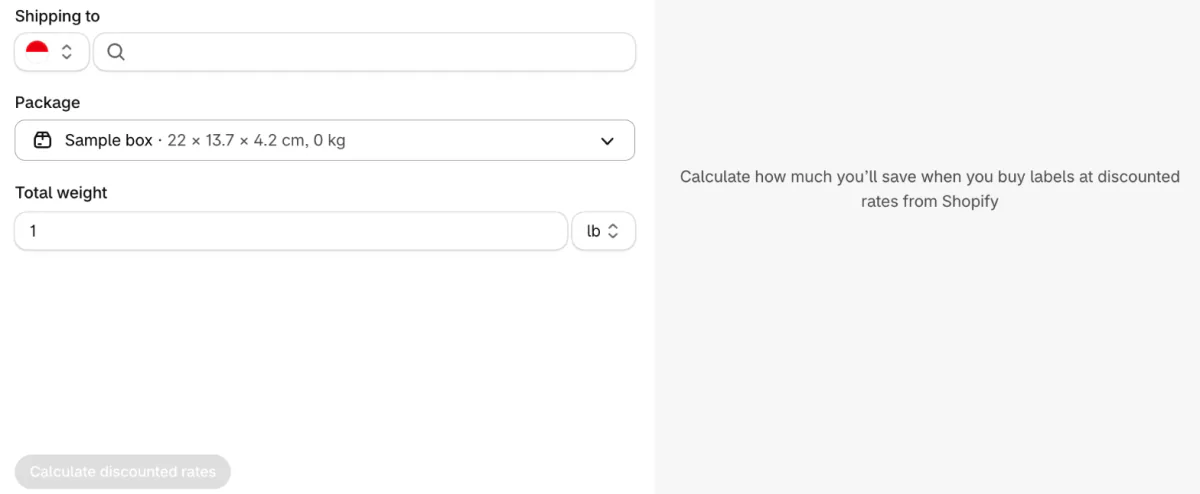
The discount can vary with the package, weight, destination and origin, and with your location, plan and carrier. The same box can price differently by service, so compare services for your own parcel. UPS vs FedEx vs USPS sorts carriers by parcel, and Shopify shipping rates covers what shoppers pay at checkout.
How do you ship fragile items?
Use a sturdy box, cushioning on every side and cover for what the item is worth.
Shopify's guide to shipping fragile items, published in January 2025, advises:
- A box only a little bigger than the item.
- About 3 inches of cushioning on every side.
- Each item wrapped on its own.
- A second box around valuable or the most fragile items.
- Tape on every seam, and fragile labels on more than one side.
Shopify has two ways to handle the cost of fragile items: their own rates and insurance. A custom shipping profile gives chosen products their own rates, and the Help Center's own example is fragile products that need more expensive shipping options. On a store already moved to markets, the same job sits in a market's shipping options.
For a US label, you can insure a parcel up to $5,000. On Grow, Advanced and Plus with Shopify Payments, up to $200 per eligible label is included. A checkout add-on is a different thing, and is shipping protection worth it weighs it.
How do you ship heavy items?
The carrier's weight limit decides the service before the price does.
| Service | Heaviest parcel | Size limit |
|---|---|---|
| USPS, domestic | 70 lb | 108 in, length plus girth |
| UPS, most services | 150 lb | 165 in, length plus girth, and 108 in long |
| FedEx Ground and Home Delivery | 150 lb | 165 in, length plus girth, and 108 in long |
| FedEx Ground Economy | 70 lb | 130 in, length plus girth, and 60 in long |
As Shopify's Help Center prints them, read November 19, 2026. Check the carrier's own page before you rely on a limit.
Size can cost more than weight. On some services, a box over 1 cubic foot (1,728 cubic inches) is billed by its dimensional weight, a weight worked out from its size, when that number is larger than the order's weight.
A custom shipping profile gives heavy products their own rate, so a sofa cushion and a mug don't share one. A big order can also ship in several boxes: fulfill it in parts, with a tracking number for each, as partially fulfill an order in Shopify shows. Past these limits the parcel services stop.
Should you offer free shipping, and how do shoppers see it?
Shopify applies free shipping above an amount you set, in the same form as your other rates.
Open Settings, then Shipping and delivery, where the Shipping options row manages where you ship and what it costs. In a shipping option's form, switch on Offer free shipping and enter a Minimum order amount.
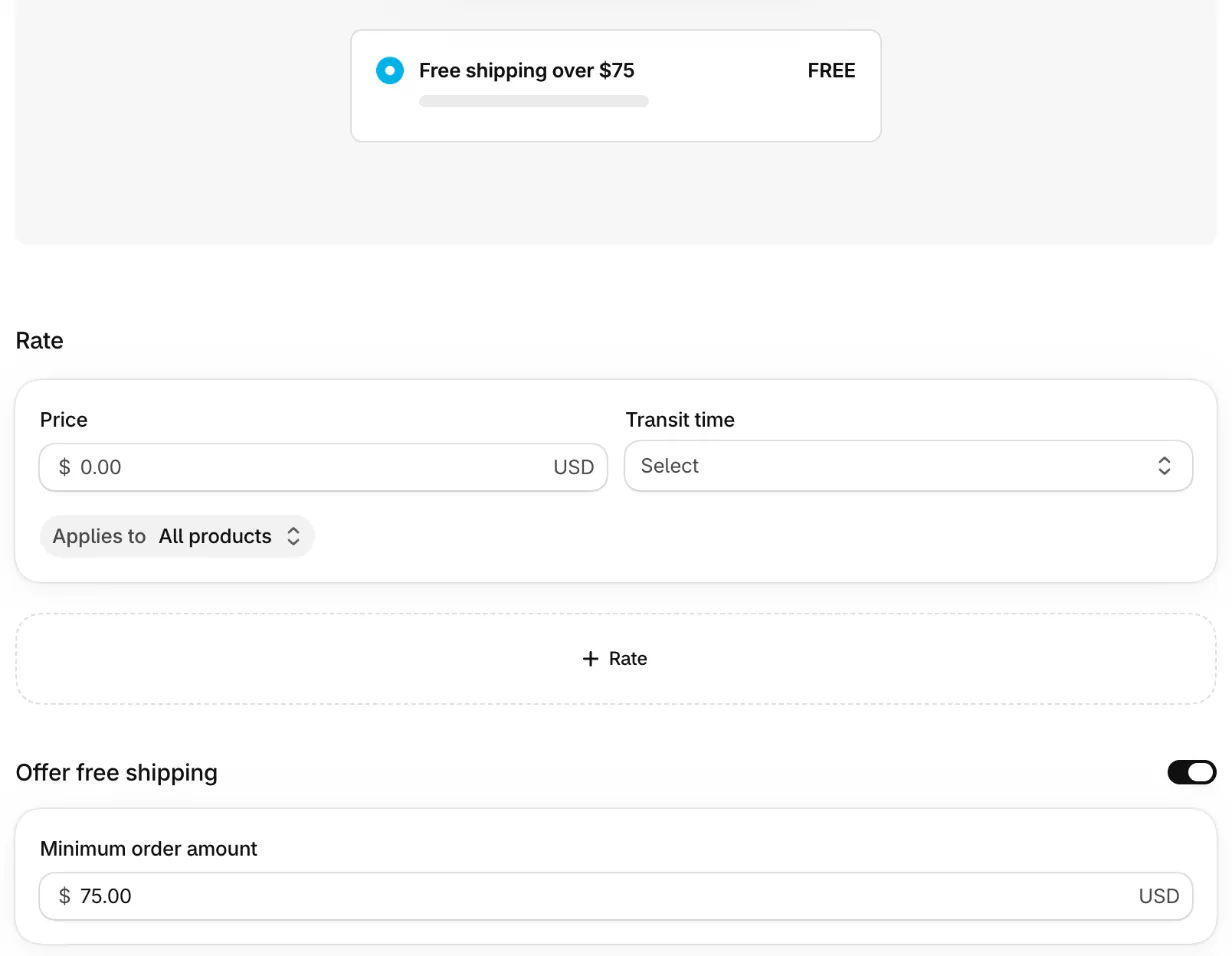
Sledge can put the goal in front of shoppers: in its cart drawer settings, the Progress goal switch shows a bar that counts up to a goal you set as a Minimum purchase amount or Minimum quantity. Free shipping bar for Shopify shows how to set one up.
The goal and the rate are two separate settings, so if you use both, set them to the same amount. A free shipping threshold is the name for the amount.
How do you ship to Canada or Australia?
Add the country to an active market, add customs details, and price your own parcel.
- The country needs a market and a shipping rate.
- For a Shopify label, each product needs an HS code (the number customs uses to sort it) and a country of origin.
- The label asks for the customs form, under Edit customs information.
- Your shopper may owe duties and taxes at the door.
For a US location, Shopify sells USPS and UPS labels that can go to Canada. Prices change by service, so run your own parcel through Calculate rates above. The Australia answer in the questions below has one dated example. Shopify international shipping is the page for markets, duties and HS codes.
FAQ
Questions, answered
-

14-day free trial
Explore Sledge on your store before you decide to commit.
-

No credit card required
Start improving your store with no upfront commitment.
-

Setup in minutes
Get Sledge running without a lengthy setup process.
-

Built to grow sales
Turn shopper behavior into actions that help you sell more.
How do I ship products to customers from my Shopify store?
Weigh each packed product and enter it on the product page. Set what shoppers pay under Settings, then Shipping and delivery. When an order arrives, buy a label if your location is eligible, or ship with any carrier and add the tracking number. Click Mark as fulfilled, and Shopify can email the shopper the tracking.
How much does it cost to ship to Canada?
It depends on weight, box size, speed and carrier, so price your own parcel before you quote it. In Shopify, open Settings, then Shipping and delivery, click Shipping labels, then Calculate rates. Choose Canada, your package and its weight to see discounted rates. Your shopper may also owe duties and taxes at the door.
How much does it cost to ship to Australia?
The same parcel costs a different amount on each service. Shippo's table, with rates pulled May 28, 2026, estimated a one-pound parcel from San Francisco to Sydney at $39.16 by USPS First Class Package International and $91.38 by USPS Priority Mail Express International. Price yours in Shopify's Calculate rates before you set a rate.
How do I ship from the US to Canada?
Put Canada in an active market with a shipping rate. Add an HS code (the number customs uses to sort it) and a country of origin to each product. Then open the order, click Create shipping label and fill in the customs form. Shopify sells USPS and UPS labels for a US location. The international shipping guide covers duties.
Should I ship orders myself or use a fulfillment service?
Ship yourself while orders are few: you keep every box in hand and pay only postage and packing. Think about a fulfillment service when packing eats your selling hours or stock outgrows your space. A third-party logistics company stores your stock and ships for you, and Shopify's Fulfillment Network app connects you to one.
Do I need Shopify's shipping labels to ship an order?
No. You can buy a label on a carrier's site or in a shipping app, add its tracking number to the order and click Mark as fulfilled. Shopify sells labels only for fulfillment locations in 10 countries, and its discounts vary by plan, carrier and package. If you see no label button, the tracking route still works.
How heavy a parcel can I ship?
USPS parcels stop at 70 lb. Most UPS services and FedEx Ground take up to 150 lb, with a 165 inch limit on length plus girth. Anything heavier is outside their parcel limits. A big order can also go in two boxes: fulfill it in parts and give each part its own tracking number.
Want shoppers to add one more item to reach free shipping?
Sledge doesn't ship orders, print labels, quote carrier rates or compare carriers. Shopify and your carrier do that. Sledge's cart drawer can show shoppers a free-shipping progress bar toward the goal you set. Try it free for 14 days. Growth Intelligence turns on when you pick a paid plan, and its suggested fixes add up to one dollar figure, labeled Est. potential.

