
Ecommerce returns are items a shopper sends back for a refund, store credit or an exchange. Shopify covers the basics without an app: a written return policy, return rules for the window and fees, requests from customer accounts, return labels within the US or within Canada, and the refund itself. An app helps once exchanges or volume grow.
The email has a photo of a jacket two sizes too big. You find the order, buy a label somewhere, send it and wait. The parcel arrives, you refund in full, and only later remember the $8 return fee your policy says you keep.
What are ecommerce returns, and how many come back?
The trip a return makes, from the label back to your shelf, is returns logistics. NRF and Happy Returns estimated that 19.3% of online sales would be returned in 2025. Retailers in the same report expected 17% of holiday sales to come back. Its retailer survey covered large US companies, so your own rate can sit far from either figure.
How you handle returns changes who buys again. In the same report's survey of 2,006 shoppers who had returned an online purchase in the past year, 82% called free returns a major consideration when they buy. And 71% said a poor return experience makes them less likely to shop with that store again.
How do you write a return policy on Shopify?
Start with the policy, the page shoppers read to see whether they can send something back. In your Shopify admin, go to Settings, then Policies, and open "Return and refund policy" under Written policies. Switch on "Use automated policy", and Shopify writes the policy from your store settings, return rules included, and keeps it in sync when they change. Turning it on replaces a policy you wrote, so copy yours first. Or leave it off and write your own.
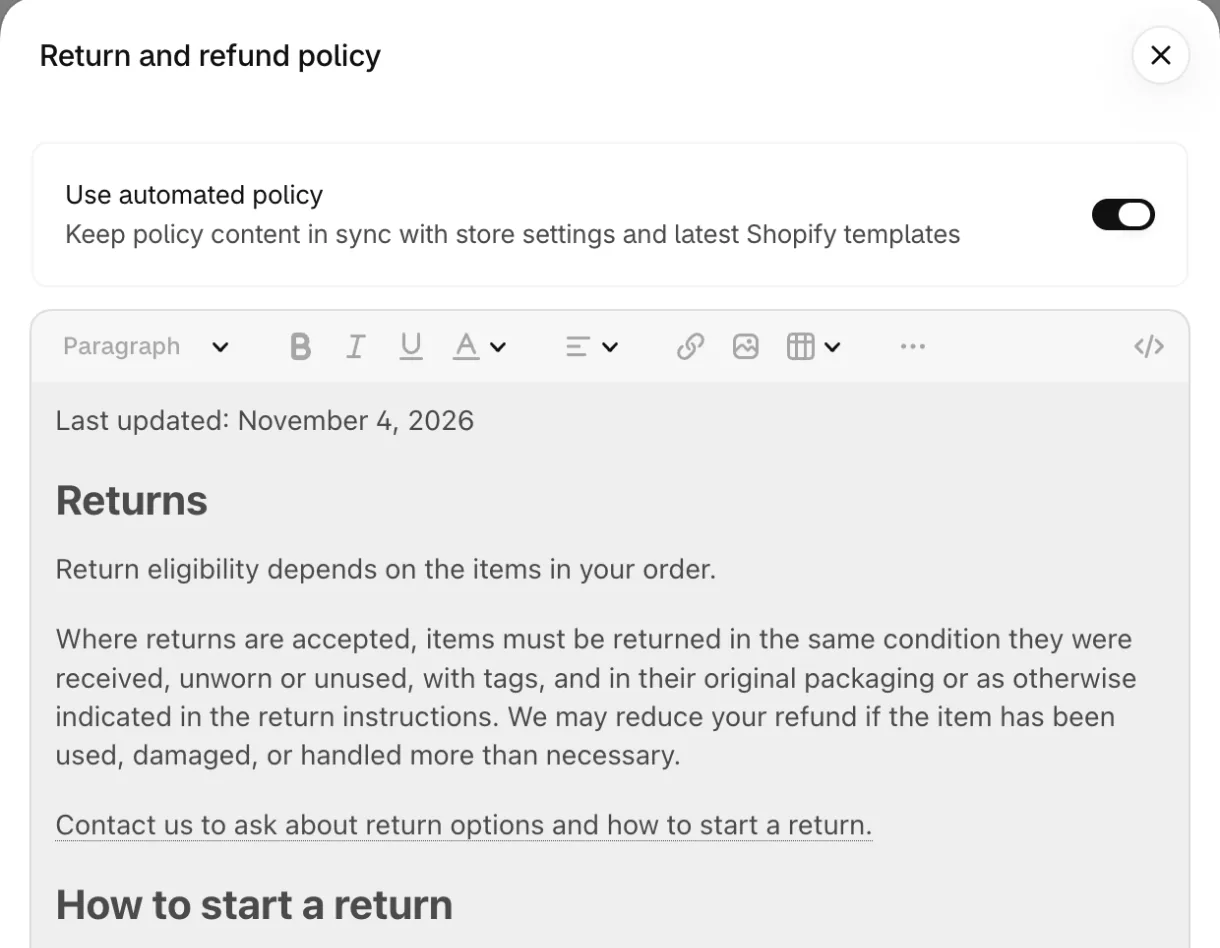
Either way, the policy should say how long shoppers have, what condition items must be in, who pays return shipping, what is final sale, and how to start a return. Shopify says its templates aren't legal advice, so read what it writes. By default, the policy shows in the footer of your store and checkout. Link it near the price too.
How do you set return rules in Shopify?
Return rules decide what a shopper can send back, for how long and at what cost. Go to Settings, then Policies, and open "Default rules" under "Return and cancellation rules". Turn on "Return rules", then set five things.
- Return window: 14, 30 or 90 days, Unlimited, or Custom for a number of your own, counted from "Delivery of item" or "Delivery of last item in order". A tick box extends it over weekends and holidays.
- Return shipping: free, a flat rate per return, or left to the shopper, who buys their own label.
- Restocking fee: a percentage of the return.
- Final sale items: products or collections that can't come back, but not both. Shopify shows this setting only once return rules are on. Bundles can't be final sale.
- Return window override: a different window for chosen collections, products, sizes or colors. Where several overrides apply, the shortest wins.
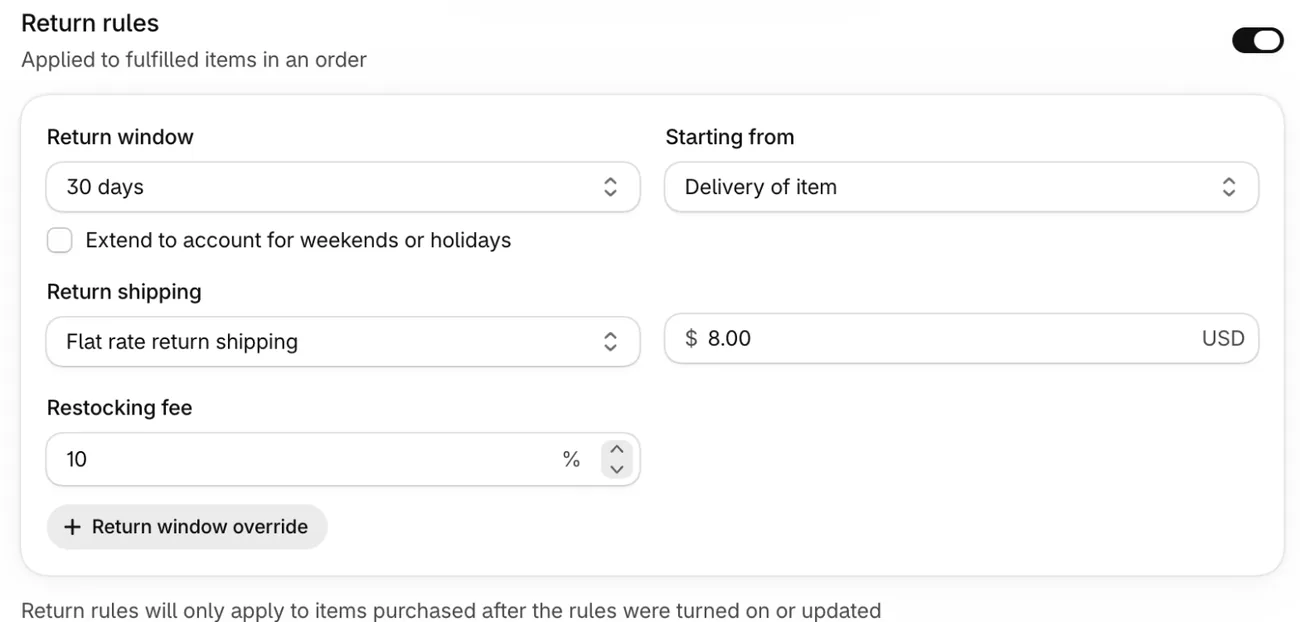
Rules apply only to items bought after you turn them on or update them, and they still apply when you create a return by hand. So set them before your busiest weeks. Selling to the EU? Shopify Help lists the settings for the 14-day right of withdrawal.
How do shoppers start a return themselves?
Self-serve returns let a shopper ask for a return from their order page, without writing to you. Go to Settings, then Customer accounts. Under "Order actions", click Manage, then turn on the Return switch in the editor that opens. Some stores show a "Self-serve returns and cancellations" switch there instead: turn it on and pick which requests shoppers can send.
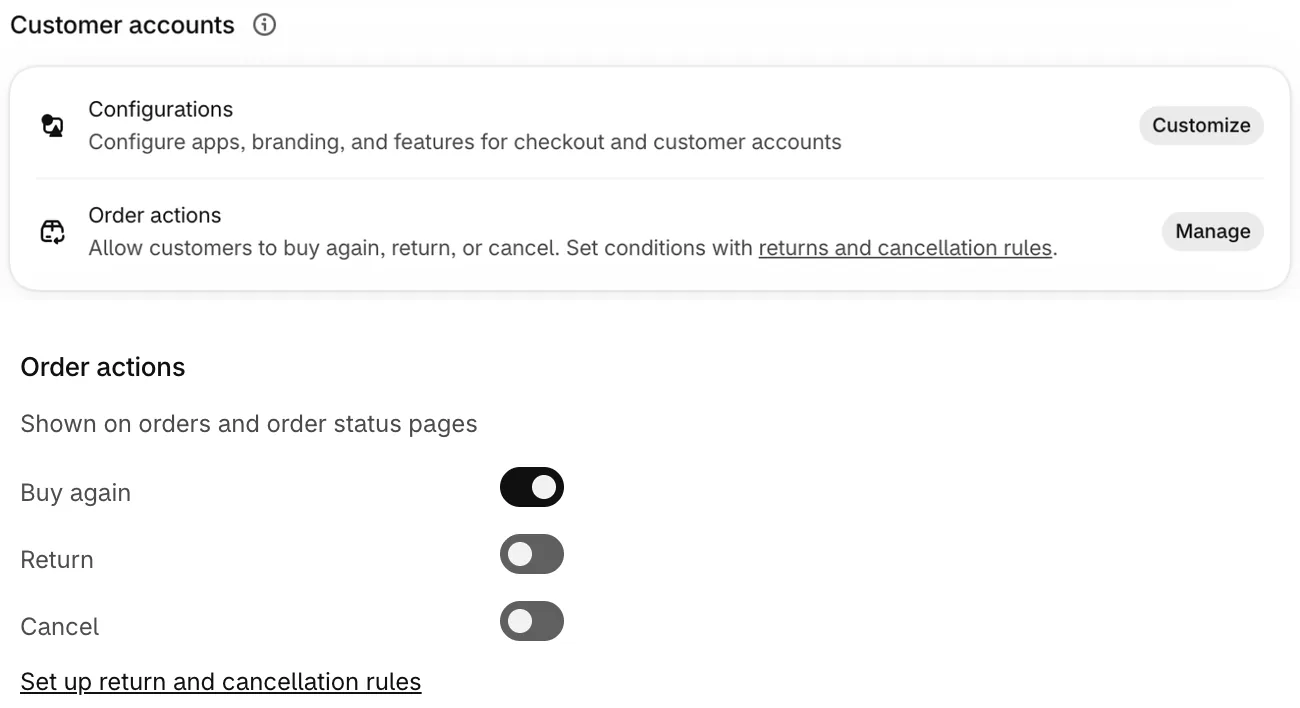
Self-serve returns work only with the new customer accounts, where a shopper signs in with an email address and a six-digit code instead of a password. They pick the items and a reason, such as Too big or Too small for clothing. Shopify notifies you, and the request waits on the order's "Return requested" card. To see every request, filter Orders by Customer request. Click Review request, then Approve or Decline. A decline needs a reason, kept private, and a note to the shopper.
A shopper can't ask for an exchange in the request, so you add the new size or color when you approve. To help shoppers find the form, add a Returns item to your footer menu under Content, then Menus, using the customer accounts link from that settings page.
How do you send a return label?
When you approve a request or create a return, Shopify asks how the item comes back, under "Return shipping options".
- Create a return label in Shopify: a USPS, UPS, FedEx or Canada Post label, for returns within the US or within Canada only, never between the two. You need a location in the shopper's country.
- Upload a return label: one you bought from a carrier or a shipping app, with its tracking number and carrier. Use it for any return Shopify can't label.
- No shipping required: Shopify records the return without a label.
You pay for a Shopify return label only when the carrier scans the parcel, and an unused label costs nothing. The parcel goes to the location you pick under "Return to", and that address prints only on the label. If shoppers buy their own label, put the address in your policy.
Shopify can't charge the shopper for its label automatically. To pass the cost on, set a return shipping fee in your rules.
How do you track ecommerce returns?
Each Shopify return label carries a tracking number. On the order, click "View details" in the Return label section, then the number, to follow the parcel on the carrier's site. Shopify shows no delivered status for return labels, so check the carrier before you refund. For a label you uploaded, enter its tracking number and carrier on the return, so it sits on the order too.
To see what comes back most, and why, open Analytics, then Reports, and pick "Top returned products with reasons". For your return rate, the sales reports' "Returned quantity rate" divides the units sent back by the units ordered. Create the return before you refund. A refund without a return records no reason, and you can't add a return to items already refunded.
How do you refund or exchange a return?
When the parcel arrives and you've checked it, open the order and click Process return on the Return in progress card. Tick what you received, use "Restock at" to put it back in stock at a location, and release any exchange items. Then refund now or later.
Under "Refund method", send the money to the original payment, to store credit or to both. Store credit needs the new customer accounts and can carry an expiry date, though local law may limit that. Before you refund, check that your restocking fee and return shipping fee came off the amount. With Shopify Payments, refunding a sale doesn't give back its card fee, so each refund also costs you that fee.
For an exchange, click "Add products" under Exchange items when you create or approve the return. You can discount the new item, but a discount on the whole order won't reach it. Its stock isn't held until you process the return. If the new item costs more, send the shopper an invoice for the difference.
How do you reduce ecommerce returns?
Start with the products that come back most. Shopify suggests return reasons that fit each product's category, so give every product a category. A run of Too small on one shirt points at its size chart, not at the shopper. A return because the item looked different points at its product page, and damage points at the packing.
Fix the worst page first: its sizes, its photos and its words. Mark what you can't resell, such as custom or personal care items, as final sale.
When do you need a returns app?
Shopify's own returns cover each job below, up to the limit in the last column. An app starts to earn its fee once shoppers want to pick their own exchange, or your returns need labels Shopify doesn't sell, such as from another country.
| Job | Where it lives in Shopify | Where Shopify stops |
|---|---|---|
| Write the policy | Settings, Policies, Return and refund policy | A policy you write yourself doesn't follow rule changes |
| Set the window and fees | Settings, Policies, Return and cancellation rules | Rules reach only items bought after each change |
| Take requests | Settings, Customer accounts | Shoppers can't ask for an exchange |
| Send a label | The order, Return, Return shipping options | Shopify labels only within the US or within Canada |
| Track the parcel | The order, Return label, View details | No delivered status in your admin |
| Refund or exchange | The order, Process return | Card fees on Shopify Payments aren't refunded |
Checked in Shopify Help on November 4, 2026.
The best Shopify returns apps compares seven of them, with what 50 returns a month cost on each. Selling clothes and swapping sizes? See the best Shopify apps for a clothing store.
FAQ
Questions, answered
-

14-day free trial
Explore Sledge on your store before you decide to commit.
-

No credit card required
Start improving your store with no upfront commitment.
-

Setup in minutes
Get Sledge running without a lengthy setup process.
-

Built to grow sales
Turn shopper behavior into actions that help you sell more.
How do you handle ecommerce returns on Shopify?
Set it up once, then work each return from its order. Write your return policy and set return rules under Settings, then Policies. Turn on self-serve returns under Settings, then Customer accounts. For each return, approve the request, send a label, follow the tracking number, then click Process return to refund or exchange.
Can customers start a return themselves on Shopify?
Yes, with self-serve returns and the new customer accounts. The shopper signs in with their email and a six-digit code, picks the items and a reason, and sends the request. You approve or decline it on the order. Shoppers can't ask for an exchange in the request, but you can add the new item when you approve.
Who pays for a Shopify return label?
You do. A label bought in Shopify goes on your Shopify bill once the carrier scans the parcel, and an unused label costs nothing. Shopify can't charge the shopper for it automatically. To pass the cost on, set a flat return shipping fee in your return rules, then check it comes off the refund.
Can you track a return in Shopify?
You can follow the parcel, but your admin shows no delivered status for it. Open the order, click View details in the Return label section, and click the tracking number to see the carrier's updates. To see why items come back, open the Top returned products with reasons report under Analytics, then Reports.
What percentage of online orders are returned?
NRF and Happy Returns estimated that 19.3% of online sales would be returned in 2025, and retailers in the same report expected 17% of holiday sales to come back. Your own rate can sit far from either. Shopify's Returned quantity rate divides the units sent back by the units ordered, so compare it product by product.
Your returns run in Shopify. Where else is your store losing sales?
Sledge doesn't handle returns. It's a Shopify app for search, filters and offers, free to try for 14 days. On a paid plan, Growth Intelligence reads your orders and searches, names the fixes it finds, and adds up what they could be worth in one dollar figure, labeled "Est. potential".

