
A $480 cart sits in your abandoned checkouts, and you wonder whether four payments of $120 would have saved it, and who is out the money if the shopper stops paying. With Shop Pay Installments it isn't you: eligible shoppers split the order into payments, and Affirm collects them. You get the full amount, minus a fee higher than your card rate, within 1 to 3 business days.
What is Shop Pay Installments?
Shop Pay Installments is Shopify's built-in buy now, pay later option, powered by Affirm, so there is no app to install. Your shopper picks it inside Shop Pay at checkout and splits the order into payments. Eligible stores in the US, Canada and the UK can offer it, and Australia is in early access.
It is not a deposit. Affirm lends your shopper the money, pays your store in full, minus the fee, and collects the rest.
How does Shop Pay Installments pay your store?
Each installment order runs in four steps.
- Your shopper pays the first payment at checkout.
- You get the full order amount, minus the Shop Pay Installments fee, within 1 to 3 business days after the payment is captured.
- That money arrives in your Shopify Payments payout.
- Later payments are charged to the shopper automatically, with an email reminder before each one.
Affirm collects every payment after the first, and Shopify says you aren't at risk if a shopper stops paying. So a 12-month plan doesn't delay your payout. You ship the order the way you ship any other.
What does Shop Pay Installments cost you?
Turning it on is free. Each installment order then carries a higher transaction fee, which already includes the standard Shopify Payments processing fee.
Shopify doesn't publish one rate: your admin shows yours. Go to Settings, then Payments, click "Manage" beside Shopify Payments, then "More actions", "Manage payment methods" and "View payment rates".
Two details add to the cost. A refund doesn't return the fee. In Australia, the fee carries 10% GST.
Shopify reports three results: a 50% increase in average order value for one in four stores using it, 28% fewer abandoned carts for stores that switched from a third-party installments provider, and 30% faster checkout for shoppers who have paid in installments before. Shopify has printed these figures since a January 2021 blog post, and gives no date range. For other ways to grow each order, see how to increase average order value on Shopify.
Can your store use Shop Pay Installments?
You need Shopify Payments and Shop Pay both turned on. Your business must also sit in the country it sells to, and sell and get paid in that country's currency.
| Where your business is | Currency you sell and get paid in | Order totals Shopify's Help Center lists |
|---|---|---|
| United States (or Puerto Rico) | USD | $35 to $30,000 |
| Canada | CAD | $35 to $30,000 CAD |
| United Kingdom | GBP | £50 to £30,000 |
| Australia (early access) | AUD | $50 to $30,000 AUD |
Those totals count discounts, shipping and taxes, and you can't change them. Every product inside the range qualifies, except gift cards and subscription products. Which plans your shoppers see depends on your package, Standard or Premium, and "Manage" under Shop Pay Installments shows yours.
Affirm also reviews your store. It can suspend installments for a password page, a main language other than English, no online store, mostly B2B sales, gambling or financial services, or regulated and prohibited products such as tobacco or weapons. A suspension shows as a message in your admin, and you appeal it through Shopify Support.
A new store still in its onboarding review may also have a payout hold that blocks turning it on. Shopify's eligibility page has the full list.
How do you turn on Shop Pay Installments?
Setting up buy now, pay later on Shopify happens in your payment settings, not in an app.
- In your Shopify admin, open Settings, then Payments.
- Under Shopify Payments, click "Manage".
- In the Shop Pay section, select "Shop Pay Installments".
- Click "Save".
If the option isn't listed, check your store against the eligibility rules above.
Once it is on, "Manage" under Shop Pay Installments shows whether you qualify for the premium package. Clicking "Select premium package" accepts the plans you're offered, which Shopify lists as interest-free monthly plans up to 12 months and monthly plans up to 24 months. Some stores qualify only for up to 6 months interest-free, and Shopify judges eligibility by your store's overall average order value.
On Shopify Plus or Enterprise with several business entities, you turn it on for each one, and a newly added eligible entity may have it on already. For in-store sales, Shopify POS offers installments in the United States only, once the online store has them, on POS app 8.4.0 or later. Rates and eligible amounts match online.
You turn it off on the same settings screen. Afterwards, run a test checkout to confirm the Shop Pay button itself still shows.
Where does Shop Pay Installments show on your product and cart pages?
On a product page, a line under the price offers the split: 4 payments in the US, Canada and Australia, 3 monthly payments in the UK. It changes with the price and with each shopper's eligibility, and the Shop Pay logo adapts to light or dark backgrounds.
Your theme decides whether that line shows. Shopify themes installed after January 31, 2022 may already include it.
- Dawn shows the line in its price area, with no setting to hide it.
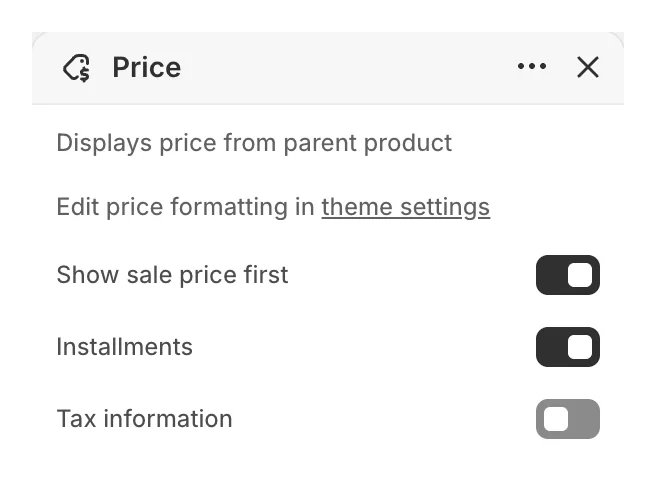
- Horizon keeps it hidden until you ask: in the theme editor, select the product page's "Price" block and tick "Installments".
- Any other theme: open a product page and look. If the line is missing, ShopExperts, a partner agency working with Shopify, adds the product page and cart lines for free on request.
The cart line sits under the subtotal. It has to be added to your theme after you turn installments on, and the Help Center sends that job to a Shop Pay Expert. For what else belongs near the subtotal, see trust signals that stop cart abandonment.
When you promote installments in a banner or an email, use Shopify's approved wording and disclosures. The Help Center has a marketing toolkit for each country.
What does your shopper see, and how do they apply?
Your shopper applies at checkout in five steps.
- Add items to the cart.
- Check out with Shop Pay.
- Choose to pay in installments.
- Pick a plan.
- Pay the first payment.
Affirm decides on each purchase and emails the result. To apply, your shopper must be signed up for Shop Pay and be 18 or older (19 in some places, Alabama among them).
| US order total | Plan |
|---|---|
| $35 to $50 | 2 interest-free payments, every 2 weeks |
| $50 to $999.99 | 4 interest-free payments, every 2 weeks |
| $150 to $30,000 | Monthly over 3, 6, 12, 18 or 24 months, at 0% to 36% APR |
That is the Help Center's full US menu, and your package decides which rows your shoppers get. Above $20,000, the shopper pays the excess up front.
Credit and debit cards work in the US and Canada, debit cards only in the UK and Australia. Credit cards work only on the 4-payment plan, and monthly plans need a debit card. Capital One and Chase credit cards are refused, and so is every prepaid card.
Your shopper can pay early with no penalty, and there are no late fees. Applying doesn't affect their credit score, though the purchase and payment history with Affirm might. Point their payment questions to the Shop Pay Installments help pages for shoppers.
Is Shop Pay Installments available in Canada and the UK?
Yes, and the rules follow your business's country. Installments work only on domestic orders: the shopper's billing address, shipping address, card and installments account must be in your business's country, and the checkout currency must match. If your store is in Canada and a US shopper asks where the option went, that is why.
Canada. You sell and get paid in CAD, and the Help Center lists $35 to $30,000 CAD. The plans follow the US shape, with monthly plans at 0% to 31.99% APR. Above $20,000 CAD the shopper pays the excess up front, and a down payment may be required.
United Kingdom. You sell and get paid in GBP, and the Help Center lists £50 to £30,000. From £50 to £999.99 the shopper pays in 3 interest-free payments, the first at checkout. The Help Center's full menu adds monthly plans from £150 over 3, 6, 12, 18 or 24 months, up to 35.99% APR (22% representative APR), where a down payment may be required. Above £17,500 the shopper pays the excess up front, and only debit cards work.
Shopify International Limited offers it in the UK as an Appointed Representative of Affirm U.K. Limited, which the FCA authorises and regulates. The FCA has regulated buy now, pay later since 15 July 2026. Shopify's UK page says only that Affirm provides both regulated and unregulated credit, not which plans those rules cover.
Australia. It is in early access, with 4 interest-free payments every 2 weeks, or monthly plans over 6, 12 or 24 months at 0% to 36% p.a. Only debit cards work, and Affirm may ask for employment and income.
Why is Shop Pay Installments not showing?
Your new store has 100 orders and not one on installments, and a test checkout shows an error. Work through your store first, then the order.
Check your store
- Shopify Payments or Shop Pay is off, or your business, currency and selling country don't match.
- A new store still in its onboarding review has a payout hold.
- Your admin shows a suspension message from Affirm's review, for example because the password page is on.
Check the order
- The order total falls outside your country's range.
- A gift card or a subscription product is in the cart.
- One item is a pre-order, and Shopify doesn't let shoppers buy pre-order items through Shop Pay.
- Your shopper, their card or their address is in another country, or the checkout runs in another currency.
- They tried Apple Pay or another digital wallet, a prepaid card, or a Capital One or Chase credit card.
- Their shipping address is a P.O. box, or an APO address in the US.
What happens with refunds, returns and order changes?
A refund comes out of your next available payout, and you don't get the installments fee back. Refund to the original payment method, not as store credit or a gift card, because those don't reduce what the shopper owes Affirm.
On the shopper's side, a refund first lowers their remaining balance, and any excess goes back to their card. Interest they already paid isn't refunded.
You can't edit an installment order. To change one, refund it and create a new order. Adding an item sends your shopper an invoice for the difference, paid with another method.
To find these orders, search "Shop Pay Installments" on the Orders page. Your orders export lists them under "Shopify Payments", so look for that name there instead.
If an installment order seems missing from a payout, open Finance, then Payouts, click "View transactions" and filter "Payment method" by Shop Pay Installments. If a shopper disputes an order, you get an email about the dispute and answer it with your evidence.
FAQ
Questions, answered
-

14-day free trial
Explore Sledge on your store before you decide to commit.
-

No credit card required
Start improving your store with no upfront commitment.
-

Setup in minutes
Get Sledge running without a lengthy setup process.
-

Built to grow sales
Turn shopper behavior into actions that help you sell more.
Does Shop Pay Installments delay shipping?
No. Affirm approves the shopper at checkout, and you get the full order amount, minus the fee, within 1 to 3 business days after the payment is captured. Ship the order the way you ship any other. The remaining payments go from the shopper to Affirm, so nothing you do waits on them.
Can I offer Shop Pay Installments on some products only?
No. Once it is on, every product inside the price range qualifies, except gift cards and subscription products. You can't change the range either: Shopify's Help Center lists $35 to $30,000 in the US and Canada, and £50 to £30,000 in the UK. Your theme controls the payment line under the price: Horizon lets you hide it, Dawn doesn't.
What happens if a shopper stops paying?
Nothing changes for you. Affirm lends the shopper the money, pays your store the full amount, minus the fee, within days, and collects every payment after that. Shopify says you aren't at risk if a shopper stops paying. A dispute about the order itself is different: you get an email about it and answer with your evidence.
Can a Canadian store offer Shop Pay Installments to US shoppers?
Not from a Canadian account. Installments work only on domestic orders: the shopper's billing address, shipping address, card and checkout currency must all match the country of the business that processes the order. A store on Shopify Plus or Enterprise can add a US business with its own US Shopify Payments account and offer installments from there.
Is a pre-order deposit the same as Shop Pay Installments?
No. With installments, Affirm lends the shopper the money and pays you the full price, minus the fee, within days. A pre-order deposit, like Sledge Pre-order’s “Partial payment”, takes a fixed amount at checkout and charges the balance on a due date you set, where your payment provider allows. And Shopify doesn't let shoppers buy pre-order items through Shop Pay.
Turn sold-out pages into pre-orders.
Install free. On a paid plan, Growth Intelligence reads how many of your products are sold out, can suggest a pre-order among its fixes, and totals what those fixes could add in one dollar figure, labeled Est. potential.

