
What changes in your Shopify filters past ten thousand products
Past ten thousand products, the filter panel stops being a convenience and becomes the way a shopper reads the catalog. Shopify caps a store at 25 filters, shows a shopper 100 values per filter, and turns filters off entirely on a collection above 5,000 products. Depth is what changes, and a flat list has to become a nested one.
You set the filters up years ago and they were fine. The catalog kept growing. Now the brand list runs off the bottom of the panel, your largest collection loads with no filters at all, and every new category wants three attributes you cannot spare.

Why does a filter list that worked at two thousand products fail at twenty?
Nothing breaks. The same panel loads, the same checkboxes tick, and the page still returns products. What changed is the ratio between what a shopper is looking at and what they are looking for.
At two thousand products a shopper ticks two boxes and lands on nine results. At twenty thousand the same two boxes land on eleven hundred, and the third box they need is not in the panel, because you ran out of room for it eight categories ago.
A collection filter is a shortlist machine. Its job is to turn a catalog into something a shopper can hold in their head. Past a certain size, a flat list of every attribute you sell stops shortening anything and starts being another catalog to read.
What do Shopify's own filters give you, and where do they stop?
More than most stores use. Standard filters cover availability, price, product type, vendor and the variant options you already sell on. Custom filters cover the fields you fill in yourself. Values can be grouped, so Onyx, Ebony and Midnight sit under one entry named Black. Filters named Size sort themselves, so extra small comes before small without you dragging anything.
If grouping and tidying get you where you need to be, you are done. Shopify's own filters are doing the job.
The published limits decide when they will not. A store gets 25 filters total, standard and custom together. One filter shows a shopper 100 values while the admin shows you up to 1,000, so a brand filter can read as complete while most of it never reaches the storefront. One group holds 200 values, and a store holds 1,000 groups. Past 5,000 products a collection displays no filters at all, and Shopify's answer is to split it into smaller collections.
That last one is the cliff, because the collection a shopper most wants to narrow is usually your biggest.
When does a filter rail have to become a nested tree?
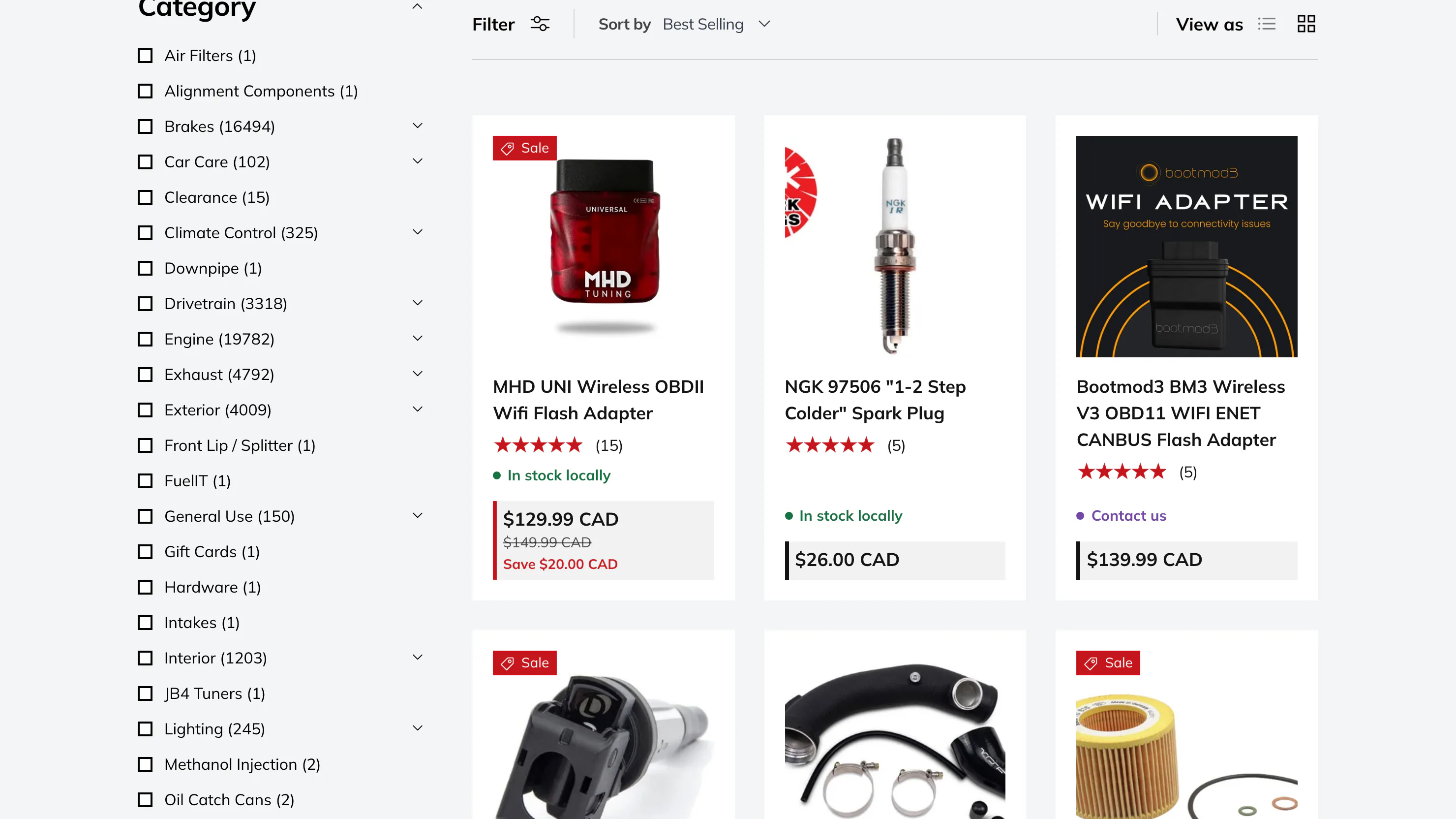
When your categories have categories. A parts catalog with 67,000 products cannot show a shopper every category at once, and it should not try: Engine holds nearly 20,000 items and Brakes holds over 16,000. Flattened into one list, those two entries are useless, because ticking Engine still leaves a shopper nearly 20,000 products to read.
Nested, they are a map. Brakes opens into Pads, Pads opens into Front, and the count beside each branch says how many products sit under it before anyone commits a click. Each list stays short. The catalog stays whole.
Where do the filters come from when there is no variant to use?
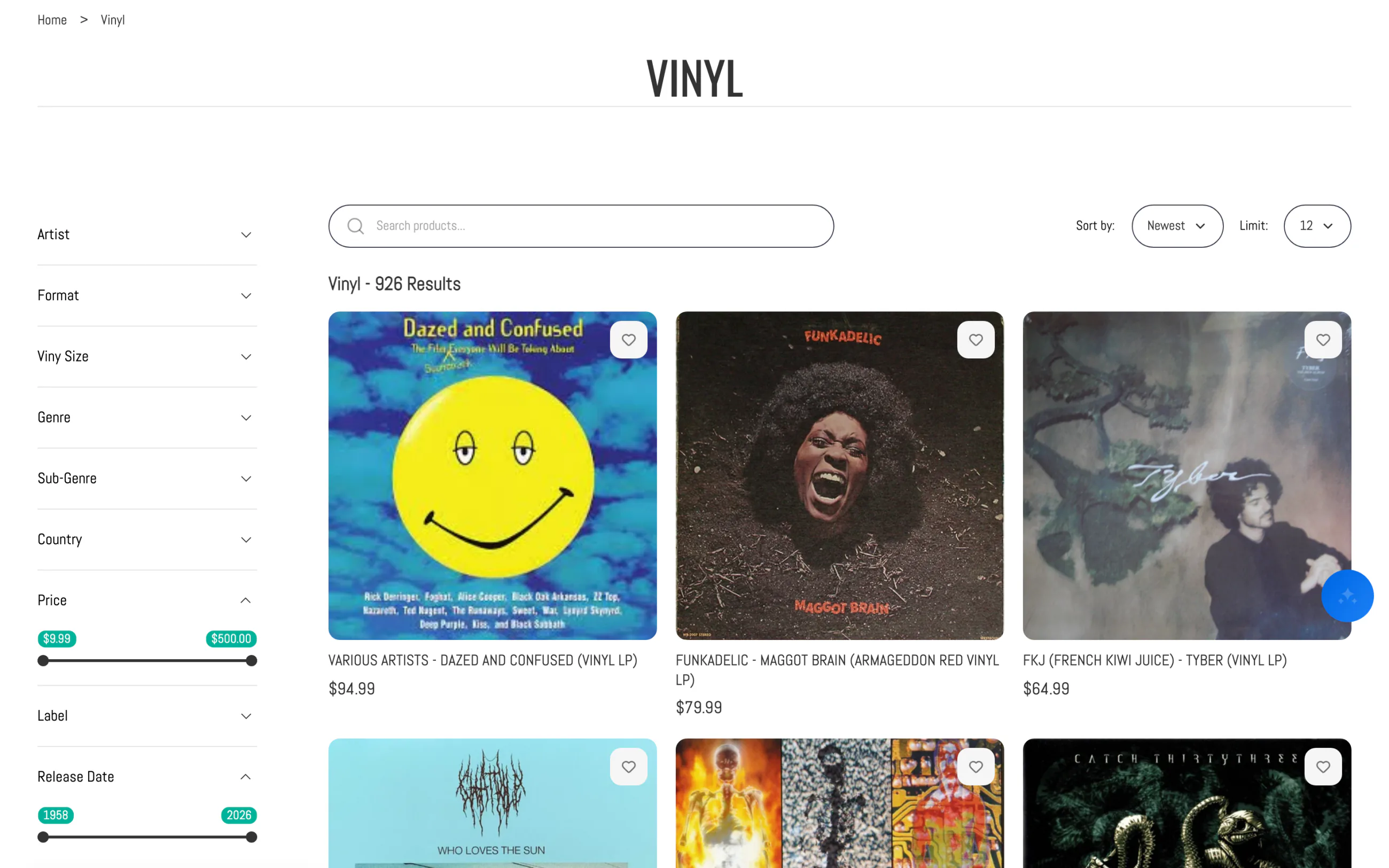
In metafields and tags, mostly, which is where a large catalog diverges from a small one. A clothing store filters on what it already sells on: size, color. A record shop filters on artist, label, format, pressing country and release year, and Shopify has a variant for none of them. Nobody buys a different size of 1974.
Shopify can build a filter from those fields, and each one counts against the same 25. A store selling antennas on frequency band, impedance and connector gender wants eighty filters, and eighty do not fit inside 25.
What does a filter app do that Shopify's own filters cannot?
The ceilings go. Sledge filters are not capped at 25, they nest, and they read metafields and tags as equal sources to a variant option. They keep working on a collection past 5,000 products, and every count stays live as a shopper narrows, so a dead end reads as a zero before anyone clicks it.
Two habits matter more than the ceiling once you have the room. Give each category the facets it actually sells on rather than one panel for the whole store, which is the same argument as different filters per collection, just louder at scale. And decide the order deliberately: the facet a shopper reaches for first belongs at the top, and that order is a merchandising call, not a technical one.
Depth is not free. A rail with 80 filters is worse than a rail with nine if the nine are the ones shoppers use. The number to watch is not how many facets you offer but how many a shopper touches before they stop narrowing.
Questions, answered
How many filters can a Shopify store have?
Twenty five, standard and custom counted together, for the whole store rather than per collection. Shopify's wording is a maximum of 25 filters for your store. Six categories that each want four attributes spend 24 of them before you add price or availability, which is why growth is what runs you out.
Why do my filters disappear on my biggest collection?
Because it holds more than 5,000 products. Shopify's own documentation says collections over that size do not display filters, and it suggests splitting the collection into smaller ones. Nothing in the admin warns you first. The collection simply loads with no filter panel at all.
How many values can one Shopify filter show?
A shopper sees at most 100. The Search and Discovery app lists up to 1,000 of them while you build the filter, so a brand filter can look complete in the admin and still hide most of itself on the storefront. Grouping values is the way back under the line.
Do I need a filter app for a large catalog?
Not always. If grouping gets you inside the 25 and your biggest collection is under 5,000 products, stay where you are. An app earns its keep when the catalog needs nested categories, filtering inside a collection past the cliff, or facets built from fields you fill in yourself.
What is a nested or hierarchical filter?
A category filter that opens into the categories underneath it instead of listing everything at once. Brakes opens into Pads, Pads opens into Front. Each list a shopper reads stays short, and the count beside each branch says how many products sit under it.
Your biggest collection is the one shoppers can see least.
On Pro at $29.99 a month, Growth Intelligence reads your catalog and what shoppers typed into your search bar that week, then names the filter they keep reaching for and puts a dollar estimate on adding it. On Accelerate it runs daily.
14-day free trial · No code · Works with any theme · Uninstalls clean