
Shopify pagination splits a collection into pages. In Dawn, set "Products per page" in the Product grid section, from 8 to 36. Horizon loads 24 more as shoppers scroll, and switching off "Auto load products on scroll" gives you numbered pages instead. Neither theme offers a Load more button, so that takes a developer or an app.
Your collection holds 300 products and the page shows 16. Or it scrolls forever, and a shopper who opens a jacket and presses Back lands at the top. Nearly every answer you find is a developer's change to your theme. Most of this is one setting. The rest is a choice between three styles, and each one costs something different.
What is Shopify pagination on a collection page?
Pagination is how your theme splits a collection page, and your search results, into pages. It comes in three styles: numbered pages, a Load more button, or infinite scroll, which adds products as the shopper scrolls.
The 60 products per page in your admin's Collection items list is a different number. It splits the list you edit, not the page shoppers see, and it's why dragging products into order gets hard past 60.
How do you change how many products show per page?
Open the theme editor on a collection page and select the section that lists your products. In Online Store, click Themes, then Customize, and pick a collection page from the menu at the top.
| Theme | Section | Setting | Range | Starts at |
|---|---|---|---|---|
| Dawn | Product grid | Products per page | 8 to 36, in steps of 4 | 16 |
| Horizon | Collection | Auto load products on scroll | Loads 24 at a time | Switched on |
| Horizon | Collection | Products per page, once auto load is off | 8 to 36, in steps of 4 | 24 |
Checked November 3, 2026, in Dawn 16.1.1 and Horizon 4.3.0.
In Dawn, "Products per page" is a slider for how many products one page holds, with page numbers under the grid.
Horizon, the default theme on new stores, comes with "Auto load products on scroll" switched on. That setting is its infinite scroll: products load 24 at a time, and the slider stays hidden. Switch it off, and the same slider appears, with page numbers under the grid.
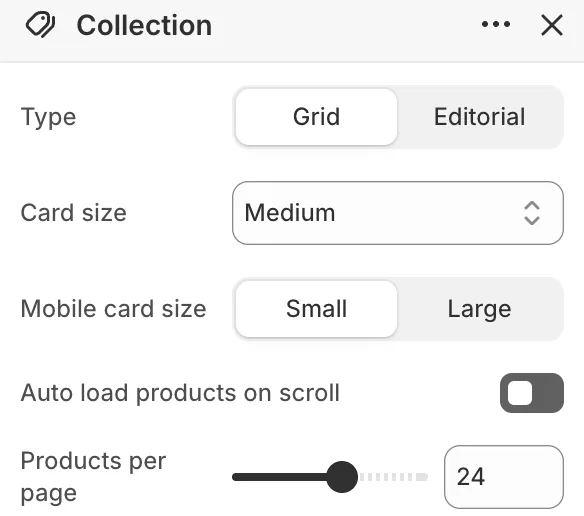
Horizon's Search results section has the same two settings. Dawn's search page shows 24 products a page, with no setting to change it. On another theme, look in the section that lists products.
Can a Shopify collection show more than 50 products a page?
Yes. Shopify lets a theme show up to 250 products on one page, but your theme's slider sets the real ceiling, and both free themes stop at 36. The 50 you keep reading about is a limit developers work around inside a theme, not a cap on your collection.
Thirty-six can be too few. Baymard's 2020 guidance suggests 50 to 150 products on a desktop page, 100 to 150 for visual products such as clothing, and 15 to 30 on a phone.
A developer can raise your theme's number. You pay for the work, plus a check at every theme update, since a change that conflicts with the update has to be copied over by hand. An app can set the number instead.
One edge case: Shopify's own page numbers stop at the 25,000th product in a collection, so a catalog past that needs smaller collections.
Numbered pages, Load more or infinite scroll: which fits your store?
If your shoppers hunt for something specific, the research favors Load more over infinite scroll, which suits pure browsing. No style is best for every store, Nielsen Norman Group says.
| Style | What the shopper gets | What it costs | Built into |
|---|---|---|---|
| Numbered pages | A sense of size and where they are, and an easy way back to a spot | A new page load each time, and shoppers rarely go past the first few | Dawn, and Horizon with auto load off |
| Load more | One growing list, with a pause at each button, so the footer stays in reach | One tap per batch | Neither free theme |
| Infinite scroll | The most products seen | Less attention per product, a footer that keeps moving, and Back loses the place most often | Horizon, switched on from the start |
From Google's pagination guide, Baymard's 2016 testing and 2026 product list review, and Nielsen Norman Group (2022).
In 2016, Baymard found shoppers saw the most products with infinite scroll, often 100 or more, but looked at each one less. With Load more they browsed more than with page numbers and read more closely than with scrolling.
When shoppers hunt for one item or compare a few, Nielsen Norman Group advises against infinite scroll. Baymard's August 2026 review favors Load more over infinite scroll, with each batch sized for desktop and phone.
A new Horizon store runs infinite scroll without anyone choosing it, because auto load comes switched on.
Why do shoppers land back at the top after pressing Back?
A shopper scrolls 80 products deep on a phone, opens a jacket, presses Back, and lands on the first row again. The list didn't keep their place, so Back reloaded it from the top. In Baymard's 2020 benchmark, 13% of sites send shoppers back to the top of the list after a product page, and its testing named it a direct cause of abandonment. Infinite scroll makes it worst. On a phone, a 40-product list runs about 20 screens.
With numbered pages, a lost place costs the least, since each page holds fewer products. Whatever your theme, test it on a real phone: open a product, press Back, and check where you land. On that phone, a store audit also opens your three most visited collections and notes the page your best sellers first appear on.
A developer can make your theme remember the place, priced like any theme change: the work, then a check at every update. Some single-purpose paging apps list keeping the place among their features. Where Sledge shows your collections and search results, it puts the shopper back where they were in the list, with up to ten loaded pages.
Does infinite scroll hurt your Shopify SEO?
Not by itself. Google says its crawler, the program that reads pages for Search, follows links and doesn't click buttons or scroll. Google's pagination guide asks for each page to have its own address and a link to the next. For infinite scroll, its guide to loading on scroll adds that the address in the browser should change as each new batch comes on screen.
Dawn's numbered pages link page to page. Horizon with auto load on changes the address as it loads. But on Shopify's own Horizon demo store, checked November 3, 2026, page 1 of the All collection carries no link in the page to page 2.
Your products still reach Google another way. Shopify builds a sitemap for every store, a list of all your products, collections, pages and blog posts, and updates it when you add one.
If Google lists page 24 of your T-shirts, that's normal. Google treats each page in a series as its own page, and the same title on every page is fine. Leave those pages alone, and don't tell Google every page is a copy of page 1.
How do you add Load more to Shopify without code?
Use an app, since neither free theme has a Load more button. Single-purpose apps on the Shopify App Store swap page numbers for Load more or infinite scroll, and the four we read each charge a monthly fee after a free trial.
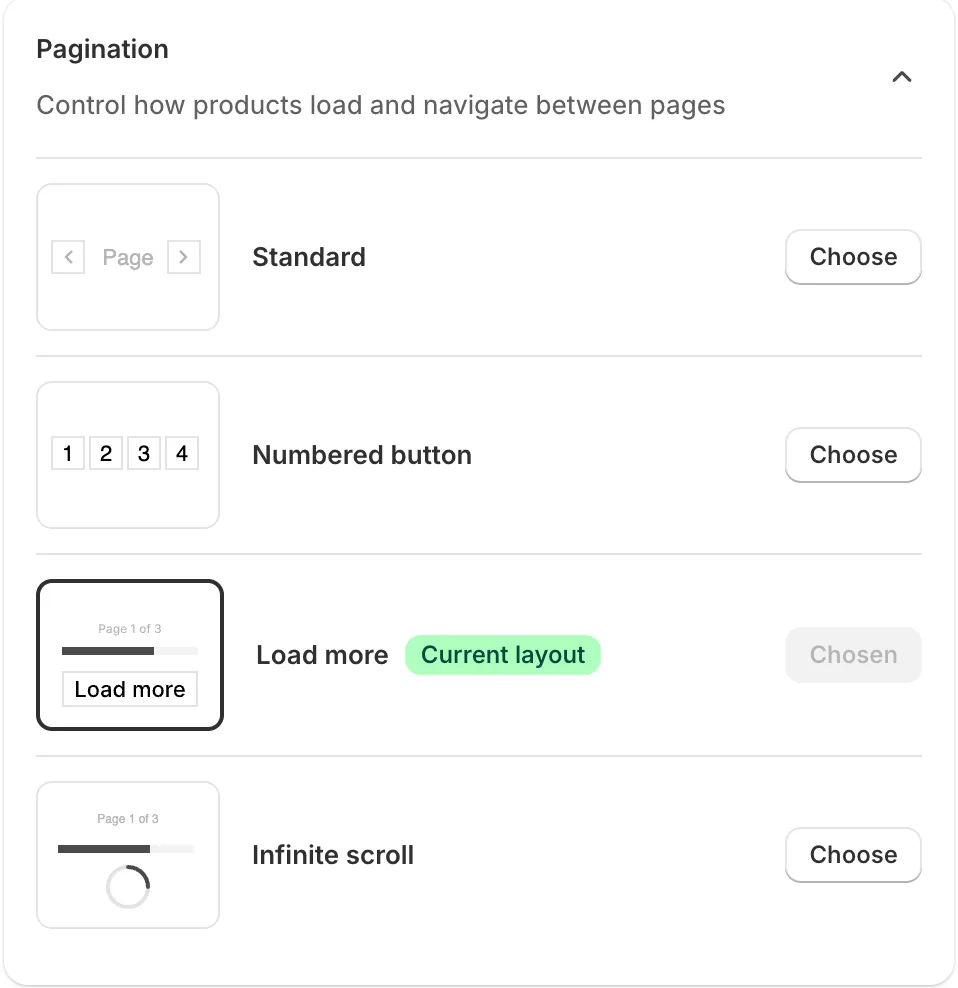
Sledge is a Shopify search and filter app that pages your collections and search results in one of four styles, on all four paid plans. In Sledge, open Product Filter, then Layout. Under "Pagination", the setting for how products load, pick one.
- "Standard" shows two arrows and a line with the page, the page count and the total.
- "Numbered button" shows page numbers between two arrows.
- "Load more" shows that same line with a progress bar and a Load more button.
- "Infinite scroll" shows a spinner and starts the next batch about two screens before the shopper reaches the end.
One style covers your collections and your search results page, for the whole store. Sledge doesn't change your theme's own grid or its setting.
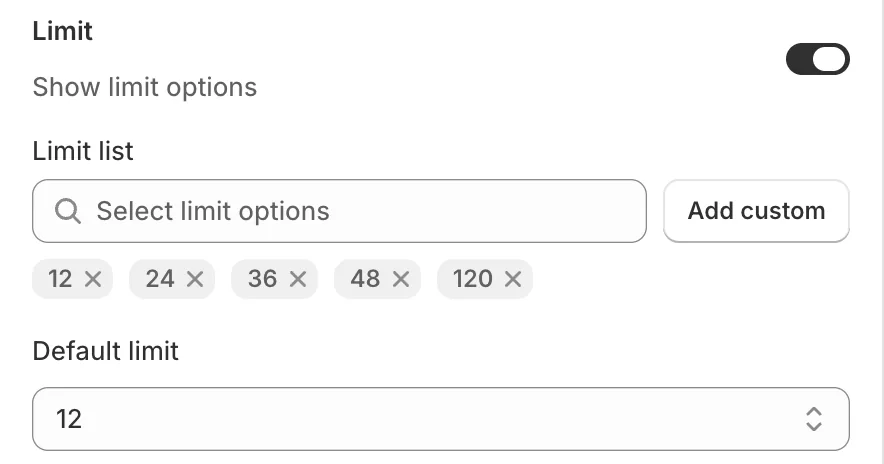
To set how many products load at once, open Settings, Global Settings, Product List. "Default limit", the size of each page or batch, is 12 unless you change it. "Limit list" holds 12, 24, 36, 48 and 120, and "Add custom" takes your own number. With the "Limit" switch on, shoppers can pick their own number from that list too.
With Load more or Infinite scroll, the browser's address carries the page number. A refresh or a shared link brings back up to ten loaded pages. Keeping the place after Back needs Sledge's loading placeholders, the grey cards shown while products load, which come switched on.
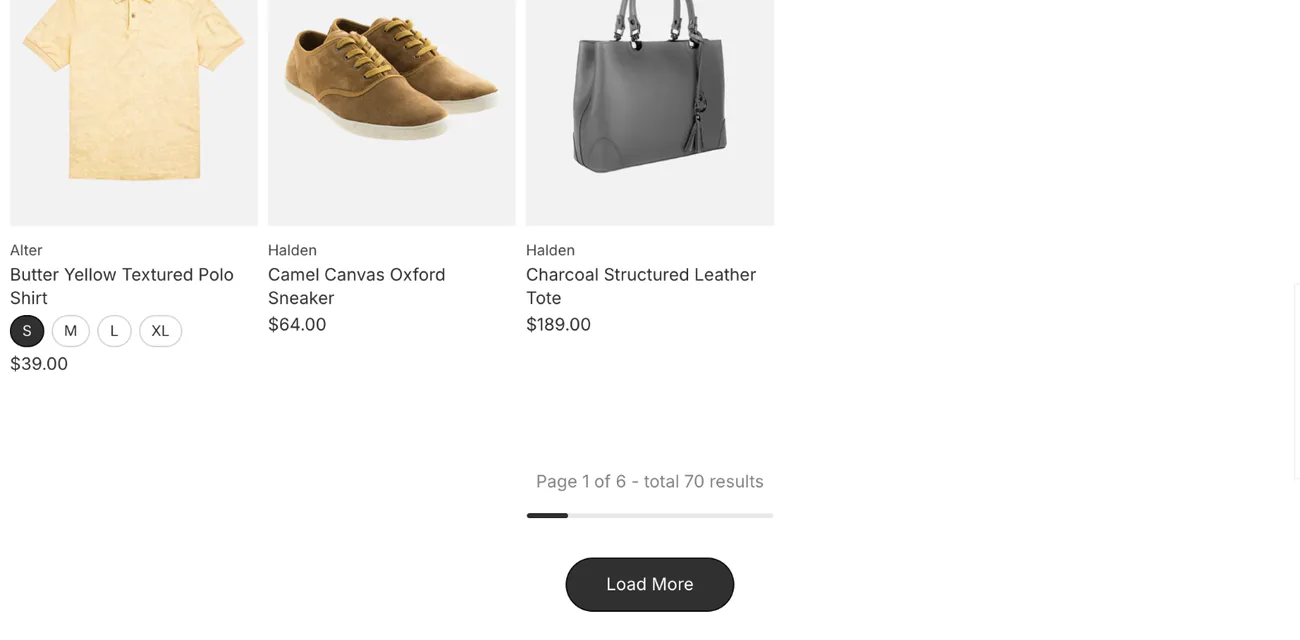
If shoppers page through hundreds of products to find one, the fix may be a filter, not a longer page. Sledge's filters narrow the list first, and past ten thousand products, the filters themselves have to change.
FAQ
Questions, answered
-

14-day free trial
Explore Sledge on your store before you decide to commit.
-

No credit card required
Start improving your store with no upfront commitment.
-

Setup in minutes
Get Sledge running without a lengthy setup process.
-

Built to grow sales
Turn shopper behavior into actions that help you sell more.
How do I change how many products show per page on Shopify?
In the theme editor, open a collection page and click the section that lists products. Dawn calls it Product grid: set Products per page from 8 to 36. Horizon calls it Collection: switch off Auto load products on scroll, then set Products per page from 8 to 36. Save, then check the page on your phone.
Can Shopify show more than 50 products per page?
Yes. Shopify lets a theme show up to 250 products on one page. The 50 you keep reading about is a limit developers work around inside a theme. Dawn's and Horizon's settings stop at 36, so going past that takes a developer's change, or an app such as Sledge, whose ready-made list runs to 120 and takes your own number.
Is infinite scroll bad for SEO on Shopify?
Not by itself. Google says its crawler follows links and doesn't scroll or click, so each page needs its own address and a link to the next. Dawn's numbered pages do that. Horizon's scroll gives each page an address but no link in the page to the next, and Shopify's sitemap still lists every product for Google.
Should I use Load more or infinite scroll on Shopify?
It depends on how your shoppers shop. Baymard's testing favors a Load more button over infinite scroll on product lists, and Nielsen Norman Group advises against infinite scroll when shoppers hunt for one item or compare. Infinite scroll fits pure browsing, where nobody needs the footer. Numbered pages help shoppers who come back to a spot.
Why does my collection go back to the top when shoppers press Back?
When the list doesn't remember where the shopper was, Back reloads it from the top. It happens most with infinite scroll and Load more, often on phones. Baymard found 13% of sites do it and calls it a direct cause of abandonment. Where Sledge shows your collections and search results, it puts the shopper back where they were.
Pages sorted. Now what goes on page one?
Try Sledge free for 14 days and give your collections and search results Load more, page numbers or infinite scroll. Shoppers who press Back land where they were. Growth Intelligence turns on when you pick a paid plan. It reads your sales and searches, lists fixes, and totals what they could add in one dollar figure, labeled Est. potential.

