
The Shopify product image size to upload is 2048 x 2048 px for a square photo, or 2048 x 2560 px for a 4:5 portrait. Shopify takes up to 5000 x 5000 px and 25 megapixels, in a file under 20 MB. Shoot every main photo in one shape, then set your theme's card shape to match, and the grid lines up with nothing trimmed.
Half your photos came from a supplier, the rest from your phone. On the collection page some cards stand taller than others, and the prices zigzag down each row. You switch the theme to Square, and every jacket loses its hem. The fix starts before you upload.
What size should Shopify product images be?
Shopify says square product photos usually display best at 2048 x 2048 px. For a 4:5 portrait, keep the same width: 2048 x 2560 px.
| Where it goes | Upload | Shape | Whose number |
|---|---|---|---|
| Square main photo | 2048 x 2048 px | 1:1 | Shopify's |
| Portrait main photo | 2048 x 2560 px | 4:5 | Ours |
| Close zoom on fabric, square | 4000 x 4000 px | 1:1 | Ours |
| Close zoom on fabric, portrait | 4000 x 5000 px | 4:5 | Ours |
| Zoom works above | 800 x 800 px | Any | Shopify's blog |
| Upload limit | 5000 x 5000 px, 25 megapixels, under 20 MB | n/a | Shopify's |
| Widest or tallest shape | 100:1 to 1:100 | n/a | Shopify's |
| Photos, videos and 3D models per product | 250 | n/a | Shopify's |
"Ours" marks a size we worked out from Shopify's numbers and the themes' shapes, not one of Shopify's requirements.
Guides that still print 4472 x 4472 px are quoting 20 megapixels, the limit Shopify gives for theme pictures. Product photos get 25. No Shopify page we read sets a 3 MB limit on product photos.
Why 2048 is usually enough: Shopify makes smaller copies of each photo for collection pages on its own. Dawn's product page asks for copies up to 1946 px wide. Horizon's product page and zoom ask for up to 3840 px, and Dawn's zoom up to 4096. So a bigger photo pays off where shoppers zoom in on fabric or print, and on a large, sharp screen showing Horizon's product page.
Skip the compressing. Shopify asks for the best quality you have, and says it can compress and convert each photo for shoppers on its own, to keep pages loading fast. For the rest of a store's speed, see how to improve Shopify store speed.
Banners and a collection's own picture take other sizes, covered in Shopify banner size.
Square or portrait: which shape should you shoot?
Square suits most catalogs, and 4:5 portrait suits clothing. A portrait keeps a whole outfit in frame, on a model or a hanger, and at the same width its card stands a quarter taller on a phone.
In both Dawn and Horizon, "Portrait" on a product card means 4:5. Horizon also offers Landscape.
Whichever you pick, give every main photo in a collection the same shape. Shopify's own advice: product photos display at the same size side by side when they share one shape, or aspect ratio. Shoot the second photo the same way, because the photo that shows when a shopper points at a card fills the same box. One background and one crop help too, as visual merchandising explains.
Why are your product images different sizes on the collection page?
A fresh Dawn or Horizon store sizes each card to its own main photo. Dawn calls this "Adapt to image" and Horizon calls it "Auto". A square photo beside a tall one makes a short card beside a long one, and the prices fall out of line. Both themes ship this setting on their collection page, search results and homepage product list.
Photos imported from your old store, or sent by several suppliers, often arrive in mixed shapes.
You have two fixes. Upload every main photo in one shape, and the cards on your product listing page line up with nothing trimmed. Or set the cards to Portrait or Square: every card matches, and a photo of another shape is trimmed to fill it. Dawn keeps the middle of each photo and trims the edges.
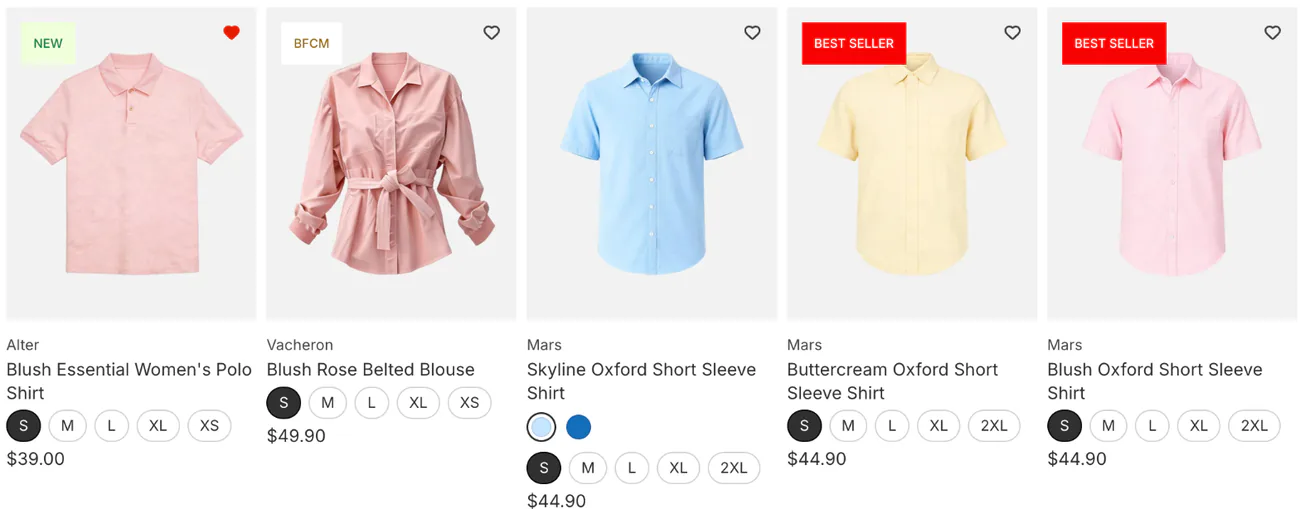
How do you set the card shape in Dawn and Horizon?
The card shape is a theme setting, and each grid has its own. Change it on the collection page, the search results page and every product list on your homepage, a section both themes call Featured collection.
In Dawn, open a collection page in the theme editor and click the Product grid section. Under "Product card", choose "Image ratio", the shape of every photo in that grid: Adapt to image, Portrait or Square.
In Horizon, open a collection page in the theme editor, click Product card, then Product image. Choose "Aspect ratio": Auto, Portrait, Square or Landscape. On the homepage and the search results page, Product image is called Media.
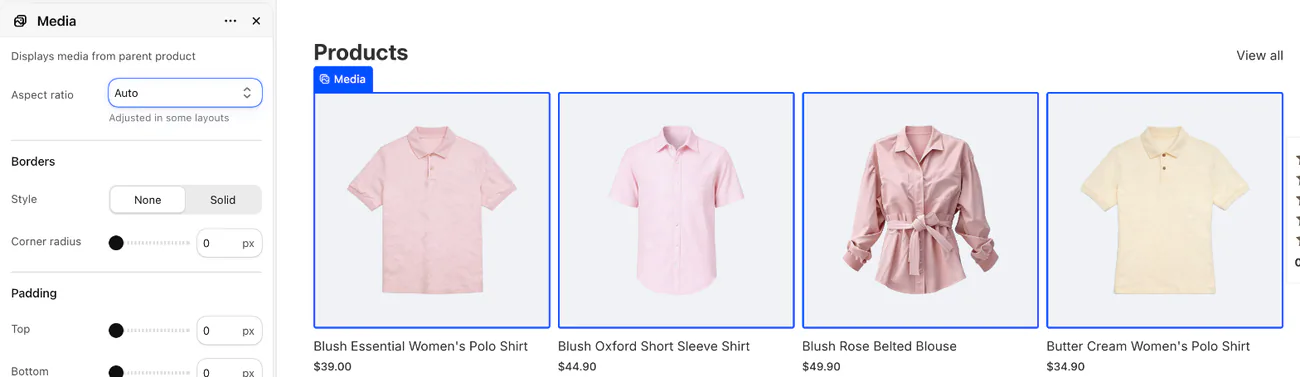
Checked November 4, 2026, on Dawn 16.1.1 and Horizon 4.3.0. On another theme, look for a similar setting in its product grid or product card section.
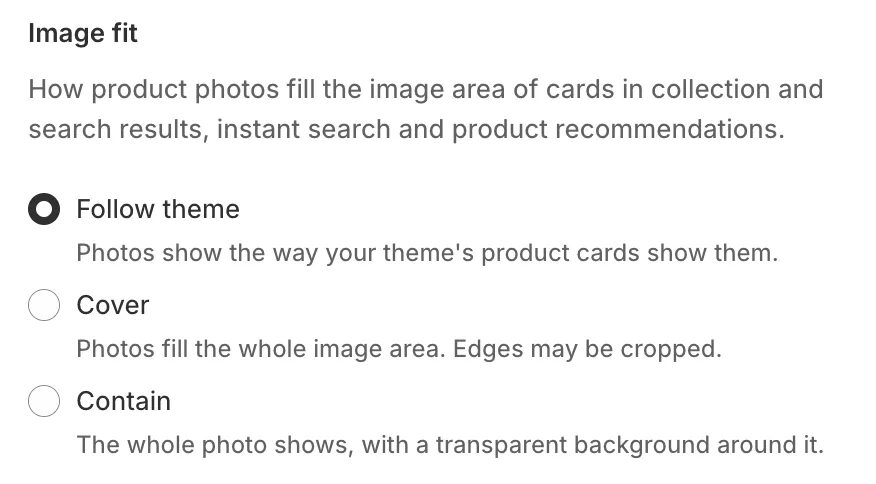
Sledge is a Shopify app for search and filters. If Sledge shows the products on your collection and search pages, its cards keep one shape for your theme, 4:5 on Horizon, and "Image fit" in its product card settings picks "Cover" to fill the card or "Contain" to show the whole photo.
How do you change a product image's size in Shopify?
Crop the photo in Shopify, or change the space your theme gives it. To crop, open the product, click the photo, and click "Crop and transform".
Choose Freeform, Original or Square, click Apply, then click Save. There is no 4:5 choice, so crop portraits before you upload, or use Freeform by eye.
"Resize" is for the pixel size, not the shape. Leave "Lock aspect ratio" on, because Shopify warns that a photo resized to a new shape can look distorted.
On the product page, both themes show the whole photo by default. In Dawn, "Width" under Media in the Product information section makes the photo column Small, Medium or Large.
Why is your image too large, blurry or the wrong color?
A file under 20 MB can still fail on megapixels. Multiply width by height and divide by a million. Shopify's own example, 4900 x 6930 px, comes to 33.9 megapixels, over the 25 a product photo can have. Shopify's fix is to resize it. Keep the shape: a square photo at 4000 x 4000 px comes to 16 megapixels.
A photo can look blurry when it is too small for its space and gets stretched to fill it. Upload at least 2048 px wide. Shopify's blog says zoom needs photos larger than 800 x 800 px.
If colors shift after upload, check the color profile. Shopify removes it, and browsers then assume sRGB, the most common color setting on the web. So export your photos in sRGB.
Which file format should product photos be?
Use JPEG for photos and PNG for a transparent background or a flat graphic. Shopify's pages disagree here: one names PNG first for product images, and another says JPEG for products.
Since Shopify sends browsers WebP or AVIF where they take it, the file you upload mostly sets the quality. Shopify also takes WebP, HEIC and GIF, and converts TIFF and BMP on upload. A collection's own picture can't be WebP, though a product photo can.
FAQ
Questions, answered
-

14-day free trial
Explore Sledge on your store before you decide to commit.
-

No credit card required
Start improving your store with no upfront commitment.
-

Setup in minutes
Get Sledge running without a lengthy setup process.
-

Built to grow sales
Turn shopper behavior into actions that help you sell more.
What is the best Shopify product image size?
For square photos, 2048 x 2048 px, the size Shopify says usually displays best. For 4:5 portrait photos, use 2048 x 2560 px. Go up to 4000 px wide if shoppers zoom in on fabric or texture. Stay inside Shopify's limits: 5000 x 5000 px, 25 megapixels and 20 MB.
Should Shopify product images be square or portrait?
Either works, as long as every main photo in a collection shares one shape. Square suits most products and is the shape Shopify's own advice uses. Portrait, at 4:5, suits clothing: the whole outfit fits, and the card stands a quarter taller. Dawn and Horizon both offer Portrait and Square for product cards.
Why are my Shopify product images different sizes?
A fresh Dawn or Horizon store sizes each card to its own main photo. Dawn calls this “Adapt to image” and Horizon calls it “Auto”. Mix square and portrait photos and the rows go uneven. Upload every main photo in one shape, or set the cards to Portrait or Square, which trims any photo of another shape to fit.
How do I change the product image size in Shopify?
To change the photo itself, open the product, click the photo, go to the crop tool and pick Freeform, Original or Square, then Apply and Save. There is no 4:5 button, so crop portraits before you upload. To change the shape it shows in, use your theme: “Image ratio” in Dawn, “Aspect ratio” in Horizon.
What is the maximum image size on Shopify?
A product photo can be up to 5000 x 5000 px and 25 megapixels, in a file under 20 MB, Shopify says. If Shopify calls a file under 20 MB too large, the megapixels are the problem: multiply width by height and divide by a million. Resize it at the same shape: a square photo at 4000 x 4000 px, for example, is 16 megapixels.
Every card lines up. Can shoppers see the pattern?
Try Sledge free for 14 days and add image swatches to the filters on your collection and search pages. Growth Intelligence turns on when you pick a paid plan. It can flag when none of your filters has an image swatch, and it totals what its fixes could add in one dollar figure, labeled Est. potential.

