
Back to school marketing ideas need an early start, because NRF's 2026 survey found 62% of shoppers had already started by early July.
It is the second week of July. A parent has the school's list: three notebooks, a lunch box and one backpack. They find the backpack on your store and leave. Nothing shows the rest of the list in one place, and nothing says how long the price lasts.
When should back to school marketing start?
Count backward from the first day of school in your biggest region, and have the first offer live six weeks before it, which is early July for an August start.
NRF's 2026 survey, run with Prosper Insights & Analytics, found 62% of shoppers had already started by early July. That was 67% a year earlier and 55% in 2024. Among shoppers who had not yet bought half their list, 46% said they were waiting for the best deals.
School starts on different dates, so count back from your own. This plan puts the first day of school at week 0:
| Weeks before day one | What goes live |
|---|---|
| 8 | Tag the school products and build one collection from the tag (idea 4) |
| 6 | Kits and price breaks (ideas 1 to 3) |
| 4 | Early-bird price, and an email to last year's buyers (ideas 4 and 8) |
| 2 | Banner and countdown (ideas 6 and 7) |
| 0 | Day one of school |
| 2 weeks after | Switch everything off and sell refills (idea 10) |
This plan is a suggestion, not a rule from a source. A content calendar turns it into dated rows.
To run the whole window as one scheduled event, open Markets, then Rollouts, and create an "Event" rollout, which publishes your changes for a set period and then rolls them back. It needs the Basic plan or higher, and Shopify Editions shows what else a rollout can hold.
Which back to school promotion ideas sell a school list?
A school list is one shopping trip, so sell it as one purchase.
1. Sell the list as one kit
Say you put three notebooks, pens and a pencil pouch together at one price. Shopify's Bundles app, free from Shopify, makes fixed bundles and multipacks from your admin.
Sledge, a Shopify app for search, filters and offers, does the same in Fix Bundles. You name the kit under "Bundle name" and price it at one bundled price. The same form has an "Active dates" card, which sets when the kit starts and stops, and a "Countdown" switch. The kit can appear on the product page, on collection pages and in search and instant search.
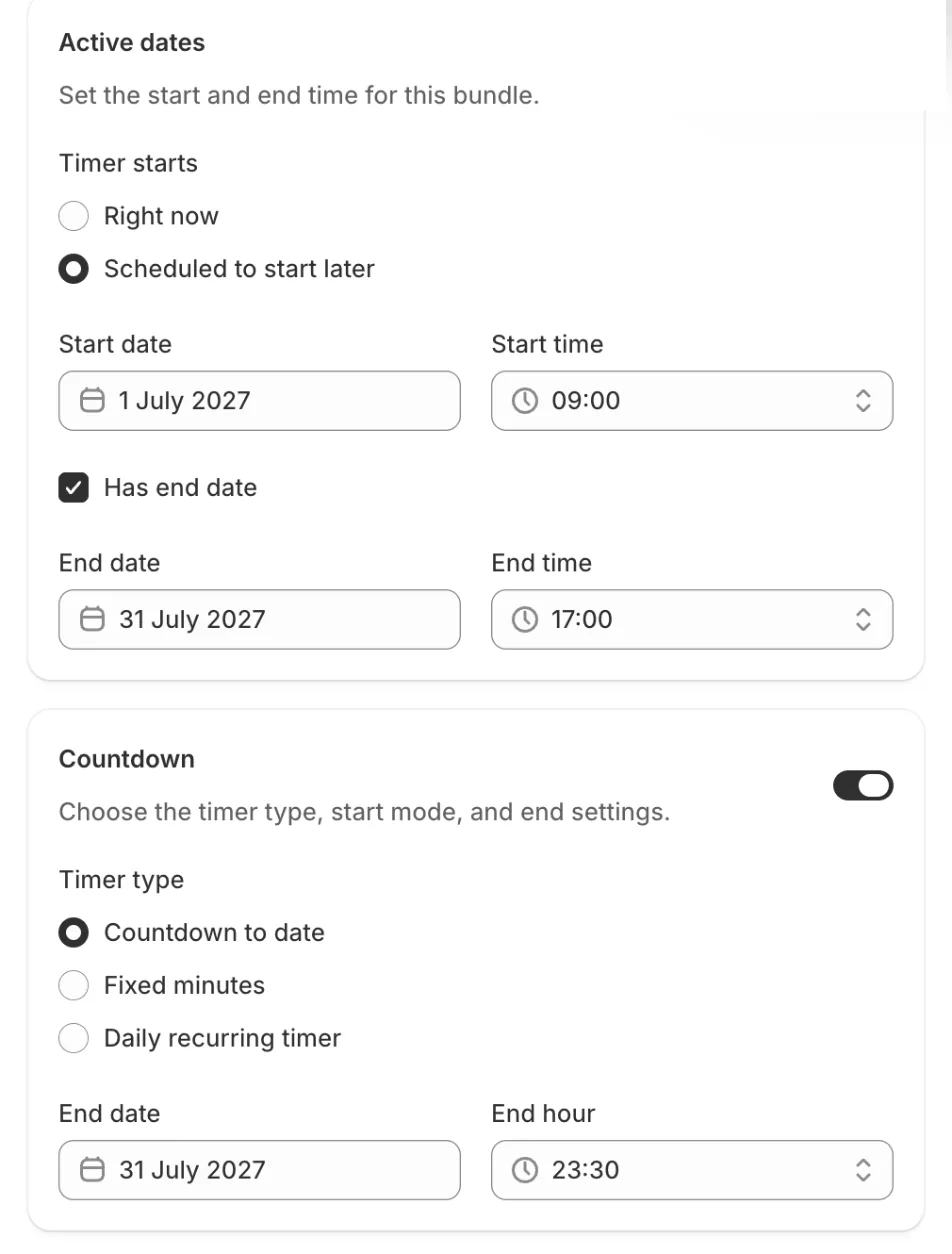
A kit still reads sold out when one item in it runs out, so check stock on every part first. Bundle ideas compares the bundle types, Sledge bundles lists the offers, and product bundle defines the term.
2. Let shoppers build their own kit
Some shoppers want to pick each part themselves. Sledge's "BYOB (Build Your Own Bundle)" lets them do it. Its "Builder structure" card has one tab per step, such as "Choose a notebook" and then "Choose a pouch". Each tab has its own products and its own "Discount". The set lives on a page of its own.
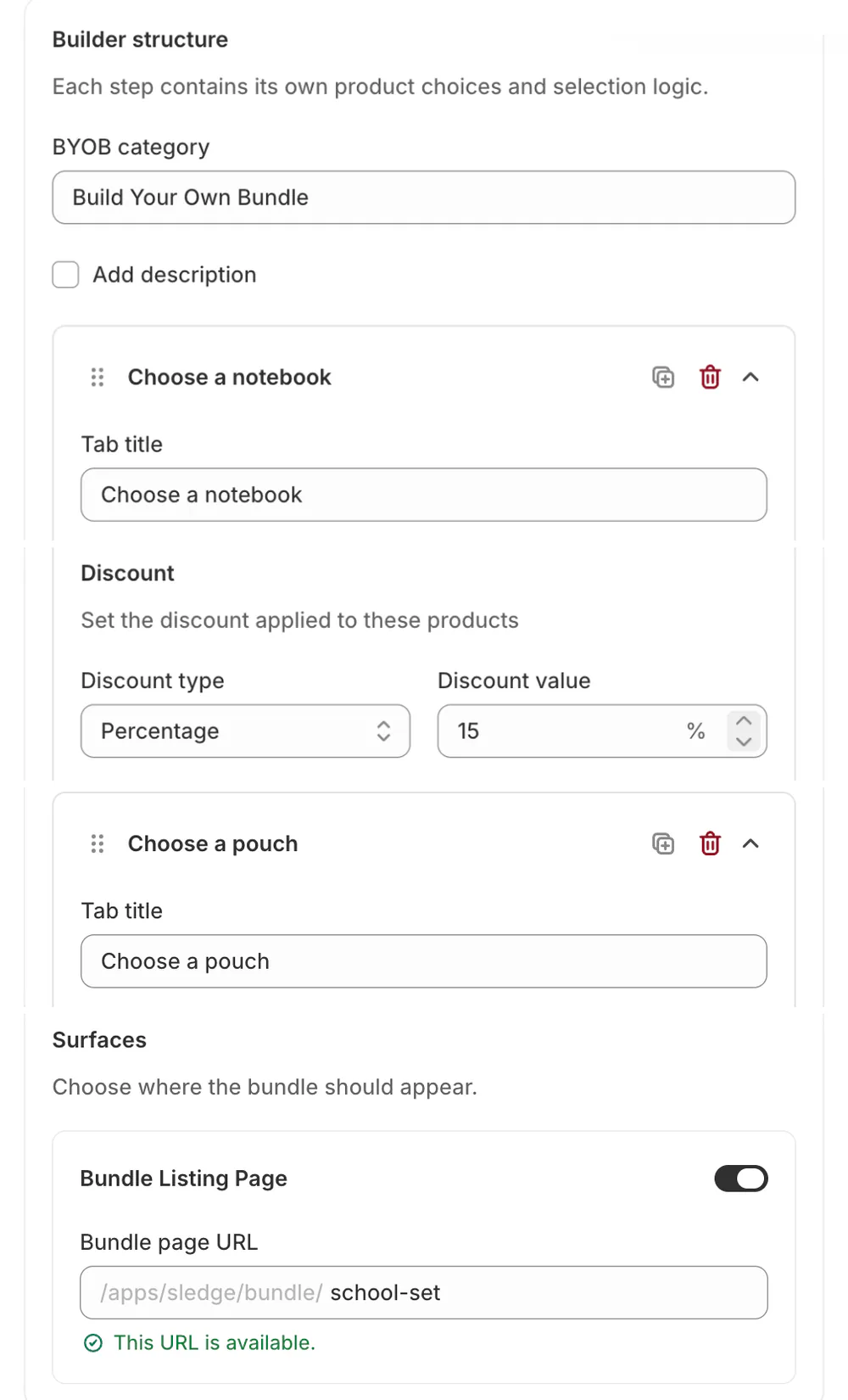
A build-your-own set has no dates of its own, so switch it off by hand with its Status when the sale ends. Build your own bundle on Shopify walks through the setup, and a BYOB bundle is the term.
3. Give a price break for stocking up
In Shopify, an Amount off products discount takes a "Minimum quantity of items", the number a shopper must buy before the price drops. A Buy X get Y discount also works on quantity, but the shopper has to add the free item to the cart themselves.
In Sledge, Volume Discounts sets the same price break by quantity, with a tier label such as "Buy 3, save 10%". Say a pack of pens drops 10% at three. Quantity breaks explains the term, and bundle pricing covers how deep to cut.
Which back to school sale ideas keep the window on time?
Give the sale a start, an end and a place to see it.
4. Open with an early-bird price
Tag your school products, then make a collection that fills itself from the tag. Go to Discounts, then Create discount, and pick "Amount off products", the type that takes a percentage off chosen products. Under "Applies to", pick "Specific collections" and choose the school collection. Under "Schedule", the card that sets when the discount runs, pick a start date, then click "Set end date" and pick the last day, so the price ends without you.
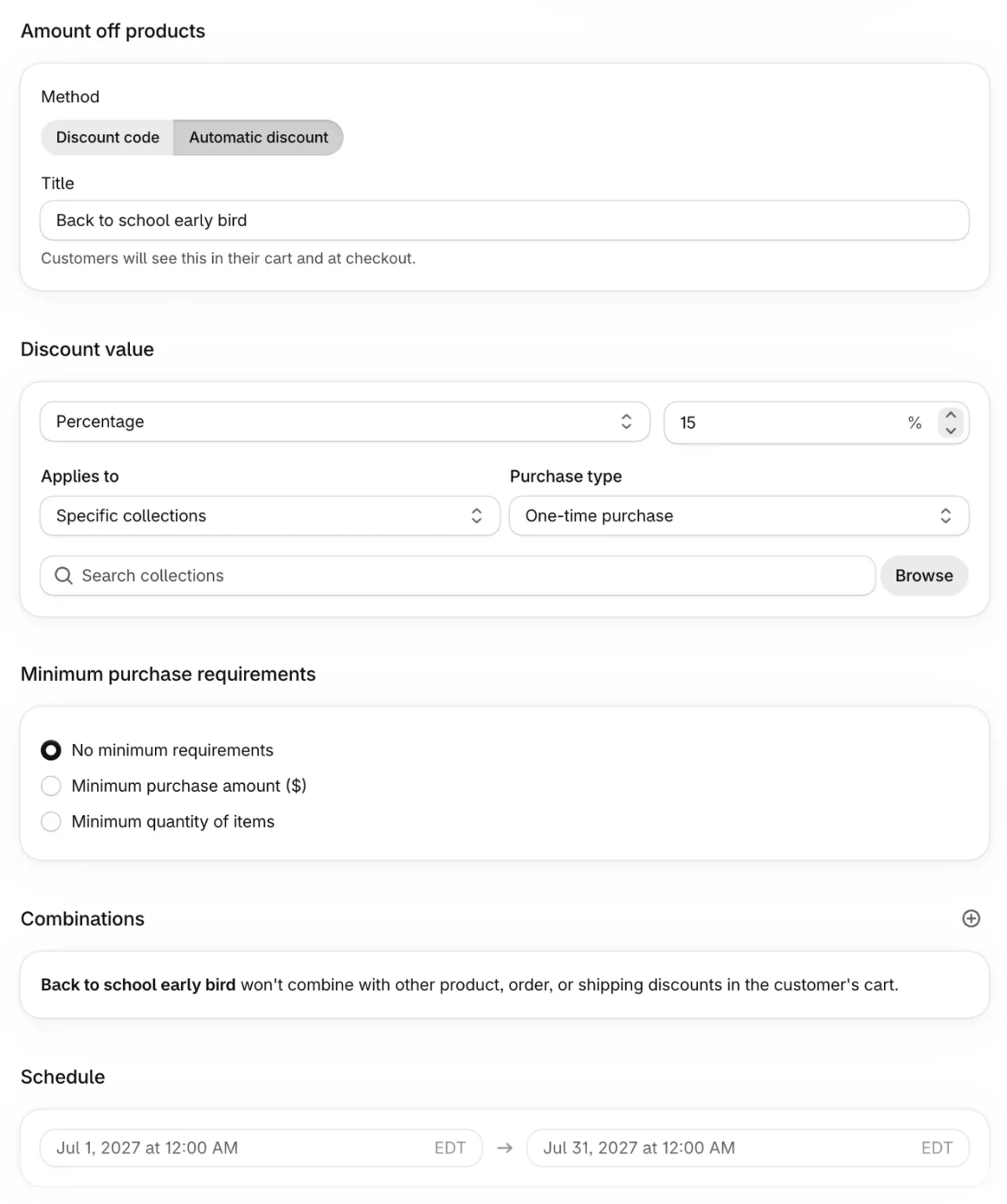
The Combinations card decides whether the discount can stack with others, and a new discount starts out with every combination off. Stacking works only where Shopify's rules allow. If a theme change travels with the price, put both in the Event rollout above. Create a discount code covers the form, and overlapping promotions covers two sales at once.
5. Give teachers and students their own code
Make a discount code and set its "Eligibility" to "Specific customers" or "Customer segments", so only people on the list can use it. Under "Maximum discount uses", tick "Limit to one per customer". A code works for whoever has it, so hand it to people you have checked, or keep the discount small.
6. Put the last day on a clock
Your theme's announcement bar is a line of text that you take down yourself, because Shopify's Help Center describes no end date for it. An Event rollout from the first section can take it down for you.
Sledge's Global Countdown counts down across your store. Pick "Countdown to date" as the timer type, then set an end date and an end hour. It disappears from your store when it reaches zero. Product Countdown does the same on one product page. The end hour is read on each shopper's own device clock, so a shopper in another time zone sees it end at that hour on their own clock.
A deadline that is real is fair scarcity marketing. On Dawn or Horizon, follow the Dawn or Horizon countdown guide.
7. Say it where shoppers browse
The announcement bar sits above every page, but a parent comparing backpacks is on a collection page. In Shopify, edit the bar under Online Store, then Customize, in the "Announcement bar" section. Some themes have none and need an app.
Sledge's Banner puts a promo message on your "Collection Page", "Search Page", "Instant Search" and "Cart Drawer", and it takes "Active dates", so it comes down when the sale ends. Scheduling a sale banner shows both routes, and banner sizes covers the artwork.
What should you do around a back to school sale?
Email last year's buyers first, check your state's tax rules, and switch everything off when the sale ends.
8. Email last year's buyers first
Last year's buyers have already bought from you. In Shopify Messaging, go to Create message and pick a starting point. When this page was written, the "Holidays and occasions" group listed a "Back to school" template first.
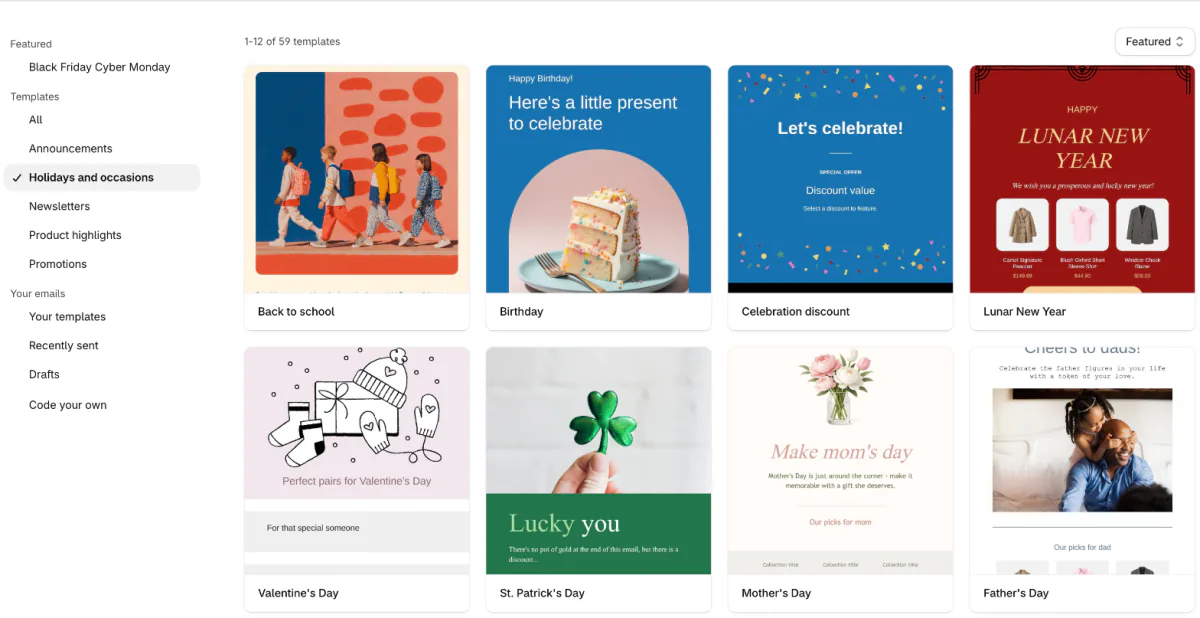
In the "To" field, pick a segment of customers who bought a school-season item last year, or click "Create segment" to build one. Then use "Schedule send" to set the day, so the email goes out without you.
Messaging is on the Basic plan and higher, with 10,000 free emails a month, then $1 USD per 1,000. Say you have 2,000 subscribers and send three times: that is 6,000 emails, inside the free 10,000. Shopify email marketing covers the costs, and newsletter ideas has more to send.
9. Check whether your state runs a sales tax holiday
Some US states run a back to school tax holiday with their own dates, item types and price caps, and these change from year to year. The Federation of Tax Administrators keeps a state-by-state list.
If one covers your products, you can set it up with a tax override, which sets one rate for a whole collection. Go to Settings, then Taxes and duties, then "Tax rates and exemptions", the section where you add overrides. Shipping charges have an override of their own. An override works only on a collection you fill by hand, not the self-filling one from idea 4, so make a second collection for it. Shopify's Help Center describes no end date for it, so put its removal on your list.
The rules differ by state and county, and Shopify tells you to check with a local tax authority.
10. Switch it all off, then sell the refills
Before the sale starts, write down what ends by itself and what you remove by hand.
- Ends by itself: a discount with an end date, a fixed bundle with an end date, a banner with its dates, a countdown at zero and any change inside an Event rollout.
- You remove by hand: the announcement bar text unless it sits in an Event rollout, a build-your-own set, a tax override and a school collection you made just for the sale.
Then keep selling. NRF's survey found 47% of shoppers plan to buy only the essentials for the start of the school year and replenish through the year, so leave the price break from idea 3 running on refills.
Giveaways, creator posts and social calendars have no Shopify setup. Giveaway ideas covers how to run a giveaway.
FAQ
Questions, answered
-

14-day free trial
Explore Sledge on your store before you decide to commit.
-

No credit card required
Start improving your store with no upfront commitment.
-

Setup in minutes
Get Sledge running without a lengthy setup process.
-

Built to grow sales
Turn shopper behavior into actions that help you sell more.
When should you start back to school marketing?
Start six to eight weeks before the first day of school in your biggest region, with your first offer live by early July if your schools start in August. NRF's 2026 survey found 62% of shoppers had already started by then, against 67% a year earlier and 55% in 2024. Start dates vary by district, so count from your own.
What back to school marketing ideas work for a small online store?
Sell the supply list as a kit, let shoppers build their own, and give a price break for stocking up. For the promotion, open with an early-bird price, put the last day on a countdown, and email last year's buyers first. Each one needs only your Shopify admin or one app.
How do you run a back to school sale on Shopify?
Create an automatic discount of the type Amount off products, apply it to a school collection, and set its start and end dates. For a sale that also changes your theme, schedule a rollout of the Event type under Markets, on the Basic plan or higher. Review its Combinations card so it does not clash with other discounts.
What back to school bundles can a Shopify store offer?
A kit of the usual items at one price, or a build-your-own set where the shopper picks each part. Shopify's free Bundles app makes the fixed kind. A kit still shows as sold out when one item in it runs out, so check stock on every part before the sale starts.
What should a back to school email campaign include?
Send last year's buyers the list first, the sale dates, and one link to the school collection. Shopify's email tool has offered a Back to school template, under Holidays and occasions. It is on Basic and higher, with 10,000 free emails a month, then $1 per 1,000. Schedule the send instead of pressing it by hand.
Which back to school social media ideas fit a Shopify store?
Post the kit with its list in the caption, and name the last day of the sale. Link every post to the one collection page your banner points to. Giveaways and creator posts have no Shopify setup; the giveaway ideas page covers how to run one.
Put your back to school sale on the storefront, with its dates built in.
Sledge doesn't send campaign emails, buy ads or post to social. It puts the sale on your storefront: fixed bundles with their own start and end dates, build-your-own sets, a countdown that disappears when it reaches zero, and a banner on collection pages. Try it free for 14 days. Growth Intelligence turns on when you pick a paid plan, and its suggested fixes add up to one dollar figure, labeled Est. potential.

