
August 26, 2026 was Shopify's deadline for every non-Plus store to move onto checkout extensibility, its newer way of customizing checkout and the pages after it, and it took the Additional Scripts box, custom edits to the old checkout, and code that apps added to checkout with it. If your thank-you-page upsell ran through one of those, it stopped showing. The fix is adding it back as a block through the checkout editor, on both the thank-you page and Order status separately.
You open the thank-you page one morning and the offer that has been sitting there for months is gone. No error, no warning email, just a blank confirmation screen where a block used to be. Nothing in your app settings changed. Shopify's checkout did.
What changed on August 26?
By that date, Shopify had moved every non-Plus store still on the old checkout onto checkout extensibility, which replaced custom edits to the old checkout, the Additional Scripts box, and Shopify Scripts. The old methods are gone, not deprecated: it's a one-way upgrade, and there is no toggle back.
Anything that lived in those legacy slots went with them. An upsell pasted into Additional Scripts, a widget an app added to checkout, an edit a developer made to the old checkout two years ago: all removed in the same pass, on every store still running the old checkout.
Why doesn't a "checkout extensibility ready" app just work?
Because ready means the app built a block. It doesn't mean the block is sitting on your page.
Checkout extensibility renders through app blocks you place yourself, the same way you add a block to your theme. An app can ship full support for the new framework and still show nothing on your thank-you page, because nobody added its block there yet. That step used to be automatic when a script just ran. Now it's a deliberate click, once, in the checkout editor.
The fix, screen by screen
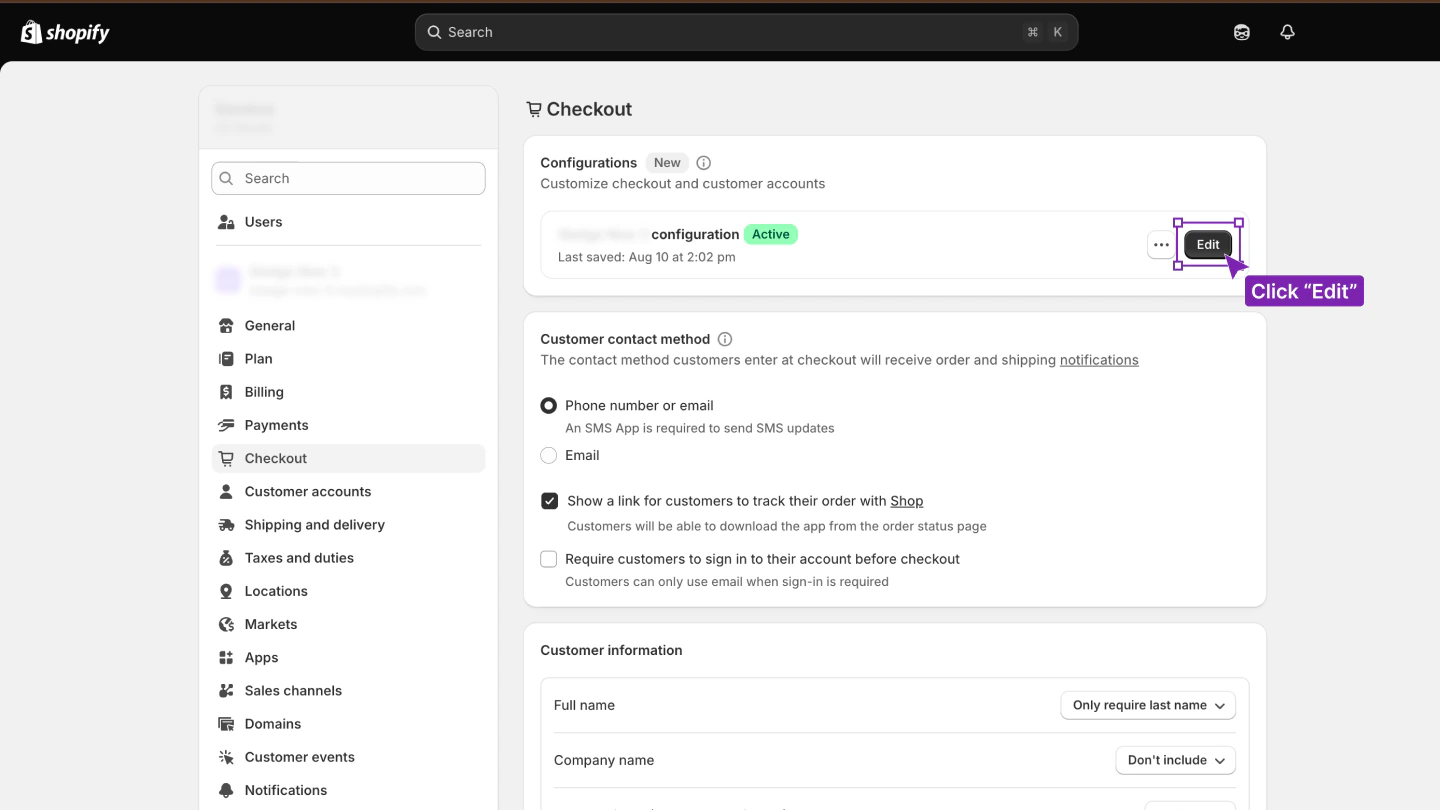
Open Settings, then Checkout. Find the active configuration and click Edit. This is the checkout editor, and it's where every thank-you-page block lives now.
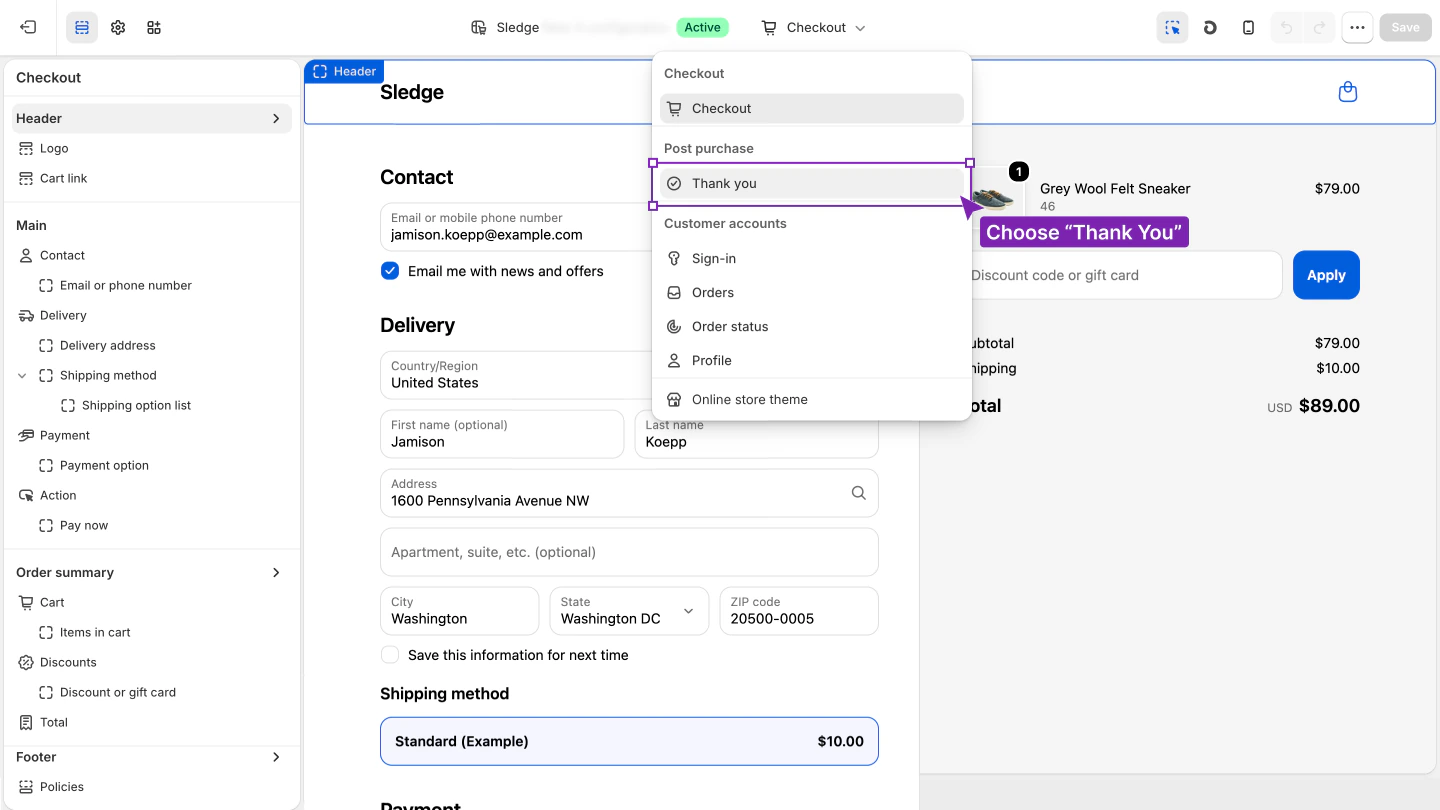
Use the page selector at the top of the editor and switch it from Checkout to Thank you.
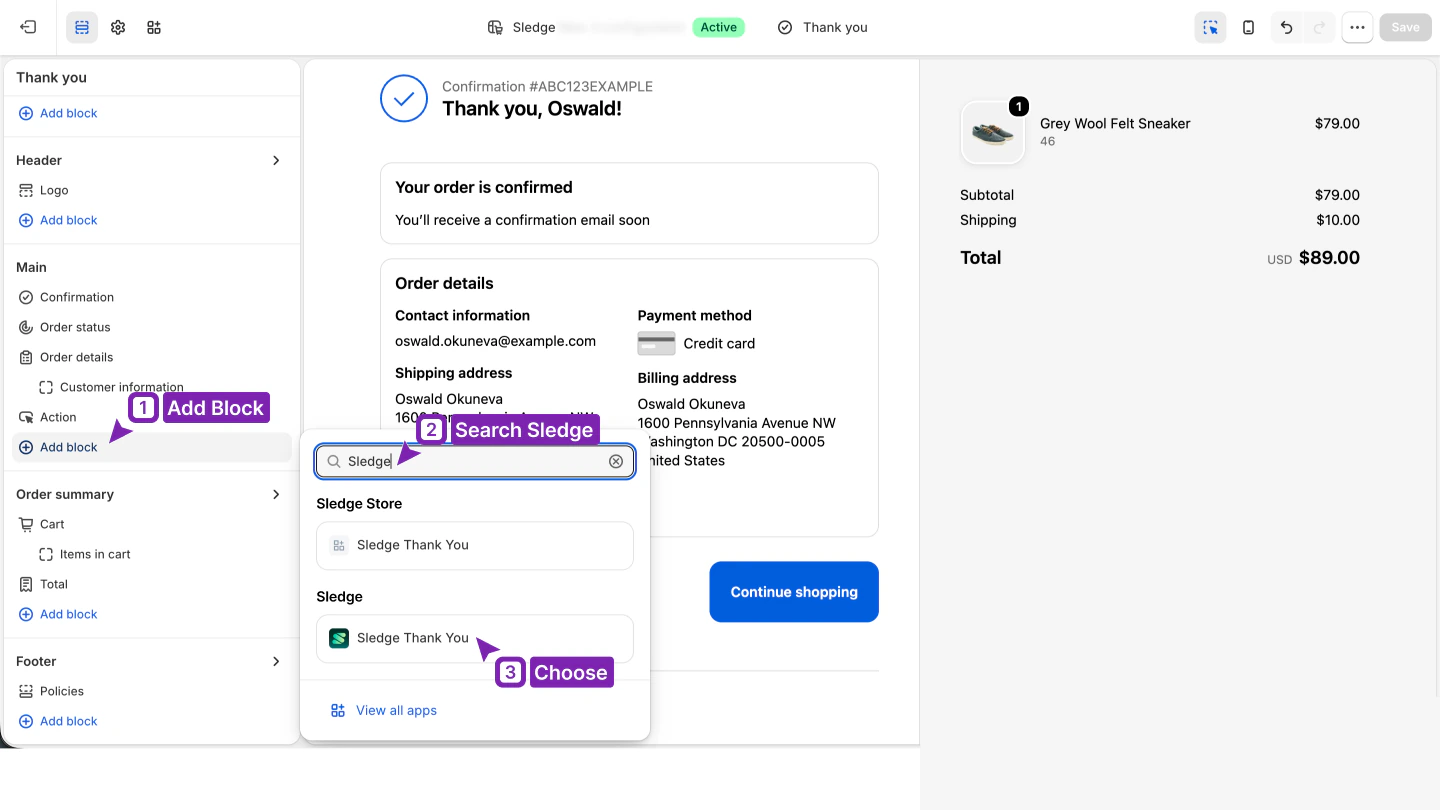
Click Add block, search your upsell app's name, and choose its Thank You block from the list.
The block appears with a live preview the moment you choose it, positioned right under the order summary. Click Save, and it's live.
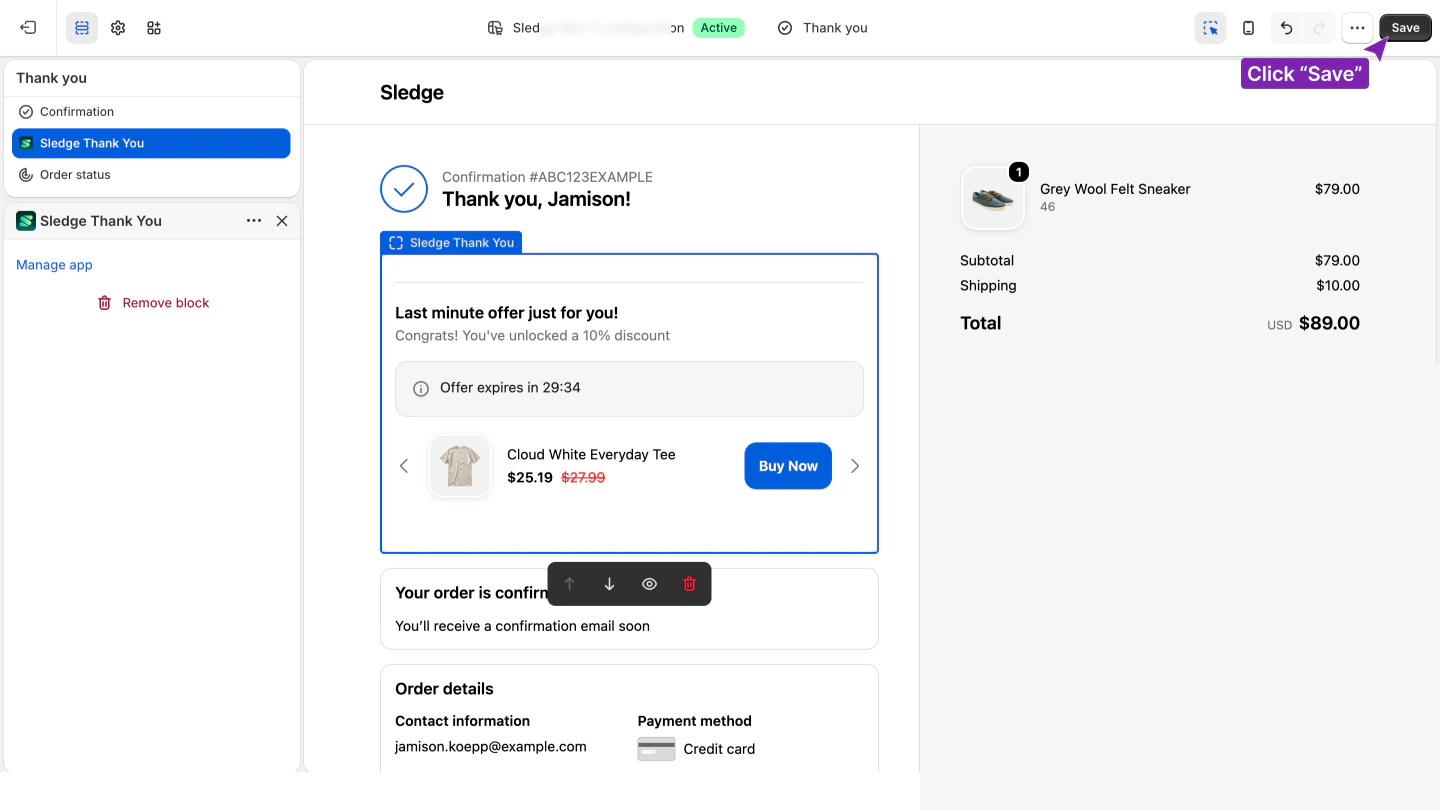
One step left, and it's the one most stores skip: the Order status page is a separate page in the same editor, not a duplicate of the thank-you page. A shopper who closes the tab and comes back later to check their order lands there, not on the page you just fixed. Switch the selector again, add the block, save.
Does this need to happen again for the next Sledge update?
No. Sledge's thank-you-page offer renders through this same checkout-extensibility framework, built that way from the start rather than migrated into it. The block existed before August 26 and needed no rebuild after.
What it still needs, same as every app block, is the placement step above: open the checkout editor, add it to the thank-you page, save. Once it's there, a shopper adds the offer in a tap from the confirmation page, and it completes through checkout as its own order next to the one they just placed. Nothing about that flow changes, because the block was never built on the part Shopify removed.
The checkout extensibility checklist
- Open Settings, then Checkout, and click Edit on the active configuration.
- Switch the page selector to Thank you.
- Click Add block, search your app's name, and choose its block.
- Save. Then switch to Order status and repeat. It's a separate page.
- An app's "supports checkout extensibility" claim means the block exists, not that it's placed.
FAQ
Questions, answered
-

14-day free trial
Explore Sledge on your store before you decide to commit.
-

No credit card required
Start improving your store with no upfront commitment.
-

Setup in minutes
Get Sledge running without a lengthy setup process.
-

Built to grow sales
Turn shopper behavior into actions that help you sell more.
Why did my Shopify thank-you-page upsell disappear?
By August 26, 2026, Shopify's deadline, every non-Plus store still on the old checkout was moved onto checkout extensibility, and the Additional Scripts box, custom edits to the old checkout, and code that apps added to checkout went with it. Anything that showed your upsell through one of those stopped showing, and the upgrade cannot be reverted.
My upsell app says it supports checkout extensibility. Why is my thank-you page still blank?
Supporting checkout extensibility means the app built a block for it. It does not mean the block is placed on your page. You add it yourself from Settings, Checkout, the same way you would add any other block to that page.
What does the fix involve?
Four screens in the checkout editor: open the active configuration, switch the page selector to Thank you, add your app's block, and save. Then repeat on the Order status page, since it is a separate page in the same editor.
Is the Order status page the same as the thank-you page?
No. They are two separate pages in the checkout editor, and a block added to one does not appear on the other. Configure both, or a shopper who returns to check their order sees a blank page again.
Does Sledge's thank-you-page upsell need this fix too?
No migration on Sledge's side. The block renders through the same checkout-extensibility framework the August upgrade made mandatory, so it was already built for it. You still add the block to the page yourself, the same as any app block, using the same steps above.
One block, placed once, built for the checkout you have now.
Sledge's thank-you-page offer already runs on checkout extensibility, so there's nothing to migrate. Start free, add the block where this guide shows you, and Growth Intelligence names the next offer worth building, with the dollars behind it.

