
Shopify Editions is Shopify's roundup of new features, published on its Editions page about twice a year. It is not a plan or an app: the features reach the admin you already have, some at once and some later. The latest is Fall '26, released October 28, 2026, with more than 150 updates.
You open the Editions page to see what changed, and 150 updates scroll past in words written for developers. You can't tell which ones are in your admin today, which cost extra, or whether you need to do anything. This page sorts the Fall '26 list for a small online store.
What is Shopify Editions?
Shopify Editions is the page where Shopify collects its new features about twice a year, each release under a season and a name. The first was Summer '22, "Connect to Consumer". Each Edition sorts its updates into tabs by area, and Fall '26 has 11 of them, from Sidekick and Online to Retail and Developer.
There is nothing to sign up for and no new bill. Some features land on the day. Others carry a label such as "Rolling out soon", "Coming soon" or "Early access", and reach stores over the following months. Shopify's Editions page lists every release.
When does Shopify release a new Edition?
Shopify's Editions page says "Every six months", and the gaps between the last four releases ran from about four to seven months.
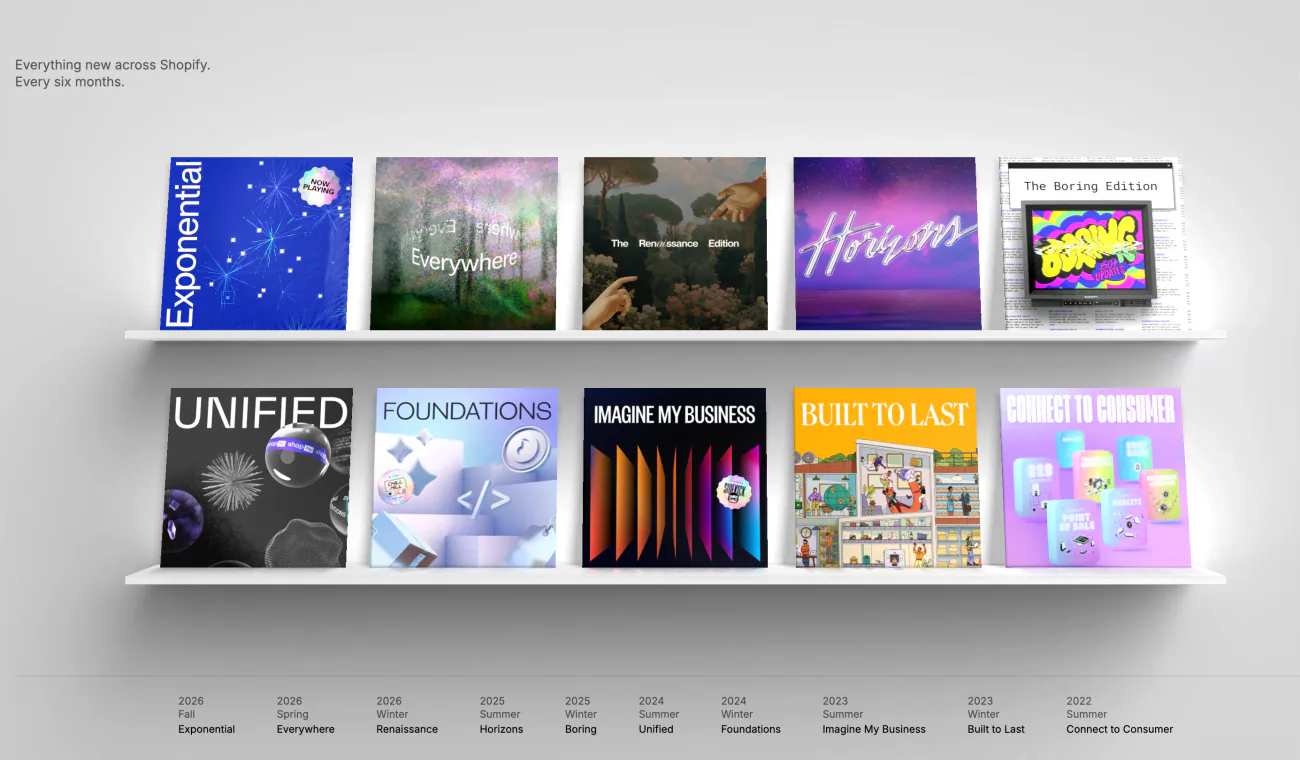
| Edition | Name | Released | What Shopify led with |
|---|---|---|---|
| Fall '26 | Exponential | October 28, 2026 | Shopify's network at checkout, AI shopping assistants, a rebuilt Sidekick, a new admin look |
| Spring '26 | Everywhere | June 17, 2026 | Shopify Catalog, AI channels managed in the admin, Sidekick, Campaign Autopilot |
| Winter '26 | Renaissance | December 10, 2025 | Sidekick suggestions, the SimGym store simulator, Rollouts, over 250 Horizon theme improvements |
| Summer '25 | Horizons | May 21, 2025 | Store design, AI and checkout |
Fall '26 is the latest as of November 9, 2026. Shopify has not dated the next one, and we update this page after it lands.
The mid-2026 release is Spring '26. Some articles call it Summer '26, but that is not Shopify's name for it.
What's new in the Fall '26 Edition for a small store?
Ten Fall '26 updates can already reach your store, though a few need Shopify Payments, a theme that supports them or early access.
Checked November 9, 2026, on Shopify's Edition page and Help Center.
- Sidekick takes on longer jobs. Sidekick, the assistant in your admin, now plans a task with several steps and works through it, such as editing the descriptions of every product in a collection. It can also run calculations, search the web and remember what you teach it. Each change waits for your review before Sidekick applies it.
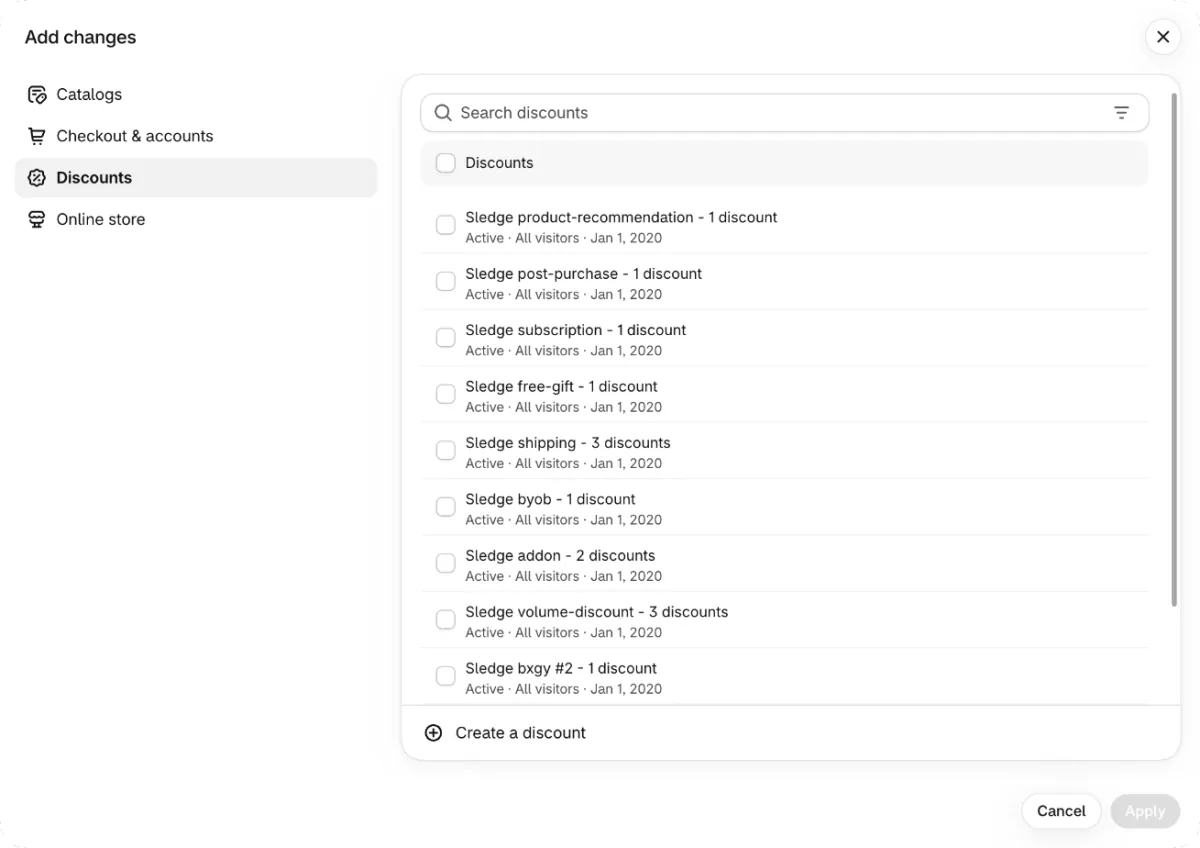
- Rollouts now switch discounts on and off. Go to Markets, then Rollouts, click "Create rollout", then "Add changes", the list of what the rollout will change. A rollout now takes Discounts and Catalogs beside your theme and checkout. An Event rollout publishes the changes for a set period and rolls them back when it ends, so a sale closes on time. Rollouts need the Basic plan or higher, and Experiments, Shopify's A/B tests, need Grow or higher. Our A/B testing guide walks through a test.
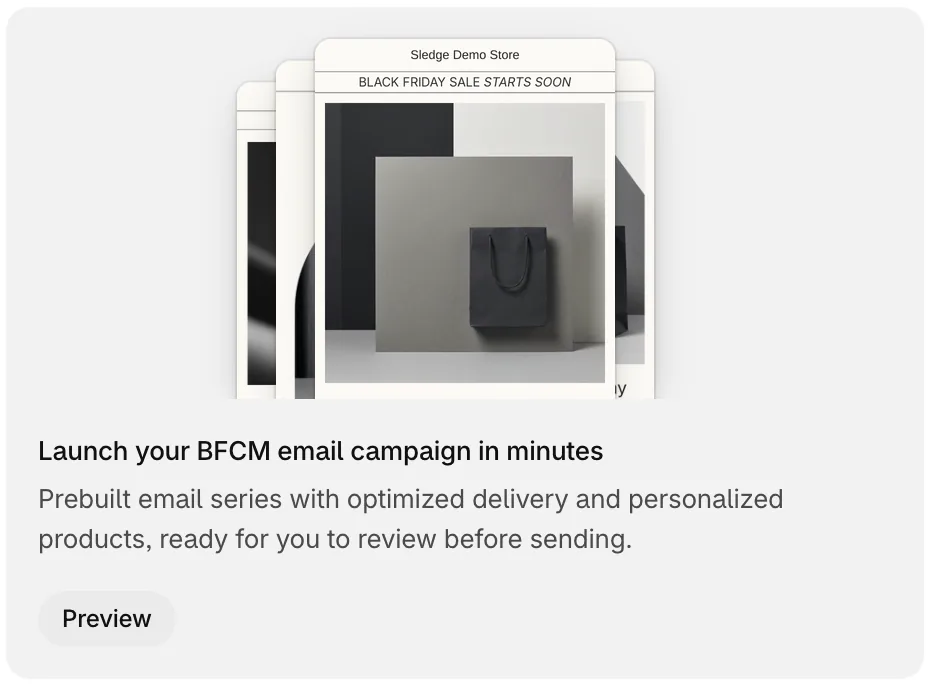
- A ready-made Black Friday email series. In Apps, then Messaging, Shopify can show a card titled "Launch your BFCM email campaign in minutes", which offers a prebuilt Black Friday Cyber Monday series for a limited time. Click "Preview", then "Review and schedule", then "Schedule". The series goes to all of your email subscribers, and you can't change the audience. Our guide to Shopify's email marketing covers the rest of Messaging.
- Store policies from a template. Under Settings, then Policies, "Use automated policy" fills your return, shipping, contact or terms of service policy with Shopify's own wording. Turning it on replaces your text and its translations, so save a copy first. Shopify says the wording is not legal advice. Our refund policy template is another place to start.
- Risky checkouts stopped early. On Shopify Payments, Shopify can block some high-risk checkout attempts before an order exists. You review them in the "Blocked" view of Orders, then Abandoned checkouts. If you know the customer, you can send them a draft order invoice instead.
- Chargeback replies written for you. With Shopify Payments, Shopify drafts the defense for card chargebacks and inquiries using AI. It also attaches the carrier's proof of delivery, and FedEx delivery photos now show on the order. Our return fraud guide covers what a chargeback costs and how to answer one.
- Session counts changed in September. From September 21 to 23, 2026, Shopify changed how Analytics counts sessions. A session now lasts while the shopper stays active instead of ending at midnight UTC, and known bots are left out by default. Your sessions and conversion rate can move while traffic and orders stay the same. Add an annotation, your own note on a report's timeline, so the jump has a reason beside it. Customer behavior analytics explains what those numbers mean.
- A knowledge base for AI shopping assistants. Under Sales channels, then Agentic, click "Knowledge Base" in the Sources section to see the store facts AI assistants read. Shopify suggests updates, and nothing changes until you click "Approve & publish". It replaces the Shopify Knowledge Base app, which closes on January 15, 2027. If the app holds 1,000 facts or fewer, your own facts move over on their own. With more, you add them by hand before that date.
- Seven local payment methods. Shopify Payments adds Alipay, WeChat Pay, MB WAY, OXXO, Satispay, Scalapay and GrabPay. Each one shows only to shoppers in a supported country paying in an eligible currency, and some are in early access. They matter only if you sell to those countries and have set them up as markets.
- Better search suggestions. Shoppers typing in your store's search box get better suggestions, and add-to-carts from search rose 8%, Shopify says. Your theme has to support predictive search, the list of matches that opens while a shopper types.
Smaller changes include folders for your files and passkeys, which sign you in with your face, fingerprint, PIN or screen lock.
Which Fall '26 changes aren't in your admin yet?
Several headline items carry "Rolling out soon", "Coming soon" or "Early access" on Shopify's own page, so your admin may not show them today.
- A new admin look. Every admin page gets new colors, type, spacing and icons, a side menu that folds away, and Sidekick as a floating chat at the bottom. Shopify marks it "Rolling out soon to all pages".
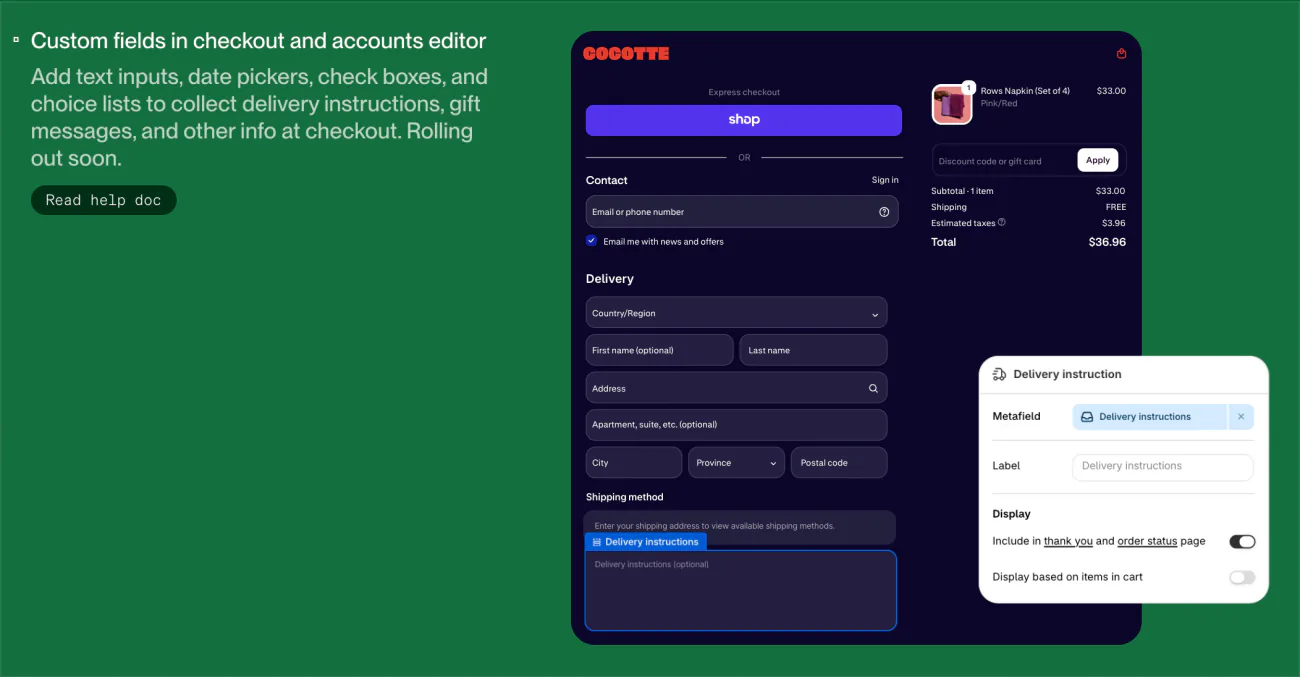
- Custom fields at checkout. Text boxes, date pickers, check boxes and choice lists collect details such as a membership number or a delivery date, and the answers show on the order. Shopify's Help Center says they won't be released before or during Black Friday Cyber Monday. Below Shopify Plus, you get only the "Delivery instructions" and "Gift message" fields.
- A tidier checkout. Payment methods laid out as tiles and a thank-you page animation are "Rolling out soon". A shorter, stacked form and Apple Pay by QR code in other browsers are "Coming soon".
- Canvas. It shows your store's page designs side by side, and you can ask Sidekick to build or change a theme from a description. It is in early access for certain stores, works on desktop only, opens from the Themes page and stays optional.
- Wider chargeback protection. New features in the Shopify Protect app are "Rolling out soon". Cover for orders not paid with Shop Pay is "Coming soon".
- Seller health. Under Settings, then General, it shows whether your store is in good standing with Shopify and what needs your attention. It is in early access and rolling out gradually, and its filterable activity log is "Coming soon".
How do you find a new Shopify feature in your admin?
Open the feature's help page from the Edition and read three things before you go looking: its status, its plan and what else it needs.
- Open the help link. On the Edition page, each feature links to "Read help doc" or "Learn more", its page in Shopify's Help Center.
- Read the box at the top. A "Coming soon" or "Early access" box means the feature is not in every store yet.
- Check the plan note. Many help pages say which plans get the feature, such as Experiments from Grow. Our Shopify pricing guide lists what each plan includes.
- Check what else it needs. Some features need Shopify Payments, a theme that supports them, or a store in one country, such as Shop Promise in the US.
- Ask Shopify Support. If your store meets every condition and the feature is still missing, contact Shopify Support with its name and help page.
Which Fall '26 updates can a small store skip?
Most of the Retail and Developer tabs can wait, and so can anything locked to a plan or a country you don't sell in.
- In-person selling. The Retail tab covers Shopify POS, Shopify's point of sale for selling face to face.
- Developer tools. The Developer tab is for people who build apps and themes.
- Multi-currency payouts. Payouts in more currencies arrive in Australia, France, Singapore and Hong Kong, on the Advanced and Plus plans only.
- Shop Promise. It is a free Shopify program for stores in the United States, and Shopify says eligibility grew 20 times.
- Shipping labels by country. DHL Express labels come to the UK, France, Italy, Germany and Spain. Canada gets UPS international labels and Canada Post return labels, and the UK gets Royal Mail pickup points. Our shipping label guide covers the basics.
- Plan and country extras. Roles across an organization are for Shopify Plus. Shop Pay Installments in Australia is in early access, and HSA and FSA payments are coming to the US only.
If you sell in person, the Retail tab is the one to read.
FAQ
Questions, answered
-

14-day free trial
Explore Sledge on your store before you decide to commit.
-

No credit card required
Start improving your store with no upfront commitment.
-

Setup in minutes
Get Sledge running without a lengthy setup process.
-

Built to grow sales
Turn shopper behavior into actions that help you sell more.
What is Shopify Editions?
Shopify Editions is Shopify's showcase of new features, published about twice a year on its Editions page. Each Edition gets a season and a name, such as Fall '26, Exponential. It is not a new plan and needs no sign-up. Features reach the admin you already have, some on the day and some over the following months.
When is the next Shopify Edition?
Shopify has not announced a date. Its Editions page says every six months, and the last four came out in May 2025, December 2025, June 2026 and October 2026. Fall '26, released October 28, 2026, is the latest as of November 9, 2026. We update this page after each new Edition.
Is there a Shopify Summer '26 Edition?
No. Shopify named its mid-2026 release the Spring '26 Edition, Everywhere, published June 17, 2026. Some articles call it Summer '26, because the mid-year releases from 2022 to 2025 were summer Editions. The release after it was Fall '26, Exponential, on October 28, 2026.
What was in the Shopify Winter '26 Edition?
Winter '26, Renaissance, came out December 10, 2025 with more than 150 updates. Shopify led with Sidekick, which began suggesting actions and building custom apps for your admin. It also brought selling inside AI chats, the SimGym store simulator, Rollouts for scheduled launches and over 250 improvements to the free Horizon theme.
Why is a new Shopify feature missing from my admin?
Many Edition features arrive in stages. Open the feature's Help Center page from the Edition: a box at the top says Coming soon or Early access, and a plan note says which plans get it. Some need Shopify Payments or a store in one country. If all of that matches and it is still missing, ask Shopify Support.
Do I pay extra for Shopify Editions?
No. An Edition is an announcement, not a product. Most features come with your Shopify plan. Some need a higher plan, such as Experiments in Rollouts from Grow, or every checkout field type on Plus. A few are free apps from Shopify you install, and some charge per use, such as Shop Campaigns ads.
Shopify adds the features. What should you fix first?
Sledge doesn't track Shopify's releases or switch Edition features on for you. It adds search, filters, bundles and a cart drawer to your store, with a 14-day free trial. Growth Intelligence turns on when you pick a paid plan. It reads your store's searches and orders, suggests what to fix next and adds those fixes up to one dollar total, labeled Est. potential.

