
Yes, a shopper can enter a Shopify discount code before checkout when your cart has a box for it. Horizon has one, with its setting switched on by default. Dawn has none. On any theme, a shareable discount link puts the code in the cart for the shopper, and Sledge's cart drawer adds a box of its own.
Your email went out with SPRING15. A shopper adds a jacket, opens the cart and looks for somewhere to type it. There is no box, so the total still reads full price. A few click Checkout to see if the code works there. Others go hunting for a better code.
Can a Shopify discount code go in the cart?
Yes, as long as the cart has a box for it. Shopify's checkout usually shows a code box while a code is active. Shopify's discounts FAQ describes discounts as applied "in a customer's cart and at checkout, either automatically or when the customer enters a discount code."
An automatic discount needs no box, because Shopify applies it on its own. A code the shopper types, like the coupon code in your email, needs somewhere to go.
Shoppers want to see what they'll pay before checkout. In Baymard's survey of US online shoppers, 12% of those not just browsing left a cart because they couldn't see or work out the total cost up front. With no box, the total in your cart leaves the code's saving out until checkout.
Does your theme already have a discount box in the cart?
Horizon does, and its setting is switched on by default. To check, open Online Store and click Edit theme. Click the gear icon for Theme settings, then open Cart. Under Cart features, look for "Allow discounts in cart", the switch that puts a code box in your cart. Click Save if you changed it.
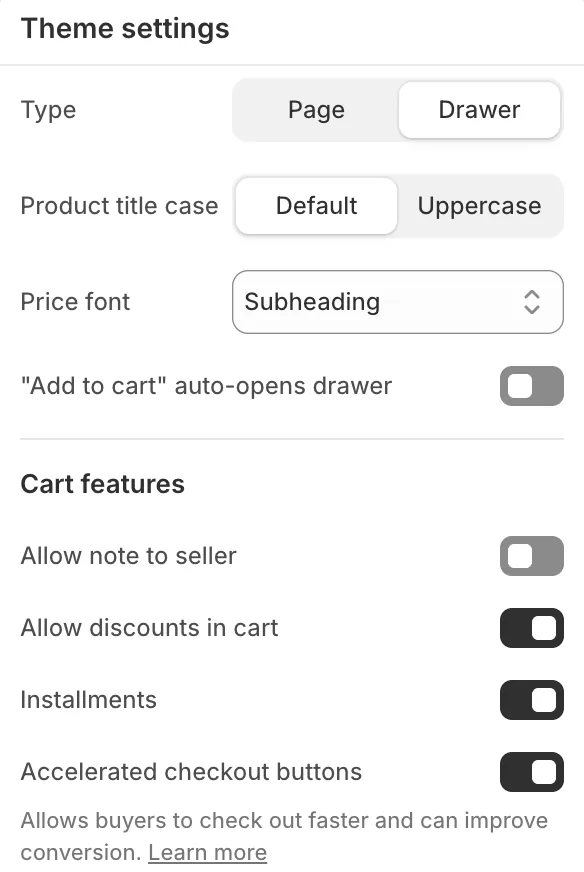
The box shows on Horizon's cart page and in its own cart drawer as a "Discount" row. Tapping it opens a code box and an Apply button. Each code the shopper adds then shows with an X to remove it, and a wrong one gets "Discount code cannot be applied to your cart". To change what else that drawer shows, see how to upgrade Horizon's cart drawer.
Dawn has no box, even in the version released November 2, 2026. Its cart shows a discount only once one is applied: a code on the whole order under the subtotal, a product's own discount on its line. Moving to Horizon brings the box, but that is a theme change, not a setting. Dawn vs Horizon weighs that move.
On any other theme, open Theme settings, then Cart, and look for a discount option. We checked only Horizon and Dawn.
How do you apply a Shopify discount code before checkout without a box?
Send a shareable discount link, and the code is already on the cart when the shopper lands. Shopify makes the link from a code you have created in Discounts.
- In your Shopify admin, open Discounts and click the code.
- Click Promote, then choose Get a shareable link.
- Pick the page, product or collection the link opens.
- Click Copy link, or download the QR code, then click Close.
Put the link behind the button in your email or your post. Print the QR code on a flyer. Shopify POS can scan it at your register too. Horizon shows the code in the cart, and on Dawn the saving should show as a discount line under the subtotal or on the product.
Each shareable link carries one discount, and it works only while that discount is active. A code made by another app gets no link from your Shopify admin. Once applied, the code stays on the cart until the shopper removes it at checkout.
How do you add a discount box to Dawn or another cart?
A link covers one campaign. For any code a shopper brings, the cart needs a box of its own, and two routes give it one.
Pay a developer to add a box
A developer can add a code box to your theme's cart. You get a box where you choose to put it. You pay for the work, plus a recheck after every theme update. Before it goes live, test a wrong code, two codes at once and a free-shipping code.
Use a cart drawer with its own box
Sledge is a Shopify app whose cart drawer has a discount code box of its own, on any theme. The drawer opens in place of your theme's drawer.
- In Sledge, open Tools, then Cart Drawer, and switch the Cart Drawer on.
- Open its settings. In the Footer card, switch on "Discount code", the block that shows the box.
- Set the words in the box and on its button.
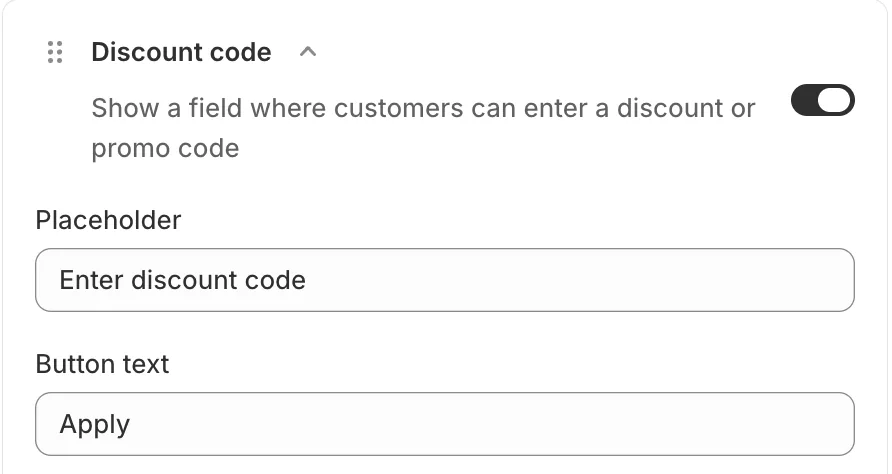
Shoppers tap Discount, type the code and tap Apply. The code sits under the box with an X to remove it, and the total drops before checkout. A code from your shareable link should show there too.
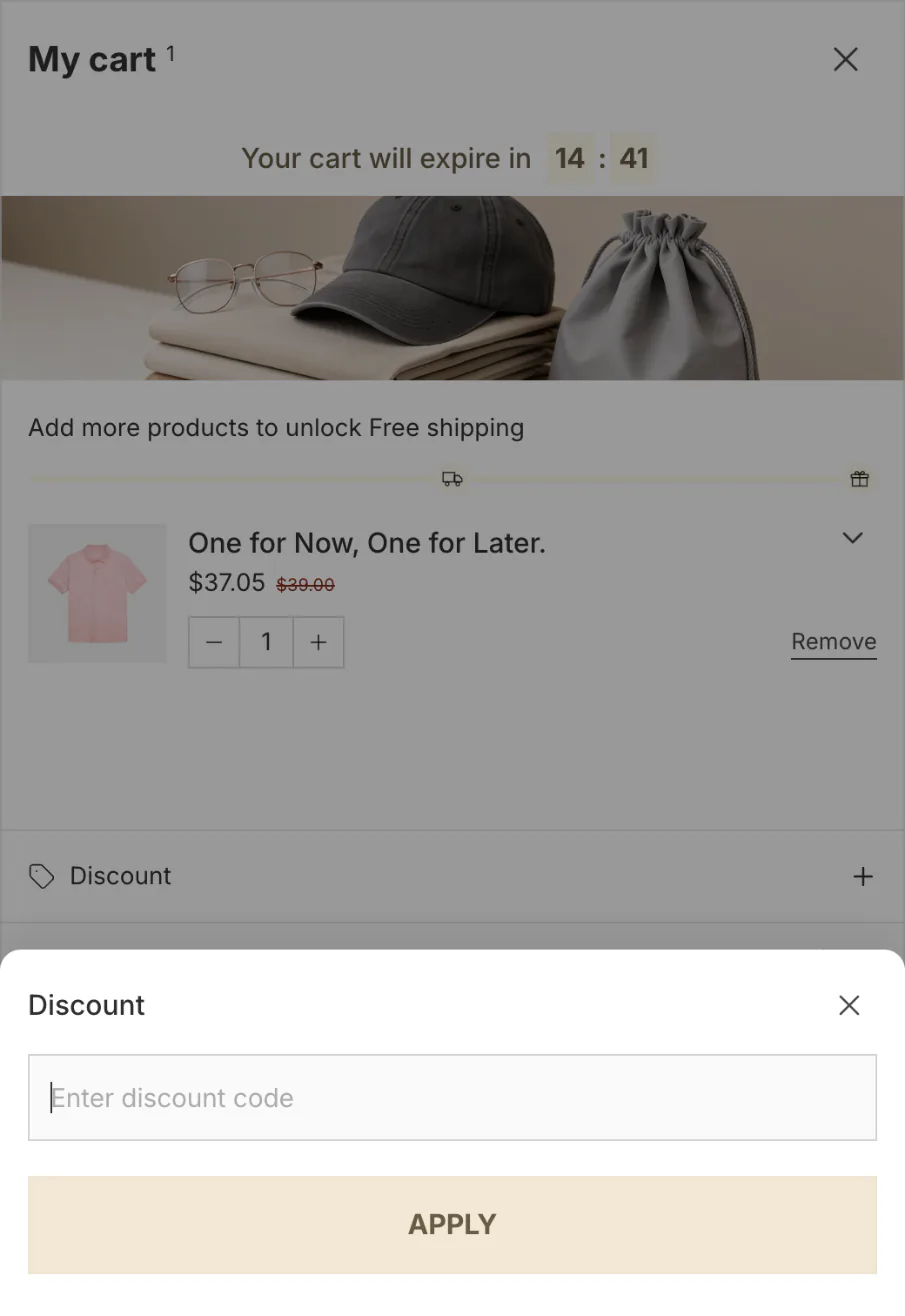
Sledge never edits your theme files, so switching its drawer off brings your theme's drawer back. The box lives in the drawer only, and your theme's cart page keeps its own box, or none. The cart drawer and its code box come with all four paid plans, and the drawer runs on the 14-day free trial.
Other apps sell a cart drawer too: see six Shopify cart drawer apps side by side.
Should you use a discount link or a discount code box?
On Horizon, the theme's own setting is enough. On Dawn, a shareable link covers one campaign, and a box covers any code.
| Route | Horizon setting | Shareable link | Developer-built box | Sledge's cart drawer |
|---|---|---|---|---|
| Where the shopper enters it | Cart page and Horizon's drawer | Nowhere: it arrives with the link | Where the developer puts it | The drawer |
| What it costs | Free | Free | Paid work, rechecked after updates | A Sledge plan after the 14-day trial |
| Saving shows before checkout | Yes | Yes on Horizon, should on Dawn | Depends on the build | Yes |
| Works on Dawn | No | Yes | Yes | Yes |
Checked November 3, 2026, on Horizon 4.3.0 and Dawn 16.1.1.
Then test it. Add a product, enter a real code in the cart or open your link, and check that the total drops before checkout.
Why won't a discount code work in the cart?
Start with these four.
- The code is mistyped, not active yet, or has ended.
- The cart falls short of the code's minimum, or holds none of the products it covers.
- The code doesn't combine with an automatic discount already running. What stacks, what collides has the rules.
- It's a free-shipping code, and shipping isn't priced until the shopper adds an address at checkout.
For a code paired with a free gift, see how 10% off and a free gift combine.
FAQ
Questions, answered
-

14-day free trial
Explore Sledge on your store before you decide to commit.
-

No credit card required
Start improving your store with no upfront commitment.
-

Setup in minutes
Get Sledge running without a lengthy setup process.
-

Built to grow sales
Turn shopper behavior into actions that help you sell more.
Can customers enter a discount code in the Shopify cart?
Yes, when the cart shows a box for it. Shopify’s checkout usually shows one while a code is active, and Horizon also takes codes in the cart: its setting “Allow discounts in cart” is switched on by default. Dawn has no cart box. A shareable discount link or a cart drawer with a code box covers any theme.
How do I turn on the discount code box in Horizon?
In your Shopify admin, open Online Store and click Edit theme. Click the gear icon for Theme settings, open Cart, and check that “Allow discounts in cart” is switched on under Cart features. Save. The box then shows on Horizon’s cart page and in its cart drawer under “Discount”, and shoppers see the new total before checkout.
Why isn’t the discount code box showing at checkout?
Shopify shows the checkout box only while at least one discount code is active. It is off by default on a checkout sent from a draft order, it waits for a Shop Pay shopper to log in, and an app that changes prices or checkout can hide it. Check those four first.
Does a free-shipping code work in the cart?
Not in a way the shopper can see. Shipping is priced once the shopper adds an address at checkout, so the cart has no shipping cost to take the saving off. Horizon keeps the code and says the saving shows at checkout. In your email or banner, tell shoppers to enter a free-shipping code at checkout.
Does Sledge’s cart drawer replace Horizon’s discount box?
In the drawer, yes. When Sledge’s cart drawer is on, it opens instead of your theme’s drawer, and its “Discount code” block, once switched on, is the box shoppers use there. Your theme’s cart page keeps its own: Horizon’s box if it is on, nothing on Dawn. Switch Sledge’s drawer off and your theme’s drawer comes back.
Your cart takes the code. Which carts still don't buy?
Try Sledge free for 14 days and put a code box in its cart drawer on any theme. Growth Intelligence turns on when you pick a paid plan. It can flag carts that don't turn into orders, and it totals what its fixes could add in one dollar figure, labeled Est. potential.

