
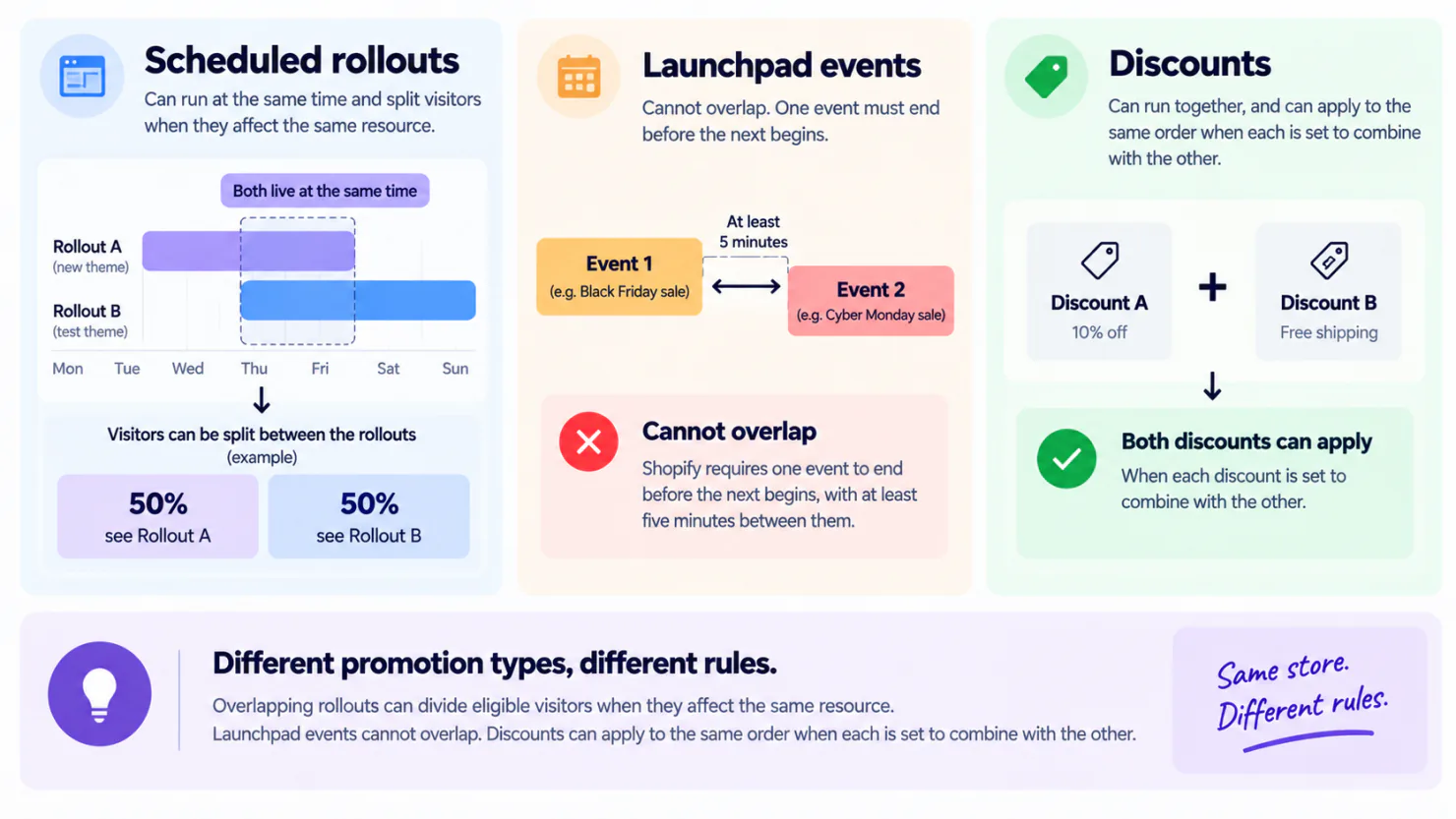
Sometimes. Shopify handles overlapping discounts, app campaigns, scheduled theme changes, and Launchpad events differently. A discount, a badge and an app banner can share the same days and reach every visitor. Scheduled rollouts are different. When two rollouts change the same part of your store, such as your theme, and both are running at the same time, Shopify divides your visitors between them based on the settings you gave each rollout. A visitor sees only one version of that part of your store at a time. If four overlapping rollouts all affect the same theme resource and each is set to reach 100% of eligible visitors, Shopify divides the eligible traffic evenly, so each rollout gets 25% effective traffic. Run them one after another and nobody is divided.
You scheduled the gift guide homepage for Monday and the sale homepage for Friday, both set to reach every visitor. From Friday on, each one reached only about half your visitors. Each rollout's analytics page showed its share of visitors, so the split was there to see.
What counts as two promotions running at once?
In a sale week, "promotion" can mean a discount, a badge or banner, a scheduled theme change, or an event in Launchpad, Shopify's sale event scheduler. What happens when two overlap depends on which kinds they are.
A discount and a badge can run on the same product at the same time. The discount applies, and the badge still shows.
Two discounts can both be live on the same weekend, whatever their settings. A shopper gets both on one order only when each discount's Combinations setting, the list of other discount kinds it may combine with, allows the other. Two product discounts on the same item also need Shopify Plus, Shopify's top plan. Otherwise the shopper gets the one that saves more. Shopify allows at most 25 active automatic discounts, the kind that apply without a code, and discounts made by apps count toward that 25. Which discounts combine in one cart covers those rules in full.
Scheduled rollouts are different. When overlapping rollouts affect the same resource, Shopify divides eligible visitors between them according to their traffic settings.
Launchpad events on Shopify Plus cannot overlap. Shopify requires one event to end before the next begins, with at least five minutes between them.
Visitor traffic is divided when overlapping rollouts affect the same resource and Shopify needs to allocate eligible visitors between them. The exact split depends on the rollout settings and the resources involved.
Why do four scheduled theme changes reach a quarter of your visitors each?
Shopify Rollouts is the built-in tool for scheduling a theme change, on every plan from Basic up. In your admin, open Markets, the section for the countries you sell to, then Rollouts. Each rollout schedules a change to your theme, your checkout, or both, such as a sale homepage that goes live on Friday.
Launch reach is the share of visitors you ask a rollout to cover. When rollouts overlap, Shopify divides your visitors between them in proportion to that setting. Set four overlapping rollouts to 100% and each one gets 25% of your visitors, per Shopify's guidance on managing rollouts. Shopify calls your setting "intended allocation" and the share each rollout actually gets "effective traffic."
The shares change as rollouts start and end. A rollout that ends at noon and one that starts at 1pm the same day never divide your visitors between them.
Say Black Friday week brings 20,000 visits to your store, and you sell a $48 linen shirt that costs you $19. If one visit in fifty ends in a sale, that is 400 orders. Each shirt leaves you $29, so the week earns about $11,600 after the cost of the shirts.
Now schedule four theme changes to run together all week, each set to reach everyone. Each one gets only 5,000 visits and shows about 100 orders and $2,900. The four still add up to 400 orders and $11,600. But if you compare the four to pick one to keep, each is judged on a quarter of your visitors.
Why does Shopify's own flash-sale scheduler refuse to overlap at all?
Launchpad is a Shopify app for stores on Plus. It runs a sale as a scheduled event, with a start time, an optional end time, and the price, product and theme changes in between. No other built-in Shopify tool puts all three into one timed event.
You cannot run or schedule overlapping events, and each event has to begin at least five minutes after the previous one ends, per Shopify's Launchpad considerations. So a week-long sale on your whole store and a Saturday flash sale cannot both be set up for the same Saturday.
If an event has no end date, Launchpad will not schedule any event after it. You have to edit that event and give it an end date that comes before the next one starts.
Some Shopify Launchpad documentation still refers to Shopify Scripts for controlling discount codes during an event. Shopify's migration guidance says Scripts needed to be replaced by June 30, 2026, so do not treat that old Launchpad reference as a current setup recommendation.
Which promotions collide, and which only look like they do?
Here is what each kind of promotion does when a second one of the same kind runs on the same days.
| Discount type | Where it lives | What happens when two run at once | What you do about it |
|---|---|---|---|
| Discount | Discounts | Both stay live. They apply to one order only if each allows the other, and two product discounts on one item also need Plus. Otherwise the shopper gets the one that saves more | Open both, and check each one's Combinations setting |
| Scheduled theme change | Markets, then Rollouts. The theme editor lists them too | When both affect the same resource, Shopify divides eligible visitors between them according to the rollout settings | Run them one after another, or read each one's results against its effective traffic |
| Launchpad event, on Plus | Launchpad | Launchpad will not let you schedule the second one | Give the first an end date, and start the second at least five minutes later |
| Sledge badge, banner or countdown | Sledge, on each campaign | Each one runs to its own dates, and all of them show together | Give each its own start, and an end if you want one |
Overlapping rollouts can divide eligible visitors when they affect the same resource. Launchpad events cannot overlap, and two discounts apply to one order only when each is set to combine with the other.
Where does Shopify show you next month's promotions?
No single screen shows them all together. The Discounts page lists each discount with its active dates. The Rollouts page lists your scheduled theme changes, and the theme editor shows them too. Sale badges built into your theme are set inside the theme. Launchpad events show only in Launchpad. So you check each list one by one.
Checking list by list costs you most in the week your promotions all overlap. Black Friday 2026 is Friday, November 27, Small Business Saturday is the 28th, and Cyber Monday is the 30th, per Shopify's retail holiday calendar. That is three big sale days inside four days. The eight-week Black Friday checklist says what to set up in which week, and scheduling a single banner to start and end shows the steps for one promotion.
Shopify has no single calendar of your promotions, so keep your own.
How do you run four promotions in one week without dividing anyone?
Sledge is a Shopify app that schedules badge campaigns, promotion banners, countdown timers and bundle offers to start and end at times you set. Each one can carry its own start and end date in your store's time zone. Set an end, and a campaign meant to close on Sunday closes on Sunday, whether or not anyone is awake. Leave the end blank and it runs until you turn it off.
Overlapping campaigns do not divide your visitors. Badges, banners and countdowns that share the same days all show to every visitor they target. A product page shows one Sledge bundle offer at a time.
Sometimes you do want your visitors divided, to learn which of two versions sells more. That is an A/B test. It splits your visitors evenly by default, or by percentages you choose, and keeps each visitor on one version for the whole visit. Badge and bundle tests report revenue per version. Banner and site-wide countdown tests report clicks and click-through rate, the share of visitors who click. A/B tests come with every paid plan.
A Sledge schedule does not change your theme, your prices, or the discounts you create yourself, so those still need dates of their own. Each Sledge bundle offer does add its own automatic discount to your Discounts page, with the bundle's dates, and it counts toward Shopify's limit of 25 active automatic discounts. You schedule badge campaigns and promotion banners and countdowns in the Sledge app too.
A split should be one you chose, with a number at the end of it: revenue for badges and bundles, clicks for banners.
FAQ
Questions, answered
-

14-day free trial
Explore Sledge on your store before you decide to commit.
-

No credit card required
Start improving your store with no upfront commitment.
-

Setup in minutes
Get Sledge running without a lengthy setup process.
-

Built to grow sales
Turn shopper behavior into actions that help you sell more.
Do two Shopify Rollouts always split traffic evenly?
Not always. Shopify divides your visitors in proportion to the launch reach you set on each overlapping rollout. Set one to 60% and the other to 100%, and together they ask for 160 parts. The first gets 60 of those parts, which is 37.5% of your visitors, and the second gets 100, which is 62.5%. Rollouts come in two kinds: a launch puts your change live, and an experiment tests it against your current store. Launches get their share of visitors first, per Shopify's guidance on managing rollouts.
Which Shopify plan do I need to schedule promotions?
Rollouts, Shopify's scheduled theme changes, work on Basic and up. An experiment, which tests one version against your current store, needs Grow or higher. Aiming a rollout at one market, meaning one country or group of countries you sell to, needs Advanced or Plus. Launchpad, Shopify's sale event scheduler, comes only with Plus, Shopify's top plan. From Basic up, Shopify Flow, Shopify's free automation app, can run a task at a time you set.
Can Shopify schedule one badge on one collection?
Not directly. A rollout can hold one theme change, one checkout change, or one of each. The theme change can be a whole different theme, or edits you make in the theme editor that go live only with that rollout. A rollout cannot change product details, what is in a collection, or prices. So a badge on one collection works only if your theme editor lets you style that collection's page on its own. Older themes, which Shopify calls vintage, cannot use rollouts at all.
Can Shopify schedule a seasonal collection to come back down?
It can schedule the start, not the end. Future publishing lets you pick a date for a product, collection, blog post or page to appear on your store, but there is no date for taking it down. A product also needs the Active status, meaning ready to sell and not a draft, before that date comes. Hiding the collection page itself stays a job you do by hand. Shopify Flow can empty the collection at a time you set by taking its products out of it, without hiding those products anywhere else.
Can Shopify Flow run a promotion on a schedule?
Partly. Shopify Flow is Shopify's automation app, free from the Basic plan up, and it can run a task at a time you choose, such as taking products out of a collection. A task can repeat as often as every 10 minutes or as rarely as once a year. So Flow can switch things on and off on time, but it gives you no calendar to look at.
Which big sale days are left in 2026?
Singles' Day, a large online sale day, is November 11. Black Friday is November 27, Small Business Saturday is November 28, and Cyber Monday is November 30, per Shopify's retail holiday calendar. Green Monday is the second Monday of December, which is December 14 this year. Shopify's calendar lists December 7, the first Monday, so plan for the 14th.
Can one promotion be scheduled across several Shopify stores at once?
Mostly not. Each store keeps its own settings, and Shopify has no single calendar for promotions across stores. On Plus, a scheduled Shopify Flow workflow, meaning an automated task, can be copied to several stores at once. Theme changes and discounts are still set up one store at a time, so plan the dates once and enter them in each store.
Can a Launchpad event switch a discount code off?
No. Shopify states you cannot use Launchpad to deactivate discount codes. Two more limits matter when one event starts right after another. If you change a product's price during an event, the product goes back to its price from before the event when the event ends, so your change is lost. Shopify also asks you to check that no collection in an event holds more than 1,000 products.
Run the whole week at once, without dividing your visitors.
Install free. Give every badge, banner and countdown its own start, and an end if you want one, and they all run together. On the Pro plan and up, Growth Intelligence, the advisor built into Sledge, reads your own orders and names which offer to run next, with a dollar estimate attached.

