
An About Us page tells a shopper who is behind your store and why to trust it with an order. Copy one of the seven About Us page examples below, from a founder story to a customer page, fill in the brackets, and paste it into Shopify under Online Store, then Pages.
The About link sits in your menu. The page behind it says "Welcome to our store. We sell quality products at great prices." A shopper who tapped it to find out who you are leaves knowing nothing new.
How do you write an About Us page?
An About Us page answers one question: why should a stranger buy from you? Shopify's Help Center lists five things to draw on: what you sell, why you sell it, who you are, who you sell to, and what makes you stand out. It also asks you to include a specific request for your customers, such as a newsletter sign-up.
Pick the two or three a shopper doubts most, and tell them with details only you could give, such as a name, a place or a number.
You don't have to call the page "About Us". Shopify's Help Center suggests titles such as "Our story" or "Values", or something specific like "Fair trade commitment".
What are 7 About Us page examples you can copy?
Each sample below is a fill-in About Us page template, written for a made-up store, with a highlighted [bracket] wherever your own facts go. Delete what isn't true for you and keep one idea per sentence. Pick the row that sounds like your store.
| Sample | Fits a store that |
|---|---|
| 1. The founder story | Began because you needed a product that didn't exist |
| 2. The mission | Keeps one promise a shopper can check |
| 3. The maker | Makes each item by hand |
| 4. The single product | Sells one thing |
| 5. The small batch | Makes things nearby, in short runs |
| 6. The team | Is a few people a shopper can name |
| 7. The customers | Has real customers saying what the product fixed |
1. The founder story
Sample for a made-up rain jacket shop.
Why I started [Store name]
I couldn't find a rain jacket that stayed dry on my [20-minute] bike ride to work. So in [year] I started sewing my own at the kitchen table. [Store name] now makes [one jacket] in [five] sizes, and [I still check every one before it ships]. If yours ever leaks, write to me at [email]. [Shop the jacket]
Pair it with a photo of you at work, not a stock image.
2. The mission
Sample for a made-up bag shop.
A bag you only buy once
A broken zip shouldn't end a good bag. So we make [bags] you can fix. Every strap and zip is a [replaceable part], and [we repair any bag we sold, free, for as long as you own it]. Here is how a repair works: [link to your repair steps]. [Shop the tote]
Pair it with a link to the one page that proves the promise.
3. The maker
Sample for a made-up leather wallet workshop.
Made at our bench in [town]
Each [wallet] starts as one piece of [vegetable-tanned leather] on a bench in [town]. [Name] cuts it, [Name] stitches it by hand, and one wallet takes about [three hours]. [We make each one after you order, so allow 5 to 7 days.] [See how a wallet is made]
Pair it with a close photo of the bench, the tools and your hands.
4. The single product
Sample for a made-up cast-iron pan shop.
One pan, made well
We make one thing: a [10-inch cast-iron pan]. With only one product, we can say exactly what it does: [sears a steak, bakes cornbread and goes from the stove to the oven]. In [year] we changed the [handle] after [customers told us it ran hot]. [Shop the pan] or [read the care guide].
Pair it with one clear photo of the product in use.
5. The small batch
Sample for a made-up coffee roaster.
Roasted in [town], [twice a week]
We roast [coffee] in [10-kilo] batches at [a former bakery] on [street name]. [Beans roasted on Monday ship on Tuesday.] [Live nearby? Collect your order on Saturdays between 9 and 1.] [Shop this week's roast]
Pair it with a photo of the place and your opening hours.
6. The team
Sample for a made-up skincare brand.
The [four] of us
We're [four] people in [city]. [Name] makes every batch, [Name] packs your order, [Name] answers your emails and [Name] takes the photos. [Write to us and one of us replies within one working day.] [Meet the team]
Pair it with a team photo, a first name and one line under each face.
7. The customers
Sample for a made-up running sock shop.
What [our socks] fixed for them
We started [Store name] to [stop blisters on long runs]. Our customers say whether we did.
"[A real customer's own words, used with their permission.]" [First name, city]
"[A second quote.]" [First name, city]
[Read more reviews] or [tell us yours]
Pair it with real photos from customers, and ask each one first. The testimonial page guide sets out how to quote customers honestly.
Written for this page, November 2026. Shopify settings checked November 6, 2026.
How do you add an About Us page in Shopify?
An About Us page is an ordinary Shopify page: you write it in the admin, then link it from a menu.
- Open Online Store, then Pages, and click "Add page".
- Type the title in "Title", then paste your sample into "Content", the box with the text toolbar above it.
- On the right, under "Visibility", the setting that decides whether shoppers can see the page, choose "Visible".
- Click "Save".
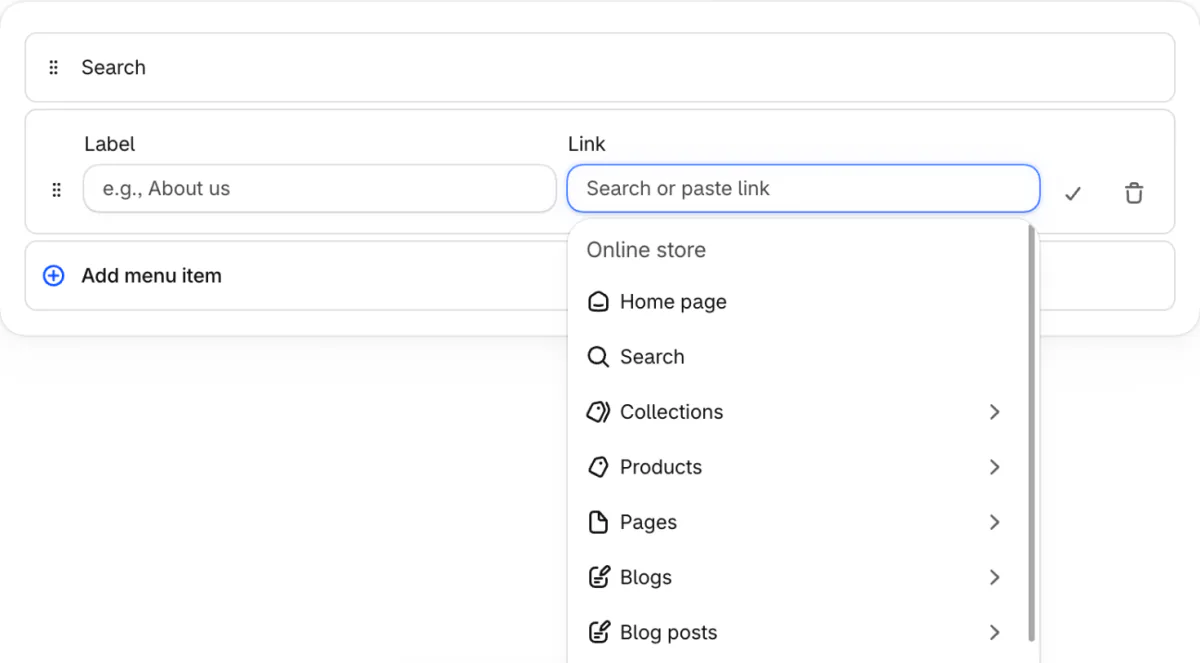
- Open Content, then Menus, pick your main menu or footer menu and click "Add menu item".
- Type a "Label", click the "Link" box and choose "Pages", pick your page, click the tick beside the row, then click "Save".
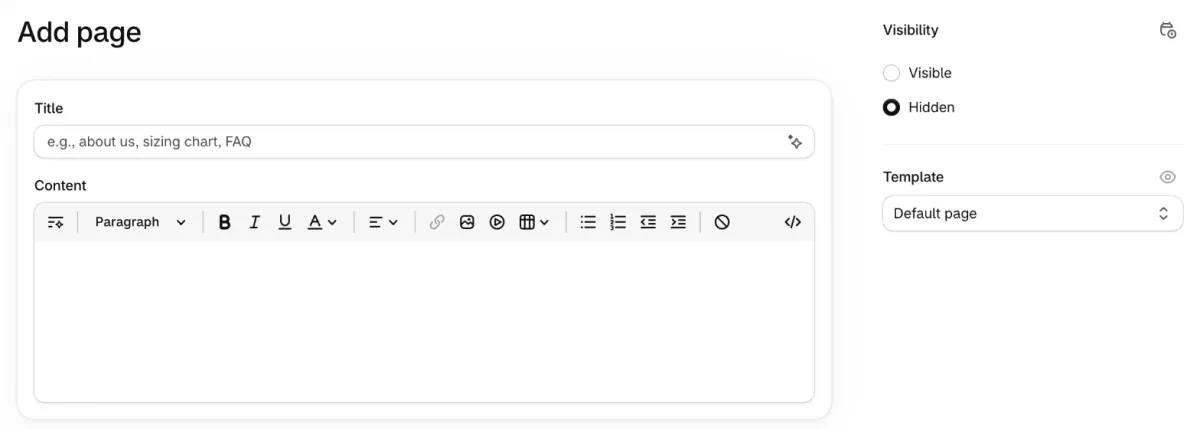
A new page can open on "Hidden", even though Shopify's Help Center says a new page is visible by default. A hidden page stays off your store, so check "Visibility" before you save.
A saved page appears in no menu until you add it. Pick it from the list rather than pasting its address, because Shopify warns a pasted address can break the link later.
"Search engine listing" previews how the page looks in search results. Click its pencil icon to set the page title and the meta description, the short summary shown beneath the title. Shopify says a title over 70 characters or a description over 160 might be cut off. The Shopify SEO checklist covers both.
The "Template" menu on the right lists your theme's page designs. Leave it on "Default page" for a plain text page. For columns or a banner, give the page a design of its own, as the testimonial page steps show. Shopify's Help Center says an edit to a design applies to every page that uses it.
Last, open your store on your phone and tap the link, to see the page as a shopper does.
What makes an About Us page fall flat?
Most weak About Us pages could belong to any store. Check yours for four faults.
- A line any store could print. "Quality products at great prices" tells a shopper nothing, so swap it for a fact only you have, such as how long one wallet takes to stitch.
- Nobody on it. Add a first name and a photo, even if it only shows your hands at work.
- No next step. End with one button, such as "Shop the bestseller" or "Join the list".
- Old facts. A team photo with someone who left, or a "since 2019" you stopped checking, makes a shopper wonder whether anyone is minding the store.
FAQ
Questions, answered
-

14-day free trial
Explore Sledge on your store before you decide to commit.
-

No credit card required
Start improving your store with no upfront commitment.
-

Setup in minutes
Get Sledge running without a lengthy setup process.
-

Built to grow sales
Turn shopper behavior into actions that help you sell more.
What should I put on an About Us page?
Cover what you sell, why you sell it, who you are, who you sell to and what makes you stand out, the five things Shopify's Help Center lists. End with one request, such as a newsletter sign-up or a link to your bestseller. Two or three of the five, told with specifics, usually say more than all five told vaguely.
Does an About Us page have to be called About Us?
No. Shopify's Help Center says you can choose a title that means more to your business, such as Our story or Values, or something specific such as Fair trade commitment. The title also shows in the browser tab and in search results, so make it say what shoppers will find.
Do I need HTML to make an About Us page on Shopify?
No. In your Shopify admin, open Online Store, then Pages, click Add page, and type in the Content box. The toolbar above it makes text bold, adds lists and links, and inserts pictures, tables and videos. Set Visibility to Visible, click Save, then add the page to a menu under Content, then Menus.
Can Shopify write my About Us page for me?
Shopify's Sidekick can draft a page title and page content from a prompt, according to Shopify's Help Center, and it writes text only. On the Add page screen, the sparkle in the Title field starts a title draft. Add your own photos and facts, and cut any claim you can't back up, since Sidekick doesn't know your story.
Why isn't my About Us page showing on my store?
Two things can keep a new page out of sight. Visibility may say Hidden, and no menu may link to it yet. Open the page under Online Store, then Pages, to check the first. Then add it under Content, then Menus, and pick the page from the list instead of pasting its address.
They read your story. What do they find next?
Sledge doesn't write or host your About Us page. It runs the search, filters and merchandising a shopper meets after reading your page, and you can try Sledge free for 14 days. Growth Intelligence turns on when you pick a paid plan. It reads your searches and orders, then lists fixes that could win back sales, with one dollar total labeled "Est. potential".

