Checkout abandonment is the share of shoppers who reach your checkout and leave without paying. On Shopify, divide the visits that paid by those that reached checkout, then subtract the result from 100%. Cart abandonment, as Stripe uses the term, is leaving before checkout. The Conversion rate breakdown holds both numbers, and Abandoned checkouts can show why a payment failed.
Say 380 visits reached your checkout this month and 95 paid. The other 285 started checkout and stopped, and Shopify's report does not say where.
What counts as checkout abandonment on Shopify?
A shopper abandons checkout when they reach it and leave without paying. Leaving the cart before that is cart abandonment. Stripe's guide draws the same line.
| What it counts | Where Shopify shows it |
|---|---|
| Visits that reached checkout | Analytics, then Reports, then Conversion rate breakdown. A visit counts once the shopper presses a key or clicks in checkout. |
| Visits that paid | The same report, as its last step. |
| Checkouts left after the shopper gave an email | Orders, then Abandoned checkouts, a smaller list. A checkout joins it after more than ten minutes unfinished. Shopify leaves out some bot activity and deletes checkouts after three months. |
Published averages often mix cart counts with checkout counts, so compare your own weeks. The step before checkout is in trust signals that stop cart abandonment.
How do you work out your checkout abandonment rate?
Divide the visits that paid by the visits that reached checkout, then subtract the result from 100%. Shopify's Conversion rate breakdown holds both numbers.
- In your Shopify admin, open Analytics, then Reports, and click Conversion rate breakdown under the Behavior category. It is a four-step chart from all visits to completed checkouts.
- Pick a range such as Last 30 days that starts after September 23, 2026, and leave the "Open Funnel" switch as it loads. An open funnel counts a visit that goes straight to checkout, and a closed one counts only visits that took every step in order.
- Read the numbers for the last two steps, Reached checkout and Completed checkout. Shopify's Help Center calls them Sessions that reached checkout and Sessions that completed checkout, and a session is its word for a visit.
- Divide Completed checkout by Reached checkout, then subtract the result from 100%. For the 380 visits and 95 payments above, 95 divided by 380 is 25%, so your rate is 75%.
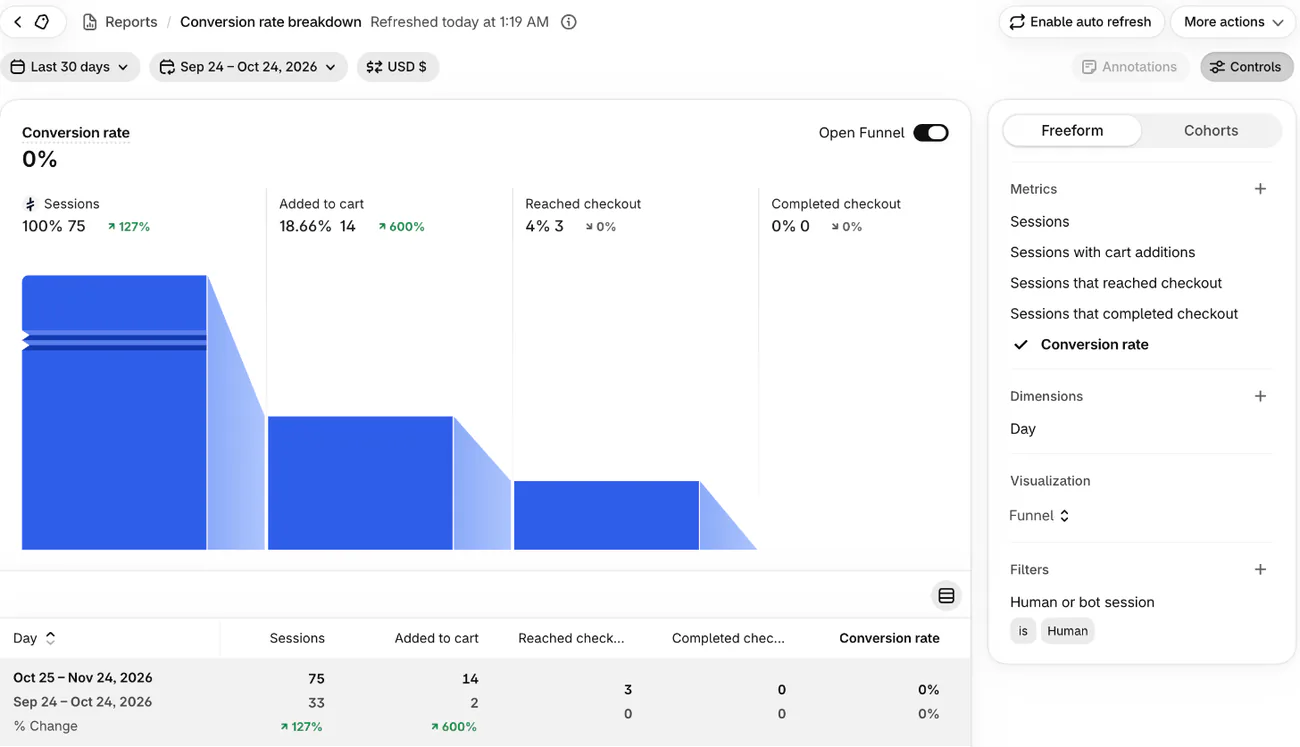
In its default view the report shows each step against all visits, not the checkout step on its own, so you divide the last two numbers yourself.
Between September 21 and 23, 2026, Shopify changed how it counts visits. It began ending a visit after 30 minutes of inactivity, filtering out identified bots by default and counting a visit that goes straight to checkout. A range that starts earlier mixes two ways of counting. Ecommerce KPIs covers eight numbers to track.
Where in checkout do shoppers leave?
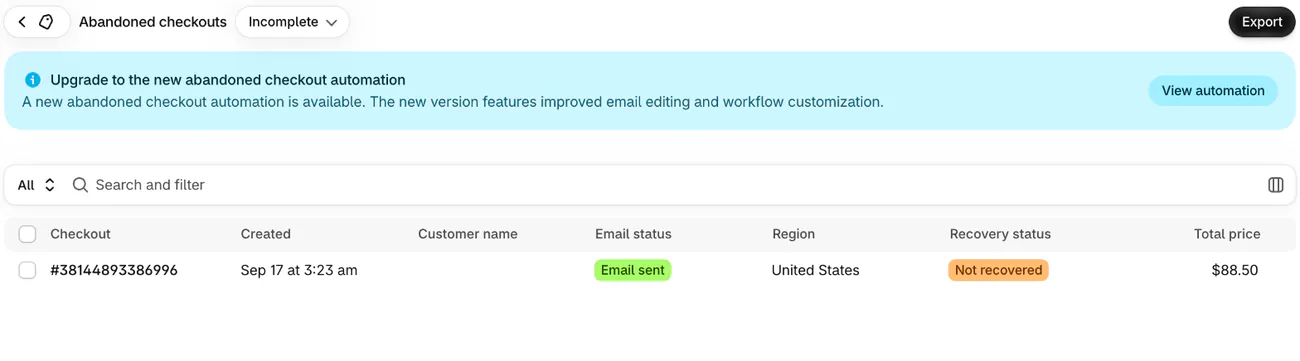
Shopify's report has no step inside checkout, so the Abandoned checkouts list is where you see how far shoppers got once they gave an email. Checkout is one page by default, so contact, delivery and payment are three sections of that page.
| What you see | How far they got | Look at first |
|---|---|---|
| Not in the list. The report counts more visits than the list holds. Say the list holds 120: up to 165 of the 285 left before typing an email. | The contact section | Contact method and form fields, in the settings below |
| A checkout with an email and no address | Left as the delivery form came up | The address form and its suggestions |
| A checkout with an address and no payment event in its Timeline | Saw the shipping price and the total, and never tried to pay | Shipping rates and delivery dates, then what Sledge can show |
| A checkout with a payment event and a message | Tried to pay and failed | The reasons payments fail |
The last two rows are a reading of Shopify's Help Center, which says each payment attempt writes a payment event and that no shipping rate appears until the shopper types a delivery address. A run of near-identical rows can be card-testing bots, and Shopify filters those out only in part.
Baymard says retargeting emails, such as a recovery email, win back distracted shoppers but not ones a broken step drove away, so fix the step first. The email itself is in abandoned cart email subject lines and templates. Turning it on is one of ten store jobs sorted in ecommerce automation on Shopify.
Why do payments fail, and which failures can you fix?
A failed payment usually leaves no order, only an abandoned checkout, and its Timeline records the reason Shopify has. To read it, open Orders, then Abandoned checkouts, open the failed checkout, click the payment event in its Timeline and read the Message field.
Shopify lists 16 reasons and says the list is not complete. The four groups below are ours, not Shopify's. Twelve of the 16 sit with the shopper or the bank. Stock, discount codes and your payment settings are the causes you control.
| Group | Reasons Shopify lists | What you can do |
|---|---|---|
| Card or address details (8) | An incorrect or invalid card number, an expiry date in the wrong format, an expired card, a security code in the wrong format or wrong, a ZIP or postal code that doesn't match the billing address, an incorrect billing address. | The shopper retries. A wallet button such as Shop Pay skips the typing. |
| The bank or card said no (4) | A processor decline, a plain card decline, a wrong PIN, a failed 3-D Secure check (the bank's extra check on the cardholder). | The bank decides, and many return only a generic decline. Ask the shopper to call the bank or pay another way. |
| Shopify stopped it (2) | A block for high fraud risk, and a payment that couldn't be processed for technical reasons. | With Shopify Payments, a high-risk block sits in the Blocked view of Abandoned checkouts. If you know the shopper, a draft order and an invoice let them pay another way. Shopify chargebacks covers its fraud checks. |
| Your store changed something (2) | Inventory ran out, or a discount code or gift card could no longer be used. | Shopify holds stock only once the shopper submits payment, so the last unit goes to whoever submits payment first. |
If every payment fails, open Settings, then Payments. Check that test mode is off, since nobody can place a live order while it is on, and that your account shows no restriction.
Shopify's Help Center also names two optional Shopify Payments checks that can turn real shoppers away. "Decline charges that fail AVS postal code verification" needs the ZIP or postal code to match the card's billing address, and "Decline charges that fail CVV verification" needs the card's 3 or 4 digit security code to match. They sit under Settings, Payments, Shopify Payments, Manage and Fraud prevention, and Shopify warns the postal code check may bring more failed payments.
With another provider, an abandoned checkout can also mean the shopper left the provider's page, the payment failed there or the confirmation never reached Shopify, so check the provider's own dashboard. Do you need a merchant account on Shopify? explains which setups need one.
Baymard's list, updated October 28, 2026, puts site errors at 17% and a declined card at 10% among the reasons US shoppers gave for leaving a cart. A failed payment is one slice, and the one where Shopify records a reason.
Reasons from Shopify's abandoned checkouts and payment problems pages, read November 24, 2026.
What can you change on your Shopify checkout page?
You can change the contact method, form fields, layout and look yourself, and apps can edit the information, shipping and payment pages only on Shopify Plus.
| Part of checkout | Where to click | What to check |
|---|---|---|
| Contact | Settings, then Checkout, then Customer contact method | Choose Email, or Phone number or email. The same card has a tick box, "Require customers to sign in to their account before checkout", which Shopify's Help Center says hides wallet buttons such as Apple Pay in the cart, so keep it off. Steps: the CRO guide. |
| Contact and delivery | Settings, then Checkout, then Customer information | Set Company name to Don't include if you sell only to individuals, and Shipping address phone number to Optional. Address line 2 set to Required or Don't include may block some homes. |
| Delivery | Settings, then Checkout, then Configurations, Edit and the gear icon | The "Address autocompletion" switch, under Address form, suggests addresses as the shopper types. Shopify's Help Center says it is on by default in 23 countries. |
| Delivery | Settings, then Shipping and delivery, or Markets | Rates appear only after the shopper types an address, and an address outside your zones meets a "no shipping rate" notice. Shopify shipping rates covers the setup. |
| Payment | Settings, then Payments | Test mode off, the payment methods you offer on, and wallet buttons such as Shop Pay on. Credit card processing fees covers what taking a card costs. |
| Layout | The checkout editor: its gear icon, then Checkout layout | One-page checkout is the default and Three-page checkout is the option. |
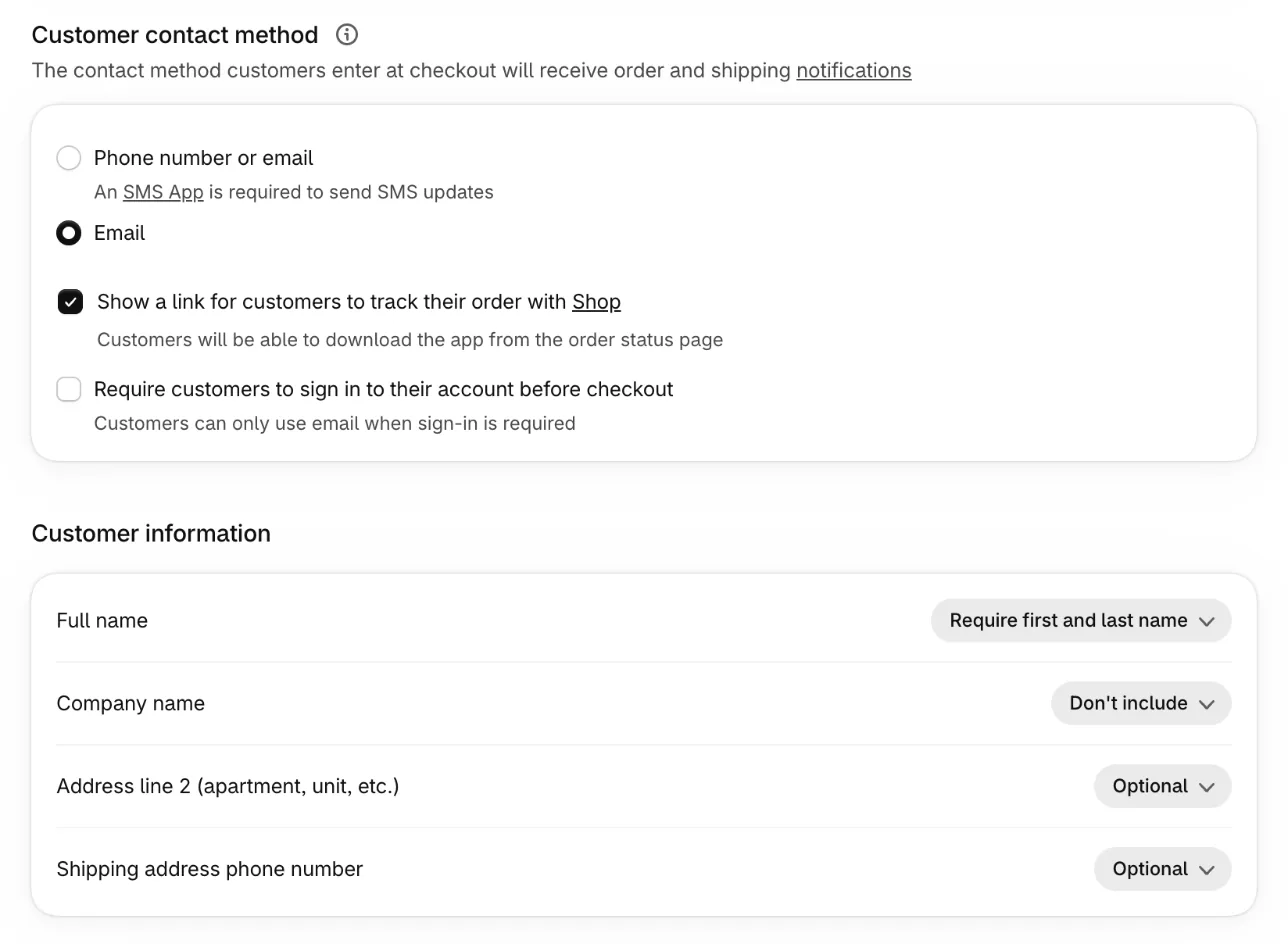
As of November 24, 2026, Shopify's Help Center says updates to the checkout form fields launch after BFCM, so check each label on your screen. Baymard counts 23.48 form elements shown by default in the average US checkout, against an ideal of 12 to 14.
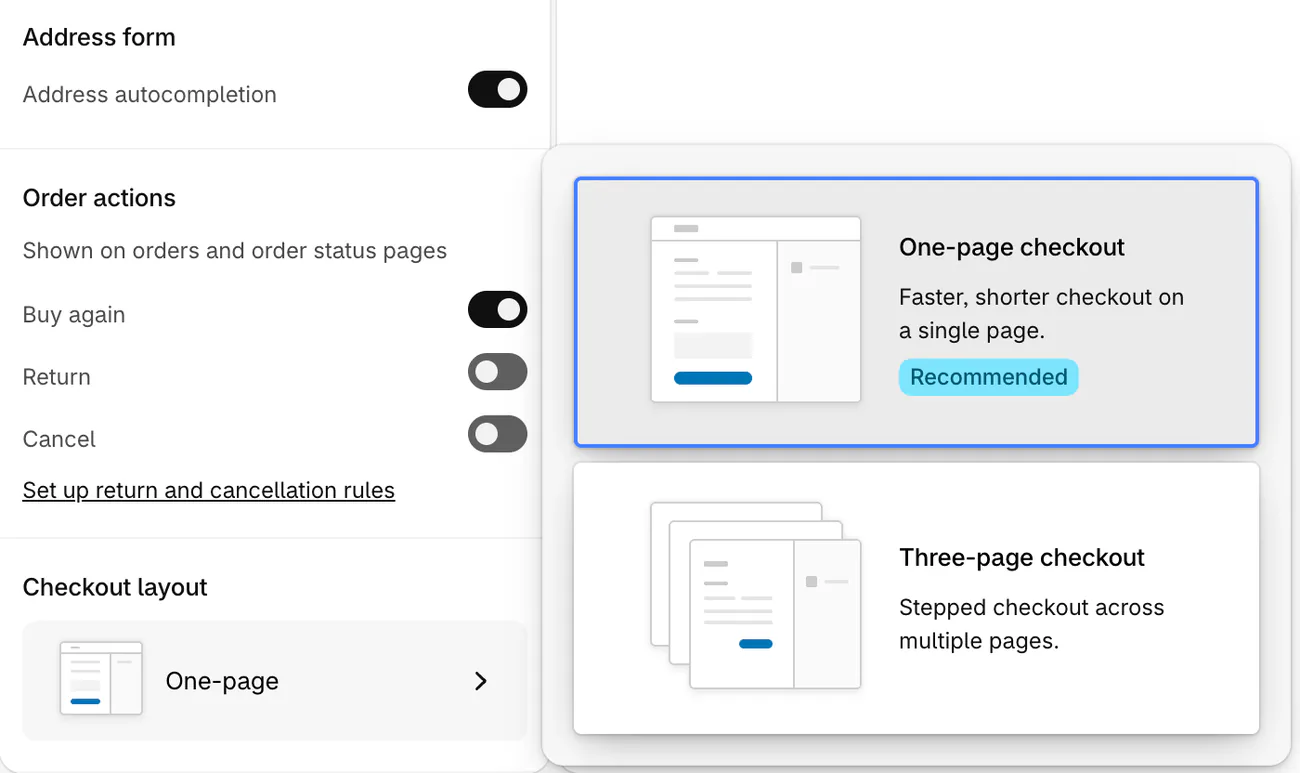
The number of steps matters less than what each one asks: Baymard says a one-page checkout with 30 form fields can do worse than three well-built steps. Switch the layout only when your Abandoned checkouts point at one section.
Standard changes, such as your logo, colors, fonts and layout, come with Basic or higher. Apps that edit the information, shipping and payment pages work only on Shopify Plus, and so does changing form fields by country. Apps for the thank-you and order status pages work from Basic. For trust cues, see trust signals that stop cart abandonment.
What can Sledge do before the Checkout button?
Sledge works up to the Checkout button and leaves checkout itself to Shopify.
Shipping rates appear only after the shopper types an address, so a price can surprise them at the delivery section. A free-shipping goal in Sledge's cart drawer shows how close the cart is before the click. Open Tools, then Cart Drawer, switch on "Progress goal" under Body and click Free shipping. How to add a free-shipping progress bar covers where the bar sits in the drawer.
The Signals tab in Sledge Analytics can show "Checkout abandoned": shoppers who clicked Checkout and did not order. It appears only when enough shoppers and orders give it something to compare. It counts clicks on your store's Checkout button, not Shopify's visits to checkout, so the two numbers differ.
Sledge is a Shopify app for search, filters, offers and analytics. Its cart drawer and Signals tab come with every plan, from Pro at $29.99 a month. Sledge changes no checkout steps, reads no payment reasons and sends no recovery emails.
How do you check that a fix worked?
Change one thing, place a test order, and compare the same number of days before and after, with both ranges starting after September 23, 2026.
A test order checks that the payment step works for the method you tried, as the CRO guide and testing your store before Black Friday explain. A small store needs a longer window, because with 20 checkouts a week one order moves the rate by five points.
FAQ
Questions, answered
-

14-day free trial
Explore Sledge on your store before you decide to commit.
-

No credit card required
Start improving your store with no upfront commitment.
-

Setup in minutes
Get Sledge running without a lengthy setup process.
-

Built to grow sales
Turn shopper behavior into actions that help you sell more.
What is checkout abandonment?
Checkout abandonment is when a shopper reaches your checkout and leaves without paying. Its rate is 100% minus the share of those visits that finish. Cart abandonment is different: it counts shoppers who leave before starting checkout. Shopify shows each step against all visits, so you work the rate out from two numbers.
Does Shopify show a checkout abandonment rate?
Not under that name. Open Analytics, then Reports, then Conversion rate breakdown, and read the Reached checkout and Completed checkout numbers. Divide the second by the first and subtract the result from 100%. Shopify counts a visit as reaching checkout once the shopper presses a key or clicks there.
Why is my Abandoned checkouts list smaller than the gap in the report?
The report counts every visit that reached checkout. The list adds a checkout only after the shopper types an email and stops for more than ten minutes, leaves out some bot activity and deletes checkouts after three months. A shopper who leaves before typing an email shows in the report and never reaches the list.
Why do payments fail at Shopify checkout?
Usually a typing slip, a bank decline, a fraud block or a store setting. Open Orders, then Abandoned checkouts, open the failed checkout and read the payment event in its Timeline. Shopify lists 16 reasons, from an incorrect card number to a discount code that can no longer be used.
What is a good checkout abandonment rate?
There is no single number to aim for. Published averages often mix cart and checkout counts, and Stripe's guide gives a range of 50% to nearly 90% by category without naming a sample. Compare your rate with your own last four weeks, and change one thing at a time. Your conversion rate works the same way.
Does Sledge show checkout abandonment?
In part. Sledge's Signals tab can show Checkout abandoned: shoppers who clicked Checkout in your cart and did not order. It appears only when enough shoppers and orders give it something to compare. Sledge stops at the Checkout button, so payment reasons and checkout steps stay in Shopify's Abandoned checkouts.
Where in your store do shoppers give up before paying?
Sledge doesn't edit your checkout steps, take payments or send recovery emails. Before the Checkout button, its cart drawer can show how close a cart is to free shipping, and its Signals tab can show shoppers who clicked Checkout and did not order. Try it free for 14 days. Growth Intelligence turns on when you pick a paid plan, and its suggested fixes add up to one dollar figure, labeled Est. potential.