
Credit card processing fees are what a store pays to take a card, and each fee holds three parts: interchange to the shopper's bank, an assessment to the card network and the processor's markup. Shopify Payments shows them as one rate, 2.9% + 30¢ for a standard US online card on Basic, and lower percentages on higher plans.
A week of card sales adds up to $2,000. The payout arrives smaller, and the line that explains it says Fees. You can't tell who gets that money, or which part of it you could change.
What are credit card processing fees?
A card fee is three charges in one: interchange, an assessment and the processor's markup. Each part goes to a different party, and the card networks set two of the three prices.
| Part | Who gets it | Who sets it |
|---|---|---|
| Interchange | The bank that issued the shopper's card. | The card networks. It varies by card type, how the card is taken and the industry. |
| Assessment, also called a network fee | The card network itself. | The network, usually as a small percentage. |
| Processor markup | The company that processes the payment. | The processor, as cents, a percentage or both. |
From Stripe's explainer, last updated July 14, 2025.
Publishers give different ranges for the average credit card processing fee. Capital One puts it at 1.5% to 3.5% of the sale, a Federal Reserve staff note at 1.5% to 3%, and Stripe at 1% to 3%. The note adds that interchange may be 70% to 90% of the fee, a figure it takes from industry guides. The rate that counts is your own, and the calculation below finds it.
Shopify Payments shows one rate per plan and card type, so the three parts sit inside it. Shopify's own guide files Shopify Payments under flat-rate pricing, which it describes as one blended rate for all three. Shopify's Help Center says you pay nothing to Visa or Mastercard themselves on top of it. You pay the fee, not the shopper, per Capital One.
A monthly merchant account fee is a separate bill, and what a merchant account is, and whether your store needs one covers it.
How much are credit card processing fees on Shopify?
On a US Basic plan, a standard online card costs 2.9% + 30¢, and each higher plan lowers the percentage and keeps the 30¢. These are US rates in USD, read from Shopify's pricing page as archived on November 23, 2026, and other countries differ. The Shopify pricing guide lists the rate on every plan, and the Shopify Payments guide lists the countries it covers.
Shopify prints the starting rate before you set anything up. Under Settings, then Payments, the Shopify Payments section reads "Card rates starting at 2.9% + $0.30".
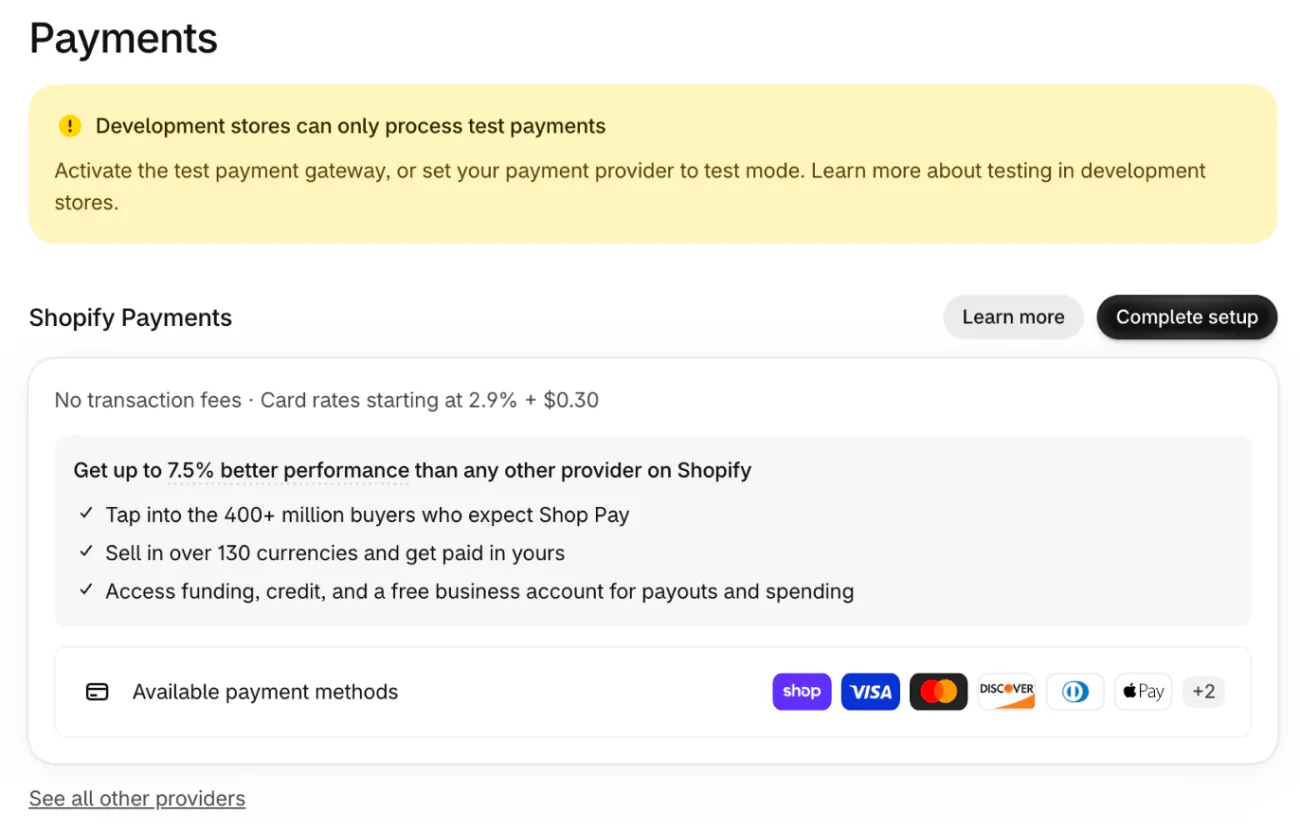
After setup, the same section has a "Manage" button, which opens its settings. Per Shopify's Help Center, open More actions in those settings, then Manage payment methods, then View payment rates for the full list for your plan. The Stripe fees guide walks through those clicks.
Three things push one sale above the headline rate.
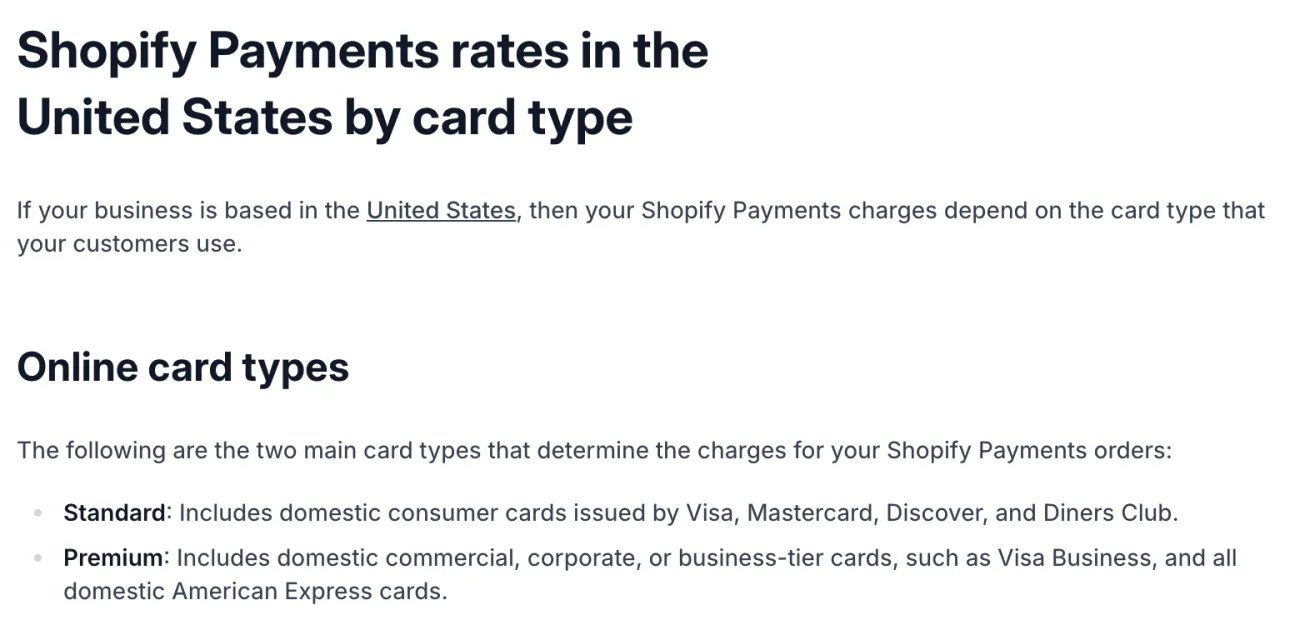
- A premium card. It costs 3.5% + 30¢ on Basic, and Shopify counts domestic business cards and all domestic American Express cards as premium.
- A card from abroad. It adds 1% to the rate.
- A card you type in yourself. On a draft order, for example, it carries higher fees, and Shopify's Help Center prints no number for it.
PayPal's rates sit in Shop Pay vs PayPal, and Stripe's in Stripe fees.
How do you calculate your credit card processing fees?
A fee is the sale times the percentage plus the fixed cents, and your effective rate is a month's fees divided by that month's gross Shopify Payments charges.
Say an order comes to $30. On Basic, 2.9% is 87¢, and the 30¢ brings the fee to $1.17, which is 3.9% of the sale. Say an order comes to $90. The 2.9% is $2.61, the 30¢ brings it to $2.91, and that is 3.23%.
The percentage is the same at any order size, so the 30¢ is what makes small orders cost more per dollar. If you sell $30 items, you feel it most.
The numbers for your own rate are in the Shopify Payments activity report. Shopify's Help Center describes where it sits and what it shows.
- In your Shopify admin, open Finance.
- Click "Documents", then "Shopify Payments activity report".
- Pick "Last month", or "Custom" to set your own dates.
- In the Activity section, open the "Charges" group, which holds every payment your shoppers made through Shopify Payments, local payment methods included. Divide its fees by its gross amount and multiply by 100.
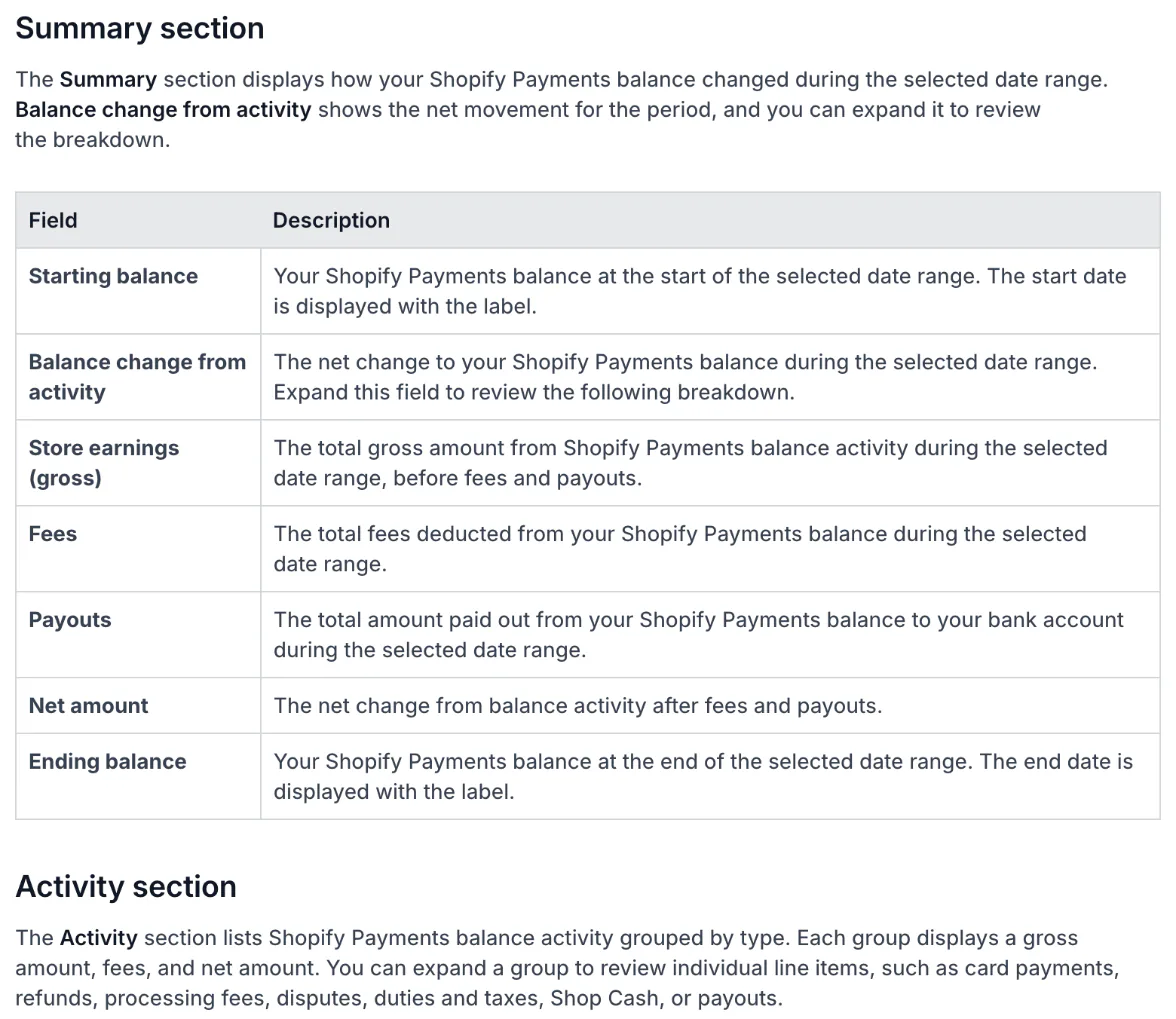
Say a month's Charges show $3,600 gross and $120 in fees. Dividing 120 by 3,600 gives 3.3%. The same fees go on the payment fees line of a profit and loss template.
Refunds and disputes sit in their own groups, with fee adjustments under "Refunds" and dispute fees under "Disputes", so add them for an all-in cost. The report's data runs three days late, and it counts only payments that Shopify Payments took, so you need Shopify Payments set up to see it.
If your rate sits above the headline, the Payments finance reports can show why. Under Analytics, then Reports, the "Finances" category has a report called "Net payments by method". Per Shopify's Help Center, it can split payments by "Credit card type" (standard or premium) and by "Billing country" (domestic or international).
How do you reduce credit card processing fees on Shopify?
Shopify Payments quotes one rate for your plan and card type, so the savings come from five things around it. With one flat rate, the markup is not a separate line you can negotiate. Another processor may let you negotiate one, and it brings Shopify's own fee on top, as the first item shows.
- Take cards through Shopify Payments. Another provider adds Shopify's own transaction fee on top of its fees, from 2% on Basic to 0.2% on Plus. On a $90 order with no tax or shipping, Shopify's 2% fee on Basic is $1.80, before the provider's own rate. Orders you take through Shopify Payments, Shop Pay or a manual method such as cash on delivery carry no transaction fee, and PayPal is exempt while Shopify Payments is your main provider. A lower rate at the provider can outweigh that fee, so compare both before you switch. To see what you were billed, open Settings, then Billing, click a bill under "Past bills" and find its "Transaction fees" section, per Shopify's Help Center. On Plus, export the bill from your organization's Billing page.
- Check your plan's card rate. A higher plan lowers the percentage and costs more each month. Basic to Grow lowers it by 0.2 points, from 2.9% to 2.7%, and the 30¢ stays. Say the higher plan costs $60 more a month. The lower rate alone repays that once card sales pass $30,000 a month, which is $60 divided by 0.002. Your own gap is under Settings, then Plan, and it changes with your billing term, so use your figure.
- Keep the sale instead of refunding it. Shopify Payments returns no card fee on a refund or a cancellation, per Shopify's Help Center. Example: ten refunded $90 orders cost $29.10 in fees and bring in nothing. An exchange keeps the sale. For fewer returns to begin with, read how to reduce returns.
- Answer disputes. A dispute on Shopify Payments in the US costs $15, and the fee is returned if you win, per Shopify's Help Center. Shopify chargebacks covers evidence and deadlines.
- Make each order bigger. The 30¢ is fixed, so three separate $30 orders pay $3.51 in fees, while the same $90 in one order pays $2.91. That is 60¢ on the same $90, a small saving. The larger gain comes when shoppers add items, because you keep the margin on them. A free-shipping goal in the cart, quantity breaks and bundles each give shoppers a reason to add more, and average order value shows whether it works.
If the fee stays, price it in. Say you want to keep $90 on an item. At Basic's rate the fee on a $93 sale is $3.00, which leaves $90.00, so a $93 price covers it. That is a 3.3% higher price, and it recovers the fee without lowering it. Adding a card surcharge is a separate step with its own rules, since card networks and some US states set limits, so read your processor's terms first.
Shopify can change its rates, so check its pricing page before you plan around a decimal.
FAQ
Questions, answered
-

14-day free trial
Explore Sledge on your store before you decide to commit.
-

No credit card required
Start improving your store with no upfront commitment.
-

Setup in minutes
Get Sledge running without a lengthy setup process.
-

Built to grow sales
Turn shopper behavior into actions that help you sell more.
What are credit card processing fees?
Credit card processing fees are what a store pays each time it takes a card. Each fee holds three parts: interchange to the bank that issued the card, an assessment to the card network and the processor's markup. On Shopify Payments you see one rate for your plan and card type instead of the three parts.
How much are credit card processing fees for a small business?
Publishers differ: Capital One says 1.5% to 3.5% of the sale, a Federal Reserve staff note says 1.5% to 3%, and Stripe says 1% to 3%. On Shopify Payments in the US, a standard online card costs 2.9% + 30¢ on Basic, so a $90 sale pays $2.91, or 3.23%.
How do you calculate credit card processing fees?
Multiply the sale by the percentage and add the fixed fee. On Basic, a $30 sale pays 87¢ for the 2.9% plus 30¢, so $1.17 in all, or 3.9% of the sale. To find your own rate, divide a month's fees by that month's gross Shopify Payments charges: $120 on $3,600 is 3.3%.
How can you reduce credit card processing fees on a Shopify store?
Take cards through Shopify Payments, because another provider adds Shopify's own transaction fee on top of its fees. Then check your plan's card rate, refund less often because the fee stays on a refund, answer disputes, and make orders bigger so the fixed 30¢ spreads thinner.
How do you offset credit card processing fees?
Price the fee in or make orders bigger. To keep $90 on an item after Basic's 2.9% + 30¢, charge $93. Three $30 orders pay $3.51 in fees and one $90 order pays $2.91. A card surcharge is a separate step: card networks and some US states set rules, so read your processor's terms first.
Is Shopify's transaction fee the same as a card fee?
No. The card fee is what Shopify Payments charges to process a card, 2.9% + 30¢ on Basic in the US. The transaction fee is Shopify's own charge when you take cards through another provider, from 2% on Basic to 0.2% on Plus. Shopify's Help Center says it comes on top of that provider's fees.
The 30¢ is fixed. Your order size isn't.
Sledge takes no part in payments, so it changes nothing that Shopify or a card network charges you. It is a flat subscription from $29.99 a month and never takes a percentage of your sales. Start a 14-day free trial of its bundles and volume discounts and the cart drawer free-shipping goal. Growth Intelligence turns on when you pick a paid plan and totals what its suggested fixes could add in one dollar figure, labeled Est. potential.