A holiday marketing calendar lists the dates your store sells around and the week to start work on each. In 2027, Valentine's Day is Sunday, February 14, US Mother's Day is May 9, Father's Day is June 20 and Black Friday is November 26. Start gift dates eight weeks out and Black Friday twelve.
Say it's Monday, May 3, and Mother's Day is Sunday. The gift guide is a draft, the sale has no start date and the email isn't written. Each job takes about a week, and you have six days. A calendar would have flagged the week of March 8.
What are the key retail dates in 2027?
The table lists twenty-one dates for 2027, and each row says which week to start work.
Dates are for the US unless a row says otherwise. The US days off come from the Office of Personnel Management's 2027 list, and the rest follow their usual rule, such as the second Sunday of May or the day after Thanksgiving. Shopify's retail holiday calendar covers 2026 only, so the 2027 dates here follow those same rules.
Each start week begins on a Monday. Every Season row shares one start week, counted back from Black Friday.
| Date | Occasion | Plan | Start work the week of |
|---|---|---|---|
| Fri, Jan 1 | New Year's Day | Quick moment | Nov 30, 2026 |
| Sat, Feb 6 | Lunar New Year | Gift day | Dec 7, 2026 |
| Sun, Feb 14 | Valentine's Day | Gift day | Dec 14, 2026 |
| Mon, Feb 15 | Presidents' Day | Quick moment | Jan 18 |
| Sun, Mar 7 | Mother's Day (UK) | Gift day | Jan 4 |
| Sun, Mar 28 | Easter | Quick moment | Feb 22 |
| Sun, May 9 | Mother's Day (US) | Gift day | Mar 8 |
| Mon, May 31 | Memorial Day | Quick moment | May 3 |
| Sun, Jun 20 | Father's Day | Gift day | Apr 19 |
| Sun, Jul 4 | Independence Day (federal day off Mon, Jul 5) | Quick moment | May 31 |
| Aug, varies | Back to school | Gift day | 8 weeks before your first day (Mon, Aug 16 gives Jun 21) |
| Mon, Sep 6 | Labor Day | Quick moment | Aug 9 |
| Sun, Oct 31 | Halloween | Quick moment | Sep 27 |
| Thu, Nov 11 | Singles' Day and Veterans Day | Quick moment | Oct 11 |
| Thu, Nov 25 | Thanksgiving | Season | Aug 30 |
| Fri, Nov 26 | Black Friday | Season | Aug 30 |
| Sat, Nov 27 | Small Business Saturday | Season | Aug 30 |
| Mon, Nov 29 | Cyber Monday | Season | Aug 30 |
| Tue, Nov 30 | GivingTuesday | Season | Aug 30 |
| Mon, Dec 13 | Green Monday, the second Monday of December | Season | Aug 30 |
| Sat, Dec 25 | Christmas Day | Season | Aug 30 |
Dates worked out and checked on November 24, 2026. Season rows start 12 weeks out, Gift day rows 8 and Quick moment rows 4.
- Seven dates fall on a Sunday in 2027: Feb 14, Mar 7 (UK), Mar 28, May 9, Jun 20, Jul 4 and Oct 31. For those seven, an offer that ends on the day ends on a Sunday.
- Prime Day, Ramadan and Eid, Diwali and Hanukkah are not in the table, because a company or a religious calendar sets each one. Add each date to your plan when its source posts it. The NFL's Super Bowl is set for Sunday, February 14, which lands on Valentine's Day.
- The Thanksgiving weekend has its own pages. Small Business Saturday lists the weekend's dates, the Black Friday checklist and Cyber Monday cover the work, and Christmas marketing ideas covers the last order day.
- New Year marketing ideas plans December 27 to January 31, the weeks around the January 1 row.
How early should you start work on each date?
Start twelve weeks before Black Friday, eight before a gift day and four before the rest.
| Plan | Dates it covers | Start work | Scheduled by | Last look |
|---|---|---|---|---|
| Season | Thanksgiving to GivingTuesday, Green Monday, Christmas Day | 12 weeks out | 3 weeks out | 1 week out |
| Gift day | Lunar New Year, Valentine's Day, both Mother's Days, Father's Day, back to school | 8 weeks out | 3 weeks out | 1 week out |
| Quick moment | Everything else | 4 weeks out | 2 weeks out | 1 week out |
Weeks count back from the date, and for a Season from Black Friday. "Start work" means choosing the offer, the products and the last order day. "Scheduled by" means the discount, banner, timer and email all sit on their start dates. "Last look" means a test order placed from your phone.
These weeks are a suggestion, not a rule from a source. They line up with the plans in the Black Friday checklist and the back to school plan. Shopify's own calendar advises starting creative tests and landing pages two to three weeks before a big date, and finalizing offers a week before launch.
A store that sells costumes or decor may want the eight-week plan for Halloween, since the stock has to arrive first.
What do you fill in for each date?
One short plan per date keeps the start, the end and the take-down in the same place.
Free to copy. Replace each highlighted bracket, and treat the dates as an example.
Plan for one date
Date: [Mother's Day, Sunday, May 9, 2027]
Plan: [Gift day: start work the week of March 8]
Offer: [one gift set at one price]
Last order day: [your carrier's send-by date, minus your packing days]
Scheduled by: [Sunday, April 18, three weeks before]
Starts: [Sunday, April 25, 12:00 AM]
Discount: [Discounts, Schedule: the start and the end]
Banner, badge and countdown: [Sledge, Active dates: the same start and end]
Email: [Messaging, Schedule send: the day and the hour]
Last look: [Sunday, May 2: place a test order on your phone]
Ends: [Sunday, May 9, 11:30 PM, your store's time zone]
Take down: [Monday, May 10: banner, badge, collection order]
Result: [Total sales over time, April 25 to May 10, against last year]
Written for this page, November 2026.
- Your last order day is your carrier's send-by date minus your packing days. Christmas marketing ideas works through an example.
- "Ends" and "Take down" are separate lines because a discount stops by itself, while a banner, a badge or a collection order stops only if it has its own end.
- "Result" is read in Shopify: open Analytics, then Reports, and choose "Total sales over time". Shopify reports lists the others.
To track these rows in a sheet with a status for each, use the content calendar.
Where do you schedule each piece in Shopify and Sledge?
Each piece has its own date screen, so set its start and its end when you build it.
| Piece | Where | What you set |
|---|---|---|
| Sale price | Discounts, then the "Schedule" card (Shopify's Help Center calls it Active dates) | A start, then "Set end date" |
| A whole season of theme and discount changes | Markets, then Rollouts | An "Event", which publishes changes for a set period and then rolls them back (Basic plan and up) |
| Apps, then Messaging | "Schedule send", with a custom date and time | |
| Banner | Sledge, Tools, Promotion, Banner | "Active dates" |
| Countdown | Sledge, Tools, Promotion, Global Countdown | "Active dates" for when it shows, and the "Countdown" card for what it counts to |
| Badge | Sledge, Tools, Merchandising, Badge Campaign | "Active dates" |
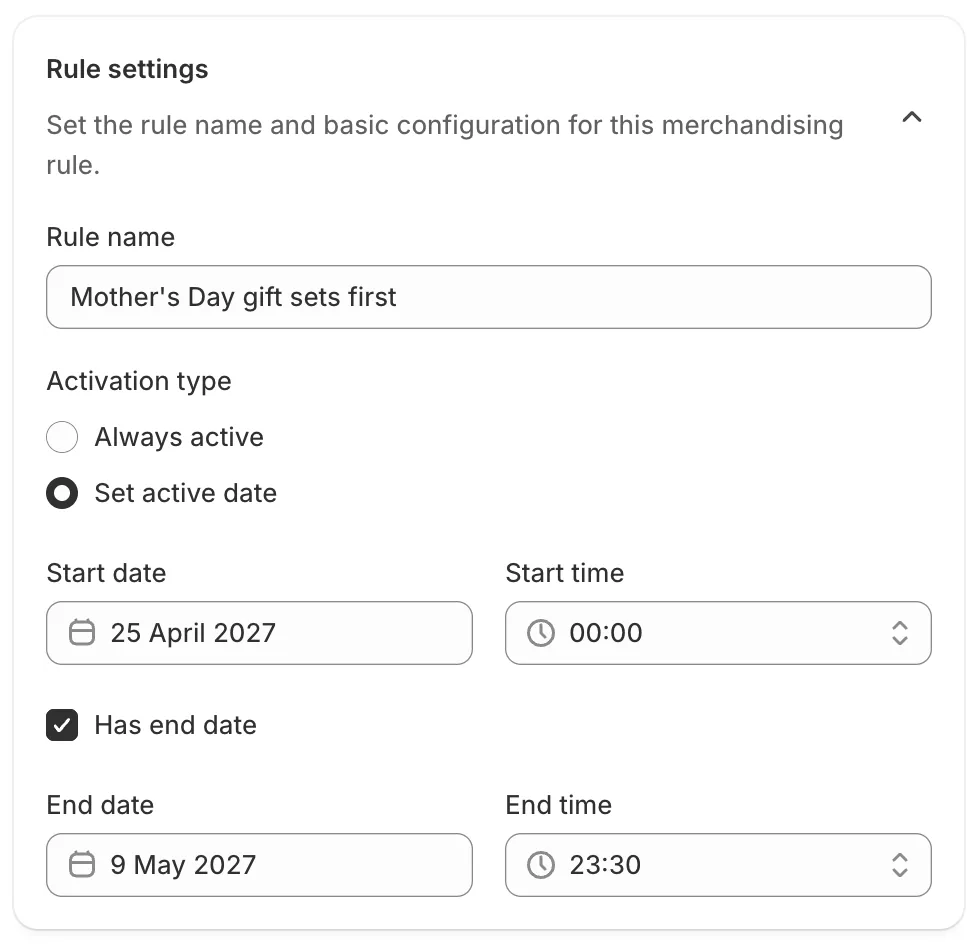
| Collection order | Sledge, Tools, Merchandising, Strategy | "Rule settings", "Activation type", "Set active date" |
| Bundle offer | Sledge, Tools, "Bundle, Discount & Upsell" | The "Active dates" card on most offers |
Shopify holds the price, the season and the email. Sledge, a Shopify app for search, filters and offers, holds what shoppers see on the pages.
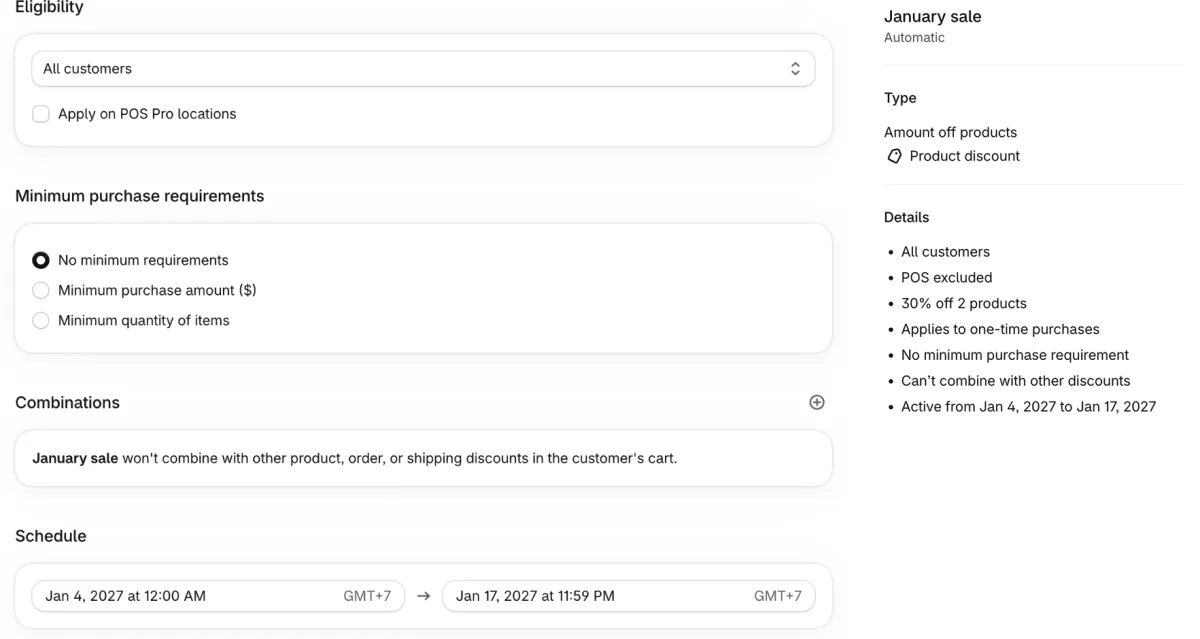
Start with the sale price. Shopify's discount screen has a "Schedule" card: pick a start, then click "Set end date" so the discount stops on its own.
In Sledge, a promotion banner takes its start and end under "Active dates", the card that sets when a piece starts and stops. A Global Countdown, a Badge Campaign and most bundle offers have the same card. Under "Timer starts", pick "Scheduled to start later" even when the start is today, because "Right now" has no end date.
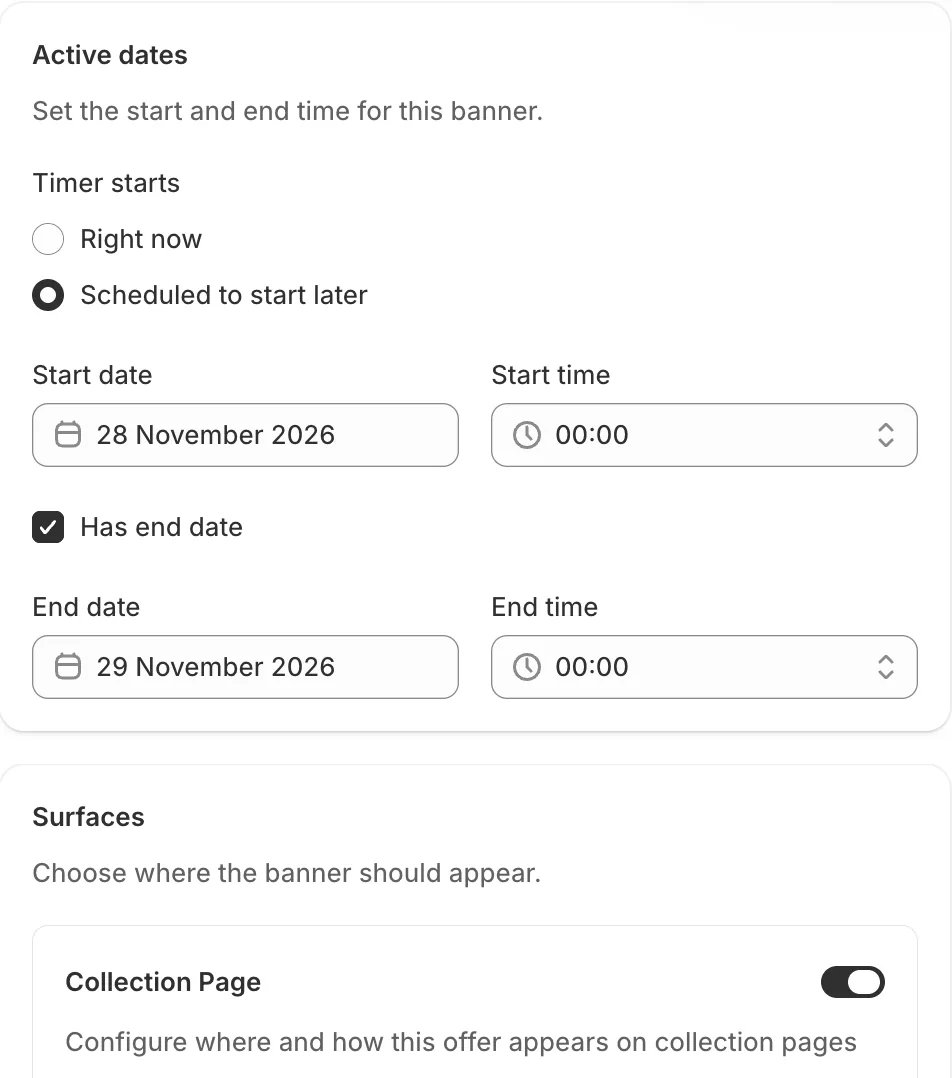
Dates follow your store's time zone on Shopify's discount screen and on Sledge's banner, badge and rule screens. A countdown set to "Countdown to date" is the exception. It counts to your end hour on each shopper's own device clock, so a shopper far from your time zone can see zero earlier or later than the discount ends. Name the end time and your zone in the banner text.
Merchandising times the order of a collection the same way. Under Strategy, the "Rule settings" card has an "Activation type" with two choices, "Always active" and "Set active date". Pick the second, give it a start and an end, and the rule re-orders your collection and search results only between those dates.
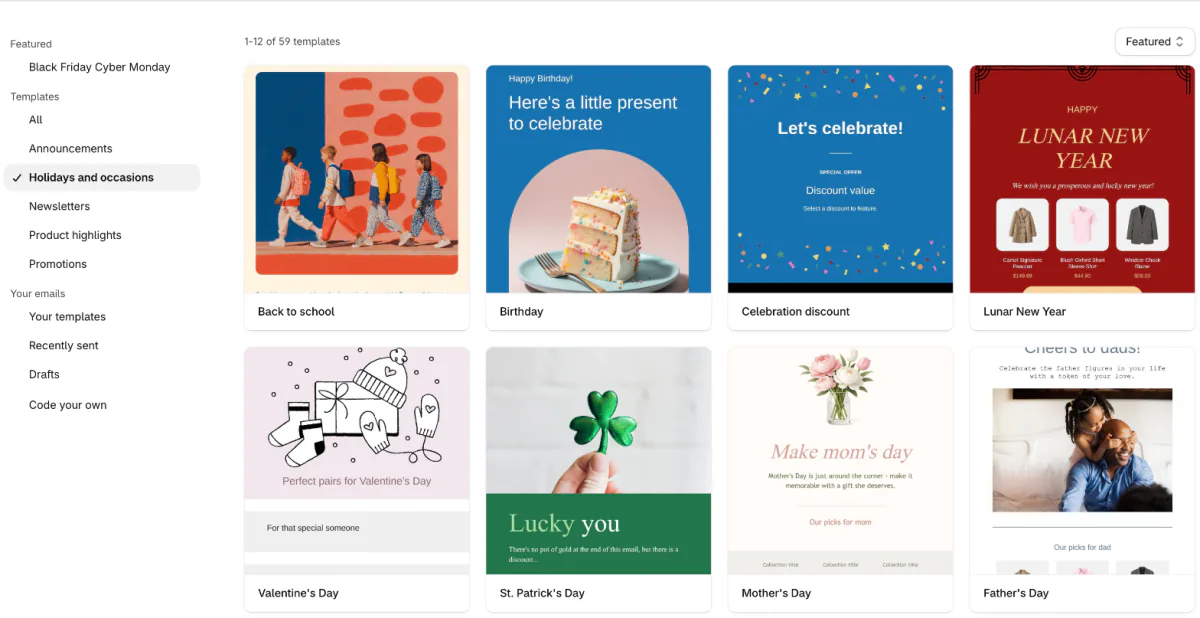
Email has its own screen. In Apps, then Messaging, click "Schedule send" and pick a custom date and time. On November 12, Messaging's template list held a "Holidays and occasions" group of 59 templates.
To switch a whole season on and off, create an "Event" rollout under Markets, then Rollouts. A discount inside a rollout keeps its own dates, and it can sit in only one unended rollout at a time. When two rollouts change the same part of your store, Shopify divides your visitors between them, which overlapping promotions explains.
The guide to scheduling a sale banner walks through a banner with Rollouts and Active dates, and the announcement bar page covers editing it. Shopify has no screen that lists every promotion's dates, so keep your own list.
Which of these dates should your store skip?
Plan one anchor date a quarter, and add a date only when last year's sales show it earns its work.
A date earns a plan when it matches what you sell, you can deliver in time and you can make an offer you would keep. Shopify's own calendar suggests one anchor campaign per quarter, and it advises checking past sales for the dates that spike.
To see which dates earned their work last year, open "Total sales over time" again. Set "Group by" to day, then compare the same weeks one year back. Once a date is chosen, what to put on sale covers which products to feature, and a flash sale suits a one-day offer.
Anchor dates for the year
Q1 anchor: [Valentine's Day, Sunday, February 14]
Q2 anchor: [Mother's Day, Sunday, May 9]
Q3 anchor: [back to school, first day of school: your date]
Q4 anchor: [Black Friday, Friday, November 26]
Smaller dates I will mark with one email and no sale: [ ]
Say you sell candles. You anchor Valentine's Day, Mother's Day and the Black Friday weekend, and give Father's Day one email. You skip back to school, because it does not match what you sell.
FAQ
Questions, answered
-

14-day free trial
Explore Sledge on your store before you decide to commit.
-

No credit card required
Start improving your store with no upfront commitment.
-

Setup in minutes
Get Sledge running without a lengthy setup process.
-

Built to grow sales
Turn shopper behavior into actions that help you sell more.
What is a holiday marketing calendar?
A holiday marketing calendar lists the dates your store sells around, such as Valentine's Day, Mother's Day and Black Friday, and the week to start work on each. It differs from a content calendar, which schedules every post and email. Pick the dates first, then plan the posts for them.
How far ahead should you plan holiday marketing?
Start twelve weeks before Black Friday, eight before a gift day such as Mother's Day and four before smaller dates. Those weeks are a suggestion, not a rule from a source. Shopify's own retail calendar advises testing ideas two to three weeks before a big date and finalizing offers a week before launch.
What is a retail calendar?
A retail calendar is a year of dated selling moments, such as Valentine's Day and Black Friday, used to plan sales, stock and ads. Large retailers also use a 4-5-4 calendar for reporting, where each quarter splits into months of four, five and four weeks. A store plans its promotions from the first kind.
Is there a free holiday marketing calendar template?
Yes. The per-date plan on this page is free to copy: fill it in for each date you pick, then paste the rows into a sheet. For a sheet with seven columns and a status for every row, use the content calendar guide, which also covers scheduling posts and emails.
When are Valentine's Day, Mother's Day and Father's Day in 2027?
Valentine's Day 2027 is Sunday, February 14. US Mother's Day is the second Sunday of May, which is May 9, and Father's Day is the third Sunday of June, which is June 20. UK Mother's Day is March 7, the fourth Sunday of Lent, three weeks before Easter.
When is GivingTuesday in 2027?
GivingTuesday 2027 is Tuesday, November 30, the Tuesday after Thanksgiving, which falls on November 25. The GivingTuesday site lists December 1 for 2026 and printed no 2027 date on November 24, so this date follows that rule. Black Friday is the day after Thanksgiving, November 26.
Can Sledge schedule a holiday sale?
Yes, for what shoppers see. In your store, a banner, a Global Countdown, a badge campaign and a merchandising rule each take a start and an end date, so a date's on-site pieces open and close on their own. Sledge doesn't hold a holiday calendar or send campaign emails, and Shopify schedules the discount and the email.
Set each date once. Let the store keep it.
Sledge doesn't hold a holiday calendar, send your campaign emails or schedule social posts. On your store, a banner, a countdown, a badge campaign and a merchandising rule each take a start and an end date, so a date's on-site pieces switch on and off without you. Try it free for 14 days. Growth Intelligence turns on when you pick a paid plan, and its suggested fixes add up to one dollar figure, labeled Est. potential.