A merchant account is the account that holds card payments for a short time before they reach your bank. Shopify's Help Center says Shopify Payments removes that step, so a store on it needs none of its own. Another payment provider may ask for one.
You open Settings, then Payments, and see a list of providers. A guide you read says you must apply for a merchant account first, with documents and a wait of weeks. Shopify says its own provider skips that. Both can be true, and one choice decides which applies to you.
What is a merchant account?
A merchant account is the account that holds your card sales for a short time before they move to your business bank account. An online store uses an ecommerce, or card-not-present, merchant account, which works with a payment gateway to send card data from your checkout to the bank, according to Shopify's guide.
| Part | What it does |
|---|---|
| Payment gateway | Carries the card details from your checkout. Chase's guide calls it the bridge. |
| Merchant account | Holds the money briefly. Chase's guide calls it the destination. |
| Payment facilitator | Owns one master account that many small stores sell under. |
| Business bank account | Where the money ends up. It is not the same thing as a merchant account. |
Shopify's guide separates the account from the payment processor: the account collects the funds, while the processor is a card processing service. It also says that unless you use an integrated provider such as Shopify Payments, you need a merchant account to take cards.
Do you need a merchant account on Shopify?
No, if you take cards through Shopify Payments: Shopify's Help Center says it removes the step of setting up a merchant account. The checks move inside your admin instead: Shopify's US requirements page says Shopify and its banking partners must collect and verify information about you and your business, and may ask for more later.
In the US, Shopify Payments setup asks for your business type. Pick Individual if you have a Social Security number or an Individual Taxpayer Identification Number (ITIN) but no Employer Identification Number (EIN). Your payout bank account must be a full US checking account in dollars that accepts ACH transfers, the US bank-to-bank payment system.
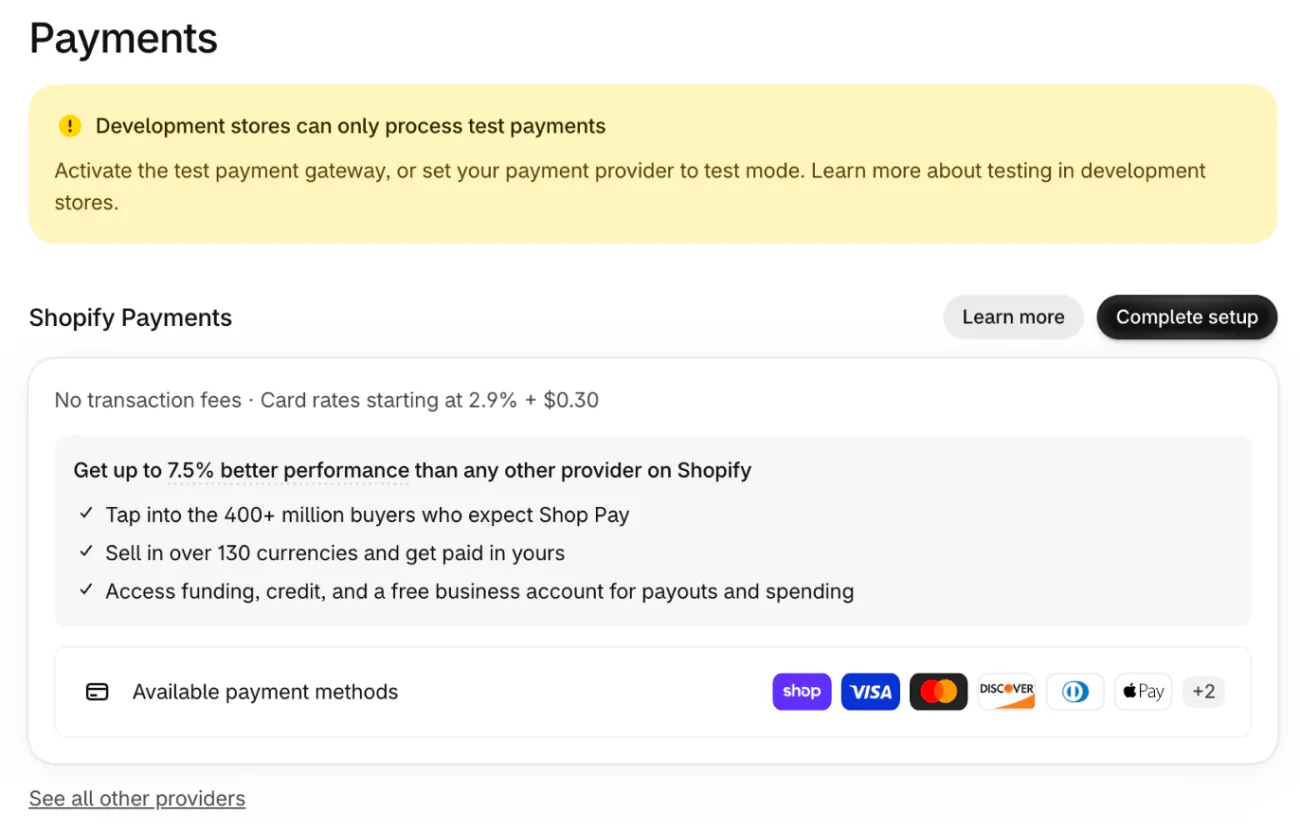
On a new store the button reads "Complete setup", and the card beside it says No transaction fees. The card's feature list also mentions a free business account. That is Shopify Balance, a place to receive payouts, and it is not a merchant account.
Shopify Payments is offered in 41 countries and regions, per Shopify's list, and our Shopify Payments guide names them. If yours isn't on it, or Shopify Payments doesn't support your business category, the Help Center says to use a third-party payment provider.
With another provider, the answer comes from the provider. Shopify's Help Center says it may ask you to submit and verify your bank details with it. Authorize.net's own page says you must have a merchant account to accept cards, and it sells one plan that includes the account and one that connects to yours. Stripe's guide says a provider like Stripe can supply the account as part of its regular processing.
Where Shopify Payments is offered, Stripe is its banking partner and can't be activated as a separate choice, the Help Center says. What Stripe's fees add up to on one sale covers the rest.
How do you get a merchant account if your provider needs one?
Ask your provider first, then gather your business and bank details, apply, and wait for its decision. Shopify's guide lists what providers ask for: your business name and contact details, how long you've been in business, bank details, financial statements, a business license, an EIN, tax documents, articles of incorporation if you have them, and a working online store.
A trade name that differs from your legal name is a DBA, short for doing business as.
Expect a wait. Shopify's guide says approval takes a few days to a few weeks and suggests allowing up to four. It is not a guaranteed yes: banks and processors weigh your credit score, what you sell and your financial history. Stripe's guide, last updated April 20, 2026, runs ten steps, from registering your business to taking a first payment.
Shopify's guide calls a payment facilitator fast, designed to get you selling quickly, where an account of your own is slow, with more checks upfront. Once a provider approves you, it gives you account credentials, which you type into Settings, then Payments, as the last section shows.
What does a merchant account cost?
Beyond the card rate on each sale, merchant account fees can include setup, monthly, annual, batch, chargeback and early-termination charges. They fall into three groups: a fee on each sale, recurring fees and one-off fees. Providers price credit card processing in one of three ways, per Shopify's guide.
- Interchange-plus passes on the exact fee the card networks charge, plus a defined markup for the processor.
- Flat rate is one percentage on every sale, whatever the card.
- Tiered sorts sales into pricing buckets.
| Fee | Stripe's guide | Shopify's guide |
|---|---|---|
| Setup | Up to $200 at some providers | A one-time charge, no amount |
| Monthly minimum | $20 to $50 | No range, only an example of a $50 minimum |
| Annual | About $100 to $500 | $99 to $199 |
| Batch, each time a day's sales go for processing | $0.10 to $0.30, worded as a per-transaction fee | 10¢ to 30¢ |
| Chargeback | $15 to $50 | Roughly $15 to $100 |
| Early termination | $250 to $500 | A flat $300 to $500, or the monthly fees left on the contract |
USD, as printed by each guide, read November 24, 2026.
Chase's guide, which prints no date, puts monthly service fees at about $10 for basic accounts and $25 to $30 for online setups, and transaction fees usually between 1.5% and 3.5%. The ranges differ from guide to guide, so ask a provider for its own list before you sign. The profit and loss template for a Shopify store shows where a provider's statement goes in your books.
Shopify's guide says Shopify Payments gives you a merchant account's benefits without third-party provider fees. On a Shopify store the card rate sits in Settings, then Payments, where the screen above prints "Card rates starting at 2.9% + $0.30". Shopify Payments covers rates and payouts, Shopify pricing lists the rate by plan, credit card processing fees covers what sits inside a card fee, and Shopify chargebacks covers the chargeback fee.
What changes on Shopify when you use another payment provider?
Every sale that goes through another provider carries Shopify's own transaction fee: 2% on Basic, 1% on Grow, 0.6% on Advanced and 0.2% on Plus. Those are the rates on Shopify's pricing page, read November 24, 2026. Shopify's Help Center says to check that page for the rates in your location.
The fee sits on top of your provider's own fees, and Shopify charges it even when Shopify Payments is also on. Orders paid through Shopify Payments, Shop Pay or manual payments carry none, and PayPal is exempt when Shopify Payments is your main provider.
- You can use only one third-party credit card provider at a time, and in a supported country Shopify Payments can run beside one that keeps shoppers on your checkout.
- Shopify lists over 100 providers, and availability depends on your country.
- A US store whose sales tax Shopify manages can't add a third-party provider until it sets US sales tax to "Self-directed", where you register, collect and file sales tax yourself. Shopify says you can't switch that setting back from your admin.
Our Shopify Payments guide covers what else changes without it, such as Shopify Protect and some currency features, and Shop Pay vs PayPal covers PayPal.
Which payment provider do pre-orders and subscriptions need?
Shopify allows pre-orders only with Shopify Payments or PayPal Express, and lists five gateways for subscription apps, though its Payments overview names only Shopify Payments. Its Pre-orders page says they are "currently only available" to stores using Shopify Payments or PayPal Express.
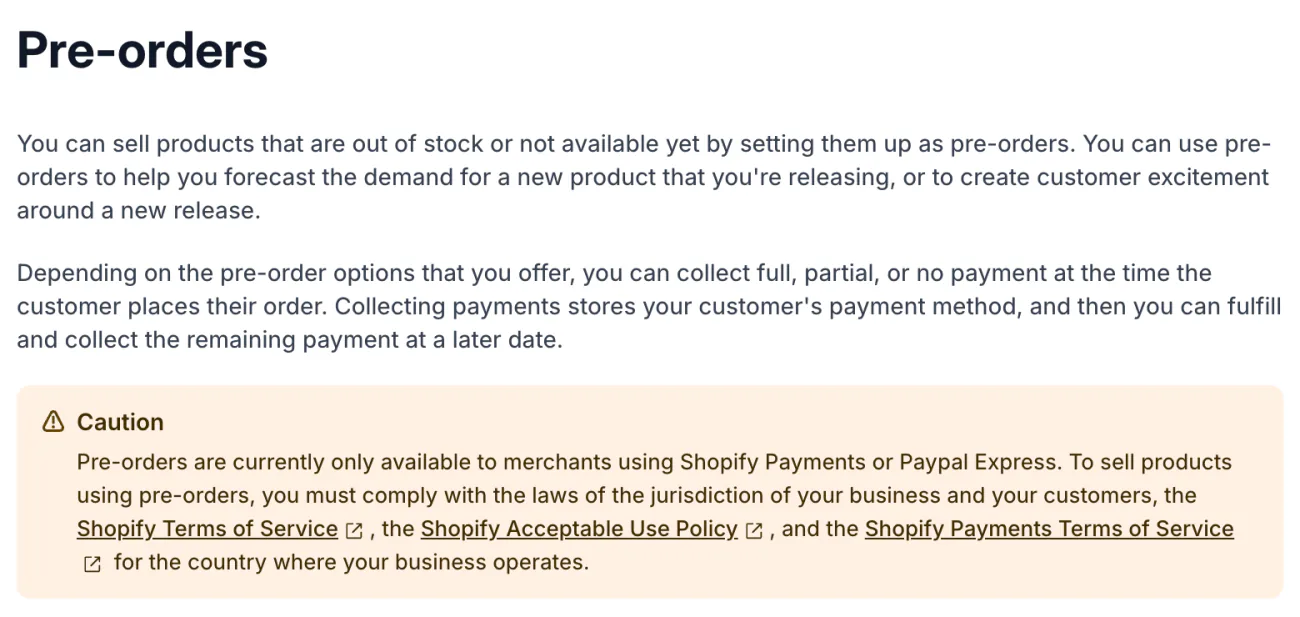
For subscriptions, a store that uses third-party subscription apps must use one of five gateways: Shopify Payments, PayPal Express, Authorize.net, Adyen or Stripe. The Help Center adds that availability depends on your region and the gateway's terms of service.
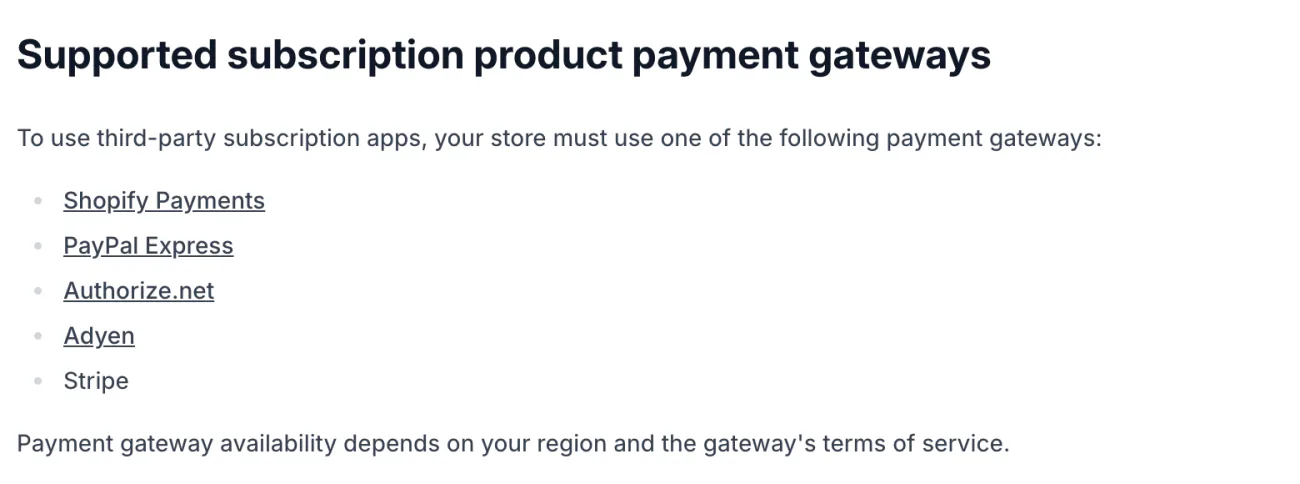
Shopify's Payments overview is stricter. It says a store that sells subscription products needs Shopify Payments as its primary payment gateway, so check with Shopify before you plan around any other gateway.
Shopify's PayPal page says PayPal Express Checkout isn't available in France or the United States, where PayPal comes through Shopify Payments as PayPal Wallet. Check which route your store has before you plan a pre-order.
Sledge's Pre-order campaigns and Subscription offer are built on selling plans, the Shopify setting that marks a product as a pre-order or a repeat order, so Shopify's limits on payment providers apply to them.
Taking a pre-order deposit covers deposits, the Shopify pre-order guide covers the whole route, and how to offer subscriptions on Shopify covers the other offer. More on Sledge's pre-orders.
How do you switch payment provider on Shopify?
Open Settings, then Payments, choose the new provider, enter its account details, then click Activate and Save.
- In your Shopify admin, go to Settings, then Payments.
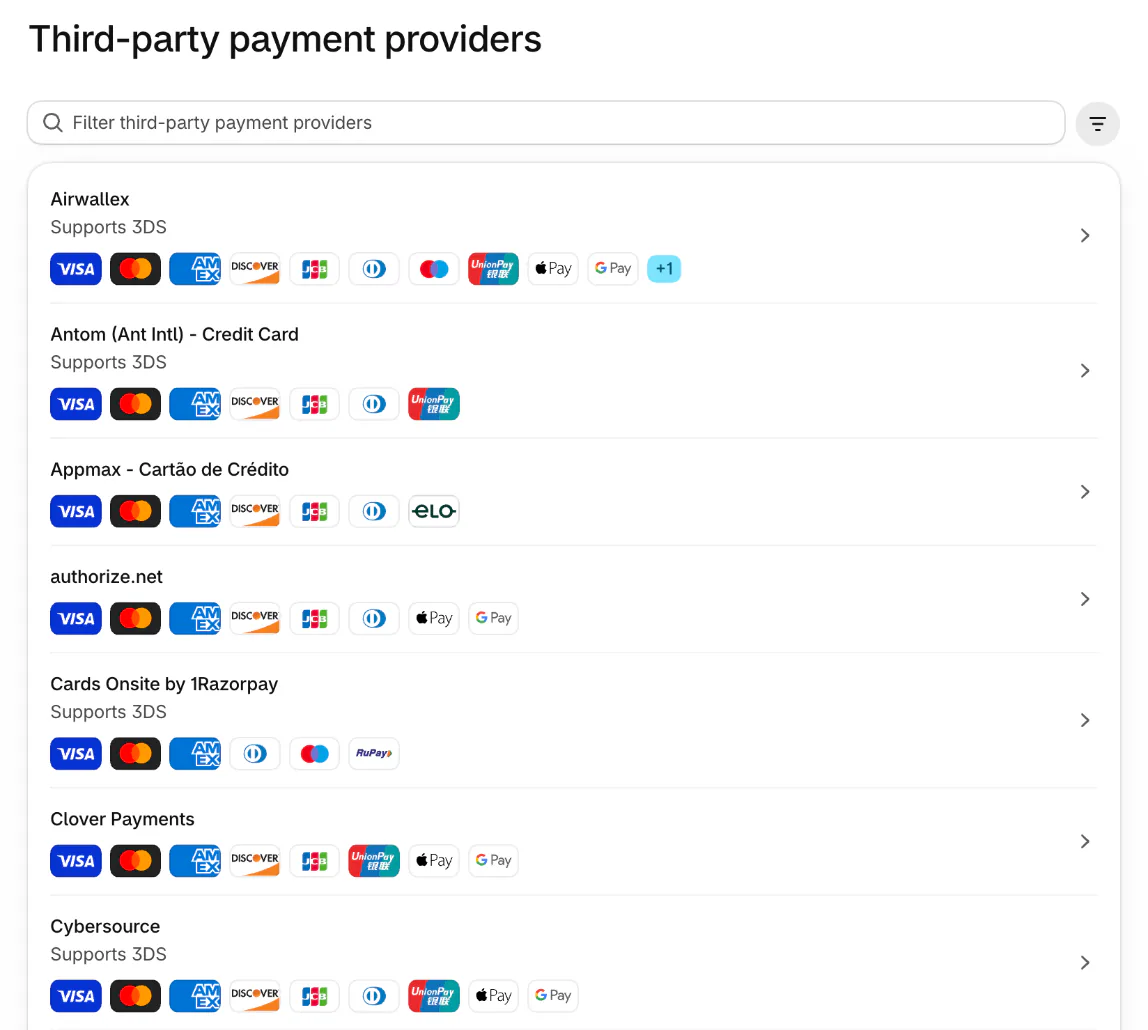
- With Shopify Payments active, click "Manage" in its section, then "Switch to a third-party provider" at the bottom of the page, and click it again to confirm. Without it, click "See all other providers", the link under that section. Where Shopify Payments isn't offered in your country, click "Choose a provider" in the Payment providers section.
- Select the provider you want from the list.
- Type the account credentials the provider gave you.
- Click "Activate", then "Save".
Shopify's Help Center lists these steps, read November 24, 2026.
- Only the store owner can add or switch a provider.
- Your old provider stays available for returns, so don't remove its credentials from the Payments page before you refund orders placed with it.
- After you switch, place a test order, which the ecommerce checklist walks through. If shoppers still leave at payment, checkout abandonment shows how to read why a payment failed.
FAQ
Questions, answered
-

14-day free trial
Explore Sledge on your store before you decide to commit.
-

No credit card required
Start improving your store with no upfront commitment.
-

Setup in minutes
Get Sledge running without a lengthy setup process.
-

Built to grow sales
Turn shopper behavior into actions that help you sell more.
Do I need a merchant account to use Shopify?
No, not if you use Shopify Payments: Shopify's Help Center says it removes the step of setting up a merchant account. With another payment provider, the answer is the provider's. Some include the account in their plan and some expect yours, so ask before you apply for anything.
Is Shopify Payments a merchant account?
Shopify says Shopify Payments gives you a merchant account's benefits without the application. You don't open an account with a bank or processor yourself. You verify your identity, business and bank account in your Shopify admin, and your payouts arrive in that bank account.
How do I accept credit card payments without a merchant account?
Use a provider that supplies the account, such as Shopify Payments on a Shopify store. A payment facilitator keeps one master account and lets many small stores sell under it, Shopify's guide explains. It calls that fast, with fewer upfront checks than an account of your own.
What is the difference between a merchant account and a payment gateway?
The merchant account holds the money for a short time. The payment gateway carries the card details from your checkout toward it. Chase's guide calls the gateway the bridge and the merchant account the destination. A payment processor is a card processing service, Shopify's guide says.
What is a high-risk merchant account?
Shopify's guide says a business counts as high-risk when it sells in a heavily regulated industry or sees frequent chargebacks and fraud, and then needs a specialized account with tighter monitoring. If Shopify Payments won't take your business type, Help says to add a payment provider that supports it.
What does Shopify charge if I use my own provider?
Shopify adds a third-party transaction fee on top of your provider's own fees: 2% of each sale on Basic, 1% on Grow, 0.6% on Advanced and 0.2% on Plus, per Shopify's pricing page on November 24, 2026. Orders paid through Shopify Payments don't carry it, and PayPal is exempt when Shopify Payments is your main provider.
Payments settled? Find what to fix before checkout.
Sledge isn't a payment provider and doesn't hold money or open a merchant account. Its Pre-order campaigns and Subscription offer use Shopify's selling plans, so Shopify's limits on payment providers apply to them. Try it free for 14 days. Growth Intelligence turns on with a paid plan and totals what its fixes could add as one figure, labeled Est. potential.