Ecwid vs Shopify comes down to what you already have. Ecwid adds a store to a site you built elsewhere, from $5 a month for 10 products, and says it takes no fee of its own on sales. Shopify runs the whole store from $29 a month paid yearly with no product cap, and can sell on other sites too.
You have a site that already brings visitors, and you want five products on it. Or the shop is the business, and one page will not hold it. We read Ecwid's pricing and payments pages and Shopify's help pages on November 23, 2026, and took Shopify's prices from a copy of its US pricing page saved on November 21.
Which one fits what you already have?
Ecwid fits a site you own, and Shopify fits a store it hosts.
| If you | Look at | Why |
|---|---|---|
| Run a site on WordPress, Wix or Squarespace and want a few products on it | Ecwid | Ecwid says Starter adds a store to any site for $5 a month, up to 10 products |
| Want Shopify's checkout on that same site | Shopify's Buy Button | The channel comes with every Shopify plan, and orders arrive in your Shopify admin |
| Want the shop to be the whole site | Either | Shopify has themes, and Ecwid's Instant Site builder has 70+ templates |
| Will list more than 100 products | Shopify | Basic has no product cap, and Ecwid asks for its $49 Business plan past 100 |
| Take cards through a provider other than Shopify Payments | Ecwid | Ecwid says it adds no fee on top, and Shopify Basic adds 2% |
| Need a stock count for each size or color | Shopify | Basic gives each combination of up to 3 options, such as size and color, its own stock, up to 2,048 combinations. Ecwid's pricing page lists stock tracking for options and variations from its $49 Business plan |
| Sell at a market or counter too | Shopify | Basic takes cards with a phone or card reader. Ecwid's mobile point of sale takes cash from Venture, and it links to other point-of-sale systems from its $49 Business plan |
| Rely on Shopify App Store apps on your product pages | A Shopify store | Shopify says Buy Buttons aren't compatible with those apps |
Read on Ecwid's and Shopify's own pages, November 23, 2026, with Shopify's prices taken from a US copy saved November 21. Prices are US dollars paid yearly.
Weighing another platform? Shopify vs Wix, Shopify vs Squarespace and Shopify vs WooCommerce each set that platform beside Shopify.
Can you add a store to a site you already have?
Both can: Ecwid is built to add a store to a site, and Shopify's Buy Button channel does the same job from your Shopify admin.
Ecwid's pricing page says a store can sit on a site built with WordPress, Wix, Squarespace or any other platform. Every plan includes it, Starter too. Its pages name a dozen site types, from Drupal and Joomla to Jimdo and Tilda.
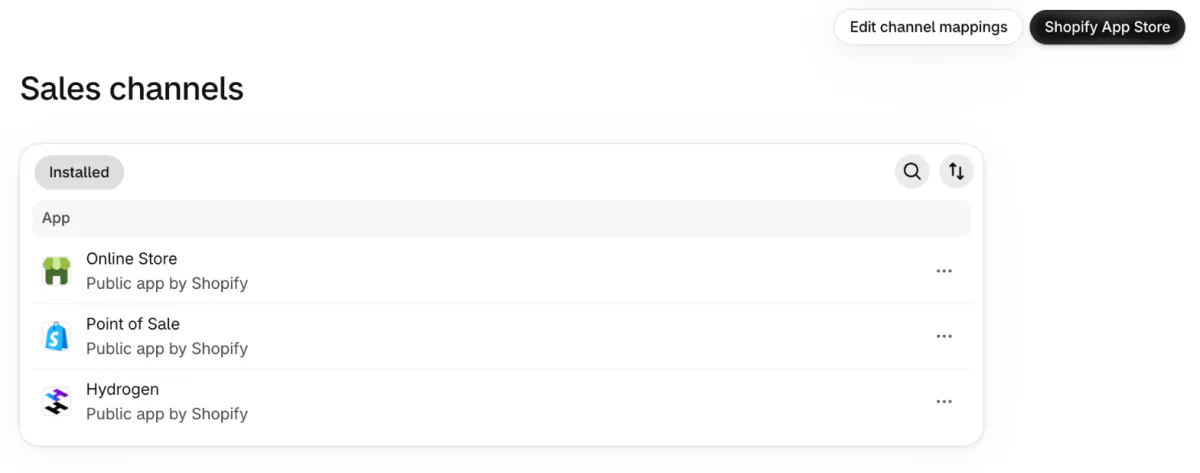
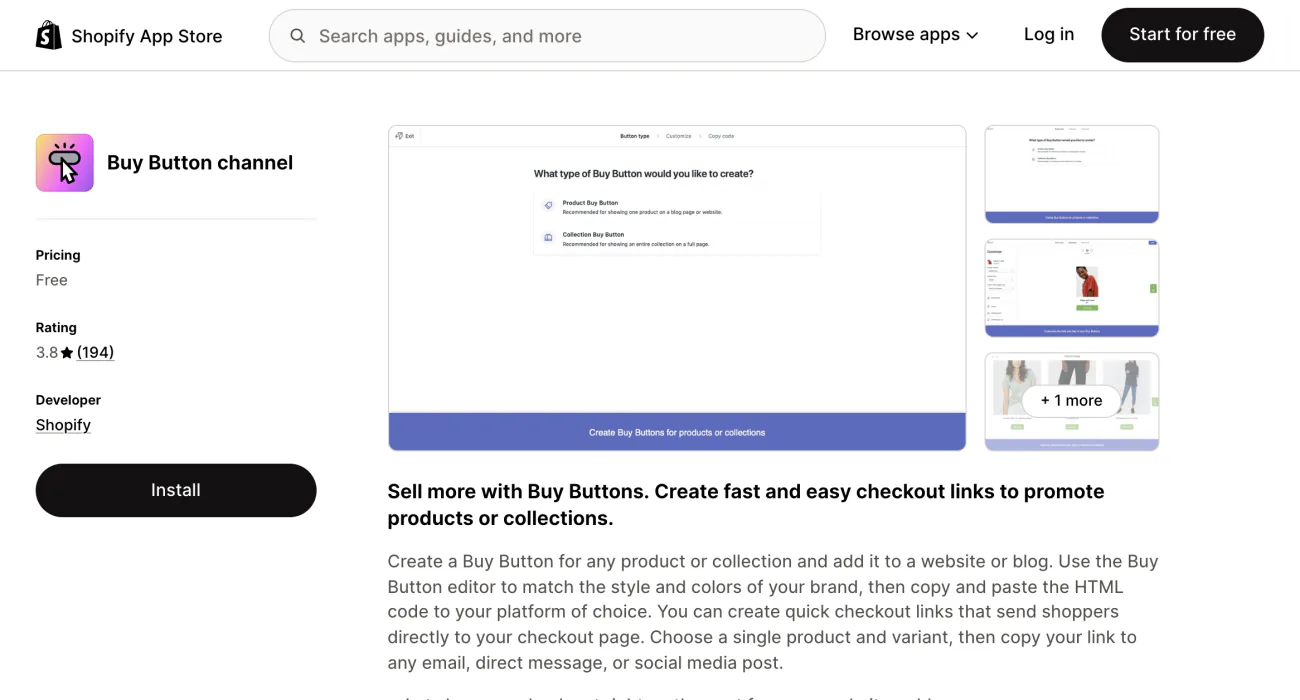
On Shopify, add the channel once. Go to Settings, then Sales channels, click Shopify App Store, search for Buy Button and click Install.
Publish each product to the channel from the Publishing section of its product page. Then open Sales channels, then Buy Button, and click "Create a Buy Button". Pick Product Buy Button or Collection Buy Button, and choose what to sell. The last click is "Copy code", which gives you the piece to place on your page. Shopify's help center shows where it goes on WordPress, Squarespace and Wix.
A Collection Buy Button makes one button for each product in that collection in a single run through those steps, so a long catalog does not need a button built by hand for each product. Orders arrive in your Shopify admin. Shopify's third-party transaction fee applies to a Buy Button sale unless Shopify Payments is on.
Shopify's help center sets two limits. Buy Buttons aren't compatible with apps from the Shopify App Store, review apps included, and Shopify advises against putting one on a Shopify store. A WordPress site can use Shopify's free plugin instead, covered in Shopify vs WooCommerce.
Ecwid vs Shopify pricing: what does each plan cost?
Paid yearly, Ecwid runs from $5 to $119 a month with a product cap on every plan but the last, and Shopify Basic costs $29 with no cap.
| Plan | Paid yearly | Paid monthly | Products |
|---|---|---|---|
| Ecwid Starter | $5 | $5 | Up to 10 |
| Ecwid Venture | $29 | $35 | Up to 100 |
| Ecwid Business | $49 | $65 | Up to 2,500 |
| Ecwid Unlimited | $119 | $149 | No cap |
| Shopify Basic | $29 | $39 | No cap |
US prices in USD a month, from Ecwid's pricing page, read November 23, 2026, and Shopify's pricing page, archived November 21, 2026. Ecwid lists its prices before tax.
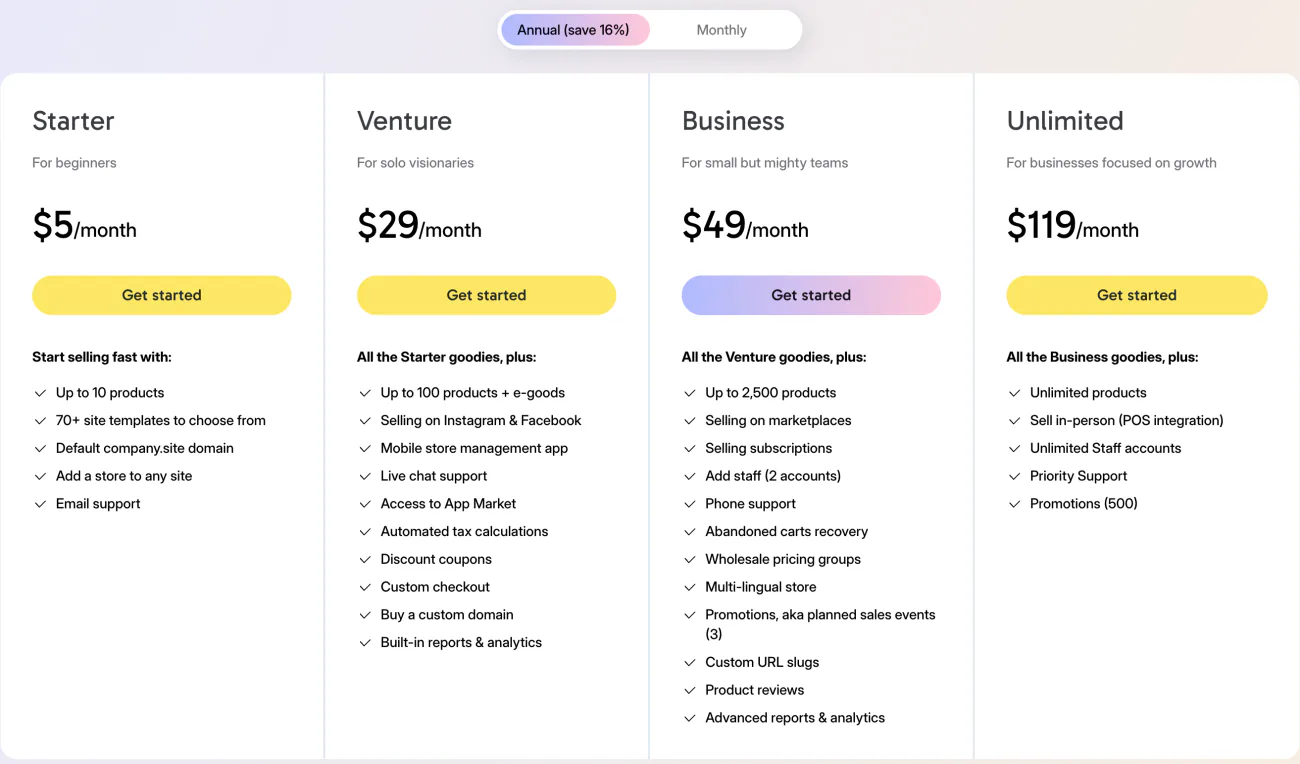
Ecwid's pricing page no longer lists a free plan. An archived copy of it from December 31, 2024 listed one, and today's page starts at Starter. Ecwid is part of Lightspeed, and its pages read "Ecwid by Lightspeed". Shopify's archived US page lists $1 a month for the first 3 months, after a 3-day free trial.
Shopify's live page shows prices for your region, so the Shopify figures here come from a copy of its US page saved on November 21, 2026. Our Shopify pricing guide covers Grow, Advanced and Plus, and Shopify's own page shows today's prices.
Do Ecwid and Shopify charge transaction fees?
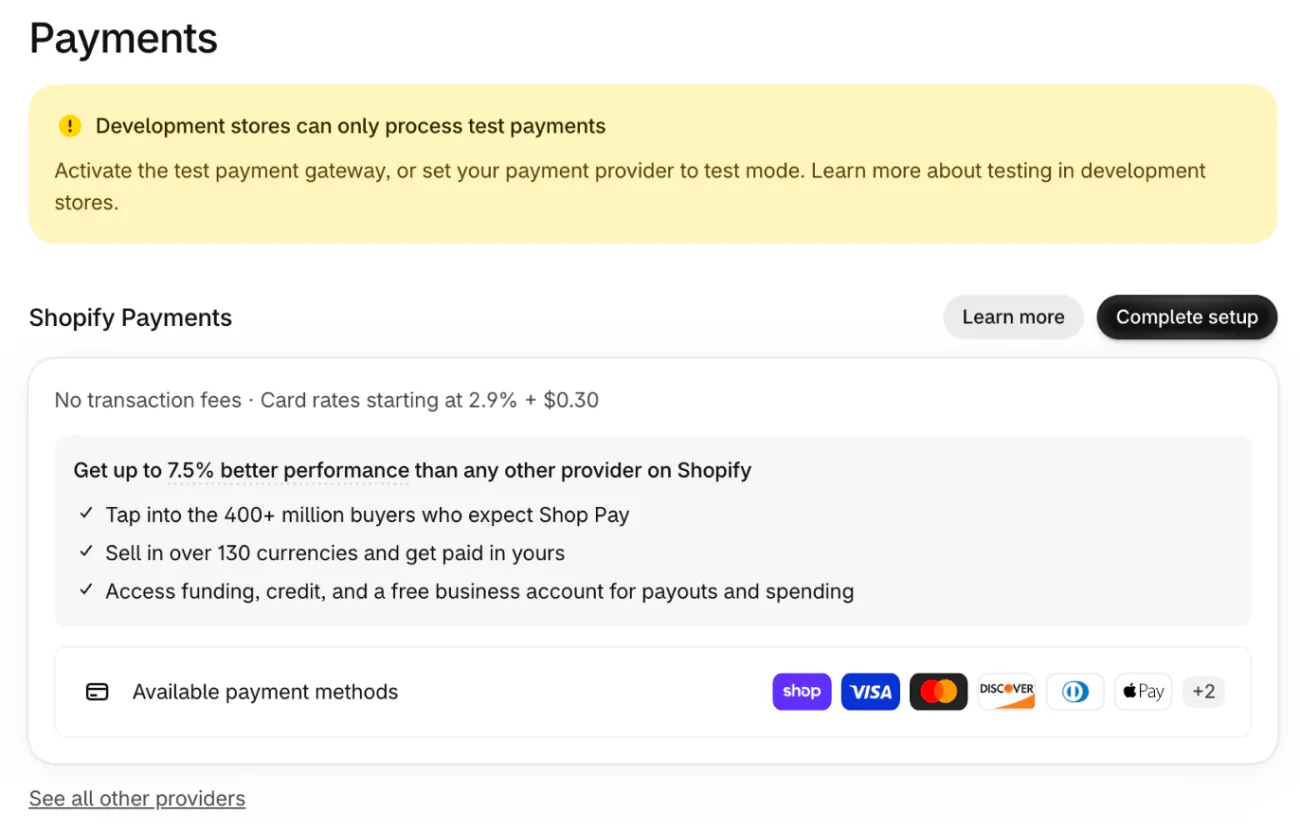
Ecwid says it takes no fee of its own on any plan, and Shopify Basic takes none on Shopify Payments sales but adds 2% on another provider's.
| On a $50 order | Shopify Basic | Ecwid |
|---|---|---|
| Standard US card online | $1.75, through Shopify Payments | $1.75, through Stripe |
| Card through another provider | That provider's fee plus $1.00 (2%) | That provider's fee only |
A made-up $50 order on a standard US card, worked out from Shopify's pricing page, archived November 21, 2026, and Stripe's, read November 23, 2026.
Ecwid says its plans carry no setup or transaction fees, and that each payment provider sets its own rate. It lists over 70 providers, PayPal and Stripe among them. Shopify's 2% is its third-party transaction fee, and it falls to 1% on Grow and 0.6% on Advanced.
Shopify Payments is open to stores in 41 countries and regions, per Shopify's help center. Where it isn't, a store takes cards through another provider, and Basic adds that 2%.
What does a month cost at your catalog size?
On 100 orders of $50 paid by standard US card, plan and card fees come to $204 a month on Shopify Basic and from $180 to $294 on Ecwid, depending on how many products you list.
| Your catalog | Ecwid plan, paid yearly | Ecwid month | Shopify Basic month |
|---|---|---|---|
| Up to 10 products | Starter, $5 | $180.00 | $204.00 |
| Up to 100 | Venture, $29 | $204.00 | $204.00 |
| Up to 2,500 | Business, $49 | $224.00 | $204.00 |
| More than 2,500 | Unlimited, $119 | $294.00 | $204.00 |
Made-up numbers: 100 online orders of $50, all on standard US cards through Shopify Payments or Stripe, so card fees come to $175.00 on both. The table leaves out the domain, apps, shipping, tax and what each plan includes.
Card fees are the same $175.00 on both, so the plan sets the gap. Ecwid costs less at 10 products, ties at 100 and costs more beyond that. Ecwid lists stock tracking for product options and variations, such as the sizes and colors of one product, from Business, so a small catalog that counts stock by size may land on the $224.00 row.
How do Ecwid and Shopify compare on support and selling channels?
Shopify Basic lists 24/7 live chat and in-person card sales, while Ecwid adds chat, phone and selling channels plan by plan.
| For | Ecwid | Shopify Basic |
|---|---|---|
| Help | Email on Starter, chat from Venture (24 hours, Monday to Friday) and phone call-backs from Business | 24/7 live chat |
| In person | A mobile point of sale takes cash from Venture, and links to point-of-sale systems start on Business, with Square and Clover (limited countries) on Unlimited | Cards with a phone or card reader, and POS Pro at $89 a month per location |
| Social and marketplaces | Instagram and Facebook from Venture in limited countries, marketplaces from Business through third-party apps that may add fees | Listed as "Sell on social and marketplaces" |
From Ecwid's pricing page, read November 23, 2026, and Shopify's, archived November 21, 2026.
Can you move from Ecwid to Shopify later?
Yes, through a spreadsheet, because Shopify's free Store Migration app doesn't list Ecwid.
The app names Square, WooCommerce, Etsy, Wix, Amazon, eBay, Clover and Lightspeed R/X (Vend). From Ecwid, export your products as a CSV file, a spreadsheet. Match its columns to Shopify's sample file, then bring it in with Shopify's product import. Check that sizes and colors arrive as options, and expect the design to stay behind. Importing products covers the columns, and migrating to Shopify covers the redirects.
FAQ
Questions, answered
-

14-day free trial
Explore Sledge on your store before you decide to commit.
-

No credit card required
Start improving your store with no upfront commitment.
-

Setup in minutes
Get Sledge running without a lengthy setup process.
-

Built to grow sales
Turn shopper behavior into actions that help you sell more.
Is Ecwid cheaper than Shopify?
At 10 products, yes: Ecwid Starter costs $5 a month, and Shopify Basic costs $29 paid yearly. At 100 products the two tie at $29. Past 100, Ecwid Business costs $49, and past 2,500, Unlimited costs $119, while Shopify Basic stays at $29 with no product cap. Ecwid lists stock tracking for each size and color from Business.
Does Ecwid have a free plan?
Not on its pricing page any more, which starts with Starter at $5 a month for up to 10 products. An archived copy of the same page from December 31, 2024 still listed a free plan. Shopify's archived US page lists $1 a month for the first 3 months, after a 3-day free trial.
Does Ecwid or Shopify charge transaction fees?
Ecwid says it charges no setup or transaction fees on any plan, though your payment provider still takes its rate. Shopify charges none on Shopify Payments sales. With another provider, the fee is 2% on Basic, falling to 1% on Grow and 0.6% on Advanced.
Can I add Shopify to a site I already have?
Yes. Add the Buy Button channel under Settings, then Sales channels, then open Buy Button and click "Create a Buy Button". Place what it gives you on a page of your site, and orders arrive in your Shopify admin. Shopify says Buy Buttons aren't compatible with apps from its App Store, and the channel comes with every plan.
Is Shopify or Ecwid better for a small business?
It depends on what you already have. Ecwid fits a few products on a site you keep, since Ecwid adds a store to that site from $5 a month. Shopify fits a store that will pass 100 products, sell at a counter or stand on its own site.
Can I move from Ecwid to Shopify later?
Yes, through a spreadsheet. Shopify's free Store Migration app lists eight platforms, and Ecwid isn't one of them. Export your products from Ecwid as a CSV file, match its columns to Shopify's sample file, bring it in with Shopify's product import, and check that sizes and colors arrive as options. Our import guide covers the columns.
Selling on Shopify? See what shoppers can't find.
Sledge runs on Shopify stores only, not on Ecwid or in a Buy Button on another site. On Shopify, it adds search, filters and offers. Start free for 14 days. Plans after that run from $29.99 a month, with no share of your sales. On paid plans, Growth Intelligence lists fixes and shows one total in dollars, labeled "Est. potential".