An inventory spreadsheet template lists each product by SKU with its count, cost, stock value, units sold per day, days left and a reorder level. Copy the 12 columns below into Excel or Google Sheets. Shopify already keeps nine of them.
Your stock sheet says 40 mugs. Shopify says 34, because six shipped after you exported. You import the sheet back and Shopify skips that row.
Inventory spreadsheet template to copy
Paste the headings into row 1 of a blank sheet, then fill in one row for each size and color. The second row says what goes in each column.
Inventory sheet
| SKU | Product and option | On hand | Available | On order | Unit cost | Stock value | Sold per day | Days left | Lead time | Reorder level | Order now? |
|---|---|---|---|---|---|---|---|---|---|---|---|
| [the SKU] | [name, size or color] | [count] | [count] | [units on the way] | [cost of one unit] | [On hand times Unit cost] | [units sold a day] | [Available divided by Sold per day] | [days] | [Sold per day times Lead time, plus a safety amount] | [Yes or No] |
Written for this page, November 2026. Shopify Help Center checked November 24, 2026.
- Give each size and color its own row and its own SKU, because Shopify counts each one on its own.
- Type Unit cost as what one unit cost you. Stock value is a count times a cost, not an accounting figure. Divide a product's gross profit by its average Stock value and you have GMROI.
- Take Sold per day from Shopify's Inventory sold daily by product report, or divide the last 28 days of sales by 28.
- Lead time runs from the day you order to the day you can sell the stock, as lead time explains.
- For the safety amount in Reorder level, start with three days of sales. Safety stock sizes it from your slowest delivery.
- Add a Location column if you stock more than one place, and a Bin or Supplier column if you use them.
Stock value, Days left, Reorder level and Order now? are the four formula columns. In Excel and Google Sheets a formula starts with an equals sign, and you click cells instead of typing their addresses. Order now? reads Yes when Available plus On order is at or below Reorder level. Ordering no earlier than that level is how just-in-time inventory works. If a product sold nothing, leave Days left empty. Keep one clean copy and work in another.
What does a filled-in inventory spreadsheet look like?
Here is a sheet for Example Store. The names and figures are made up.
Inventory sheet
| SKU | Product and option | On hand | Available | On order | Unit cost | Stock value | Sold per day | Days left | Lead time | Reorder level | Order now? |
|---|---|---|---|---|---|---|---|---|---|---|---|
| CND-8C | Cedar soy candle, 8 oz | 56 | 49 | 0 | $3.80 | $212.80 | 7 | 7 | 10 | 91 | Yes |
| MUG-12W | Matte white mug, 12 oz | 130 | 126 | 0 | $4.60 | $598.00 | 2 | 63 | 21 | 48 | No |
| BAG-S | Linen gift bag, small | 36 | 36 | 100 | $1.90 | $68.40 | 3 | 12 | 10 | 39 | No |
| SNF-B | Brass candle snuffer | 60 | 60 | 0 | $2.10 | $126.00 | 0 | 14 | 0 | No |
Total stock value $1,005.20.
- Candle, Yes. At 7 sold a day, its 49 Available cover 7 days. Over the 10-day lead time you sell 70, and a safety amount of 21 (three days of sales) brings the Reorder level to 91. With 49 left and none on order, you order now.
- Bag, No. Its 36 Available sit under the level of 39, but 100 are On order.
- Snuffer, No. Nothing sold, so Days left stays empty. Its 60 units are $126.00 of stock that isn't moving.
A Yes means writing an order. The purchase order template has the lines for it. What you pay a supplier for stock leaves your cash when you pay and reaches profit only as it sells, which the profit and loss template shows.
How do you move stock between Shopify and the sheet?
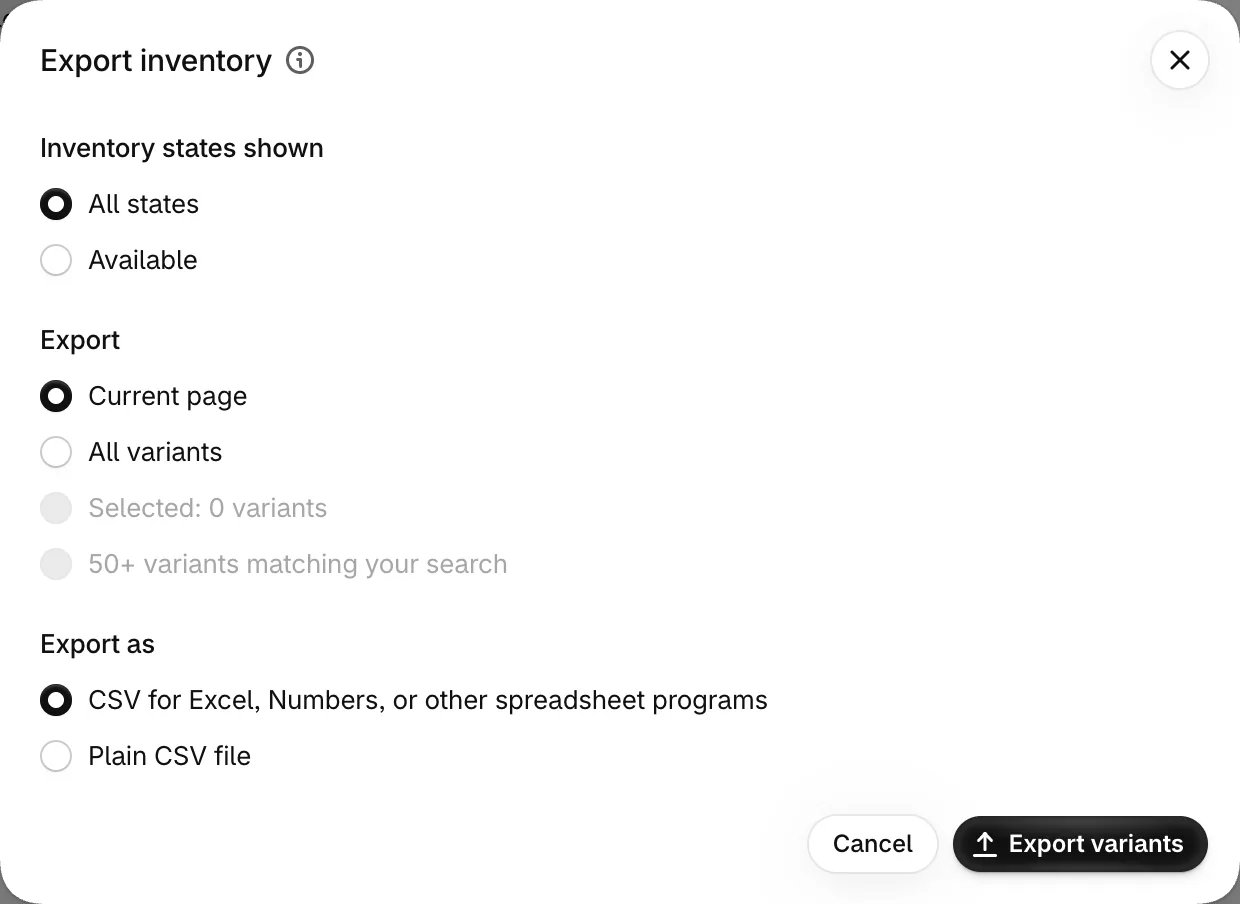
Export your stock from Products, then Inventory, copy its counts into the sheet, and import a file only to change counts. Click Export at the top right of the Inventory page. Under "Inventory states shown" choose All states, under "Export" choose All variants (every size and color), and under "Export as" pick "CSV for Excel, Numbers, or other spreadsheet programs". Then click "Export variants". A store with several locations also sees an "Export from" menu.
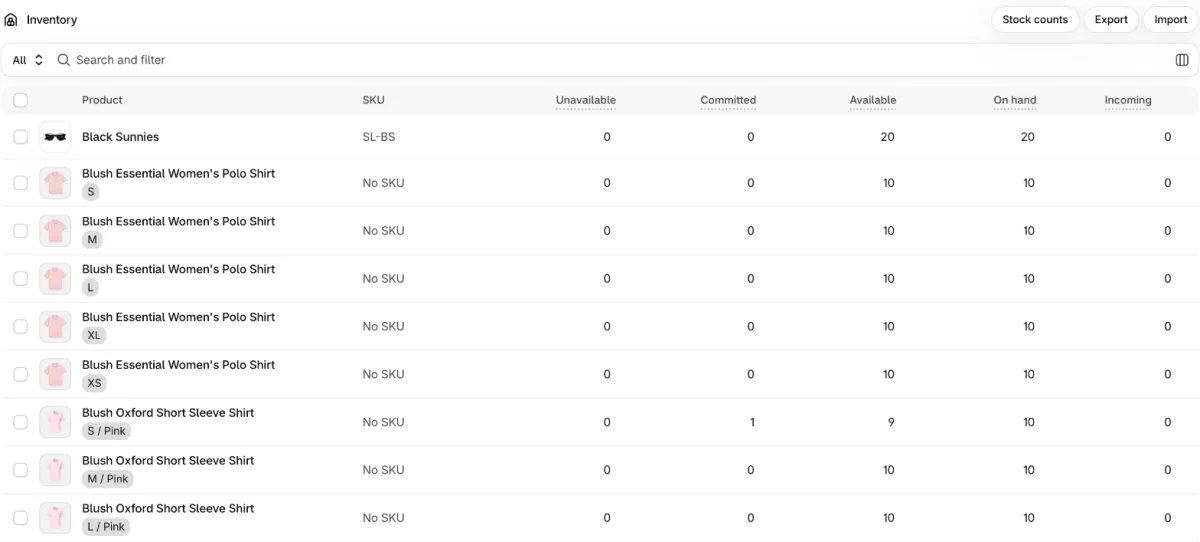
The file has one row for each size and color at each location. Copy its On hand (current), Available and Incoming columns into On hand, Available and On order, matching rows by SKU.
To change counts from the sheet, edit only On hand (new) in that file and click Import. On the All states file it is the one quantity you can edit, and you leave it empty for a row you don't change. Before it changes anything, Shopify compares On hand (current) with your store's live count. If the count moved after your export, that row is skipped and Shopify emails you the details. The file can't exceed 15 MB, and Shopify's Help Center lists every column. Put the template's other columns on a second tab, so the file you import holds only Shopify's.
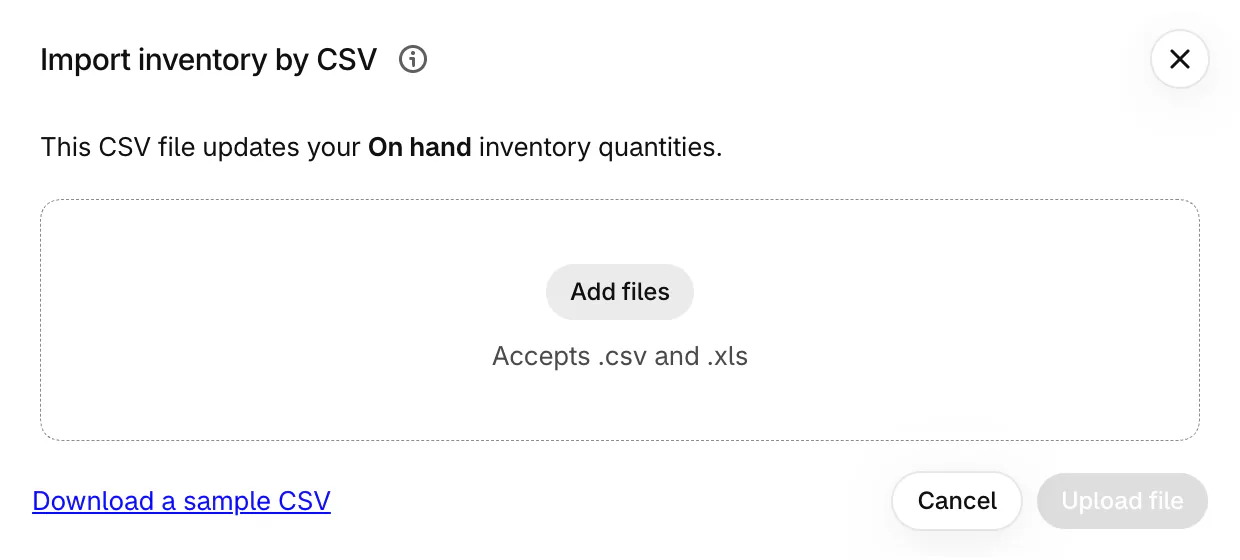
If you ship orders every day, counts keep moving after your export, and Shopify skips each row that moved. Skipped rows are the first sign to stop pushing counts from a sheet.
Which inventory spreadsheet columns does Shopify already keep?
Shopify keeps nine of the template's 12 columns. Lead time, Reorder level and Order now? have no column on the Inventory page, so they stay in your sheet.
| Sheet column | Where Shopify keeps it | What to know |
|---|---|---|
| SKU, Product and option | Products, then Inventory | The Product and SKU columns, one row for each size and color. |
| On hand, Available | Products, then Inventory | On hand adds Available, Committed and Unavailable. |
| On order | The Incoming column | Units on a transfer or a purchase order that haven't arrived. |
| Unit cost | Cost per item, in the Price card of a product | Shopify's Month-end inventory value report reads it. |
| Stock value | Month-end inventory value, under Analytics, then Reports | On hand times cost per item at each month end, for products with a cost. |
| Sold per day | Inventory sold daily by product | The average sold a day for each size and color. |
| Days left | Products by days of inventory remaining | Counts the last 28 days of sales, and shows N/A when nothing sold. |
| Lead time, Reorder level, Order now? | No column on the Inventory page | Work these out in your sheet. |
Since October 1, 2026, Shopify's inventory reports measure stock by On hand, which includes units already sold but not shipped. The sheet divides Available, so a days-left figure from the report can read higher than the sheet's. Order more stock in Products, then Purchase orders. Units on a purchase order or a transfer show as Incoming until you receive them. The inventory report guide covers the other reports.
When should you stop using a spreadsheet for inventory?
Stop when you retype what Shopify already counts, or when you ship often enough that your file is out of date before you import it. Four signs:
- You type in each order. A sale moves units from Available to Committed at once, and out of On hand when you fulfill it. A sheet knows only what you type.
- Your import skips rows. Each skipped row is a count that moved after your export, so you export again and retype it.
- More than one person edits the file. Or one product sells in several places. Either way, the counts drift apart faster than anyone retypes them.
- You want a warning. A sheet doesn't email you when a product runs low. Shopify Flow can, as Shopify inventory management shows.
Keep the sheet for the three columns Shopify lacks, and to plan an order before you type it into Purchase orders. To count what is on the shelf, use the Stock counts button on the Inventory page. Shopify inventory management walks through the count.
A sheet also can't see what shoppers do. Sledge has no inventory, cost or profit report. On paid plans, Sledge Analytics adds a Signals tab that can flag a sold-out product shoppers keep opening ("Sold out but wanted"), a best seller running low ("Best seller running low") and stock that hasn't sold in 30 days ("Stock not selling").
FAQ
Questions, answered
-

14-day free trial
Explore Sledge on your store before you decide to commit.
-

No credit card required
Start improving your store with no upfront commitment.
-

Setup in minutes
Get Sledge running without a lengthy setup process.
-

Built to grow sales
Turn shopper behavior into actions that help you sell more.
Is there a free inventory spreadsheet template for Excel or Google Sheets?
Yes. Copy this page's 12-column template into a blank Excel or Google Sheets file and add the four formulas. This page has no file to download. Shopify's inventory export is the other free start: it gives you a spreadsheet already filled with your own products and counts.
What columns should an inventory tracking template have?
At least a SKU, a product name, a count, a unit cost and a reorder level. This template has 12: SKU, Product and option, On hand, Available, On order, Unit cost, Stock value, Sold per day, Days left, Lead time, Reorder level and an Order now? flag. Shopify keeps nine of them. The other three stay in your sheet.
How do I update Shopify inventory from a spreadsheet?
Open Products, then Inventory, and click Export. Choose All states, change only the On hand (new) column and save the file. Then click Import and add it. A row whose count moved after your export is skipped, and Shopify emails you the details. The file can't exceed 15 MB.
Why did Shopify skip rows when I imported my inventory file?
Shopify compares the On hand (current) column of your file with your store's count before it changes anything. If the count moved after your export, that row doesn't import and Shopify emails you the details. Export again and re-enter the new counts. Shopify's Help Center says clearing On hand (current) skips the check, which also removes its protection.
How do I work out stock value in a spreadsheet?
Multiply each row's On hand by its Unit cost, then add up the column. Shopify's Month-end inventory value report does the same sum at the end of each month, for products that have a cost per item. It is a simple count times a cost, not an accounting figure.
Can Sledge track my inventory?
No. Sledge has no inventory, cost or profit report, and it doesn't count your stock. On paid plans, Sledge Analytics adds a Signals tab that can flag a sold-out product shoppers keep opening, a best seller running low and stock that isn't selling. Back in Stock sign-ups need the Accelerate plan or higher.
A sheet knows your stock. It can't see who came looking.
Sledge has no inventory, cost or profit report, and it doesn't count stock or set reorder levels, so those stay in Shopify and your spreadsheet. On paid plans, its Signals tab can flag sold-out products shoppers keep opening and best sellers running low. Back in Stock sign-ups need Accelerate or higher. Growth Intelligence turns on when you pick a paid plan. It reads your orders and searches, and one total, labeled Est. potential, shows what its suggested fixes could add.