
Webflow vs Shopify starts level on price: both entry plans cost $29 a month paid yearly. Webflow Standard holds 500 ecommerce items and adds a 2% transaction fee to each sale. Shopify has no product cap and charges no transaction fee on Shopify Payments sales. Webflow fits a design-led site with a small shop, and Shopify fits a growing catalog.
You want a store that looks like your brand and nobody else's. You also want it to keep working when the catalog doubles. On November 23, 2026, we read Webflow's pricing and ecommerce pages and Shopify's Help Center, plus an archived copy of Shopify's pricing page from November 21.
Webflow or Shopify: which fits what you sell?
Pick by what the site is for, because both start at $29 a month paid yearly.
| If your store | Look at | Why |
|---|---|---|
| Is a design-led site with a small shop | Webflow | You lay out every page, and each ecommerce plan lists a custom shopping cart and checkout |
| Will sell a catalog that passes 500 products, variants and categories | Shopify | No product cap on any plan, where Webflow's plans stop at 500, 5,000 and 15,000 items |
| Takes cards where Shopify Payments works | Shopify | No transaction fee on those sales, where Webflow Standard adds 2% on top of Stripe's or PayPal's fee |
| Runs a big library of posts or case studies beside a small shop | Webflow | Standard holds 2,000 "CMS items", such as blog posts, apart from its 500 ecommerce items |
| Needs a few people to log in and update the site | Webflow | Standard lists 3 staff accounts for clients or content editors, where Shopify Basic lists none and Grow lists 5 |
| Sells at a market table or counter too | Shopify | Every plan takes cards with a phone or card reader, and Webflow's pricing page lists no in-person selling |
| Wants emails that bring back shoppers who leave a cart | Shopify | Abandoned checkout recovery comes with every plan, and Webflow's pricing page lists none |
Read on Webflow's and Shopify's own pages, November 23, 2026, except Shopify's pricing page, an archived copy from November 21.
Comparing more platforms? See Shopify vs Wix, Shopify vs Squarespace and Shopify vs WooCommerce.
Webflow vs Shopify pricing: what does each plan cost?
Webflow Standard and Shopify Basic both cost $29 a month paid yearly, and each is the entry plan for an online store.
| Plan | Paid yearly | Paid monthly | Products | Fee on sales |
|---|---|---|---|---|
| Webflow Standard | $29 | $42 | 500 items | 2%, on top of Stripe's or PayPal's fee |
| Webflow Plus | $74 | $84 | 5,000 items | 0% |
| Webflow Advanced | $212 | $235 | 15,000 items | 0% |
| Shopify Basic | $29 | $39 | No cap | None on Shopify Payments sales, 2% with another provider |
US prices in USD from Webflow's pricing page, read November 23, 2026, and Shopify's pricing page, archived November 21, 2026. Webflow counts variants and categories as items.
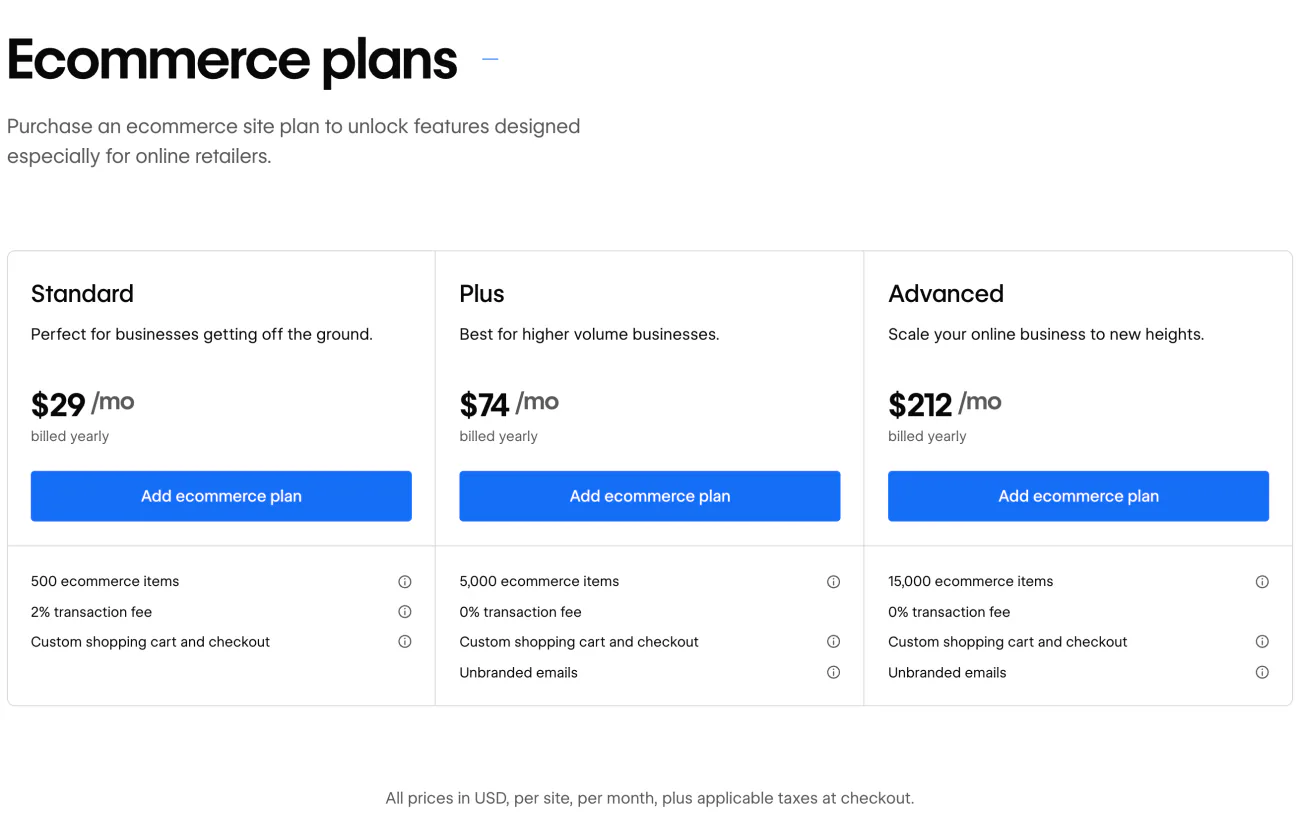
Webflow's Basic plan at $15 and Premium plan at $25 a month paid yearly are for sites without a store, and its Starter plan is free. On most Shopify plans, the first three months cost $1 a month after a three-day free trial. Grow, Advanced and Plus are on Shopify's pricing page and in our Shopify pricing guide.
What do Webflow and Shopify take from each sale?
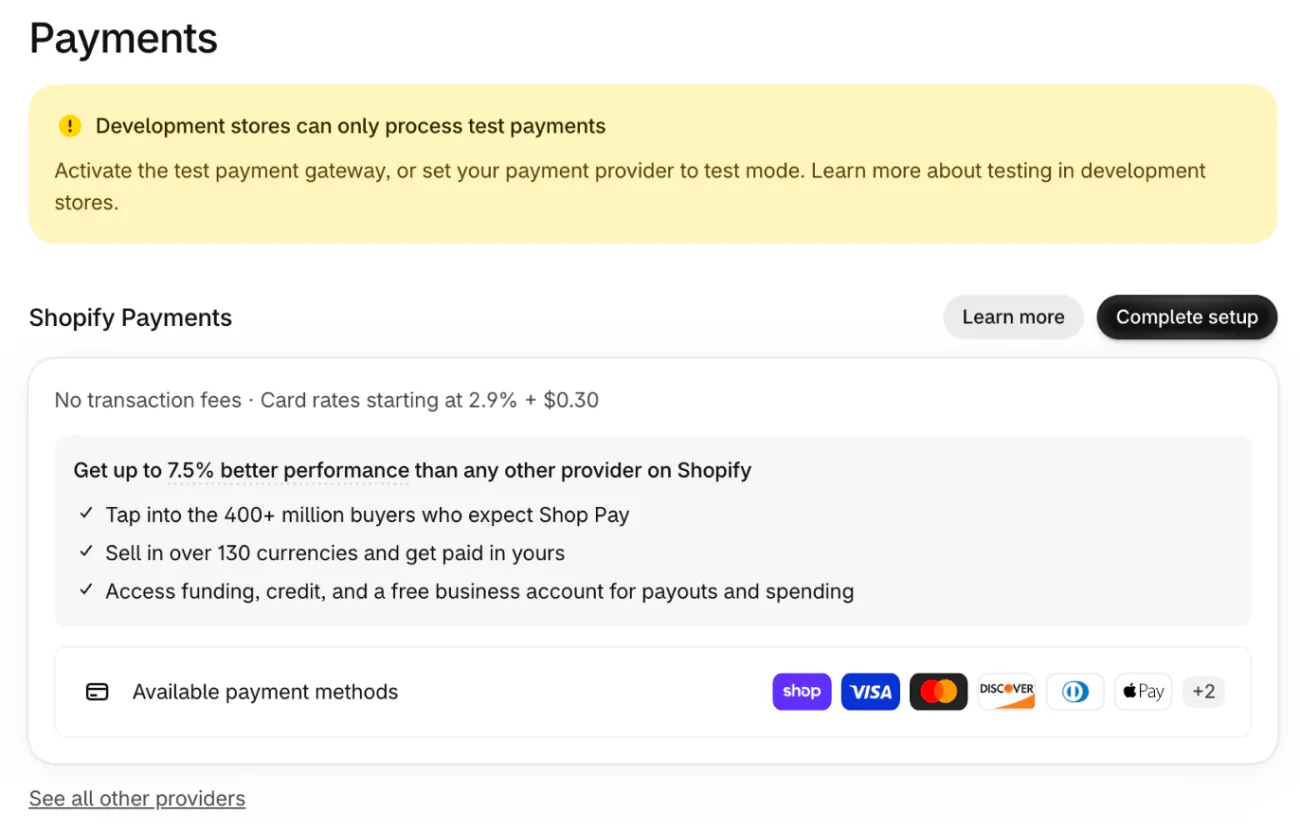
A standard US card costs 2.9% + 30¢ through Stripe or Shopify Payments on Basic, and Webflow Standard adds 2% on top.
Webflow says its transaction fee comes in addition to Stripe's or PayPal's own fee, and Stripe's pricing page lists 2.9% + 30¢ for a domestic card. On a store that hasn't set up Shopify Payments yet, Settings, then Payments, shows a Shopify Payments card that reads "No transaction fees" and "Card rates starting at 2.9% + $0.30". The link "See all other providers" opens the third-party list, and a provider there carries Shopify's transaction fee: 2% on Basic, 1% on Grow and 0.6% on Advanced.
| A made-up month | Webflow Standard | Webflow Plus | Shopify Basic |
|---|---|---|---|
| Plan, paid yearly | $29.00 | $74.00 | $29.00 |
| Card fees, 100 orders at 2.9% + 30¢ | $175.00 | $175.00 | $175.00 |
| Webflow's fee on sales | $100.00 | $0.00 | None |
| The month | $304.00 | $249.00 | $204.00 |
A made-up store with 100 orders of $50, every shopper on a standard US card, the Shopify store on Shopify Payments, no tax, shipping or refunds, worked out from Stripe's, Webflow's and Shopify's pages.
Paid yearly, Plus costs $45 more than Standard and drops the 2%, so it costs less once sales pass $2,250 a month. It also raises the item cap to 5,000.
The gap closes if you can't use Shopify Payments, which works for stores in 41 countries and regions. Shopify Basic then adds 2% on sales through another provider, the same as Webflow Standard.
Shopify stores opened since May 12, 2025 also pay Shopify's transaction fee on the part of an order paid with a gift card or store credit, even with Shopify Payments.
How many products can Webflow and Shopify each hold?
Shopify sets no cap on products, and Webflow's plans stop at 500, 5,000 or 15,000 ecommerce items, counting variants and categories.
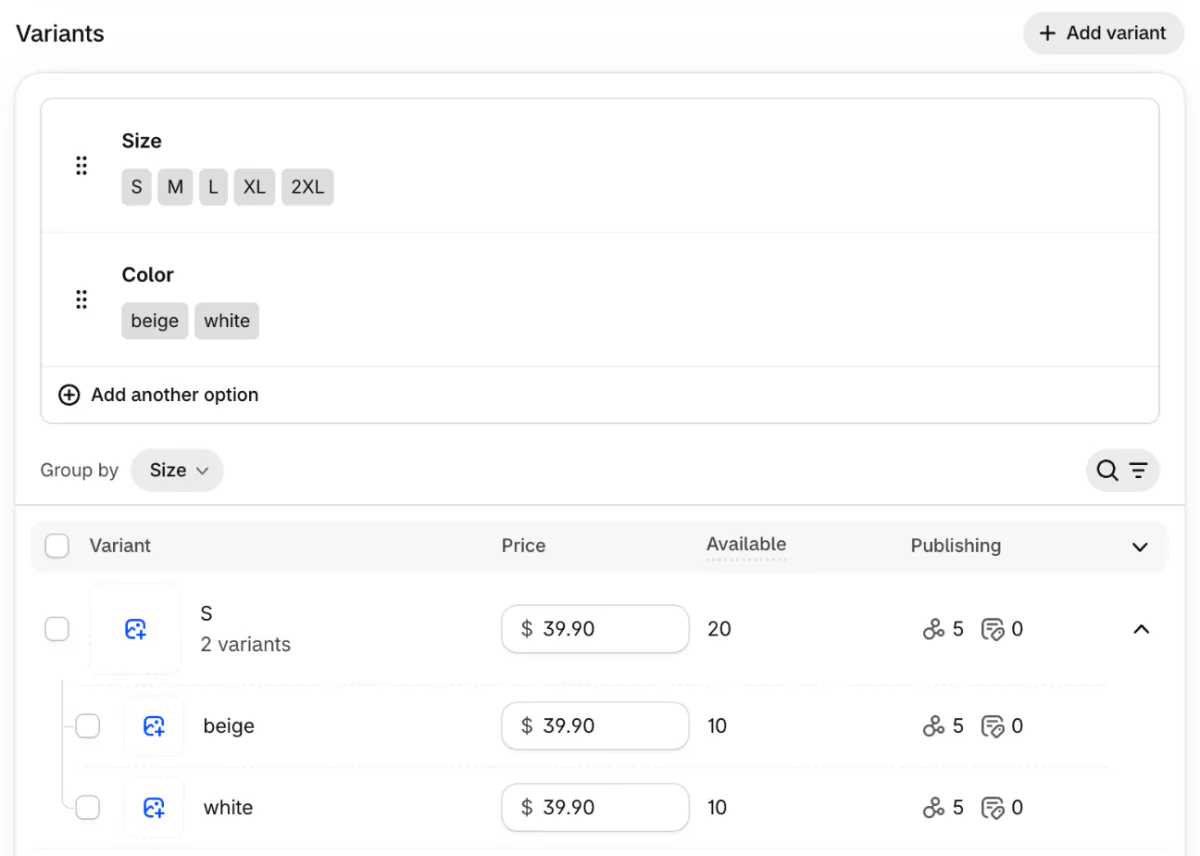
A shirt in five sizes and two colors is ten variants, one for each size and color pair. In your Shopify admin it is one product. Under Products, then Add product, the "Add options like size or color" button on the Variants card builds the list. One product can hold up to 3 options and 2,048 variants. On Webflow those variants count toward the cap, so 100 shirts like that make 1,000 variants, twice Standard's 500, before the shirts and their categories are counted.
Our Shopify variants guide covers adding them. Older guides may print 1,000 or 3,000 items for Webflow. Webflow raised Plus to 5,000 and Advanced to 15,000 items in November 2022.
Does Webflow or Shopify fit a site where design comes first?
Webflow lets you lay out every page, and each of its ecommerce plans lists a custom shopping cart and checkout.
Shopify starts from a theme. In your Shopify admin, Online Store, then Themes, then the Edit theme button on the live theme, opens the theme editor, where you move sections and blocks without writing code. Checkout customization is listed as Limited on Basic, Grow and Advanced, and Full on Shopify Plus.
Webflow runs posts, case studies and products from one content system, and Standard holds up to 2,000 "CMS items", its label for posts and similar entries, beside its ecommerce items. Shopify keeps a blog and pages inside the store, in the same theme as the shop. Free themes to start from are in our guide to Shopify themes, and Shopify's AI store builder can draft a store from a short prompt.
What else comes with Webflow and Shopify plans?
Shopify lists in-person selling, cart recovery and shipping labels on every plan, and Webflow's ecommerce plans list staff logins and ad connections.
| Extra | Webflow ecommerce plans | Shopify plans |
|---|---|---|
| People who log in | 3, 10 or 15 staff accounts, for clients or content editors | None on Basic, 5 on Grow, 15 on Advanced |
| Selling in person | Not listed on its pricing page | A phone or card reader on every plan, and POS Pro adds $89 a month per location |
| Cart recovery emails | Not listed on its pricing page, and its app directory lists an app | Abandoned checkout recovery on every plan |
| Shipping labels | Custom shipping rules, with shipping software for labels | Buy and print labels on every plan |
| Sales tax | Calculated for the US, Canada, the EU and Australia | Automated sales tax calculations on every plan |
| Ads, social and email | Meta, Google Shopping and Mailchimp connections | Social and marketplace selling and email campaigns on every plan |
From Webflow's pricing and ecommerce pages, read November 23, 2026, and Shopify's pricing page, archived November 21, 2026.
In your Shopify admin, Orders, then Abandoned checkouts, lists the carts shoppers left, and our abandoned cart email guide sets up the emails.
Shopify says its App Store listed more than 21,000 apps at the end of 2025, and a paid app is usually another monthly charge, so add up the app bill before you pick a plan. Webflow has an app directory too, and its ecommerce page names Zapier connections for shipping, accounting and notifications.
Can you move from Webflow to Shopify later?
Yes, and because Shopify's migration app, guides and Import tiles don't list Webflow, the product list moves as a file and the design is rebuilt.
Shopify's Store Migration app lists Square, WooCommerce, Etsy, Wix, Amazon, eBay, Clover and Lightspeed, and its Help Center has migration guides for ten platforms, none of them Webflow. On November 23, the platform tiles under "Import from your platform" in the Shopify admin didn't include it either. A product file goes in under Products, then Import, in the "Bulk import via CSV" box, which takes a spreadsheet file already formatted to Shopify's template. Download the sample, match your columns to it, and test with a few products first. Our product import guide has the steps.
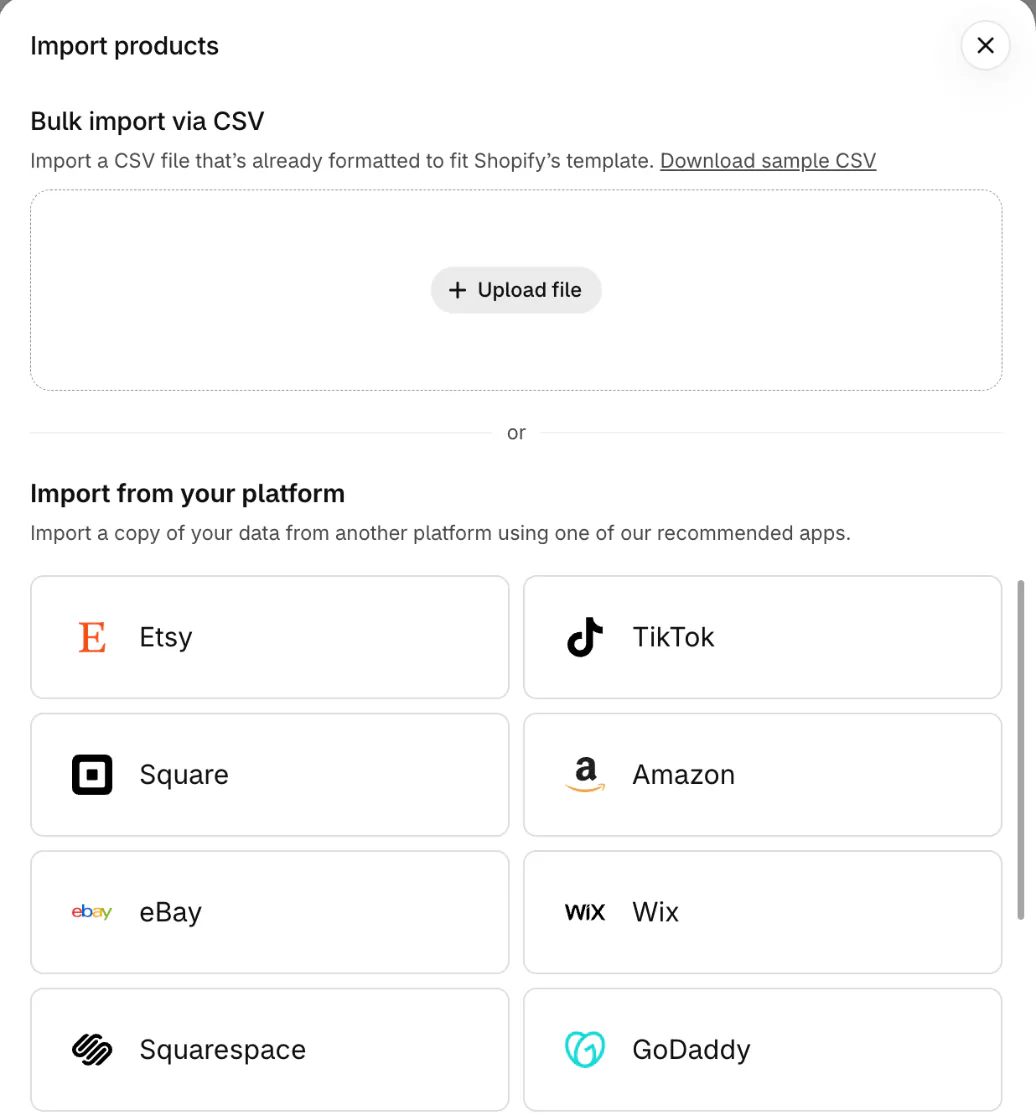
Every old address needs a redirect to its new page, and Shopify allows up to 100,000 of them below Plus. Migrating to Shopify walks through the steps.
Moving from Squarespace or WooCommerce instead? Squarespace to Shopify and WooCommerce to Shopify say what moves from each.
FAQ
Questions, answered
-

14-day free trial
Explore Sledge on your store before you decide to commit.
-

No credit card required
Start improving your store with no upfront commitment.
-

Setup in minutes
Get Sledge running without a lengthy setup process.
-

Built to grow sales
Turn shopper behavior into actions that help you sell more.
Is Webflow cheaper than Shopify?
The entry plans cost the same: Webflow Standard and Shopify Basic are both $29 a month paid yearly. Sales differ. Webflow Standard adds a 2% transaction fee to each sale, $100 on 100 orders of $50, on top of Stripe's or PayPal's fee. Shopify charges none on Shopify Payments sales. Webflow Plus, at $74 a month, drops the fee.
Is Webflow or Shopify better for a small business?
It depends on the job. Webflow fits when your site is your brand and the shop on it is small. Shopify fits when you will add products, take cards in person, or email shoppers who leave a cart. Both start at $29 a month paid yearly, so the plan price will not decide it.
Does Webflow charge transaction fees on ecommerce?
Yes on Standard. Webflow charges 2% of each sale on Standard and 0% on Plus and Advanced, on top of what Stripe or PayPal charge. Shopify adds no transaction fee on Shopify Payments sales, and charges 2% on Basic, 1% on Grow and 0.6% on Advanced when you use another payment provider.
Is Webflow good for ecommerce?
Yes, for a design-led store with a small catalog. Every Webflow ecommerce plan lists a custom cart and checkout, and the plans hold 500, 5,000 or 15,000 ecommerce items. Webflow's pricing page lists no in-person selling and no cart recovery emails, though its app directory lists an app for cart recovery.
Can I use Shopify on a Webflow site?
Yes, for a few products. Shopify's Buy Button channel, included in every plan, puts a product and its checkout on a site built elsewhere, a Webflow page included, and needs a supported payment provider. Adding the button is a step for whoever built the site, and you then pay for a Webflow plan and a Shopify plan.
Can I switch from Webflow to Shopify later?
Yes, with more manual work than from the platforms Shopify lists. Store Migration and Shopify's migration guides don't include Webflow, so you move your product list as a spreadsheet file and bring it in under Products, then Import. The design, pages and blog posts are rebuilt, and each old address needs a redirect. Our migration guide covers the steps.
On Shopify? Find the fixes your store is missing.
Sledge is a Shopify app, so it doesn't run on a Webflow site or change what either platform charges. On a Shopify store it adds search, filters and offers. Try it free for 14 days, then pay from $29.99 a month, never a percentage of your sales. On a paid plan, Growth Intelligence lists fixes and sums them as one dollar total, "Est. potential".