
The Shopify AI store builder turns one line about your business into up to 3 free themes per try. On a store you already have, it runs in the Shopify app or a phone's browser, not on desktop. Sidekick then edits the theme from plain requests. Products, prices, payments and shipping are still yours to set up.
Say you type "linen shirts for hot summers, calm and natural" and get three themes back. You pick one, open your admin and find 0 products and a store behind a password page. The design was the quick part.
What is the Shopify AI store builder?
The AI store builder is Shopify's free theme generator: describe your business in a line, and it designs up to 3 themes you can try.
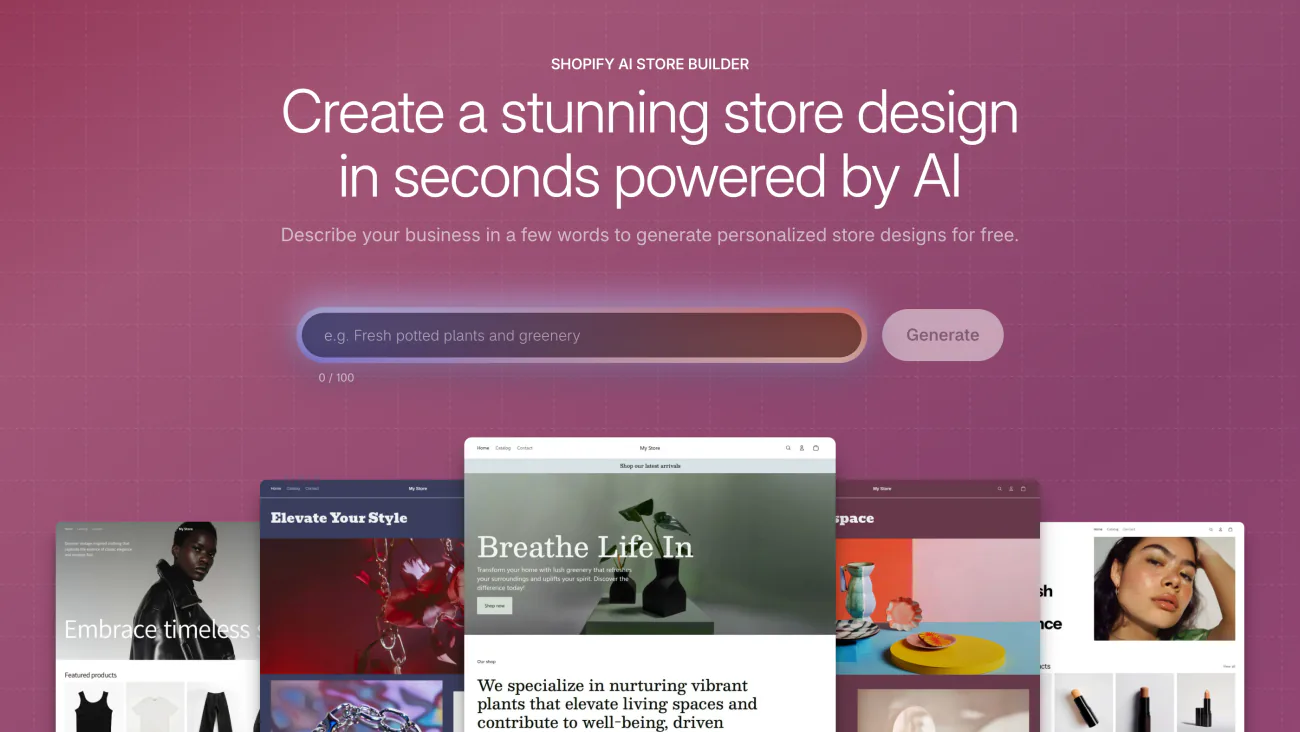
The tool page on shopify.com takes a line of up to 100 characters. On a store you already have, Shopify's Help Center says you can no longer generate a theme from the desktop admin. You use the Shopify app or the admin in a phone's browser instead. Themes you made before stay on the Themes page, and you can still preview and add them from a desktop.
With your storefront set to English, generating works only during the free trial or on the Basic, Grow or Advanced plan. Starter stores get the Spotlight theme and can't generate one. A generated theme counts as one of Shopify's free themes, so Shopify Support helps you customize it.
A theme is the design, not the store. Products, collections, menus and pages live in your admin, so switching themes leaves them untouched. Shopify first released the generator in March 2025, and older guides still send you to the desktop admin.
How do you create a Shopify store using AI?
Start a trial, describe your business in the Shopify app, pick a theme, then fill the store with your own products. These steps follow Shopify's Help Center.
- Start a free trial. In the US it's 3 days free, then $1 a month for 3 months. You can also start from a chat in ChatGPT or Claude.
- In the Shopify app, tap the Menu icon, then Sales channels, Online Store and Manage themes. In a phone's browser, open the Themes page of your admin.
- Find the section called Design your store in seconds. Describe what you sell, who buys it and the look you want, then tap Generate themes, and Shopify designs up to 3 free ones.
- Tap a theme to look at it, then tap Try theme. It lands in Draft themes on your Themes page, hidden from shoppers until you publish it.
- Open the theme editor, ask Sidekick for changes, and save.
- Add your products, prices and photos. Set up payments, shipping and policies, place a test order, then pick a plan, which you need before the store can open. Each plan's price is in our Shopify pricing guide.
The line you type sets the result. "Clean and modern" fits any store, while "linen shirts for hot summers, calm and natural" names a product, a buyer and a mood. Shopify asks for a clear, descriptive business description, and some topics that break its policies can't be used at all.
What can Sidekick change once the theme is built?
Sidekick edits your theme's look, sections and blocks from a plain request in the theme editor, and nothing changes until you save. Ask it to make your store feel more retro, and it adjusts colors, fonts, spacing, shadows and how round the corners are. It can also:
- change the settings of any section or block
- add sections and blocks your theme already includes
- move, hide or remove them
- add color schemes and move where the cart sits
For headings and announcements, the Generate text icon in a text box writes a draft for you. Sidekick can't edit the images inside your theme.
For a block your theme doesn't have, Shopify's Help Center says to select a section, click Add block, then Generate. Describe it in five words or more, look at the preview, and click Keep if it works.
Neither Shopify Support nor your theme's designer will troubleshoot a generated block. Test it on a phone and on a desktop before you keep it.
Check every claim Sidekick writes, too. Shopify's own example is text for a T-shirt that promises "machine-washable" when you never said so. Sidekick comes with your plan. What else it does in your admin is in Shopify AI tools sorted by job.
What is Shopify Canvas, and should you build in it?
Canvas lets Sidekick build a whole theme from your description, but it's in early access, and a theme made there stays there.
Shopify's Canvas pages describe two ways in. Click New on the Themes page and describe your brand in a chat with Sidekick, which builds an unpublished theme that saves as you go. Or pick Duplicate in Canvas, an option in an existing theme's menu. Shopify's Fall '26 Edition says Canvas gets a store from no theme to launch 20% faster. The rest of that Edition is in Shopify Editions.
The catch is what you give up:
- A Canvas theme opens only in Canvas, never in the regular theme editor.
- It gets no theme updates, and you can't download it.
- You can't add or set up app blocks or app embeds there, the pieces that place an app on your pages.
- Canvas works with Shopify's own themes and custom themes, not ones bought from other designers.
A theme copied into Canvas keeps the original's app settings. Shopify's advice is to duplicate the theme, take the apps you don't want off that copy, then pick Duplicate in Canvas on it. If you expect to add apps later, build in the regular theme editor.
Can ChatGPT or Claude build your Shopify store?
Yes. Shopify's own plugin for ChatGPT and connector for Claude create a store from a chat before you sign up, and Shopify says that store currently starts on a 4-month free trial. Gemini, Grok, Perplexity and Microsoft Copilot can do it too. Shopify adds no fee for this, though any subscription the chat app charges is yours to pay.
What you get is an unsaved store with a Canvas theme, behind a password, so no one can buy yet. Products you add are published as you add them, and the store may hold sample content. Until you save it through the link the chat gives you, anyone with its address can view and change it from an AI tool. The link to view the store expires after about 30 minutes.
The 4-month trial starts when you save the store. If it ends before you pick a plan, Shopify pauses the store.
The chat can't change your plan, payments, taxes or domain. After you save the store and connect the chat again, its design edits go to a copy of your theme, never the live one. Shopify calls what it makes "a starting point rather than a finished store". Selling to shoppers inside a chat is a different job, covered in AI shopping assistants.
What does AI leave for you to set up?
AI leaves you the setup that lets the store take an order, from products and payments to shipping and a plan. A store can look finished and still sell nothing, with empty collections and no contact page. Before you open, work through this list in your admin:
- Product names, descriptions and prices, checked for anything AI wrote.
- Your own photos. Tinker, Shopify's free phone app, has more than 100 AI tools for images, videos and brand assets.
- Store policies. Sidekick can fill in a policy template, but not your privacy policy.
- What you charge to ship, with the steps in Shopify shipping rates.
- Payments with test mode off. Shopify Payments covers fees and payouts.
- A business address and your domain.
- Search titles and descriptions for your pages. Shopify meta descriptions shows what to write.
- A test order, then a plan. Without a plan the store stays in private mode, hidden from search engines, as our Shopify SEO checklist explains.
AI store builder apps in the Shopify App Store do other jobs: a stocked dropshipping store, AI pages inside a page builder, or edits from a chat. Before you install one, check its price, its recent reviews and whether its pages stay if you remove it.
FAQ
Questions, answered
-

14-day free trial
Explore Sledge on your store before you decide to commit.
-

No credit card required
Start improving your store with no upfront commitment.
-

Setup in minutes
Get Sledge running without a lengthy setup process.
-

Built to grow sales
Turn shopper behavior into actions that help you sell more.
Does Shopify have an AI website builder?
Yes. Shopify's AI store builder designs up to 3 free themes from a short description of your business. On a store you already have, it runs in the Shopify app or the admin in a phone's browser, not on desktop. You need the free trial or the Basic, Grow or Advanced plan. Sidekick then edits the theme you pick.
Is the Shopify AI store builder free?
Generating themes costs nothing extra, and Sidekick comes with your Shopify plan. You do need the free trial or a plan that includes it: in the US, Basic is $39 a month, or $29 a month paid yearly, after 3 free days and 3 months at $1. Shopify's Help Center says Starter stores can't generate a theme.
Why can't I find Shopify's AI theme generator on desktop?
Shopify moved it. Its Help Center says you can no longer generate a theme from the desktop admin. In the Shopify app, tap the Menu icon, then Sales channels, Online Store and Manage themes, or open the Themes page in a phone's browser. Themes you generated before still sit on the Themes page, and you can preview and add them from a desktop.
Is Shopify Magic Shopify's AI store builder?
No. Shopify Magic was the old name for Shopify's built-in AI tools, which now sit inside Sidekick. The store builder is the theme generator on the Themes page, and Sidekick is what edits that theme afterwards, from the theme editor. For Shopify's other AI tools, see Shopify AI tools sorted by job.
Can ChatGPT build a Shopify store for you?
Yes. Shopify's plugin for ChatGPT and its connector for Claude can create a store from a chat before you sign up, and Shopify says such a store currently starts on a 4-month free trial. It opens with a Canvas theme, behind a password, and may hold sample content. Payments, taxes and your domain still get set in your admin.
Will an AI-built store look like everyone else's?
It can, if the prompt is vague. Shopify asks for a clear, descriptive business description, so name what you sell, who buys it and the look you want. Then swap in your own photos, write your own headlines and add your own policies. Those are the parts no other store has.
Your AI-built store is live. Do shoppers find what they came for?
Sledge doesn't design themes or write your store for you. Once your theme is live, it adds search, filters, bundles and a cart drawer. You can try Sledge free for 14 days. Growth Intelligence turns on when you pick a paid plan: it reads your store's searches and orders, and its suggested fixes add up to one dollar figure, labeled Est. potential.

