To migrate from WooCommerce to Shopify, export your products and customers as files and upload them to Shopify's free Store Migration app, which adds the products as drafts. A product with four or more attributes arrives without variants. Orders, reviews, blog posts, coupons and subscriptions need other apps, your own hands or Shopify Support.
Say you export 300 products from WooCommerce and open the file. A shirt in three sizes takes four rows, and one lists every size in one cell. Its category sits in a column Shopify has no name for. You can upload the file as it is to Shopify's Store Migration app, or reshape it for Shopify's own import.
What moves from WooCommerce to Shopify, and what stays behind?
Products and customers move by file, and everything else needs an app, a Shopify Partner or your own hands.
| In WooCommerce | In Shopify | How it gets there |
|---|---|---|
| Products and variations | Products, up to three options each | Store Migration, which adds drafts, or Shopify's own import |
| Categories | Tags, then collections you build from them | By hand |
| Customers | Customers, without their passwords | A file, imported under Customers |
| Orders | Orders | A migration app that connects to your store |
| Reviews | Reviews | A review app that imports them |
| Coupons | Discount codes | Recreated by hand or with an app |
| WordPress posts and pages | A blog and pages | By hand or with an app |
| Subscriptions | Subscription contracts | Shopify Support, a second payment gateway or Shopify Professional Services |
| Plugins and theme | Apps and a theme | Rebuilt |
From Shopify's Help Center guide to migrating from WooCommerce, read November 23, 2026.
Shopify's post on the Store Migration app adds that the app handles no redirects, collections or menus.
Which way should you migrate from WooCommerce to Shopify?
Use Shopify's free Store Migration app for products and customers, reshape the files yourself for more control, or add a paid app or a Shopify Partner for the rest.
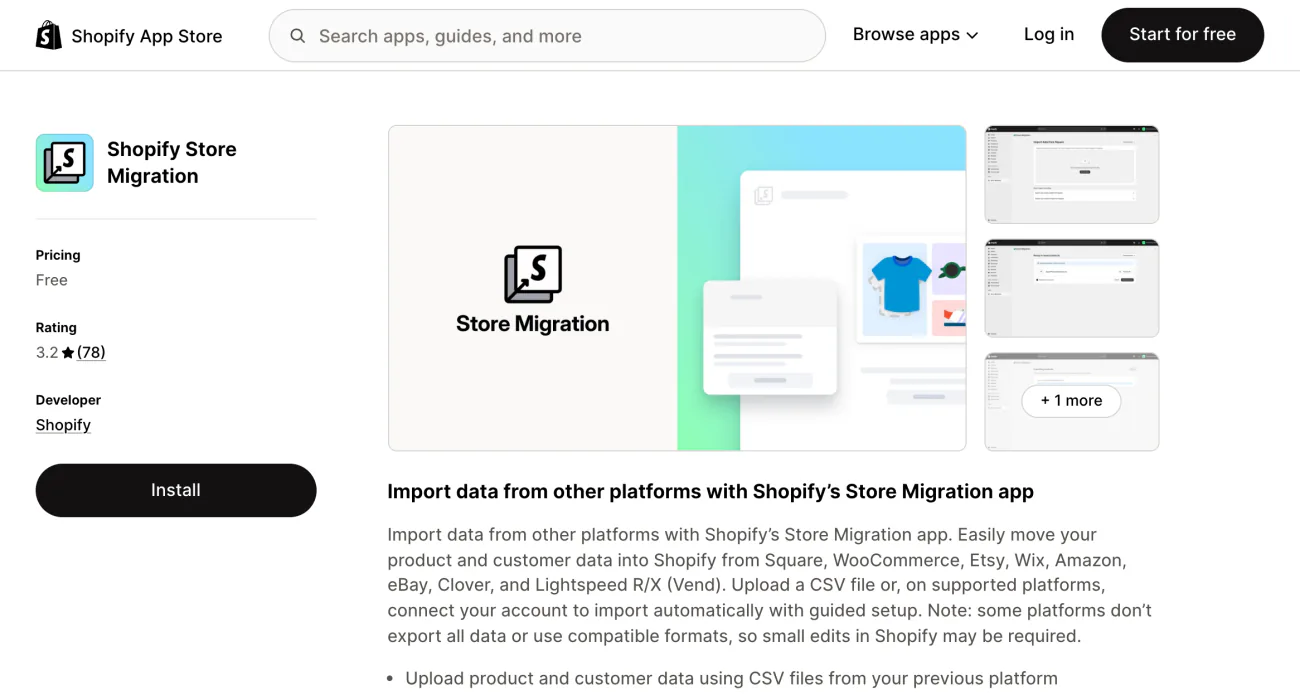
- The free app. Store Migration takes each file as WooCommerce exports it and adds the products as drafts.
- Shopify's own import. It takes a file you've edited to Shopify's layout, which the next two sections cover.
- A migration app. One that connects to your store is the route to orders. Under Products, then Import, the "Import from your platform" section lists WooCommerce and hands the job to a recommended app.
- A Shopify Partner. How to hire a Shopify expert covers when it pays.
Move products first, then customers, then orders. How to migrate to Shopify has the full order of work, the launch checklist and how Google treats a site move.
How do you export your products from WooCommerce?
WooCommerce has a built-in product export under Products, All Products, Export. WooCommerce's own guide has you pick the columns, product types and categories, all chosen by default. Tick "Yes, export all custom meta", the extra details your other plugins saved on each product, only if you need them. Then click "Generate CSV", the button that downloads your products as a spreadsheet file.
Back up the old store before you close it. Keep it online until Shopify has pulled in your pictures, because it downloads each one from the links in the file.
The file also lists grouped products, links to products sold elsewhere, upsells, cross-sells and download files, and Shopify's guide maps no column for them. Shopify's free Digital Products app delivers download files.
How do you convert WooCommerce variable products for Shopify?
WooCommerce attributes become Shopify options, and a product can have at most three. Attributes are the sizes, colors and other choices a variable product offers.
WooCommerce writes a variable product as one parent row plus one row per variation, with every value of an attribute in one cell, such as "Blue, Red, Green". Shopify wants one value per row. A shirt in three sizes becomes three rows, one size each, that repeat the product's URL handle, the last part of its web address.
The free app takes the file as it is and adds each product as a draft, which the bulk editor sets to Active in one pass. A product with four or more attributes arrives without variants, so you add them by hand or with an app, and Shopify variants covers going past three options. To edit the file yourself, map each column as in the table below.
| In your WooCommerce file | In Shopify's file | What you do |
|---|---|---|
| Attribute names and values | Option names and values | One value per row, three options at most |
| Categories | Tags | Put the category names in the tag column |
| Regular price and Sale price | Price and Compare-at price | A sale that is on goes in Price, the regular price in Compare-at price |
| Weight | Weight, in grams | Multiply kilograms by 1,000, pounds by 453.6 and ounces by 28.35 |
| Images | Product image URL | One link per row, not a comma-separated cell |
| Stock | Inventory quantity | Copy it across |
Delete every column the table above doesn't mention, as Shopify's guide says. WooCommerce exports a sale price even when the sale starts next month, and Shopify doesn't import sale dates. Read the two sale-date columns first, and use a sale price only for a sale that has started and not ended.
Upload the edited file under Products, then Import, then "Add files". How to import products to Shopify covers the 15 MB limit, what a blank cell erases and missing pictures.
How do you move WooCommerce customers to Shopify?
Export a full customer file with a plugin, since WooCommerce's own download has no street addresses, then import it under Customers. In WooCommerce, Customers, then Download, saves names, emails, orders and spend. The example in Shopify's guide is a paid plugin.
The Store Migration app takes the plugin's file as it is. Shopify's own import under Customers needs a file that matches its headings exactly, and it has no mapping step. State and country need their standard short codes. Passwords can't move. With Shopify's customer accounts, customers sign in with their email and a one-time code, and otherwise you invite each one to set a password.
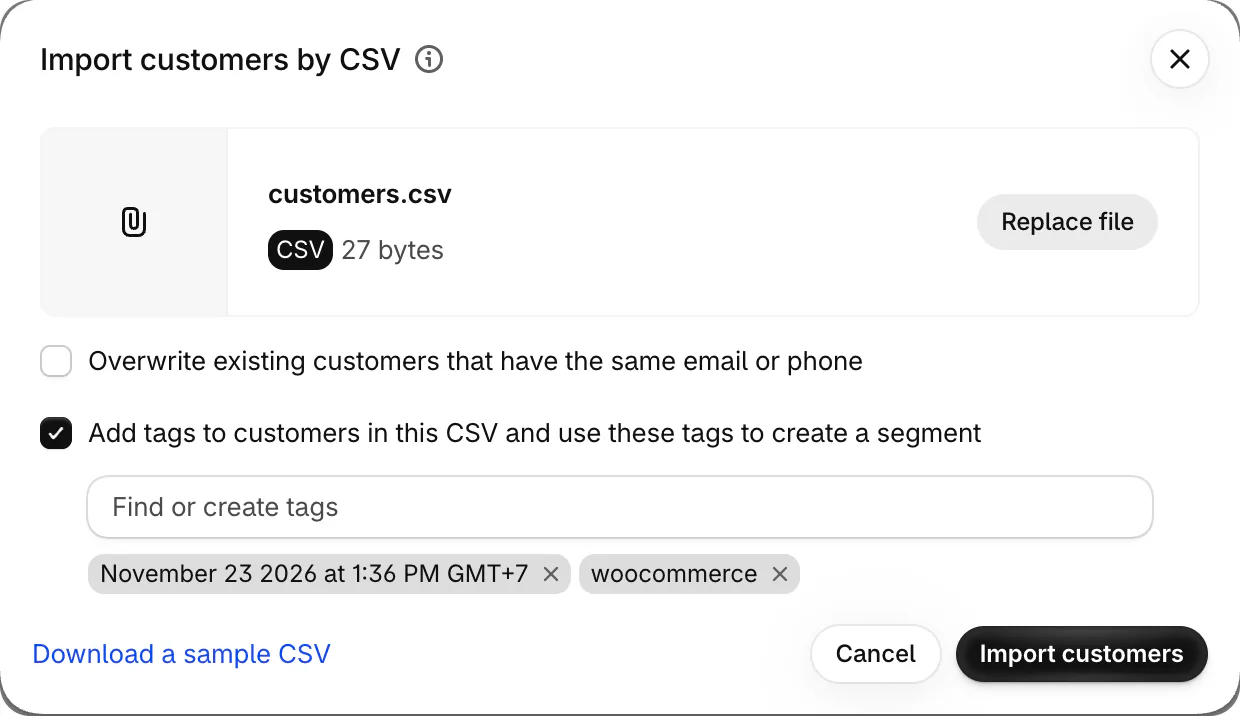
Go to Customers, click Import and add the edited file in the "Import customers by CSV" window. Tick "Add tags to customers in this CSV and use these tags to create a segment", Shopify's option that tags everyone in the file and builds a group from that tag. Then type your tag, such as woocommerce, in the "Find or create tags" box. Leave "Overwrite existing customers that have the same email or phone" unticked unless the file should replace what a customer already has. How to import customers to Shopify covers the file in full.
How do you move WooCommerce orders and reviews?
Neither moves through Shopify's own import: orders need an app that connects to your store, and reviews need a review app. Shopify can't import orders from a file, and reviews aren't in WooCommerce's product export.
Shopify's guide names three apps for orders. They are listed here in its order, with what each app's listing said about price on November 23, 2026.
| App | What its listing says it moves | What its listing says about price |
|---|---|---|
| LitExtension Store Migration | Products, customers, orders, categories, reviews and coupons | Free to install, with a free demo of 20 products, 20 orders and 20 customers, then priced by what you migrate. Billed in USD |
| Matrixify | Orders, pages, blogs and redirects, and a WooCommerce migration | A free Demo plan of 10 items per file, then monthly plans |
| Ablestar WooCommerce Importer | Products, orders, customers and reviews, with URL redirects | First 20 products free, more from $4.99. Orders and customers from $9.99. Billed in USD |
Import products and customers first, so each order finds both. Shopify's guide names Judge.me and Ablestar WooCommerce Importer for reviews. If your reviews already live in Judge.me, ask Judge.me support to export them, because its own article of March 23, 2026 says its WooCommerce app is retired. Imported reviews won't be verified.
Prices change, so open an app's own page before you pay. Review apps for Shopify, compared lists the free plans.
What happens to WooCommerce Subscriptions?
Subscriptions don't move with products and customers, and the hard part is each subscriber's saved card. WooCommerce Subscriptions is a paid WooCommerce extension.
On Shopify, use Shopify's free Subscriptions app or pick another subscription app. For saved cards, Shopify's Help Center points to two routes. One is a second payment gateway that moves each card as its owner updates it, which can take months or even years. The other is Shopify Professional Services, a paid service, and moving card numbers that way needs Plus or Enterprise.
The cost is time and money. You may run two payment gateways side by side for months, and on a plan other than Plus or Enterprise the second one stays on until the last card has moved. Shopify's file import for contracts names apps from its own App Store as the source, so recreating the contracts is a job for you or your subscription app's maker. Contact Shopify Support before you launch.
What do you rebuild by hand after the import?
Coupons, categories, blog posts, pages and plugins don't come over, so rebuild them before you switch the domain.
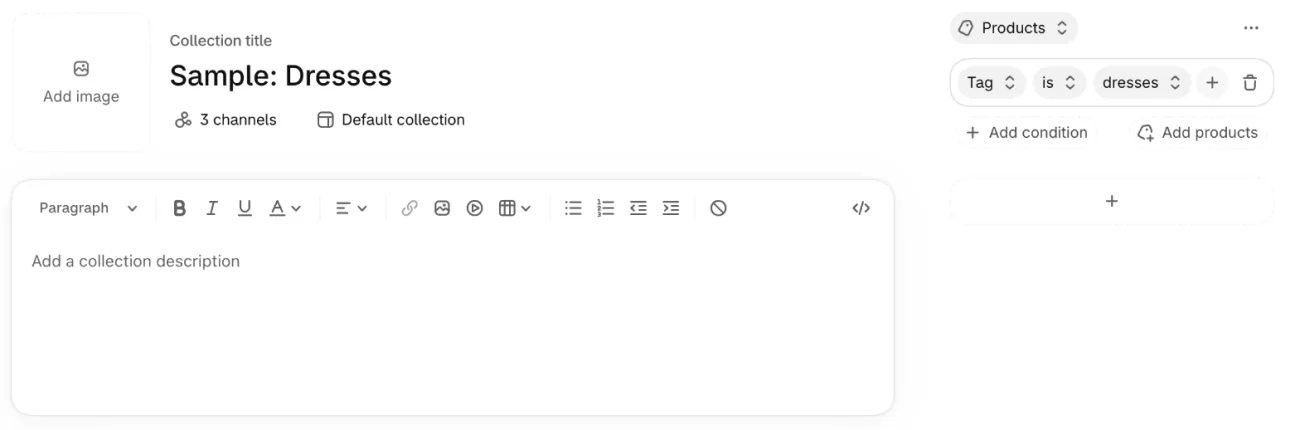
Categories come first. Shopify has no matching column, so its guide has you put each category name in the Tags column. Then open Products, then Collections, click "Add collection", name it, click "Add condition", choose "Tag", leave the middle box on "is" and pick the category's tag. Shopify lists only tags your products already carry, so import the products before you build the collection.
- Coupons. You recreate each one as a discount code, and how to create a discount code on Shopify shows how.
- WordPress posts and pages. Add a blog and pages in Shopify, or use an app such as Matrixify, as Shopify's guide suggests.
- Plugins. They stay behind. Shopify's post on the Store Migration app has you list your apps and confirm a Shopify equivalent for each before you go live.
A plugin that added search, filters, bundles or upsells needs a Shopify replacement too. Sledge is a Shopify app for search, filters, bundles and upsells, and it starts once your products are in Shopify. After the import, your attributes are options and, if you put your categories in the Tags column, your categories are tags. In Sledge's filters, "Add filter item" has a Source box that lists Collection, Tags and each product option, such as Options Size. In Field Priority, part of Sledge's search, you choose which product details search reads, and Tags is one of them. Tags is off by default, so switch it on to let search read your categories.
How do you keep your old WooCommerce links working?
Each old address needs a URL redirect to its new page, and WooCommerce's default addresses differ from Shopify's.
| Old WooCommerce address, by default | Shopify address |
|---|---|
| yourstore.com/product/name | /products/name |
| yourstore.com/product-category/name | /collections/name |
| A page | /pages/name |
Open WordPress, then Settings, then Permalinks, to see your own patterns, since you can change them. WooCommerce's export has no address column, so list your old addresses from your sitemap, your analytics or Google Search Console.
A Shopify redirect works only on an old address that shows Page not found. Shopify's list of addresses it won't redirect includes any that start with /shop, so check your shop page and every product address that starts with /shop. Disconnect the domain from the old platform before you connect it to Shopify, or you might hit certificate errors. Keep the store password on while you test.
The redirect steps and Google's wording on site moves are in how to migrate to Shopify and Shopify URL redirects.
FAQ
Questions, answered
-

14-day free trial
Explore Sledge on your store before you decide to commit.
-

No credit card required
Start improving your store with no upfront commitment.
-

Setup in minutes
Get Sledge running without a lengthy setup process.
-

Built to grow sales
Turn shopper behavior into actions that help you sell more.
Do WooCommerce variations transfer to Shopify?
Yes, up to a point. WooCommerce exports a variable product as one parent row plus a row for each variation, and Shopify allows three options per product. Shopify's Store Migration app imports a product with four or more attributes without its variants, so you add them by hand afterwards or use an app.
Can you export customers from WooCommerce without a plugin?
Only part of each customer's details. WooCommerce > Customers has a Download button that exports a file of names, emails, orders and spend, but Shopify's guide says it holds no street addresses. For full addresses the guide uses a paid export plugin. Shopify's customer file must then match its own column headings exactly.
Do WooCommerce orders and reviews move to Shopify?
Not through Shopify's own import. Shopify can't import orders from a spreadsheet file, and reviews aren't in WooCommerce's product export, so both need an app. Shopify's guide names LitExtension, Matrixify and Ablestar WooCommerce Importer for orders, and Judge.me and Ablestar for reviews. Import products and customers first, so each order finds its product and customer.
What happens to WooCommerce Subscriptions when you move?
They don't come over with products and customers. For subscribers' saved payment methods, Shopify's Help Center points to two routes: a second payment gateway that moves each card as its owner updates it, which can take months or years, or Shopify Professional Services. You or your subscription app's maker then recreate the contracts.
Will my WooCommerce links still work on Shopify?
Not by themselves. WooCommerce product addresses read /product/ by default and category addresses /product-category/, while Shopify's read /products/ and /collections/, so each old address needs a URL redirect to its new page. Shopify can't redirect an address that starts with /shop, so check yours. Our URL redirects guide has the steps.
Does Sledge migrate a WooCommerce store?
No. Sledge is a Shopify app for search, filters, bundles and upsells, and it moves no products, customers, orders, reviews or addresses. Once your catalog is in Shopify, its filters can read your collections, tags and options, and its search can read your tags. Plans start at $29.99 a month after a 14-day free trial.
Your plugins stayed on WooCommerce. What replaces them?
Sledge doesn't run on WooCommerce, and it moves no products, customers, orders or reviews. On Shopify, it adds search, filters, bundles and upsells to the store you rebuilt. Try it free for 14 days, then plans start at $29.99 a month with no cut of your sales. Growth Intelligence turns on when you pick a paid plan, and its suggested fixes add up to one dollar figure, labeled Est. potential.