
A receipt template records that you were paid: your store's details, a receipt number, the date, what was bought, the amount and how it was paid. Copy the sales, cash or payment receipt below and swap each bracket for your own details. For online orders, Shopify already sends one, the Order confirmation, by email or text.
A buyer at your Saturday market stall pays $44.52 in cash and wants a receipt for work. That week, a gift shop sends $500 toward a wholesale order by bank transfer and wants proof it arrived. Neither sale went through your checkout, so Shopify sent no receipt for either.
Sales receipt template
Use this one for goods paid in full, online or in person. Swap each highlighted bracket for your own details and cut any line that doesn't fit. The figures are made up.
Sales receipt
Receipt number: [R-0318]. Date paid: [November 13, 2026].
Order number: [#1318, if the sale is also a Shopify order].
Sold by. [Store name], [address], [email]. [Sales tax or VAT number, if you have one.]
Sold to. [Buyer's name or business], [email].
| Item | Qty | Price | Amount |
|---|---|---|---|
| [Soy candle, cedar] | [2] | [$24.00] | [$48.00] |
| [Ceramic mug, sand] | [1] | [$32.00] | [$32.00] |
Subtotal [$80.00]. Shipping [$6.00]. Sales tax at [7%] on the items [$5.60].
Total paid [$91.60] by [card ending in 4242] on [November 13, 2026]. Balance [$0.00].
Returns. [Unused items within 30 days, with this receipt.]
Questions. Email [address]. Thanks for shopping with us.
Template written for this page in November 2026. Shopify steps checked in its Help Center on November 13, 2026.
Cash receipt template
For cash you take without ringing the sale up in Shopify POS. Give the buyer one copy and keep the other.
Cash receipt
Receipt number: [C-0047]. Date: [November 14, 2026].
Received from: [the buyer's name, if they want it on the receipt].
| Item | Amount |
|---|---|
| [Linen tote, natural] | [$28.00] |
| [Beeswax candle] | [$14.00] |
Subtotal [$42.00]. Sales tax at [6%] [$2.52]. Total [$44.52].
Cash received [$50.00]. Change given [$5.48].
Received by: [your name]. Signature: [sign here].
[Store name], [phone or email].
Payment receipt template for a transfer or deposit
For money that reaches you outside your checkout: a bank transfer, a check, or a deposit on a custom order.
Payment receipt
Receipt number: [P-0112]. Date received: [November 13, 2026].
Received from: [Company or customer name].
For: [Order #1042, 50 bags of house blend coffee].
Amount received: [$500.00] by [bank transfer], reference [88213].
Order total [$1,250.00]. Paid before today [$0.00]. Paid today [$500.00]. Balance due [$750.00] by [December 13, 2026].
[For a deposit: what happens to it if the order is canceled.]
Received by: [your name], [store name], [email].
These apply to all three receipts:
- Number every receipt and never reuse a number. When the sale is also a Shopify order, add the order number so you can find it later.
- On a card payment, show the last four digits at most. US law lets a machine-printed card receipt show no more than the last five digits, and never the expiry date.
- Charge sales tax, VAT or GST? Print your registration number and list the tax apart from the prices. Ask your accountant what else applies where you sell.
What should a receipt include?
A receipt names who was paid and carries a receipt number, the date, what was bought, the amount and the payment method. For a part payment, add what is still owed.
A receipt confirms that money arrived, while an invoice asks for it. In UK guidance, an invoice "is not the same as a receipt, which is an acknowledgement of payment". For a bill to send before payment, use the invoice template.
In the UK, if you're VAT-registered and sell retail, you needn't give a VAT invoice unless the customer asks for one. For £250 or less, a simplified one will do: your name, address and VAT number, the date of supply, what was sold, the total including VAT and the VAT rate.
Keep your copy of each receipt. The IRS names receipt books and cash register tapes among the documents behind your gross receipts. A paper receipt book takes the same lines as the templates above, ending with your signature.
What receipts does Shopify already send?
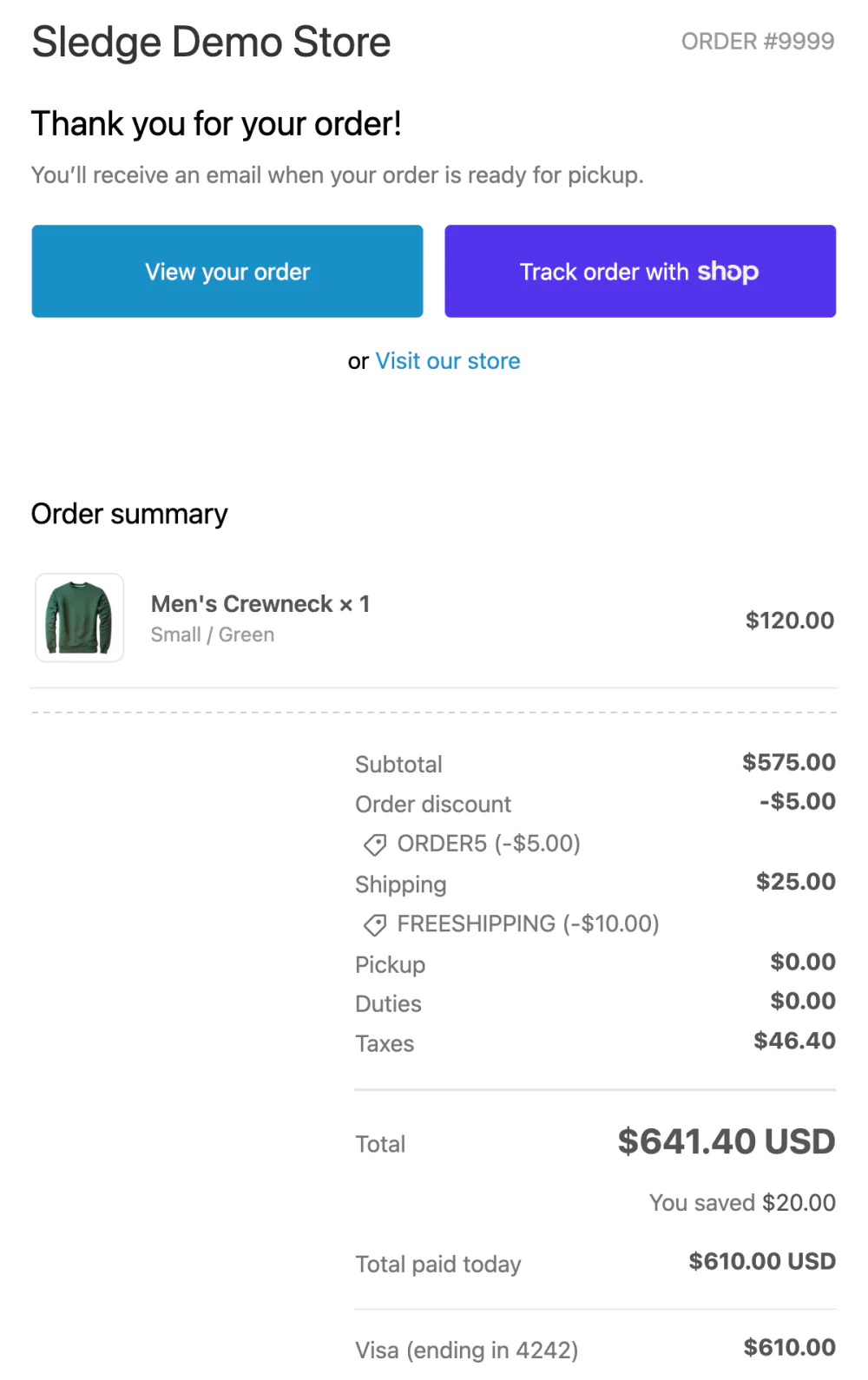
Every online order gets an Order confirmation from Shopify, and no setting in your admin turns it off. It goes by email, or by text when the buyer gave only a phone number. Its row sits in the "Order processing" group, under Settings, then Notifications, then Customer notifications.
The email never uses the word "receipt". It still lists each item, the total and how the buyer paid, so it does a receipt's job.
The "Customize email templates" button on that page adds your logo and accent color to it, and to Shopify's other emails. Changing its words takes code, and the post-purchase email flow explains what that involves.
A buyer lost theirs? Open the order and find the confirmation in the "Timeline", the order's log of events. Click "Resend email" under it, then send it to the customer again or a copy to yourself.
Selling in person with Shopify POS? After each payment, the app offers to print, email or text the receipt, or to print a gift receipt that leaves out the amount paid. To change the logo or the header and footer text of a printed receipt, go to Point of Sale, then Settings, then "Printed receipts", with no code. A printed POS receipt shows its own receipt number, which starts with the register's number, rather than the order number.
How do you give a receipt for a sale Shopify didn't take?
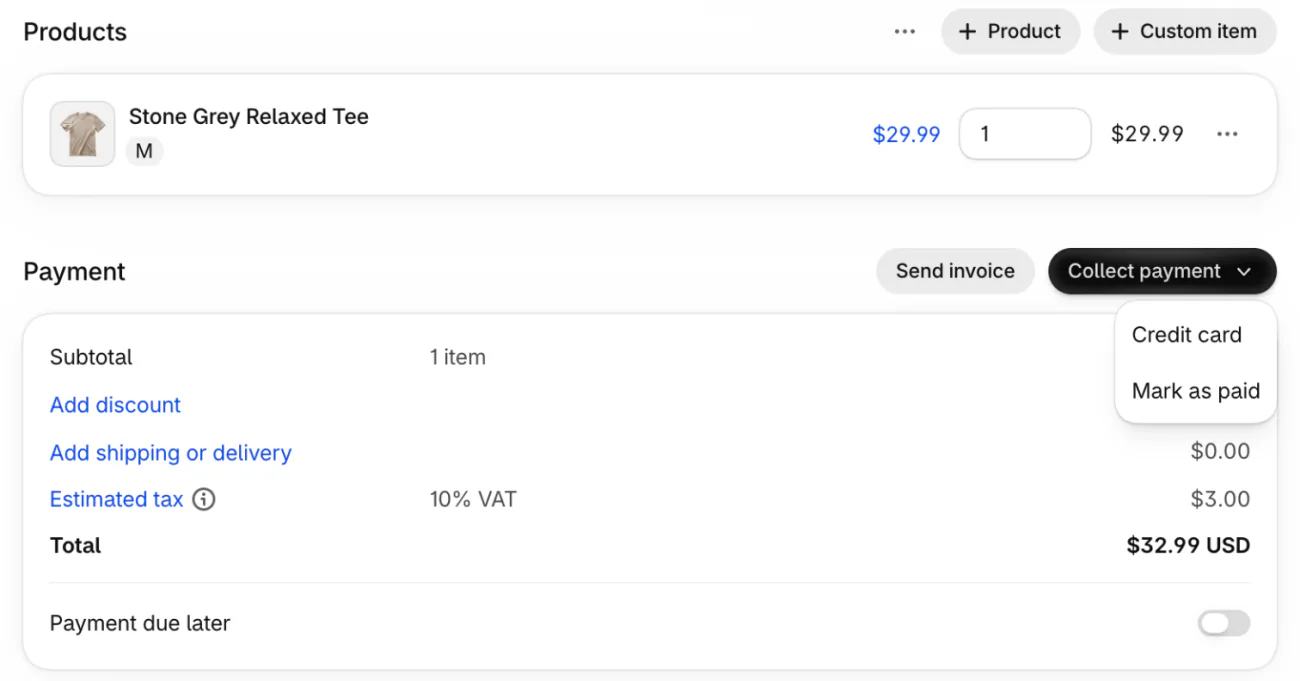
Record the sale as a draft order and mark it paid, and Shopify emails the customer an order confirmation.
Go to Drafts under Orders and click Create order. Add what they bought and the customer, with their email. In the Payment card, click "Collect payment", then "Mark as paid", Shopify's option for money you already have. Check the amount received, then click Create order.
The sale then sits in your orders like any other. If you'd rather not record the sale in Shopify, fill in the cash or payment receipt above and keep your copy for your books.
Can you print a receipt from Shopify?
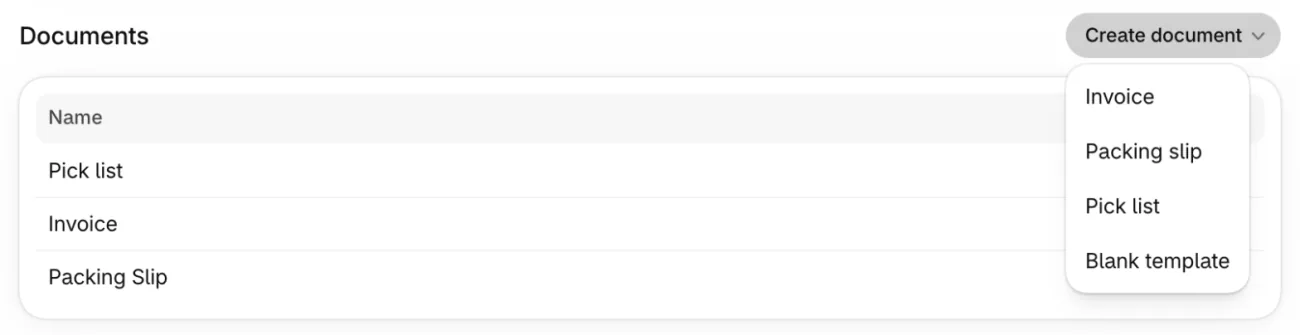
Shopify's print templates have no Receipt type: they come as Invoice, Packing slip, Pick list or Blank template. They sit under "Documents" in Settings, then Shipping and delivery. Shopify is adding that section to stores gradually, so yours may not have it yet.
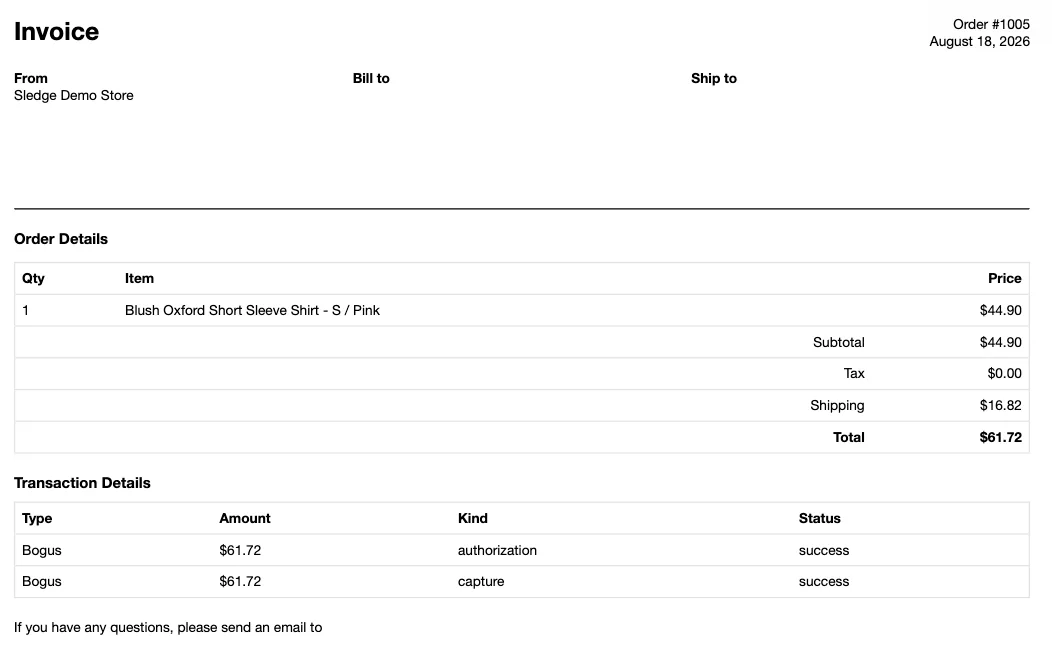
Shopify calls its invoice "a record of what your customer ordered and paid", so a paid order's invoice is the one to print. On the order page, the More actions menu holds "Print multiple documents": pick the invoice there and save the print as a PDF to email.
Before you send it, open the Invoice row under Documents, click Preview and pick a paid order. Check for a line that shows the payment. On a paid test order, the totals said nothing about payment. Below them, the "Transaction Details" table, the order's payment record, listed the payment twice, as the hold and then the charge, each marked success. If yours shows no payment, send the sales receipt above instead, or write the payment date and method on a printed copy.
A layout of your own titled Receipt means building it from the blank template, in code. Shopify's advice for complex changes is to hire a designer: paid work, and one more layout to recheck while the feature is still rolling out.
FAQ
Questions, answered
-

14-day free trial
Explore Sledge on your store before you decide to commit.
-

No credit card required
Start improving your store with no upfront commitment.
-

Setup in minutes
Get Sledge running without a lengthy setup process.
-

Built to grow sales
Turn shopper behavior into actions that help you sell more.
What is the difference between a receipt and an invoice?
An invoice asks to be paid, often by a due date. A receipt confirms the money arrived: the amount, the date and how it was paid. On Shopify, the Send invoice button on a draft order sends the buyer a payment link, and the Order confirmation they get once they pay works as their receipt.
Does Shopify send receipts automatically?
Yes, for online orders. Shopify sends an Order confirmation for each one, by email, or by text to a buyer who gave only a phone number. No setting in your admin turns it off. Shopify POS offers to print, email or text a receipt after each in-person sale. A sale outside both gets no receipt until you record it as a draft order marked paid, or send one yourself.
How do I resend a receipt on Shopify?
Open the order in your Shopify admin. In the Timeline, find the confirmation email and click Resend email. Shopify asks whether to send it to the customer again or send a copy to you; pick one and click Send. For an in-person sale, reprint the receipt from the order in the Shopify POS app.
Is there a free receipt template for Google Docs or Word?
Paste any receipt on this page into a new Google Doc or Word document, then replace each bracket. Save it once as your own template, then make a copy for each sale so every receipt keeps its own number. Print it, or export it as a PDF to email.
What should a cash receipt include?
A receipt number, the date, your store's name and contact details, every item and its price, any sales tax, the total, the cash received and the change given, plus your signature. Add the buyer's name if they ask for it. Keep your copy, since the IRS lists receipt books among the documents for your business income.
Each receipt means a shopper paid. Where do the rest leave?
Sledge doesn't make, print or send receipts. It's a Shopify app for search, filters, bundles and a cart drawer, which shoppers use before they pay. Try it free for 14 days. Growth Intelligence turns on when you pick a paid plan. It finds where shoppers leave without buying, and its suggested fixes add up to one dollar figure, labeled Est. potential.

