
A packing slip template lists what is in one box: the order number and date, the ship-to address, and each item with its size or color, SKU and quantity, usually without prices. Fill in the one below for any store. On Shopify, each order already prints a slip: open it and click Print packing slips.
An order for two speckled mugs went out with one. The slip said 2, in the same small type as every other number on the page.
Packing slip template to fill in
Copy it into Word, Google Docs or a spreadsheet, then type over each highlighted bracket. Cut the lines you won't use. The items are an example.
Packing slip
[Your store name], [return address], [support email]
Order [#1042]. Order date [November 13, 2026]. Shipped [November 14, 2026].
Ship to. [Customer name], [street, city, state, ZIP, country].
Shipping. [Standard shipping]. Tracking [number, if you have it].
| Item | Size or color | SKU | Ordered | In this box |
|---|---|---|---|---|
| [Speckled mug] | [White, 12 oz] | [MUG-WHT-12] | [2] | [2] |
| [Soy candle] | [Cedar, 8 oz] | [CND-CED-08] | [1] | [1] |
| [Linen tea towel] | [Sage] | [TWL-SAG] | [1] | [0, ships separately] |
Box [1] of [2].
Note. [Gift message, or the name to engrave, copied from the order.]
Returns. [Something not right? Start a return at your returns page within 30 days of delivery, and keep this slip.]
Questions? Reply to your order email or write to [support email]. Enjoy your order.
A layout made for this page in November 2026. The Shopify steps below match Shopify's Help Center as of November 13, 2026.
- Leave prices off. A slip can reach someone who didn't pay, such as a gift recipient.
- In your own copy, bold any quantity above 1. A second mug looks just like the first, so it's the easiest one to leave out.
- Use one slip per box. On a split order, list only what's in that box and write "Box 1 of 2". Shopify can print a separate slip for each shipment.
- Keep the returns line. A parcel that comes back with its slip names its own order, so you aren't left guessing whose it is.
What is a packing slip, and what goes on one?
A packing slip lists what's in one box, so the packer can check the box and the customer can check the order. Shopify's own slip prints the order number and date, the shipping and billing addresses, and each item with its photo, size or color and quantity, plus its SKU when the item has one.
Four other papers can travel with an order.
| Paper | What it says | Where it goes | Prices |
|---|---|---|---|
| Packing slip | What's in this box | Inside the parcel | Usually none |
| Invoice | What's owed or paid | To whoever pays | Yes |
| Receipt | That the payment arrived | To whoever paid | Yes |
| Shipping label | Where the box goes | On the outside | No |
| Customs form | What's inside, for border checks | On the outside, abroad only | The total value |
When you ship abroad, the value goes on the customs form, not the slip. The total value on Shopify's form covers every item in the parcel, and each of its pages goes on the outside of the box.
How do you print packing slips on Shopify?
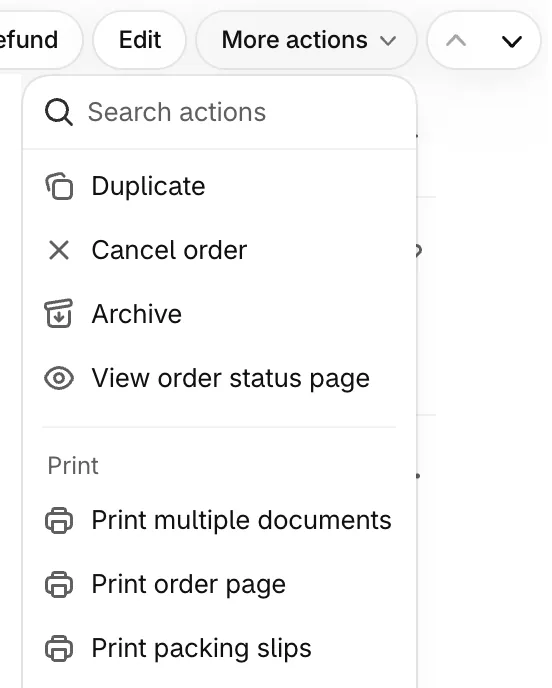
Open the order and click Print packing slips. It sits under More actions, or under a Print button on stores without Shopify's newer Documents section.
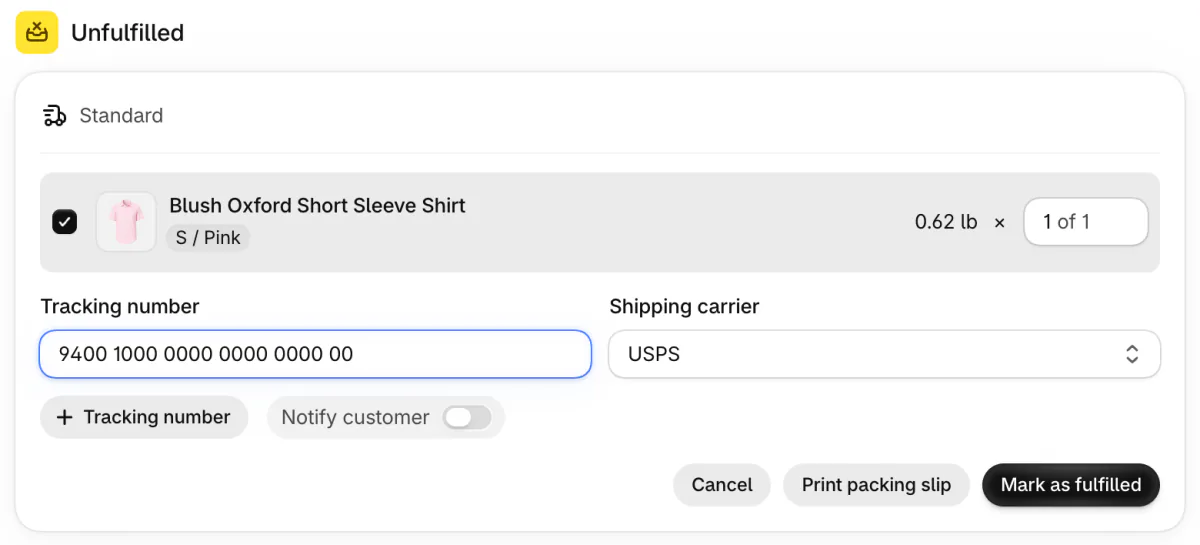
Packing as you go? Click Mark as fulfilled on the order's Unfulfilled card, and Print packing slip shows up beside the button that finishes the fulfillment.
For a day's orders, go to Orders, tick them, click Print, then Print packing slips. If you ship from more than one location, pick the one these orders leave from and click Continue. On the Shopify app for iPhone or Android, press and hold any order, tick the ones you're packing and tap Print packing slips.
Can a Shopify packing slip print on a 4 x 6 label?
Yes, on stores with the Documents section: set the paper size to Thermal, Shopify's 4 x 6 inch size for label printers. Shopify is rolling the section out gradually, so it may not show in your admin yet. Without it, the slip can still print at that size alongside a shipping label bought in Shopify.
To print the slip at that size, open the order, click More actions and pick Print multiple documents. In the Print documents window, switch on Packing Slip, set Paper size to "4 × 6 (Thermal)" and click Continue to print. That one menu sets the size for every document in the print. Then pick 4 x 6 paper in your printer's own window as well.
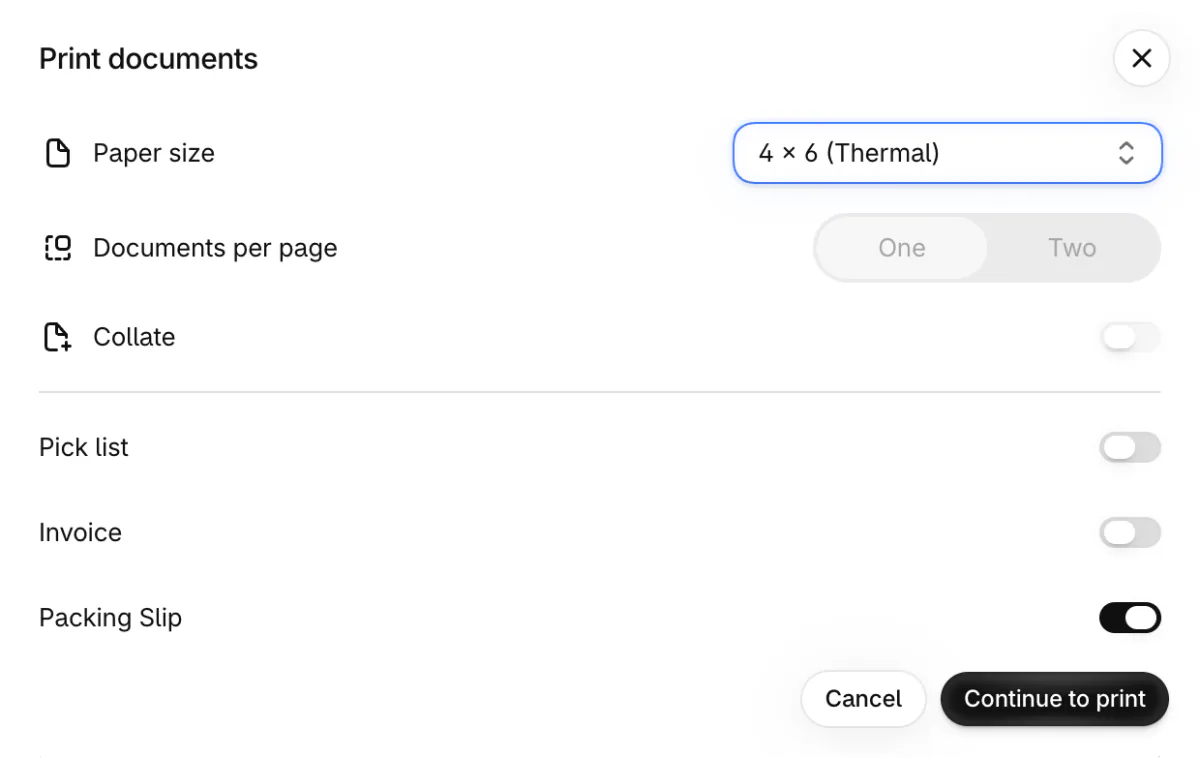
For a day's orders on a label printer, tick them on the Orders page, click Print, then Print multiple documents, and set the paper size to Thermal there too. Allow pop-ups for your Shopify admin before you print, because the documents open in a new browser tab. With pop-ups blocked, nothing prints.
Bought the shipping label in Shopify? On the Shipping labels page under Orders, the Print documents button prints the slip along with the label, resized to fit the paper you pick, Thermal included. Without either route, fitting the slip to a 4 x 6 label means paying a developer to rework it. If you're still choosing a printer, here is what a 4 x 6 label printer costs.
Where is Shopify's packing slip template, and can you change it?
It's in Settings, then Shipping and delivery, and every change to what it prints is a developer's job. Click Packing slip template there. On stores with the newer Documents section, which lists your templates instead, click the Packing Slip row, and Preview fills it in with one of your orders.
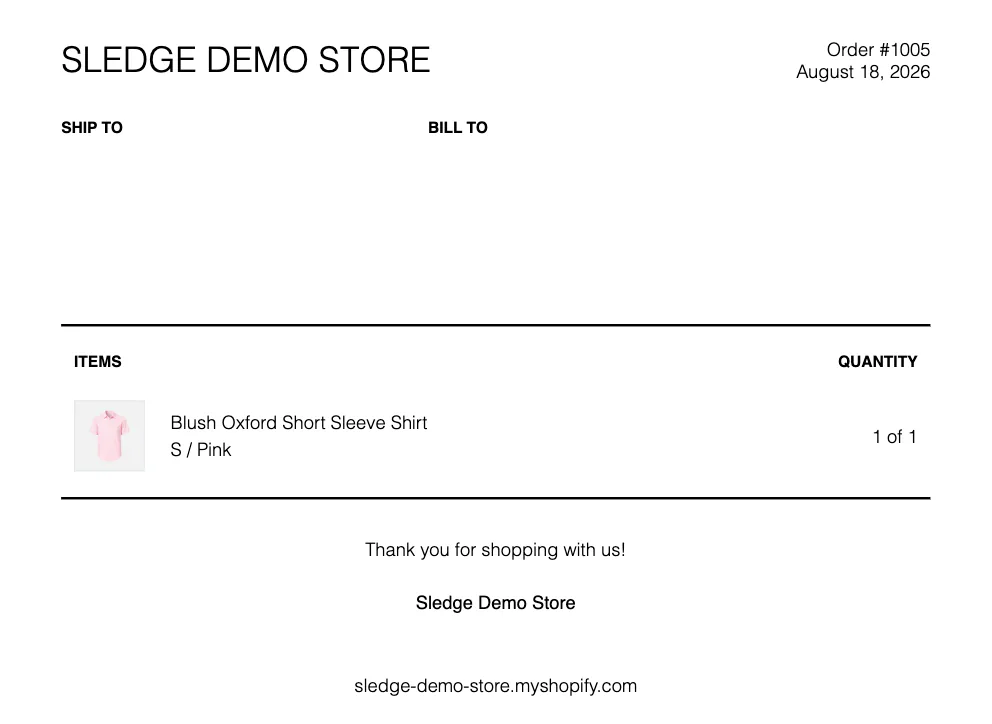
The slip can only print details Shopify passes to it, such as your store's name and address, the customer's name, the order note and each item's photo, size or color, SKU and quantity. None of them is a price.
Adding a logo, dropping the photos or rewording a line all mean hiring a developer. You pay for their time, and one mistake can break the slip on every order until someone spots it.
The newer section also lets you keep more than one packing slip, such as one for wholesale orders and one for retail. Tick "Set as default template for packing slips" on the one that Print packing slips should use.
Before anyone edits a template there, click Duplicate, so a copy of the original stays. Revert to default puts Shopify's version back, and it can't be undone.
FAQ
Questions, answered
-

14-day free trial
Explore Sledge on your store before you decide to commit.
-

No credit card required
Start improving your store with no upfront commitment.
-

Setup in minutes
Get Sledge running without a lengthy setup process.
-

Built to grow sales
Turn shopper behavior into actions that help you sell more.
What is a packing slip?
A packing slip is the list of items that goes inside a parcel. It lists the order number, the ship-to address and each item with its quantity, usually without prices. The packer checks the box against it, and the customer uses it to spot a missing item or start a return.
What's the difference between a packing slip and an invoice?
A packing slip says what's in the box and travels inside the parcel to the ship-to address. An invoice says what's owed or paid and goes to whoever pays, often by email. A gift order shows the gap: the recipient gets the slip, and the buyer keeps the invoice.
Does a packing slip show prices?
Usually not, which keeps a gift's price out of the box. Shopify's packing slip has no field for prices. When a customer needs prices on paper, send an invoice instead. Copy this invoice template, or print one from the order if your store has the Documents section.
Can I make a packing slip in Word or Google Docs?
Yes. Copy the template on this page into a blank Word or Google Docs file, or a spreadsheet, and replace each bracket. Save one copy with your store name and return address filled in, then reuse it for each order. At more than a few orders a day, Shopify's own slip saves the typing.
Do I need an app to print packing slips on Shopify?
No. Every Shopify store prints packing slips from the order with Print packing slips. Shopify's own printing app, Shopify Order Printer, showed as not currently available on the Shopify App Store on November 13, 2026. If your store has the Documents section, its pick list gathers every item from many orders into one list, set up by choosing options, with no developer needed.
A packing slip lists what sold. What did shoppers look for first?
Sledge doesn't print packing slips or any other order paperwork. Its cart drawer, bundles, search and filters work before the order, and Sledge can put an offer on the thank-you page after checkout. Try it free for 14 days. Growth Intelligence turns on when you pick a paid plan. It reads what shoppers typed into your search, added to cart and bought, and its suggested fixes add up to one dollar figure, labeled Est. potential.

