

To set up Shopify international shipping, switch on a market for each country and add a shipping rate for it. Then decide who pays duties and import taxes, add customs codes to your products and buy duty-paid labels if you collect the duties. Place a test order to each new country before your first real one.
A shopper in Dublin fills her cart with your jacket, then opens the country menu at checkout. Ireland isn't on it. She closes the tab, and you never learn she came. Another pays, then refuses the parcel at her door over a fee nobody warned her about.
How do you turn on international shipping for a country?
A country can place an order only when it sits in an active market and has a shipping rate. Shopify calls a group of countries a market. A new store starts with a market for its home country and an International market that is switched off. Creating a market for a country costs nothing on any plan.
- In your Shopify admin, go to Markets and click Create market.
- Name it, click Add condition beside Includes, choose Regions and pick the countries.
- Set the status to Draft for now. Switch it to Active once its rate is in, then click Save.
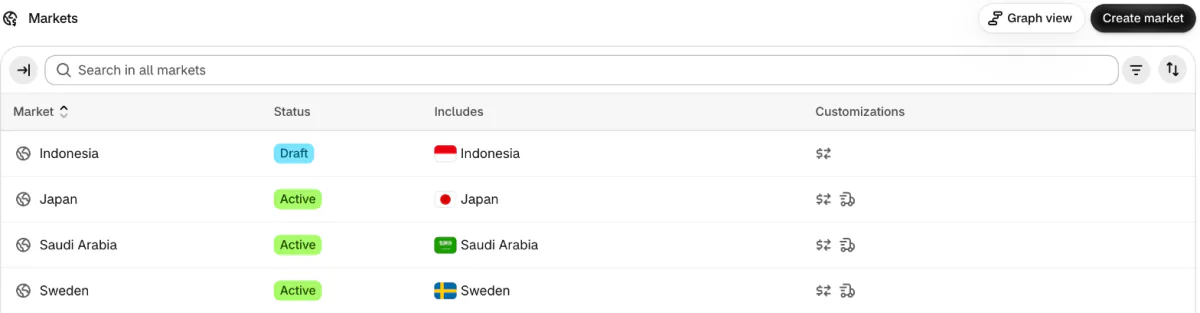
A market left on Draft stays switched off, and shoppers in it can't check out.
How do you add a shipping rate for another country?
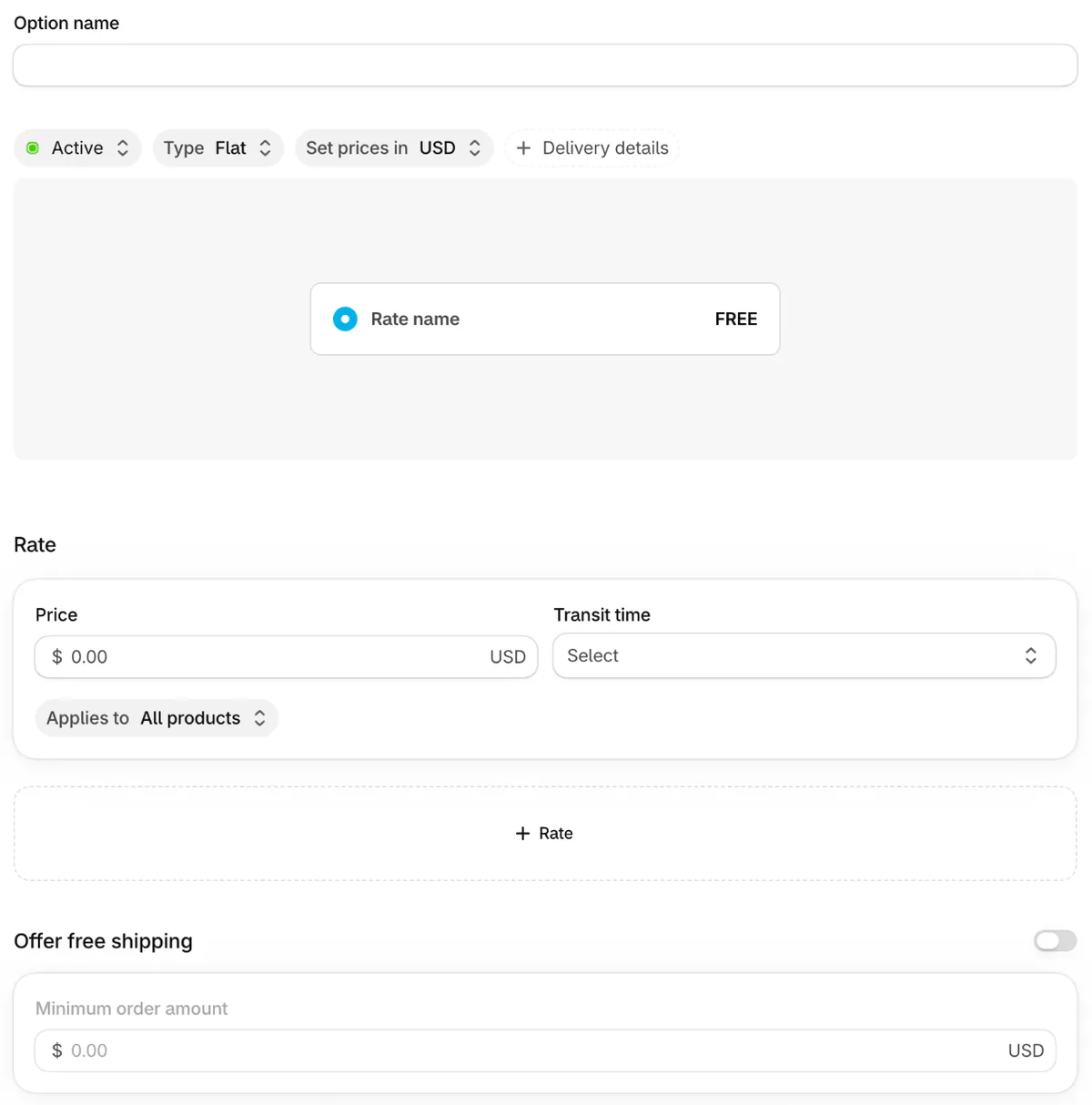
Open the market, click the plus beside Shipping, then Add shipping option, and fill in Option name, Type and Price. Shopify says it is moving rates under Markets gradually, so your admin shows one of two layouts. Open Settings, then Shipping and delivery. If a banner reads "Shipping has moved to Markets", follow the bold line above. If it doesn't, open a shipping profile, click Add zone, pick the countries and click Add shipping option.
Enter 0 as the price for a free rate, or turn on "Offer free shipping" and set a "Minimum order amount", a free shipping threshold. Add the rate before you activate the market, because Shopify tells a shopper whose address no rate covers that no shipping rate is available for their region. Type starts on Flat, one fixed price, and the other types are in our Shopify shipping rates guide. Showing prices in the shopper's own currency is in our Shopify multi currency guide.
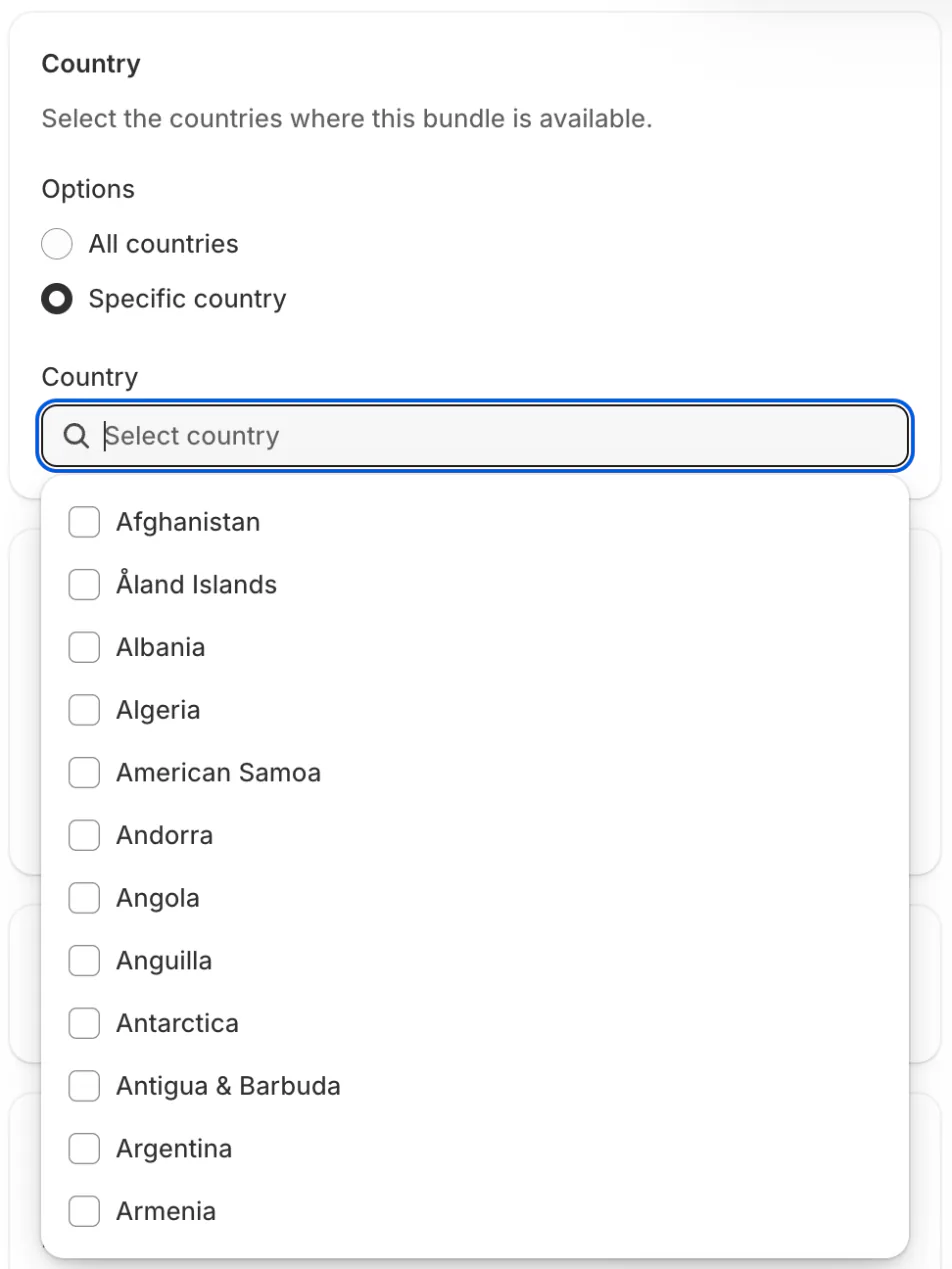
Free shipping usually costs more abroad, so you may want a higher minimum there. Sledge's Shipping offer, under Tools, then Bundle, Discount & Upsell, then Shipping, can show a free-shipping goal as a bar and take its discount off the rates you already show, for the countries you pick under Country. At checkout it follows the country on the delivery address. It sets up no markets, rates, zones, duties, customs codes or labels.
Who pays duties and import taxes when the parcel arrives?
Either the shopper pays the carrier at the door, or you collect an estimate at checkout and pay the duty yourself. Shopify's names for the two are DAP, delivered at place, and DDP, delivered duty paid.
- The shopper pays at the door (DAP). The carrier collects the duty and import tax on delivery, and may add a fee for collecting it. A bill the shopper didn't expect can end in a refused parcel.
- You collect at checkout (DDP). The shopper sees the total up front. Your carrier bills you for the duty later.
You can't offer both DAP and DDP to shoppers in the same country.
The rules move, so check the date. Shopify says that since August 29, 2025, duties and import taxes apply to every parcel into the US, whatever its value. From July 1, 2026, the European Commission says, the EU charges a temporary €3 duty on parcels worth up to €150, counted once for each kind of item by tariff classification and not for each unit, so five T-shirts owe €3, and the seller or importer declares and pays it. Both were read on November 6, 2026.
To hand the whole job over instead, Shopify's Managed Markets makes Global-e the seller of record, the company legally responsible for the sale. It is open only to stores in the continental US and to some in Canada and the UK.
How do you collect duties and import taxes at checkout?
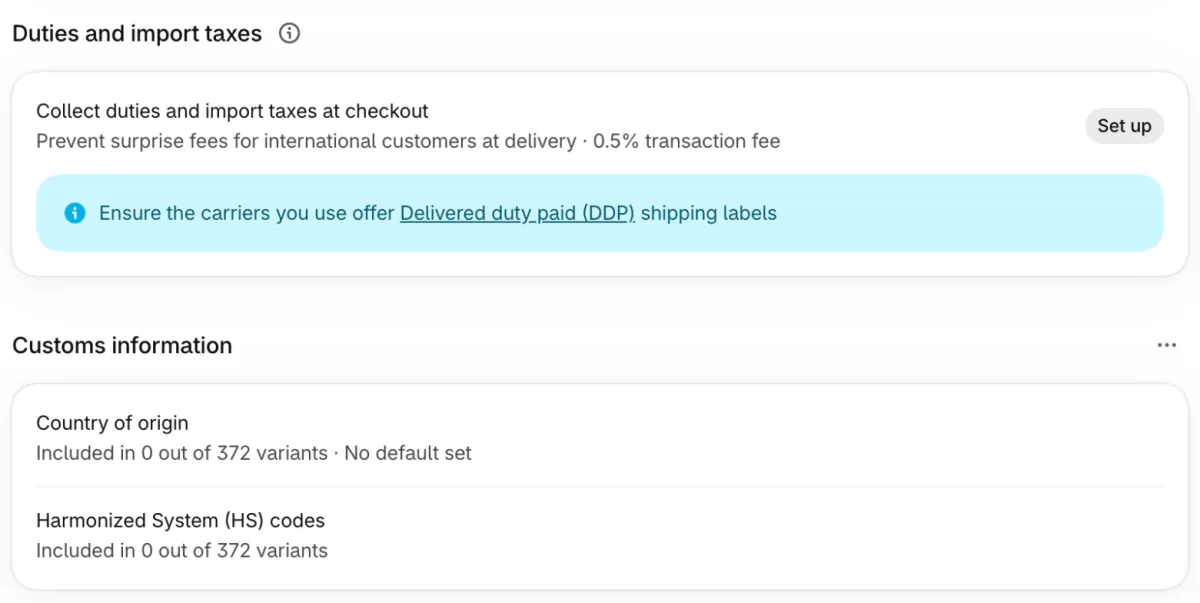
Go to Settings, then Taxes and duties, and click Set up under "Collect duties and import taxes at checkout". Shopify's own line under it reads "Prevent surprise fees for international customers at delivery".
- Confirm your carriers offer duty-paid labels.
- Choose the countries to collect for.
- Fix the products Shopify flags as missing a customs code or a country of origin.
- Check your shipping policy and notifications, read the terms and click Agree and activate.
The section and its fee line were checked November 6, 2026, in the Shopify admin. The steps follow Shopify's Help Center.
Shopify's Help Center adds one condition the steps leave out: you can't use Shopify Fulfillment Network. If your shipping zones include Rest of world, duties can't be collected there, so add the country to another zone or a new one.
Shopify charges a transaction fee on every order it works out duties for, even when the amount is zero, and on test orders. The admin reads 0.5% today, a temporary rate. Without the temporary rate, Shopify lists 0.85% with Shopify Payments as your main gateway and 1.5% with another provider. The amount you collect is an estimate, so a wrong code can still bring a bill at the door. To cover the duty yourself instead of adding it to the shopper's total, choose Duties included in price in the market's settings, as Shopify's Help Center says.
What are customs codes (HS codes), and where do you add them?
An HS code is a trade code, usually six digits, that tells customs what an item is. HS stands for Harmonized System, and Shopify requires a code for international orders. Say your cotton sweatshirt falls under 6110.20 in the US tariff schedule. Look yours up in the US government's tariff search, then pair it with a country of origin, the country where the item was made.
- On a product. Open the product, or one size or color of it, and click the arrow beside the Country of origin and HS Code chips in the Shipping card. Under More details, fill "Country/Region of origin" and "Harmonized System (HS) code".
- For many at once. In the Products list, click Bulk edit, then Columns, and add Harmonized system code and Country of origin. Or use Update with CSV, a spreadsheet upload, under Settings, then Taxes and duties.
- While buying a label. Click Edit customs information and tick Save shipping info to product details, so the next order doesn't ask again.
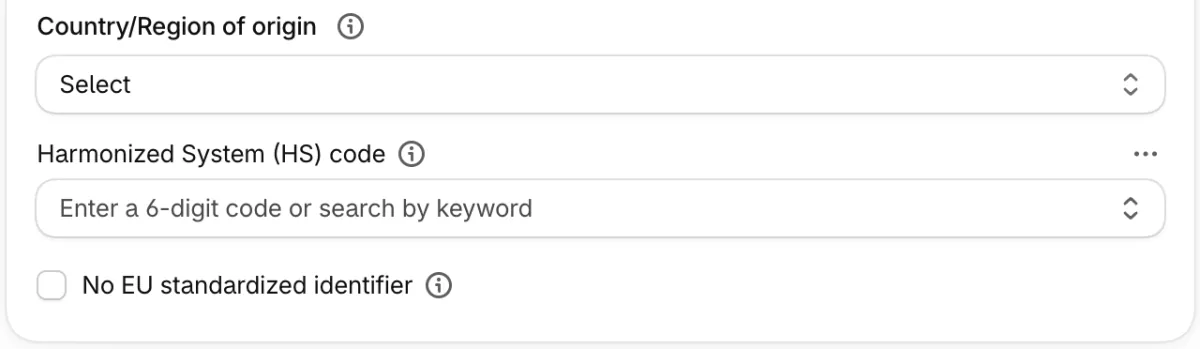
Without a code, Shopify won't print an international label. The description on the label usually comes from the code, not your product title, and you can edit it for one label. Since November 1, 2026, Shopify says, a parcel worth up to €150 sent into the EU from outside it also needs a product identifier for each item, usually its barcode.
How do you buy a label for an order going to another country?
Open the order, click Create shipping label, and check each item's customs details before you pay. Shopify's Help Center says a customs label needs six details for each item: an HS code of at least six digits, a country of origin, a description, a quantity, a value and a weight. You add or fix them under Edit customs information, in the Items section. Shopify's label service covers stores based in the US, Canada and Australia, and the carriers differ by country.
If you collected duties, buy a duty-paid label. Shopify's own carrier accounts sell them through DHL Express, DHL Express Canada and Canada Post, and Canada Post only for parcels to the US. For any other carrier, Shopify says you can't buy the label for an order where duties were collected, so you buy it outside Shopify or refund the order. A standard label after you collected duties makes the shopper pay for them twice. To compare UPS, FedEx and USPS for US parcels, see UPS vs FedEx vs USPS.
How do you test a new country before your first real order?
Place a test order with a delivery address in that country, and stop before you fulfill it. Turn on Shopify's Test payment gateway, which needs a paid Shopify plan, add a product, and at checkout choose the new country from the menu. Turn the gateway off afterwards, because shoppers can't place live orders while it is on.
- The country shows in the menu.
- The rate you set shows.
- A duties line shows, if you collect them.
- The confirmation email reads right.
Cancel the order afterwards. Don't fulfill a test order, because you pay for any label you buy. To see how many products each country gets without an order, open Markets, click Graph view and then View as.
FAQ
Questions, answered
-

14-day free trial
Explore Sledge on your store before you decide to commit.
-

No credit card required
Start improving your store with no upfront commitment.
-

Setup in minutes
Get Sledge running without a lengthy setup process.
-

Built to grow sales
Turn shopper behavior into actions that help you sell more.
Does Shopify ship internationally for you?
Not by itself. Shopify gives you the settings, and in some countries the labels, but you or your fulfillment partner send the parcel. You can sell to a country once it sits in an active market and has a shipping rate. Stores in the US or Canada may be eligible for Shopify Fulfillment Network, which sends parcels for you.
Why can't shoppers choose my country at checkout?
Usually the country sits in no active market, or its market has no shipping rate, and Shopify lists a country at checkout only when it has both. Open Markets, check the market's status says Active, then open the market and check its Shipping row names a rate rather than reading Not shipping. A market set to Draft stays switched off.
Who pays import duties on Shopify orders?
You decide, country by country. By default the shopper pays the carrier at the door. If you collect duties at checkout, the shopper pays an estimate with the order, and a duty-paid label keeps the carrier from asking again if its details match the checkout's. Shopify charges a transaction fee on each such order, now 0.5%, a temporary rate.
Do I need HS codes to ship internationally on Shopify?
Yes. Shopify says international orders need one, and it won't print an international label for an order whose items lack one. An HS code is a trade code, usually six digits, that tells customs what an item is. Add it, with the country where the item was made, on the product's page, in bulk or by spreadsheet upload.
How do I turn off international shipping on Shopify?
Open Markets, click the market for that country, change its status from Active to Draft and click Save. Shoppers there can no longer check out, and your settings stay saved. To stop only the duties charge for every country, go to Settings, then Taxes and duties, click Manage in the duties section and then Turn off.
Shoppers abroad can check out. What else is your store missing?
Sledge doesn't set up markets, rates, duties, customs codes or labels. Its Shipping offer adds a free-shipping bar for the countries you pick. Try Sledge free for 14 days. Growth Intelligence turns on when you pick a paid plan, and it totals what its suggested fixes could add in one dollar figure, labeled "Est. potential".

